


O agente pré-criado que você criou na última etapa requer um webhook. As funções do Cloud Run são usadas para hospedar o webhook neste tutorial devido à simplicidade, mas há muitas outras maneiras de hospedar um serviço de webhook. O exemplo também usa a linguagem de programação Go, mas é possível usar qualquer linguagem compatível com as funções do Cloud Run.
Criar a função
As funções do Cloud Run podem ser criadas com o console do Google Cloud (acesse a documentação, abra o console). Para criar uma função para este tutorial:
É importante que o agente do Dialogflow e a função estejam no mesmo projeto. Essa é a maneira mais fácil de o Dialogflow ter acesso seguro à sua função. Antes de criar a função, selecione seu projeto no console do Google Cloud .
Abra a página de visão geral das funções do Cloud Run.
Clique em Criar função e defina os seguintes campos:
- Ambiente: 1ª geração
- Nome da função: tutorial-telecommunications-webhook
- Região: se você especificou uma região para o agente, use a mesma região.
- Tipo de gatilho HTTP: HTTP
- URL: clique no botão de cópia aqui e salve o valor. Você vai precisar desse URL ao configurar o webhook.
- Autenticação: exigir autenticação
- Exigir HTTPS: marcado
Clique em Salvar.
Clique em Próxima (não é necessário ter configurações especiais de ambiente de execução, build, conexões ou segurança).
Defina os seguintes campos:
- Ambiente de execução: selecione o ambiente de execução mais recente do Go.
- Código-fonte: editor inline
- Ponto de entrada: HandleWebhookRequest
Substitua o código pelo seguinte:
package cxtwh

import (
	"context"
	"encoding/json"
	"fmt"
	"log"
	"net/http"
	"os"
	"strings"

	"cloud.google.com/go/spanner"
  "google.golang.org/grpc/codes"
)

// client is a Spanner client, created only once to avoid creation
// for every request.
// See: https://cloud.google.com/functions/docs/concepts/go-runtime#one-time_initialization
var client *spanner.Client

func init() {
	// If using a database, these environment variables will be set.
	pid := os.Getenv("PROJECT_ID")
	iid := os.Getenv("SPANNER_INSTANCE_ID")
	did := os.Getenv("SPANNER_DATABASE_ID")
	if pid != "" && iid != "" && did != "" {
		db := fmt.Sprintf("projects/%s/instances/%s/databases/%s",
			pid, iid, did)
		log.Printf("Creating Spanner client for %s", db)
		var err error
		// Use the background context when creating the client,
		// but use the request context for calls to the client.
		// See: https://cloud.google.com/functions/docs/concepts/go-runtime#contextcontext
		client, err = spanner.NewClient(context.Background(), db)
		if err != nil {
			log.Fatalf("spanner.NewClient: %v", err)
		}
	}
}

type fulfillmentInfo struct {
	Tag string `json:"tag"`
}

type sessionInfo struct {
	Session    string         `json:"session"`
	Parameters map[string]any `json:"parameters"`
}

type text struct {
	Text []string `json:"text"`
}

type responseMessage struct {
	Text text `json:"text"`
}

type fulfillmentResponse struct {
	Messages []responseMessage `json:"messages"`
}

// webhookRequest is used to unmarshal a WebhookRequest JSON object. Note that
// not all members need to be defined--just those that you need to process.
// As an alternative, you could use the types provided by the Dialogflow protocol buffers:
// https://pkg.go.dev/google.golang.org/genproto/googleapis/cloud/dialogflow/cx/v3#WebhookRequest
type webhookRequest struct {
	FulfillmentInfo fulfillmentInfo `json:"fulfillmentInfo"`
	SessionInfo     sessionInfo     `json:"sessionInfo"`
}

// webhookResponse is used to marshal a WebhookResponse JSON object. Note that
// not all members need to be defined--just those that you need to process.
// As an alternative, you could use the types provided by the Dialogflow protocol buffers:
// https://pkg.go.dev/google.golang.org/genproto/googleapis/cloud/dialogflow/cx/v3#WebhookResponse
type webhookResponse struct {
	FulfillmentResponse fulfillmentResponse `json:"fulfillmentResponse"`
	SessionInfo         sessionInfo         `json:"sessionInfo"`
}

// detectCustomerAnomaly handles same-named tag.
func detectCustomerAnomaly(ctx context.Context, request webhookRequest) (
	webhookResponse, error) {
	// Create session parameters that are populated in the response.
	// This example hard codes values, but a real system
	// might look up this value in a database.
	p := map[string]any{
		"anomaly_detect":        "false",
		"purchase":              "device protection",
		"purchase_amount":       "12.25",
		"bill_without_purchase": "54.34",
		"total_bill":            "66.59",
		"first_month":           "January 1",
	}
	// Build and return the response.
	response := webhookResponse{
		SessionInfo: sessionInfo{
			Parameters: p,
		},
	}
	return response, nil
}

// validatePhoneLine handles same-named tag.
func validatePhoneLine(ctx context.Context, request webhookRequest) (
	webhookResponse, error) {
	// Create session parameters that are populated in the response.
	// This example hard codes values, but a real system
	// might look up this value in a database.
	p := map[string]any{
		"domestic_coverage":   "true",
		"phone_line_verified": "true",
	}
	// Build and return the response.
	response := webhookResponse{
		SessionInfo: sessionInfo{
			Parameters: p,
		},
	}
	return response, nil
}

// cruisePlanCoverage handles same-named tag.
func cruisePlanCoverage(ctx context.Context, request webhookRequest) (
	webhookResponse, error) {
	// Get the existing parameter values
	port := request.SessionInfo.Parameters["destination"].(string)
	port = strings.ToLower(port)
	// Check if the port is covered
	covered := "false"
	if client != nil {
		// A Spanner client exists, so access the database.
		// See: https://pkg.go.dev/cloud.google.com/go/spanner#ReadOnlyTransaction.ReadRow
		row, err := client.Single().ReadRow(ctx,
			"Destinations",
			spanner.Key{port},
			[]string{"Covered"})
		if err != nil {
			if spanner.ErrCode(err) == codes.NotFound {
				log.Printf("Port %s not found", port)
			} else {
				return webhookResponse{}, err
			}
		} else {
			// A row was returned, so check the value
			var c bool
			err := row.Column(0, &c)
			if err != nil {
				return webhookResponse{}, err
			}
			if c {
				covered = "true"
			}
		}
	} else {
		// No Spanner client exists, so use hardcoded list of ports.
		coveredPorts := map[string]bool{
			"anguilla": true,
			"canada":   true,
			"mexico":   true,
		}
		_, ok := coveredPorts[port]
		if ok {
			covered = "true"
		}
	}
	// Create session parameters that are populated in the response.
	// This example hard codes values, but a real system
	// might look up this value in a database.
	p := map[string]any{
		"port_is_covered": covered,
	}
	// Build and return the response.
	response := webhookResponse{
		SessionInfo: sessionInfo{
			Parameters: p,
		},
	}
	return response, nil
}

// internationalCoverage handles same-named tag.
func internationalCoverage(ctx context.Context, request webhookRequest) (
	webhookResponse, error) {
	// Get the existing parameter values
	destination := request.SessionInfo.Parameters["destination"].(string)
	destination = strings.ToLower(destination)
	// Hardcoded list of covered international monthly destinations
	coveredMonthly := map[string]bool{
		"anguilla":  true,
		"australia": true,
		"brazil":    true,
		"canada":    true,
		"chile":     true,
		"england":   true,
		"france":    true,
		"india":     true,
		"japan":     true,
		"mexico":    true,
		"singapore": true,
	}
	// Hardcoded list of covered international daily destinations
	coveredDaily := map[string]bool{
		"brazil":    true,
		"canada":    true,
		"chile":     true,
		"england":   true,
		"france":    true,
		"india":     true,
		"japan":     true,
		"mexico":    true,
		"singapore": true,
	}
	// Check coverage
	coverage := "neither"
	_, monthly := coveredMonthly[destination]
	_, daily := coveredDaily[destination]
	if monthly && daily {
		coverage = "both"
	} else if monthly {
		coverage = "monthly_only"
	} else if daily {
		coverage = "daily_only"
	}
	// Create session parameters that are populated in the response.
	// This example hard codes values, but a real system
	// might look up this value in a database.
	p := map[string]any{
		"coverage": coverage,
	}
	// Build and return the response.
	response := webhookResponse{
		SessionInfo: sessionInfo{
			Parameters: p,
		},
	}
	return response, nil
}

// cheapestPlan handles same-named tag.
func cheapestPlan(ctx context.Context, request webhookRequest) (
	webhookResponse, error) {
	// Create session parameters that are populated in the response.
	// This example hard codes values, but a real system
	// might look up this value in a database.
	p := map[string]any{
		"monthly_cost":   70,
		"daily_cost":     100,
		"suggested_plan": "monthly",
	}
	// Build and return the response.
	response := webhookResponse{
		SessionInfo: sessionInfo{
			Parameters: p,
		},
	}
	return response, nil
}

// Define a type for handler functions.
type handlerFn func(ctx context.Context, request webhookRequest) (
	webhookResponse, error)

// Create a map from tag to handler function.
var handlers map[string]handlerFn = map[string]handlerFn{
	"detectCustomerAnomaly": detectCustomerAnomaly,
	"validatePhoneLine":     validatePhoneLine,
	"cruisePlanCoverage":    cruisePlanCoverage,
	"internationalCoverage": internationalCoverage,
	"cheapestPlan":          cheapestPlan,
}

// handleError handles internal errors.
func handleError(w http.ResponseWriter, err error) {
	log.Printf("ERROR: %v", err)
	http.Error(w,
		fmt.Sprintf("ERROR: %v", err),
		http.StatusInternalServerError)
}

// HandleWebhookRequest handles WebhookRequest and sends the WebhookResponse.
func HandleWebhookRequest(w http.ResponseWriter, r *http.Request) {
	var request webhookRequest
	var response webhookResponse
	var err error

	// Read input JSON
	if err = json.NewDecoder(r.Body).Decode(&request); err != nil {
		handleError(w, err)
		return
	}
	log.Printf("Request: %+v", request)

	// Get the tag from the request, and call the corresponding
	// function that handles that tag.
	tag := request.FulfillmentInfo.Tag
	if fn, ok := handlers[tag]; ok {
		response, err = fn(r.Context(), request)
	} else {
		err = fmt.Errorf("Unknown tag: %s", tag)
	}
	if err != nil {
		handleError(w, err)
		return
	}
	log.Printf("Response: %+v", response)

	// Send response
	if err = json.NewEncoder(w).Encode(&response); err != nil {
		handleError(w, err)
		return
	}
}
Clique em Implantar.
Aguarde até que o indicador de status mostre que a função foi implantada. Enquanto espera, analise o código que você acabou de implantar.
Configurar o webhook para seu agente
Agora que o webhook existe como um serviço, você vai associá-lo ao seu agente. Para configurar o webhook do agente:
- Abra o console do Dialogflow CX.
- Escolha seu projeto do Google Cloud.
- Selecione seu agente.
- Selecione a guia Gerenciar.
- Clique em Webhooks.
- Clique no webhook atual (criado pelo agente pré-criado).
- Atualize o URL do webhook para o URL do webhook que você salvou ao criar a função.
- Defina o Subtipo como "Padrão".
- Clique em Salvar.
Teste o agente
Seu agente está pronto para ser testado. Clique no botão Testar agente para abrir o simulador. Tente ter a seguinte conversa com o agente:
| Turno de conversa | Você | Agente |
|---|---|---|
| 1 | Olá | Olá! Sou o agente virtual de telecomunicações. Posso ajudar você a resolver dúvidas sobre faturamento e planos, solucionar problemas e adicionar planos de viagem e cruzeiro. Como posso ajudar você hoje? |
| 2 | Quero adicionar um plano de cruzeiro | Vou dar uma olhada para você. Qual é o número de telefone que você usa com a gente? |
| 3 | 123-123-1234 | Quantos dias dura o cruzeiro? |
| 4 | 7 | A opção 1 inclui ligações e mensagens de texto. Custa US $[XX]/dia. Saiba mais aqui [URL]. A opção 2 inclui ligações, mensagens de texto e dados. Custa US $[XX]/dia. Confira mais informações aqui [URL]. Qual plano de cruzeiro você quer adicionar? |
| 5 | Opção 1 | Entendi. Adicionei esse plano à sua conta. Durante o cruzeiro, talvez você também precise de cobertura em terra. Em qual porto você vai parar? |
| 6 | México | E quantos dias você vai passar lá? |
| 7 | 3 | Temos uma ótima novidade! O México tem cobertura incluída em terra. Tudo pronto. Posso ajudar com mais alguma coisa hoje? |
Essa conversa específica foi gerenciada pelo fluxo Cruise Plan.
Na conversa #6,
você informou "México" como o porto de destino.
A porta de destino e o número de dias são capturados como os parâmetros de formulário destination e trip_duration da página Collect Port.
Navegue pelo agente para encontrar essas definições de parâmetro.
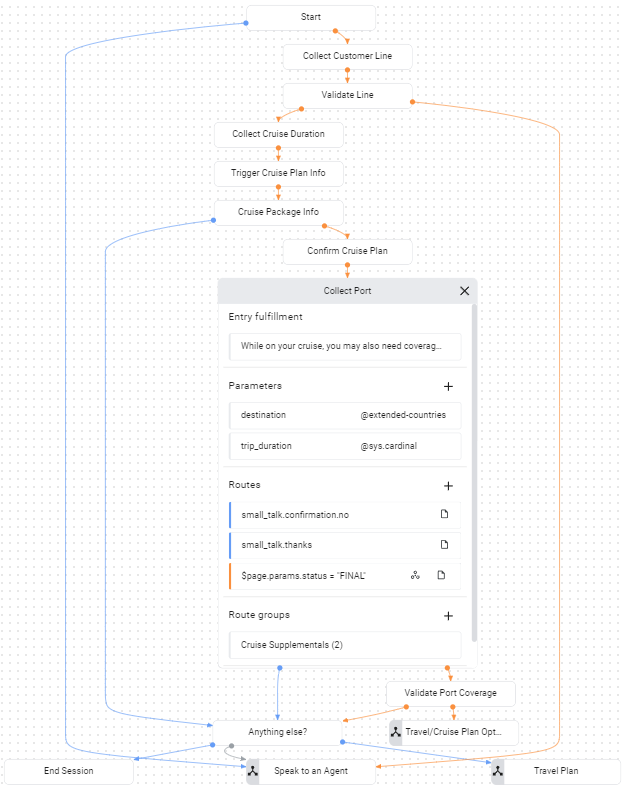
Na página Collect Port,
há uma rota de condição para o preenchimento do formulário:
$page.params.status = "FINAL".
Depois que os dois parâmetros de formulário forem fornecidos,
essa rota será chamada.
Essa rota chama o webhook
e fornece a tag cruisePlanCoverage para ele.
Se você examinar o código do webhook acima,
vai notar que essa tag aciona a chamada da mesma função nomeada.
Essa função determina se o destino fornecido está coberto pelo plano. A função verifica se variáveis de ambiente específicas estão definidas com informações para se conectar ao banco de dados. Se essas variáveis de ambiente não forem definidas, a função usará uma lista codificada de destinos. Nas próximas etapas, você vai alterar o ambiente da função para que ela recupere dados de um banco de dados e valide a cobertura do plano para os destinos.
Solução de problemas
O código do webhook inclui log statements. Se você estiver com problemas, tente visualizar os registros da função.
Mais informações
Para mais informações sobre as etapas acima, consulte: