


Agen bawaan yang Anda buat di langkah terakhir memerlukan webhook. Cloud Run Functions digunakan untuk menghosting webhook dalam tutorial ini karena kesederhanaannya, tetapi ada banyak cara lain untuk menghosting layanan webhook. Contoh ini juga menggunakan bahasa pemrograman Go, tetapi Anda dapat menggunakan bahasa apa pun yang didukung oleh Cloud Run Functions.
Membuat Fungsi
Fungsi Cloud Run dapat dibuat dengan Konsol Google Cloud (buka dokumentasi, buka konsol). Untuk membuat fungsi untuk tutorial ini:
Penting bahwa agen Dialogflow dan fungsi Anda berada dalam project yang sama. Ini adalah cara termudah bagi Dialogflow untuk memiliki akses aman ke fungsi Anda. Sebelum membuat fungsi, pilih project Anda dari konsol Google Cloud .
Buka halaman Cloud Run Functions overview.
Klik Create Function, dan tetapkan kolom berikut:
- Environment: 1st gen
- Nama fungsi: tutorial-telecommunications-webhook
- Region: Jika Anda menentukan region untuk agen, gunakan region yang sama.
- Jenis Pemicu HTTP: HTTP
- URL: Klik tombol salin di sini dan simpan nilainya. Anda akan memerlukan URL ini saat mengonfigurasi webhook.
- Authentication: Require authentication
- Require HTTPS: dicentang
Klik Simpan.
Klik Next (Anda tidak memerlukan setelan runtime, build, koneksi, atau keamanan khusus).
Tetapkan kolom berikut:
- Runtime: Pilih runtime Go terbaru.
- Source code: Inline Editor
- Titik entri: HandleWebhookRequest
Ganti kode dengan kode berikut:
package cxtwh

import (
	"context"
	"encoding/json"
	"fmt"
	"log"
	"net/http"
	"os"
	"strings"

	"cloud.google.com/go/spanner"
  "google.golang.org/grpc/codes"
)

// client is a Spanner client, created only once to avoid creation
// for every request.
// See: https://cloud.google.com/functions/docs/concepts/go-runtime#one-time_initialization
var client *spanner.Client

func init() {
	// If using a database, these environment variables will be set.
	pid := os.Getenv("PROJECT_ID")
	iid := os.Getenv("SPANNER_INSTANCE_ID")
	did := os.Getenv("SPANNER_DATABASE_ID")
	if pid != "" && iid != "" && did != "" {
		db := fmt.Sprintf("projects/%s/instances/%s/databases/%s",
			pid, iid, did)
		log.Printf("Creating Spanner client for %s", db)
		var err error
		// Use the background context when creating the client,
		// but use the request context for calls to the client.
		// See: https://cloud.google.com/functions/docs/concepts/go-runtime#contextcontext
		client, err = spanner.NewClient(context.Background(), db)
		if err != nil {
			log.Fatalf("spanner.NewClient: %v", err)
		}
	}
}

type fulfillmentInfo struct {
	Tag string `json:"tag"`
}

type sessionInfo struct {
	Session    string         `json:"session"`
	Parameters map[string]any `json:"parameters"`
}

type text struct {
	Text []string `json:"text"`
}

type responseMessage struct {
	Text text `json:"text"`
}

type fulfillmentResponse struct {
	Messages []responseMessage `json:"messages"`
}

// webhookRequest is used to unmarshal a WebhookRequest JSON object. Note that
// not all members need to be defined--just those that you need to process.
// As an alternative, you could use the types provided by the Dialogflow protocol buffers:
// https://pkg.go.dev/google.golang.org/genproto/googleapis/cloud/dialogflow/cx/v3#WebhookRequest
type webhookRequest struct {
	FulfillmentInfo fulfillmentInfo `json:"fulfillmentInfo"`
	SessionInfo     sessionInfo     `json:"sessionInfo"`
}

// webhookResponse is used to marshal a WebhookResponse JSON object. Note that
// not all members need to be defined--just those that you need to process.
// As an alternative, you could use the types provided by the Dialogflow protocol buffers:
// https://pkg.go.dev/google.golang.org/genproto/googleapis/cloud/dialogflow/cx/v3#WebhookResponse
type webhookResponse struct {
	FulfillmentResponse fulfillmentResponse `json:"fulfillmentResponse"`
	SessionInfo         sessionInfo         `json:"sessionInfo"`
}

// detectCustomerAnomaly handles same-named tag.
func detectCustomerAnomaly(ctx context.Context, request webhookRequest) (
	webhookResponse, error) {
	// Create session parameters that are populated in the response.
	// This example hard codes values, but a real system
	// might look up this value in a database.
	p := map[string]any{
		"anomaly_detect":        "false",
		"purchase":              "device protection",
		"purchase_amount":       "12.25",
		"bill_without_purchase": "54.34",
		"total_bill":            "66.59",
		"first_month":           "January 1",
	}
	// Build and return the response.
	response := webhookResponse{
		SessionInfo: sessionInfo{
			Parameters: p,
		},
	}
	return response, nil
}

// validatePhoneLine handles same-named tag.
func validatePhoneLine(ctx context.Context, request webhookRequest) (
	webhookResponse, error) {
	// Create session parameters that are populated in the response.
	// This example hard codes values, but a real system
	// might look up this value in a database.
	p := map[string]any{
		"domestic_coverage":   "true",
		"phone_line_verified": "true",
	}
	// Build and return the response.
	response := webhookResponse{
		SessionInfo: sessionInfo{
			Parameters: p,
		},
	}
	return response, nil
}

// cruisePlanCoverage handles same-named tag.
func cruisePlanCoverage(ctx context.Context, request webhookRequest) (
	webhookResponse, error) {
	// Get the existing parameter values
	port := request.SessionInfo.Parameters["destination"].(string)
	port = strings.ToLower(port)
	// Check if the port is covered
	covered := "false"
	if client != nil {
		// A Spanner client exists, so access the database.
		// See: https://pkg.go.dev/cloud.google.com/go/spanner#ReadOnlyTransaction.ReadRow
		row, err := client.Single().ReadRow(ctx,
			"Destinations",
			spanner.Key{port},
			[]string{"Covered"})
		if err != nil {
			if spanner.ErrCode(err) == codes.NotFound {
				log.Printf("Port %s not found", port)
			} else {
				return webhookResponse{}, err
			}
		} else {
			// A row was returned, so check the value
			var c bool
			err := row.Column(0, &c)
			if err != nil {
				return webhookResponse{}, err
			}
			if c {
				covered = "true"
			}
		}
	} else {
		// No Spanner client exists, so use hardcoded list of ports.
		coveredPorts := map[string]bool{
			"anguilla": true,
			"canada":   true,
			"mexico":   true,
		}
		_, ok := coveredPorts[port]
		if ok {
			covered = "true"
		}
	}
	// Create session parameters that are populated in the response.
	// This example hard codes values, but a real system
	// might look up this value in a database.
	p := map[string]any{
		"port_is_covered": covered,
	}
	// Build and return the response.
	response := webhookResponse{
		SessionInfo: sessionInfo{
			Parameters: p,
		},
	}
	return response, nil
}

// internationalCoverage handles same-named tag.
func internationalCoverage(ctx context.Context, request webhookRequest) (
	webhookResponse, error) {
	// Get the existing parameter values
	destination := request.SessionInfo.Parameters["destination"].(string)
	destination = strings.ToLower(destination)
	// Hardcoded list of covered international monthly destinations
	coveredMonthly := map[string]bool{
		"anguilla":  true,
		"australia": true,
		"brazil":    true,
		"canada":    true,
		"chile":     true,
		"england":   true,
		"france":    true,
		"india":     true,
		"japan":     true,
		"mexico":    true,
		"singapore": true,
	}
	// Hardcoded list of covered international daily destinations
	coveredDaily := map[string]bool{
		"brazil":    true,
		"canada":    true,
		"chile":     true,
		"england":   true,
		"france":    true,
		"india":     true,
		"japan":     true,
		"mexico":    true,
		"singapore": true,
	}
	// Check coverage
	coverage := "neither"
	_, monthly := coveredMonthly[destination]
	_, daily := coveredDaily[destination]
	if monthly && daily {
		coverage = "both"
	} else if monthly {
		coverage = "monthly_only"
	} else if daily {
		coverage = "daily_only"
	}
	// Create session parameters that are populated in the response.
	// This example hard codes values, but a real system
	// might look up this value in a database.
	p := map[string]any{
		"coverage": coverage,
	}
	// Build and return the response.
	response := webhookResponse{
		SessionInfo: sessionInfo{
			Parameters: p,
		},
	}
	return response, nil
}

// cheapestPlan handles same-named tag.
func cheapestPlan(ctx context.Context, request webhookRequest) (
	webhookResponse, error) {
	// Create session parameters that are populated in the response.
	// This example hard codes values, but a real system
	// might look up this value in a database.
	p := map[string]any{
		"monthly_cost":   70,
		"daily_cost":     100,
		"suggested_plan": "monthly",
	}
	// Build and return the response.
	response := webhookResponse{
		SessionInfo: sessionInfo{
			Parameters: p,
		},
	}
	return response, nil
}

// Define a type for handler functions.
type handlerFn func(ctx context.Context, request webhookRequest) (
	webhookResponse, error)

// Create a map from tag to handler function.
var handlers map[string]handlerFn = map[string]handlerFn{
	"detectCustomerAnomaly": detectCustomerAnomaly,
	"validatePhoneLine":     validatePhoneLine,
	"cruisePlanCoverage":    cruisePlanCoverage,
	"internationalCoverage": internationalCoverage,
	"cheapestPlan":          cheapestPlan,
}

// handleError handles internal errors.
func handleError(w http.ResponseWriter, err error) {
	log.Printf("ERROR: %v", err)
	http.Error(w,
		fmt.Sprintf("ERROR: %v", err),
		http.StatusInternalServerError)
}

// HandleWebhookRequest handles WebhookRequest and sends the WebhookResponse.
func HandleWebhookRequest(w http.ResponseWriter, r *http.Request) {
	var request webhookRequest
	var response webhookResponse
	var err error

	// Read input JSON
	if err = json.NewDecoder(r.Body).Decode(&request); err != nil {
		handleError(w, err)
		return
	}
	log.Printf("Request: %+v", request)

	// Get the tag from the request, and call the corresponding
	// function that handles that tag.
	tag := request.FulfillmentInfo.Tag
	if fn, ok := handlers[tag]; ok {
		response, err = fn(r.Context(), request)
	} else {
		err = fmt.Errorf("Unknown tag: %s", tag)
	}
	if err != nil {
		handleError(w, err)
		return
	}
	log.Printf("Response: %+v", response)

	// Send response
	if err = json.NewEncoder(w).Encode(&response); err != nil {
		handleError(w, err)
		return
	}
}
Klik Deploy.
Tunggu hingga indikator status menunjukkan bahwa fungsi telah berhasil di-deploy. Sambil menunggu, periksa kode yang baru saja Anda deploy.
Mengonfigurasi webhook untuk agen Anda
Setelah webhook ada sebagai layanan, Anda akan mengaitkan webhook ini dengan agen Anda. Untuk mengonfigurasi webhook bagi agen Anda:
- Buka konsol Dialogflow CX.
- Pilih project Google Cloud Anda.
- Pilih agen Anda.
- Pilih tab Kelola.
- Klik Webhook.
- Klik webhook yang ada (yang dibuat oleh agen bawaan).
- Perbarui Webhook URL ke URL webhook yang Anda simpan saat membuat fungsi.
- Tetapkan Subtype ke Standard.
- Klik Simpan.
Mencoba agen
Agen Anda kini siap dicoba. Klik tombol Test Agent untuk membuka simulator. Coba lakukan percakapan berikut dengan agen:
| Giliran percakapan | Anda | Agen |
|---|---|---|
| 1 | Halo | Halo! Saya adalah agen telekomunikasi virtual. Saya dapat membantu Anda menyelesaikan pertanyaan terkait penagihan dan paket, memecahkan masalah, serta menambahkan rencana perjalanan dan pelayaran. Ada yang bisa saya bantu hari ini? |
| 2 | Saya ingin menambahkan rencana kapal pesiar | Izinkan kami memeriksanya untuk Anda. Berapa nomor telepon Anda yang terdaftar di sistem kami? |
| 3 | 123-123-1234 | Berapa hari pelayaran Anda? |
| 4 | 7 | Opsi 1 mencakup telepon dan SMS. Biayanya $[XX]/hari. Info selengkapnya di sini [URL]. Opsi 2 mencakup panggilan, SMS, dan data. Biayanya $[XX]/hari. Info selengkapnya di sini [URL]. Rencana kapal pesiar mana yang ingin Anda tambahkan? |
| 5 | Opsi 1 | Oke. Kami telah menambahkan paket tersebut ke akun Anda. Saat berada di kapal pesiar, Anda mungkin juga memerlukan cakupan di darat. Anda akan berhenti di pelabuhan mana? |
| 6 | Meksiko | Dan, berapa hari Anda akan berada di sana? |
| 7 | 3 | Kabar baik! Meksiko memiliki cakupan gratis di darat. Anda sudah siap. Apa ada hal lain yang bisa saya bantu? |
Percakapan khusus ini dikelola oleh alur Cruise Plan.
Pada giliran percakapan #6,
Anda memberikan "Meksiko" sebagai port tujuan.
Pelabuhan tujuan dan jumlah hari di sana
dicatat sebagai parameter formulir destination dan trip_duration
dari halaman Collect Port.
Jelajahi agen Anda untuk menemukan definisi parameter ini.
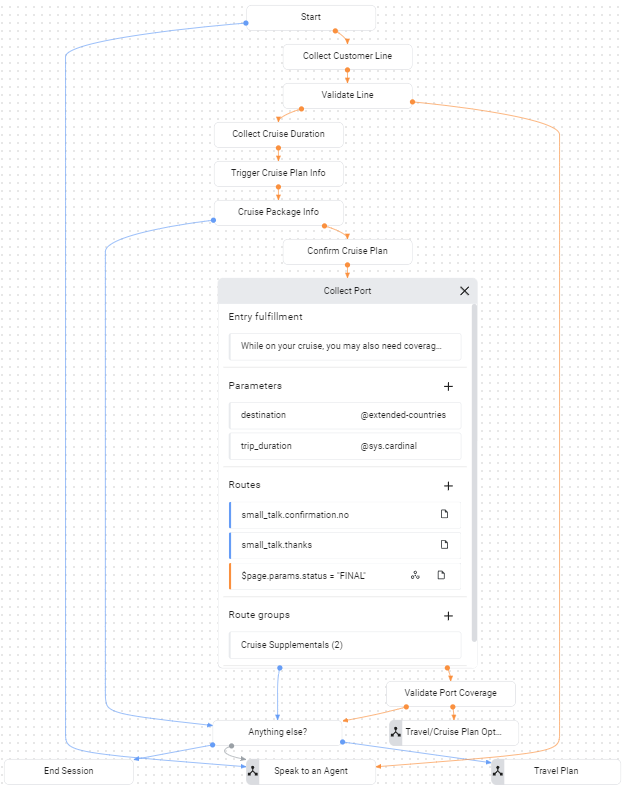
Di halaman Collect Port,
ada rute kondisi untuk penyelesaian formulir:
$page.params.status = "FINAL".
Setelah dua parameter formulir diberikan,
rute ini akan dipanggil.
Rute ini memanggil webhook Anda
dan memberikan tag cruisePlanCoverage ke webhook Anda.
Jika Anda memeriksa kode webhook di atas,
Anda akan melihat bahwa tag ini memicu fungsi bernama yang sama untuk dipanggil.
Fungsi ini menentukan apakah tujuan yang diberikan tercakup dalam paket. Fungsi ini memeriksa apakah variabel lingkungan tertentu ditetapkan dengan informasi untuk terhubung ke database. Jika variabel lingkungan ini tidak ditetapkan, fungsi akan menggunakan daftar tujuan hardcode. Pada langkah berikutnya, Anda akan mengubah lingkungan untuk fungsi agar mengambil data dari database guna memvalidasi cakupan paket untuk tujuan.
Pemecahan masalah
Kode webhook menyertakan pernyataan logging. Jika Anda mengalami masalah, coba lihat log untuk fungsi Anda.
Informasi selengkapnya
Untuk mengetahui informasi selengkapnya tentang langkah-langkah di atas, lihat: