יצירת אפליקציית יומן רישום עם איזון עומסים של HTTP

בדוגמה המתקדמת הזו נדגים איך ליצור אפליקציית יומן שמשתמשת ב-Node.js לקצה הקדמי וב-MySQL לבק-אנד. התבנית גם יוצרת ומקשרת מאזן עומסים של HTTP שמבצע איזון עומסים בשני אזורים, ומנגנון לשינוי גודל אוטומטי שמשנה את גודל האפליקציה באופן אוטומטי.
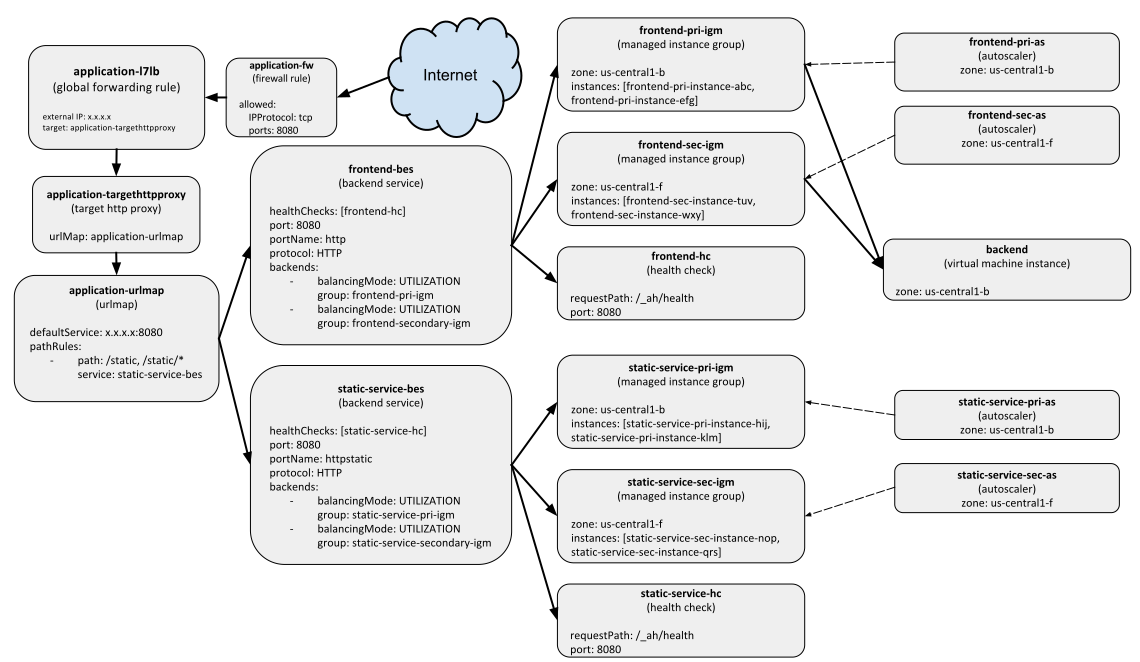
משאבי פריסה מאוזני עומסים של HTTP
משאבי פריסה עם איזון עומסים ב-HTTP (לחיצה להגדלה)

בדוגמה הזו אנחנו מניחים שאתם מכירים את קונטיינרים של Docker, וגם את המשאבים של Compute Engine, במיוחד איזון עומסים של HTTP, התאמה אוטומטית לעומס, קבוצות מופעי מכונה מנוהלים ותבניות של הגדרות מכונה.

מדריכים נוספים למתחילים זמינים במדריך למתחילים או במדריך המפורט.

לפני שמתחילים

יצירת תבניות

בדוגמה הזו מופעל פריסה עם כמה סוגים של משאבים. כדי להתחיל, יוצרים תבניות לשימוש חוזר שמגדירות את המשאבים האלה בנפרד. בהמשך תשתמשו בתבניות האלה בהגדרה הסופית.

בסוף הדוגמה הזו, הפריסה תכיל את המשאבים הבאים:

  • מכונה אחת של Compute Engine למכונה הווירטואלית של MySQL בקצה העורפי.
  • תבנית של הגדרות מכונה שמשתמשת בקובץ אימג' של Docker.
  • שתי קבוצות של מופעי מכונה מנוהלים עם התאמה אוטומטית לעומס (autoscaling) בשני אזורים שונים, שמריצות את שירות ה-frontend node.js.
  • עוד שתי קבוצות מופעי מכונה מנוהלים עם שינוי גודל אוטומטי, שמציגות נתונים סטטיים.
  • בדיקת תקינות ומאזן עומסים מסוג HTTP כדי להפיץ את התנועה בין קבוצות המופעים המנוהלות המתאימות.

יצירת תבניות ה-Backend

הקצה העורפי של האפליקציה הזו הוא מכונה וירטואלית אחת ב-Compute Engine שמריצה קונטיינר של MySQL Docker. יוצרים תבנית שמגדירה מכונה של Compute Engine שמשתמשת בתמונה שעברה אופטימיזציה לקונטיינרים. נותנים לקובץ את השם container_vm.[py|jinja]:

Jinja


{% from 'container_helper.jinja' import GenerateManifest %}
{% set COMPUTE_URL_BASE = 'https://www.googleapis.com/compute/v1/' %}

resources:
- name: {{ env['name'] }}
  type: compute.v1.instance
  properties:
    zone: {{ properties['zone'] }}
    machineType: {{ COMPUTE_URL_BASE }}projects/{{ env['project'] }}/zones/{{ properties['zone'] }}/machineTypes/f1-micro
    metadata:
      items:
      - key: gce-container-declaration
        value: |
          {{ GenerateManifest(env['name'], properties['port'], properties['dockerImage'], properties['dockerEnv'])|indent(10) }}
    disks:
    - deviceName: boot
      type: PERSISTENT
      autoDelete: true
      boot: true
      initializeParams:
        diskName: {{ env['name'] }}-disk
        sourceImage: {{ COMPUTE_URL_BASE }}projects/cos-cloud/global/images/{{ properties['containerImage'] }}
    networkInterfaces:
    - accessConfigs:
      - name: external-nat
        type: ONE_TO_ONE_NAT
      network: {{ COMPUTE_URL_BASE }}projects/{{ env['project'] }}/global/networks/default
    serviceAccounts:
      - email: default
        scopes:
        - https://www.googleapis.com/auth/logging.write
        - https://www.googleapis.com/auth/monitoring.write

Python

# Copyright 2016 Google Inc. All rights reserved.
#
# Licensed under the Apache License, Version 2.0 (the "License");
# you may not use this file except in compliance with the License.
# You may obtain a copy of the License at
#
#     http://www.apache.org/licenses/LICENSE-2.0
#
# Unless required by applicable law or agreed to in writing, software
# distributed under the License is distributed on an "AS IS" BASIS,
# WITHOUT WARRANTIES OR CONDITIONS OF ANY KIND, either express or implied.
# See the License for the specific language governing permissions and
# limitations under the License.

"""Creates a Container VM with the provided Container manifest."""

from container_helper import GenerateManifest


COMPUTE_URL_BASE = 'https://www.googleapis.com/compute/v1/'


def GlobalComputeUrl(project, collection, name):
  return ''.join([COMPUTE_URL_BASE, 'projects/', project,
                  '/global/', collection, '/', name])


def ZonalComputeUrl(project, zone, collection, name):
  return ''.join([COMPUTE_URL_BASE, 'projects/', project,
                  '/zones/', zone, '/', collection, '/', name])


def GenerateConfig(context):
  """Generate configuration."""

  base_name = context.env['name']

  # Properties for the container-based instance.
  instance = {
      'zone': context.properties['zone'],
      'machineType': ZonalComputeUrl(context.env['project'],
                                     context.properties['zone'],
                                     'machineTypes',
                                     'f1-micro'),
      'metadata': {
          'items': [{
              'key': 'gce-container-declaration',
              'value': GenerateManifest(context)
              }]
          },
      'disks': [{
          'deviceName': 'boot',
          'type': 'PERSISTENT',
          'autoDelete': True,
          'boot': True,
          'initializeParams': {
              'diskName': base_name + '-disk',
              'sourceImage': GlobalComputeUrl('cos-cloud',
                                              'images',
                                              context.properties[
                                                  'containerImage'])
              },
          }],
      'networkInterfaces': [{
          'accessConfigs': [{
              'name': 'external-nat',
              'type': 'ONE_TO_ONE_NAT'
              }],
          'network': GlobalComputeUrl(context.env['project'],
                                      'networks',
                                      'default')
          }],
        'serviceAccounts': [{
            'email': 'default',
            'scopes': ['https://www.googleapis.com/auth/logging.write']
            }]
      }

  # Resources to return.
  resources = {
      'resources': [{
          'name': base_name,
          'type': 'compute.v1.instance',
          'properties': instance
          }]
      }

  return resources

בתבנית מוגדרים מספר משתנים, כמו containerImage ו-manifest, שיוזנו כשמגדירים את ההגדרות. התבנית הזו יוצרת רק מופע אחד של מכונה וירטואלית (VM).

כשמשתמשים בקובצי אימג' של קונטיינרים במכונות של Compute Engine, צריך גם לספק קובץ מניפסט (שונה ממניפסט של Deployment Manager) כדי לתאר ל-Compute Engine באיזה קובץ אימג' של קונטיינר להשתמש. יוצרים שיטת עזר בשם container_helper.[py|jinja] כדי להגדיר באופן דינמי את מניפסט מאגר התגים:

Jinja


{% macro GenerateManifest(name, port, dockerImage, dockerEnv) -%}

apiVersion: v1
kind: Pod
metadata:
  name: {{ name }}
spec:
  containers:
  - name: {{ name }}
    image: {{ dockerImage }}
    ports:
    - hostPort: {{ port }}
      containerPort: {{ port }}
    {% if dockerEnv -%}
    env:
    {% for key, value in dockerEnv.items() -%}
    - name: {{ key }}
      value: '{{ value }}'
    {% endfor -%}
    {% endif -%}
{%- endmacro -%}

Python

# Copyright 2016 Google Inc. All rights reserved.
#
# Licensed under the Apache License, Version 2.0 (the "License");
# you may not use this file except in compliance with the License.
# You may obtain a copy of the License at
#
#     http://www.apache.org/licenses/LICENSE-2.0
#
# Unless required by applicable law or agreed to in writing, software
# distributed under the License is distributed on an "AS IS" BASIS,
# WITHOUT WARRANTIES OR CONDITIONS OF ANY KIND, either express or implied.
# See the License for the specific language governing permissions and
# limitations under the License.

"""Helper methods for working with containers in config."""

import six
import yaml


def GenerateManifest(context):
  """Generates a Container Manifest given a Template context.

  Args:
    context: Template context, which must contain dockerImage and port
        properties, and an optional dockerEnv property.

  Returns:
    A Container Manifest as a YAML string.
  """
  env_list = []
  if 'dockerEnv' in context.properties:
    for key, value in six.iteritems(context.properties['dockerEnv']):
      env_list.append({'name': key, 'value': str(value)})

  manifest = {
      'apiVersion': 'v1',
      'kind': 'Pod',
      'metadata': {
          'name': str(context.env['name'])
          },
      'spec': {
          'containers': [{
              'name': str(context.env['name']),
              'image': context.properties['dockerImage'],
              'ports': [{
                  'hostPort': context.properties['port'],
                  'containerPort': context.properties['port']
                  }],
              }]
          }
      }

  if env_list:
    manifest['spec']['containers'][0]['env'] = env_list

  return yaml.dump(manifest, default_flow_style=False)

יצירת תבניות frontend

הקצה הקדמי של האפליקציה הזו מריץ Node.js ומאפשר למשתמשים לשלוח הודעות בדף אינטרנט. יהיו שתי קבוצות של מופעי מכונה מנוהלים שמכילות שני מופעים כל אחת: קבוצה ראשית של מופעי מכונה מנוהלים וקבוצה משנית של מופעי מכונה מנוהלים לאיזון עומסים.

כדי ליצור את תבניות הקצה הקדמי האלה, פועלים לפי ההוראות הבאות.

  1. יוצרים תבנית של הגדרות מכונה.

    כדי ליצור קבוצה של מופעי מכונה מנוהלים (MIG), צריך משאב מסוג Instance Template (תבנית מכונה). קבוצה כזו היא קבוצה של מופעים זהים של מכונות וירטואליות שמנוהלים באופן מרכזי. בדוגמה הזו נוצרת קבוצת מופעי מכונה מנוהלים עבור מופעי Node.js של קצה קדמי, אבל קודם צריך ליצור את תבנית של הגדרות מכונה.

    מגדירים קובץ בשם container_instance_template.[py|jinja]:

    Jinja


    {% from 'container_helper.jinja' import GenerateManifest %}
    {% set IT_NAME = env['name'] + '-it' %}
    
    resources:
    - name: {{ IT_NAME }}
      type: compute.v1.instanceTemplate
      properties:
        properties:
          metadata:
            items:
            - key: gce-container-declaration
              value: |
                {{ GenerateManifest(env['name'], properties['port'],properties['dockerImage'], properties['dockerEnv'])|indent(12) }}
          machineType: f1-micro
          disks:
          - deviceName: boot
            boot: true
            autoDelete: true
            mode: READ_WRITE
            type: PERSISTENT
            initializeParams:
              sourceImage: https://www.googleapis.com/compute/v1/projects/cos-cloud/global/images/{{ properties['containerImage'] }}
          networkInterfaces:
          - accessConfigs:
            - name: external-nat
              type: ONE_TO_ONE_NAT
            network: https://www.googleapis.com/compute/v1/projects/{{ env['project'] }}/global/networks/default
          serviceAccounts:
            - email: default
              scopes:
              - https://www.googleapis.com/auth/logging.write
              - https://www.googleapis.com/auth/monitoring.write
    outputs:
    - name: instanceTemplateSelfLink
      value: $(ref.{{ IT_NAME }}.selfLink)
    

    Python

    # Copyright 2016 Google Inc. All rights reserved.
    #
    # Licensed under the Apache License, Version 2.0 (the "License");
    # you may not use this file except in compliance with the License.
    # You may obtain a copy of the License at
    #
    #     http://www.apache.org/licenses/LICENSE-2.0
    #
    # Unless required by applicable law or agreed to in writing, software
    # distributed under the License is distributed on an "AS IS" BASIS,
    # WITHOUT WARRANTIES OR CONDITIONS OF ANY KIND, either express or implied.
    # See the License for the specific language governing permissions and
    # limitations under the License.
    
    """Creates a Container VM with the provided Container manifest."""
    
    from container_helper import GenerateManifest
    
    
    def GenerateConfig(context):
      """Generates configuration."""
    
      image = ''.join(['https://www.googleapis.com/compute/v1/',
                       'projects/cos-cloud/global/images/',
                       context.properties['containerImage']])
      default_network = ''.join(['https://www.googleapis.com/compute/v1/projects/',
                                 context.env['project'],
                                 '/global/networks/default'])
    
      instance_template = {
          'name': context.env['name'] + '-it',
          'type': 'compute.v1.instanceTemplate',
          'properties': {
              'properties': {
                  'metadata': {
                      'items': [{
                          'key': 'gce-container-declaration',
                          'value': GenerateManifest(context)
                          }]
                      },
                  'machineType': 'f1-micro',
                  'disks': [{
                      'deviceName': 'boot',
                      'boot': True,
                      'autoDelete': True,
                      'mode': 'READ_WRITE',
                      'type': 'PERSISTENT',
                      'initializeParams': {'sourceImage': image}
                      }],
                  'networkInterfaces': [{
                      'accessConfigs': [{
                          'name': 'external-nat',
                          'type': 'ONE_TO_ONE_NAT'
                          }],
                      'network': default_network
                      }],
                    'serviceAccounts': [{
                        'email': 'default',
                        'scopes': ['https://www.googleapis.com/auth/logging.write']
                        }]
                  }
              }
          }
    
      outputs = [{'name': 'instanceTemplateSelfLink',
                  'value': '$(ref.' + instance_template['name'] + '.selfLink)'}]
    
      return {'resources': [instance_template], 'outputs': outputs}
    

  2. יצירת קבוצה של מופעי מכונה מנוהלים עם שינוי גודל אוטומטי.

    עכשיו שיש לכם תבנית של הגדרות מכונה, אתם יכולים להגדיר תבנית שמשתמשת בתבנית של הגדרות מכונה כדי ליצור קבוצת מופעי מכונה מנוהלים עם שינוי גודל אוטומטי. יוצרים קובץ חדש בשם autoscaled_group.[py|jinja] עם התוכן הבא:

    Jinja


    resources:
      - name: {{ env["name"] }}-igm
        type: compute.v1.instanceGroupManager
        properties:
          zone: {{ properties["zone"] }}
          targetSize: {{ properties["size"] }}
          baseInstanceName: {{ env["name"] }}-instance
          instanceTemplate: {{ properties["instanceTemplate"] }}
    
      - name: {{ env["name"] }}-as
        type: compute.v1.autoscaler
        properties:
          zone: {{ properties["zone"] }}
          target: $(ref.{{ env["name"] }}-igm.selfLink)
          autoscalingPolicy:
            maxNumReplicas: {{ properties["maxSize"] }}
    

    Python

    # Copyright 2016 Google Inc. All rights reserved.
    #
    # Licensed under the Apache License, Version 2.0 (the "License");
    # you may not use this file except in compliance with the License.
    # You may obtain a copy of the License at
    #
    #     http://www.apache.org/licenses/LICENSE-2.0
    #
    # Unless required by applicable law or agreed to in writing, software
    # distributed under the License is distributed on an "AS IS" BASIS,
    # WITHOUT WARRANTIES OR CONDITIONS OF ANY KIND, either express or implied.
    # See the License for the specific language governing permissions and
    # limitations under the License.
    
    """Creates autoscaled, network LB IGM running specified docker image."""
    
    
    def GenerateConfig(context):
      """Generate YAML resource configuration."""
    
      # NOTE: Once we can specify the port/service during creation of IGM,
      # we will wire it up here.
      name = context.env['name']
      resources = [{
          'name': name + '-igm',
          'type': 'compute.v1.instanceGroupManager',
          'properties': {
              'zone': context.properties['zone'],
              'targetSize': context.properties['size'],
              'baseInstanceName': name + '-instance',
              'instanceTemplate': context.properties['instanceTemplate']
          }
      }, {
          'name': name + '-as',
          'type': 'compute.v1.autoscaler',
          'properties': {
              'zone': context.properties['zone'],
              'target': '$(ref.' + name + '-igm.selfLink)',
              'autoscalingPolicy': {
                  'maxNumReplicas': context.properties['maxSize']
    
              }
          }
      }]
      return {'resources': resources}
    

    יוצרים את קובץ הסכימה המתאים:

    Jinja

    # Copyright 2016 Google Inc. All rights reserved.
    #
    # Licensed under the Apache License, Version 2.0 (the "License");
    # you may not use this file except in compliance with the License.
    # You may obtain a copy of the License at
    #
    #     http://www.apache.org/licenses/LICENSE-2.0
    #
    # Unless required by applicable law or agreed to in writing, software
    # distributed under the License is distributed on an "AS IS" BASIS,
    # WITHOUT WARRANTIES OR CONDITIONS OF ANY KIND, either express or implied.
    # See the License for the specific language governing permissions and
    # limitations under the License.
    
    info:
      title: Autoscaled, network LB IGM template
      author: Google
      description: Creates an autoscaled Instance Group Manager running the specified Docker image
      version: 1.0
    
    required:
    - zone
    - instanceTemplate
    
    properties:
      zone:
        type: string
        description: Zone in which this VM will run
    
      instanceTemplate:
        type: string
        description: URL for the instance template to use for IGM
    
      size:
        type: integer
        default: 1
        description: Initial size of the Managed Instance Group
    
      maxSize:
        type: integer
        default: 1
        description: Maximum size the Managed Instance Group will be autoscaled to
    

    Python

    # Copyright 2016 Google Inc. All rights reserved.
    #
    # Licensed under the Apache License, Version 2.0 (the "License");
    # you may not use this file except in compliance with the License.
    # You may obtain a copy of the License at
    #
    #     http://www.apache.org/licenses/LICENSE-2.0
    #
    # Unless required by applicable law or agreed to in writing, software
    # distributed under the License is distributed on an "AS IS" BASIS,
    # WITHOUT WARRANTIES OR CONDITIONS OF ANY KIND, either express or implied.
    # See the License for the specific language governing permissions and
    # limitations under the License.
    
    info:
      title: Autoscaled, network LB IGM template
      author: Google
      description: Creates an autoscaled Instance Group Manager running the specified Docker image
      version: 1.0
    
    required:
    - zone
    - instanceTemplate
    
    properties:
      zone:
        type: string
        description: Zone in which this VM will run
    
      instanceTemplate:
        type: string
        description: URL for the instance template to use for IGM
    
      size:
        type: integer
        default: 1
        description: Initial size of the Managed Instance Group
    
      maxSize:
        type: integer
        default: 1
        description: Maximum size the Managed Instance Group will be autoscaled to
    

  3. יוצרים משאבים באמצעות התבניות האלה.

    עד עכשיו הגדרתם תבניות בסיס שקובעות את המאפיינים של המשאבים. באמצעות התבניות האלה, מגדירים את ההגדרה של חזית האתר. יוצרים קובץ חדש בשם service.[py|jinja] עם התוכן הבא:

    Jinja


    resources:
      - name: {{ env["name"] }}
        type: container_instance_template.jinja
        properties:
          port: {{ properties["port"] }}
          dockerEnv: {{ properties["dockerEnv"] }}
          dockerImage: {{ properties["dockerImage"] }}
          containerImage: {{ properties["containerImage"] }}
    
      - name: {{ env["name"] }}-pri
        type: autoscaled_group.jinja
        properties:
          zone: {{ properties["primaryZone"] }}
          size: {{ properties["primarySize"] }}
          maxSize: {{ properties["maxSize"] }}
          port: {{ properties["port"] }}
          service: {{ properties["service"] }}
          baseInstanceName: {{ env["name"] }}-instance
          instanceTemplate: $(ref.{{ env["name"] }}-it.selfLink)
    
      - name: {{ env["name"] }}-sec
        type: autoscaled_group.jinja
        properties:
          zone: {{ properties["secondaryZone"] }}
          size: {{ properties["secondarySize"] }}
          maxSize: {{ properties["maxSize"] }}
          port: {{ properties["port"] }}
          service: {{ properties["service"] }}
          baseInstanceName: {{ env["name"] }}-instance
          instanceTemplate: $(ref.{{ env["name"] }}-it.selfLink)
    
      - name: {{ env["name"] }}-hc
        type: compute.v1.httpHealthCheck
        properties:
          port: {{ properties["port"] }}
          requestPath: /_ah/health
    
      - name: {{ env["name"] }}-bes
        type: compute.v1.backendService
        properties:
          port: {{ properties["port"] }}
          portName: {{ properties["service"] }}
          backends:
            - name: {{ env["name"] }}-primary
              group: $(ref.{{ env["name"] }}-pri-igm.instanceGroup)
            - name: {{ env["name"] }}-secondary
              group: $(ref.{{ env["name"] }}-sec-igm.instanceGroup)
          healthChecks: [ $(ref.{{ env["name"] }}-hc.selfLink) ]
    

    Python

    # Copyright 2016 Google Inc. All rights reserved.
    #
    # Licensed under the Apache License, Version 2.0 (the "License");
    # you may not use this file except in compliance with the License.
    # You may obtain a copy of the License at
    #
    #     http://www.apache.org/licenses/LICENSE-2.0
    #
    # Unless required by applicable law or agreed to in writing, software
    # distributed under the License is distributed on an "AS IS" BASIS,
    # WITHOUT WARRANTIES OR CONDITIONS OF ANY KIND, either express or implied.
    # See the License for the specific language governing permissions and
    # limitations under the License.
    
    """Creates primary/secondary zone autoscaled IGM running specified container."""
    
    
    def GenerateConfig(context):
      """Generate YAML resource configuration."""
    
      name = context.env['name']
    
      resources = [{
          'name': name,
          'type': 'container_instance_template.py',
          'properties': {
              'port': context.properties['port'],
              'dockerEnv': context.properties['dockerEnv'],
              'dockerImage': context.properties['dockerImage'],
              'containerImage': context.properties['containerImage']
          }
      }, {
          'name': name + '-pri',
          'type': 'autoscaled_group.py',
          'properties': {
              'zone': context.properties['primaryZone'],
              'size': context.properties['primarySize'],
              'maxSize': context.properties['maxSize'],
              'port': context.properties['port'],
              'service': context.properties['service'],
              'baseInstanceName': name + '-instance',
              'instanceTemplate': '$(ref.' + name + '-it.selfLink)'
          }
      }, {
          'name': name + '-sec',
          'type': 'autoscaled_group.py',
          'properties': {
              'zone': context.properties['secondaryZone'],
              'size': context.properties['secondarySize'],
              'maxSize': context.properties['maxSize'],
              'port': context.properties['port'],
              'service': context.properties['service'],
              'baseInstanceName': name + '-instance',
              'instanceTemplate': '$(ref.' + name + '-it.selfLink)'
          }
      }, {
          'name': name + '-hc',
          'type': 'compute.v1.httpHealthCheck',
          'properties': {
              'port': context.properties['port'],
              'requestPath': '/_ah/health'
          }
      }, {
          'name': name + '-bes',
          'type': 'compute.v1.backendService',
          'properties': {
              'port': context.properties['port'],
              'portName': context.properties['service'],
              'backends': [{
                  'name': name + '-primary',
                  'group': '$(ref.' + name + '-pri-igm.instanceGroup)'
              }, {
                  'name': name + '-secondary',
                  'group': '$(ref.' + name + '-sec-igm.instanceGroup)'
              }],
              'healthChecks': ['$(ref.' + name + '-hc.selfLink)']
          }
      }]
      return {'resources': resources}
    

    יוצרים את קובץ הסכימה המתאים:

    Jinja

    # Copyright 2016 Google Inc. All rights reserved.
    #
    # Licensed under the Apache License, Version 2.0 (the "License");
    # you may not use this file except in compliance with the License.
    # You may obtain a copy of the License at
    #
    #     http://www.apache.org/licenses/LICENSE-2.0
    #
    # Unless required by applicable law or agreed to in writing, software
    # distributed under the License is distributed on an "AS IS" BASIS,
    # WITHOUT WARRANTIES OR CONDITIONS OF ANY KIND, either express or implied.
    # See the License for the specific language governing permissions and
    # limitations under the License.
    
    info:
      title: Autoscaled IGM
      author: Google
      description: Creates primary/secondary zone autoscaled IGM running specified container.
      version: 1.0
    
    imports:
    - path: autoscaled_group.jinja
    - path: ../../common/jinja/container_instance_template.jinja
      name: container_instance_template.jinja
    
    required:
    - port
    - service
    - primaryZone
    - secondaryZone
    - dockerImage
    
    properties:
      primarySize:
        type: integer
        default: 1
        description: The size of the primary autoscaled IGM
    
      secondarySize:
        type: integer
        default: 0
        description: The size of the secondary autoscaled IGM
    
      maxSize:
        type: integer
        default: 1
        description: The maximum size of the IGM
    
      containerImage:
        type: string
        default: family/cos-stable
        description: The container image to be used
    
      dockerEnv:
        type: object
        default: {}
        description: The container environment variables
    
      dockerImage:
        type: string
        description: the docker image to be used
    
      port:
        type: integer
        description: Port to expose on the container as well as on the load balancer (e.g., 8080)
    
      service:
        type: string
        description: Name of the service the port exposes for loadbalancing (backendService) purposes
    
      primaryZone:
        type: string
        description: Primary Zone in which to run the service
    
      secondaryZone:
        type: string
        description: Secondary Zone in which to run the service
    

    Python

    # Copyright 2016 Google Inc. All rights reserved.
    #
    # Licensed under the Apache License, Version 2.0 (the "License");
    # you may not use this file except in compliance with the License.
    # You may obtain a copy of the License at
    #
    #     http://www.apache.org/licenses/LICENSE-2.0
    #
    # Unless required by applicable law or agreed to in writing, software
    # distributed under the License is distributed on an "AS IS" BASIS,
    # WITHOUT WARRANTIES OR CONDITIONS OF ANY KIND, either express or implied.
    # See the License for the specific language governing permissions and
    # limitations under the License.
    
    info:
      title: Autoscaled IGM
      author: Google
      description: Creates primary/secondary zone autoscaled IGM running specified container.
      version: 1.0
    
    imports:
    - path: autoscaled_group.py
    - path: ../../common/python/container_instance_template.py
      name: container_instance_template.py
    
    required:
    - port
    - service
    - primaryZone
    - secondaryZone
    - dockerImage
    
    properties:
      primarySize:
        type: integer
        default: 1
        description: The size of the primary autoscaled IGM
    
      secondarySize:
        type: integer
        default: 0
        description: The size of the secondary autoscaled IGM
    
      maxSize:
        type: integer
        default: 1
        description: The maximum size of the IGM
    
      containerImage:
        type: string
        default: family/cos-stable
        description: The container image to be used
    
      dockerEnv:
        type: object
        default: {}
        description: The container environment variables
    
      dockerImage:
        type: string
        description: the docker image to be used
    
      port:
        type: integer
        description: Port to expose on the container as well as on the load balancer (e.g., 8080)
    
      service:
        type: string
        description: Name of the service the port exposes for loadbalancing (backendService) purposes
    
      primaryZone:
        type: string
        description: Primary Zone in which to run the service
    
      secondaryZone:
        type: string
        description: Secondary Zone in which to run the service
    

    הנה פירוט של מה שהתבנית הזו יוצרת:

    1. שתי קבוצות של מופעי מכונה מנוהלים, אחת ראשית ואחת משנית.

      התבנית משתמשת בתבנית autoscaled_group.[py|jinja] כדי ליצור קבוצת מופעי מכונה מנוהלים עם קנה מידה אוטומטי, ראשונית ומשנית.

    2. לאחר מכן, התבנית יוצרת שירות קצה עורפי ובודק תקינות. שירות לקצה העורפי נדרש לאיזון עומסים של HTTP, והוא מגדיר את יכולת ההגשה של קבוצות המכונות בשירות הזה לקצה העורפי. במקרה כזה, קבוצות המופעים המנוהלות הראשיות והמשניות הן חלק מהקצה העורפי הזה, ומאפייני ברירת המחדל של שירות הקצה העורפי חלים.

      כברירת מחדל, שירות קצה עורפי מבצע איזון עומסים על סמך ניצול המעבד של קבוצות המופעים המשויכות, אבל אפשר גם לבצע איזון עומסים על סמך בקשות לשנייה (RPS).

      הערה: תמיד נדרשת בדיקת תקינות כשיוצרים שירות לקצה העורפי.

יצירת תבנית מאחדת

לבסוף, יוצרים תבנית מאחדת שמשלבת בין תבניות ה-backend וה-frontend. יוצרים קובץ חדש בשם application.[py|jinja]:

Jinja


{% set BACKEND = env["deployment"] + "-backend" %}
{% set FRONTEND = env["deployment"] + "-frontend" %}
{% set STATIC_SERVICE = env["deployment"] + "-static-service" %}
{% set APPLICATION = env["deployment"] + "-application" %}

{% set APPLICATION_PORT = 8080 %}
{% set LB_PORT = 8080 %}
{% set MYSQL_PORT = 8080 %}

{% set CONTAINER_IMAGE = "family/cos-stable" %}

resources:
- name: {{ BACKEND }}
  type: container_vm.jinja
  properties:
    zone: {{ properties["primaryZone"] }}
    dockerImage: {{ properties["backendImage"] }}
    containerImage: {{ CONTAINER_IMAGE }}
    port: {{ MYSQL_PORT }}

- name: {{ FRONTEND }}
  type: service.jinja
  properties:
    primaryZone: {{ properties["primaryZone"] }}
    primarySize: 2
    secondaryZone: {{ properties["secondaryZone"] }}
    secondarySize: 0
    dockerImage: {{ properties["frontendImage"] }}
    containerImage: {{ CONTAINER_IMAGE }}
    port: {{ APPLICATION_PORT }}
    service: http
    # If left out will default to 1
    maxSize: 20

    # Define the variables that are exposed to container as env variables.
    dockerEnv:
      SEVEN_SERVICE_MYSQL_PORT: {{ MYSQL_PORT }}
      SEVEN_SERVICE_PROXY_HOST: $(ref.{{ BACKEND }}.networkInterfaces[0].networkIP)

- name: {{ STATIC_SERVICE }}
  type: service.jinja
  properties:
    primaryZone: {{ properties["primaryZone"] }}
    primarySize: 2
    secondaryZone: {{ properties["secondaryZone"] }}
    secondarySize: 0
    dockerImage: {{ properties["staticImage"] }}
    containerImage: {{ CONTAINER_IMAGE }}
    port: {{ APPLICATION_PORT }}
    service: httpstatic
    # If left out will default to 1
    maxSize: 20

- name: {{ APPLICATION }}-urlmap
  type: compute.v1.urlMap
  properties:
    defaultService: $(ref.{{ FRONTEND }}-bes.selfLink)
    hostRules:
      - hosts: ["*"]
        pathMatcher: pathmap
    pathMatchers:
      - name: pathmap
        defaultService: $(ref.{{ FRONTEND }}-bes.selfLink)
        pathRules:
          - paths: ["/static", "/static/*"]
            service: $(ref.{{ STATIC_SERVICE }}-bes.selfLink)
- name: {{ APPLICATION }}-targetproxy
  type: compute.v1.targetHttpProxy
  properties:
    urlMap: $(ref.{{ APPLICATION }}-urlmap.selfLink)
- name: {{ APPLICATION }}-l7lb
  type: compute.v1.globalForwardingRule
  properties:
    IPProtocol: TCP
    portRange: {{ LB_PORT }}
    target: $(ref.{{ APPLICATION }}-targetproxy.selfLink)
- name: {{ APPLICATION }}-fw
  type: compute.v1.firewall
  properties:
    allowed:
      - IPProtocol: TCP
        ports: [ {{ LB_PORT }} ]
    sourceRanges: [ 0.0.0.0/0 ]

Python


# Copyright 2016 Google Inc. All rights reserved.
#
# Licensed under the Apache License, Version 2.0 (the "License");
# you may not use this file except in compliance with the License.
# You may obtain a copy of the License at
#
#      http://www.apache.org/licenses/LICENSE-2.0
#
# Unless required by applicable law or agreed to in writing, software
# distributed under the License is distributed on an "AS IS" BASIS,
# WITHOUT WARRANTIES OR CONDITIONS OF ANY KIND, either express or implied.
# See the License for the specific language governing permissions and
# limitations under the License.

"""Create appplication template with back-end and front-end templates."""


def GenerateConfig(context):
  """Generate configuration."""

  backend = context.env['deployment'] + '-backend'
  frontend = context.env['deployment'] + '-frontend'
  static_service = context.env['deployment'] + '-static-service'
  application = context.env['deployment'] + '-application'

  container_image = 'family/cos-stable'

  application_port = 8080
  lb_port = 8080
  mysql_port = 8080

  resources = [{
      'name': backend,
      'type': 'container_vm.py',
      'properties': {
          'zone': context.properties['primaryZone'],
          'dockerImage': context.properties['backendImage'],
          'containerImage': container_image,
          'port': mysql_port
      }
  }, {
      'name': frontend,
      'type': 'service.py',
      'properties': {
          'primaryZone': context.properties['primaryZone'],
          'primarySize': 2,
          'secondaryZone': context.properties['secondaryZone'],
          'secondarySize': 0,
          'dockerImage': context.properties['frontendImage'],
          'containerImage': container_image,
          'port': application_port,
          'service': 'http',
          # If left out will default to 1
          'maxSize': 20,
          # Define the variables that are exposed to container as env variables.
          'dockerEnv': {
              'SEVEN_SERVICE_MYSQL_PORT': mysql_port,
              'SEVEN_SERVICE_PROXY_HOST': '$(ref.' + backend
                                          + '.networkInterfaces[0].networkIP)'
          }
      }
  }, {
      'name': static_service,
      'type': 'service.py',
      'properties': {
          'primaryZone': context.properties['primaryZone'],
          'primarySize': 2,
          'secondaryZone': context.properties['secondaryZone'],
          'secondarySize': 0,
          'dockerImage': context.properties['staticImage'],
          'containerImage': container_image,
          'port': application_port,
          'service': 'httpstatic',
          # If left out will default to 1
          'maxSize': 20
      }
  }, {
      'name': application + '-urlmap',
      'type': 'compute.v1.urlMap',
      'properties': {
          'defaultService': '$(ref.' + frontend + '-bes.selfLink)',
          'hostRules': [{
              'hosts': ['*'],
              'pathMatcher': 'pathmap'
          }],
          'pathMatchers': [{
              'name': 'pathmap',
              'defaultService': '$(ref.' + frontend + '-bes.selfLink)',
              'pathRules': [{
                  'paths': ['/static', '/static/*'],
                  'service': '$(ref.' + static_service + '-bes.selfLink)'
              }]
          }]
      }
  }, {
      'name': application + '-targetproxy',
      'type': 'compute.v1.targetHttpProxy',
      'properties': {
          'urlMap': '$(ref.' + application + '-urlmap.selfLink)'
      }
  }, {
      'name': application + '-l7lb',
      'type': 'compute.v1.globalForwardingRule',
      'properties': {
          'IPProtocol': 'TCP',
          'portRange': lb_port,
          'target': '$(ref.' + application + '-targetproxy.selfLink)'
      }
  }, {
      'name': application + '-fw',
      'type': 'compute.v1.firewall',
      'properties': {
          'allowed': [{
              'IPProtocol': 'TCP',
              'ports': [lb_port]
          }],
          'sourceRanges': ['0.0.0.0/0']
      }
  }]
  return {'resources': resources}

יוצרים קובץ סכימה תואם:

Jinja

# Copyright 2016 Google Inc. All rights reserved.
#
# Licensed under the Apache License, Version 2.0 (the "License");
# you may not use this file except in compliance with the License.
# You may obtain a copy of the License at
#
#      http://www.apache.org/licenses/LICENSE-2.0
#
# Unless required by applicable law or agreed to in writing, software
# distributed under the License is distributed on an "AS IS" BASIS,
# WITHOUT WARRANTIES OR CONDITIONS OF ANY KIND, either express or implied.
# See the License for the specific language governing permissions and
# limitations under the License.

info:
  title: Application Template
  author: Google
  description: Create application template with back-end and front-end templates
  version: 1.0

imports:
- path: service.jinja
- path: ../../common/jinja/container_vm.jinja
  name: container_vm.jinja

required:
- primaryZone
- secondaryZone
- backendImage
- frontendImage
- staticImage

properties:
  primaryZone:
    type: string
    description: Primary Zone in which to run the service

  secondaryZone:
    type: string
    description: Secondary Zone in which to run the service

  backendImage:
    type: string
    description: Docker image to use in the backend

  frontendImage:
    type: string
    description: Docker image to use in the frontend service

  staticImage:
    type: string
    description: Docker image to use in the static service

Python

# Copyright 2016 Google Inc. All rights reserved.
#
# Licensed under the Apache License, Version 2.0 (the "License");
# you may not use this file except in compliance with the License.
# You may obtain a copy of the License at
#
#      http://www.apache.org/licenses/LICENSE-2.0
#
# Unless required by applicable law or agreed to in writing, software
# distributed under the License is distributed on an "AS IS" BASIS,
# WITHOUT WARRANTIES OR CONDITIONS OF ANY KIND, either express or implied.
# See the License for the specific language governing permissions and
# limitations under the License.

info:
  title: Application Template
  author: Google
  description: Create application template with back-end and front-end templates
  version: 1.0

imports:
- path: service.py
- path: ../../common/python/container_vm.py
  name: container_vm.py

required:
- primaryZone
- secondaryZone
- backendImage
- frontendImage
- staticImage

properties:
  primaryZone:
    type: string
    description: Primary Zone in which to run the service

  secondaryZone:
    type: string
    description: Secondary Zone in which to run the service

  backendImage:
    type: string
    description: Docker image to use in the backend

  frontendImage:
    type: string
    description: Docker image to use in the frontend service

  staticImage:
    type: string
    description: Docker image to use in the static service

בנוסף לחלק הקדמי ולחלק האחורי, התבנית מגדירה גם כמה משאבים נוספים:

  1. שירות סטטי עם קבוצות ראשיות ומשניות של מופעי מכונה מנוהלים. השירות הסטטי הזה מציג דף אינטרנט שנמצא בנתיב /static באפליקציה.

  2. משאב של מפת כתובות URL. כדי להשתמש באיזון עומסים של HTTP, צריך למפות את כתובות ה-URL השונות לנתיבים הנכונים באמצעות מפת URL. במקרה הזה, נתיב ברירת המחדל, שמצוין על ידי המאפיין defaultService, הוא שירות הקצה העורפי שיצרתם קודם. אם משתמש עובר אל /static, מפת ה-URL תמפה את הנתיב הזה לשירות הסטטי, כפי שמוגדר בקטע pathMatchers.

  3. כלל העברה גלובלי ושרת proxy של HTTP ביעד. מכיוון שהאפליקציה מאוזנת בעומס בין שני אזורים נפרדים, תצטרכו כלל העברה גלובלי שמשרת כתובת IP חיצונית אחת. בנוסף, נדרש HTTP proxy ליעד להגדרת איזון עומסים של HTTP.

  4. כלל חומת אש שמאפשר תעבורה דרך יציאה 8080.

יצירת ההגדרה

אחרי שהתבניות והסכימות הקשורות מוכנות, אפשר ליצור הגדרה לפריסת המשאבים האלה. יוצרים קובץ הגדרות בשם application.yaml עם התוכן הבא, ומחליפים את הערכים ZONE_TO_RUN ו-SECONDARY_ZONE_TO_RUN בתחומי הזמינות הראשי והמשני שאתם בוחרים.

Jinja

# Copyright 2016 Google Inc. All rights reserved.
#
# Licensed under the Apache License, Version 2.0 (the "License");
# you may not use this file except in compliance with the License.
# You may obtain a copy of the License at
#
#     http://www.apache.org/licenses/LICENSE-2.0
#
# Unless required by applicable law or agreed to in writing, software
# distributed under the License is distributed on an "AS IS" BASIS,
# WITHOUT WARRANTIES OR CONDITIONS OF ANY KIND, either express or implied.
# See the License for the specific language governing permissions and
# limitations under the License.

# Launches an autoscaled, load-balanced frontend in two zones running nodejs
# for serving traffic using L7 loadbalancing. Also launches a single MySQL
# container instance, wires the two together using references, and passes
# them as env variables to the underlying frontend Docker containers.
#
# NOTE: Due to the fact that IGM does not allow specifying service/port to
# created IG, you must run the following commands after creation of the
# template:
#
# export DEPLOYMENT=<DEPLOYMENT NAME>
# export PRIMARY_ZONE=<PRIMARY ZONE>
# export SECONDARY_ZONE=<SECONDARY ZONE>
#
# gcloud compute instance-groups unmanaged set-named-ports ${DEPLOYMENT}-frontend-pri-igm \
#  --named-ports http:8080,httpstatic:8080 \
#  --zone ${PRIMARY_ZONE}
#
# gcloud compute instance-groups unmanaged set-named-ports ${DEPLOYMENT}-frontend-sec-igm \
#  --named-ports http:8080,httpstatic:8080 \
#  --zone ${SECONDARY_ZONE}
#
# Then to see the IP that exposes the application, you can do:
# gcloud compute forwarding-rules list | grep application-${DEPLOYMENT}-l7lb

imports:
- path: application.jinja

resources:
- name: nodejs
  type: application.jinja
  properties:
    primaryZone: ZONE_TO_RUN
    secondaryZone: SECOND_ZONE_TO_RUN
    backendImage: gcr.io/deployment-manager-examples/mysql
    frontendImage: gcr.io/deployment-manager-examples/nodejsservice
    staticImage: gcr.io/deployment-manager-examples/nodejsservicestatic

Python

# Copyright 2016 Google Inc. All rights reserved.
#
# Licensed under the Apache License, Version 2.0 (the "License");
# you may not use this file except in compliance with the License.
# You may obtain a copy of the License at
#
#     http://www.apache.org/licenses/LICENSE-2.0
#
# Unless required by applicable law or agreed to in writing, software
# distributed under the License is distributed on an "AS IS" BASIS,
# WITHOUT WARRANTIES OR CONDITIONS OF ANY KIND, either express or implied.
# See the License for the specific language governing permissions and
# limitations under the License.

# Launches an autoscaled, load-balanced frontend in two zones running nodejs
# for serving traffic using L7 loadbalancing. Also launches a single MySQL
# container instance, wires the two together using references, and passes
# them as env variables to the underlying frontend Docker containers.
#
# NOTE: Due to the fact that IGM does not allow specifying service/port to
# created IG, you must run the following commands after creation of the
# template:
#
# export DEPLOYMENT=<DEPLOYMENT NAME>
# export PRIMARY_ZONE=<PRIMARY ZONE>
# export SECONDARY_ZONE=<SECONDARY ZONE>
#
# gcloud compute instance-groups unmanaged set-named-ports ${DEPLOYMENT}-frontend-pri-igm \
#  --named-ports http:8080,httpstatic:8080 \
#  --zone ${PRIMARY_ZONE}
#
# gcloud compute instance-groups unmanaged set-named-ports ${DEPLOYMENT}-frontend-sec-igm \
#  --named-ports http:8080,httpstatic:8080 \
#  --zone ${SECONDARY_ZONE}
#
# Then to see the IP that exposes the application, you can do:
# gcloud compute forwarding-rules list | grep application-${DEPLOYMENT}-l7lb

imports:
- path: application.py

resources:
- name: nodejs
  type: application.py
  properties:
    primaryZone: ZONE_TO_RUN
    secondaryZone: SECOND_ZONE_TO_RUN
    backendImage: gcr.io/deployment-manager-examples/mysql
    frontendImage: gcr.io/deployment-manager-examples/nodejsservice
    staticImage: gcr.io/deployment-manager-examples/nodejsservicestatic

פריסת ההגדרה

עכשיו נבצע פריסה של המשאבים. מריצים את הפקודה הבאה באמצעות Google Cloud CLI, ואפשר גם להחליף את advanced-configuration-l7 בשם פריסה לבחירתכם. חשוב לזכור ששם הפריסה ישמש באופן אוטומטי לשמות המשאבים.

בדוגמה הזו, שם הפריסה הוא advanced-configuration-l7. אם בוחרים לשנות את שם הפריסה, צריך להשתמש בשם הפריסה הזה בכל הדוגמאות הבאות.

gcloud deployment-manager deployments create advanced-configuration-l7 --config application.yaml

התגובה אמורה להיראות כמו המשאבים הבאים:

Waiting for create operation-1469468950934-5387966d431f0-49b11bc4-1421b2f0...done.
Create operation operation-1469468950934-5387966d431f0-49b11bc4-1421b2f0 completed successfully.
NAME                                               TYPE                             STATE      ERRORS
advanced-configuration-l7-application-fw           compute.v1.firewall              COMPLETED  []
advanced-configuration-l7-application-l7lb         compute.v1.globalForwardingRule  COMPLETED  []
advanced-configuration-l7-application-targetproxy  compute.v1.targetHttpProxy       COMPLETED  []
advanced-configuration-l7-application-urlmap       compute.v1.urlMap                COMPLETED  []
advanced-configuration-l7-backend                  compute.v1.instance              COMPLETED  []
advanced-configuration-l7-frontend-bes             compute.v1.backendService        COMPLETED  []
advanced-configuration-l7-frontend-hc              compute.v1.httpHealthCheck       COMPLETED  []
advanced-configuration-l7-frontend-it              compute.v1.instanceTemplate      COMPLETED  []
advanced-configuration-l7-frontend-pri-as          compute.v1.autoscaler            COMPLETED  []
advanced-configuration-l7-frontend-pri-igm         compute.v1.instanceGroupManager  COMPLETED  []
advanced-configuration-l7-frontend-sec-as          compute.v1.autoscaler            COMPLETED  []
advanced-configuration-l7-frontend-sec-igm         compute.v1.instanceGroupManager  COMPLETED  []
advanced-configuration-l7-static-service-bes       compute.v1.backendService        COMPLETED  []
advanced-configuration-l7-static-service-hc        compute.v1.httpHealthCheck       COMPLETED  []
advanced-configuration-l7-static-service-it        compute.v1.instanceTemplate      COMPLETED  []
advanced-configuration-l7-static-service-pri-as    compute.v1.autoscaler            COMPLETED  []
advanced-configuration-l7-static-service-pri-igm   compute.v1.instanceGroupManager  COMPLETED  []
advanced-configuration-l7-static-service-sec-as    compute.v1.autoscaler            COMPLETED  []
advanced-configuration-l7-static-service-sec-igm   compute.v1.instanceGroupManager  COMPLETED  []

הוספת תוויות שירות

לאחר מכן, מציינים את תוויות השירות המתאימות לקבוצות המנוהלות של המופעים. תוויות שירות הן מטא-נתונים שמשמשים את שירות איזון העומסים לקיבוץ משאבים.

כדי להוסיף תוויות שירות, מריצים את הפקודות הבאות, בהתאמה לאזורים הראשיים והמשניים לאזורים שבחרתם בקובץ הגדרות הפריסה:

gcloud compute instance-groups unmanaged set-named-ports advanced-configuration-l7-frontend-pri-igm \
  --named-ports http:8080,httpstatic:8080 \
  --zone [PRIMARY_ZONE]

gcloud compute instance-groups unmanaged set-named-ports advanced-configuration-l7-frontend-sec-igm \
  --named-ports http:8080,httpstatic:8080 \
  --zone [SECONDARY_ZONE]

בדיקת ההגדרה

כדי לבדוק את ההגדרה, מקבלים את כתובת ה-IP החיצונית שמשרתת תנועה על ידי שליחת שאילתה לכלל ההעברה:

gcloud compute forwarding-rules list | grep advanced-configuration-l7-l7lb
advanced-configuration-l7-l7lb             107.178.249.126 TCP         advanced-configuration-l7-targetproxy

במקרה הזה, כתובת ה-IP החיצונית היא 107.178.249.126.

בדפדפן, נכנסים לכתובת ה-IP החיצונית ביציאה 8080. לדוגמה, אם כתובת ה-IP החיצונית שלכם היא 107.178.249.126, כתובת ה-URL תהיה:

http://107.178.249.126:8080

אמור להופיע דף ריק, וזה צפוי. לאחר מכן, מפרסמים הודעה בדף. עוברים לכתובת ה-URL הבאה:

http://107.178.249.126:8080?msg=hello_world!

יופיע אישור שההודעה נוספה. חוזרים לכתובת ה-URL הראשית. עכשיו אמורה להופיע בדף ההודעה:

hello_world!

אפשר גם להיכנס לדף הסטטי שיצרתם או לבדוק את תקינות האפליקציה באמצעות כתובות ה-URL הבאות:

# Static web page
http://107.178.249.126:8080/static

# Health check
http://107.178.249.126:8080/_ah/health

הגדרתם את התצורה בהצלחה.

(אופציונלי) יצירת תמונות Docker

‫Docker מאפשרת לכם להריץ תוכנה בתוך קונטיינרים באופן אוטומטי. קונטיינרים מאפשרים לבודד שירותים שונים בתוך קונטיינרים שיכולים לפעול כולם על מכונת Linux אחת.

בדוגמה הזו נעשה שימוש בכמה קובצי אימג' קיימים של Docker, אבל אפשר גם ליצור גרסאות משלכם של קובצי האימג' האלה של Docker. הוראות ליצירת תמונות של קצה העורפי (backend) של MySQL ותמונות של קצה חזיתי (frontend) של Node.js מופיעות בקטע יצירת תבניות משאבים.

כדי ליצור את קובץ אימג' של Docker שמציג את דף האינטרנט הסטטי:

  1. יוצרים מכונה וירטואלית חדשה עם קובץ אימג' שמותאם לקונטיינרים:

    gcloud compute instances create docker-playground \
      --image-family container-vm \
      --image-project google-containers \
      --zone us-central1-a \
      --machine-type f1-micro
    
  2. מתחברים למכונה:

    gcloud compute ssh --zone us-central1-a docker-playground
    
  3. יוצרים קובץ בשם Dockerfile עם התוכן הבא:

    FROM node:latest
    
    RUN mkdir /var/www/
    ADD service.js /var/www/service.js
    WORKDIR /var/www/
    RUN npm install mysql
    
    CMD ["node", "service.js"]
    
  4. יוצרים קובץ בשם service.js עם התוכן הבא:

    var http = require('http');
    var url = require('url');
    
    console.log('Started static node server')
    
    http.createServer(function (req, res) {
      reqUrl = url.parse(req.url, true);
    
      res.useChunkedEncodingByDefault = false;
      res.writeHead(200, {'Content-Type': 'text/html'});
    
      if (reqUrl.pathname == '/_ah/health') {
        res.end('ok');
      } else if (reqUrl.pathname == '/exit') {
        process.exit(-1)
      } else {
          res.end('static server');
      }
    }).listen(8080, '0.0.0.0');
    
    console.log('Static server running at http://127.0.0.1:8080/');
    
  5. יוצרים את קובץ האימג' של Docker, ומחליפים את username בשם המשתמש שלכם ב-Docker Hub. אם אין לכם שם משתמש ב-Docker Hub, צריך ליצור שם משתמש לפני שיוצרים את קובץ האימג' של Docker.

    sudo docker build --no-cache -t username/nodejsservicestatic .
    
  6. מעבירים את התמונות למאגר Docker:

    sudo docker push username/nodejsservicestatic
    

עכשיו יש לכם את קובצי האימג' של Docker להפעלת Node.js ו-MySQL. אפשר לראות את התמונות האלה במאגר על ידי חיפוש השמות של התמונות. כדי לנסות את התמונות, אפשר להחליף את כל המופעים של gcr.io/deployment-manager-examples/mysql ושל gcr.io/deployment-manager-examples/nodejsservice בתמונות המתאימות.

השלבים הבאים

אחרי שתסיימו את הדוגמה הזו, תוכלו:

  • אפשר להמשיך את הדוגמה הזו וליצור דף אינטרנט חזק יותר, או להוסיף עוד שירותים לשרת האינטרנט.
  • מידע נוסף על הגדרות או על פריסות
  • אפשר לנסות ליצור הגדרות משלכם.