פריסת אפליקציית יומן עם איזון עומסים ברשת

במדריך הזה נלמד איך לפרוס אפליקציה לדוגמה של יומן רישום שמשתמשת ב-Node.js לחלק הקדמי שלה וב-MySQL לחלק האחורי שלה. בסיום המדריך, הפריסה שלכם תכלול את המשאבים הבאים:
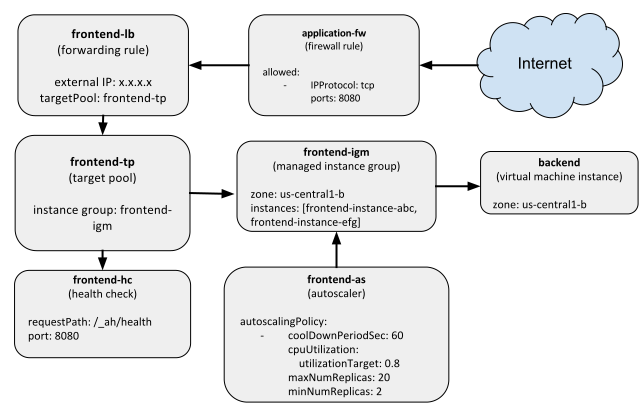
משאבי פריסה מאוזני עומס ברשת (אפשר ללחוץ כדי להגדיל)

אם אתם משתמשים חדשים ב-Deployment Manager, כדאי לעיין במדריכים למתחילים או במדריך המפורט.

לפני שמתחילים

יצירת תבניות משאבים

בדוגמה הזו מופעל פריסה שמכילה מגוון של משאבי Google Cloud. כדי להתחיל, יוצרים תבניות שמגדירות את המשאבים האלה בנפרד. בהמשך, קוראים לתבניות האלה בהגדרה הסופית. הפריסה כוללת את המשאבים הבאים:

  • מכונה של Compute Engine שמארחת מסד נתונים של MySQL בשביל האפליקציה.
  • תבנית של הגדרות מכונה למכונות קצה, שמשתמשת בקובץ אימג' של Docker לאפליקציית Node.js.
  • קבוצת מופעי מכונה מנוהלים, שמשתמשת בתבנית של הגדרות מכונה כדי ליצור שני מופעי קצה.
  • קנה מידה אוטומטי, שמתחיל או מפסיק מופעים נוספים של חזית האתר על סמך תנועה נכנסת.
  • בדיקת תקינות, שבודקת אם מופעי הקצה הקדמי זמינים לביצוע עבודה.
  • מאזן עומסי רשת עם כלל העברה.
  • מאגר יעד לקבוצת מופעי מכונה מנוהלים.

יצירת התבנית עבור קצה העורפי של MySQL

החלק העורפי של האפליקציה הזו הוא מכונה וירטואלית אחת ב-Compute Engine שמריצה קונטיינר של MySQL Docker. תבנית container_vm.py מגדירה מכונה ב-Compute Engine שיכולה להריץ קונטיינרים של Docker. כדי לוודא שהתבנית עומדת במבנה הנכון ומכילה את כל המאפיינים הנדרשים, צריך גם קובץ סכימה.

מעתיקים את התבנית שלמטה או מורידים אותה ממאגר GitHub:

# Copyright 2016 Google Inc. All rights reserved.
#
# Licensed under the Apache License, Version 2.0 (the "License");
# you may not use this file except in compliance with the License.
# You may obtain a copy of the License at
#
#     http://www.apache.org/licenses/LICENSE-2.0
#
# Unless required by applicable law or agreed to in writing, software
# distributed under the License is distributed on an "AS IS" BASIS,
# WITHOUT WARRANTIES OR CONDITIONS OF ANY KIND, either express or implied.
# See the License for the specific language governing permissions and
# limitations under the License.

"""Creates a Container VM with the provided Container manifest."""

from container_helper import GenerateManifest


COMPUTE_URL_BASE = 'https://www.googleapis.com/compute/v1/'


def GlobalComputeUrl(project, collection, name):
  return ''.join([COMPUTE_URL_BASE, 'projects/', project,
                  '/global/', collection, '/', name])


def ZonalComputeUrl(project, zone, collection, name):
  return ''.join([COMPUTE_URL_BASE, 'projects/', project,
                  '/zones/', zone, '/', collection, '/', name])


def GenerateConfig(context):
  """Generate configuration."""

  base_name = context.env['name']

  # Properties for the container-based instance.
  instance = {
      'zone': context.properties['zone'],
      'machineType': ZonalComputeUrl(context.env['project'],
                                     context.properties['zone'],
                                     'machineTypes',
                                     'f1-micro'),
      'metadata': {
          'items': [{
              'key': 'gce-container-declaration',
              'value': GenerateManifest(context)
              }]
          },
      'disks': [{
          'deviceName': 'boot',
          'type': 'PERSISTENT',
          'autoDelete': True,
          'boot': True,
          'initializeParams': {
              'diskName': base_name + '-disk',
              'sourceImage': GlobalComputeUrl('cos-cloud',
                                              'images',
                                              context.properties[
                                                  'containerImage'])
              },
          }],
      'networkInterfaces': [{
          'accessConfigs': [{
              'name': 'external-nat',
              'type': 'ONE_TO_ONE_NAT'
              }],
          'network': GlobalComputeUrl(context.env['project'],
                                      'networks',
                                      'default')
          }],
        'serviceAccounts': [{
            'email': 'default',
            'scopes': ['https://www.googleapis.com/auth/logging.write']
            }]
      }

  # Resources to return.
  resources = {
      'resources': [{
          'name': base_name,
          'type': 'compute.v1.instance',
          'properties': instance
          }]
      }

  return resources

מורידים את קובץ הסכימה של התבנית.

בתבנית יש מאפיינים לא מוגדרים, כמו containerImage, שמוגדרים בתבניות מאוחרות יותר.

כשמשתמשים בקובצי אימג' של קונטיינרים במכונות של Compute Engine, צריך גם לספק קובץ מניפסט שמתאר באיזה קובץ אימג' של קונטיינר להשתמש. יוצרים שיטת עזר בשם container_helper.py כדי להגדיר באופן דינמי את מניפסט מאגר התגים:

# Copyright 2016 Google Inc. All rights reserved.
#
# Licensed under the Apache License, Version 2.0 (the "License");
# you may not use this file except in compliance with the License.
# You may obtain a copy of the License at
#
#     http://www.apache.org/licenses/LICENSE-2.0
#
# Unless required by applicable law or agreed to in writing, software
# distributed under the License is distributed on an "AS IS" BASIS,
# WITHOUT WARRANTIES OR CONDITIONS OF ANY KIND, either express or implied.
# See the License for the specific language governing permissions and
# limitations under the License.

"""Helper methods for working with containers in config."""

import six
import yaml


def GenerateManifest(context):
  """Generates a Container Manifest given a Template context.

  Args:
    context: Template context, which must contain dockerImage and port
        properties, and an optional dockerEnv property.

  Returns:
    A Container Manifest as a YAML string.
  """
  env_list = []
  if 'dockerEnv' in context.properties:
    for key, value in six.iteritems(context.properties['dockerEnv']):
      env_list.append({'name': key, 'value': str(value)})

  manifest = {
      'apiVersion': 'v1',
      'kind': 'Pod',
      'metadata': {
          'name': str(context.env['name'])
          },
      'spec': {
          'containers': [{
              'name': str(context.env['name']),
              'image': context.properties['dockerImage'],
              'ports': [{
                  'hostPort': context.properties['port'],
                  'containerPort': context.properties['port']
                  }],
              }]
          }
      }

  if env_list:
    manifest['spec']['containers'][0]['env'] = env_list

  return yaml.dump(manifest, default_flow_style=False)

יצירת התבנית לחלק הקדמי של Node.js

הקצה הקדמי של האפליקציה מריץ Node.js, ומאפשר למשתמשים לשלוח הודעות בדף האינטרנט. הקצה הקדמי פועל בקבוצה של מכונות וירטואליות, עם תמיכה של מידרוג אוטומטי ומאזן עומסים. כדי ליצור תבניות של קצה קדמי, צריך לפעול לפי ההוראות הבאות.

  1. יוצרים משאב תבנית של הגדרות מכונה.

    כדי ליצור קבוצת מופעי מכונה מנוהלים, צריך תבנית של הגדרות מכונה. קבוצת מופעי מכונה מנוהלים היא קבוצה של מופעים זהים של מכונות וירטואליות (VM) שאתם שולטים בהם כישות אחת.

    יוצרים קובץ בשם container_instance_template.py ומורידים את הסכימה של התבנית:

    # Copyright 2016 Google Inc. All rights reserved.
    #
    # Licensed under the Apache License, Version 2.0 (the "License");
    # you may not use this file except in compliance with the License.
    # You may obtain a copy of the License at
    #
    #     http://www.apache.org/licenses/LICENSE-2.0
    #
    # Unless required by applicable law or agreed to in writing, software
    # distributed under the License is distributed on an "AS IS" BASIS,
    # WITHOUT WARRANTIES OR CONDITIONS OF ANY KIND, either express or implied.
    # See the License for the specific language governing permissions and
    # limitations under the License.
    
    """Creates a Container VM with the provided Container manifest."""
    
    from container_helper import GenerateManifest
    
    
    def GenerateConfig(context):
      """Generates configuration."""
    
      image = ''.join(['https://www.googleapis.com/compute/v1/',
                       'projects/cos-cloud/global/images/',
                       context.properties['containerImage']])
      default_network = ''.join(['https://www.googleapis.com/compute/v1/projects/',
                                 context.env['project'],
                                 '/global/networks/default'])
    
      instance_template = {
          'name': context.env['name'] + '-it',
          'type': 'compute.v1.instanceTemplate',
          'properties': {
              'properties': {
                  'metadata': {
                      'items': [{
                          'key': 'gce-container-declaration',
                          'value': GenerateManifest(context)
                          }]
                      },
                  'machineType': 'f1-micro',
                  'disks': [{
                      'deviceName': 'boot',
                      'boot': True,
                      'autoDelete': True,
                      'mode': 'READ_WRITE',
                      'type': 'PERSISTENT',
                      'initializeParams': {'sourceImage': image}
                      }],
                  'networkInterfaces': [{
                      'accessConfigs': [{
                          'name': 'external-nat',
                          'type': 'ONE_TO_ONE_NAT'
                          }],
                      'network': default_network
                      }],
                    'serviceAccounts': [{
                        'email': 'default',
                        'scopes': ['https://www.googleapis.com/auth/logging.write']
                        }]
                  }
              }
          }
    
      outputs = [{'name': 'instanceTemplateSelfLink',
                  'value': '$(ref.' + instance_template['name'] + '.selfLink)'}]
    
      return {'resources': [instance_template], 'outputs': outputs}
    

    מורידים את קובץ הסכימה של התבנית.

  2. יוצרים מאזן עומסים, קבוצת מופעי מכונה מנוהלים ומנגנון להתאמה אוטומטית של משאבים.

    לאחר מכן, יוצרים עוד תבנית שמשתמשת בתבנית container_instance_template.py ויוצרת את שאר משאבי ה-Frontend, כולל מידרוג אוטומטי, מאזן עומסים וקבוצת מופעי מכונה מנוהלים.

התבנית הזו כוללת את המשאבים הבאים:

  1. תבנית של הגדרות מכונה באמצעות התבנית container_instance_template.py

  2. קבוצת מופעי מכונה מנוהלים שמשתמשת בתבנית של הגדרות מכונה, וכלי לשינוי גודל אוטומטי שמפנה לקבוצת מופעי המכונה המנוהלים. שימוש בהפניות מבטיח ש-Deployment Manager ייצור את המשאבים בסדר מסוים. במקרה הזה, קבוצת מופעי מכונה מנוהלים נוצרת לפני מידרוג אוטומטי.

  3. מאזן עומסי רשת שמכיל את המשאבים הבאים:

    • כלל העברה עם כתובת IP חיצונית אחת שחשופה לאינטרנט.
    • מאגר יעד שמכיל את קבוצת מופעי מכונה מנוהלים שיצרתם קודם.
    • בדיקת תקינות לצירוף למאגר היעדים.

יוצרים קובץ בשם frontend.py ומורידים את הסכימה של התבנית:

# Copyright 2016 Google Inc. All rights reserved.
#
# Licensed under the Apache License, Version 2.0 (the "License");
# you may not use this file except in compliance with the License.
# You may obtain a copy of the License at
#
#     http://www.apache.org/licenses/LICENSE-2.0
#
# Unless required by applicable law or agreed to in writing, software
# distributed under the License is distributed on an "AS IS" BASIS,
# WITHOUT WARRANTIES OR CONDITIONS OF ANY KIND, either express or implied.
# See the License for the specific language governing permissions and
# limitations under the License.

"""Creates autoscaled, network LB IGM running specified docker image."""


def GenerateConfig(context):
  """Generate YAML resource configuration."""

  # Pull the region out of the zone
  region = context.properties['zone'][:context.properties['zone'].rfind('-')]
  name = context.env['name']

  resources = [{
      'name': name,
      'type': 'container_instance_template.py',
      'properties': {
          'port': context.properties['port'],
          'dockerEnv': context.properties['dockerEnv'],
          'dockerImage': context.properties['dockerImage'],
          'containerImage': context.properties['containerImage']
      }
  }, {
      'name': name + '-igm',
      'type': 'compute.v1.instanceGroupManager',
      'properties': {
          'zone': context.properties['zone'],
          'targetSize': context.properties['size'],
          'targetPools': ['$(ref.' + name + '-tp.selfLink)'],
          'baseInstanceName': name + '-instance',
          'instanceTemplate': '$(ref.' + name + '-it.selfLink)'
      }
  }, {
      'name': name + '-as',
      'type': 'compute.v1.autoscaler',
      'properties': {
          'zone': context.properties['zone'],
          'target': '$(ref.' + name + '-igm.selfLink)',
          'autoscalingPolicy': {
              'maxNumReplicas': context.properties['maxSize']
          }
      }
  }, {
      'name': name + '-hc',
      'type': 'compute.v1.httpHealthCheck',
      'properties': {
          'port': context.properties['port'],
          'requestPath': '/_ah/health'
      }
  }, {
      'name': name + '-tp',
      'type': 'compute.v1.targetPool',
      'properties': {
          'region': region,
          'healthChecks': ['$(ref.' + name + '-hc.selfLink)']
      }
  }, {
      'name': name + '-lb',
      'type': 'compute.v1.forwardingRule',
      'properties': {
          'region': region,
          'portRange': context.properties['port'],
          'target': '$(ref.' + name + '-tp.selfLink)'
      }
  }]
  return {'resources': resources}

מורידים את קובץ הסכימה של התבנית.

יצירת תבנית מאחדת

לבסוף, יוצרים תבנית שמשלבת בין תבניות ה-backend וה-frontend. יוצרים קובץ בשם nodejs.py עם התוכן הבא:

# Copyright 2016 Google Inc. All rights reserved.
#
# Licensed under the Apache License, Version 2.0 (the "License");
# you may not use this file except in compliance with the License.
# You may obtain a copy of the License at
#
#     http://www.apache.org/licenses/LICENSE-2.0
#
# Unless required by applicable law or agreed to in writing, software
# distributed under the License is distributed on an "AS IS" BASIS,
# WITHOUT WARRANTIES OR CONDITIONS OF ANY KIND, either express or implied.
# See the License for the specific language governing permissions and
# limitations under the License.

"""Create nodejs template with the back-end and front-end templates."""


def GenerateConfig(context):
  """Generate configuration."""

  backend = context.env['deployment'] + '-backend'
  frontend = context.env['deployment'] + '-frontend'
  firewall = context.env['deployment'] + '-application-fw'
  application_port = 8080
  mysql_port = 3306
  resources = [{
      'name': backend,
      'type': 'container_vm.py',
      'properties': {
          'zone': context.properties['zone'],
          'dockerImage': 'gcr.io/qwiklabs-resources/mysql',
          'containerImage': 'family/cos-stable',
          'port': mysql_port,
          'dockerEnv': {
              'MYSQL_ROOT_PASSWORD': 'mypassword'
          }
      }
  }, {
      'name': frontend,
      'type': 'frontend.py',
      'properties': {
          'zone': context.properties['zone'],
          'dockerImage': 'gcr.io/qwiklabs-resources/nodejsservice',
          'port': application_port,
          # Define the variables that are exposed to container as env variables.
          'dockerEnv': {
              'SEVEN_SERVICE_MYSQL_PORT': mysql_port,
              'SEVEN_SERVICE_PROXY_HOST': '$(ref.' + backend
                                          + '.networkInterfaces[0].networkIP)'
          },
          # If left out will default to 1
          'size': 2,
          # If left out will default to 1
          'maxSize': 20
      }
  }, {
      'name': firewall,
      'type': 'compute.v1.firewall',
      'properties': {
          'allowed': [{
              'IPProtocol': 'TCP',
              'ports': [application_port]
          }],
          'sourceRanges': ['0.0.0.0/0']
      }
  }]
  return {'resources': resources}

מורידים את קובץ הסכימה של התבנית.

שימו לב שחלק הקצה של האפליקציה נקרא env["deployment"]-frontend, וגם חלק הקצה העורפי נקרא באופן דומה. כשפורסים את האפליקציה, Deployment Manager מחליף אוטומטית את env["deployment"] בשם הפריסה.

יצירת ההגדרה

אחרי שכל התבניות מוכנות, אפשר ליצור הגדרה שתשמש לפריסת המשאבים. יוצרים קובץ תצורה בשם nodejs.yaml עם התוכן הבא:

# Copyright 2016 Google Inc. All rights reserved.
#
# Licensed under the Apache License, Version 2.0 (the "License");
# you may not use this file except in compliance with the License.
# You may obtain a copy of the License at
#
#     http://www.apache.org/licenses/LICENSE-2.0
#
# Unless required by applicable law or agreed to in writing, software
# distributed under the License is distributed on an "AS IS" BASIS,
# WITHOUT WARRANTIES OR CONDITIONS OF ANY KIND, either express or implied.
# See the License for the specific language governing permissions and
# limitations under the License.

# Launches an autoscaled, load-balanced frontend running nodejs for serving
# traffic. Also launches a single MySQL container instance, wires the two
# together using references, and passes them as env variables to the underlying
# frontend Docker containers.
imports:
- path: nodejs.py

resources:
- name: nodejs
  type: nodejs.py
  properties:
    zone: ZONE_TO_RUN

מחליפים את ZONE_TO_RUN בתחום שבו רוצים את המשאבים, לדוגמה us-central1-a.

פריסת המשאבים

עכשיו אפשר לפרוס את המשאבים. מריצים את הפקודה הבאה ב-Google Cloud CLI:

gcloud deployment-manager deployments create advanced-configuration --config nodejs.yaml

בסיום הפריסה, ב-Deployment Manager מוצג סיכום של המשאבים שנוצרו, בדומה לסיכום הבא:

Waiting for create operation-1468522101491-5379cf2344539-5961abe8-a500190c...done.
Create operation operation-1468522101491-5379cf2344539-5961abe8-a500190c completed successfully.
NAME                                   TYPE                             STATE      ERRORS
advanced-configuration-application-fw  compute.v1.firewall              COMPLETED  []
advanced-configuration-backend         compute.v1.instance              COMPLETED  []
advanced-configuration-frontend-as     compute.v1.autoscaler            COMPLETED  []
advanced-configuration-frontend-hc     compute.v1.httpHealthCheck       COMPLETED  []
advanced-configuration-frontend-igm    compute.v1.instanceGroupManager  COMPLETED  []
advanced-configuration-frontend-it     compute.v1.instanceTemplate      COMPLETED  []
advanced-configuration-frontend-lb     compute.v1.forwardingRule        COMPLETED  []
advanced-configuration-frontend-tp     compute.v1.targetPool            COMPLETED  []

בדיקת האפליקציה

כדי לבדוק את האפליקציה, קודם צריך לקבל את כתובת ה-IP החיצונית שמשרתת תנועה, על ידי שליחת שאילתה לכלל ההעברה:

$ gcloud compute forwarding-rules describe advanced-configuration-frontend-lb --region us-central1
IPAddress: 104.154.81.44
IPProtocol: TCP
creationTimestamp: '2016-07-14T11:48:37.228-07:00'
description: ''
id: '9033201246750269546'
kind: compute#forwardingRule
name: advanced-configuration-frontend-lb
portRange: 8080-8080
region: https://www.googleapis.com/compute/v1/projects/myproject/regions/us-central1
selfLink: https://www.googleapis.com/compute/v1/projects/myproject/regions/us-central1/forwardingRules/advanced-configuration-frontend-lb
target: https://www.googleapis.com/compute/v1/projects/myproject/regions/us-central1/targetPools/advanced-configuration-frontend-tp

במקרה הזה, כתובת ה-IP החיצונית היא 104.154.81.44.

לאחר מכן, בדפדפן, נכנסים לכתובת ה-IP החיצונית עם היציאה 8080. לדוגמה, אם כתובת ה-IP החיצונית שלכם היא 104.154.81.44, כתובת ה-URL תהיה:

http://104.154.81.44:8080

אמור להופיע דף ריק, וזה צפוי. לאחר מכן, מפרסמים הודעה בדף. עוברים לכתובת ה-URL הבאה:

http://104.154.81.44:8080?msg=hellothere!

יופיע אישור שההודעה נוספה. חוזרים לכתובת ה-URL הראשית, ועכשיו אמורה להופיע בדף ההודעה:

hellothere!

עכשיו יש לכם אפליקציה שניתן לפרוס אותה, והיא יכולה לרשום ביומן הודעות שנשלחות אליה.

השלבים הבאים

אחרי שתסיימו את הדוגמה הזו, תוכלו: