

This document describes how to verify a Cloud Deploy deployment.
You can configure Cloud Deploy to verify that an application that you have deployed to any target is working correctly. Verification is done using your own testing image or images, and you configure Cloud Deploy to run those tests after deployment finishes.
How does deployment verification work?
You configure one or more targets in your delivery pipeline for deployment verification by defining tasks to run.
After an application is deployed, Cloud Deploy runs the verify tasks in the Cloud Deploy execution environment.
Success or failure of the tests executed indicates success or failure of the verification:
Verification success is determined by the exit code generated by the container.
0indicates success. A non-zero exit code indicates failure. To generate the expected verification result, make sure the container exits with the appropriate exit code. If more than one container is executed as part of verification, they must all succeed for verification to succeed.If the verification fails, the rollout also fails.
If a deployment fails during verification, you can see that by inspecting the rollout:
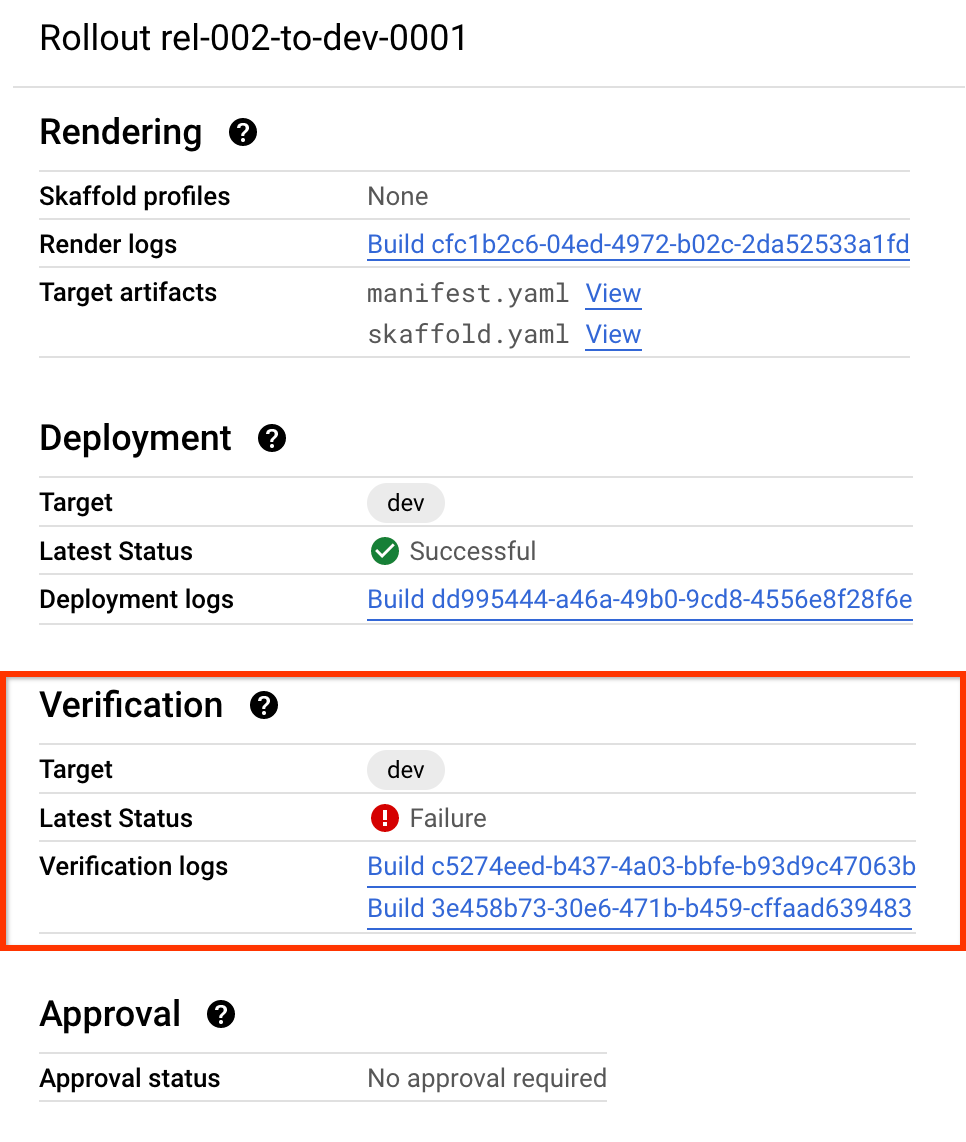
You can ignore or retry a failed verification.
You can also terminate an in-progress verify job.
Components used for verification
The rollout resource includes the following objects, which support deployment verification:
Phase
The collection of operations (jobs) in a rollout that are logically grouped together, for example a deploy or a deploy and verify.
Job
The specific operation to be performed on a rollout, such as deploy or verify.
Job run
A child of the rollout resource, the job run is an instance of a job, for example an attempt to deploy.
For more about Cloud Deploy resources, see Cloud Deploy service architecture
Configure Cloud Deploy for deployment verification
Enabling deployment verification for a Cloud Deploy target consists
of adding a verify stanza to a given target (or targets) in a delivery
pipeline progression, as shown in this example:
apiVersion: deploy.cloud.google.com/v1
kind: DeliveryPipeline
metadata:
 name: my-demo-app
description: main application pipeline
serialPipeline:
 stages:
 - targetId: dev
   profiles: []
   strategy:
     standard:
       verify:
         tasks:
         - type: container
           image: "VERIFY_IMAGE"
           command: [COMMANDS_TO_RUN]
           args: [LIST_OF_ARGS]
           env: {VERIFY_TASK_ENV_MAP}
In this YAML:
VERIFY_IMAGE
Is the name of the image you want to run for the verify job. For example,
us-central1-docker.pkg.dev/gcp-project-id-12345/my-repository/my-app:v1.2for an Artifact Registry image.COMMANDS_TO_RUN
Is a list of entrypoints to run on that container.
"/bin/sh"is a typical command to specify here, to invoke a shell.LIST_OF_ARGS
Is a list of arguments to provide to the command. This is a comma-separated list, with each argument in quotation marks. If your COMMAND_TO_RUN is
"/bin/sh", then one of the arguments here would be"-c", and another argument would be the entire command you want to run in the shell you're invoking.Here's an example:
command: ["/bin/sh"]
args: ["-c", `echo "This command ran!"`]
VERIFY_TASK_ENV_MAP
Is a map of environment variables passed into the container, in the format
KEY:VAL.
The verify operation is executed within its own execution environment. This execution environment can
be configured for VERIFY the same as it can be for RENDER and DEPLOY.
Run verification on the application cluster
By default, deployment verification runs in the Cloud Deploy execution environment. You can also configure Skaffold to run verification on the same cluster where your application is running.
To run your verification containers on the cluster, you must configure the verification
containers under the verify stanza in your skaffold.yaml. For each container
defined, you must also set executionMode.kubernetesCluster.
verify:
- name:
  container:
    name:
    image:
    command:
    args:
  executionMode:
    kubernetesCluster:
The following is an example verify stanza that includes executionMode to invoke the verification container on the application cluster:
verify:
- name: integration-test-container
  container:
    name: integration-test-container
    image: integration-test-container
  executionMode:
    kubernetesCluster: {}
In addition, you must set the verify stanza to true inside your delivery pipeline configuration.
The following is an example delivery pipeline definition where the dev target
has verification enabled.
apiVersion: deploy.cloud.google.com/v1
kind: DeliveryPipeline
metadata:
 name: my-demo-app
description: main application pipeline
serialPipeline:
 stages:
 - targetId: dev
   profiles: []
   strategy:
     standard:
       verify: true
This ability is available for deployments to GKE only, not for Cloud Run. Deployments to Cloud Run can only run verification in the Cloud Deploy execution environment.
For parallel deployments, verification is configured on the multi-target, and the verification containers run on each child target.
You can also include the jobManifestPath and overrides properties,
under kubernetesCluster, to point to a manifest for your verify container, and
any values you want to override. (overrides takes Kubernetes inline JSON with
the values you want to replace.) Learn more.
The executionMode stanza is optional, and if you omit it, Skaffold runs the
verification containers in the Cloud Deploy execution environment.
Retry the verification
When a verify job fails, you can retry the verification, creating a new job run:
gcloud deploy rollouts retry-job ROLLOUT_NAME \
             --job-id=JOB_ID \
             --phase-id=PHASE_ID \
             --delivery-pipeline=PIPELINE_NAME \
             --release=RELEASE_NAME \
             --region=REGION
Retrying the verification changes the state of the rollout from FAILED to
IN_PROGRESS.
You can only retry a verification for a rollout whose verify job failed.
Available environment variables
Cloud Deploy also provides and populates the following environment variables in the execution environment. You can use these environment variables as part of your deploy hook, verify job, or custom target render or deploy.
ANTHOS_MEMBERSHIPFor targets of type
ANTHOS, the fully specified resource name of the Anthos membership.CLOUD_RUN_LOCATIONFor targets of type
RUN, the region the Cloud Run service is deployed in.CLOUD_RUN_PROJECTFor targets of type
RUN, the project in which the Cloud Run service was created.CLOUD_RUN_SERVICEFor targets of type
RUN, the name of the Cloud Run service deployed.CLOUD_RUN_SERVICE_URLSFor targets of type
RUN, the URL or URLs (comma-separated list) that end users will use to access your service. You can find these in the Cloud Run service details for your service, in the Google Cloud console. The URLs are generated by Cloud Run after your Cloud Run Service or Services have been successfully deployed. Therefore this environment variable is only available in postdeploy hooks and verify jobs.CLOUD_RUN_REVISIONFor targets of type
RUN, the specific revision of the Cloud Run service.GKE_CLUSTERFor targets of type
GKE, the fully specified resource name of the Google Kubernetes Engine cluster, for exampleprojects/p/locations/us-central1/clusters/dev.TARGET_TYPEThe specific runtime type of the target. Either
GKE,ANTHOS, orRUN. For custom targets, this won't be set.CLOUD_DEPLOY_LOCATIONThe region containing the Cloud Deploy resources.
CLOUD_DEPLOY_DELIVERY_PIPELINEThe ID of the delivery pipeline.
CLOUD_DEPLOY_TARGETThe ID of the target.
CLOUD_DEPLOY_PROJECTThe Google Cloud project number for the project containing the Cloud Deploy resources.
CLOUD_DEPLOY_PROJECT_IDThe Google Cloud project ID for the project.
CLOUD_DEPLOY_RELEASEThe ID of the release in which the hooks will run.
CLOUD_DEPLOY_ROLLOUTThe ID of the rollout that contains the jobs for the hooks.
CLOUD_DEPLOY_JOB_RUNThe ID of the job run that represents the current execution of the job.
CLOUD_DEPLOY_PHASEThe phase in the rollout that contains the job for the deploy hook, verify job, or custom render or deploy.
What's next
- Learn more about tasks
- Try the quickstart: Verify your deployment