Use data lineage with Google Cloud systems

View data lineage to understand the relationships between your project's resources and the processes that created them. These relationships show how data assets, such as tables and datasets, are transformed by processes like queries and pipelines. This guide describes how to view data lineage details in the Google Cloud console or retrieve them by using the Data Lineage API.

Roles and permissions

Data lineage tracks lineage information automatically when you enable the Data Lineage API. You don't need any administrator or editor roles to capture lineage for your data assets.

To view data lineage, you need specific Identity and Access Management (IAM) permissions. Lineage information is captured across projects, so you need permissions in multiple projects.

  • When viewing lineage in Knowledge Catalog, BigQuery, or Vertex AI: you need permissions to view lineage information in the project where you are viewing it.

  • When viewing lineage that was recorded in other projects: you need permissions to view lineage information in those projects where it was recorded.

To get the permissions that you need to view data lineage, ask your administrator to grant you the following IAM roles:

  • Data Lineage Viewer (roles/datalineage.viewer) on the project where lineage is recorded, and the project where lineage is viewed
  • View BigQuery table details: BigQuery Data Viewer (roles/bigquery.dataViewer) on the table's storage project
  • View BigQuery job details: BigQuery Resource Viewer (roles/bigquery.resourceViewer) on the job's compute project
  • View details for other cataloged assets: Dataplex Catalog Viewer (roles/dataplex.catalogViewer) on the project where catalog entries are stored

For more information about granting roles, see Manage access to projects, folders, and organizations.

These predefined roles contain the permissions required to view data lineage. To see the exact permissions that are required, expand the Required permissions section:

Required permissions

The following permissions are required to view data lineage:

  • View BigQuery table details: bigquery.tables.get - the table's storage project
  • View BigQuery job details: bigquery.jobs.get - the job's compute project

You might also be able to get these permissions with custom roles or other predefined roles.

Types of data lineage views

You can view lineage information as a graph or a list. By default, the lineage graph displays table-level lineage. For BigQuery and Managed Service for Apache Spark jobs, you can view column-level lineage in both graph and list views.

The following view types are available:

  • Graph view: displays lineage as an interactive graph, letting you explore relationships between data assets and columns by expanding nodes.

  • List view: displays lineage in a tabular format, providing simplified and detailed representations of table-level and column-level lineage. You can customize columns and export lineage data from this view.

The key elements in the graph are described as follows:

  • Nodes: represent the data entities. In the table-level view, a node shows the table name and its columns. In the column-level view, each node represents a specific table and its columns that have lineage.

  • Edges: the lines that connect nodes and represent the processes that occur between them. Edges can feature icons or labels to provide more information about the transformation:

    • Icons: In table-level view, icons appear on edges to represent the transformation process. When you manually explore the graph, icons on edges represent the source system of the process (for example, BigQuery or Vertex AI). If multiple processes are involved, a 'multiple processes' icon is displayed. If the process source system is unknown, a gear icon is used. When you apply filters, a gear icon is used for all processes.
    • Labels: In column-level view, edges are labeled to describe the type of dependency between columns, such as Exact copy or Other.

Enable data lineage

Enable data lineage to begin automatically tracking lineage information for supported systems. By default, enabling the API activates lineage tracking for most supported services. To control Managed Service for Apache Spark lineage ingestion, see Control lineage ingestion for a service.

You must enable the Data Lineage API in both the project where you view lineage and the projects where lineage is recorded. For more information, see Project types.

  1. To capture lineage information, complete the following steps:
    1. In the Google Cloud console, on the Project selector page, select the project where you want to record lineage.

      Go to Project selector

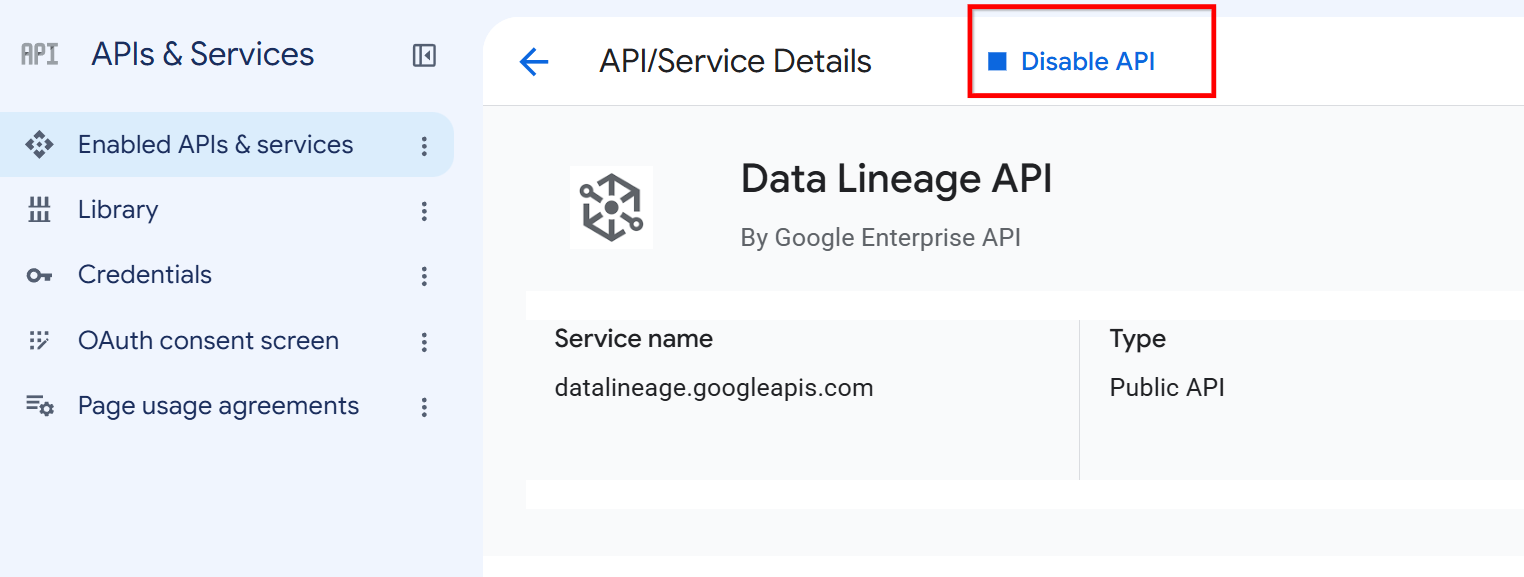
    2. Enable the Data Lineage API.

      Enable the Data Lineage API

    3. Repeat the previous steps for each project where you want to record lineage.
  2. In the project where you view lineage, enable the Data Lineage API and the Dataplex API.

    Enable the APIs

Control lineage ingestion for a service

After you enable the Data Lineage API, the service starts automatic lineage tracking for most supported services. You can then selectively enable or disable lineage ingestion for specific integrations at the project, folder, or organization level. During preview, this feature only supports configuring ingestion for Managed Service for Apache Spark.

The configuration is hierarchical. The most specific configuration takes precedence. For example, a project-level configuration overrides a folder-level configuration. If no configuration is set, the service's default behavior is used. For Managed Service for Apache Spark, the default is Enabled.

Any changes to the configuration might take up to 24 hours to propagate, but usually become effective within two hours.

For Managed Service for Apache Spark, lineage data is only sent if lineage is enabled. For more information, see Using Spark data lineage and Use data lineage with Managed Service for Apache Spark.

For more information about controlling lineage ingestion including how the configuration is applied hierarchically, see Control lineage ingestion.

Prerequisites

To control lineage ingestion, you must use the Data Lineage API. Ensure you have a client project configured for billing and quota, as the Data Lineage API is a client-based API.

  1. Enable the datalineage.googleapis.com API in your client project. For more information, see Enable data lineage.

  2. Set the client project. For the following examples, use the X-Goog-User-Project header. For more information, see System parameters.

Get current configuration

To check whether lineage ingestion is enabled for a resource or to obtain the etag value before you modify the configuration, retrieve the current configuration.

C#

C#

Before trying this sample, follow the C# setup instructions in the Knowledge Catalog quickstart using client libraries. For more information, see the Knowledge Catalog C# API reference documentation.

To authenticate to Knowledge Catalog, set up Application Default Credentials. For more information, see Set up authentication for a local development environment.

using Google.Cloud.DataCatalog.Lineage.ConfigManagement.V1;

public sealed partial class GeneratedConfigManagementServiceClientSnippets
{
    /// <summary>Snippet for GetConfig</summary>
    /// <remarks>
    /// This snippet has been automatically generated and should be regarded as a code template only.
    /// It will require modifications to work:
    /// - It may require correct/in-range values for request initialization.
    /// - It may require specifying regional endpoints when creating the service client as shown in
    ///   https://cloud.google.com/dotnet/docs/reference/help/client-configuration#endpoint.
    /// </remarks>
    public void GetConfigRequestObject()
    {
        // Create client
        ConfigManagementServiceClient configManagementServiceClient = ConfigManagementServiceClient.Create();
        // Initialize request argument(s)
        GetConfigRequest request = new GetConfigRequest
        {
            ConfigName = ConfigName.FromProjectLocation("[PROJECT]", "[LOCATION]"),
        };
        // Make the request
        Config response = configManagementServiceClient.GetConfig(request);
    }
}

Go

Go

Before trying this sample, follow the Go setup instructions in the Knowledge Catalog quickstart using client libraries. For more information, see the Knowledge Catalog Go API reference documentation.

To authenticate to Knowledge Catalog, set up Application Default Credentials. For more information, see Set up authentication for a local development environment.


//go:build examples

package main

import (
	"context"

	configmanagement "cloud.google.com/go/datacatalog/lineage/configmanagement/apiv1"
	configmanagementpb "cloud.google.com/go/datacatalog/lineage/configmanagement/apiv1/configmanagementpb"
)

func main() {
	ctx := context.Background()
	// This snippet has been automatically generated and should be regarded as a code template only.
	// It will require modifications to work:
	// - It may require correct/in-range values for request initialization.
	// - It may require specifying regional endpoints when creating the service client as shown in:
	//   https://pkg.go.dev/cloud.google.com/go#hdr-Client_Options
	c, err := configmanagement.NewClient(ctx)
	if err != nil {
		// TODO: Handle error.
	}
	defer c.Close()

	req := &configmanagementpb.GetConfigRequest{
		// TODO: Fill request struct fields.
		// See https://pkg.go.dev/cloud.google.com/go/datacatalog/lineage/configmanagement/apiv1/configmanagementpb#GetConfigRequest.
	}
	resp, err := c.GetConfig(ctx, req)
	if err != nil {
		// TODO: Handle error.
	}
	// TODO: Use resp.
	_ = resp
}

Java

Java

Before trying this sample, follow the Java setup instructions in the Knowledge Catalog quickstart using client libraries. For more information, see the Knowledge Catalog Java API reference documentation.

To authenticate to Knowledge Catalog, set up Application Default Credentials. For more information, see Set up authentication for a local development environment.

import com.google.cloud.datacatalog.lineage.configmanagement.v1.Config;
import com.google.cloud.datacatalog.lineage.configmanagement.v1.ConfigManagementServiceClient;
import com.google.cloud.datacatalog.lineage.configmanagement.v1.ConfigName;
import com.google.cloud.datacatalog.lineage.configmanagement.v1.GetConfigRequest;

public class SyncGetConfig {

  public static void main(String[] args) throws Exception {
    syncGetConfig();
  }

  public static void syncGetConfig() throws Exception {
    // This snippet has been automatically generated and should be regarded as a code template only.
    // It will require modifications to work:
    // - It may require correct/in-range values for request initialization.
    // - It may require specifying regional endpoints when creating the service client as shown in
    // https://cloud.google.com/java/docs/setup#configure_endpoints_for_the_client_library
    try (ConfigManagementServiceClient configManagementServiceClient =
        ConfigManagementServiceClient.create()) {
      GetConfigRequest request =
          GetConfigRequest.newBuilder()
              .setName(ConfigName.ofProjectLocationName("[PROJECT]", "[LOCATION]").toString())
              .build();
      Config response = configManagementServiceClient.getConfig(request);
    }
  }
}

Python

Python

Before trying this sample, follow the Python setup instructions in the Knowledge Catalog quickstart using client libraries. For more information, see the Knowledge Catalog Python API reference documentation.

To authenticate to Knowledge Catalog, set up Application Default Credentials. For more information, see Set up authentication for a local development environment.

# This snippet has been automatically generated and should be regarded as a
# code template only.
# It will require modifications to work:
# - It may require correct/in-range values for request initialization.
# - It may require specifying regional endpoints when creating the service
#   client as shown in:
#   https://googleapis.dev/python/google-api-core/latest/client_options.html
from google.cloud import datacatalog_lineage_configmanagement_v1


def sample_get_config():
    # Create a client
    client = datacatalog_lineage_configmanagement_v1.ConfigManagementServiceClient()

    # Initialize request argument(s)
    request = datacatalog_lineage_configmanagement_v1.GetConfigRequest(
        name="name_value",
    )

    # Make the request
    response = client.get_config(request=request)

    # Handle the response
    print(response)

REST

To view the current lineage configuration, use the projects.locations.config.get method. You can retrieve the configuration for a project, folder, or organization.

The following example shows how to get the configuration for a project:

Before using any of the request data, make the following replacements:

  • CLIENT_PROJECT_ID: The ID of your client project used for billing or quotas.
  • PROJECT_ID: The ID of the project whose configuration you want to view.

HTTP method and URL:

GET https://datalineage.googleapis.com/v1/projects/PROJECT_ID/locations/global/config

To send your request, expand one of these options:

The command returns one of the following outputs:

  • If no configuration is set, you get an output with an empty ingestion object:
    {
      "name": "projects/123456789012/locations/global/config",
      "ingestion": {}
    }
      

    In this case, Managed Service for Apache Spark lineage ingestion uses the default setting, which is enabled.

  • If Managed Service for Apache Spark lineage ingestion is explicitly enabled, you get the following output:
    {
      "name": "projects/123456789012/locations/global/config",
      "ingestion": {
        "rules": [
          {
            "integrationSelector": {
              "integration": "DATAPROC"
            },
            "lineageEnablement": {
              "enabled": true
            }
          }
        ]
      },
      "etag": "1a2b3c4d5e"
    }
      
  • If Managed Service for Apache Spark lineage ingestion is disabled, you get the following output:
    {
      "name": "projects/123456789012/locations/global/config",
      "ingestion": {
        "rules": [
          {
            "integrationSelector": {
              "integration": "DATAPROC"
            },
            "lineageEnablement": {
              "enabled": false
            }
          }
        ]
      },
      "etag": "1a2b3c4d5e"
    }
      

To get the configuration for a folder or organization, replace projects/PROJECT_ID with folders/FOLDER_ID or organizations/ORGANIZATION_ID.

The etag field in the response is a checksum generated by the server based on the current value of the configuration. When updating a configuration using the patch method, you can include the etag value returned from a recent get request in the request body. If you provide the etag, Knowledge Catalog uses it to verify that the configuration hasn't changed since your last read request. If there's a mismatch, the update request fails. This prevents you from unintentionally overwriting configurations made by other users in read-modify-write scenarios. If you don't provide an etag in your patch request, Knowledge Catalog overwrites the configuration unconditionally.

Disable lineage ingestion for a service

To manage costs, enforce data governance policies, or exclude development projects and other workloads that don't benefit from lineage tracking, disable lineage ingestion for a service.

Java

package com.google.cloud.datacatalog.lineage.configmanagement.v1.samples;

import com.google.api.gax.rpc.NotFoundException;
import com.google.cloud.datacatalog.lineage.configmanagement.v1.Config;
import com.google.cloud.datacatalog.lineage.configmanagement.v1.Config.Ingestion;
import com.google.cloud.datacatalog.lineage.configmanagement.v1.Config.Ingestion.IngestionRule;
import com.google.cloud.datacatalog.lineage.configmanagement.v1.Config.Ingestion.IngestionRule.IntegrationSelector;
import com.google.cloud.datacatalog.lineage.configmanagement.v1.Config.Ingestion.IngestionRule.IntegrationSelector.Integration;
import com.google.cloud.datacatalog.lineage.configmanagement.v1.Config.Ingestion.IngestionRule.LineageEnablement;
import com.google.cloud.datacatalog.lineage.configmanagement.v1.ConfigManagementServiceClient;
import com.google.cloud.datacatalog.lineage.configmanagement.v1.ConfigName;
import com.google.cloud.datacatalog.lineage.configmanagement.v1.GetConfigRequest;
import com.google.cloud.datacatalog.lineage.configmanagement.v1.UpdateConfigRequest;

public class DisableLineageIngestion {

  public static void main(String[] args) throws Exception {
    // TODO(developer): Replace these variables before running the sample.
    String projectId = "your-project-id";
    String location = "global";
    disableLineageIngestion(projectId, location);
  }

  // Disables lineage ingestion for a specific service
  // (Managed Service for Apache Spark).
  public static void disableLineageIngestion(String projectId, String location) throws Exception {
    // Initialize client that will be used to send requests. This client only needs to be created
    // once, and can be reused for multiple requests.
    try (ConfigManagementServiceClient client = ConfigManagementServiceClient.create()) {
      // Format the resource name.
      String name = ConfigName.ofProjectLocationName(projectId, location).toString();

      Config.Builder configBuilder = Config.newBuilder().setName(name);

      // It is a best practice to read the existing config to preserve other rules
      // and use the etag for optimistic concurrency control.
      try {
        GetConfigRequest getRequest = GetConfigRequest.newBuilder().setName(name).build();
        Config existingConfig = client.getConfig(getRequest);
        configBuilder.mergeFrom(existingConfig);
      } catch (NotFoundException e) {
        // If config doesn't exist, we will proceed by creating a new one.
      }

      // Create an integration selector for the service you want to disable.
      IntegrationSelector selector =
          IntegrationSelector.newBuilder().setIntegration(Integration.DATAPROC).build();

      // Set lineage enablement to false to disable tracking.
      LineageEnablement enablement = LineageEnablement.newBuilder().setEnabled(false).build();

      // Build the ingestion rule.
      IngestionRule disableRule =
          IngestionRule.newBuilder()
              .setIntegrationSelector(selector)
              .setLineageEnablement(enablement)
              .build();

      // Preserve existing rules except for the one we are modifying, then add the new rule.
      // We clear the ingestion block out of the configBuilder entirely to reconstruct it.
      Ingestion.Builder ingestionBuilder = Ingestion.newBuilder();
      if (configBuilder.hasIngestion()) {
        for (IngestionRule rule : configBuilder.getIngestion().getRulesList()) {
          // Keep all existing rules EXCEPT the one targeting DATAPROC
          if (rule.getIntegrationSelector().getIntegration() != Integration.DATAPROC) {
            ingestionBuilder.addRules(rule);
          }
        }
      }
      ingestionBuilder.addRules(disableRule);

      // Update the config builder with the reconstructed ingestion settings.
      configBuilder.setIngestion(ingestionBuilder.build());

      // Build the update request.
      UpdateConfigRequest request = UpdateConfigRequest.newBuilder()
          .setConfig(configBuilder.build())
          .build();

      // Update the config.
      Config response = client.updateConfig(request);
      System.out.printf("Successfully updated config: %s\n", response.getName());
    }
  }
}

Python

from google.api_core.exceptions import NotFound
from google.cloud.datacatalog.lineage import configmanagement_v1

def disable_lineage_ingestion(project_id: str, location: str = "global") -> configmanagement_v1.Config:
    """Disables lineage ingestion for a specific service.

    Args:
        project_id: The ID of your Google Cloud project.
        location: The region location, usually 'global'.

    Returns:
        The updated Configuration object.
    """
    # Initialize client that will be used to send requests.
    client = configmanagement_v1.ConfigManagementServiceClient()

    # The config name format
    name = f"projects/{project_id}/locations/{location}/config"

    try:
        # Retrieve the existing config to preserve other configurations and 
        # obtain the latest etag for optimistic concurrency control.
        config = client.get_config(name=name)

        # Filter out existing rules for the integration we are updating
        new_rules = [
            rule for rule in config.ingestion.rules
            if rule.integration_selector.integration != configmanagement_v1.Config.Ingestion.IngestionRule.IntegrationSelector.Integration.DATAPROC
        ]
    except NotFound:
        # If the config does not exist, start fresh
        config = configmanagement_v1.Config(name=name)
        new_rules = []

    # Define the integration to disable tracking for (e.g., DATAPROC).
    integration_selector = configmanagement_v1.Config.Ingestion.IngestionRule.IntegrationSelector(
        integration=configmanagement_v1.Config.Ingestion.IngestionRule.IntegrationSelector.Integration.DATAPROC
    )

    # Set lineage enablement to False to disable tracking.
    lineage_enablement = configmanagement_v1.Config.Ingestion.IngestionRule.LineageEnablement(
        enabled=False
    )

    # Create the ingestion rule.
    disable_rule = configmanagement_v1.Config.Ingestion.IngestionRule(
        integration_selector=integration_selector,
        lineage_enablement=lineage_enablement,
    )

    # Append the new disabling rule and assign it back to the config ingestion rules
    new_rules.append(disable_rule)
    config.ingestion = configmanagement_v1.Config.Ingestion(rules=new_rules)

    # Create the update request using the config (which includes the etag if it existed).
    request = configmanagement_v1.UpdateConfigRequest(
        config=config,
    )

    # Make the request to update the config
    response = client.update_config(request=request)

    print(f"Successfully updated config: {response.name}")
    return response

REST

To disable lineage ingestion for a specific service, use the projects.locations.config.patch method with an ingestion rule that sets lineageEnablement.enabled to false for the specific integration.

To prevent unintentionally overwriting configurations made by other users in read-modify-write scenarios, you can include the etag field in the request body. For more information, see Get current configuration.

Before using any of the request data, make the following replacements:

  • CLIENT_PROJECT_ID: The ID of your client project used for billing or quotas.
  • PROJECT_ID: The ID of the project whose configuration you want to update.
  • ETAG: The etag value returned from a recent get request.

HTTP method and URL:

PATCH https://datalineage.googleapis.com/v1/projects/PROJECT_ID/locations/global/config

Request JSON body:

{
  "ingestion": {
    "rules": [
      {
        "integrationSelector": {
          "integration": "DATAPROC"
        },
        "lineageEnablement": {
          "enabled": false
        }
      }
    ]
  },
  "etag": "ETAG"
}

To send your request, expand one of these options:

You should receive a JSON response similar to the following:

{
  "name": "projects/PROJECT_ID/locations/global/config",
  "ingestion": {
    "rules": [
      {
        "integrationSelector": {
          "integration": "DATAPROC"
        },
        "lineageEnablement": {
          "enabled": false
        }
      }
    ]
  },
  "etag": "1a2b3c4d5e"
}

To disable lineage ingestion of a service for a folder or organization, replace projects/PROJECT_ID with folders/FOLDER_ID or organizations/ORGANIZATION_ID.

Enable lineage ingestion for a service

To resume tracking after disabling it, or to enable an integration disabled by default, enable lineage ingestion for a service.

Java

package com.google.cloud.datacatalog.lineage.configmanagement.v1.samples;

import com.google.api.gax.rpc.NotFoundException;
import com.google.cloud.datacatalog.lineage.configmanagement.v1.Config;
import com.google.cloud.datacatalog.lineage.configmanagement.v1.Config.Ingestion;
import com.google.cloud.datacatalog.lineage.configmanagement.v1.Config.Ingestion.IngestionRule;
import com.google.cloud.datacatalog.lineage.configmanagement.v1.Config.Ingestion.IngestionRule.IntegrationSelector;
import com.google.cloud.datacatalog.lineage.configmanagement.v1.Config.Ingestion.IngestionRule.IntegrationSelector.Integration;
import com.google.cloud.datacatalog.lineage.configmanagement.v1.Config.Ingestion.IngestionRule.LineageEnablement;
import com.google.cloud.datacatalog.lineage.configmanagement.v1.ConfigManagementServiceClient;
import com.google.cloud.datacatalog.lineage.configmanagement.v1.ConfigName;
import com.google.cloud.datacatalog.lineage.configmanagement.v1.GetConfigRequest;
import com.google.cloud.datacatalog.lineage.configmanagement.v1.UpdateConfigRequest;

public class EnableLineageIngestion {

  public static void main(String[] args) throws Exception {
    // TODO(developer): Replace these variables before running the sample.
    String projectId = "your-project-id";
    String location = "global";
    enableLineageIngestion(projectId, location);
  }

  // Enables lineage ingestion for a specific service
  // (Managed Service for Apache Spark).
  public static void enableLineageIngestion(String projectId, String location) throws Exception {
    // Initialize client that will be used to send requests. This client only needs to be created
    // once, and can be reused for multiple requests.
    try (ConfigManagementServiceClient client = ConfigManagementServiceClient.create()) {
      // Format the resource name.
      String name = ConfigName.ofProjectLocationName(projectId, location).toString();

      Config.Builder configBuilder = Config.newBuilder().setName(name);

      // It is a best practice to read the existing config to preserve other rules
      // and use the etag for optimistic concurrency control.
      try {
        GetConfigRequest getRequest = GetConfigRequest.newBuilder().setName(name).build();
        Config existingConfig = client.getConfig(getRequest);
        configBuilder.mergeFrom(existingConfig);
      } catch (NotFoundException e) {
        // If config doesn't exist, we will proceed by creating a new one.
      }

      // Create an integration selector for the service you want to enable (e.g., DATAPROC).
      IntegrationSelector selector =
          IntegrationSelector.newBuilder().setIntegration(Integration.DATAPROC).build();

      // Set lineage enablement to true to enable tracking.
      LineageEnablement enablement = LineageEnablement.newBuilder().setEnabled(true).build();

      // Build the ingestion rule.
      IngestionRule enableRule =
          IngestionRule.newBuilder()
              .setIntegrationSelector(selector)
              .setLineageEnablement(enablement)
              .build();

      // Preserve existing rules except for the one we are modifying, then add the new rule.
      // We clear the ingestion block out of the configBuilder entirely to reconstruct it.
      Ingestion.Builder ingestionBuilder = Ingestion.newBuilder();
      if (configBuilder.hasIngestion()) {
        for (IngestionRule rule : configBuilder.getIngestion().getRulesList()) {
          // Keep all existing rules EXCEPT the one targeting DATAPROC
          if (rule.getIntegrationSelector().getIntegration() != Integration.DATAPROC) {
            ingestionBuilder.addRules(rule);
          }
        }
      }
      ingestionBuilder.addRules(enableRule);

      // Update the config builder with the reconstructed ingestion settings.
      configBuilder.setIngestion(ingestionBuilder.build());

      // Build the update request.
      UpdateConfigRequest request = UpdateConfigRequest.newBuilder()
          .setConfig(configBuilder.build())
          .build();

      // Update the config.
      Config response = client.updateConfig(request);
      System.out.printf("Successfully updated config: %s\n", response.getName());
    }
  }
}

Python

from google.api_core.exceptions import NotFound
from google.cloud.datacatalog.lineage import configmanagement_v1

def enable_lineage_ingestion(project_id: str, location: str = "global") -> configmanagement_v1.Config:
    """Enables lineage ingestion for a specific service like Dataproc 
    (Managed Service for Apache Spark).

    Args:
        project_id: The ID of your Google Cloud project.
        location: The region location, usually 'global'.

    Returns:
        The updated Configuration object.
    """
    # Initialize client that will be used to send requests.
    client = configmanagement_v1.ConfigManagementServiceClient()

    # The config name format
    name = f"projects/{project_id}/locations/{location}/config"

    try:
        # Retrieve the existing config to preserve other configurations and 
        # obtain the latest etag for optimistic concurrency control.
        config = client.get_config(name=name)

        # Filter out existing rules for the integration we are updating
        new_rules = [
            rule for rule in config.ingestion.rules
            if rule.integration_selector.integration != configmanagement_v1.Config.Ingestion.IngestionRule.IntegrationSelector.Integration.DATAPROC
        ]
    except NotFound:
        # If the config does not exist, start fresh
        config = configmanagement_v1.Config(name=name)
        new_rules = []

    # Define the integration to enable tracking for (e.g., DATAPROC).
    integration_selector = configmanagement_v1.Config.Ingestion.IngestionRule.IntegrationSelector(
        integration=configmanagement_v1.Config.Ingestion.IngestionRule.IntegrationSelector.Integration.DATAPROC
    )

    # Set lineage enablement to True to enable tracking.
    lineage_enablement = configmanagement_v1.Config.Ingestion.IngestionRule.LineageEnablement(
        enabled=True
    )

    # Create the ingestion rule.
    enable_rule = configmanagement_v1.Config.Ingestion.IngestionRule(
        integration_selector=integration_selector,
        lineage_enablement=lineage_enablement,
    )

    # Append the new enabling rule and assign it back to the config ingestion rules
    new_rules.append(enable_rule)
    config.ingestion = configmanagement_v1.Config.Ingestion(rules=new_rules)

    # Create the update request using the config (which includes the etag if it existed).
    request = configmanagement_v1.UpdateConfigRequest(
        config=config,
    )

    # Make the request to update the config
    response = client.update_config(request=request)

    print(f"Successfully updated config: {response.name}")
    return response

REST

To enable lineage ingestion for a specific service, use the projects.locations.config.patch method with an ingestion rule that sets lineageEnablement.enabled to true for the specific integration.

To prevent unintentionally overwriting configurations made by other users in read-modify-write scenarios, you can include the etag field in the request body. For more information, see Get current configuration.

Before using any of the request data, make the following replacements:

  • CLIENT_PROJECT_ID: The ID of your client project used for billing or quotas.
  • PROJECT_ID: The ID of the project whose configuration you want to update.
  • ETAG: The etag value returned from a recent get request.

HTTP method and URL:

PATCH https://datalineage.googleapis.com/v1/projects/PROJECT_ID/locations/global/config

Request JSON body:

{
  "ingestion": {
    "rules": [
      {
        "integrationSelector": {
          "integration": "DATAPROC"
        },
        "lineageEnablement": {
          "enabled": true
        }
      }
    ]
  },
  "etag": "ETAG"
}

To send your request, expand one of these options:

You should receive a JSON response similar to the following:

{
  "name": "projects/PROJECT_ID/locations/global/config",
  "ingestion": {
    "rules": [
      {
        "integrationSelector": {
          "integration": "DATAPROC"
        },
        "lineageEnablement": {
          "enabled": true
        }
      }
    ]
  },
  "etag": "1a2b3c4d5e"
}

To enable lineage ingestion of a service for a folder or organization, replace projects/PROJECT_ID with folders/FOLDER_ID or organizations/ORGANIZATION_ID.

View lineage

To track how data is transformed and moves across systems, you can view data lineage using the Google Cloud console or the API.

Console

You can access data lineage information in the Google Cloud console from various starting points:

  • Knowledge Catalog: Go to the Knowledge Catalog Search page, select Knowledge Catalog as the search mode, search for the entry you want to view, and then click it. For more information, see Search for resources in Knowledge Catalog.
  • BigQuery: Go to the BigQuery page and open the table for which you want to see the data lineage.
  • Vertex AI: Go to the Datasets or Model Registry page, and click the dataset or model for which you want to see the data lineage.

To view the lineage graph, follow these steps:

  1. Click the Lineage tab.

    The default Graph view opens, showing table-level lineage across systems and regions. For more information, see Lineage graph view.

  2. To manually explore the lineage graph, click Expand next to a node to load five more nodes at a time.

    For more information, see Manually explore the lineage graph.

  3. Click a node in the Graph view.

    The Details panel opens with information about the asset, such as fully qualified name and type. For more information, see Node details.

  4. Click an edge with a process icon in the Graph view.

    The Query panel opens. For more information, see Inspect transformation logic and Audit and history of runs.

    • To inspect transformation logic, click the Details tab.

    • To see audit and history of runs, click the Runs tab.

  5. In the Lineage explorer panel, select filter criteria—for example, Direction, Dependency type, or Time range—and then click Apply.

    This opens a focused view within a specific region (Preview). This view automatically expands the graph up to three levels of nodes. For more information, see Apply filters for a focused lineage view.

  6. In the focused Graph view, select a node, and then in the node's details panel, click Visualize Path to visualize the lineage path from the selected node back to the root entry (only in focused view).

    For more information, see Lineage path visualization.

  7. To view column-level lineage (only for BigQuery and Managed Service for Apache Spark jobs), do one of the following:

    • In a focused Graph view, click the column icon on a table.
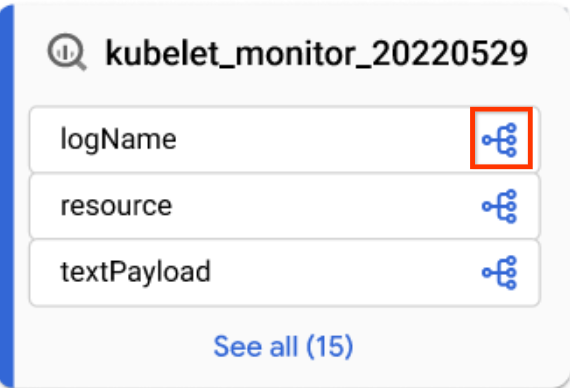
      Icon used to switch to column-level lineage.
      Column icon
    • In the Lineage explorer panel, filter by column name, and click Apply.

    For more information, see Column-level lineage.

  8. Click Reset.

    This action removes all applied filters and takes you to the beginning of the graph view.

  9. Click List to switch to the list view.

    The List view offers simplified and detailed tabular representations of lineage for both table-level and column-level lineage, synchronized with the Graph view. By default, simplified list view is displayed, and you can toggle to detailed list view for analyzing individual source-target relationships. You can configure which columns are displayed and export lineage data. For more information, see Lineage list view.

Java

import com.google.api.gax.rpc.ApiException;
import com.google.cloud.datacatalog.lineage.v1.BatchSearchLinkProcessesRequest;
import com.google.cloud.datacatalog.lineage.v1.EntityReference;
import com.google.cloud.datacatalog.lineage.v1.EventLink;
import com.google.cloud.datacatalog.lineage.v1.LineageClient;
import com.google.cloud.datacatalog.lineage.v1.LineageEvent;
import com.google.cloud.datacatalog.lineage.v1.Link;
import com.google.cloud.datacatalog.lineage.v1.ListLineageEventsRequest;
import com.google.cloud.datacatalog.lineage.v1.ListRunsRequest;
import com.google.cloud.datacatalog.lineage.v1.LocationName;
import com.google.cloud.datacatalog.lineage.v1.ProcessLinks;
import com.google.cloud.datacatalog.lineage.v1.Run;
import com.google.cloud.datacatalog.lineage.v1.SearchLinksRequest;
import java.io.IOException;
import java.util.ArrayList;
import java.util.HashSet;
import java.util.LinkedList;
import java.util.List;
import java.util.Queue;
import java.util.Set;

public class ViewLineageExample {

  public static void main(String[] args) throws IOException {
    // TODO(developer): Replace these variables before running the sample.
    String projectId = "my-project-id";
    String location = "us";
    String targetFullyQualifiedName = "bigquery:my-project-id.my_dataset.my_table";
    int maxDepth = 3;

    viewLineage(projectId, location, targetFullyQualifiedName, maxDepth);
  }

  static class Node {
    String fqn;
    int depth;
    Node(String fqn, int depth) {
      this.fqn = fqn;
      this.depth = depth;
    }
  }

  public static void viewLineage(
      String projectId, String location, String targetFullyQualifiedName, int maxDepth)
      throws IOException {
    // Initialize client that will be used to send requests. This client only needs
    // to be created once, and can be reused for multiple requests.
    try (LineageClient client = LineageClient.create()) {
      String parent = LocationName.of(projectId, location).toString();

      Set<String> visitedNodes = new HashSet<>();
      Queue<Node> queue = new LinkedList<>();

      visitedNodes.add(targetFullyQualifiedName);
      queue.offer(new Node(targetFullyQualifiedName, 0));

      while (!queue.isEmpty()) {
        Node current = queue.poll();
        System.out.printf("\nExploring node (Depth %d): %s\n", current.depth, current.fqn);

        if (current.depth >= maxDepth) {
          continue;
        }

        EntityReference targetEntity =
            EntityReference.newBuilder().setFullyQualifiedName(current.fqn).build();
        SearchLinksRequest searchLinksRequest =
            SearchLinksRequest.newBuilder().setParent(parent).setTarget(targetEntity).build();

        List<String> linkNames = new ArrayList<>();
        try {
          // 1. Search for links related to the target entity
          for (Link link : client.searchLinks(searchLinksRequest).iterateAll()) {
            linkNames.add(link.getName());
          }
        } catch (ApiException e) {
          System.out.printf("  Failed to retrieve links for %s: %s\n", current.fqn, e.getMessage());
          continue;
        }

        if (linkNames.isEmpty()) {
          continue;
        }

        // 2. Batch search for processes in chunks of 100
        for (int i = 0; i < linkNames.size(); i += 100) {
          List<String> batch = linkNames.subList(i, Math.min(linkNames.size(), i + 100));
          BatchSearchLinkProcessesRequest batchSearchRequest =
              BatchSearchLinkProcessesRequest.newBuilder()
                  .setParent(parent)
                  .addAllLinks(batch)
                  .build();

          try {
            for (ProcessLinks processLinks :
                client.batchSearchLinkProcesses(batchSearchRequest).iterateAll()) {
              String processName = processLinks.getProcess();
              System.out.printf("  Process: %s\n", processName);

              // 3. List runs for the process
              ListRunsRequest runsRequest =
                  ListRunsRequest.newBuilder().setParent(processName).build();
              for (Run run : client.listRuns(runsRequest).iterateAll()) {
                System.out.printf("    Run: %s\n", run.getName());

                // 4. List events for the run
                ListLineageEventsRequest eventsRequest =
                    ListLineageEventsRequest.newBuilder().setParent(run.getName()).build();
                for (LineageEvent event : client.listLineageEvents(eventsRequest).iterateAll()) {
                  for (EventLink eventLink : event.getLinksList()) {
                    String sourceFqn = eventLink.getSource().getFullyQualifiedName();
                    // If exploring upstream, queue the source
                    if (!sourceFqn.isEmpty() && !visitedNodes.contains(sourceFqn)) {
                      visitedNodes.add(sourceFqn);
                      queue.offer(new Node(sourceFqn, current.depth + 1));
                    }
                  }
                }
              }
            }
          } catch (ApiException e) {
            System.out.printf("  Failed to retrieve processes/runs: %s\n", e.getMessage());
          }
        }
      }
    }
  }
}

Python

from google.cloud import datacatalog_lineage_v1
from google.api_core.exceptions import GoogleAPICallError

def view_lineage(project_id: str, location: str, target_fully_qualified_name: str, max_depth: int = 3):
    """Retrieves lineage for a given entity using a depth-limited search."""
    client = datacatalog_lineage_v1.LineageClient()
    parent = f"projects/{project_id}/locations/{location}"

    # Store visited nodes to avoid infinite loops in cyclic graphs
    visited_nodes = set([target_fully_qualified_name])
    queue = [(target_fully_qualified_name, 0)]

    while queue:
        current_node, current_depth = queue.pop(0)
        print(f"\nExploring node (Depth {current_depth}): {current_node}")

        if current_depth >= max_depth:
            continue

        target_entity = datacatalog_lineage_v1.EntityReference(
            fully_qualified_name=current_node
        )
        search_links_request = datacatalog_lineage_v1.SearchLinksRequest(
            parent=parent,
            target=target_entity,
        )

        try:
            links = list(client.search_links(request=search_links_request))
        except GoogleAPICallError as e:
            print(f"  Failed to retrieve links for {current_node}: {e.message}")
            continue

        if not links:
            continue

        # Extract link names to query processes in batches
        link_names = [link.name for link in links]

        # Batch max size is 100
        for i in range(0, len(link_names), 100):
            batch = link_names[i:i + 100]
            batch_request = datacatalog_lineage_v1.BatchSearchLinkProcessesRequest(
                parent=parent,
                links=batch
            )

            try:
                for process_links in client.batch_search_link_processes(request=batch_request):
                    process_name = process_links.process
                    print(f"  Process: {process_name}")

                    runs_request = datacatalog_lineage_v1.ListRunsRequest(parent=process_name)
                    for run in client.list_runs(request=runs_request):
                        print(f"    Run: {run.name}")

                        events_request = datacatalog_lineage_v1.ListLineageEventsRequest(parent=run.name)
                        for event in client.list_lineage_events(request=events_request):
                            for event_link in event.links:
                                source_fqn = event_link.source.fully_qualified_name

                                # If exploring upstream, queue the source
                                if source_fqn and source_fqn not in visited_nodes:
                                    visited_nodes.add(source_fqn)
                                    queue.append((source_fqn, current_depth + 1))

            except GoogleAPICallError as e:
                 print(f"  Failed to retrieve processes/runs: {e.message}")

Refine the lineage visualization

To refine the lineage visualization, you can use highlighting and filtering options in Lineage explorer:

  1. To search for specific projects, datasets, or entity names, use the Filters panel.

    After you apply filters, lineage nodes that match your filter criteria are considered matching nodes. You can refine how matching and non-matching nodes are displayed.

  2. In the top right corner of the lineage graph, click the More actions icon located next to the Clear filters button to see display options.

  3. Select one or both of the following options:
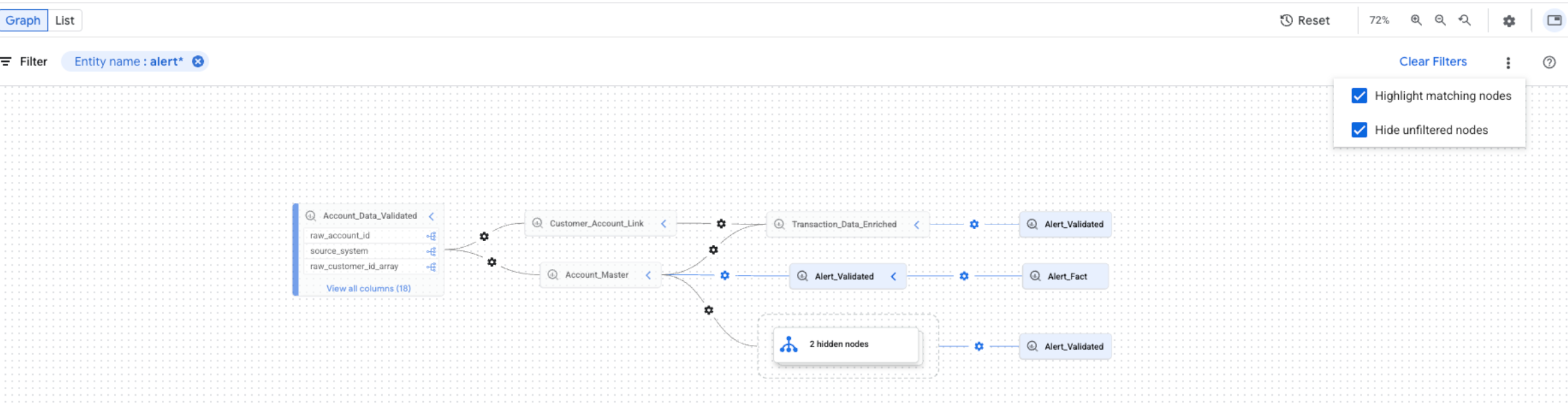
Highlight and filter options in lineage explorer.
Highlight and filter options.

You can select both options at the same time. If both options are selected, unfiltered nodes are hidden, and matching nodes are highlighted in the filtered graph view.

What's next