

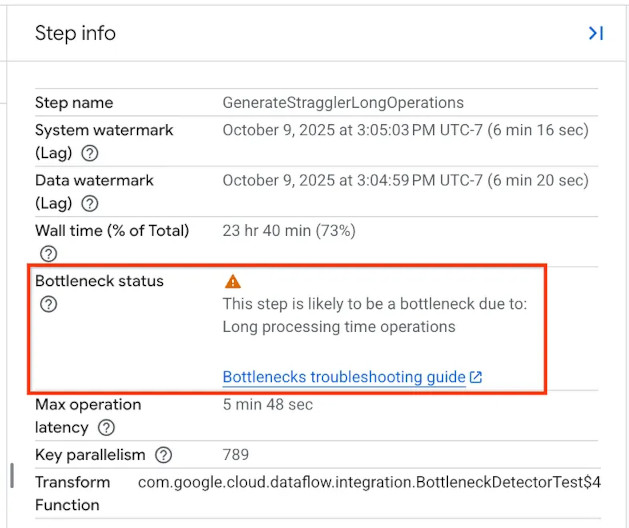
Use the Dataflow bottleneck detector to diagnose progress blocks and optimize pipeline performance in your Dataflow streaming jobs. The detector automatically highlights components in your data pipelines that limit throughput and cause backlogs.
By identifying the exact location and likely cause of execution delays, the bottleneck detector lets you troubleshoot complex Apache Beam streaming pipelines without trial-and-error guesswork.
How bottleneck detection works
Streaming pipelines usually consist of a sequence of steps connected by queues. Data flows sequentially from upstream sources through intermediate transforms to downstream sinks.
In many pipelines, overall throughput is constrained by a single component or
step, creating a bottleneck, or slowdown in job progress. If a downstream
component can't process data as quickly as an upstream component produces data,
the queue between them begins to fill. For example, if an upstream streaming
shuffle component produces data more quickly than a slow downstream user-defined
DoFn can process the data, the queue fills.
Over time, this delay affects all steps in a pipeline. The backlog increases upstream, eventually limiting the rate at which the pipeline can ingest and process input from the original source. This behavior is called backlog propagation.
When backlog propagation occurs, multiple stages of the pipeline can appear unhealthy or slow, even though only a single step is causing the underlying constraint. The bottleneck detector continuously monitors execution delays across all components, including the following:
- Streaming shuffles
- User-defined functions (
DoFnthreads) - Persistent state commits
When a component experiences a processing delay that exceeds five minutes, the Dataflow bottleneck detector registers it as a bottleneck. It highlights the step in the job execution graph and provides detailed diagnostic information.
Kinds of bottlenecks
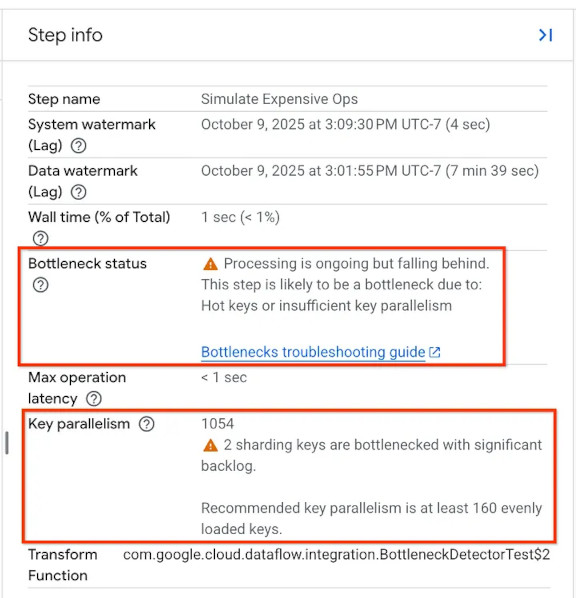
When a bottleneck is active, the bottleneck detector classifies it into one of the following states:
- Processing is stuck and not making progress: The pipeline's progress is completely halted at the affected step.
- Processing is ongoing but falling behind: The current step is functioning but can't process incoming data as quickly as it arrives, resulting in a growing backlog.
- Processing is ongoing but the backlog is steady: The step is processing data at a rate equal to the incoming rate. The backlog is not growing, but it remains elevated.
- Processing is ongoing and catching up from a backlog: The step is successfully clearing the backlog. If you start a pipeline with an existing backlog, this state is normal and does not require intervention.
For more information about viewing bottleneck detector diagnostics and how to address them, see Detect and resolve bottlenecks.
What's next
- Learn how to detect and resolve Dataflow pipeline bottlenecks.
- Review Troubleshoot slow or stuck streaming jobs.
- For advanced performance profiling, see Monitor pipeline performance using Cloud Profiler.