


設定自訂命名空間
自訂命名空間可做為邏輯環境,用來封裝及隔離資料基礎和分析資料產品模組。在專屬的自訂命名空間中執行,可讓您獨立管理設定和部署選項,為環境提供隔離功能。這種分離式設計的一大優點是,您可以從 Google Cloud Cortex Framework 的 cortex 命名空間無縫提取未來的更新和強化功能,不必擔心覆寫或損毀自訂模組。強烈建議您在專屬命名空間中建立自訂模組。
自訂命名空間資料夾結構
Cortex Framework 命名空間資料夾用於封裝及隔離自訂模組構件。下表定義了自訂命名空間的資料夾結構:
| 目錄路徑 | 用途和說明 |
|---|---|
config/ |
Cortex 部署設定 (必要) 如要建立新的命名空間,必須在 config.yaml 中設定。
|
src/data_modules/custom_namespace/data_foundation/data_foundation_module_type |
資料基礎模組 將原始資料集轉換為基礎資料集。 每個資料基礎都會分開儲存在子目錄中,並包含:
|
src/data_modules/custom_namespace/data_product/data_product_module_type |
資料產品定義 包含商業邏輯和分析模型。每個產品都位於子目錄中,並包含:
|
src/data_modules/custom_namespace/includes/ |
JavaScript 輔助程式 放置於此的任何 JavaScript 檔案都會自動封裝,並在編譯期間透過命名空間路徑 (例如 includes/custom_namespace/) 提供給 Dataform 模型。
|
src/data_modules/custom_namespace/common/ |
命名空間共用工具 命名空間範圍的自訂建構工具、部署工具和其他工具。 |
自訂命名空間設定
新的命名空間:您可以擴充 config.yaml 檔案的對應部分,在 src/data_modules/ 下建立新目錄,並新增模組程式碼資產,藉此定義 custom_namespace。
如要讓 Google Cloud Cortex Framework 編譯器瞭解您的自訂命名空間和模組,您必須在全域設定檔 (例如 config/config.yaml) 中註冊這些項目。
步驟 A:註冊命名空間
在 data.namespaces 區塊下方新增命名空間中繼資料:
data:
  namespaces:
    - name: cortex
      path: ../src/data_modules/cortex
    - name:  custom_namespace    # <-- Name of custom namespace
      path:  ../src/data_modules/custom_namespace  # <-- Points to subdirectory under 'src/data_modules/'
步驟 B:設定自訂模組
在 data.modules.foundation 或 data.modules.product 下註冊自訂模組。type 欄位請使用以半形句號分隔的格式 custom_namespace.module_type:
data:
  modules:
    foundations:
      - moduleId:  custom_namespace_data_foundation_module_type
        modulePath: custom_namespace.sap   # Format: <namespace>.<module_type>
        dataSourceId: sap_raw_s4
        dataTargetId: data_foundation_sap_custom_namespace
        moduleSettings:
          sapVersion: s4
          mandt: "100"
        # Default table settings file, relative to configuration file directory
        # tableSettings: "../src/data_modules/custom_namespace/data_foundation/data_foundation_module_type/table_settings.default.yaml"
        # Custom table settings file, relative to 'config/' directory
        tableSettings: "custom_namespace/data_foundation/data_foundation_module_type/table_settings.yaml"

    products:
      - moduleId: custom_namespace_data_product_module_type
        modulePath: custom_namespace.data_product_module_type # Format: <namespace>.<module_type>
        dependencyBindings:
          sapModule: custom_namespace_data_foundation_module_type # References an existing foundation moduleId
        dataTargetId: product_target
        # Custom table settings file, relative to 'config/' directory
        # tableSettings: "custom_namespace/data_product/data_product_module_type/table_settings.yaml"
        # Default table settings file, relative to configuration file directory
        # tableSettings: "../src/data_modules/custom_namespace/data_product/data_product_module_type/table_settings.default.yaml"
自訂命名空間共用程式碼
自訂命名空間支援在模組之間共用程式碼構件。支援的構件類型如下:
- includes - 包含可供 Dataform 構件使用的 JavaScript 輔助程式。這些檔案可以放在「
src/data_modules/custom_namespace/includes/」資料夾中。 - 建構工具 - 任何可將模組原始碼編譯為 Dataform 構件的自訂產生器類別。可放置在
src/data_modules/custom_namespace/common/中。
瞭解及參照建構工具
建構工具是 Python 產生器類別,可將模組來源檔案編譯為 Dataform 輸出內容。Google Cloud Cortex Framework 會使用彈性的三層建構工具解析順序編譯模組:
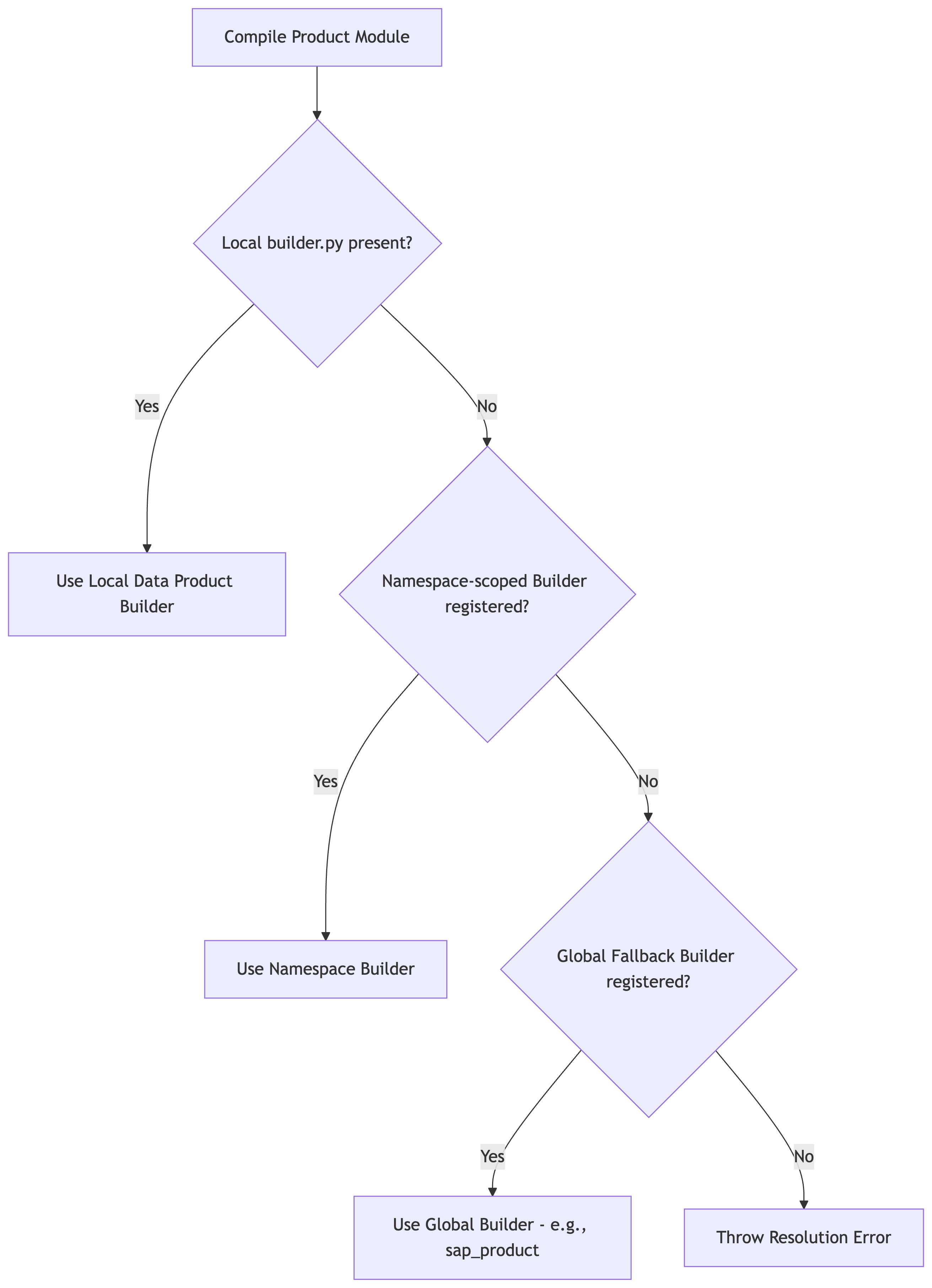
第 1 層:全球備援建構工具
這個架構包含 src/common/builders/ 中非常強大的建構工具。這些建構函式會在全域註冊,且可供任何自訂命名空間使用。
舉例來說,如要為自訂資料產品使用標準 SAP 資料產品建構工具,請在 manifest.yaml 中參照 sap_product:
# src/data_modules/custom_namespace/data_product/data_product_module_type/manifest.yaml
type: data_product_module_type
builder: sap_product     # Automatically resolves to the global SapProductBuilder fallback
dependencies:
  sapModule:
    type: sap
    supportedVersions:
      - ecc
      - s4
第 2 層:命名空間範圍內的建構函式
如果自訂命名空間內的模組需要專用編譯器,您可以為該命名空間註冊自訂建構工具。
在
src/data_modules/custom_namespace/common/builders/my_builder.py下建立建構工具檔案。使用
@builder_registry.register("my_builder")裝飾建構工具類別:from common.builders.base import ProductBuilder from common.registry import builder_registry @builder_registry.register("my_builder") class MyCustomProductBuilder(ProductBuilder): # Implement build logic here...在產品的
manifest.yaml中使用builder: my_builder參照。
第 3 層:個別產品層級的建構者
如要建立非常獨特的管道,您可以為單一資料產品專門定義建構工具範圍。
只要在資料產品資料夾 (例如
src/data_modules/custom_namespace/data_product/data_product_module_type/builder.py) 內建立名為builder.py的檔案即可。在其中定義
BaseBuilder或ProductBuilder的子類別:from common.builders.base import ProductBuilder class UniqueSalesPerformanceBuilder(ProductBuilder): # Implement unique build logic here...編譯器會自動動態匯入及執行這個類別,不需要任何註冊或裝飾器。
在接下來的步驟中,您將瞭解如何將資料模組新增至命名空間:建立資料基礎模組和建立資料產品模組。
- 下一步:建立資料基礎模組
- 返回「總覽」