

Supplier Spend Analysis
This consumption data product sample provides an example on how to accelerate insights into supplier spend position using SAP ERP or SAP BDC sourced data.
With it you can:
- Optimize total spend by material type and track country concentration.
- Understand hidden purchasing patterns to maximize procurement value.
- Use AI to uncover new insights.
Reference architecture
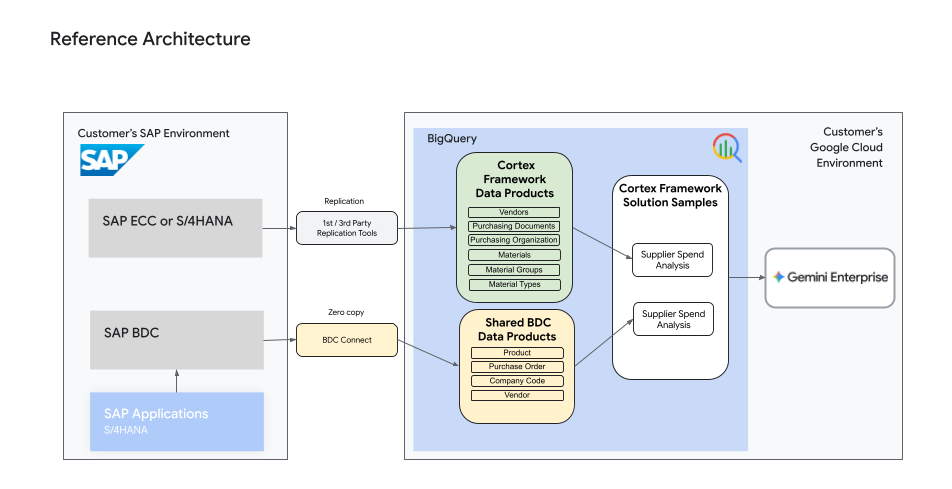
A high level reference architecture provides an overview of the source specific data products required to feed this use case.
Required data products
If building on top of SAP ERP sourced data the following Cortex Framework data products are required:
- Vendors
- Purchasing Documents
- Purchasing Organizational Structure
- Materials
If building on top of SAP BDC sourced data the following BDC data products are required:
- Purchase Order (tables:
purchaseorder,purchaseorderitem, andpurchaseorderscheduleline) - Supplier
- Purchasing Organization
- Procurement Configuration Data
Enable data product in Google Cloud Google Cloud Cortex Framework
To deploy the Supplier Spend Analysis data product, you must enable it in your config/config.yaml file by registering the data product module under data.modules.products.
For detailed information on configuring config/config.yaml, see the Deployment and Deployment configuration documentation.
SAP ERP Sourced Data Product
To enable the SAP ERP conformed data product, add the following configuration under the products: section, ensuring all dependent foundation data products are also configured and enabled:
data:
  modules:
    products:
      # Enabled Supplier Spend Analysis sample (SAP ERP version)
      - moduleId: sap_supplier_spend_analysis_sample
        modulePath: cortex_samples.sap.products.supplier_spend_analysis
        enabled: true # If using configuration file based on config.yaml.example, please the `enabled` flag is set to `true`
        dataTargetId: product_target
        dependencyBindings:
          sapMaterials: sap_materials
          sapPurchasingDocuments: sap_purchasing_documents
          sapPurchasingOrganizationalStructure: sap_purchasing_organizational_structure
          sapVendors: sap_vendors
SAP BDC Sourced Data Product
To enable the SAP BDC conformed data product, ensure that your external data catalog is registered under data.modules.catalogs, and add the following configuration:
data:
  modules:
    products:
      # Enabled Supplier Spend Analysis sample (SAP BDC version)
      - moduleId: sap_bdc_supplier_spend_analysis_sample
        modulePath: cortex_samples.sap_bdc.products.supplier_spend_analysis
        enabled: true # If using configuration file based on config.yaml.example, please the `enabled` flag is set to `true`
        dataTargetId: product_target
        dependencyBindings:
          sapBdcSupplier: sap_bdc_catalog
          sapBdcProcurementConfigurationData: sap_bdc_catalog
          sapBdcPurchasingOrganization: sap_bdc_catalog
          sapBdcPurchaseOrder: sap_bdc_catalog
Entity Relationship Diagrams
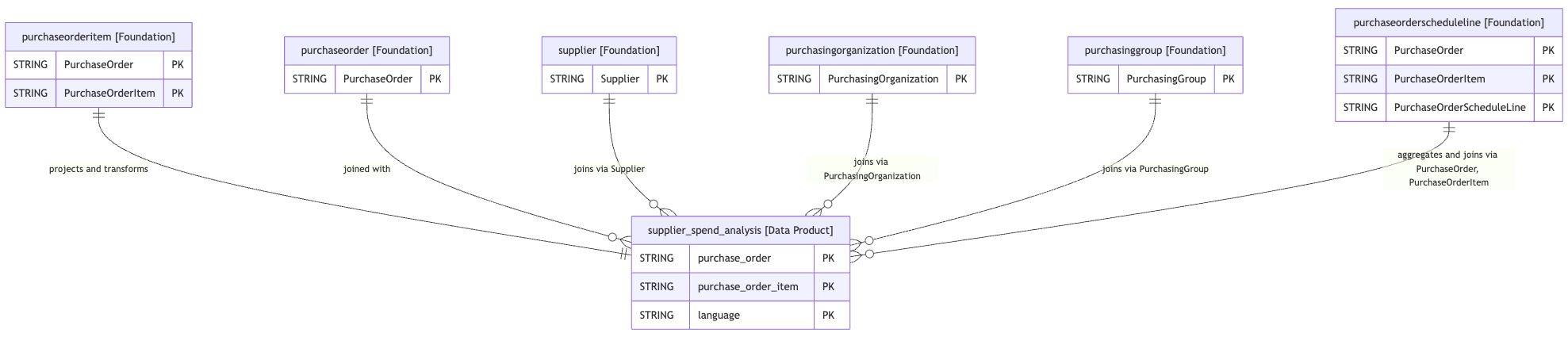
The following Entity Relationship (ER) diagrams outline the structure of the data product views and their relationships with source and associated foundation tables.
SAP ERP Supplier Spend Analysis ER Diagram

SAP BDC Supplier Spend Analysis ER Diagram
Source code
The source code for this Sales Performance consumption data product sample, can be found in the repository:
- SAP ERP or in your local source code using the path
src/data_modules/cortex_samples/sap/products/supplier_spend_analysis - SAP BDC or in your local source code using the path
src/data_modules/cortex_samples/sap_bdc/products/supplier_spend_analysis
Enable AI agents
After creating your Sales Performance Insights data model in BigQuery, you may be interested in building a custom data agent. This lets you query sales trends and performance metrics directly using natural language, bypassing the need for complex SQL.