שימוש ב-KubernetesPodOperator

Managed Airflow (דור 3) | Managed Airflow (דור 2) | Managed Airflow (דור 1 מדור קודם)

בדף הזה מוסבר איך להשתמש ב-KubernetesPodOperator כדי לפרוס Kubernetes Pods מ-Managed Service for Apache Airflow אל אשכול Google Kubernetes Engine שמהווה חלק מהסביבה של Managed Service for Apache Airflow.

האופרטור KubernetesPodOperator מפעיל קבוצות Pod של Kubernetes באשכול שבסביבה שלכם. לעומת זאת, אופרטורים של Google Kubernetes Engine מריצים Pods של Kubernetes באשכול שצוין, שיכול להיות אשכול נפרד שלא קשור לסביבה שלכם. אפשר גם ליצור ולמחוק אשכולות באמצעות אופרטורים של Google Kubernetes Engine.

‫KubernetesPodOperator היא אפשרות טובה אם אתם צריכים:

  • יחסי תלות מותאמים אישית של Python שלא זמינים דרך מאגר PyPI הציבורי.
  • תלויות בינאריות שלא זמינות בתמונת ה-worker של Managed Airflow.

לפני שמתחילים

הגדרת משאבים בסביבת Managed Service for Apache Airflow

כשיוצרים סביבת Managed Airflow, מציינים את פרמטרי הביצועים שלה, כולל פרמטרי הביצועים של האשכול של הסביבה. הפעלת Kubernetes Pods באשכול הסביבה עלולה לגרום לתחרות על משאבי האשכול, כמו מעבד (CPU) או זיכרון. מכיוון שהמתזמן והעובדים של Airflow נמצאים באותו אשכול GKE, המתזמנים והעובדים לא יפעלו כראוי אם התחרות תוביל למחסור במשאבים.

כדי למנוע מצב של מחסור במשאבים, אפשר לבצע אחת או יותר מהפעולות הבאות:

יצירת מאגר צמתים

הדרך המומלצת למנוע מחסור במשאבים בסביבת Managed Airflow היא ליצור מאגר צמתים חדש ולהגדיר את ה-Pods של Kubernetes כך שיפעלו רק באמצעות משאבים מהמאגר הזה.

המסוף

  1. נכנסים לדף Environments במסוף Google Cloud .

    מעבר אל Environments

  2. לוחצים על שם הסביבה.

  3. בדף Environment details, עוברים לכרטיסייה Environment configuration.

  4. בקטע משאבים > אשכול GKE, לוחצים על הקישור view cluster details.

  5. יוצרים מאגר צמתים כמו שמתואר במאמר הוספת מאגר צמתים.

gcloud

  1. קובעים את השם של האשכול בסביבה:

    gcloud composer environments describe ENVIRONMENT_NAME \
      --location LOCATION \
      --format="value(config.gkeCluster)"
    

    מחליפים את:

    • ENVIRONMENT_NAME בשם הסביבה.
    • LOCATION עם האזור שבו הסביבה ממוקמת.
  2. הפלט מכיל את שם האשכול של הסביבה. לדוגמה, אפשר להשתמש בכתובת europe-west3-example-enviro-af810e25-gke.

  3. יוצרים מאגר צמתים כמו שמתואר במאמר הוספת מאגר צמתים.

הגדלת מספר הצמתים בסביבה

הגדלת מספר הצמתים בסביבת Managed Airflow מגדילה את כוח המחשוב שזמין לעומסי העבודה. ההגדלה הזו לא מספקת משאבים נוספים למשימות שדורשות יותר CPU או RAM ממה שסוג המכונה שצוין מספק.

כדי להגדיל את מספר הצמתים, צריך לעדכן את הסביבה.

מציינים את סוג המכונה המתאים.

במהלך יצירת סביבה ב-Managed Airflow, אפשר לציין סוג מכונה. כדי לוודא שיש משאבים זמינים, צריך לציין סוג מכונה לסוג המחשוב שמתבצע בסביבת Managed Airflow.

הגדרה מינימלית

כדי ליצור KubernetesPodOperator, נדרשים רק הפרמטרים name,‏ image ו-task_id של Pod. ‫/home/airflow/composer_kube_config מכיל פרטי כניסה לאימות ב-GKE.

Airflow 2

kubernetes_min_pod = KubernetesPodOperator(
    # The ID specified for the task.
    task_id="pod-ex-minimum",
    # Name of task you want to run, used to generate Pod ID.
    name="pod-ex-minimum",
    # Entrypoint of the container, if not specified the Docker container's
    # entrypoint is used. The cmds parameter is templated.
    cmds=["echo"],
    # The namespace to run within Kubernetes, default namespace is
    # `default`. In Composer 1 there is the potential for
    # the resource starvation of Airflow workers and scheduler
    # within the Cloud Composer environment,
    # the recommended solution is to increase the amount of nodes in order
    # to satisfy the computing requirements. Alternatively, launching pods
    # into a custom namespace will stop fighting over resources,
    # and using Composer 2 will mean the environment will autoscale.
    namespace="default",
    # Docker image specified. Defaults to hub.docker.com, but any fully
    # qualified URLs will point to a custom repository. Supports private
    # gcr.io images if the Composer Environment is under the same
    # project-id as the gcr.io images and the service account that Composer
    # uses has permission to access the Google Container Registry
    # (the default service account has permission)
    image="marketplace.gcr.io/google/ubuntu2204",
)

Airflow 1

kubernetes_min_pod = kubernetes_pod_operator.KubernetesPodOperator(
    # The ID specified for the task.
    task_id="pod-ex-minimum",
    # Name of task you want to run, used to generate Pod ID.
    name="pod-ex-minimum",
    # Entrypoint of the container, if not specified the Docker container's
    # entrypoint is used. The cmds parameter is templated.
    cmds=["echo"],
    # The namespace to run within Kubernetes, default namespace is
    # `default`. There is the potential for the resource starvation of
    # Airflow workers and scheduler within the Cloud Composer environment,
    # the recommended solution is to increase the amount of nodes in order
    # to satisfy the computing requirements. Alternatively, launching pods
    # into a custom namespace will stop fighting over resources.
    namespace="default",
    # Docker image specified. Defaults to hub.docker.com, but any fully
    # qualified URLs will point to a custom repository. Supports private
    # gcr.io images if the Composer Environment is under the same
    # project-id as the gcr.io images and the service account that Composer
    # uses has permission to access the Google Container Registry
    # (the default service account has permission)
    image="marketplace.gcr.io/google/ubuntu2204",
)

הגדרת זיקה של Pod

כשמגדירים את הפרמטר affinity ב-KubernetesPodOperator, אפשר לשלוט בצמתים שבהם יתוזמנו קבוצות ה-Pod, כמו צמתים רק במאגר צמתים מסוים. בדוגמה הזו, האופרטור פועל רק במאגרי צמתים בשמות pool-0 ו-pool-1. הצמתים בסביבת Managed Airflow (Legacy Gen 1) נמצאים ב-default-pool, ולכן ה-Pods לא פועלים בצמתים בסביבה.

Airflow 2

# Pod affinity with the KubernetesPodOperator
# is not supported with Composer 2
# instead, create a cluster and use the GKEStartPodOperator
# https://cloud.google.com/composer/docs/using-gke-operator
kubernetes_affinity_ex = KubernetesPodOperator(
    task_id="ex-pod-affinity",
    name="ex-pod-affinity",
    namespace="default",
    image="perl:5.34.0",
    cmds=["perl"],
    arguments=["-Mbignum=bpi", "-wle", "print bpi(2000)"],
    # affinity allows you to constrain which nodes your pod is eligible to
    # be scheduled on, based on labels on the node. In this case, if the
    # label 'cloud.google.com/gke-nodepool' with value
    # 'nodepool-label-value' or 'nodepool-label-value2' is not found on any
    # nodes, it will fail to schedule.
    affinity={
        "nodeAffinity": {
            # requiredDuringSchedulingIgnoredDuringExecution means in order
            # for a pod to be scheduled on a node, the node must have the
            # specified labels. However, if labels on a node change at
            # runtime such that the affinity rules on a pod are no longer
            # met, the pod will still continue to run on the node.
            "requiredDuringSchedulingIgnoredDuringExecution": {
                "nodeSelectorTerms": [
                    {
                        "matchExpressions": [
                            {
                                # When nodepools are created in Google Kubernetes
                                # Engine, the nodes inside of that nodepool are
                                # automatically assigned the label
                                # 'cloud.google.com/gke-nodepool' with the value of
                                # the nodepool's name.
                                "key": "cloud.google.com/gke-nodepool",
                                "operator": "In",
                                # The label key's value that pods can be scheduled
                                # on.
                                "values": [
                                    "pool-0",
                                    "pool-1",
                                ],
                            }
                        ]
                    }
                ]
            }
        }
    },
)

Airflow 1

kubernetes_affinity_ex = kubernetes_pod_operator.KubernetesPodOperator(
    task_id="ex-pod-affinity",
    name="ex-pod-affinity",
    namespace="default",
    image="perl:5.34.0",
    cmds=["perl"],
    arguments=["-Mbignum=bpi", "-wle", "print bpi(2000)"],
    # affinity allows you to constrain which nodes your pod is eligible to
    # be scheduled on, based on labels on the node. In this case, if the
    # label 'cloud.google.com/gke-nodepool' with value
    # 'nodepool-label-value' or 'nodepool-label-value2' is not found on any
    # nodes, it will fail to schedule.
    affinity={
        "nodeAffinity": {
            # requiredDuringSchedulingIgnoredDuringExecution means in order
            # for a pod to be scheduled on a node, the node must have the
            # specified labels. However, if labels on a node change at
            # runtime such that the affinity rules on a pod are no longer
            # met, the pod will still continue to run on the node.
            "requiredDuringSchedulingIgnoredDuringExecution": {
                "nodeSelectorTerms": [
                    {
                        "matchExpressions": [
                            {
                                # When nodepools are created in Google Kubernetes
                                # Engine, the nodes inside of that nodepool are
                                # automatically assigned the label
                                # 'cloud.google.com/gke-nodepool' with the value of
                                # the nodepool's name.
                                "key": "cloud.google.com/gke-nodepool",
                                "operator": "In",
                                # The label key's value that pods can be scheduled
                                # on.
                                "values": [
                                    "pool-0",
                                    "pool-1",
                                ],
                            }
                        ]
                    }
                ]
            }
        }
    },
)

כפי שהדוגמה מוגדרת, המשימה נכשלת. אם בודקים את היומנים, רואים שהמשימה נכשלת כי מאגרי הצמתים pool-0 ו-pool-1 לא קיימים.

כדי לוודא שמאגרי הצמתים ב-values קיימים, מבצעים אחד מהשינויים הבאים בהגדרות:

  • אם יצרתם מאגר צמתים קודם לכן, מחליפים את pool-0 ואת pool-1 בשמות של מאגרי הצמתים ומעלים שוב את ה-DAG.

  • יוצרים מאגר צמתים בשם pool-0 או pool-1. אפשר ליצור את שניהם, אבל המשימה צריכה רק אחד מהם כדי להצליח.

  • מחליפים את pool-0 ואת pool-1 ב-default-pool, שהוא מאגר ברירת המחדל שבו Airflow משתמש. לאחר מכן, מעלים שוב את ה-DAG.

אחרי שמבצעים את השינויים, צריך לחכות כמה דקות עד שהסביבה תתעדכן. אחר כך מריצים שוב את המשימה ex-pod-affinity ומוודאים שהיא מצליחה.ex-pod-affinity

שלבי הגדרת תצורה נוספים

בדוגמה הזו מוצגים פרמטרים נוספים שאפשר להגדיר ב-KubernetesPodOperator.

מידע נוסף זמין במקורות המידע הבאים:

Airflow 2

kubernetes_full_pod = KubernetesPodOperator(
    task_id="ex-all-configs",
    name="pi",
    namespace="default",
    image="perl:5.34.0",
    # Entrypoint of the container, if not specified the Docker container's
    # entrypoint is used. The cmds parameter is templated.
    cmds=["perl"],
    # Arguments to the entrypoint. The docker image's CMD is used if this
    # is not provided. The arguments parameter is templated.
    arguments=["-Mbignum=bpi", "-wle", "print bpi(2000)"],
    # The secrets to pass to Pod, the Pod will fail to create if the
    # secrets you specify in a Secret object do not exist in Kubernetes.
    secrets=[],
    # Labels to apply to the Pod.
    labels={"pod-label": "label-name"},
    # Timeout to start up the Pod, default is 120.
    startup_timeout_seconds=120,
    # The environment variables to be initialized in the container
    # env_vars are templated.
    env_vars={"EXAMPLE_VAR": "/example/value"},
    # If true, logs stdout output of container. Defaults to True.
    get_logs=True,
    # Determines when to pull a fresh image, if 'IfNotPresent' will cause
    # the Kubelet to skip pulling an image if it already exists. If you
    # want to always pull a new image, set it to 'Always'.
    image_pull_policy="Always",
    # Annotations are non-identifying metadata you can attach to the Pod.
    # Can be a large range of data, and can include characters that are not
    # permitted by labels.
    annotations={"key1": "value1"},
    # Optional resource specifications for Pod, this will allow you to
    # set both cpu and memory limits and requirements.
    # Prior to Airflow 2.3 and the cncf providers package 5.0.0
    # resources were passed as a dictionary. This change was made in
    # https://github.com/apache/airflow/pull/27197
    # Additionally, "memory" and "cpu" were previously named
    # "limit_memory" and "limit_cpu"
    # resources={'limit_memory': "250M", 'limit_cpu': "100m"},
    container_resources=k8s_models.V1ResourceRequirements(
        limits={"memory": "250M", "cpu": "100m"},
    ),
    # Specifies path to kubernetes config. If no config is specified will
    # default to '~/.kube/config'. The config_file is templated.
    config_file="/home/airflow/composer_kube_config",
    # If true, the content of /airflow/xcom/return.json from container will
    # also be pushed to an XCom when the container ends.
    do_xcom_push=False,
    # List of Volume objects to pass to the Pod.
    volumes=[],
    # List of VolumeMount objects to pass to the Pod.
    volume_mounts=[],
    # Affinity determines which nodes the Pod can run on based on the
    # config. For more information see:
    # https://kubernetes.io/docs/concepts/configuration/assign-pod-node/
    # Pod affinity with the KubernetesPodOperator
    # is not supported with Composer 2
    # instead, create a cluster and use the GKEStartPodOperator
    # https://cloud.google.com/composer/docs/using-gke-operator
    affinity={},
)

Airflow 1

kubernetes_full_pod = kubernetes_pod_operator.KubernetesPodOperator(
    task_id="ex-all-configs",
    name="pi",
    namespace="default",
    image="perl:5.34.0",
    # Entrypoint of the container, if not specified the Docker container's
    # entrypoint is used. The cmds parameter is templated.
    cmds=["perl"],
    # Arguments to the entrypoint. The docker image's CMD is used if this
    # is not provided. The arguments parameter is templated.
    arguments=["-Mbignum=bpi", "-wle", "print bpi(2000)"],
    # The secrets to pass to Pod, the Pod will fail to create if the
    # secrets you specify in a Secret object do not exist in Kubernetes.
    secrets=[],
    # Labels to apply to the Pod.
    labels={"pod-label": "label-name"},
    # Timeout to start up the Pod, default is 120.
    startup_timeout_seconds=120,
    # The environment variables to be initialized in the container
    # env_vars are templated.
    env_vars={"EXAMPLE_VAR": "/example/value"},
    # If true, logs stdout output of container. Defaults to True.
    get_logs=True,
    # Determines when to pull a fresh image, if 'IfNotPresent' will cause
    # the Kubelet to skip pulling an image if it already exists. If you
    # want to always pull a new image, set it to 'Always'.
    image_pull_policy="Always",
    # Annotations are non-identifying metadata you can attach to the Pod.
    # Can be a large range of data, and can include characters that are not
    # permitted by labels.
    annotations={"key1": "value1"},
    # Optional resource specifications for Pod, this will allow you to
    # set both cpu and memory limits and requirements.
    # Prior to Airflow 1.10.4, resource specifications were
    # passed as a Pod Resources Class object,
    # If using this example on a version of Airflow prior to 1.10.4,
    # import the "pod" package from airflow.contrib.kubernetes and use
    # resources = pod.Resources() instead passing a dict
    # For more info see:
    # https://github.com/apache/airflow/pull/4551
    resources={"limit_memory": "250M", "limit_cpu": "100m"},
    # Specifies path to kubernetes config. If no config is specified will
    # default to '~/.kube/config'. The config_file is templated.
    config_file="/home/airflow/composer_kube_config",
    # If true, the content of /airflow/xcom/return.json from container will
    # also be pushed to an XCom when the container ends.
    do_xcom_push=False,
    # List of Volume objects to pass to the Pod.
    volumes=[],
    # List of VolumeMount objects to pass to the Pod.
    volume_mounts=[],
    # Affinity determines which nodes the Pod can run on based on the
    # config. For more information see:
    # https://kubernetes.io/docs/concepts/configuration/assign-pod-node/
    affinity={},
)

שימוש בתבניות Jinja

‫Airflow תומך בתבניות Jinja ב-DAG.

צריך להצהיר על פרמטרים נדרשים של Airflow ‏ (task_id,‏ name ו-image) באמצעות האופרטור. כמו שרואים בדוגמה הבאה, אפשר להשתמש ב-Jinja כדי ליצור תבנית לכל הפרמטרים האחרים, כולל cmds,‏ arguments,‏ env_vars ו-config_file.

הפרמטר env_vars בדוגמה מוגדר ממשתנה Airflow בשם my_value. ערך ה-DAG בדוגמה מתקבל ממשתנה התבנית vars ב-Airflow. ל-Airflow יש עוד משתנים שמאפשרים גישה לסוגים שונים של מידע. לדוגמה, אפשר להשתמש במשתנה התבנית conf כדי לגשת לערכים של אפשרויות ההגדרה של Airflow. מידע נוסף ורשימת המשתנים שזמינים ב-Airflow מופיעים בחומר העזר בנושא תבניות במסמכי התיעוד של Airflow.

בלי לשנות את ה-DAG או ליצור את המשתנה env_vars, המשימה ex-kube-templates בדוגמה נכשלת כי המשתנה לא קיים. יוצרים את המשתנה הזה בממשק המשתמש של Airflow או באמצעות Google Cloud CLI:

ממשק המשתמש של Airflow

  1. עוברים אל ממשק המשתמש של Airflow.

  2. בסרגל הכלים, בוחרים באפשרות אדמין > משתנים.

  3. בדף List Variable (משתנה רשימה), לוחצים על Add a new record (הוספת רשומה חדשה).

  4. בדף Add Variable (הוספת משתנה), מזינים את הפרטים הבאים:

    • מקש:my_value
    • ערך: example_value
  5. לוחצים על Save.

אם בסביבה שלכם נעשה שימוש ב-Airflow 1, מריצים את הפקודה הבאה:

  1. עוברים אל ממשק המשתמש של Airflow.

  2. בסרגל הכלים, בוחרים באפשרות ניהול > משתנים.

  3. בדף משתנים, לוחצים על הכרטיסייה יצירה.

  4. בדף Variable, מזינים את הפרטים הבאים:

    • מקש:my_value
    • ערך: example_value
  5. לוחצים על Save.

gcloud

מזינים את הפקודה הבאה:

gcloud composer environments run ENVIRONMENT \
    --location LOCATION \
    variables set -- \
    my_value example_value

אם בסביבה שלכם נעשה שימוש ב-Airflow 1, מריצים את הפקודה הבאה:

gcloud composer environments run ENVIRONMENT \
    --location LOCATION \
    variables -- \
    --set my_value example_value

מחליפים את:

  • ENVIRONMENT בשם הסביבה.
  • LOCATION עם האזור שבו הסביבה ממוקמת.

בדוגמה הבאה אפשר לראות איך משתמשים בתבניות Jinja עם KubernetesPodOperator:

Airflow 2

kubernetes_template_ex = KubernetesPodOperator(
    task_id="ex-kube-templates",
    name="ex-kube-templates",
    namespace="default",
    image="bash",
    # All parameters below are able to be templated with jinja -- cmds,
    # arguments, env_vars, and config_file. For more information visit:
    # https://airflow.apache.org/docs/apache-airflow/stable/macros-ref.html
    # Entrypoint of the container, if not specified the Docker container's
    # entrypoint is used. The cmds parameter is templated.
    cmds=["echo"],
    # DS in jinja is the execution date as YYYY-MM-DD, this docker image
    # will echo the execution date. Arguments to the entrypoint. The docker
    # image's CMD is used if this is not provided. The arguments parameter
    # is templated.
    arguments=["{{ ds }}"],
    # The var template variable allows you to access variables defined in
    # Airflow UI. In this case we are getting the value of my_value and
    # setting the environment variable `MY_VALUE`. The pod will fail if
    # `my_value` is not set in the Airflow UI.
    env_vars={"MY_VALUE": "{{ var.value.my_value }}"},
    # Sets the config file to a kubernetes config file specified in
    # airflow.cfg. If the configuration file does not exist or does
    # not provide validcredentials the pod will fail to launch. If not
    # specified, config_file defaults to ~/.kube/config
    config_file="{{ conf.get('core', 'kube_config') }}",
)

Airflow 1

kubernetes_template_ex = kubernetes_pod_operator.KubernetesPodOperator(
    task_id="ex-kube-templates",
    name="ex-kube-templates",
    namespace="default",
    image="bash",
    # All parameters below are able to be templated with jinja -- cmds,
    # arguments, env_vars, and config_file. For more information visit:
    # https://airflow.apache.org/docs/apache-airflow/stable/macros-ref.html
    # Entrypoint of the container, if not specified the Docker container's
    # entrypoint is used. The cmds parameter is templated.
    cmds=["echo"],
    # DS in jinja is the execution date as YYYY-MM-DD, this docker image
    # will echo the execution date. Arguments to the entrypoint. The docker
    # image's CMD is used if this is not provided. The arguments parameter
    # is templated.
    arguments=["{{ ds }}"],
    # The var template variable allows you to access variables defined in
    # Airflow UI. In this case we are getting the value of my_value and
    # setting the environment variable `MY_VALUE`. The pod will fail if
    # `my_value` is not set in the Airflow UI.
    env_vars={"MY_VALUE": "{{ var.value.my_value }}"},
    # Sets the config file to a kubernetes config file specified in
    # airflow.cfg. If the configuration file does not exist or does
    # not provide validcredentials the pod will fail to launch. If not
    # specified, config_file defaults to ~/.kube/config
    config_file="{{ conf.get('core', 'kube_config') }}",
)

שימוש בסודות וב-ConfigMaps של Kubernetes

סוד ב-Kubernetes הוא אובייקט שמכיל מידע רגיש. ‫ConfigMap ב-Kubernetes הוא אובייקט שמכיל נתונים לא סודיים בצמדי מפתח-ערך.

ב-Managed Airflow (דור 2), אפשר ליצור Secrets ו-ConfigMaps באמצעות Google Cloud CLI,‏ API או Terraform, ואז לגשת אליהם מ-KubernetesPodOperator.

מידע על קובצי הגדרות ב-YAML

כשיוצרים Kubernetes Secret או ConfigMap באמצעות Google Cloud CLI ו-API, צריך לספק קובץ בפורמט YAML. הפורמט של הקובץ הזה צריך להיות זהה לפורמט שבו משתמשים ב-Kubernetes Secrets וב-ConfigMaps. בתיעוד של Kubernetes יש הרבה דוגמאות קוד של ConfigMap ו-Secrets. כדי להתחיל, אפשר לעיין בדף הפצת פרטי כניסה בצורה מאובטחת באמצעות סודות ובמאמר בנושא ConfigMaps.

כמו ב-Kubernetes Secrets, צריך להשתמש בייצוג base64 כשמגדירים ערכים ב-Secrets.

כדי לקודד ערך, אפשר להשתמש בפקודה הבאה (זו אחת מתוך הרבה דרכים לקבל ערך מקודד בפורמט Base64):

echo "postgresql+psycopg2://root:example-password@127.0.0.1:3306/example-db" -n | base64

פלט:

cG9zdGdyZXNxbCtwc3ljb3BnMjovL3Jvb3Q6ZXhhbXBsZS1wYXNzd29yZEAxMjcuMC4wLjE6MzMwNi9leGFtcGxlLWRiIC1uCg==

בהמשך המדריך הזה נשתמש בשתי הדוגמאות הבאות של קובצי YAML. קובץ הגדרות לדוגמה ב-YAML בשביל סוד של Kubernetes:

apiVersion: v1
kind: Secret
metadata:
  name: airflow-secrets
data:
  sql_alchemy_conn: cG9zdGdyZXNxbCtwc3ljb3BnMjovL3Jvb3Q6ZXhhbXBsZS1wYXNzd29yZEAxMjcuMC4wLjE6MzMwNi9leGFtcGxlLWRiIC1uCg==

דוגמה נוספת שמראה איך לכלול קבצים. כמו בדוגמה הקודמת, קודם מקודדים את התוכן של קובץ (cat ./key.json | base64), ואז מספקים את הערך הזה בקובץ ה-YAML:

apiVersion: v1
kind: Secret
metadata:
  name: service-account
data:
  service-account.json: |
    ewogICJ0eXBl...mdzZXJ2aWNlYWNjb3VudC5jb20iCn0K

קובץ הגדרות לדוגמה ב-YAML עבור ConfigMap. אין צורך להשתמש בייצוג base64 ב-ConfigMaps:

apiVersion: v1
kind: ConfigMap
metadata:
  name: example-configmap
data:
  example_key: example_value

ניהול סודות ב-Kubernetes

ב-Managed Airflow (דור 2), יוצרים סודות באמצעות Google Cloud CLI ו-kubectl:

  1. קבלת מידע על האשכול בסביבה:

    1. מריצים את הפקודה הבאה:

      gcloud composer environments describe ENVIRONMENT \
          --location LOCATION \
          --format="value(config.gkeCluster)"
      

      מחליפים את:

      • ENVIRONMENT בשם של הסביבה.
      • מחליפים את LOCATION באזור שבו נמצאת סביבת Managed Airflow.

      הפלט של הפקודה הזו הוא בפורמט הבא: projects/<your-project-id>/zones/<zone-of-composer-env>/clusters/<your-cluster-id>.

    2. כדי לקבל את מזהה אשכול GKE, מעתיקים את הפלט אחרי /clusters/ (מסתיים ב--gke).

    3. כדי לקבל את האזור, מעתיקים את הפלט אחרי /zones/.

  2. מתחברים לאשכול GKE באמצעות הפקודה הבאה:

    gcloud container clusters get-credentials CLUSTER_ID \
      --project PROJECT \
      --zone ZONE
    

    מחליפים את:

    • CLUSTER_ID: מזהה האשכול של הסביבה.
    • PROJECT_ID: מזהה הפרויקט.
    • ZONE עם האזור שבו נמצא האשכול של הסביבה.
  3. יצירת סודות של Kubernetes:

    הפקודות הבאות מדגימות שתי גישות שונות ליצירת סודות של Kubernetes. בגישה --from-literal משתמשים בצמדי מפתח/ערך. הגישה --from-file משתמשת בתוכן הקובץ.

    • כדי ליצור Kubernetes Secret על ידי ציון צמדי מפתח/ערך, מריצים את הפקודה הבאה. בדוגמה הזו נוצר סוד בשם airflow-secrets עם שדה sql_alchemy_conn והערך test_value.

      kubectl create secret generic airflow-secrets \
        --from-literal sql_alchemy_conn=test_value
      
    • כדי ליצור סוד של Kubernetes על ידי ציון תוכן הקובץ, מריצים את הפקודה הבאה. בדוגמה הזו נוצר סוד בשם service-account עם השדה service-account.json שהערך שלו נלקח מהתוכן של קובץ מקומי בשם ./key.json.

      kubectl create secret generic service-account \
        --from-file service-account.json=./key.json
      

שימוש ב-Kubernetes Secrets ב-DAG

בדוגמה הזו מוצגות שתי דרכים להשתמש ב-Kubernetes Secrets: כמשתנה סביבתי וכנפח שמוטמע על ידי ה-Pod.

הסוד הראשון, airflow-secrets, מוגדר כמשתנה סביבה של Kubernetes בשם SQL_CONN (בניגוד למשתנה סביבה של Airflow או Managed Airflow).

הסוד השני, service-account, מטמיע את service-account.json, קובץ עם טוקן של חשבון שירות, ב-/var/secrets/google.

כך נראים אובייקטים מסוג Secret:

Airflow 2

secret_env = Secret(
    # Expose the secret as environment variable.
    deploy_type="env",
    # The name of the environment variable, since deploy_type is `env` rather
    # than `volume`.
    deploy_target="SQL_CONN",
    # Name of the Kubernetes Secret
    secret="airflow-secrets",
    # Key of a secret stored in this Secret object
    key="sql_alchemy_conn",
)
secret_volume = Secret(
    deploy_type="volume",
    # Path where we mount the secret as volume
    deploy_target="/var/secrets/google",
    # Name of Kubernetes Secret
    secret="service-account",
    # Key in the form of service account file name
    key="service-account.json",
)

Airflow 1

secret_env = secret.Secret(
    # Expose the secret as environment variable.
    deploy_type="env",
    # The name of the environment variable, since deploy_type is `env` rather
    # than `volume`.
    deploy_target="SQL_CONN",
    # Name of the Kubernetes Secret
    secret="airflow-secrets",
    # Key of a secret stored in this Secret object
    key="sql_alchemy_conn",
)
secret_volume = secret.Secret(
    deploy_type="volume",
    # Path where we mount the secret as volume
    deploy_target="/var/secrets/google",
    # Name of Kubernetes Secret
    secret="service-account",
    # Key in the form of service account file name
    key="service-account.json",
)

השם של סוד Kubernetes הראשון מוגדר במשתנה secret_env. הסוד הזה נקרא airflow-secrets. הפרמטר deploy_type מציין שהמשתנה צריך להיות חשוף כמשתנה סביבה. השם של משתנה הסביבה הוא SQL_CONN, כפי שצוין בפרמטר deploy_target. לבסוף, הערך של משתנה הסביבה SQL_CONN מוגדר לערך של המפתח sql_alchemy_conn.

השם של הסוד השני ב-Kubernetes מוגדר במשתנה secret_volume. הסוד הזה נקרא service-account. הוא נחשף כנפח, כפי שמצוין בפרמטר deploy_type. הנתיב של הקובץ שצריך לטעון, deploy_target, הוא /var/secrets/google. לבסוף, הערך key של הסוד שמאוחסן ב-deploy_target הוא service-account.json.

כך נראית הגדרת האופרטור:

Airflow 2

kubernetes_secret_vars_ex = KubernetesPodOperator(
    task_id="ex-kube-secrets",
    name="ex-kube-secrets",
    namespace="default",
    image="ubuntu",
    startup_timeout_seconds=300,
    # The secrets to pass to Pod, the Pod will fail to create if the
    # secrets you specify in a Secret object do not exist in Kubernetes.
    secrets=[secret_env, secret_volume],
    # env_vars allows you to specify environment variables for your
    # container to use. env_vars is templated.
    env_vars={
        "EXAMPLE_VAR": "/example/value",
        "GOOGLE_APPLICATION_CREDENTIALS": "/var/secrets/google/service-account.json ",
    },
)

Airflow 1

kubernetes_secret_vars_ex = kubernetes_pod_operator.KubernetesPodOperator(
    task_id="ex-kube-secrets",
    name="ex-kube-secrets",
    namespace="default",
    image="ubuntu",
    startup_timeout_seconds=300,
    # The secrets to pass to Pod, the Pod will fail to create if the
    # secrets you specify in a Secret object do not exist in Kubernetes.
    secrets=[secret_env, secret_volume],
    # env_vars allows you to specify environment variables for your
    # container to use. env_vars is templated.
    env_vars={
        "EXAMPLE_VAR": "/example/value",
        "GOOGLE_APPLICATION_CREDENTIALS": "/var/secrets/google/service-account.json ",
    },
)

מידע על ספק CNCF Kubernetes

האופרטור KubernetesPodOperator מיושם בספק apache-airflow-providers-cncf-kubernetes.

הערות מפורטות על הגרסה של ספק CNCF Kubernetes זמינות באתר של ספק CNCF Kubernetes.

גרסה 6.0.0

בגרסה 6.0.0 של חבילת הספק CNCF Kubernetes, נעשה שימוש בחיבור kubernetes_default כברירת מחדל ב-KubernetesPodOperator.

אם ציינתם חיבור בהתאמה אישית בגרסה 5.0.0, המפעיל עדיין משתמש בחיבור הזה. כדי לחזור לשימוש בחיבור kubernetes_default, יכול להיות שתצטרכו לשנות את הגדרות ה-DAG בהתאם.

גרסה 5.0.0

בגרסה הזו יש כמה שינויים שלא תואמים לאחור בהשוואה לגרסה 4.4.0. החשובים ביותר קשורים לkubernetes_defaultחיבור שלא נמצא בשימוש בגרסה 5.0.0.

  • צריך לשנות את החיבור של kubernetes_default. נתיב ההגדרה של Kubernetes צריך להיות מוגדר ל-/home/airflow/composer_kube_config (כמו שמוצג באיור הבא). לחלופין, צריך להוסיף את config_file להגדרות של KubernetesPodOperator (כמו בדוגמת הקוד הבאה).
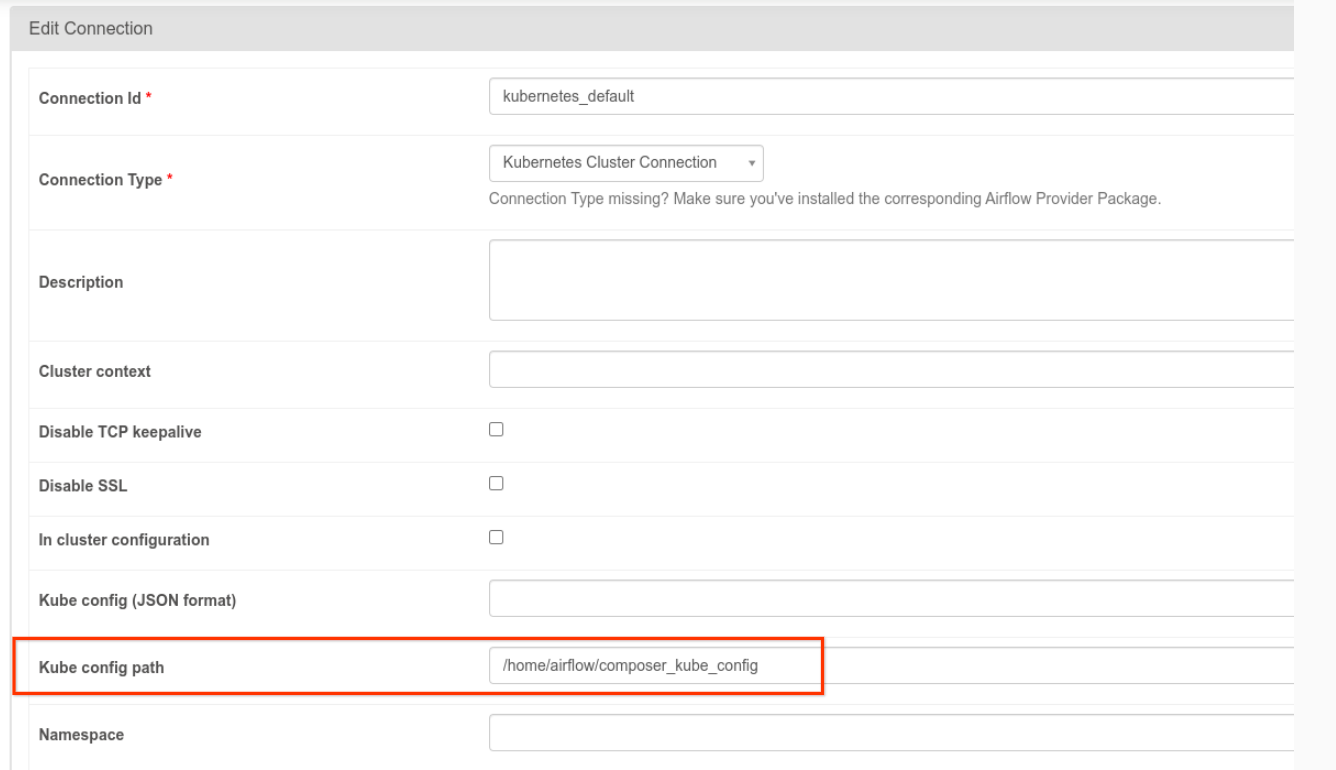
שדה הנתיב של Kube config בממשק המשתמש של Airflow
איור 1. ממשק המשתמש של Airflow, שינוי החיבור kubernetes_default (לחיצה להגדלה)
  • כדי לשנות את הקוד של משימה באמצעות KubernetesPodOperator, פועלים לפי השלבים הבאים:
KubernetesPodOperator(
  # config_file parameter - can be skipped if connection contains this setting
  config_file="/home/airflow/composer_kube_config",
  # definition of connection to be used by the operator
  kubernetes_conn_id='kubernetes_default',
  ...
)

מידע נוסף על גרסה 5.0.0 זמין בהערות המוצר של ספק Kubernetes של CNCF.

פתרון בעיות

בקטע הזה מפורטות הצעות לפתרון בעיות נפוצות שקשורות ל-KubernetesPodOperator:

צפייה ביומנים

כשמנסים לפתור בעיות, אפשר לבדוק את היומנים בסדר הבא:

  1. יומני משימות של Airflow:

    1. נכנסים לדף Environments במסוף Google Cloud .

      מעבר אל Environments

    2. ברשימת הסביבות, לוחצים על שם הסביבה. הדף Environment details ייפתח.

    3. עוברים לכרטיסייה DAGs.

    4. לוחצים על השם של ה-DAG ואז על ההרצה של ה-DAG כדי לראות את הפרטים והיומנים.

  2. יומנים של מתזמן Airflow:

    1. עוברים לדף פרטי הסביבה.

    2. עוברים לכרטיסייה יומנים.

    3. בודקים את היומנים של מתזמן Airflow.

  3. יומני Pod במסוף Google Cloud , בקטע GKE workloads. היומנים האלה כוללים את קובץ ה-YAML של הגדרת ה-Pod, אירועי ה-Pod ופרטי ה-Pod.

קודי החזרה שאינם אפס

כשמשתמשים ב-KubernetesPodOperator (וב-GKEStartPodOperator), קוד החזרה של נקודת הכניסה של הקונטיינר קובע אם המשימה נחשבת למוצלחת או לא. קודי החזרה שאינם אפס מציינים כשל.

דפוס נפוץ הוא להריץ סקריפט של מעטפת כנקודת הכניסה של הקונטיינר כדי לקבץ כמה פעולות בתוך הקונטיינר.

אם אתם כותבים סקריפט כזה, מומלץ לכלול את הפקודה set -e בראש הסקריפט, כדי שפקודות שנכשלו בסקריפט יסיימו את הסקריפט ויעבירו את הכשל למופע המשימה של Airflow.

הזמן הקצוב לתפוגה של Pod

זמן הקצוב לתפוגה (timeout) שמוגדר כברירת מחדל ב-KubernetesPodOperator הוא 120 שניות, מה שיכול לגרום לזמני קצוב לתפוגה לפני הורדה של תמונות גדולות יותר. אפשר להגדיל את הזמן הקצוב לתפוגה באמצעות שינוי הפרמטר startup_timeout_seconds כשיוצרים את KubernetesPodOperator.

כשפוד מגיע לזמן קצוב לתפוגה, היומן הספציפי למשימה זמין בממשק המשתמש של Airflow. לדוגמה:

Executing <Task(KubernetesPodOperator): ex-all-configs> on 2018-07-23 19:06:58.133811
Running: ['bash', '-c', u'airflow run kubernetes-pod-example ex-all-configs 2018-07-23T19:06:58.133811 --job_id 726 --raw -sd DAGS_FOLDER/kubernetes_pod_operator_sample.py']
Event: pod-name-9a8e9d06 had an event of type Pending
...
...
Event: pod-name-9a8e9d06 had an event of type Pending
Traceback (most recent call last):
  File "/usr/local/bin/airflow", line 27, in <module>
    args.func(args)
  File "/usr/local/lib/python2.7/site-packages/airflow/bin/cli.py", line 392, in run
    pool=args.pool,
  File "/usr/local/lib/python2.7/site-packages/airflow/utils/db.py", line 50, in wrapper
    result = func(*args, **kwargs)
  File "/usr/local/lib/python2.7/site-packages/airflow/models.py", line 1492, in _run_raw_task
    result = task_copy.execute(context=context)
  File "/usr/local/lib/python2.7/site-packages/airflow/contrib/operators/kubernetes_pod_operator.py", line 123, in execute
    raise AirflowException('Pod Launching failed: {error}'.format(error=ex))
airflow.exceptions.AirflowException: Pod Launching failed: Pod took too long to start

יכול להיות שפסק זמן של Pod יתרחש גם אם ל-Managed Airflow חסרות הרשאות ה-IAM הנדרשות לביצוע המשימה. כדי לוודא זאת, אפשר להשתמש בלוחות הבקרה של GKE כדי לבדוק את היומנים של עומס העבודה הספציפי, או להשתמש ב-Cloud Logging.

יצירת חיבור חדש נכשלה

השדרוג האוטומטי מופעל כברירת מחדל באשכולות GKE. אם מאגר הצמתים נמצא באשכול שעובר שדרוג, יכול להיות שתופיע השגיאה הבאה:

<Task(KubernetesPodOperator): gke-upgrade> Failed to establish a new
connection: [Errno 111] Connection refused

כדי לבדוק אם האשכול עובר שדרוג, במסוף Google Cloud , עוברים לדף Kubernetes clusters ומחפשים את סמל הטעינה לצד שם האשכול של הסביבה.

המאמרים הבאים