


Managed Airflow (דור 3) | Managed Airflow (דור 2) | Managed Airflow (דור 1 מדור קודם)
במאמר הזה מוסבר איך להשתמש באופרטורים של Google Kubernetes Engine כדי ליצור אשכולות ב-Google Kubernetes Engine ולהפעיל Kubernetes Pods באשכולות האלה.
אופרטורים של Google Kubernetes Engine מריצים פודים של Kubernetes באשכול ספציפי, שיכול להיות אשכול נפרד שלא קשור לסביבה שלכם.
לעומת זאת, KubernetesPodOperator מריץ פודים של Kubernetes באשכול של הסביבה שלכם.
בדף הזה מוסבר על DAG לדוגמה שיוצר אשכול Google Kubernetes Engine עם GKECreateClusterOperator, משתמש ב-GKEStartPodOperator עם ההגדרות הבאות ואז מוחק אותו באמצעות GKEDeleteClusterOperator:
- הגדרה מינימלית: הגדרה של הפרמטרים הנדרשים בלבד.
- הגדרת תבנית: משתמשים בפרמטרים שאפשר ליצור מהם תבנית באמצעות Jinja.
- הגדרת זיקה של Pod: מגבילה את הצמתים הזמינים לתזמון של Pods.
- הגדרה מלאה: כוללת את כל ההגדרות.
לפני שמתחילים
מומלץ להשתמש בגרסה העדכנית של Managed Airflow. לפחות, הגרסה הזו צריכה להיות נתמכת כחלק ממדיניות ההוצאה משימוש והתמיכה.
הגדרת אופרטור GKE
כדי לפעול לפי הדוגמה הזו, צריך להוסיף את כל קובץ gke_operator.py
לתיקייה dags/ בסביבה שלכם או להוסיף את הקוד הרלוונטי ל-DAG.
יצירת אשכול
הקוד שמוצג כאן יוצר אשכול Google Kubernetes Engine עם שני מאגרי צמתים,
pool-0 ו-pool-1, שלכל אחד מהם יש צומת אחד. במקרה הצורך, אפשר להגדיר פרמטרים אחרים מתוך Google Kubernetes Engine API כחלק מ-body.
מומלץ להשתמש באשכולות אזוריים. קלאסטרים אזוריים חשופים יותר לכשלים אזוריים. לדוגמה, יכול להיות שתרצו להשתמש באזור us-central1 עבור האשכול במקום באזור us-central1-a.
מידע נוסף על שיקולים ספציפיים לאזור זמין במאמר מיקום גיאוגרפי ואזורים.
לפני הפרסום של apache-airflow-providers-google גרסה 5.1.0,
לא הייתה אפשרות להעביר את האובייקט node_pools ב-GKECreateClusterOperator. אם אתם משתמשים ב-Airflow 2, צריך לוודא שבסביבה שלכם מותקנת apache-airflow-providers-google גרסה 5.1.0 ואילך. אפשר להתקין גרסה חדשה יותר של חבילת PyPI הזו על ידי ציון apache-airflow-providers-google ו->=5.1.0 כגרסה הנדרשת.
כפתרון עקיף למשתמשי Airflow 1, אנחנו משתמשים ב-BashOperator וב-gcloud כדי ליצור את מאגרי הצמתים האלה.
Airflow 2
# TODO(developer): update with your values
PROJECT_ID = "my-project-id"
# It is recommended to use regional clusters for increased reliability
# though passing a zone in the location parameter is also valid
CLUSTER_REGION = "us-west1"
CLUSTER_NAME = "example-cluster"
CLUSTER = {
    "name": CLUSTER_NAME,
    "node_pools": [
        {"name": "pool-0", "initial_node_count": 1},
        {"name": "pool-1", "initial_node_count": 1},
    ],
}
create_cluster = GKECreateClusterOperator(
    task_id="create_cluster",
    project_id=PROJECT_ID,
    location=CLUSTER_REGION,
    body=CLUSTER,
)
Airflow 1
# TODO(developer): update with your values
PROJECT_ID = "my-project-id"
CLUSTER_ZONE = "us-west1-a"
CLUSTER_NAME = "example-cluster"
CLUSTER = {"name": CLUSTER_NAME, "initial_node_count": 1}
create_cluster = GKECreateClusterOperator(
    task_id="create_cluster",
    project_id=PROJECT_ID,
    location=CLUSTER_ZONE,
    body=CLUSTER,
)
# Using the BashOperator to create node pools is a workaround
# In Airflow 2, because of https://github.com/apache/airflow/pull/17820
# Node pool creation can be done using the GKECreateClusterOperator

create_node_pools = BashOperator(
    task_id="create_node_pools",
    bash_command=f"gcloud container node-pools create pool-0 \
                    --cluster {CLUSTER_NAME} \
                    --num-nodes 1 \
                    --zone {CLUSTER_ZONE} \
                    && gcloud container node-pools create pool-1 \
                    --cluster {CLUSTER_NAME} \
                    --num-nodes 1 \
                    --zone {CLUSTER_ZONE}",
)
הפעלת עומסי עבודה באשכול
בקטעים הבאים מוסבר כל אחד מההגדרות של GKEStartPodOperator בדוגמה. מידע על כל משתנה הגדרה זמין במאמר Airflow reference for GKE operators.
Airflow 2
from airflow import models
from airflow.providers.google.cloud.operators.kubernetes_engine import (
    GKECreateClusterOperator,
    GKEDeleteClusterOperator,
    GKEStartPodOperator,
)
from airflow.utils.dates import days_ago

from kubernetes.client import models as k8s_models


with models.DAG(
    "example_gcp_gke",
    schedule=None,  # Override to match your needs
    start_date=days_ago(1),
    tags=["example"],
) as dag:
    # TODO(developer): update with your values
    PROJECT_ID = "my-project-id"
    # It is recommended to use regional clusters for increased reliability
    # though passing a zone in the location parameter is also valid
    CLUSTER_REGION = "us-west1"
    CLUSTER_NAME = "example-cluster"
    CLUSTER = {
        "name": CLUSTER_NAME,
        "node_pools": [
            {"name": "pool-0", "initial_node_count": 1},
            {"name": "pool-1", "initial_node_count": 1},
        ],
    }
    create_cluster = GKECreateClusterOperator(
        task_id="create_cluster",
        project_id=PROJECT_ID,
        location=CLUSTER_REGION,
        body=CLUSTER,
    )

    kubernetes_min_pod = GKEStartPodOperator(
        # The ID specified for the task.
        task_id="pod-ex-minimum",
        # Name of task you want to run, used to generate Pod ID.
        name="pod-ex-minimum",
        project_id=PROJECT_ID,
        location=CLUSTER_REGION,
        cluster_name=CLUSTER_NAME,
        # Entrypoint of the container, if not specified the Docker container's
        # entrypoint is used. The cmds parameter is templated.
        cmds=["echo"],
        # The namespace to run within Kubernetes, default namespace is
        # `default`.
        namespace="default",
        # Docker image specified. Defaults to hub.docker.com, but any fully
        # qualified URLs will point to a custom repository. Supports private
        # gcr.io images if the Composer Environment is under the same
        # project-id as the gcr.io images and the service account that Composer
        # uses has permission to access the Google Container Registry
        # (the default service account has permission)
        image="marketplace.gcr.io/google/ubuntu2204",
    )

    kubernetes_template_ex = GKEStartPodOperator(
        task_id="ex-kube-templates",
        name="ex-kube-templates",
        project_id=PROJECT_ID,
        location=CLUSTER_REGION,
        cluster_name=CLUSTER_NAME,
        namespace="default",
        image="bash",
        # All parameters below are able to be templated with jinja -- cmds,
        # arguments, env_vars, and config_file. For more information visit:
        # https://airflow.apache.org/docs/apache-airflow/stable/macros-ref.html
        # Entrypoint of the container, if not specified the Docker container's
        # entrypoint is used. The cmds parameter is templated.
        cmds=["echo"],
        # DS in jinja is the execution date as YYYY-MM-DD, this docker image
        # will echo the execution date. Arguments to the entrypoint. The docker
        # image's CMD is used if this is not provided. The arguments parameter
        # is templated.
        arguments=["{{ ds }}"],
        # The var template variable allows you to access variables defined in
        # Airflow UI. In this case we are getting the value of my_value and
        # setting the environment variable `MY_VALUE`. The pod will fail if
        # `my_value` is not set in the Airflow UI.
        env_vars={"MY_VALUE": "{{ var.value.my_value }}"},
    )

    kubernetes_affinity_ex = GKEStartPodOperator(
        task_id="ex-pod-affinity",
        project_id=PROJECT_ID,
        location=CLUSTER_REGION,
        cluster_name=CLUSTER_NAME,
        name="ex-pod-affinity",
        namespace="default",
        image="perl",
        cmds=["perl"],
        arguments=["-Mbignum=bpi", "-wle", "print bpi(2000)"],
        # affinity allows you to constrain which nodes your pod is eligible to
        # be scheduled on, based on labels on the node. In this case, if the
        # label 'cloud.google.com/gke-nodepool' with value
        # 'nodepool-label-value' or 'nodepool-label-value2' is not found on any
        # nodes, it will fail to schedule.
        affinity={
            "nodeAffinity": {
                # requiredDuringSchedulingIgnoredDuringExecution means in order
                # for a pod to be scheduled on a node, the node must have the
                # specified labels. However, if labels on a node change at
                # runtime such that the affinity rules on a pod are no longer
                # met, the pod will still continue to run on the node.
                "requiredDuringSchedulingIgnoredDuringExecution": {
                    "nodeSelectorTerms": [
                        {
                            "matchExpressions": [
                                {
                                    # When nodepools are created in Google Kubernetes
                                    # Engine, the nodes inside of that nodepool are
                                    # automatically assigned the label
                                    # 'cloud.google.com/gke-nodepool' with the value of
                                    # the nodepool's name.
                                    "key": "cloud.google.com/gke-nodepool",
                                    "operator": "In",
                                    # The label key's value that pods can be scheduled
                                    # on.
                                    "values": [
                                        "pool-1",
                                    ],
                                }
                            ]
                        }
                    ]
                }
            }
        },
    )
    kubernetes_full_pod = GKEStartPodOperator(
        task_id="ex-all-configs",
        name="full",
        project_id=PROJECT_ID,
        location=CLUSTER_REGION,
        cluster_name=CLUSTER_NAME,
        namespace="default",
        image="perl:5.34.0",
        # Entrypoint of the container, if not specified the Docker container's
        # entrypoint is used. The cmds parameter is templated.
        cmds=["perl"],
        # Arguments to the entrypoint. The docker image's CMD is used if this
        # is not provided. The arguments parameter is templated.
        arguments=["-Mbignum=bpi", "-wle", "print bpi(2000)"],
        # The secrets to pass to Pod, the Pod will fail to create if the
        # secrets you specify in a Secret object do not exist in Kubernetes.
        secrets=[],
        # Labels to apply to the Pod.
        labels={"pod-label": "label-name"},
        # Timeout to start up the Pod, default is 120.
        startup_timeout_seconds=120,
        # The environment variables to be initialized in the container
        # env_vars are templated.
        env_vars={"EXAMPLE_VAR": "/example/value"},
        # If true, logs stdout output of container. Defaults to True.
        get_logs=True,
        # Determines when to pull a fresh image, if 'IfNotPresent' will cause
        # the Kubelet to skip pulling an image if it already exists. If you
        # want to always pull a new image, set it to 'Always'.
        image_pull_policy="Always",
        # Annotations are non-identifying metadata you can attach to the Pod.
        # Can be a large range of data, and can include characters that are not
        # permitted by labels.
        annotations={"key1": "value1"},
        # Optional resource specifications for Pod, this will allow you to
        # set both cpu and memory limits and requirements.
        # Prior to Airflow 2.3 and the cncf providers package 5.0.0
        # resources were passed as a dictionary. This change was made in
        # https://github.com/apache/airflow/pull/27197
        # Additionally, "memory" and "cpu" were previously named
        # "limit_memory" and "limit_cpu"
        # resources={'limit_memory': "250M", 'limit_cpu': "100m"},
        container_resources=k8s_models.V1ResourceRequirements(
            limits={"memory": "250M", "cpu": "100m"},
        ),
        # If true, the content of /airflow/xcom/return.json from container will
        # also be pushed to an XCom when the container ends.
        do_xcom_push=False,
        # List of Volume objects to pass to the Pod.
        volumes=[],
        # List of VolumeMount objects to pass to the Pod.
        volume_mounts=[],
        # Affinity determines which nodes the Pod can run on based on the
        # config. For more information see:
        # https://kubernetes.io/docs/concepts/configuration/assign-pod-node/
        affinity={},
    )
    delete_cluster = GKEDeleteClusterOperator(
        task_id="delete_cluster",
        name=CLUSTER_NAME,
        project_id=PROJECT_ID,
        location=CLUSTER_REGION,
    )

    create_cluster >> kubernetes_min_pod >> delete_cluster
    create_cluster >> kubernetes_full_pod >> delete_cluster
    create_cluster >> kubernetes_affinity_ex >> delete_cluster
    create_cluster >> kubernetes_template_ex >> delete_cluster
Airflow 1
from airflow import models
from airflow.operators.bash_operator import BashOperator
from airflow.providers.google.cloud.operators.kubernetes_engine import (
    GKECreateClusterOperator,
    GKEDeleteClusterOperator,
    GKEStartPodOperator,
)
from airflow.utils.dates import days_ago


with models.DAG(
    "example_gcp_gke",
    schedule_interval=None,  # Override to match your needs
    start_date=days_ago(1),
    tags=["example"],
) as dag:
    # TODO(developer): update with your values
    PROJECT_ID = "my-project-id"
    CLUSTER_ZONE = "us-west1-a"
    CLUSTER_NAME = "example-cluster"
    CLUSTER = {"name": CLUSTER_NAME, "initial_node_count": 1}
    create_cluster = GKECreateClusterOperator(
        task_id="create_cluster",
        project_id=PROJECT_ID,
        location=CLUSTER_ZONE,
        body=CLUSTER,
    )
    # Using the BashOperator to create node pools is a workaround
    # In Airflow 2, because of https://github.com/apache/airflow/pull/17820
    # Node pool creation can be done using the GKECreateClusterOperator

    create_node_pools = BashOperator(
        task_id="create_node_pools",
        bash_command=f"gcloud container node-pools create pool-0 \
                        --cluster {CLUSTER_NAME} \
                        --num-nodes 1 \
                        --zone {CLUSTER_ZONE} \
                        && gcloud container node-pools create pool-1 \
                        --cluster {CLUSTER_NAME} \
                        --num-nodes 1 \
                        --zone {CLUSTER_ZONE}",
    )

    kubernetes_min_pod = GKEStartPodOperator(
        # The ID specified for the task.
        task_id="pod-ex-minimum",
        # Name of task you want to run, used to generate Pod ID.
        name="pod-ex-minimum",
        project_id=PROJECT_ID,
        location=CLUSTER_ZONE,
        cluster_name=CLUSTER_NAME,
        # Entrypoint of the container, if not specified the Docker container's
        # entrypoint is used. The cmds parameter is templated.
        cmds=["echo"],
        # The namespace to run within Kubernetes, default namespace is
        # `default`.
        namespace="default",
        # Docker image specified. Defaults to hub.docker.com, but any fully
        # qualified URLs will point to a custom repository. Supports private
        # gcr.io images if the Composer Environment is under the same
        # project-id as the gcr.io images and the service account that Composer
        # uses has permission to access the Google Container Registry
        # (the default service account has permission)
        image="marketplace.gcr.io/google/ubuntu2204",
    )

    kubernetes_template_ex = GKEStartPodOperator(
        task_id="ex-kube-templates",
        name="ex-kube-templates",
        project_id=PROJECT_ID,
        location=CLUSTER_ZONE,
        cluster_name=CLUSTER_NAME,
        namespace="default",
        image="bash",
        # All parameters below are able to be templated with jinja -- cmds,
        # arguments, env_vars, and config_file. For more information visit:
        # https://airflow.apache.org/docs/apache-airflow/stable/macros-ref.html
        # Entrypoint of the container, if not specified the Docker container's
        # entrypoint is used. The cmds parameter is templated.
        cmds=["echo"],
        # DS in jinja is the execution date as YYYY-MM-DD, this docker image
        # will echo the execution date. Arguments to the entrypoint. The docker
        # image's CMD is used if this is not provided. The arguments parameter
        # is templated.
        arguments=["{{ ds }}"],
        # The var template variable allows you to access variables defined in
        # Airflow UI. In this case we are getting the value of my_value and
        # setting the environment variable `MY_VALUE`. The pod will fail if
        # `my_value` is not set in the Airflow UI.
        env_vars={"MY_VALUE": "{{ var.value.my_value }}"},
    )

    kubernetes_affinity_ex = GKEStartPodOperator(
        task_id="ex-pod-affinity",
        project_id=PROJECT_ID,
        location=CLUSTER_ZONE,
        cluster_name=CLUSTER_NAME,
        name="ex-pod-affinity",
        namespace="default",
        image="perl",
        cmds=["perl"],
        arguments=["-Mbignum=bpi", "-wle", "print bpi(2000)"],
        # affinity allows you to constrain which nodes your pod is eligible to
        # be scheduled on, based on labels on the node. In this case, if the
        # label 'cloud.google.com/gke-nodepool' with value
        # 'nodepool-label-value' or 'nodepool-label-value2' is not found on any
        # nodes, it will fail to schedule.
        affinity={
            "nodeAffinity": {
                # requiredDuringSchedulingIgnoredDuringExecution means in order
                # for a pod to be scheduled on a node, the node must have the
                # specified labels. However, if labels on a node change at
                # runtime such that the affinity rules on a pod are no longer
                # met, the pod will still continue to run on the node.
                "requiredDuringSchedulingIgnoredDuringExecution": {
                    "nodeSelectorTerms": [
                        {
                            "matchExpressions": [
                                {
                                    # When nodepools are created in Google Kubernetes
                                    # Engine, the nodes inside of that nodepool are
                                    # automatically assigned the label
                                    # 'cloud.google.com/gke-nodepool' with the value of
                                    # the nodepool's name.
                                    "key": "cloud.google.com/gke-nodepool",
                                    "operator": "In",
                                    # The label key's value that pods can be scheduled
                                    # on.
                                    "values": [
                                        "pool-1",
                                    ],
                                }
                            ]
                        }
                    ]
                }
            }
        },
    )
    kubernetes_full_pod = GKEStartPodOperator(
        task_id="ex-all-configs",
        name="full",
        project_id=PROJECT_ID,
        location=CLUSTER_ZONE,
        cluster_name=CLUSTER_NAME,
        namespace="default",
        image="perl",
        # Entrypoint of the container, if not specified the Docker container's
        # entrypoint is used. The cmds parameter is templated.
        cmds=["perl"],
        # Arguments to the entrypoint. The docker image's CMD is used if this
        # is not provided. The arguments parameter is templated.
        arguments=["-Mbignum=bpi", "-wle", "print bpi(2000)"],
        # The secrets to pass to Pod, the Pod will fail to create if the
        # secrets you specify in a Secret object do not exist in Kubernetes.
        secrets=[],
        # Labels to apply to the Pod.
        labels={"pod-label": "label-name"},
        # Timeout to start up the Pod, default is 120.
        startup_timeout_seconds=120,
        # The environment variables to be initialized in the container
        # env_vars are templated.
        env_vars={"EXAMPLE_VAR": "/example/value"},
        # If true, logs stdout output of container. Defaults to True.
        get_logs=True,
        # Determines when to pull a fresh image, if 'IfNotPresent' will cause
        # the Kubelet to skip pulling an image if it already exists. If you
        # want to always pull a new image, set it to 'Always'.
        image_pull_policy="Always",
        # Annotations are non-identifying metadata you can attach to the Pod.
        # Can be a large range of data, and can include characters that are not
        # permitted by labels.
        annotations={"key1": "value1"},
        # Resource specifications for Pod, this will allow you to set both cpu
        # and memory limits and requirements.
        # Prior to Airflow 1.10.4, resource specifications were
        # passed as a Pod Resources Class object,
        # If using this example on a version of Airflow prior to 1.10.4,
        # import the "pod" package from airflow.contrib.kubernetes and use
        # resources = pod.Resources() instead passing a dict
        # For more info see:
        # https://github.com/apache/airflow/pull/4551
        resources={"limit_memory": "250M", "limit_cpu": "100m"},
        # If true, the content of /airflow/xcom/return.json from container will
        # also be pushed to an XCom when the container ends.
        do_xcom_push=False,
        # List of Volume objects to pass to the Pod.
        volumes=[],
        # List of VolumeMount objects to pass to the Pod.
        volume_mounts=[],
        # Affinity determines which nodes the Pod can run on based on the
        # config. For more information see:
        # https://kubernetes.io/docs/concepts/configuration/assign-pod-node/
        affinity={},
    )
    delete_cluster = GKEDeleteClusterOperator(
        task_id="delete_cluster",
        name=CLUSTER_NAME,
        project_id=PROJECT_ID,
        location=CLUSTER_ZONE,
    )

    create_cluster >> create_node_pools >> kubernetes_min_pod >> delete_cluster
    create_cluster >> create_node_pools >> kubernetes_full_pod >> delete_cluster
    create_cluster >> create_node_pools >> kubernetes_affinity_ex >> delete_cluster
    create_cluster >> create_node_pools >> kubernetes_template_ex >> delete_cluster
הגדרה מינימלית
כדי להפעיל Pod באשכול GKE עם GKEStartPodOperator, נדרשות רק האפשרויות project_id, location, cluster_name, name, namespace, image ו-task_id.
כשמציבים את קטע הקוד הבא ב-DAG, המשימה pod-ex-minimum מצליחה כל עוד הפרמטרים שצוינו קודם מוגדרים ותקינים.
Airflow 2
# TODO(developer): update with your values
PROJECT_ID = "my-project-id"
# It is recommended to use regional clusters for increased reliability
# though passing a zone in the location parameter is also valid
CLUSTER_REGION = "us-west1"
CLUSTER_NAME = "example-cluster"
kubernetes_min_pod = GKEStartPodOperator(
    # The ID specified for the task.
    task_id="pod-ex-minimum",
    # Name of task you want to run, used to generate Pod ID.
    name="pod-ex-minimum",
    project_id=PROJECT_ID,
    location=CLUSTER_REGION,
    cluster_name=CLUSTER_NAME,
    # Entrypoint of the container, if not specified the Docker container's
    # entrypoint is used. The cmds parameter is templated.
    cmds=["echo"],
    # The namespace to run within Kubernetes, default namespace is
    # `default`.
    namespace="default",
    # Docker image specified. Defaults to hub.docker.com, but any fully
    # qualified URLs will point to a custom repository. Supports private
    # gcr.io images if the Composer Environment is under the same
    # project-id as the gcr.io images and the service account that Composer
    # uses has permission to access the Google Container Registry
    # (the default service account has permission)
    image="marketplace.gcr.io/google/ubuntu2204",
)
Airflow 1
# TODO(developer): update with your values
PROJECT_ID = "my-project-id"
CLUSTER_ZONE = "us-west1-a"
CLUSTER_NAME = "example-cluster"
kubernetes_min_pod = GKEStartPodOperator(
    # The ID specified for the task.
    task_id="pod-ex-minimum",
    # Name of task you want to run, used to generate Pod ID.
    name="pod-ex-minimum",
    project_id=PROJECT_ID,
    location=CLUSTER_ZONE,
    cluster_name=CLUSTER_NAME,
    # Entrypoint of the container, if not specified the Docker container's
    # entrypoint is used. The cmds parameter is templated.
    cmds=["echo"],
    # The namespace to run within Kubernetes, default namespace is
    # `default`.
    namespace="default",
    # Docker image specified. Defaults to hub.docker.com, but any fully
    # qualified URLs will point to a custom repository. Supports private
    # gcr.io images if the Composer Environment is under the same
    # project-id as the gcr.io images and the service account that Composer
    # uses has permission to access the Google Container Registry
    # (the default service account has permission)
    image="marketplace.gcr.io/google/ubuntu2204",
)
הגדרת תבנית
Airflow תומך בשימוש ב-Jinja Templating.
צריך להצהיר על המשתנים הנדרשים (task_id, name, namespace ו-image) באמצעות האופרטור. כפי שאפשר לראות בדוגמה הבאה, אפשר ליצור תבנית לכל הפרמטרים האחרים באמצעות Jinja, כולל cmds, arguments ו-env_vars.
בלי לשנות את ה-DAG או את הסביבה, המשימה ex-kube-templates נכשלת. מגדירים משתנה Airflow בשם my_value כדי שה-DAG הזה יצליח.
כדי להגדיר את my_value באמצעות gcloud או ממשק המשתמש של Airflow:
gcloud
ב-Airflow 2, מזינים את הפקודה הבאה:
gcloud composer environments run ENVIRONMENT \
    --location LOCATION \
    variables set -- \
    my_value example_value
ב-Airflow 1, מזינים את הפקודה הבאה:
gcloud composer environments run ENVIRONMENT \
    --location LOCATION \
    variables -- \
    --set my_value example_value
מחליפים את:
-
ENVIRONMENTבשם הסביבה. -
LOCATIONעם האזור שבו הסביבה ממוקמת.
ממשק המשתמש של Airflow
בממשק המשתמש של Airflow 2:
בסרגל הכלים, בוחרים באפשרות אדמין > משתנים.
בדף List Variable (משתנה רשימה), לוחצים על Add a new record (הוספת רשומה חדשה).
בדף Add Variable (הוספת משתנה), מזינים את הפרטים הבאים:
- מקש:
my_value - ערך:
example_value
- מקש:
לוחצים על Save.
בממשק המשתמש של Airflow 1:
בסרגל הכלים, בוחרים באפשרות ניהול > משתנים.
בדף משתנים, לוחצים על הכרטיסייה יצירה.
בדף Variable, מזינים את הפרטים הבאים:
- מקש:
my_value - ערך:
example_value
- מקש:
לוחצים על Save.
הגדרת התבנית:
Airflow 2
# TODO(developer): update with your values
PROJECT_ID = "my-project-id"
# It is recommended to use regional clusters for increased reliability
# though passing a zone in the location parameter is also valid
CLUSTER_REGION = "us-west1"
CLUSTER_NAME = "example-cluster"
kubernetes_template_ex = GKEStartPodOperator(
    task_id="ex-kube-templates",
    name="ex-kube-templates",
    project_id=PROJECT_ID,
    location=CLUSTER_REGION,
    cluster_name=CLUSTER_NAME,
    namespace="default",
    image="bash",
    # All parameters below are able to be templated with jinja -- cmds,
    # arguments, env_vars, and config_file. For more information visit:
    # https://airflow.apache.org/docs/apache-airflow/stable/macros-ref.html
    # Entrypoint of the container, if not specified the Docker container's
    # entrypoint is used. The cmds parameter is templated.
    cmds=["echo"],
    # DS in jinja is the execution date as YYYY-MM-DD, this docker image
    # will echo the execution date. Arguments to the entrypoint. The docker
    # image's CMD is used if this is not provided. The arguments parameter
    # is templated.
    arguments=["{{ ds }}"],
    # The var template variable allows you to access variables defined in
    # Airflow UI. In this case we are getting the value of my_value and
    # setting the environment variable `MY_VALUE`. The pod will fail if
    # `my_value` is not set in the Airflow UI.
    env_vars={"MY_VALUE": "{{ var.value.my_value }}"},
)
Airflow 1
# TODO(developer): update with your values
PROJECT_ID = "my-project-id"
CLUSTER_ZONE = "us-west1-a"
CLUSTER_NAME = "example-cluster"
kubernetes_template_ex = GKEStartPodOperator(
    task_id="ex-kube-templates",
    name="ex-kube-templates",
    project_id=PROJECT_ID,
    location=CLUSTER_ZONE,
    cluster_name=CLUSTER_NAME,
    namespace="default",
    image="bash",
    # All parameters below are able to be templated with jinja -- cmds,
    # arguments, env_vars, and config_file. For more information visit:
    # https://airflow.apache.org/docs/apache-airflow/stable/macros-ref.html
    # Entrypoint of the container, if not specified the Docker container's
    # entrypoint is used. The cmds parameter is templated.
    cmds=["echo"],
    # DS in jinja is the execution date as YYYY-MM-DD, this docker image
    # will echo the execution date. Arguments to the entrypoint. The docker
    # image's CMD is used if this is not provided. The arguments parameter
    # is templated.
    arguments=["{{ ds }}"],
    # The var template variable allows you to access variables defined in
    # Airflow UI. In this case we are getting the value of my_value and
    # setting the environment variable `MY_VALUE`. The pod will fail if
    # `my_value` is not set in the Airflow UI.
    env_vars={"MY_VALUE": "{{ var.value.my_value }}"},
)
הגדרת זיקה של Pod
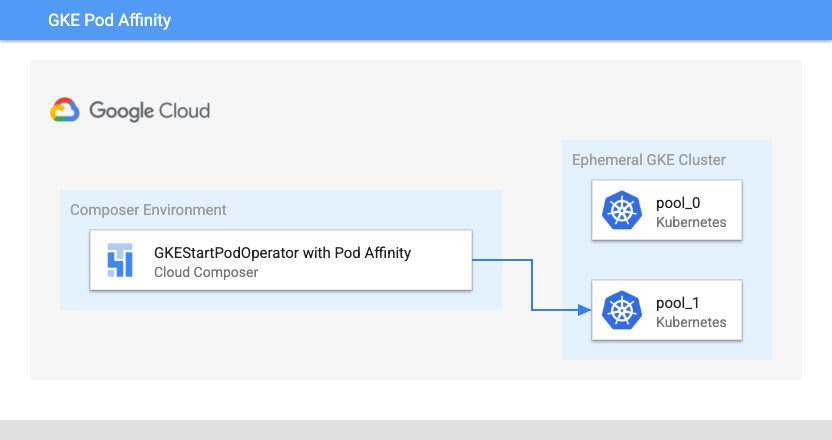
כשמגדירים את הפרמטר affinity ב-GKEStartPodOperator, אפשר לקבוע באילו צמתים יתוזמנו הפודים, למשל רק בצמתים במאגר צמתים מסוים. כשיוצרים את האשכול, נוצרים שני מאגרי צמתים בשמות pool-0 ו-pool-1. האופרטור הזה קובע שפודים חייבים לפעול רק ב-pool-1.
Airflow 2
# TODO(developer): update with your values
PROJECT_ID = "my-project-id"
# It is recommended to use regional clusters for increased reliability
# though passing a zone in the location parameter is also valid
CLUSTER_REGION = "us-west1"
CLUSTER_NAME = "example-cluster"
kubernetes_affinity_ex = GKEStartPodOperator(
    task_id="ex-pod-affinity",
    project_id=PROJECT_ID,
    location=CLUSTER_REGION,
    cluster_name=CLUSTER_NAME,
    name="ex-pod-affinity",
    namespace="default",
    image="perl",
    cmds=["perl"],
    arguments=["-Mbignum=bpi", "-wle", "print bpi(2000)"],
    # affinity allows you to constrain which nodes your pod is eligible to
    # be scheduled on, based on labels on the node. In this case, if the
    # label 'cloud.google.com/gke-nodepool' with value
    # 'nodepool-label-value' or 'nodepool-label-value2' is not found on any
    # nodes, it will fail to schedule.
    affinity={
        "nodeAffinity": {
            # requiredDuringSchedulingIgnoredDuringExecution means in order
            # for a pod to be scheduled on a node, the node must have the
            # specified labels. However, if labels on a node change at
            # runtime such that the affinity rules on a pod are no longer
            # met, the pod will still continue to run on the node.
            "requiredDuringSchedulingIgnoredDuringExecution": {
                "nodeSelectorTerms": [
                    {
                        "matchExpressions": [
                            {
                                # When nodepools are created in Google Kubernetes
                                # Engine, the nodes inside of that nodepool are
                                # automatically assigned the label
                                # 'cloud.google.com/gke-nodepool' with the value of
                                # the nodepool's name.
                                "key": "cloud.google.com/gke-nodepool",
                                "operator": "In",
                                # The label key's value that pods can be scheduled
                                # on.
                                "values": [
                                    "pool-1",
                                ],
                            }
                        ]
                    }
                ]
            }
        }
    },
)
Airflow 1
# TODO(developer): update with your values
PROJECT_ID = "my-project-id"
CLUSTER_ZONE = "us-west1-a"
CLUSTER_NAME = "example-cluster"
kubernetes_affinity_ex = GKEStartPodOperator(
    task_id="ex-pod-affinity",
    project_id=PROJECT_ID,
    location=CLUSTER_ZONE,
    cluster_name=CLUSTER_NAME,
    name="ex-pod-affinity",
    namespace="default",
    image="perl",
    cmds=["perl"],
    arguments=["-Mbignum=bpi", "-wle", "print bpi(2000)"],
    # affinity allows you to constrain which nodes your pod is eligible to
    # be scheduled on, based on labels on the node. In this case, if the
    # label 'cloud.google.com/gke-nodepool' with value
    # 'nodepool-label-value' or 'nodepool-label-value2' is not found on any
    # nodes, it will fail to schedule.
    affinity={
        "nodeAffinity": {
            # requiredDuringSchedulingIgnoredDuringExecution means in order
            # for a pod to be scheduled on a node, the node must have the
            # specified labels. However, if labels on a node change at
            # runtime such that the affinity rules on a pod are no longer
            # met, the pod will still continue to run on the node.
            "requiredDuringSchedulingIgnoredDuringExecution": {
                "nodeSelectorTerms": [
                    {
                        "matchExpressions": [
                            {
                                # When nodepools are created in Google Kubernetes
                                # Engine, the nodes inside of that nodepool are
                                # automatically assigned the label
                                # 'cloud.google.com/gke-nodepool' with the value of
                                # the nodepool's name.
                                "key": "cloud.google.com/gke-nodepool",
                                "operator": "In",
                                # The label key's value that pods can be scheduled
                                # on.
                                "values": [
                                    "pool-1",
                                ],
                            }
                        ]
                    }
                ]
            }
        }
    },
)
הגדרה מלאה
בדוגמה הזו מוצגים כל המשתנים שאפשר להגדיר ב-GKEStartPodOperator. לא צריך לשנות את הקוד כדי שהמשימה ex-all-configs תצליח.
פרטים על כל משתנה זמינים במאמר חומר העזר בנושא אופרטורים של GKE ב-Airflow.
Airflow 2
# TODO(developer): update with your values
PROJECT_ID = "my-project-id"
# It is recommended to use regional clusters for increased reliability
# though passing a zone in the location parameter is also valid
CLUSTER_REGION = "us-west1"
CLUSTER_NAME = "example-cluster"
kubernetes_full_pod = GKEStartPodOperator(
    task_id="ex-all-configs",
    name="full",
    project_id=PROJECT_ID,
    location=CLUSTER_REGION,
    cluster_name=CLUSTER_NAME,
    namespace="default",
    image="perl:5.34.0",
    # Entrypoint of the container, if not specified the Docker container's
    # entrypoint is used. The cmds parameter is templated.
    cmds=["perl"],
    # Arguments to the entrypoint. The docker image's CMD is used if this
    # is not provided. The arguments parameter is templated.
    arguments=["-Mbignum=bpi", "-wle", "print bpi(2000)"],
    # The secrets to pass to Pod, the Pod will fail to create if the
    # secrets you specify in a Secret object do not exist in Kubernetes.
    secrets=[],
    # Labels to apply to the Pod.
    labels={"pod-label": "label-name"},
    # Timeout to start up the Pod, default is 120.
    startup_timeout_seconds=120,
    # The environment variables to be initialized in the container
    # env_vars are templated.
    env_vars={"EXAMPLE_VAR": "/example/value"},
    # If true, logs stdout output of container. Defaults to True.
    get_logs=True,
    # Determines when to pull a fresh image, if 'IfNotPresent' will cause
    # the Kubelet to skip pulling an image if it already exists. If you
    # want to always pull a new image, set it to 'Always'.
    image_pull_policy="Always",
    # Annotations are non-identifying metadata you can attach to the Pod.
    # Can be a large range of data, and can include characters that are not
    # permitted by labels.
    annotations={"key1": "value1"},
    # Optional resource specifications for Pod, this will allow you to
    # set both cpu and memory limits and requirements.
    # Prior to Airflow 2.3 and the cncf providers package 5.0.0
    # resources were passed as a dictionary. This change was made in
    # https://github.com/apache/airflow/pull/27197
    # Additionally, "memory" and "cpu" were previously named
    # "limit_memory" and "limit_cpu"
    # resources={'limit_memory': "250M", 'limit_cpu': "100m"},
    container_resources=k8s_models.V1ResourceRequirements(
        limits={"memory": "250M", "cpu": "100m"},
    ),
    # If true, the content of /airflow/xcom/return.json from container will
    # also be pushed to an XCom when the container ends.
    do_xcom_push=False,
    # List of Volume objects to pass to the Pod.
    volumes=[],
    # List of VolumeMount objects to pass to the Pod.
    volume_mounts=[],
    # Affinity determines which nodes the Pod can run on based on the
    # config. For more information see:
    # https://kubernetes.io/docs/concepts/configuration/assign-pod-node/
    affinity={},
)
Airflow 1
# TODO(developer): update with your values
PROJECT_ID = "my-project-id"
CLUSTER_ZONE = "us-west1-a"
CLUSTER_NAME = "example-cluster"
kubernetes_full_pod = GKEStartPodOperator(
    task_id="ex-all-configs",
    name="full",
    project_id=PROJECT_ID,
    location=CLUSTER_ZONE,
    cluster_name=CLUSTER_NAME,
    namespace="default",
    image="perl",
    # Entrypoint of the container, if not specified the Docker container's
    # entrypoint is used. The cmds parameter is templated.
    cmds=["perl"],
    # Arguments to the entrypoint. The docker image's CMD is used if this
    # is not provided. The arguments parameter is templated.
    arguments=["-Mbignum=bpi", "-wle", "print bpi(2000)"],
    # The secrets to pass to Pod, the Pod will fail to create if the
    # secrets you specify in a Secret object do not exist in Kubernetes.
    secrets=[],
    # Labels to apply to the Pod.
    labels={"pod-label": "label-name"},
    # Timeout to start up the Pod, default is 120.
    startup_timeout_seconds=120,
    # The environment variables to be initialized in the container
    # env_vars are templated.
    env_vars={"EXAMPLE_VAR": "/example/value"},
    # If true, logs stdout output of container. Defaults to True.
    get_logs=True,
    # Determines when to pull a fresh image, if 'IfNotPresent' will cause
    # the Kubelet to skip pulling an image if it already exists. If you
    # want to always pull a new image, set it to 'Always'.
    image_pull_policy="Always",
    # Annotations are non-identifying metadata you can attach to the Pod.
    # Can be a large range of data, and can include characters that are not
    # permitted by labels.
    annotations={"key1": "value1"},
    # Resource specifications for Pod, this will allow you to set both cpu
    # and memory limits and requirements.
    # Prior to Airflow 1.10.4, resource specifications were
    # passed as a Pod Resources Class object,
    # If using this example on a version of Airflow prior to 1.10.4,
    # import the "pod" package from airflow.contrib.kubernetes and use
    # resources = pod.Resources() instead passing a dict
    # For more info see:
    # https://github.com/apache/airflow/pull/4551
    resources={"limit_memory": "250M", "limit_cpu": "100m"},
    # If true, the content of /airflow/xcom/return.json from container will
    # also be pushed to an XCom when the container ends.
    do_xcom_push=False,
    # List of Volume objects to pass to the Pod.
    volumes=[],
    # List of VolumeMount objects to pass to the Pod.
    volume_mounts=[],
    # Affinity determines which nodes the Pod can run on based on the
    # config. For more information see:
    # https://kubernetes.io/docs/concepts/configuration/assign-pod-node/
    affinity={},
)
מחיקת האשכול
הקוד שמוצג כאן מוחק את האשכול שנוצר בתחילת המדריך.
Airflow 2
delete_cluster = GKEDeleteClusterOperator(
    task_id="delete_cluster",
    name=CLUSTER_NAME,
    project_id=PROJECT_ID,
    location=CLUSTER_REGION,
)
Airflow 1
delete_cluster = GKEDeleteClusterOperator(
    task_id="delete_cluster",
    name=CLUSTER_NAME,
    project_id=PROJECT_ID,
    location=CLUSTER_ZONE,
)