建立從屬憑證授權單位

本頁說明如何在 CA 集區中建立從屬憑證授權單位 (CA)。

下層 CA 負責直接向使用者、電腦和裝置等實體核發憑證。下層 CA 會由上層 CA (通常是根 CA) 進行加密簽署。因此,信任根 CA 的系統會自動信任從屬 CA,以及從屬 CA 核發的終端實體憑證。

事前準備

  • 確認您具備 CA 服務作業管理員 (roles/privateca.caManager) 或 CA 服務管理員 (roles/privateca.admin) IAM 角色。詳情請參閱「設定 IAM 政策」。
  • 建立 CA 集區
  • 選取根 CA。

建立從屬 CA

與根 CA 相比,從屬 CA 更容易撤銷及輪替。如果您有多個憑證核發情境,可以為每個情境建立從屬 CA。在 CA 集區中新增多個從屬 CA,有助於更妥善地平衡分配憑證要求負載,並提高總有效 QPS

如要建立下層 CA,請按照下列步驟操作:

控制台

  1. 前往Google Cloud 控制台的「Certificate Authority Service」(憑證授權單位服務) 頁面。

    前往憑證授權單位服務

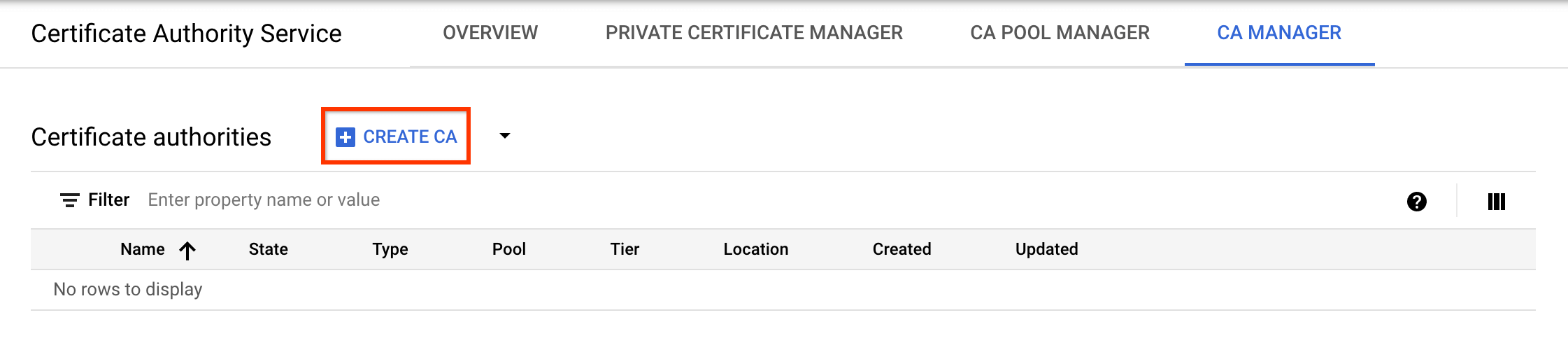
  2. 按一下「CA 管理員」分頁標籤。

  3. 按一下「建立 CA」

    使用 Cloud 控制台建立 CA。

選取 CA 類型

  1. 按一下「Subordinate CA」(下層 CA)
  2. 按一下「根 CA 位於 Google Cloud」
  3. 在「Valid for」(有效期限) 欄位中,輸入您希望 CA 憑證的有效期限。
  4. 選用:選擇 CA 的層級。預設層級為「Enterprise」。詳情請參閱「選取作業層級」。
  5. 按一下「區域」,選取 CA 的位置。詳情請參閱「位置」一節。
  6. 選用:在「Initialized state」(已初始化狀態) 下,選取要建立 CA 的作業狀態。
  7. 選用:在「設定核發情境」下方,按一下「憑證設定檔」,然後從清單中選取最符合需求的憑證設定檔。詳情請參閱「憑證設定檔」。
  8. 點選「下一步」
設定 CA 主體名稱
  1. 選用:在「Organization (O)」欄位中,輸入貴公司名稱。
  2. 選用:在「機構單位 (OU)」欄位中,輸入公司部門或業務單位。
  3. 選用:在「Country name (C)」(國家/地區名稱 (C)) 欄位中,輸入兩個英文字母的國家/地區代碼。
  4. 選用:在「州/省名稱」欄位中,輸入您所在州/省的名稱。
  5. 選用:在「Locality name」(所在地名稱) 欄位中,輸入您所在城市的名稱。
  6. 在「CA common name (CN)」(CA 一般名稱 (CN)) 欄位中,輸入 CA 名稱。
  7. 按一下「繼續」
設定 CA 金鑰大小和演算法
  1. 請選擇最符合需求的金鑰演算法。如要進一步瞭解簽署金鑰選項,請參閱「設定 CA 簽署金鑰」。
  2. 如要使用客戶管理的簽署金鑰,請選取「客戶管理的金鑰」,並提供 Cloud Key Management Service 加密金鑰版本。
  3. 按一下「繼續」
設定 CA 構件
  1. 選擇要使用 Google 代管或客戶自行管理的 Cloud Storage bucket。
    1. 如果是 Google 管理的 Cloud Storage bucket,CA 服務會在與 CA 相同的位置建立 Google 管理的 bucket。
    2. 如果是客戶代管的 Cloud Storage bucket,請按一下「瀏覽」,然後選取現有的 Cloud Storage bucket。
  2. 按一下「繼續」
新增標籤

下列步驟為選用步驟。

如要為 CA 新增標籤,請按照下列步驟操作:

  1. 按一下「新增項目」
  2. 在「Key 1」欄位中,輸入標籤鍵。
  3. 在「Value 1」(值 1) 欄位中輸入標籤值。
  4. 如要新增其他標籤,請按一下「新增項目」。然後,按照步驟 2 和 3 所述,新增標籤鍵和值。
  5. 按一下「繼續」
查看設定

仔細檢查所有設定,然後按一下「完成」建立 CA。

gcloud

  1. 為從屬 CA 建立 CA 集區:

    gcloud privateca pools create SUBORDINATE_POOL_ID --location=LOCATION
    

    更改下列內容:

    • SUBORDINATE_POOL_ID:CA 集區的名稱
    • LOCATION:要建立 CA 集區的位置。如需完整地點清單,請參閱「地點」。

    如要進一步瞭解如何建立 CA 集區,請參閱「建立 CA 集區」。

    如要進一步瞭解 gcloud privateca pools create 指令,請參閱「gcloud privateca pools create」。

  2. 在建立的 CA 集區中建立從屬 CA。

    gcloud privateca subordinates create SUBORDINATE_CA_ID \
        --pool=SUBORDINATE_POOL_ID \
        --location=LOCATION \
        --issuer-pool=ISSUER_POOL_ID \
        --issuer-location=ISSUER_LOCATION \
        --key-algorithm="ec-p256-sha256" \
        --subject="CN=Example Server TLS CA, O=Example LLC"
    

    更改下列內容:

    • SUBORDINATE_CA_ID:從屬 CA 的專屬 ID
    • SUBORDINATE_POOL_ID:CA 集區的名稱
    • LOCATION:CA 集區的位置
    • ISSUER_POOL_ID:包含核發 CA 的 CA 集區名稱
    • ISSUER_LOCATION:包含核發 CA 的 CA 集區位置

      --key-algorithm 旗標會指定您要用於建立 CA 受管理 Cloud HSM 金鑰的加密演算法。

      --subject 旗標會指定憑證主體的 X.501 名稱。

    如要使用客戶管理的簽署金鑰建立下層 CA,請執行下列指令:

    gcloud privateca subordinates create SUBORDINATE_CA_ID \
        --pool=SUBORDINATE_POOL_ID \
        --location=LOCATION \
        --issuer-pool=ISSUER_POOL_ID \
        --issuer-location=ISSUER_LOCATION \
        --kms-key-version=KMS_KEY_VERSION \
        --subject="CN=Example Server TLS CA, O=Example LLC"
    

    更改下列內容:

    • SUBORDINATE_POOL_ID:CA 集區的名稱
    • LOCATION:CA 集區的位置
    • ISSUER_POOL_ID:包含核發 CA 的 CA 集區名稱
    • ISSUER_LOCATION:包含核發 CA 的 CA 集區位置
    • KMS_KEY_VERSION:客戶管理的 Cloud KMS 加密編譯金鑰版本的完整資源 ID,用做簽署金鑰

    如要進一步瞭解簽署金鑰選項,以及如何準備客戶自行管理的簽署金鑰,請參閱「設定 CA 簽署金鑰」。

    建立從屬 CA 時,系統會傳回下列陳述式。

    Created Certificate Authority [projects/my-project-pki/locations/us-west1/caPools/SUBORDINATE_POOL_ID/certificateAuthorities/SUBORDINATE_CA_ID].
    

    如要指定自訂授權資訊存取 (AIA) 和 CRL 發布點 (CDP) 存取網址,請使用 --custom-aia-urls--custom-cdp-urls 標記。如果指定這些網址,CA 核發的所有憑證都會包含這些網址,並取代預設的 Cloud Storage 儲存空間存取網址。

    如要查看完整設定清單,請執行下列 gcloud 指令:

    gcloud privateca subordinates create --help
    

    這個指令會傳回範例,用於建立發行者位於 CA 服務或他處的下層 CA。

Terraform

resource "google_privateca_certificate_authority" "root_ca" {
  // This example assumes this pool already exists.
  // Pools cannot be deleted in normal test circumstances, so we depend on static pools
  pool                                   = "my-pool"
  certificate_authority_id               = "my-certificate-authority-root"
  location                               = "us-central1"
  deletion_protection                    = false # set to true to prevent destruction of the resource
  ignore_active_certificates_on_deletion = true
  config {
    subject_config {
      subject {
        organization = "ACME"
        common_name  = "my-certificate-authority"
      }
    }
    x509_config {
      ca_options {
        # is_ca *MUST* be true for certificate authorities
        is_ca = true
      }
      key_usage {
        base_key_usage {
          # cert_sign and crl_sign *MUST* be true for certificate authorities
          cert_sign = true
          crl_sign  = true
        }
        extended_key_usage {
        }
      }
    }
  }
  key_spec {
    algorithm = "RSA_PKCS1_4096_SHA256"
  }
  // valid for 10 years
  lifetime = "${10 * 365 * 24 * 3600}s"
}

resource "google_privateca_certificate_authority" "sub_ca" {
  // This example assumes this pool already exists.
  // Pools cannot be deleted in normal test circumstances, so we depend on static pools
  pool                     = "my-sub-pool"
  certificate_authority_id = "my-certificate-authority-sub"
  location                 = "us-central1"
  deletion_protection      = false # set to true to prevent destruction of the resource
  subordinate_config {
    certificate_authority = google_privateca_certificate_authority.root_ca.name
  }
  config {
    subject_config {
      subject {
        organization = "ACME"
        common_name  = "my-subordinate-authority"
      }
    }
    x509_config {
      ca_options {
        is_ca = true
        # Force the sub CA to only issue leaf certs.
        # Use e.g.
        #    max_issuer_path_length = 1
        # if you need to chain more subordinates.
        zero_max_issuer_path_length = true
      }
      key_usage {
        base_key_usage {
          cert_sign = true
          crl_sign  = true
        }
        extended_key_usage {
        }
      }
    }
  }
  // valid for 5 years
  lifetime = "${5 * 365 * 24 * 3600}s"
  key_spec {
    algorithm = "RSA_PKCS1_2048_SHA256"
  }
  type = "SUBORDINATE"
}

Java

如要向 CA Service 進行驗證,請設定應用程式預設憑證。詳情請參閱「為本機開發環境設定驗證機制」。


import com.google.api.core.ApiFuture;
import com.google.cloud.security.privateca.v1.CaPoolName;
import com.google.cloud.security.privateca.v1.CertificateAuthority;
import com.google.cloud.security.privateca.v1.CertificateAuthority.KeyVersionSpec;
import com.google.cloud.security.privateca.v1.CertificateAuthority.SignHashAlgorithm;
import com.google.cloud.security.privateca.v1.CertificateAuthorityServiceClient;
import com.google.cloud.security.privateca.v1.CertificateConfig;
import com.google.cloud.security.privateca.v1.CertificateConfig.SubjectConfig;
import com.google.cloud.security.privateca.v1.CreateCertificateAuthorityRequest;
import com.google.cloud.security.privateca.v1.KeyUsage;
import com.google.cloud.security.privateca.v1.KeyUsage.KeyUsageOptions;
import com.google.cloud.security.privateca.v1.Subject;
import com.google.cloud.security.privateca.v1.SubjectAltNames;
import com.google.cloud.security.privateca.v1.X509Parameters;
import com.google.cloud.security.privateca.v1.X509Parameters.CaOptions;
import com.google.longrunning.Operation;
import com.google.protobuf.Duration;
import java.io.IOException;
import java.util.concurrent.ExecutionException;

public class CreateSubordinateCa {

  public static void main(String[] args)
      throws InterruptedException, ExecutionException, IOException {
    // TODO(developer): Replace these variables before running the sample.
    // location: For a list of locations, see:
    // https://cloud.google.com/certificate-authority-service/docs/locations
    // poolId: Set it to the CA Pool under which the CA should be created.
    // subordinateCaName: Unique name for the Subordinate CA.
    String project = "your-project-id";
    String location = "ca-location";
    String poolId = "ca-pool-id";
    String subordinateCaName = "subordinate-certificate-authority-name";

    createSubordinateCertificateAuthority(project, location, poolId, subordinateCaName);
  }

  public static void createSubordinateCertificateAuthority(
      String project, String location, String poolId, String subordinateCaName)
      throws IOException, ExecutionException, InterruptedException {
    // Initialize client that will be used to send requests. This client only needs to be created
    // once, and can be reused for multiple requests. After completing all of your requests, call
    // the `certificateAuthorityServiceClient.close()` method on the client to safely
    // clean up any remaining background resources.
    try (CertificateAuthorityServiceClient certificateAuthorityServiceClient =
        CertificateAuthorityServiceClient.create()) {

      String commonName = "commonname";
      String orgName = "csr-org-name";
      String domainName = "dns.example.com";
      int caDuration = 100000; // Validity of this CA in seconds.

      // Set the type of Algorithm.
      KeyVersionSpec keyVersionSpec =
          KeyVersionSpec.newBuilder().setAlgorithm(SignHashAlgorithm.RSA_PKCS1_4096_SHA256).build();

      // Set CA subject config.
      SubjectConfig subjectConfig =
          SubjectConfig.newBuilder()
              .setSubject(
                  Subject.newBuilder().setCommonName(commonName).setOrganization(orgName).build())
              // Set the fully qualified domain name.
              .setSubjectAltName(SubjectAltNames.newBuilder().addDnsNames(domainName).build())
              .build();

      //  Set the key usage options for X.509 fields.
      X509Parameters x509Parameters =
          X509Parameters.newBuilder()
              .setKeyUsage(
                  KeyUsage.newBuilder()
                      .setBaseKeyUsage(
                          KeyUsageOptions.newBuilder().setCrlSign(true).setCertSign(true).build())
                      .build())
              .setCaOptions(CaOptions.newBuilder().setIsCa(true).build())
              .build();

      // Set certificate authority settings.
      CertificateAuthority subCertificateAuthority =
          CertificateAuthority.newBuilder()
              .setType(CertificateAuthority.Type.SUBORDINATE)
              .setKeySpec(keyVersionSpec)
              .setConfig(
                  CertificateConfig.newBuilder()
                      .setSubjectConfig(subjectConfig)
                      .setX509Config(x509Parameters)
                      .build())
              // Set the CA validity duration.
              .setLifetime(Duration.newBuilder().setSeconds(caDuration).build())
              .build();

      // Create the CertificateAuthorityRequest.
      CreateCertificateAuthorityRequest subCertificateAuthorityRequest =
          CreateCertificateAuthorityRequest.newBuilder()
              .setParent(CaPoolName.of(project, location, poolId).toString())
              .setCertificateAuthorityId(subordinateCaName)
              .setCertificateAuthority(subCertificateAuthority)
              .build();

      // Create Subordinate CA.
      ApiFuture<Operation> futureCall =
          certificateAuthorityServiceClient
              .createCertificateAuthorityCallable()
              .futureCall(subCertificateAuthorityRequest);

      Operation response = futureCall.get();

      if (response.hasError()) {
        System.out.println("Error while creating Subordinate CA !" + response.getError());
        return;
      }

      System.out.println(
          "Subordinate Certificate Authority created successfully : " + subordinateCaName);
    }
  }
}

Python

如要向 CA Service 進行驗證,請設定應用程式預設憑證。詳情請參閱「為本機開發環境設定驗證機制」。

import google.cloud.security.privateca_v1 as privateca_v1
from google.protobuf import duration_pb2


def create_subordinate_ca(
    project_id: str,
    location: str,
    ca_pool_name: str,
    subordinate_ca_name: str,
    common_name: str,
    organization: str,
    domain: str,
    ca_duration: int,
) -> None:
    """
    Create Certificate Authority (CA) which is the subordinate CA in the given CA Pool.
    Args:
        project_id: project ID or project number of the Cloud project you want to use.
        location: location you want to use. For a list of locations, see: https://cloud.google.com/certificate-authority-service/docs/locations.
        ca_pool_name: set it to the CA Pool under which the CA should be created.
        subordinate_ca_name: unique name for the Subordinate CA.
        common_name: a title for your certificate authority.
        organization: the name of your company for your certificate authority.
        domain: the name of your company for your certificate authority.
        ca_duration: the validity of the certificate authority in seconds.
    """

    ca_service_client = privateca_v1.CertificateAuthorityServiceClient()

    # Set the type of Algorithm
    key_version_spec = privateca_v1.CertificateAuthority.KeyVersionSpec(
        algorithm=privateca_v1.CertificateAuthority.SignHashAlgorithm.RSA_PKCS1_4096_SHA256
    )

    # Set CA subject config.
    subject_config = privateca_v1.CertificateConfig.SubjectConfig(
        subject=privateca_v1.Subject(
            common_name=common_name, organization=organization
        ),
        # Set the fully qualified domain name.
        subject_alt_name=privateca_v1.SubjectAltNames(dns_names=[domain]),
    )

    # Set the key usage options for X.509 fields.
    x509_parameters = privateca_v1.X509Parameters(
        key_usage=privateca_v1.KeyUsage(
            base_key_usage=privateca_v1.KeyUsage.KeyUsageOptions(
                crl_sign=True,
                cert_sign=True,
            )
        ),
        ca_options=privateca_v1.X509Parameters.CaOptions(
            is_ca=True,
        ),
    )

    # Set certificate authority settings.
    certificate_authority = privateca_v1.CertificateAuthority(
        type_=privateca_v1.CertificateAuthority.Type.SUBORDINATE,
        key_spec=key_version_spec,
        config=privateca_v1.CertificateConfig(
            subject_config=subject_config,
            x509_config=x509_parameters,
        ),
        # Set the CA validity duration.
        lifetime=duration_pb2.Duration(seconds=ca_duration),
    )

    ca_pool_path = ca_service_client.ca_pool_path(project_id, location, ca_pool_name)

    # Create the CertificateAuthorityRequest.
    request = privateca_v1.CreateCertificateAuthorityRequest(
        parent=ca_pool_path,
        certificate_authority_id=subordinate_ca_name,
        certificate_authority=certificate_authority,
    )

    operation = ca_service_client.create_certificate_authority(request=request)
    result = operation.result()

    print(f"Operation result: {result}")

啟用從屬 CA

如要啟用下層 CA,請按照下列步驟操作:

控制台

  1. 前往Google Cloud 控制台的「Certificate Authority Service」(憑證授權單位服務) 頁面。

    前往憑證授權單位服務

  2. 按一下「CA 管理員」分頁標籤。

  3. 在「憑證授權單位」下方,選取要啟用的 CA。

  4. 按一下「啟用」play_circle

gcloud

如要啟用新建立的下層 CA,請執行下列指令:

gcloud privateca subordinates enable SUBORDINATE_CA_ID \
--pool=SUBORDINATE_POOL_ID \
--location=LOCATION

更改下列內容:

  • SUBORDINATE_CA_ID:從屬 CA 的專屬 ID
  • SUBORDINATE_POOL_ID:包含從屬 CA 的 CA 集區名稱
  • LOCATION:CA 集區的位置。如需完整的位置清單,請參閱「位置」。

如要進一步瞭解 gcloud privateca subordinates enable 指令,請參閱「gcloud privateca subordinates enable」。

Terraform

將從屬 CA 的 desired_state 欄位設為 ENABLED,然後執行 terraform apply

Java

如要使用已簽署的憑證啟用從屬 CA,請呼叫 ActivateCertificateAuthority RPC:


import com.google.api.core.ApiFuture;
import com.google.cloud.security.privateca.v1.ActivateCertificateAuthorityRequest;
import com.google.cloud.security.privateca.v1.CertificateAuthorityName;
import com.google.cloud.security.privateca.v1.CertificateAuthorityServiceClient;
import com.google.cloud.security.privateca.v1.SubordinateConfig;
import com.google.longrunning.Operation;
import java.io.IOException;
import java.util.concurrent.ExecutionException;
import java.util.concurrent.TimeUnit;

public class ActivateSubordinateCa {

  public static void main(String[] args)
      throws InterruptedException, ExecutionException, IOException {
    // TODO(developer): Replace these variables before running the sample.

    // location: For a list of locations, see:
    // https://cloud.google.com/certificate-authority-service/docs/locations
    // poolId: Set a unique id for the CA pool.
    // subordinateCaName: The CA to be activated.
    // pemCaCertificate: The signed certificate, obtained by signing the CSR.
    String project = "your-project-id";
    String location = "ca-location";
    String poolId = "ca-pool-id";
    String subordinateCaName = "subordinate-certificate-authority-name";
    String pemCaCertificate =
        "-----BEGIN CERTIFICATE-----\n" + "sample-pem-certificate\n" + "-----END CERTIFICATE-----";

    // certificateAuthorityName: The name of the certificate authority which signed the CSR.
    // If an external CA (CA not present in Google Cloud) was used for signing,
    // then use the CA's issuerCertificateChain.
    String certificateAuthorityName = "certificate-authority-name";

    activateSubordinateCa(
        project, location, poolId, certificateAuthorityName, subordinateCaName, pemCaCertificate);
  }

  // Activate a subordinate CA.
  // *Prerequisite*: Get the CSR of the subordinate CA signed by another CA. Pass in the signed
  // certificate and (issuer CA's name or the issuer CA's Certificate chain).
  // *Post*: After activating the subordinate CA, it should be enabled before issuing certificates.
  public static void activateSubordinateCa(
      String project,
      String location,
      String poolId,
      String certificateAuthorityName,
      String subordinateCaName,
      String pemCaCertificate)
      throws ExecutionException, InterruptedException, IOException {
    // Initialize client that will be used to send requests. This client only needs to be created
    // once, and can be reused for multiple requests. After completing all of your requests, call
    // the `certificateAuthorityServiceClient.close()` method on the client to safely
    // clean up any remaining background resources.
    try (CertificateAuthorityServiceClient certificateAuthorityServiceClient =
        CertificateAuthorityServiceClient.create()) {
      // Subordinate CA parent.
      String subordinateCaParent =
          CertificateAuthorityName.of(project, location, poolId, subordinateCaName).toString();

      // Construct the "Activate CA Request".
      ActivateCertificateAuthorityRequest activateCertificateAuthorityRequest =
          ActivateCertificateAuthorityRequest.newBuilder()
              .setName(subordinateCaParent)
              // The signed certificate.
              .setPemCaCertificate(pemCaCertificate)
              .setSubordinateConfig(
                  SubordinateConfig.newBuilder()
                      // Follow one of the below methods:

                      // Method 1: If issuer CA is in Google Cloud, set the Certificate Authority
                      // Name.
                      .setCertificateAuthority(
                          CertificateAuthorityName.of(
                                  project, location, poolId, certificateAuthorityName)
                              .toString())

                      // Method 2: If issuer CA is external to Google Cloud, set the issuer's
                      // certificate chain.
                      // The certificate chain of the CA (which signed the CSR) from leaf to root.
                      // .setPemIssuerChain(
                      //     SubordinateConfigChain.newBuilder()
                      //         .addAllPemCertificates(issuerCertificateChain)
                      //         .build())

                      .build())
              .build();

      // Activate the CA.
      ApiFuture<Operation> futureCall =
          certificateAuthorityServiceClient
              .activateCertificateAuthorityCallable()
              .futureCall(activateCertificateAuthorityRequest);

      Operation response = futureCall.get();

      if (response.hasError()) {
        System.out.println("Error while activating the subordinate CA! " + response.getError());
        return;
      }

      System.out.println(
          "Subordinate Certificate Authority activated successfully ! !" + subordinateCaName);
      TimeUnit.SECONDS.sleep(3);
      // The current state will be STAGED.
      // The Subordinate CA has to be ENABLED before issuing certificates.
      System.out.println(
          "Current State: "
              + certificateAuthorityServiceClient
              .getCertificateAuthority(subordinateCaParent)
              .getState());
    }
  }
}

如要啟用從屬 CA,使其能夠核發憑證,請呼叫 EnableCertificateAuthority RPC:


import com.google.api.core.ApiFuture;
import com.google.cloud.security.privateca.v1.CertificateAuthority.State;
import com.google.cloud.security.privateca.v1.CertificateAuthorityName;
import com.google.cloud.security.privateca.v1.CertificateAuthorityServiceClient;
import com.google.cloud.security.privateca.v1.EnableCertificateAuthorityRequest;
import com.google.longrunning.Operation;
import java.io.IOException;
import java.util.concurrent.ExecutionException;

public class EnableCertificateAuthority {

  public static void main(String[] args)
      throws InterruptedException, ExecutionException, IOException {
    // TODO(developer): Replace these variables before running the sample.
    // location: For a list of locations, see:
    // https://cloud.google.com/certificate-authority-service/docs/locations
    // poolId: The id of the CA pool under which the CA is present.
    // certificateAuthorityName: The name of the CA to be enabled.
    String project = "your-project-id";
    String location = "ca-location";
    String poolId = "ca-pool-id";
    String certificateAuthorityName = "certificate-authority-name";
    enableCertificateAuthority(project, location, poolId, certificateAuthorityName);
  }

  // Enable the Certificate Authority present in the given ca pool.
  // CA cannot be enabled if it has been already deleted.
  public static void enableCertificateAuthority(
      String project, String location, String poolId, String certificateAuthorityName)
      throws IOException, ExecutionException, InterruptedException {
    try (CertificateAuthorityServiceClient certificateAuthorityServiceClient =
        CertificateAuthorityServiceClient.create()) {
      // Create the Certificate Authority Name.
      CertificateAuthorityName certificateAuthorityParent =
          CertificateAuthorityName.newBuilder()
              .setProject(project)
              .setLocation(location)
              .setCaPool(poolId)
              .setCertificateAuthority(certificateAuthorityName)
              .build();

      // Create the Enable Certificate Authority Request.
      EnableCertificateAuthorityRequest enableCertificateAuthorityRequest =
          EnableCertificateAuthorityRequest.newBuilder()
              .setName(certificateAuthorityParent.toString())
              .build();

      // Enable the Certificate Authority.
      ApiFuture<Operation> futureCall =
          certificateAuthorityServiceClient
              .enableCertificateAuthorityCallable()
              .futureCall(enableCertificateAuthorityRequest);
      Operation response = futureCall.get();

      if (response.hasError()) {
        System.out.println("Error while enabling Certificate Authority !" + response.getError());
        return;
      }

      // Get the current CA state.
      State caState =
          certificateAuthorityServiceClient
              .getCertificateAuthority(certificateAuthorityParent)
              .getState();

      // Check if the CA is enabled.
      if (caState == State.ENABLED) {
        System.out.println("Enabled Certificate Authority : " + certificateAuthorityName);
      } else {
        System.out.println(
            "Cannot enable the Certificate Authority ! Current CA State: " + caState);
      }
    }
  }
}

Python

如要使用已簽署的憑證啟用從屬 CA,請呼叫 ActivateCertificateAuthority RPC:

import google.cloud.security.privateca_v1 as privateca_v1


def activate_subordinate_ca(
    project_id: str,
    location: str,
    ca_pool_name: str,
    subordinate_ca_name: str,
    pem_ca_certificate: str,
    ca_name: str,
) -> None:
    """
    Activate a subordinate Certificate Authority (CA).
    *Prerequisite*: Get the Certificate Signing Resource (CSR) of the subordinate CA signed by another CA. Pass in the signed
    certificate and (issuer CA's name or the issuer CA's Certificate chain).
    *Post*: After activating the subordinate CA, it should be enabled before issuing certificates.
    Args:
        project_id: project ID or project number of the Cloud project you want to use.
        location: location you want to use. For a list of locations, see: https://cloud.google.com/certificate-authority-service/docs/locations.
        ca_pool_name: set it to the CA Pool under which the CA should be created.
        pem_ca_certificate: the signed certificate, obtained by signing the CSR.
        subordinate_ca_name: the CA to be activated.
        ca_name: The name of the certificate authority which signed the CSR.
            If an external CA (CA not present in Google Cloud) was used for signing,
            then use the CA's issuerCertificateChain.
    """

    ca_service_client = privateca_v1.CertificateAuthorityServiceClient()

    subordinate_ca_path = ca_service_client.certificate_authority_path(
        project_id, location, ca_pool_name, subordinate_ca_name
    )
    ca_path = ca_service_client.certificate_authority_path(
        project_id, location, ca_pool_name, ca_name
    )

    # Set CA subordinate config.
    subordinate_config = privateca_v1.SubordinateConfig(
        # Follow one of the below methods:
        # Method 1: If issuer CA is in Google Cloud, set the Certificate Authority Name.
        certificate_authority=ca_path,
        # Method 2: If issuer CA is external to Google Cloud, set the issuer's certificate chain.
        # The certificate chain of the CA (which signed the CSR) from leaf to root.
        # pem_issuer_chain=privateca_v1.SubordinateConfig.SubordinateConfigChain(
        #     pem_certificates=issuer_certificate_chain,
        # )
    )

    # Construct the "Activate CA Request".
    request = privateca_v1.ActivateCertificateAuthorityRequest(
        name=subordinate_ca_path,
        # The signed certificate.
        pem_ca_certificate=pem_ca_certificate,
        subordinate_config=subordinate_config,
    )

    # Activate the CA
    operation = ca_service_client.activate_certificate_authority(request=request)
    result = operation.result()

    print("Operation result:", result)

    # The current state will be STAGED.
    # The Subordinate CA has to be ENABLED before issuing certificates.
    print(
        f"Current state: {ca_service_client.get_certificate_authority(name=subordinate_ca_path).state}"
    )

如要啟用從屬 CA,使其能夠核發憑證,請呼叫 EnableCertificateAuthority RPC:

import google.cloud.security.privateca_v1 as privateca_v1


def enable_certificate_authority(
    project_id: str, location: str, ca_pool_name: str, ca_name: str
) -> None:
    """
    Enable the Certificate Authority present in the given ca pool.
    CA cannot be enabled if it has been already deleted.

    Args:
        project_id: project ID or project number of the Cloud project you want to use.
        location: location you want to use. For a list of locations, see: https://cloud.google.com/certificate-authority-service/docs/locations.
        ca_pool_name: the name of the CA pool under which the CA is present.
        ca_name: the name of the CA to be enabled.
    """

    caServiceClient = privateca_v1.CertificateAuthorityServiceClient()
    ca_path = caServiceClient.certificate_authority_path(
        project_id, location, ca_pool_name, ca_name
    )

    # Create the Enable Certificate Authority Request.
    request = privateca_v1.EnableCertificateAuthorityRequest(
        name=ca_path,
    )

    # Enable the Certificate Authority.
    operation = caServiceClient.enable_certificate_authority(request=request)
    operation.result()

    # Get the current CA state.
    ca_state = caServiceClient.get_certificate_authority(name=ca_path).state

    # Check if the CA is enabled.
    if ca_state == privateca_v1.CertificateAuthority.State.ENABLED:
        print("Enabled Certificate Authority:", ca_name)
    else:
        print("Cannot enable the Certificate Authority ! Current CA State:", ca_state)

後續步驟