


在智能体应用中使用参数化视图
如需在采用 AI 智能体或大语言模型 (LLM) 的 Bigtable 应用中安全地运行参数化视图,您必须建立严格的访问权限控制并带外传递参数。
设置访问权限控制
Bigtable 逻辑视图基于定义方权限安全模型运行。 这意味着,当您查询视图时,查询会使用定义该视图的用户的权限执行,而不是运行查询的用户的权限。如需强制执行最小权限原则,请向应用的 Service Account 授予仅访问该视图的权限,同时保留对底层源表的权限。
请按照以下步骤设置访问权限控制:
- 为您的应用创建一个具有最低权限(例如
bigtable.reader角色)的专用 IAM 角色。 - 仅向此角色授予对视图的权限。您可以使用 IAM 条件将
bigtable.logicalViews.readRows权限限制为您的特定视图。 - 如需实现更严格的访问权限控制,请使用 IAM 拒绝政策明确拒绝应用角色对底层基表的任何权限。
如需了解详情,请参阅 使用 IAM 进行 Bigtable 访问权限控制。
注入视图参数
在智能体应用中,参数化逻辑视图的参数值(例如用户凭据或租户边界)必须由您的受信任应用代码提供,而不是由 LLM 或最终用户提供。这样可将不受信任的用户输入和模型生成的查询字符串与数据库输入隔离开。
如需构建 AI 智能体,您可以使用 智能体开发套件 (ADK) 框架。 ADK 提供以下组件,可帮助您集成参数化视图:
BigtableToolset:ADK 数据库工具集,用于配置和提供与 Bigtable 通信的面向数据库的工具(特别是execute_sql_parameterized)。此工具集会自动带外提取视图参数,并针对您的数据运行 SQL 查询。ToolContext:运行时机制,用于对会话专用状态和基础架构属性进行沙盒化处理,让工具能够解析敏感过滤参数,而无需将其公开给 LLM。
下图展示了这些组件如何协同工作以将参数注入 Bigtable:
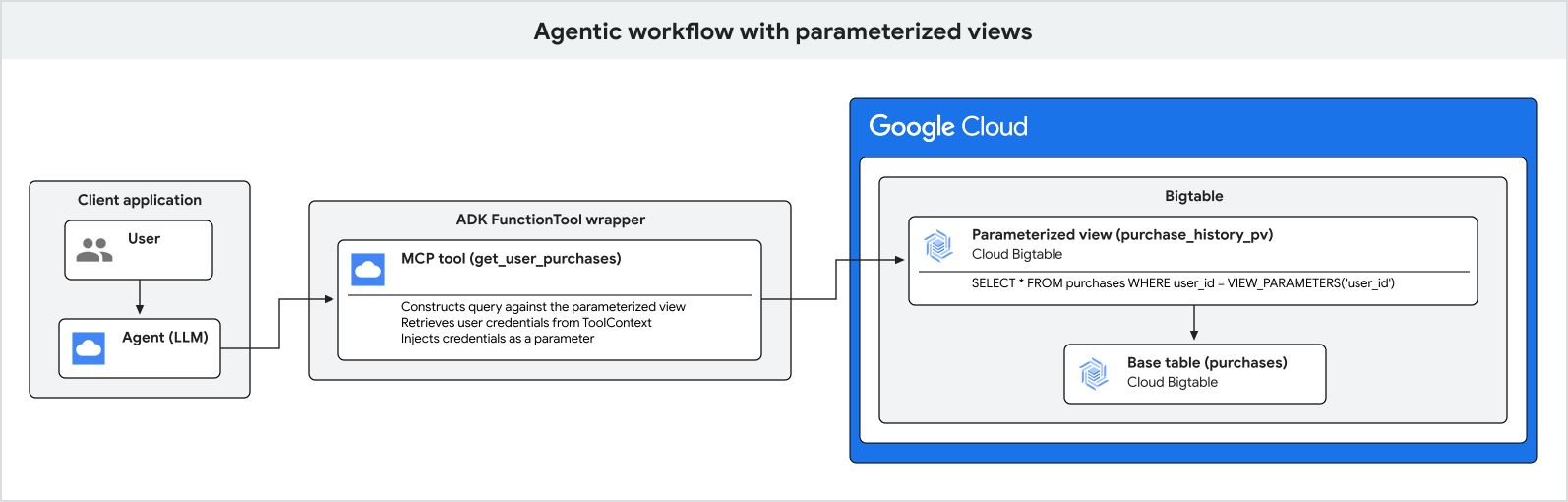
以下步骤进一步说明了参数注入过程:
- 您的应用会对最终用户进行身份验证,并获取其经过验证的用户凭据和租户组织。
- 应用会收到来自用户的自然语言查询。
- 应用会运行 ADK 智能体,并在安全会话状态中传递经过身份验证的用户和租户标识符。
- 当智能体决定查询数据库时,它只会确定自然语言过滤实参(例如城市),并调用
execute_sql_parameterized工具。 - 底层数据库工具会从
ToolContext中安全地检索敏感的用户凭据和租户边界,并针对 Bigtable 执行查询。
以下示例展示了如何使用 ADK 设置智能体应用来查询用户的交易记录。
配置 Bigtable 工具集
在 Python 应用中,使用您想要带外解析的参数名称 (view_parameter_names) 配置 ADK BigtableToolset。这会将框架基础架构属性(例如 user_id)和应用会话变量(例如 tenant_id)直接映射到数据库查询。
import google.auth
from google.adk.agents.llm_agent import LlmAgent
from google.adk.tools.bigtable.bigtable_credentials import BigtableCredentialsConfig
from google.adk.tools.bigtable.bigtable_toolset import BigtableToolset

# 1. Initialize credentials (using Application Default Credentials here)
credentials, _ = google.auth.default()
credentials_config = BigtableCredentialsConfig(credentials=credentials)

# 2. Configure the BigtableToolset
# Passing view_parameter_names=["user_id", "tenant_id"] instructs the toolset
# to automatically extract both parameters from the ToolContext at runtime
# and inject them into the query's view_parameters.
bigtable_toolset = BigtableToolset(
    credentials_config=credentials_config,
    view_parameter_names=["user_id", "tenant_id"],
)
使用工具集初始化智能体
将工具集直接传递给智能体的 tools 列表。智能体将自动检测并公开强类型 execute_sql_parameterized 工具。
# 3. Create the agent and expose the toolset
agent = LlmAgent(
    model="MODEL_NAME",
    name="purchase_history_agent",
    description="An agent that retrieves multi-tenant purchase history.",
    instruction="You are an assistant that helps users find their purchase history within their tenant.",
    tools=[bigtable_toolset],
)
将 MODEL_NAME 替换为您要使用的模型的名称,例如 gemini-2.5-flash。
运行智能体应用
执行智能体时,请使用基础架构用户身份和应用组织状态初始化活跃会话。
import asyncio
from google.adk.runners import Runner
from google.adk.sessions import InMemorySessionService
from google.genai import types

async def main():
    # 4. Initialize session service
    session_service = InMemorySessionService()

    # 5. Create a session for the authenticated user and store their specific
    # organization tenant in the state.
    authenticated_user_id = "user-anwesha-123"
    organization_tenant_id = "tenant-corp-alpha"

    session = await session_service.create_session(
        user_id=authenticated_user_id, # Resolved from tool_context.user_id
        # Resolved from tool_context.state["tenant_id"]
        state={"tenant_id": organization_tenant_id},
        app_name="purchase_history_app",
    )

    runner = Runner(
        app_name="purchase_history_app",
        agent=agent,
        session_service=session_service,
    )

    # 6. Simulate a user query
    user_query = "What did I buy in New York?"
    content = types.Content(role="user", parts=[types.Part(text=user_query)])

    # The runner runs the agent.
    # When the agent calls execute_sql_parameterized, the ADK framework resolves
    # both "user_id" and "tenant_id" out-of-band and passes them to Bigtable
    # as view parameters, completely hidden from the LLM.
    events = runner.run(
        session_id=session.id,
        user_id=session.user_id,
        new_message=content,
    )

    for event in events:
        if event.content and event.content.parts:
            print(f"Agent: {event.content.parts[0].text}")

if __name__ == "__main__":
    asyncio.run(main())
结果是经过身份验证的用户的交易记录列表,该列表按用户在其查询中指定的城市进行过滤,并限制在其租户边界内。
此过程可确保安全参数带外注入,并完全隐藏起来,以免受到语言模型操纵。