

Use parameterized views in agentic applications
To securely run parameterized views in Bigtable applications that use AI agents or large language models (LLMs), you must establish strict access control and pass parameters out of band.
Set up access control
Bigtable logical views operate on a definer's rights security model. This means that when you query a view, the query executes with the permissions of the user who defined the view, not the user who is running the query. To enforce the principle of least privilege, grant your application's service account permissions to access only the view, while withholding permissions to the underlying source table.
Follow these steps to set up access control:
- Create a dedicated IAM role for your application that has
minimal permissions, such as the
bigtable.readerrole. - Grant this role permissions to the view only. You can use an
IAM condition to limit the
bigtable.logicalViews.readRowspermission to your specific view. - For stricter access control, explicitly deny the application role any permissions on the underlying base table using an IAM deny policy.
For more information, see Bigtable access control with IAM.
Inject a view parameter
In agentic applications, parameter values for the parameterized logical view, such as user credentials or tenant boundaries, must be supplied by your trusted application code, not by the LLM or the end-user. This isolates untrusted user input and model-generated query strings from your database inputs.
To build an AI agent, you can use the Agent Development Kit (ADK) framework. ADK provides the following components that help you integrate parameterized views:
BigtableToolset: The ADK database toolset that configures and provides database-facing tools (specificallyexecute_sql_parameterized) that communicate with Bigtable. This toolset automatically extracts view parameters out-of-band and runs the SQL query against your data.ToolContext: The runtime mechanism that sandboxes session-specific state and infrastructure properties, letting tools resolve sensitive filtering parameters without exposing them to the LLM.
The following image shows how the components work together to inject a parameter into Bigtable:
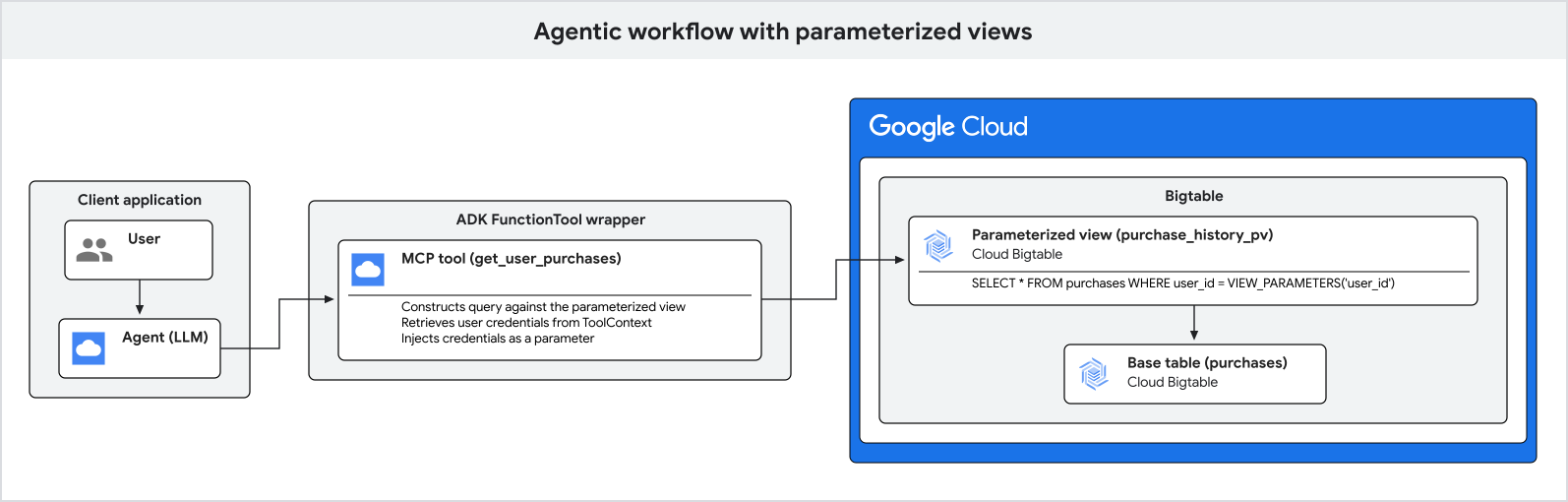
The following steps further explain the process of parameter injection:
- Your application authenticates the end user and obtains their verified user credentials and tenant organization.
- The application receives a natural language query from the user.
- The application runs the ADK agent, passing the authenticated user and tenant identifiers in the secure session state.
- When the agent decides to query the database, it determines only the natural
language filtering arguments, such as a city, and invokes the
execute_sql_parameterizedtool. - The underlying database tool securely retrieves the sensitive user
credentials and tenant boundaries from the
ToolContextand executes the query against Bigtable.
The following example shows how to set up an agentic application using ADK to query a user's purchase history.
Configure the Bigtable toolset
In your Python application, configure the ADK BigtableToolset with the
parameter names that you want to resolve out-of-band (view_parameter_names).
This maps both framework infrastructure properties, such as user_id, and
application session variables, such as tenant_id, directly to your database
query.
import google.auth
from google.adk.agents.llm_agent import LlmAgent
from google.adk.tools.bigtable.bigtable_credentials import BigtableCredentialsConfig
from google.adk.tools.bigtable.bigtable_toolset import BigtableToolset

# 1. Initialize credentials (using Application Default Credentials here)
credentials, _ = google.auth.default()
credentials_config = BigtableCredentialsConfig(credentials=credentials)

# 2. Configure the BigtableToolset
# Passing view_parameter_names=["user_id", "tenant_id"] instructs the toolset
# to automatically extract both parameters from the ToolContext at runtime
# and inject them into the query's view_parameters.
bigtable_toolset = BigtableToolset(
    credentials_config=credentials_config,
    view_parameter_names=["user_id", "tenant_id"],
)
Initialize the agent with the toolset
Pass the toolset directly to the agent's tools list. The agent will
automatically detect and expose the strongly-typed execute_sql_parameterized
tool.
# 3. Create the agent and expose the toolset
agent = LlmAgent(
    model="MODEL_NAME",
    name="purchase_history_agent",
    description="An agent that retrieves multi-tenant purchase history.",
    instruction="You are an assistant that helps users find their purchase history within their tenant.",
    tools=[bigtable_toolset],
)
Replace MODEL_NAME with the name of the model that you
want to use—for example, gemini-2.5-flash.
Run the agentic application
When executing the agent, initialize the active session with both the infrastructure user identity and your application organization state.
import asyncio
from google.adk.runners import Runner
from google.adk.sessions import InMemorySessionService
from google.genai import types

async def main():
    # 4. Initialize session service
    session_service = InMemorySessionService()

    # 5. Create a session for the authenticated user and store their specific
    # organization tenant in the state.
    authenticated_user_id = "user-anwesha-123"
    organization_tenant_id = "tenant-corp-alpha"

    session = await session_service.create_session(
        user_id=authenticated_user_id, # Resolved from tool_context.user_id
        # Resolved from tool_context.state["tenant_id"]
        state={"tenant_id": organization_tenant_id},
        app_name="purchase_history_app",
    )

    runner = Runner(
        app_name="purchase_history_app",
        agent=agent,
        session_service=session_service,
    )

    # 6. Simulate a user query
    user_query = "What did I buy in New York?"
    content = types.Content(role="user", parts=[types.Part(text=user_query)])

    # The runner runs the agent.
    # When the agent calls execute_sql_parameterized, the ADK framework resolves
    # both "user_id" and "tenant_id" out-of-band and passes them to Bigtable
    # as view parameters, completely hidden from the LLM.
    events = runner.run(
        session_id=session.id,
        user_id=session.user_id,
        new_message=content,
    )

    for event in events:
        if event.content and event.content.parts:
            print(f"Agent: {event.content.parts[0].text}")

if __name__ == "__main__":
    asyncio.run(main())
The result is a list of purchase history records for the authenticated user, filtered by the city that they specified in their query and restricted to their tenant boundary.
This process ensures that security parameters are injected out-of-band and remain completely hidden from language model manipulation.