

Create and manage protobuf schemas
This document describes how to create and perform operations on schema bundles.
In Bigtable, you can use protocol buffer (protobuf) schemas to query individual fields within protobuf messages stored as bytes in your columns. You do this by uploading your schemas in a schema bundle, a table-level resource that contains one or more of your protobuf schemas.
Using schema bundles offers the following benefits:
- Saves time and effort: with protocol buffers, you define your data structure once in a proto file, and then use the generated source code to write and read your data.
- Improves data consistency: by using a proto file as a single source of truth, you can ensure that all applications and services are using the same data model.
- Eliminates data duplication: you can use protocol buffers across projects by defining message types in proto files that reside outside of a specific project's codebase.
The process of using schemas in Bigtable starts with your proto files. A proto file is a text file where you define the structure of your data. You use the protobuf compiler tool, also referred to as protoc, to generate a protobuf file descriptor set, which is a machine-readable schema of your proto file. You then use this descriptor set to create a schema bundle.
For examples of proto files and their corresponding descriptor sets, see Example data.
The following diagram shows the process of using schemas in Bigtable:
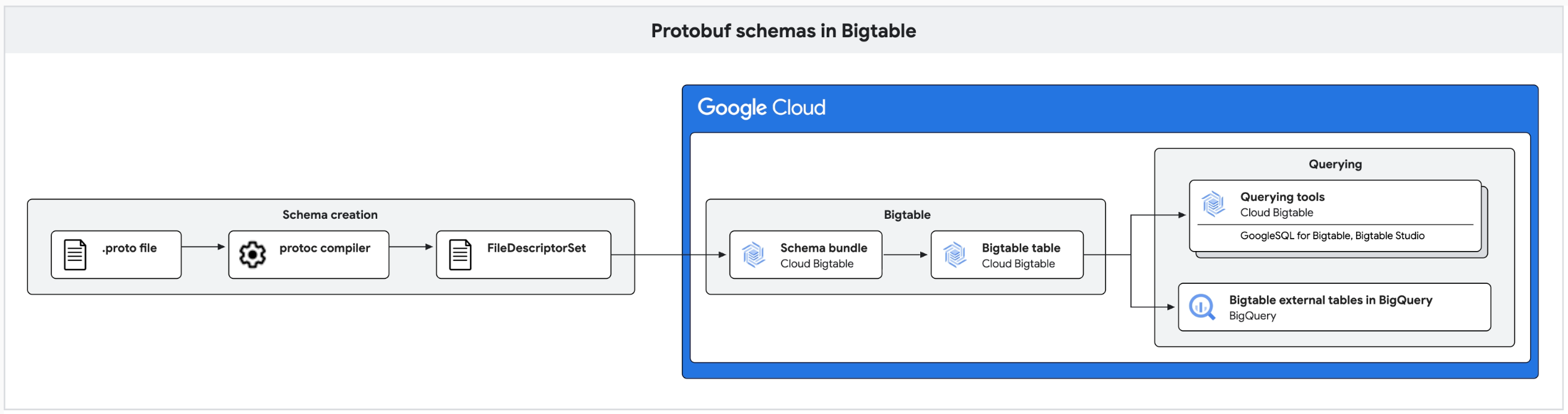
You can create schema bundles using the Google Cloud console or the Google Cloud CLI. After you upload a schema bundle to Bigtable, you can query your data using the Bigtable Studio query builder, GoogleSQL for Bigtable, or Bigtable external tables in BigQuery.
Before you begin
Take the following steps if you plan to use the gcloud CLI:
- Install the Google Cloud CLI.
Initialize the gcloud CLI:
gcloud init
Required roles
To get the permissions that you need to create and manage schema bundles, ask
your administrator to grant you the
Bigtable Admin (roles/bigtable.admin)
Identity and Access Management (IAM) role on the table.
This predefined role contains the permissions that Bigtable requires to work with schema bundles. To see the exact permissions that are required, expand the Required permissions section:
Required permissions
bigtable.schemaBundles.createbigtable.schemaBundles.updatebigtable.schemaBundles.deletebigtable.schemaBundles.getbigtable.schemaBundles.list
You might also be able to get these permissions with custom roles or other predefined roles.
For more information about Bigtable roles and permissions, see Access control with IAM.
Generate a protobuf file descriptor set
Before you can create a schema bundle, you need to generate a descriptor set from your proto files with the protobuf compiler tool.
- To install the compiler, download the package and follow the instructions in the README file.
Run the compiler:
protoc --proto_path=IMPORT_PATH --include_imports \
   --descriptor_set_out=DESCRIPTOR_OUTPUT_LOCATION PATH_TO_PROTO
Replace the following:
IMPORT_PATH: the directory where the protoc compiler searches for proto files.DESCRIPTOR_OUTPUT_LOCATION: the directory where the protoc compiler saves the generated descriptor set.PATH_TO_PROTO: the path to your proto file.
For example, to create a descriptor set named library.pb for the
library.proto file in the current directory, you can use the following command:
protoc --include_imports --descriptor_set_out=library.pb
library.proto
Create a schema bundle
Console
In the Google Cloud console, open the list of Bigtable instances.
Select an instance from the list.
In the navigation pane, click Bigtable Studio.
In the Explorer pane, next to the table where you want to create a schema bundle, click the more_vert action menu, and then click Create schema bundle.
In the Create schema bundle dialog, in the Schema Bundle ID field, enter a unique identifier for the schema bundle.
The ID must be 1 to 50 characters long, can contain only letters, numbers, underscores, and hyphens, can't start with a hyphen, and can't contain the period character (
.).In the File Descriptor Set (.pb file) field, click Browse to select the protobuf file descriptor set that you created in the Generate a protobuf file descriptor set section of this document. The file size can't exceed 4 MB.
Click Create.
The schema bundle opens in a new tab.
gcloud
To create a schema bundle, use the
gcloud bigtable schema-bundles create
command:
gcloud bigtable schema-bundles create SCHEMA_BUNDLE_ID \
    --instance=INSTANCE_ID \
    --table=TABLE_ID \
    --proto-descriptors-file=PROTO_DESCRIPTORS_FILE
Replace the following:
SCHEMA_BUNDLE_ID: a unique ID for the new schema bundle that can't contain any period ('.') characters.INSTANCE_ID: the ID of the instance in which you create the schema bundle.TABLE_ID: the ID of the table in which you create the schema bundle.PROTO_DESCRIPTORS_FILE: the path to the descriptor set that you created in the Generate a protobuf file descriptor set section of this document.
Java
To create a schema bundle, use the createSchemaBundle method:
To learn how to install and use the client library for Bigtable, see Bigtable client libraries.
To authenticate to Bigtable, set up Application Default Credentials. For more information, see Set up authentication for a local development environment.
View information about schema bundles
Before you can view information about schema bundles, you need to have a Bigtable table with at least one schema bundle. You can get information about schema bundles in a table by retrieving a single schema bundle's definition or by listing all schema bundles in a table.
Get schema bundle definition
Console
In the Google Cloud console, open the list of Bigtable instances.
Select an instance from the list.
In the navigation pane, click Bigtable Studio.
In the Explorer pane, expand the table that contains the schema bundle, and then expand Schema Bundles.
Click the schema bundle that you want to view, or click the more_vert action menu next to the schema bundle, and then click View details.
A tab opens that displays the schema bundle definition.
Optional: To open a SQL query editor tab with a sample query that uses the schema bundle, click the more_vert action menu next to the schema bundle, and then click Sample query.
gcloud
To get details about a schema bundle, use the
gcloud bigtable schema-bundles describe
command:
gcloud bigtable schema-bundles describe SCHEMA_BUNDLE_ID \
    --instance=INSTANCE_ID \
    --table=TABLE_ID
Replace the following:
SCHEMA_BUNDLE_ID: the ID of the schema bundle.INSTANCE_ID: the ID of the instance.TABLE_ID: the ID of the table.
Java
To get the definition of a schema bundle, use the getSchemaBundle method.
This method returns a SchemaBundle object that contains the schema
definition.
The following example shows how to get a schema bundle and deserialize the descriptor set to print the contents of the schema:
To learn how to install and use the client library for Bigtable, see Bigtable client libraries.
To authenticate to Bigtable, set up Application Default Credentials. For more information, see Set up authentication for a local development environment.
The output is similar to the following:
--------- Deserialized FileDescriptorSet ---------
File: my_schema.proto
Package: my_package
Message: MyMessage
--------------------------------------------------
List schema bundles in a table
Console
In the Google Cloud console, open the list of Bigtable instances.
Select an instance from the list.
In the navigation pane, click Bigtable Studio.
In the Explorer pane, expand the table that contains the schema bundles that you want to view.
Expand Schema Bundles.
The list of schema bundles in the table appears. If the table doesn't have any schema bundles, the Schema Bundles list isn't displayed.
gcloud
To see a list of schema bundles for a table, use the
gcloud bigtable schema-bundles list
command:
gcloud bigtable schema-bundles list \
    --instance=INSTANCE_ID \
    --table=TABLE_ID
Replace the following:
INSTANCE_ID: the ID of the instance.TABLE_ID: the ID of the table.
Java
To see a list of all schema bundles in a table, use the listSchemaBundles
method. This method returns a list of schema bundle IDs.
The following example shows how to list the schema bundles in a table:
To learn how to install and use the client library for Bigtable, see Bigtable client libraries.
To authenticate to Bigtable, set up Application Default Credentials. For more information, see Set up authentication for a local development environment.
The output is similar to the following:
my-schema-bundle-1
my-schema-bundle-2
Update a schema bundle
When you update a schema bundle, Bigtable checks if the new
descriptor set is backward compatible with the existing one. If Bigtable
detects incompatibility, the update fails with a FailedPrecondition error. We
recommend that you reserve deleted field numbers to prevent their reuse. For
more information, see Proto Best Practices in the protobuf documentation.
If you're sure that the incompatible changes are safe and want to force an
update, you can use the --ignore-warnings flag with gcloud CLI.
However, you can't force incompatible changes if the schema bundle is in use by
a continuous materialized view
or a logical view. Views depend on
the schema bundle's message definitions to parse and query data, so incompatible
changes would break queries against logical views and cause continuous
materialized views to fail during data processing. To make
backward-incompatible changes to a schema bundle that is referenced by a view,
you must first update or delete the referencing views.
Console
In the Google Cloud console, open the list of Bigtable instances.
Select an instance from the list.
In the navigation pane, click Bigtable Studio.
In the Explorer pane, expand the table that contains the schema bundle, and then expand Schema Bundles.
Next to the schema bundle that you want to update, click the more_vert action menu, and then click Update.
In the Update schema bundle dialog, in the File Descriptor Set (.pb file) field, select the new protobuf file descriptor set. The file size can't exceed 4 MB.
Click Save.
gcloud
To update a schema bundle to use a different descriptor set, use the
gcloud bigtable schema-bundles update
command:
gcloud bigtable schema-bundles update SCHEMA_BUNDLE_ID \
    --instance=INSTANCE_ID \
    --table=TABLE_ID \
    --proto-descriptors-file=PROTO_DESCRIPTORS_FILE
Replace the following:
SCHEMA_BUNDLE_ID: the ID of the schema bundle to update.INSTANCE_ID: the ID of the instance that contains the schema bundle.TABLE_ID: the ID of the table that contains the schema bundle.PROTO_DESCRIPTORS_FILE: the path to the new descriptor set file.
Optional: To force the update even if there are incompatible changes, append
the command with the --ignore-warnings flag. You can't force incompatible
changes if the schema bundle is in use by a continuous materialized view or
logical view.
Java
To learn how to install and use the client library for Bigtable, see Bigtable client libraries.
To authenticate to Bigtable, set up Application Default Credentials. For more information, see Set up authentication for a local development environment.
Delete a schema bundle
You can't delete a schema bundle if it's in use by a continuous materialized view or a logical view. Deleting the bundle would cause queries against logical views to fail and prevent continuous materialized views from processing incoming data. To delete the schema bundle, you must first delete any views that reference it, or update them to remove the reference.
Console
In the Google Cloud console, open the list of Bigtable instances.
Select an instance from the list.
In the navigation pane, click Bigtable Studio.
In the Explorer pane, expand the table that contains the schema bundle, and then expand Schema Bundles.
Next to the schema bundle that you want to delete, click the more_vert action menu, and then click Delete.
In the confirmation dialog, click Delete.
gcloud
To delete a schema bundle, use the
gcloud bigtable schema-bundles delete
command:
gcloud bigtable schema-bundles delete SCHEMA_BUNDLE_ID \
    --instance=INSTANCE_ID \
    --table=TABLE_ID
Replace the following:
SCHEMA_BUNDLE_ID: the ID of the schema bundle to delete.INSTANCE_ID: the ID of the instance that contains the schema bundle.TABLE_ID: the ID of the table that contains the schema bundle.
Java
To learn how to install and use the client library for Bigtable, see Bigtable client libraries.
To authenticate to Bigtable, set up Application Default Credentials. For more information, see Set up authentication for a local development environment.
Limitations
Schema bundles have the following limitations:
- You can create a maximum of 10 schema bundles per table.
- The total size of the serialized protocol buffer descriptors within a schema bundle can't exceed 4 MB. There is no direct limit on the number of individual schemas you can include in a bundle, as long as the total size of the bundle doesn't exceed this limit.
What's next
- Learn how to query protobuf data.
- Read about changing or uncertain queries.
- Refer to GoogleSQL for Bigtable overview.