

You can use artifact fingerprints to uniquely identify packages in Artifact Registry repositories.
When you push a package to a repository, Artifact Registry calculates a fingerprint for that package version. The fingerprint is a cryptographically immutable reference that you can use to validate that the package wasn't modified when moving between Google Cloud systems, such as Compute Engine and Cloud Build. After you retrieve the fingerprint of your package, you can use it to ensure your package is valid during certain Artifact Registry API requests. You can also validate local and repository instances of the same package by manually calculating the local fingerprint and comparing it to the fingerprint in the repository.
Before you begin
- Enable Artifact Registry, including enabling the Artifact Registry API and installing Google Cloud CLI.
- (Optional) Configure defaults for gcloud commands.
Required roles
To get the permissions that
you need to view package version fingerprints in Artifact Registry repositories,
ask your administrator to grant you the
Artifact Registry Reader (roles/artifactregistry.reader) IAM role on the Google Cloud project.
For more information about granting roles, see Manage access to projects, folders, and organizations.
You might also be able to get the required permissions through custom roles or other predefined roles.
Retrieve the fingerprint of a package version in your repository
Fingerprints have the following structure:
VERSION@DIRSUM_SHA256:HASH_VALUE
To retrieve the fingerprint of a package version in an Artifact Registry repository, enter the following in the Google Cloud CLI:
gcloud artifacts versions describe VERSION --repository=REPOSITORY --location=LOCATION --package=PACKAGE_NAME
Where:
- VERSION is the version of your package, such as
1.0543. - REPOSITORY is the repository containing the package you're evaluating
- LOCATION is the regional or multi-regional location for the repository. You can omit this flag if you set a default location.
- PACKAGE_NAME is the name of the package.
The response looks like this:
fingerprints:
- type: DIRSUM_SHA256
  value: 7c07b910c6dd6df6984a5591d00ad0074fe24cd81145d2c681cdfda3b3d65a04
name: projects/test-project/locations/us-west1/repositories/test-repo/packages/test-pkg/versions/v1
updateTime: '2025-08-15T00:03:41.809228Z'
The full address of the fingerprint is the package version followed by the
fingerprint type and then the hash value. In this example, the fingerprint
address is
VERSION@DIRSUM_SHA256:7c07b910c6dd6df6984a5591d00ad0074fe24cd81145d2c681cdfda3b3d65a04.
Validate fingerprints as immutable references in the Artifact Registry API
Certain Artifact Registry API requests will validate a package from your repository if the fingerprint of that package is formatted as follows:
VERSION@DIRSUM_SHA256:HASH_VALUE
For example, you want to create an attachment on a package in your repository.
In the following command, the package defined for target is formatted so that
Artifact Registry also validates the package's fingerprint:
gcloud artifacts attachments create my-attachment --target='projects/test-project/locations/us-west1/repositories/test-repo/packages/test-pkg/versions/v1@dirsum_sha256:30330c6b65a26ebf1a13e1b9ded4068b4c36d72ed3b62226e3243b5bee18fd31' --attachment-type="application/vnd.in-toto+json" --attachment-namespace="mynamespace.com" --files=att.txt
If the provided fingerprint doesn't match the fingerprint of the current
version, then Artifact Registry rejects the API request and shows a
failed_precondition error.
The following requests will validate provided fingerprints when passed using API libraries, the Google Cloud CLI, and curl:
The following requests will validate fingerprints when passed using API libraries and curl:
Validate that local and repository instances of a package are the same
To validate that a package hasn't been modified while moving between Google Cloud systems, manually calculate the fingerprint of an instance of that package outside your repository.
To manually calculate a fingerprint, do the following:
Find the fingerprint for your package in Artifact Registry as described in View the fingerprint of a package in your repository.
Manually calculate the fingerprint of your external package:
Obtain the short file name and individual SHA256 hash of each file in your package:
Open the Repositories page in the Google Cloud console:
Select your repository, and then select the image that contains the package version that you want to validate.
Click the Files tab.
Identify the short file name and SHA256 hash of each file shown on the page. The short file name is the final string following the location of the file. For example, the following screenshot shows six files for a
Version 5.0of a package in a Maven repository. Each file name begins withmy-app-5.0. The hash value for each file is shown under theHashescolumn: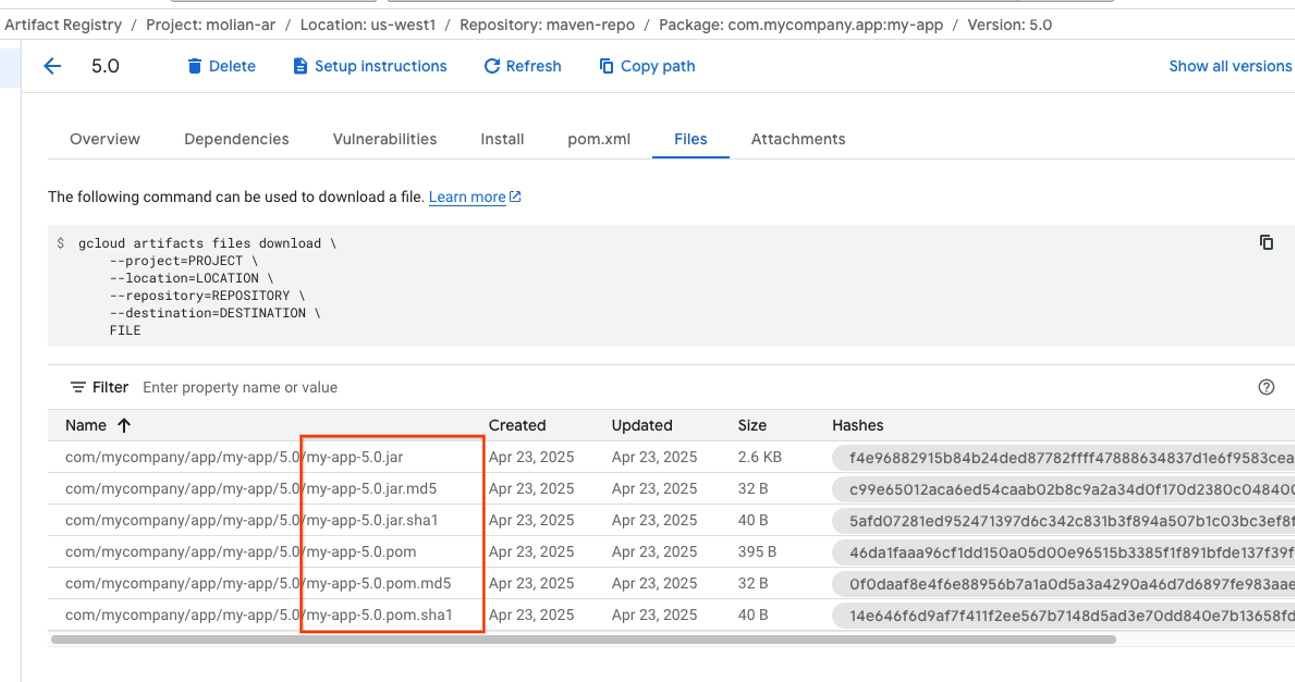
Sort the files alphabetically by short file name.
For each sorted file entry, combine the file information into the following shortened string, adding two spaces between the hash value and the file name, and ending with a null byte:
HASH_VALUE FILE_NAME/0Take each shortened string and combine them into one full sequence, with no spaces or characters between each string.
Calculate the SHA256 hash value of the full sequence. The final SHA256 hash value is the
dirsum_sha256of your external package.
Compare your manually-calculated fingerprint and the fingerprint of the package in your repository. If both fingerprints are the same, then the instance of the package in your repository hasn't been modified.