


開始使用 API Gateway 和 API 中心
本教學課程說明如何將 API Gateway 連線至 API 中心,以便從 API Gateway 專案將 API 中繼資料順暢發布至 API 中心。
在本教學課程中,您將使用 Google Cloud 控制台。
工作清單
在逐步進行本教學課程時,請使用以下工作清單。您必須完成所有工作,才能將 API Gateway 連線至 API 中樞。
事前準備
開始之前,請先完成下列必要步驟:
在專案中設定 API Gateway
如要在專案中設定 API Gateway,請按照下列步驟操作:
前往 Google Cloud 控制台的「API Gateway」頁面。
API Gateway 需要啟用下列 Google 服務:
名稱 標題 apigateway.googleapis.comAPI Gateway API servicemanagement.googleapis.comService Management API servicecontrol.googleapis.comService Control API 如果您尚未為所選專案啟用這些服務,系統會提示您啟用。
確認專案已啟用計費功能。
在主專案中設定 API Hub
建立或選取要當做主專案的 Google Cloud 專案。
主專案是 Google Cloud 您在 Google Cloud 機構中指定的專案,是所有 API 中心資源的消費者專案。一項主專案可以佈建一個 API 中心執行個體。
如要集中探索所有 API Gateway 的 API,建議您為 API 中心執行個體使用一個專屬主專案,並將多個 API Gateway 專案 (稱為執行階段專案) 附加至 API 中心執行個體。
授予連線 API Gateway 與 API 中心所需的 Identity and Access Management (IAM) 角色。
在主專案中佈建 API Hub。
將 API 部署至 API Gateway
完成 API Gateway 快速入門導覽課程,部署「hello world」Cloud Run 服務,並建立指向該服務的閘道。
舉例來說,helloworld API 會部署至 helloworld-gateway API Gateway,如 Google Cloud 控制台的「閘道」頁面所示。

將 API Gateway 專案連結至 API 中心
如要將 API Gateway 專案附加至 API 中心,請按照下列步驟操作:
- 前往 Google Cloud 控制台的「API hub」(API 中心) 頁面。
- 在下拉式選單中選取 API 中心主專案。
- 按一下左側導覽選單中的「設定」,開啟「設定」頁面。
- 前往「專案關聯」分頁。
- 按一下「Attach runtime project」(附加執行階段專案)。
系統會顯示「Select a resource」(選取資源) 窗格。 - 點選佈建 API Gateway 的 Google Cloud 專案。
- 在「專案關聯設定」窗格中,選取「API Gateway」和任何要自動匯入的 API 資產。
- 按一下 [儲存]。
執行階段專案會附加至 Google Cloud 控制台,並顯示在附加的執行階段專案清單中。
例如:

在 API 中心查看 API Gateway API
如要在 API 中心查看 API Gateway API,請按照下列步驟操作:
- 前往 Google Cloud 控制台的 API 中心「API」頁面。
- 找出您部署至 API Gateway 的「hello world」API。
如有需要,請在「篩選器」下拉式選單中選取「閘道:API Gateway」,只顯示 API Gateway API。
例如: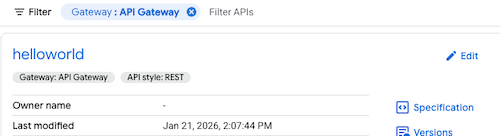
- 按一下 API 即可查看更多詳細資料,包括 API 中繼資料。
在 API 中心查看 MCP Gateway
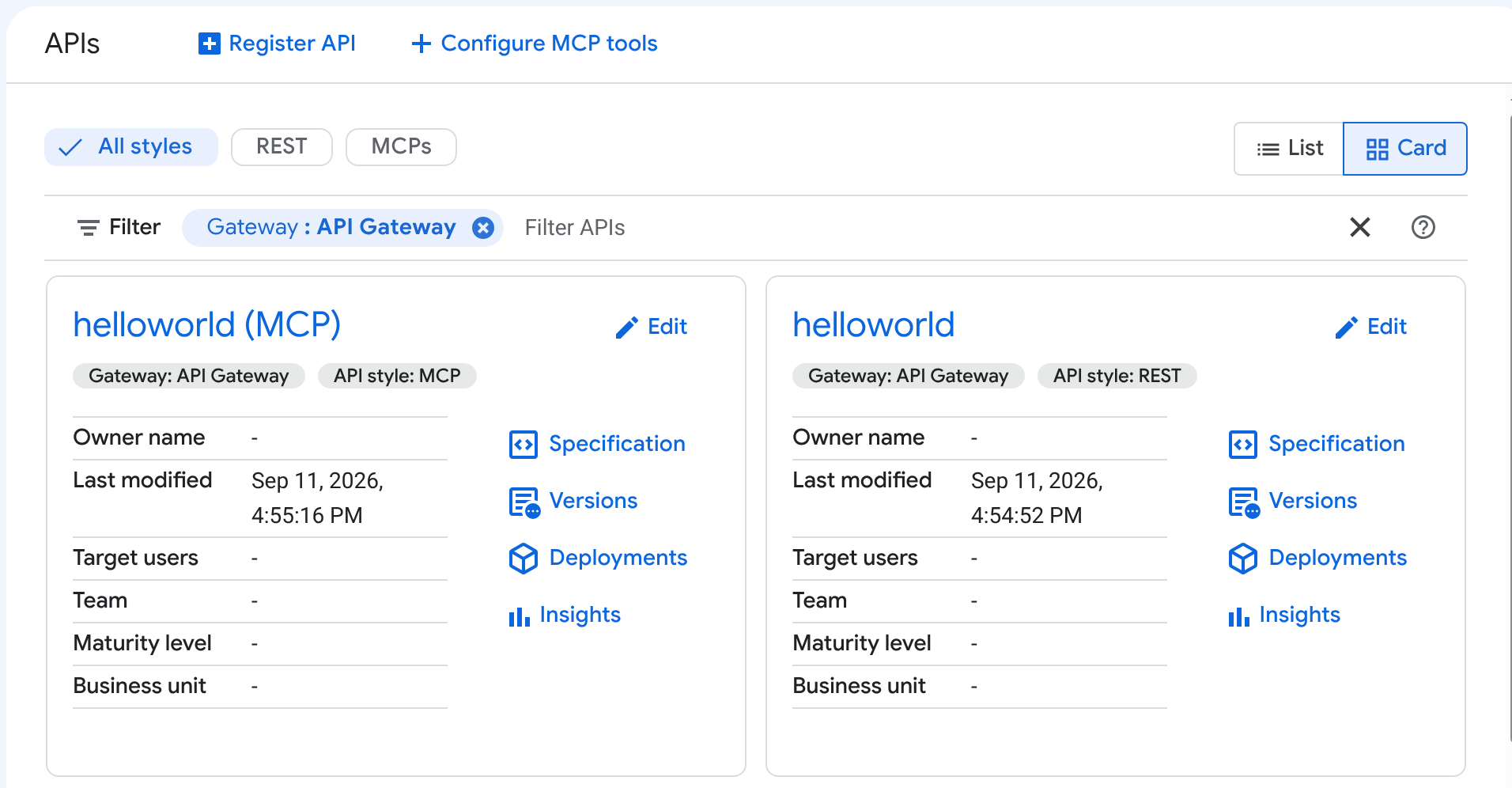
如果 API Gateway API 設定為 Model Context Protocol (MCP) 伺服器,API 中樞會為該 API 新增第二個項目,並命名為「<your-api> (MCP)」。請參閱 MCP 總覽中的「透過 API 中心和 Agent Registry 探索」。
只有啟用 MCP 的閘道,才會在 API 中心顯示這些額外項目。
如要在 API 中心查看 MCP Gateway 詳細資料,請按照下列步驟操作:
- 前往 Google Cloud 控制台的「API」頁面 (位於 API 中心)。
- 找出名為「
<your-api> (MCP)」的項目。 - 按一下 API 即可查看詳細資料,包括 MCP 專屬中繼資料和工具。
舉例來說,API 中心會同時顯示 helloworld (MCP) API 和標準的 helloworld API:
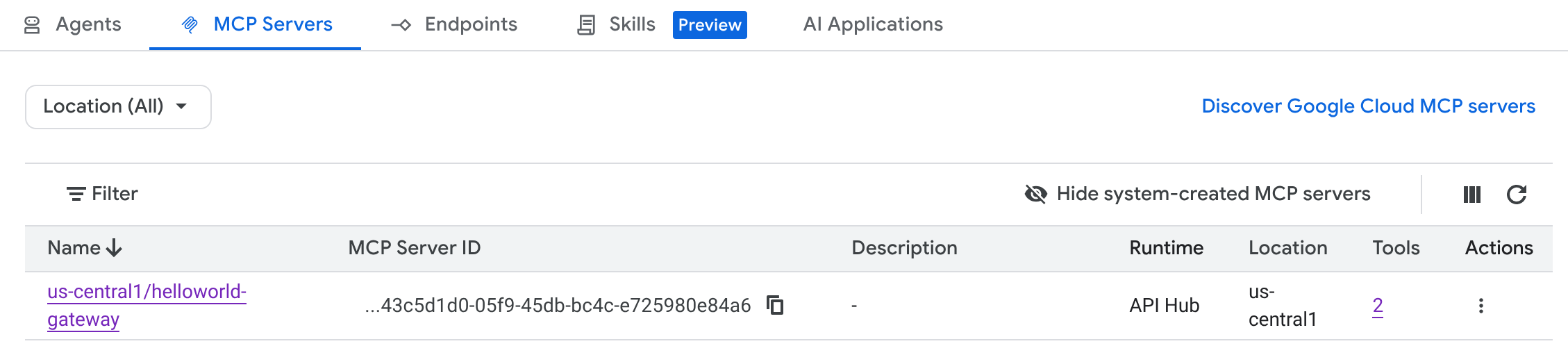
您也可以在 Agent Registry 中查看這個 MCP 伺服器。代理可以透過目錄自動探索伺服器及其工具。
舉例來說,MCP 伺服器會顯示在 Agent Registry 的「MCP 伺服器」分頁中:
清除所用資源
如要避免系統向您的 Google Cloud 帳戶收取本教學課程所用資源的費用,您可以:
您也可以刪除用於本教學課程的 Google Cloud 專案。
後續步驟
- 進一步瞭解 API Gateway
- 進一步瞭解如何透過 API 中心集中管理 API