

About migrating to Google Cloud with Hybrid Subnets
This page describes how you can use hybrid subnet routing to help migrate workloads to Google Cloud.
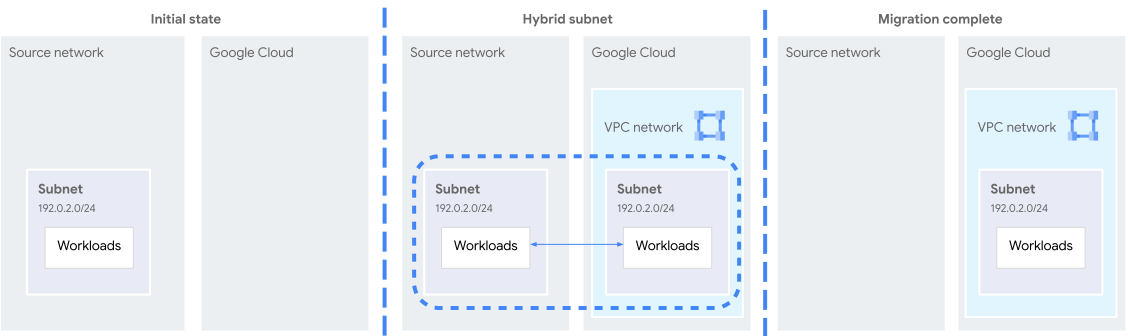
Hybrid subnet routing lets a VPC network share a CIDR block with a connected on-premises network. If a packet matches a hybrid subnet route, but the destination IP address isn't associated with a resource in that subnet, Google Cloud can route the packet to the on-premises network by using dynamic or static routes.
This configuration helps you migrate workloads to Google Cloud incrementally without needing to change their IP addresses. During migration, workloads that have migrated to your VPC network can communicate with those remaining in the on-premises network by using internal IP addresses. After all workloads have migrated, you can disable hybrid subnet routing to restore normal routing behavior.
Migrating to Google Cloud with Hybrid Subnets requires three distinct components that function together:
- Connectivity: Your on-premises and VPC networks must be connected by a network connectivity product such as Cloud VPN or Cloud Interconnect. Hybrid Subnets doesn't provide this connectivity on its own.
- Hybrid subnet routing: You must enable hybrid subnet routing by
applying the
allow-cidr-routes-overlapflag to a subnet resource. - Migration tool: You need a migration tool such as Migrate to Virtual Machines to migrate workloads to Google Cloud.
Specifications
To configure Hybrid Subnets to support migrating workloads to Google Cloud from an on-premises network, your environment must meet the following requirements.
- Connectivity requirements:
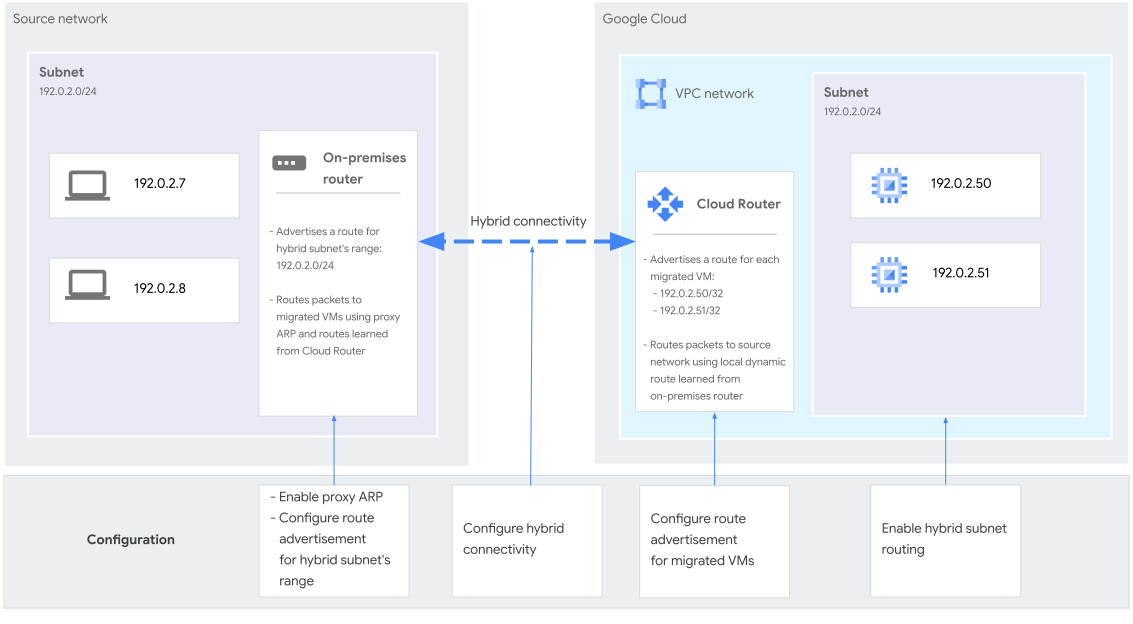
- Your on-premises and VPC networks must be connected by a network connectivity product such as Cloud VPN or Cloud Interconnect.
- The HA VPN tunnels or VLAN attachments, Cloud Routers, and subnets with hybrid subnet routing enabled must all be in the same region.
- VPC network configuration:
- An IPv4 address range of the subnet with hybrid subnet routing enabled must match a CIDR block in the on-premises network that hosts the workloads that you want to migrate. For most use cases, the primary IPv4 address range of the subnet matches a CIDR block in the on-premises network.
- You must enable hybrid subnet routing. When hybrid subnet routing is enabled, the rules for interactions between subnet routes and static routes and the rules for interactions between subnet routes and dynamic routes aren't enforced. Local and peering static or dynamic routes can exist even if their destinations match or fit within the subnet's primary IPv4 address range or any of its secondary IPv4 address ranges.
- You must configure Cloud Router custom advertised routes
to selectively advertise the IP addresses of VMs as you migrate them to
your VPC network. To support proxy ARP and longest prefix
matching, these custom advertised routes must be more specific
(have a longer subnet mask) than the IPv4 address range of the
subnet that has subnet routing enabled. You can use one
/32custom advertised route for each IP address of a migrated VM.
- On-premises network configuration:
- You must configure proxy ARP for the on-premises router.
- You must configure the on-premises router to advertise the IP address range of the shared CIDR block.
Hybrid subnet routing
When you've completed the configuration described in the Hybrid Subnets specifications, VMs in both networks can communicate by using internal IP addresses.
The following sections describe routing behavior in the VPC network that contains a subnet with hybrid subnet routing enabled and in an on-premises network once this configuration is in place.
Routing in the VPC network
During the subnet routes matching step of the VPC routing model, if a packet's destination matches a local or peering subnet route, Google Cloud attempts to deliver the packet using the matching subnet route. In a regular subnet, if the destination isn't associated with a running VM or internal forwarding rule, the packet is dropped, and all other routes are disregarded.
However, if hybrid subnet routing is enabled for the subnet, the subnet route becomes a hybrid subnet route, and the routing behavior is different:
- Matched resources: If the packet's destination matches the network interface of a running VM instance or an internal forwarding rule in the subnet, Google Cloud delivers the packet to the interface or forwarding rule. This behavior is the same as in a regular subnet.
- Unmatched resources: If the packet's destination doesn't match a resource in the subnet, Google Cloud follows the unmatched resources in hybrid subnets process. This process routes packets to next hops of local or peering static or dynamic routes as long as they have next hops in the same region as the hybrid subnet. The local or peering static or dynamic routes provide a path to deliver the packet to the on-premises network.
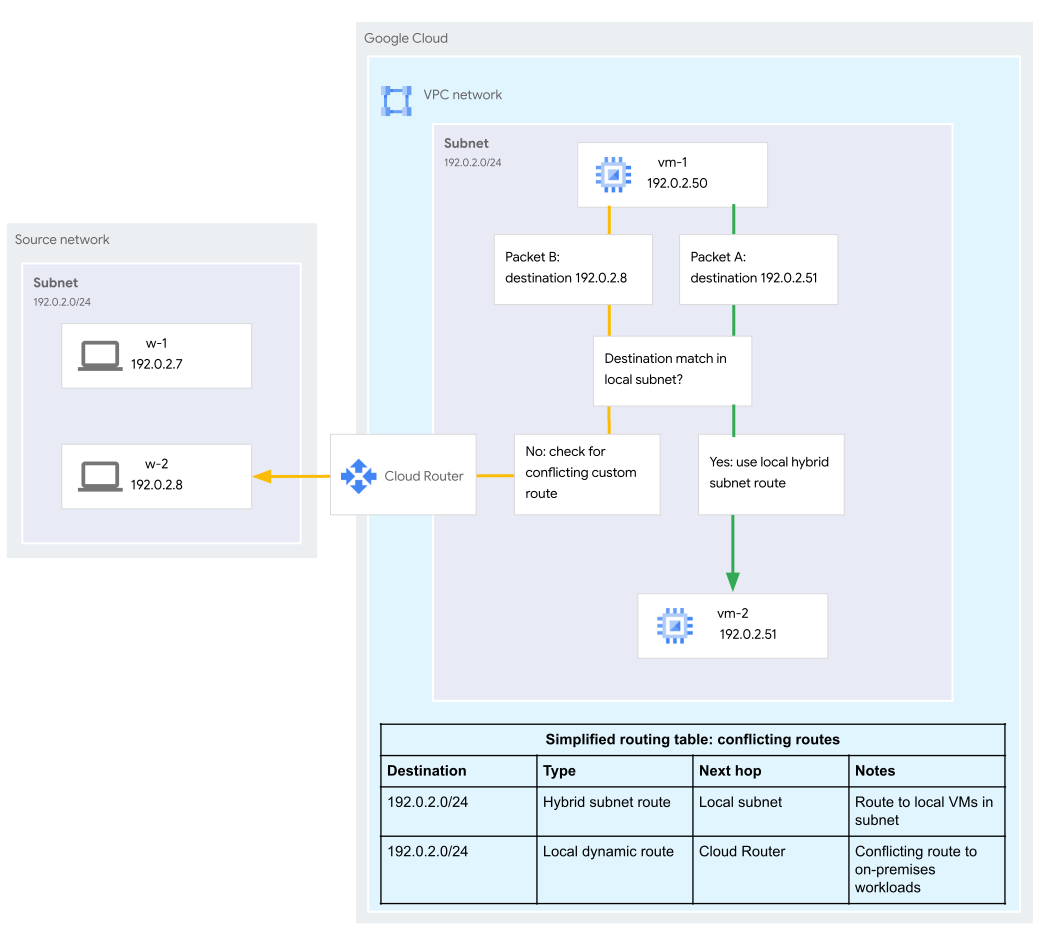
For example, in figure 3, packet A is routed to a VM in the local subnet by using a local hybrid subnet route. Packet B's destination isn't associated with a running VM or internal forwarding rule in the subnet that uses hybrid subnet routing, so Google Cloud checks for dynamic or static routes that fit within the destination range of the hybrid subnet route. A match is found, and Google Cloud uses the dynamic route to deliver Packet B to the on-premises network.
Routing in the on-premises network
This section describes routing behavior in an on-premises network. In this example, the on-premises network is connected to a VPC network by using Cloud VPN tunnels.
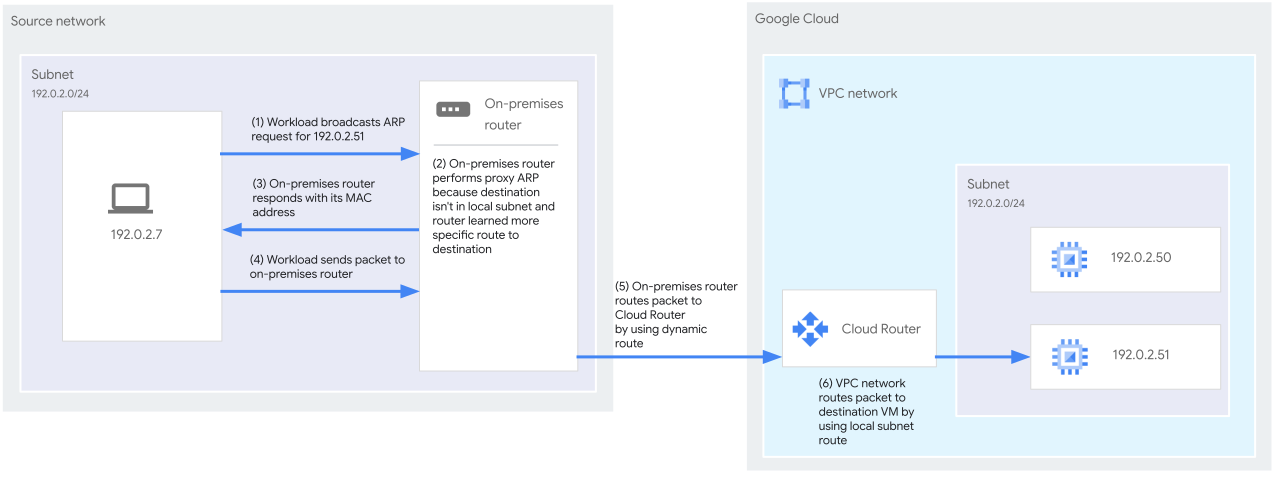
When a client VM in the on-premises network sends a packet to a server VM that is within the CIDR block that is shared by the two networks, the on-premises network's router or first-hop device performs a routing table lookup:
If the server VM is associated with an IP address in the on-premises network, the on-premises router does not intervene with proxy ARP. The server VM replies to ARP
who-haspackets from the client VM with responses that contain the server's MAC address. The client VM sends an Ethernet frame to the server VM.If the server VM is not associated with an IP address in the on-premises network, and the on-premises router has received a specific custom route advertisement from the Cloud Router BGP sessions of the Cloud VPN tunnels in the VPC network, the on-premises router intervenes with proxy ARP. The on-premises router answers ARP
who-haspackets from the client VM with responses that contain the router's MAC address. The client VM sends an Ethernet frame to the on-premises router, and the on-premises router extracts the IP packet and forwards it to one of the Cloud VPN tunnels. This delivers the packet to the VM in the subnet that has hybrid subnet routing enabled.
Limitations
Hybrid Subnets has the following limitations.
IP address management and supported traffic:
IPv6: Hybrid Subnets doesn't support IPv6 traffic.
Broadcast and multicast: Hybrid Subnets doesn't support broadcast and multicast traffic.
IP address conflicts: Hybrid Subnets doesn't detect IP address conflicts between resources in the on-premises network and the VPC network that contains the subnet that has hybrid subnet routing enabled. Make sure that each IP address, except for the default gateway, is used only once.
Unusable addresses: The first two and last two IPv4 addresses in a subnet's primary IPv4 address range can't be used by any Google Cloud resource. This rule remains in effect even if you enable hybrid subnet routing. For more information, see Unusable addresses in IPv4 subnet ranges.
Mismatched regions: Packets are dropped if the next hop of a matched static or dynamic route within the destination range of the matched hybrid subnet route is in a region different from the subnet's region. For more information, see Regionality limitation.
Static routes with network tags: Ensure that any matched static route within the destination range of the matched hybrid subnet route doesn't use network tags. Matched static routes that use network tags results in packet loss when there are high packet rates.
Unsupported product interactions: Don't use Hybrid Subnets with the following.
Network Connectivity Center (NCC): NCC is not supported with Hybrid Subnets. Google Cloud doesn't prevent you from exporting subnets that have hybrid subnet routing enabled to an NCC hub, but doing so can result in unpredictable routing behavior.
Hybrid connectivity NEGs: Google's health check probe systems for centralized health checks can't communicate with endpoints in a hybrid NEG if the endpoints fit within a hybrid subnet route.
Hybrid NAT: Hybrid NAT isn't supported with Hybrid Subnets. Hybrid NAT doesn't perform source NAT (SNAT) on packets sent from VMs to destinations in a static or dynamic route if a hybrid subnet route is matched first.
Also keep the following practical limitations in mind.
The on-premises network must support proxy ARP: Hybrid Subnets doesn't support migrating workloads from remote networks in other cloud service providers such as Azure or AWS, because those remote networks don't support proxy ARP.
The on-premises network must accept
/32route advertisements: If you use layer 3 Partner Interconnect, check with the partner to see if they support receiving/32prefixes.
Migration options
Google recommends using Migrate to Virtual Machines with Hybrid Subnets to automate the process of migrating VMs from a VMware source or from a Google Cloud VMware Engine source.
Alternatively, you can use third-party migration tools with Hybrid Subnets, as long as the requirements of Hybrid Subnets that are described in this document are fulfilled.
For information about planning a migration with Migrate to Virtual Machines, see Migration journey with Migrate to VMs.
For more information about migration options, see Migration resources.
For support with planning a migration to Google Cloud by using Hybrid Subnets, file a support case.
Considerations for using Hybrid Subnets
The following sections describe considerations for using Hybrid Subnets to migrate workloads to Google Cloud.
Proxy ARP and Hybrid Subnets
Hybrid Subnets requires proxy ARP to be configured on the on-premises network's router or first-hop device (the point where a host first sends traffic that has a destination outside of its local network).
The first-hop device can be a router, virtual appliance, firewall, or a VM running a software solution such as choparp.
We recommend the following for using proxy ARP in your on-premises network:
- Consult your network fabric vendor for best practices related to enabling proxy ARP and securing your network environment.
- Disable proxy ARP after you have completed your migration to Google Cloud.
Regionality limitation
This limitation applies when traffic matches a hybrid subnet route but the destination IP address isn't associated with a running VM or internal forwarding rule. During the unmatched resources in hybrid subnets step of Google Cloud's route selection model, routes are evaluated as if a packet's source is in the same VPC network as the hybrid subnet route.
If a static or dynamic route with a destination range that fits within a hybrid subnet route has next hops in a different region:
- If the route has a mix of next hops, where some are in the same region as the hybrid subnet route, and some are in other regions, traffic is dropped whenever ECMP selects a next hop in a region other than the subnet. This packet drop happens even if the packet also matches a less specific route that has next hops in the subnet's region.
- If the route has no next hops in the same region as the subnet that uses hybrid subnet routing, the packet is dropped.
Make sure that the following resources are located in the same region:
- The subnet that has hybrid subnet routing enabled
- The Cloud Router that learns routes to your on-premises network
- The HA VPN tunnels or VLAN attachments that provide hybrid connectivity
For example, suppose there is a subnet with the IP address range
192.0.2.0/24 that has hybrid subnet routing enabled. The subnet is in the
region us-central1. The Cloud Router has learned two routes with
destination ranges that fit within the hybrid subnet route:
- A dynamic route with destination range
192.0.2.0/25and a next hop in theus-central1region - A dynamic route with destination range
192.0.2.0/30and a next hop in theus-west1region.
A packet is sent to destination 192.0.2.2. This IP address isn't associated
with a running VM or internal forwarding rule in the local subnet,
so the route selection model selects the custom route that has the most specific
destination, which is 192.0.2.0/30. This route doesn't have a next hop in the
subnet's region, so the packet is dropped.
For more information, see unmatched resources in hybrid subnets.
VPC Network Peering
You can connect a VPC network containing a subnet that uses hybrid subnet routing to a peer VPC network by using VPC Network Peering.
Traffic from clients in a peered network can reach destinations within the shared CIDR block, regardless of whether the destinations are Google Cloud resources or in the on-premises network. If a packet from a client in the peered network has a destination that matches a peering hybrid subnet route, and the destination doesn't match a running VM or internal forwarding rule, the packet can be routed by using a static or dynamic route in the peered VPC network.
Routing using a static or dynamic route in the peered VPC network doesn't depend on exchanging custom routes with the VPC network that contains the client. However, the following are still relevant:
Ensure that the usage of the dynamic routes per region per peering group quota in the VPC network that contains the client is less than the quota's limit.
Ensure that no other routes in the client's VPC network exist for the destination ranges that match the static or dynamic routes in the peered network that fit within the peering hybrid subnet route.
Network performance
Hybrid Subnets uses Layer 3 of the OSI model to route packets between the on-premises and VPC networks. This approach helps Hybrid Subnets avoid challenges with latency, jitter, and throughput that can happen during migrations when some workloads exist on an on-premises network but other workloads have migrated to the cloud.
In particular, avoiding Layer 2 tunneling helps prevent the performance degradation that's associated with the encapsulation and encryption of an additional Layer 2 overlay. Additionally, Layer 3 routing lets Hybrid Subnets avoid a common issue with Layer 2 tunneling, where traffic is sent to a central node before reaching destinations that can be close to the traffic's point of origin. This issue is sometimes called network tromboning.
Because Hybrid Subnets uses this routing approach, you can expect performance that's similar to, or the same as, a network that doesn't use Hybrid Subnets.
Firewalls and Hybrid Subnets
Hybrid Subnets avoids challenges related to using firewalls with traffic that's encapsulated in Layer 2 overlays. For Layer 2 traffic, firewalls can only inspect packets at or beyond the overlay endpoints, unless you take specific measures such as transparent decryption or deep inspections of overlay traffic.
No special considerations are needed to use existing firewalls and firewall rules with Hybrid Subnets. However, you need to Configure firewall rules to ensure that Google Cloud VMs can communicate with workloads in the on-premises network.
Pricing
For information about pricing for Hybrid Subnets, see Virtual Private Cloud pricing.
What's next
- To prepare a VPC network for Hybrid Subnets connectivity, see Prepare for Hybrid Subnets connectivity.