

Create and access services
Private Service Connect provides multiple ways to connect service consumers to service producers. A common configuration is to make a load-balanced service available by creating a Private Service Connect published service. After the service is published, service consumers in another VPC network can access the service through a Private Service Connect endpoint. The following tutorials explain how to complete these steps:
- Create a load-balanced service
- Make the service accessible from other VPC networks
- Access the service from another VPC network
Connecting service consumers to service producers creates the following configuration.
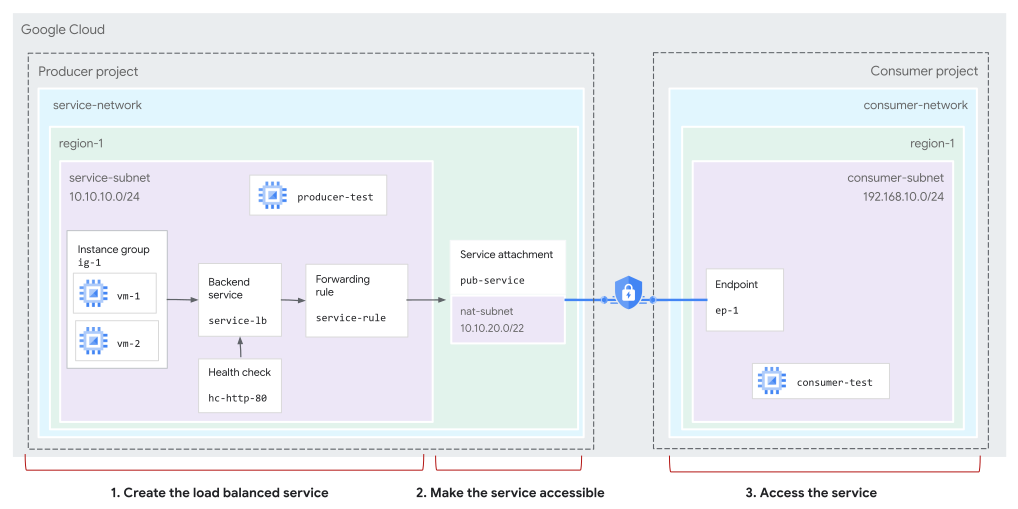
An endpoint lets service consumers send traffic from the consumer's VPC network to services in the service producer's VPC network (click to enlarge).
Client VMs send requests to the internal IP address of the endpoint, which is local to the consumer's VPC network. Private Service Connect directs the traffic to the load balancer backend VMs.
Private Service Connect endpoints, Private Service Connect service attachments, and load balancers are logical constructs. From a physical perspective, traffic goes directly from the physical server that hosts the client VM to the physical server that hosts the producer load balancer VM. For more information, see Private Service Connect architecture and performance.