הוספת מודעות לנכסי VOD

בדף הזה מוסבר איך להוסיף מודעות להפעלה של נכס וידאו על פי דרישה (VOD) באמצעות Video Stitcher API, ‏ curl, PowerShell או ספריות הלקוח.

לפני שמתחילים

לפני שקוראים ל-Video Stitcher API, צריך לבצע את השלבים הבאים:

  1. נכנסים לחשבון Google Cloud . אם אתם משתמשים חדשים ב- Google Cloud, צרו חשבון כדי שתוכלו להעריך את הביצועים של המוצרים שלנו בתרחישים מהעולם האמיתי. לקוחות חדשים מקבלים בחינם גם קרדיט בשווי 300$ להרצה, לבדיקה ולפריסה של עומסי העבודה.
  2. התקינו את ה-CLI של Google Cloud.

  3. אם אתם משתמשים בספק זהויות חיצוני (IdP), קודם אתם צריכים להיכנס ל-CLI של gcloud באמצעות המאגר המאוחד לניהול זהויות.

  4. כדי לאתחל את ה-CLI של gcloud, הריצו את הפקודה הבאה:

    gcloud init
  5. יוצרים או בוחרים Google Cloud פרויקט.

    תפקידים שנדרשים כדי לבחור או ליצור פרויקט

    • Select a project: כדי לבחור פרויקט לא צריך תפקיד IAM ספציפי – אפשר לבחור כל פרויקט שקיבלתם בו תפקיד.
    • יצירת פרויקט: כדי ליצור פרויקט, צריך את התפקיד Project Creator (יצירת פרויקטים) (roles/resourcemanager.projectCreator), שכולל את ההרשאה resourcemanager.projects.create. איך מקצים תפקידים
    • יוצרים Google Cloud פרויקט:

      gcloud projects create PROJECT_ID

      מחליפים את PROJECT_ID בשם של פרויקט Google Cloud שיוצרים.

    • בוחרים את הפרויקט שיצרתם: Google Cloud

      gcloud config set project PROJECT_ID

      מחליפים את PROJECT_ID בשם הפרויקט ב- Google Cloud .

  6. מוודאים שהחיוב מופעל בפרויקט Google Cloud .

  7. מפעילים את Video Stitcher API:

    תפקידים שנדרשים להפעלת ממשקי API

    כדי להפעיל ממשקי API, נדרשת ההרשאה serviceusage.services.enable. אם יצרתם את הפרויקט, סביר להניח שכבר יש לכם את ההרשאה הזו דרך התפקיד 'בעלים' (roles/owner). אחרת, תוכלו לקבל את ההרשאה הזו דרך התפקיד 'אדמין של Service Usage' (roles/serviceusage.serviceUsageAdmin). איך מקצים תפקידים

    gcloud services enable videostitcher.googleapis.com
  8. אם אתם משתמשים במעטפת מקומית, אתם צריכים ליצור פרטי כניסה לאימות מקומי עבור חשבון המשתמש:

    gcloud auth application-default login

    אם אתם משתמשים ב-Cloud Shell, אין צורך לבצע את הפעולה הזו.

    אם מוחזרת שגיאת אימות ואתם משתמשים בספק זהויות חיצוני (IdP), ודאו ש נכנסתם ל-CLI של gcloud באמצעות המאגר המאוחד לניהול זהויות.

  9. מעניקים תפקידים לחשבון המשתמש. מריצים את הפקודה הבאה לכל אחד מהתפקידים הבאים ב-IAM: roles/videostitcher.admin

    gcloud projects add-iam-policy-binding PROJECT_ID --member="user:USER_IDENTIFIER" --role=ROLE

    מחליפים את מה שכתוב בשדות הבאים:

    • PROJECT_ID: מזהה הפרויקט.
    • USER_IDENTIFIER: המזהה של חשבון המשתמש . לדוגמה, myemail@example.com.
    • ROLE: תפקיד ה-IAM שאתם מקצים לחשבון המשתמש.
  10. התקינו את ה-CLI של Google Cloud.

  11. אם אתם משתמשים בספק זהויות חיצוני (IdP), קודם אתם צריכים להיכנס ל-CLI של gcloud באמצעות המאגר המאוחד לניהול זהויות.

  12. כדי לאתחל את ה-CLI של gcloud, הריצו את הפקודה הבאה:

    gcloud init
  13. יוצרים או בוחרים Google Cloud פרויקט.

    תפקידים שנדרשים כדי לבחור או ליצור פרויקט

    • Select a project: כדי לבחור פרויקט לא צריך תפקיד IAM ספציפי – אפשר לבחור כל פרויקט שקיבלתם בו תפקיד.
    • יצירת פרויקט: כדי ליצור פרויקט, צריך את התפקיד Project Creator (יצירת פרויקטים) (roles/resourcemanager.projectCreator), שכולל את ההרשאה resourcemanager.projects.create. איך מקצים תפקידים
    • יוצרים Google Cloud פרויקט:

      gcloud projects create PROJECT_ID

      מחליפים את PROJECT_ID בשם של פרויקט Google Cloud שיוצרים.

    • בוחרים את הפרויקט שיצרתם: Google Cloud

      gcloud config set project PROJECT_ID

      מחליפים את PROJECT_ID בשם הפרויקט ב- Google Cloud .

  14. מוודאים שהחיוב מופעל בפרויקט Google Cloud .

  15. מפעילים את Video Stitcher API:

    תפקידים שנדרשים להפעלת ממשקי API

    כדי להפעיל ממשקי API, נדרשת ההרשאה serviceusage.services.enable. אם יצרתם את הפרויקט, סביר להניח שכבר יש לכם את ההרשאה הזו דרך התפקיד 'בעלים' (roles/owner). אחרת, תוכלו לקבל את ההרשאה הזו דרך התפקיד 'אדמין של Service Usage' (roles/serviceusage.serviceUsageAdmin). איך מקצים תפקידים

    gcloud services enable videostitcher.googleapis.com
  16. אם אתם משתמשים במעטפת מקומית, אתם צריכים ליצור פרטי כניסה לאימות מקומי עבור חשבון המשתמש:

    gcloud auth application-default login

    אם אתם משתמשים ב-Cloud Shell, אין צורך לבצע את הפעולה הזו.

    אם מוחזרת שגיאת אימות ואתם משתמשים בספק זהויות חיצוני (IdP), ודאו ש נכנסתם ל-CLI של gcloud באמצעות המאגר המאוחד לניהול זהויות.

  17. מעניקים תפקידים לחשבון המשתמש. מריצים את הפקודה הבאה לכל אחד מהתפקידים הבאים ב-IAM: roles/videostitcher.admin

    gcloud projects add-iam-policy-binding PROJECT_ID --member="user:USER_IDENTIFIER" --role=ROLE

    מחליפים את מה שכתוב בשדות הבאים:

    • PROJECT_ID: מזהה הפרויקט.
    • USER_IDENTIFIER: המזהה של חשבון המשתמש . לדוגמה, myemail@example.com.
    • ROLE: תפקיד ה-IAM שאתם מקצים לחשבון המשתמש.
  18. כדי להשתמש במדריך הזה, צריך קובץ מניפסט של MPEG-DASH ‏ (MPD) או קובץ מניפסט של HTTP Live Streaming ‏ (HLS) ‏ (M3U8) וקובצי הפלחים המשויכים. אתם יכולים להשתמש בקובצי VOD קיימים או ליצור קובצי מקור של VOD באמצעות Transcoder API.
  19. אפשרות נוספת היא להשתמש ברשת להעברת תוכן (CDN) עם המדריך הזה להתחלה מהירה. אם לא הגדרתם CDN, פועלים לפי השלבים במדריך למתחילים בנושא Media CDN עם השינויים הבאים:
    1. מעלים קובצי מניפסט של MPEG-DASH או HLS וקטעי מדיה לקטגוריה של Cloud Storage.
    2. אתם לא חייבים להגדיר את הקטגוריה של Cloud Storage כקריאה לכולם.
    3. אפשר להשתמש בכתובות URL חתומות או לא חתומות.

יצירת מפתח CDN

ה-API של Video Stitcher יכול לאחזר סרטונים מרשת להצגת תכנים (CDN). אם נכס הווידאו מוגן באמצעות חתימה על כתובת URL, צריך לרשום מפתח CDN ב-Video Stitcher API.

כדי לרשום את מפתח ה-CDN, משתמשים ב-method‏ projects.locations.cdnKeys.create.

REST ‏ (Media CDN)

לפני שמשתמשים בנתוני הבקשה, צריך להחליף את הנתונים הבאים:

  • PROJECT_NUMBER: מספר הפרויקט שלכם. הוא מופיע בשדה מספר הפרויקט בדף הגדרות IAM. Google Cloud
  • LOCATION: המיקום שבו ייצור מפתח ה-CDN. צריך להשתמש באחד מהאזורים הנתמכים
    הצגת מיקומים
    • us-central1
    • us-east1
    • us-west1
    • asia-east1
    • asia-south1
    • asia-southeast1
    • europe-west1
    • southamerica-east1
  • CDN_KEY_ID: מזהה שמוגדר על ידי המשתמש למפתח ה-CDN, שיהפוך לרכיב הסופי של שם המשאב של מפתח ה-CDN. המזהה יכול לכלול רק אותיות קטנות, מספרים ומקפים. התו הראשון חייב להיות אות, התו האחרון חייב להיות אות או מספר, והמזהה כולו יכול לכלול עד 63 תווים.
  • HOSTNAME: שם המארח של ה-CDN שרוצים לשייך למפתח ה-CDN הזה (לדוגמה, כתובת IP כמו 35.190.60.252 או שם דומיין כמו cdn.example.com)
  • MEDIA_CDN_KEYNAME: השם של קבוצת המפתחות של מפתח Media CDN
  • MEDIA_CDN_PRIVATE_KEY: המפתח הפרטי Ed25519 בגודל 64 בייט כמחרוזת בקידוד base64. מידע נוסף זמין במאמר בנושא יצירת מפתח פרטי ל-Media CDN.

כדי לשלוח את הבקשה צריך להרחיב אחת מהאפשרויות הבאות:

אתם אמורים לקבל תגובת JSON שדומה לזו:

{
  "name": "projects/PROJECT_NUMBER/locations/LOCATION/operations/OPERATION_ID",
  "metadata": {
    "@type": "type.googleapis.com/google.cloud.common.OperationMetadata",
    "createTime": CREATE_TIME,
    "target": "projects/PROJECT_NUMBER/locations/LOCATION/cdnKeys/CDN_KEY_ID",
    "verb": "create",
    "cancelRequested": false,
    "apiVersion": "v1"
  },
  "done": false
}
הפקודה הזו יוצרת פעולה ממושכת (LRO) שאפשר להריץ עליה שאילתה כדי לעקוב אחרי ההתקדמות. מעתיקים את הערך שמוחזר OPERATION_ID, שהוא החלק האחרון בשדה name, כדי להשתמש בו בקטע הבא.

REST (Cloud CDN)

לפני שמשתמשים בנתוני הבקשה, צריך להחליף את הנתונים הבאים:

  • PROJECT_NUMBER: מספר הפרויקט שלכם. הוא מופיע בשדה מספר הפרויקט בדף הגדרות IAM. Google Cloud
  • LOCATION: המיקום שבו ייצור מפתח ה-CDN. צריך להשתמש באחד מהאזורים הנתמכים
    הצגת מיקומים
    • us-central1
    • us-east1
    • us-west1
    • asia-east1
    • asia-south1
    • asia-southeast1
    • europe-west1
    • southamerica-east1
  • CDN_KEY_ID: מזהה שמוגדר על ידי המשתמש למפתח ה-CDN, שיהפוך לרכיב הסופי של שם המשאב של מפתח ה-CDN. המזהה יכול לכלול רק אותיות קטנות, מספרים ומקפים. התו הראשון חייב להיות אות, התו האחרון חייב להיות אות או מספר, והמזהה כולו יכול לכלול עד 63 תווים.
  • HOSTNAME: שם המארח של ה-CDN שרוצים לשייך למפתח ה-CDN הזה (לדוגמה, כתובת IP כמו 35.190.60.252 או שם דומיין כמו cdn.example.com)
  • GCDN_KEYNAME: השם של מפתח Cloud CDN
  • GCDN_PRIVATE_KEY: מחרוזת הסוד בקידוד base64 של מפתח Cloud CDN

כדי לשלוח את הבקשה צריך להרחיב אחת מהאפשרויות הבאות:

אתם אמורים לקבל תגובת JSON שדומה לזו:

{
  "name": "projects/PROJECT_NUMBER/locations/LOCATION/operations/OPERATION_ID",
  "metadata": {
    "@type": "type.googleapis.com/google.cloud.common.OperationMetadata",
    "createTime": CREATE_TIME,
    "target": "projects/PROJECT_NUMBER/locations/LOCATION/cdnKeys/CDN_KEY_ID",
    "verb": "create",
    "cancelRequested": false,
    "apiVersion": "v1"
  },
  "done": false
}
הפקודה הזו יוצרת פעולה ממושכת (LRO) שאפשר להריץ עליה שאילתה כדי לעקוב אחרי ההתקדמות. מעתיקים את הערך שמוחזר OPERATION_ID, שהוא החלק האחרון בשדה name, כדי להשתמש בו בקטע הבא.

REST (Akamai CDN)

לפני שמשתמשים בנתוני הבקשה, צריך להחליף את הנתונים הבאים:

  • PROJECT_NUMBER: מספר הפרויקט שלכם. הוא מופיע בשדה מספר הפרויקט בדף הגדרות IAM. Google Cloud
  • LOCATION: המיקום שבו ייצור מפתח ה-CDN. צריך להשתמש באחד מהאזורים הנתמכים
    הצגת מיקומים
    • us-central1
    • us-east1
    • us-west1
    • asia-east1
    • asia-south1
    • asia-southeast1
    • europe-west1
    • southamerica-east1
  • CDN_KEY_ID: מזהה שמוגדר על ידי המשתמש למפתח ה-CDN, שיהפוך לרכיב הסופי של שם המשאב של מפתח ה-CDN. המזהה יכול לכלול רק אותיות קטנות, מספרים ומקפים. התו הראשון חייב להיות אות, התו האחרון חייב להיות אות או מספר, והמזהה כולו יכול לכלול עד 63 תווים.
  • HOSTNAME: שם המארח של ה-CDN שרוצים לשייך למפתח ה-CDN הזה (לדוגמה, כתובת IP כמו 35.190.60.252 או שם דומיין כמו cdn.example.com)
  • AKAMAI_TOKEN_KEY: מחרוזת בקידוד base64 של מפתח האסימון להגדרת קצה של Akamai CDN

כדי לשלוח את הבקשה צריך להרחיב אחת מהאפשרויות הבאות:

אתם אמורים לקבל תגובת JSON שדומה לזו:

{
  "name": "projects/PROJECT_NUMBER/locations/LOCATION/operations/OPERATION_ID",
  "metadata": {
    "@type": "type.googleapis.com/google.cloud.common.OperationMetadata",
    "createTime": CREATE_TIME,
    "target": "projects/PROJECT_NUMBER/locations/LOCATION/cdnKeys/CDN_KEY_ID",
    "verb": "create",
    "cancelRequested": false,
    "apiVersion": "v1"
  },
  "done": false
}
הפקודה הזו יוצרת פעולה ממושכת (LRO) שאפשר להריץ עליה שאילתה כדי לעקוב אחרי ההתקדמות. מעתיקים את הערך שמוחזר OPERATION_ID, שהוא החלק האחרון בשדה name, כדי להשתמש בו בקטע הבא.

C#

לפני שמנסים את הדוגמה הזו, צריך לפעול לפי C# הוראות ההגדרה במאמר הפעלה מהירה של Video Stitcher API באמצעות ספריות לקוח. מידע נוסף מופיע במאמרי העזרה של Video Stitcher API C# API.

כדי לבצע אימות ב-Video Stitcher API, צריך להגדיר את Application Default Credentials. מידע נוסף זמין במאמר הגדרת אימות לסביבת פיתוח מקומית.


using Google.Api.Gax.ResourceNames;
using Google.Cloud.Video.Stitcher.V1;
using Google.LongRunning;
using Google.Protobuf;
using System.Threading.Tasks;

public class CreateCdnKeySample
{
    public async Task<CdnKey> CreateCdnKeyAsync(
    string projectId, string location, string cdnKeyId, string hostname,
    string keyName, string privateKey, bool isMediaCdn)
    {
        // Create the client.
        VideoStitcherServiceClient client = VideoStitcherServiceClient.Create();

        CdnKey cdnKey = new CdnKey
        {
            Hostname = hostname
        };

        if (isMediaCdn)
        {
            cdnKey.MediaCdnKey = new MediaCdnKey
            {
                KeyName = keyName,
                PrivateKey = ByteString.CopyFromUtf8(privateKey)
            };
        }
        else
        {
            cdnKey.GoogleCdnKey = new GoogleCdnKey
            {
                KeyName = keyName,
                PrivateKey = ByteString.CopyFromUtf8(privateKey)
            };
        }

        CreateCdnKeyRequest request = new CreateCdnKeyRequest
        {
            ParentAsLocationName = LocationName.FromProjectLocation(projectId, location),
            CdnKeyId = cdnKeyId,
            CdnKey = cdnKey
        };

        // Make the request.
        Operation<CdnKey, OperationMetadata> response = await client.CreateCdnKeyAsync(request);

        // Poll until the returned long-running operation is complete.
        Operation<CdnKey, OperationMetadata> completedResponse = await response.PollUntilCompletedAsync();

        // Retrieve the operation result.
        return completedResponse.Result;
    }
}

Go

לפני שמנסים את הדוגמה הזו, צריך לפעול לפי Go הוראות ההגדרה במאמר הפעלה מהירה של Video Stitcher API באמצעות ספריות לקוח. מידע נוסף מופיע במאמרי העזרה של Video Stitcher API Go API.

כדי לבצע אימות ב-Video Stitcher API, צריך להגדיר את Application Default Credentials. מידע נוסף זמין במאמר הגדרת אימות לסביבת פיתוח מקומית.

import (
	"context"
	"fmt"
	"io"

	stitcher "cloud.google.com/go/video/stitcher/apiv1"
	stitcherstreampb "cloud.google.com/go/video/stitcher/apiv1/stitcherpb"
)

// createCDNKey creates a CDN key. A CDN key is used to retrieve protected media.
// If isMediaCDN is true, create a Media CDN key. If false, create a Cloud
// CDN key. To create a privateKey value for Media CDN, see
// https://cloud.google.com/video-stitcher/docs/how-to/managing-cdn-keys#create-private-key-media-cdn.
func createCDNKey(w io.Writer, projectID, keyID, privateKey string, isMediaCDN bool) error {
	// projectID := "my-project-id"
	// keyID := "my-cdn-key"
	// privateKey := "my-private-key"
	// isMediaCDN := true
	location := "us-central1"
	hostname := "cdn.example.com"
	keyName := "cdn-key"
	ctx := context.Background()
	client, err := stitcher.NewVideoStitcherClient(ctx)
	if err != nil {
		return fmt.Errorf("stitcher.NewVideoStitcherClient: %w", err)
	}
	defer client.Close()

	var req *stitcherstreampb.CreateCdnKeyRequest
	if isMediaCDN {
		req = &stitcherstreampb.CreateCdnKeyRequest{
			Parent:   fmt.Sprintf("projects/%s/locations/%s", projectID, location),
			CdnKeyId: keyID,
			CdnKey: &stitcherstreampb.CdnKey{
				CdnKeyConfig: &stitcherstreampb.CdnKey_MediaCdnKey{
					MediaCdnKey: &stitcherstreampb.MediaCdnKey{
						KeyName:    keyName,
						PrivateKey: []byte(privateKey),
					},
				},
				Hostname: hostname,
			},
		}
	} else {
		req = &stitcherstreampb.CreateCdnKeyRequest{
			Parent:   fmt.Sprintf("projects/%s/locations/%s", projectID, location),
			CdnKeyId: keyID,
			CdnKey: &stitcherstreampb.CdnKey{
				CdnKeyConfig: &stitcherstreampb.CdnKey_GoogleCdnKey{
					GoogleCdnKey: &stitcherstreampb.GoogleCdnKey{
						KeyName:    keyName,
						PrivateKey: []byte(privateKey),
					},
				},
				Hostname: hostname,
			},
		}
	}

	// Creates the CDN key.
	op, err := client.CreateCdnKey(ctx, req)
	if err != nil {
		return fmt.Errorf("client.CreateCdnKey: %w", err)
	}
	response, err := op.Wait(ctx)
	if err != nil {
		return err
	}

	fmt.Fprintf(w, "CDN key: %v", response.GetName())
	return nil
}

Java

לפני שמנסים את הדוגמה הזו, צריך לפעול לפי Java הוראות ההגדרה במאמר הפעלה מהירה של Video Stitcher API באמצעות ספריות לקוח. מידע נוסף מופיע במאמרי העזרה של Video Stitcher API Java API.

כדי לבצע אימות ב-Video Stitcher API, צריך להגדיר את Application Default Credentials. מידע נוסף זמין במאמר הגדרת אימות לסביבת פיתוח מקומית.


import com.google.cloud.video.stitcher.v1.CdnKey;
import com.google.cloud.video.stitcher.v1.CreateCdnKeyRequest;
import com.google.cloud.video.stitcher.v1.GoogleCdnKey;
import com.google.cloud.video.stitcher.v1.LocationName;
import com.google.cloud.video.stitcher.v1.MediaCdnKey;
import com.google.cloud.video.stitcher.v1.VideoStitcherServiceClient;
import com.google.protobuf.ByteString;
import java.io.IOException;
import java.util.concurrent.ExecutionException;
import java.util.concurrent.TimeUnit;
import java.util.concurrent.TimeoutException;

public class CreateCdnKey {

  private static final int TIMEOUT_IN_MINUTES = 2;

  public static void main(String[] args) throws Exception {
    // TODO(developer): Replace these variables before running the sample.
    String projectId = "my-project-id";
    String location = "us-central1";
    String cdnKeyId = "my-cdn-key-id";
    String hostname = "cdn.example.com";
    String keyName = "my-key";
    // To create a privateKey value for Media CDN, see
    // https://cloud.google.com/video-stitcher/docs/how-to/managing-cdn-keys#create-private-key-media-cdn.
    String privateKey = "my-private-key"; // will be converted to a byte string
    Boolean isMediaCdn = true;

    createCdnKey(projectId, location, cdnKeyId, hostname, keyName, privateKey, isMediaCdn);
  }

  // createCdnKey creates a Media CDN key or a Cloud CDN key. A CDN key is used to retrieve
  // protected media.
  public static CdnKey createCdnKey(
      String projectId,
      String location,
      String cdnKeyId,
      String hostname,
      String keyName,
      String privateKey,
      Boolean isMediaCdn)
      throws IOException, ExecutionException, InterruptedException, TimeoutException {
    // Initialize client that will be used to send requests. This client only needs to be created
    // once, and can be reused for multiple requests.
    try (VideoStitcherServiceClient videoStitcherServiceClient =
        VideoStitcherServiceClient.create()) {
      CdnKey cdnKey;
      if (isMediaCdn) {
        cdnKey =
            CdnKey.newBuilder()
                .setHostname(hostname)
                .setMediaCdnKey(
                    MediaCdnKey.newBuilder()
                        .setKeyName(keyName)
                        .setPrivateKey(ByteString.copyFromUtf8(privateKey))
                        .build())
                .build();
      } else {
        cdnKey =
            CdnKey.newBuilder()
                .setHostname(hostname)
                .setGoogleCdnKey(
                    GoogleCdnKey.newBuilder()
                        .setKeyName(keyName)
                        .setPrivateKey(ByteString.copyFromUtf8(privateKey))
                        .build())
                .build();
      }

      CreateCdnKeyRequest createCdnKeyRequest =
          CreateCdnKeyRequest.newBuilder()
              .setParent(LocationName.of(projectId, location).toString())
              .setCdnKeyId(cdnKeyId)
              .setCdnKey(cdnKey)
              .build();

      CdnKey result =
          videoStitcherServiceClient
              .createCdnKeyAsync(createCdnKeyRequest)
              .get(TIMEOUT_IN_MINUTES, TimeUnit.MINUTES);
      System.out.println("Created new CDN key: " + result.getName());
      return result;
    }
  }
}

Node.js

לפני שמנסים את הדוגמה הזו, צריך לפעול לפי Node.js הוראות ההגדרה במאמר הפעלה מהירה של Video Stitcher API באמצעות ספריות לקוח. מידע נוסף מופיע במאמרי העזרה של Video Stitcher API Node.js API.

כדי לבצע אימות ב-Video Stitcher API, צריך להגדיר את Application Default Credentials. מידע נוסף זמין במאמר הגדרת אימות לסביבת פיתוח מקומית.

const location = 'us-central1';
const hostname = 'cdn.example.com';
const keyName = 'cdn-key';
/**
 * TODO(developer): Uncomment these variables before running the sample.
 */
// projectId = 'my-project-id';
// cdnKeyId = 'my-cdn-key';
// privateKey = 'my-private-key';

// Imports the Video Stitcher library
const {VideoStitcherServiceClient} =
  require('@google-cloud/video-stitcher').v1;
// Instantiates a client
const stitcherClient = new VideoStitcherServiceClient();

async function createCdnKey() {
  // Construct request
  const request = {
    parent: stitcherClient.locationPath(projectId, location),
    cdnKey: {
      hostname: hostname,
    },
    cdnKeyId: cdnKeyId,
  };

  if (isMediaCdn === 'true') {
    request.cdnKey.mediaCdnKey = {
      keyName: keyName,
      privateKey: privateKey,
    };
  } else {
    request.cdnKey.googleCdnKey = {
      keyName: keyName,
      privateKey: privateKey,
    };
  }

  const [operation] = await stitcherClient.createCdnKey(request);
  const [response] = await operation.promise();
  console.log(`CDN key: ${response.name}`);
}

createCdnKey().catch(err => {
  console.error(err.message);
  process.exitCode = 1;
});

PHP

לפני שמנסים את הדוגמה הזו, צריך לפעול לפי PHP הוראות ההגדרה במאמר הפעלה מהירה של Video Stitcher API באמצעות ספריות לקוח. מידע נוסף מופיע במאמרי העזרה של Video Stitcher API PHP API.

כדי לבצע אימות ב-Video Stitcher API, צריך להגדיר את Application Default Credentials. מידע נוסף זמין במאמר הגדרת אימות לסביבת פיתוח מקומית.

use Google\Cloud\Video\Stitcher\V1\CdnKey;
use Google\Cloud\Video\Stitcher\V1\Client\VideoStitcherServiceClient;
use Google\Cloud\Video\Stitcher\V1\CreateCdnKeyRequest;
use Google\Cloud\Video\Stitcher\V1\GoogleCdnKey;
use Google\Cloud\Video\Stitcher\V1\MediaCdnKey;

/**
 * Creates a CDN key. Cloud CDN keys and Media CDN keys are supported.
 *
 * @param string  $callingProjectId   The project ID to run the API call under
 * @param string  $location           The location of the CDN key
 * @param string  $cdnKeyId           The ID of the CDN key to be created
 * @param string  $hostname           The hostname of the CDN key
 * @param string  $keyName            For a Media CDN key, this is the keyset name.
 *                                    For a Cloud CDN key, this is the public name of the
 *                                    CDN key.
 * @param string  $privateKey         For a Media CDN key, this is a 64-byte Ed25519 private
 *                                    key encoded as a base64-encoded string. See
 *                                    https://cloud.google.com/video-stitcher/docs/how-to/managing-cdn-keys#create-private-key-media-cdn
 *                                    for more information. For a Cloud CDN key,
 *                                    this is a base64-encoded string secret.
 * @param bool    $isMediaCdn         If true, create a Media CDN key. If false,
 *                                    create a Cloud CDN key.
 */
function create_cdn_key(
    string $callingProjectId,
    string $location,
    string $cdnKeyId,
    string $hostname,
    string $keyName,
    string $privateKey,
    bool $isMediaCdn
): void {
    // Instantiate a client.
    $stitcherClient = new VideoStitcherServiceClient();

    $parent = $stitcherClient->locationName($callingProjectId, $location);
    $cdnKey = new CdnKey();
    $cdnKey->setHostname($hostname);

    if ($isMediaCdn == true) {
        $cloudCdn = new MediaCdnKey();
        $cdnKey->setMediaCdnKey($cloudCdn);
    } else {
        $cloudCdn = new GoogleCdnKey();
        $cdnKey->setGoogleCdnKey($cloudCdn);
    }
    $cloudCdn->setKeyName($keyName);
    $cloudCdn->setPrivateKey($privateKey);

    // Run CDN key creation request
    $request = (new CreateCdnKeyRequest())
        ->setParent($parent)
        ->setCdnKey($cdnKey)
        ->setCdnKeyId($cdnKeyId);
    $operationResponse = $stitcherClient->createCdnKey($request);
    $operationResponse->pollUntilComplete();
    if ($operationResponse->operationSucceeded()) {
        $result = $operationResponse->getResult();
        // Print results
        printf('CDN key: %s' . PHP_EOL, $result->getName());
    } else {
        $error = $operationResponse->getError();
        // handleError($error)
    }
}

Python

לפני שמנסים את הדוגמה הזו, צריך לפעול לפי Python הוראות ההגדרה במאמר הפעלה מהירה של Video Stitcher API באמצעות ספריות לקוח. מידע נוסף מופיע במאמרי העזרה של Video Stitcher API Python API.

כדי לבצע אימות ב-Video Stitcher API, צריך להגדיר את Application Default Credentials. מידע נוסף זמין במאמר הגדרת אימות לסביבת פיתוח מקומית.


import argparse

from google.cloud.video import stitcher_v1
from google.cloud.video.stitcher_v1.services.video_stitcher_service import (
    VideoStitcherServiceClient,
)


def create_cdn_key(
    project_id: str,
    location: str,
    cdn_key_id: str,
    hostname: str,
    key_name: str,
    private_key: str,
    is_cloud_cdn: bool,
) -> stitcher_v1.types.CdnKey:
    """Creates a Cloud CDN or Media CDN key.
    Args:
        project_id: The GCP project ID.
        location: The location in which to create the CDN key.
        cdn_key_id: The user-defined CDN key ID.
        hostname: The hostname to which this CDN key applies.
        key_name: For a Media CDN key, this is the keyset name.
                  For a Cloud CDN key, this is the public name of the CDN key.
        private_key: For a Media CDN key, this is a 64-byte Ed25519 private
                     key encoded as a base64-encoded string.
                     See https://cloud.google.com/video-stitcher/docs/how-to/managing-cdn-keys#create-private-key-media-cdn
                     for more information. For a Cloud CDN key, this is a base64-encoded string secret.
        is_cloud_cdn: If true, create a Cloud CDN key. If false, create a Media CDN key.

    Returns:
        The CDN key resource.
    """

    client = VideoStitcherServiceClient()

    parent = f"projects/{project_id}/locations/{location}"

    cdn_key = stitcher_v1.types.CdnKey(
        name=cdn_key_id,
        hostname=hostname,
    )

    if is_cloud_cdn:
        cdn_key.google_cdn_key = stitcher_v1.types.GoogleCdnKey(
            key_name=key_name,
            private_key=private_key,
        )
    else:
        cdn_key.media_cdn_key = stitcher_v1.types.MediaCdnKey(
            key_name=key_name,
            private_key=private_key,
        )

    operation = client.create_cdn_key(
        parent=parent, cdn_key_id=cdn_key_id, cdn_key=cdn_key
    )
    response = operation.result()
    print(f"CDN key: {response.name}")
    return response

Ruby

לפני שמנסים את הדוגמה הזו, צריך לפעול לפי Ruby הוראות ההגדרה במאמר הפעלה מהירה של Video Stitcher API באמצעות ספריות לקוח. מידע נוסף מופיע במאמרי העזרה של Video Stitcher API Ruby API.

כדי לבצע אימות ב-Video Stitcher API, צריך להגדיר את Application Default Credentials. מידע נוסף זמין במאמר הגדרת אימות לסביבת פיתוח מקומית.

require "google/cloud/video/stitcher"

##
# Create a Media CDN or Cloud CDN key
#
# @param project_id [String] Your Google Cloud project (e.g. `my-project`)
# @param location [String] The location (e.g. `us-central1`)
# @param cdn_key_id [String] The user-defined CDN key ID
# @param hostname [String] The hostname to which this CDN key applies
# @param key_name [String] For a Media CDN key, this is the keyset name.
#   For a Cloud CDN key, this is the public name of the CDN key.
# @param private_key [String] For a Media CDN key, this is a 64-byte Ed25519
#   private key encoded as a base64-encoded string. See
#   https://cloud.google.com/video-stitcher/docs/how-to/managing-cdn-keys#create-private-key-media-cdn
#   for more information. For a Cloud CDN key, this is a base64-encoded string
#   secret.
# @param is_media_cdn [Boolean] If true, create a Media CDN key. If false,
#  create a Cloud CDN key.
#
def create_cdn_key project_id:, location:, cdn_key_id:, hostname:, key_name:,
                   private_key:, is_media_cdn:
  # Create a Video Stitcher client.
  client = Google::Cloud::Video::Stitcher.video_stitcher_service

  # Build the resource name of the parent.
  parent = client.location_path project: project_id, location: location
  # Build the path for the CDN key resource.
  cdn_key_path = client.cdn_key_path project: project_id, location: location,
                                     cdn_key: cdn_key_id

  # Set the CDN key fields.
  new_cdn_key = if is_media_cdn
                  {
                    name: cdn_key_path,
                    hostname: hostname,
                    media_cdn_key: {
                      key_name: key_name,
                      private_key: private_key
                    }
                  }
                else
                  {
                    name: cdn_key_path,
                    hostname: hostname,
                    google_cdn_key: {
                      key_name: key_name,
                      private_key: private_key
                    }
                  }
                end

  operation = client.create_cdn_key parent: parent, cdn_key: new_cdn_key,
                                    cdn_key_id: cdn_key_id

  # The returned object is of type Gapic::Operation. You can use this
  # object to check the status of an operation, cancel it, or wait
  # for results. Here is how to block until completion:
  operation.wait_until_done!

  # Print the CDN key name.
  puts "CDN key: #{operation.response.name}"
end

בדיקת התוצאה

כדי לבדוק אם נוצר מפתח CDN, משתמשים בשיטה projects.locations.operations.get. אם התגובה מכילה "done: false", חוזרים על הפקודה עד שהתגובה מכילה "done: true".

לפני שמשתמשים בנתוני הבקשה, צריך להחליף את הנתונים הבאים:

  • PROJECT_NUMBER: מספר הפרויקט שלכם. הוא מופיע בשדה מספר הפרויקט בדף הגדרות IAM. Google Cloud
  • LOCATION: מיקום הנתונים. צריך להשתמש באחד מהאזורים הנתמכים
    הצגת מיקומים
    • us-central1
    • us-east1
    • us-west1
    • asia-east1
    • asia-south1
    • asia-southeast1
    • europe-west1
    • southamerica-east1
  • OPERATION_ID: המזהה של הפעולה

כדי לשלוח את הבקשה צריך להרחיב אחת מהאפשרויות הבאות:

אתם אמורים לקבל תגובת JSON שדומה לזו:

{
  "name": "projects/PROJECT_NUMBER/locations/LOCATION/operations/OPERATION_ID",
  "metadata": {
    "@type": "type.googleapis.com/google.cloud.common.OperationMetadata",
    "createTime": CREATE_TIME,
    "endTime": END_TIME,
    "target": "projects/PROJECT_NUMBER/locations/LOCATION/cdnKeys/CDN_KEY_ID",
    "verb": "create",
    "cancelRequested": false,
    "apiVersion": "v1"
  },
  "done": true,
  "response": {
    "@type": "type.googleapis.com/google.cloud.video.stitcher.v1.CdnKey",
    "name": "projects/PROJECT_NUMBER/locations/LOCATION/cdnKeys/CDN_KEY_ID",
    "hostname": "HOSTNAME",
    "mediaCdnKey": {
      "keyName": "MEDIA_CDN_KEYNAME"
    }
  }
}

יצירת הגדרה אישית של VOD

לפני שיוצרים סשן VOD, צריך ליצור בשבילו הגדרה. הרבה סשנים של VOD יכולים לחלוק את אותה הגדרה.

כדי ליצור את ההגדרה, משתמשים בשיטה projects.locations.vodConfigs.create.

REST

לפני שמשתמשים בנתוני הבקשה, צריך להחליף את הנתונים הבאים:

  • PROJECT_NUMBER: מספר הפרויקט שלכם. הוא מופיע בשדה מספר הפרויקט בדף הגדרות IAM. Google Cloud
  • LOCATION: המיקום שבו רוצים ליצור את הגדרות ה-VOD. צריך להשתמש באחד מהאזורים הנתמכים.
    הצגת מיקומים
    • us-central1
    • us-east1
    • us-west1
    • asia-east1
    • asia-south1
    • asia-southeast1
    • europe-west1
    • southamerica-east1
  • VOD_CONFIG_ID: מזהה מוגדר על ידי המשתמש להגדרת ה-VOD. המזהה יכול לכלול רק אותיות קטנות, מספרים ומקפים. התו הראשון חייב להיות אות, התו האחרון חייב להיות אות או מספר, והמזהה כולו יכול לכלול עד 63 תווים.
  • VOD_URI: ה-URI של המדיה לאיחוי. כתובת ה-URI הזו חייבת להפנות לקובץ מניפסט של MPEG-DASH ‏ (MPD) או לקובץ מניפסט של HLS ‏ (M3U8). משתמשים ב-URI ציבורי או ב-URI לא חתום שרשמתם עבורו מפתח CDN.
  • AD_TAG_URI
    ה-URI הציבורי של תג המודעה. אם אין לכם כזה, אתם יכולים להשתמש בדוגמה של VMAP Pre-roll.

כדי לשלוח את הבקשה צריך להרחיב אחת מהאפשרויות הבאות:

אתם אמורים לקבל תגובת JSON שדומה לזו:

{
  "name": "projects/PROJECT_NUMBER/locations/LOCATION/operations/OPERATION_ID",
  "metadata": {
    "@type": "type.googleapis.com/google.cloud.common.OperationMetadata",
    "createTime": CREATE_TIME,
    "target": "projects/PROJECT_NUMBER/locations/LOCATION/vodConfigs/VOD_CONFIG_ID",
    "verb": "create",
    "cancelRequested": false,
    "apiVersion": "v1"
  },
  "done": false
}
הפקודה הזו יוצרת פעולה ממושכת (LRO) שאפשר להריץ עליה שאילתה כדי לעקוב אחרי ההתקדמות. מידע נוסף זמין במאמר בנושא בדיקת התוצאה.

C#

לפני שמנסים את הדוגמה הזו, צריך לפעול לפי C# הוראות ההגדרה במאמר הפעלה מהירה של Video Stitcher API באמצעות ספריות לקוח. מידע נוסף מופיע במאמרי העזרה של Video Stitcher API C# API.

כדי לבצע אימות ב-Video Stitcher API, צריך להגדיר את Application Default Credentials. מידע נוסף זמין במאמר הגדרת אימות לסביבת פיתוח מקומית.


using Google.Api.Gax.ResourceNames;
using Google.Cloud.Video.Stitcher.V1;
using Google.LongRunning;
using System.Threading.Tasks;

public class CreateVodConfigSample
{
    public async Task<VodConfig> CreateVodConfigAsync(
        string projectId, string location, string vodConfigId, string sourceUri, string adTagUri)
    {
        // Create the client.
        VideoStitcherServiceClient client = VideoStitcherServiceClient.Create();

        CreateVodConfigRequest request = new CreateVodConfigRequest
        {
            ParentAsLocationName = LocationName.FromProjectLocation(projectId, location),
            VodConfigId = vodConfigId,
            VodConfig = new VodConfig
            {
                SourceUri = sourceUri,
                AdTagUri = adTagUri
            }
        };

        // Make the request.
        Operation<VodConfig, OperationMetadata> response = await client.CreateVodConfigAsync(request);

        // Poll until the returned long-running operation is complete.
        Operation<VodConfig, OperationMetadata> completedResponse = await response.PollUntilCompletedAsync();

        // Retrieve the operation result.
        return completedResponse.Result;
    }
}

Go

לפני שמנסים את הדוגמה הזו, צריך לפעול לפי Go הוראות ההגדרה במאמר הפעלה מהירה של Video Stitcher API באמצעות ספריות לקוח. מידע נוסף מופיע במאמרי העזרה של Video Stitcher API Go API.

כדי לבצע אימות ב-Video Stitcher API, צריך להגדיר את Application Default Credentials. מידע נוסף זמין במאמר הגדרת אימות לסביבת פיתוח מקומית.

import (
	"context"
	"fmt"
	"io"

	stitcher "cloud.google.com/go/video/stitcher/apiv1"
	stitcherstreampb "cloud.google.com/go/video/stitcher/apiv1/stitcherpb"
)

// createVodConfig creates a VOD config. VOD configs are used to configure VOD sessions.
func createVodConfig(w io.Writer, projectID, vodConfigID, sourceURI string) error {
	// projectID := "my-project-id"
	// vodConfigID := "my-vod-config-id"

	// Uri of the media to stitch; this URI must reference either an MPEG-DASH
	// manifest (.mpd) file or an M3U playlist manifest (.m3u8) file.
	// sourceURI := "https://storage.googleapis.com/my-bucket/main.mpd"

	// See https://cloud.google.com/video-stitcher/docs/concepts for information
	// on ad tags and ad metadata. This sample uses an ad tag URL that displays
	// a VMAP Pre-roll ad
	// (https://developers.google.com/interactive-media-ads/docs/sdks/html5/client-side/tags).
	adTagURI := "https://pubads.g.doubleclick.net/gampad/ads?iu=/21775744923/external/vmap_ad_samples&sz=640x480&cust_params=sample_ar%3Dpreonly&ciu_szs=300x250%2C728x90&gdfp_req=1&ad_rule=1&output=vmap&unviewed_position_start=1&env=vp&impl=s&correlator="
	location := "us-central1"
	ctx := context.Background()
	client, err := stitcher.NewVideoStitcherClient(ctx)
	if err != nil {
		return fmt.Errorf("stitcher.NewVideoStitcherClient: %w", err)
	}
	defer client.Close()

	req := &stitcherstreampb.CreateVodConfigRequest{
		Parent:      fmt.Sprintf("projects/%s/locations/%s", projectID, location),
		VodConfigId: vodConfigID,
		VodConfig: &stitcherstreampb.VodConfig{
			SourceUri: sourceURI,
			AdTagUri:  adTagURI,
		},
	}
	// Creates the VOD config.
	op, err := client.CreateVodConfig(ctx, req)
	if err != nil {
		return fmt.Errorf("client.CreateVodConfig: %w", err)
	}
	response, err := op.Wait(ctx)
	if err != nil {
		return err
	}

	fmt.Fprintf(w, "VOD config: %v", response.GetName())
	return nil
}

Java

לפני שמנסים את הדוגמה הזו, צריך לפעול לפי Java הוראות ההגדרה במאמר הפעלה מהירה של Video Stitcher API באמצעות ספריות לקוח. מידע נוסף מופיע במאמרי העזרה של Video Stitcher API Java API.

כדי לבצע אימות ב-Video Stitcher API, צריך להגדיר את Application Default Credentials. מידע נוסף זמין במאמר הגדרת אימות לסביבת פיתוח מקומית.


import com.google.cloud.video.stitcher.v1.CreateVodConfigRequest;
import com.google.cloud.video.stitcher.v1.LocationName;
import com.google.cloud.video.stitcher.v1.VideoStitcherServiceClient;
import com.google.cloud.video.stitcher.v1.VodConfig;
import java.io.IOException;
import java.util.concurrent.ExecutionException;
import java.util.concurrent.TimeUnit;
import java.util.concurrent.TimeoutException;

public class CreateVodConfig {

  private static final int TIMEOUT_IN_MINUTES = 2;

  public static void main(String[] args) throws Exception {
    // TODO(developer): Replace these variables before running the sample.
    String projectId = "my-project-id";
    String location = "us-central1";
    String vodConfigId = "my-vod-config-id";
    // URI of the VOD stream to stitch; this URI must reference either an MPEG-DASH
    // manifest (.mpd) file or an M3U playlist manifest (.m3u8) file.
    String sourceUri = "https://storage.googleapis.com/my-bucket/main.mpd";
    // See VMAP Pre-roll
    // (https://developers.google.com/interactive-media-ads/docs/sdks/html5/client-side/tags)
    String adTagUri = "https://pubads.g.doubleclick.net/gampad/ads...";

    createVodConfig(projectId, location, vodConfigId, sourceUri, adTagUri);
  }

  // Creates a video on demand (VOD) config. VOD configs are used to configure VOD
  // sessions. For more information, see
  // https://cloud.google.com/video-stitcher/docs/how-to/managing-vod-configs.
  public static VodConfig createVodConfig(
      String projectId, String location, String vodConfigId, String sourceUri, String adTagUri)
      throws IOException, ExecutionException, InterruptedException, TimeoutException {
    // Initialize client that will be used to send requests. This client only needs to be created
    // once, and can be reused for multiple requests.
    try (VideoStitcherServiceClient videoStitcherServiceClient =
        VideoStitcherServiceClient.create()) {
      CreateVodConfigRequest createVodConfigRequest =
          CreateVodConfigRequest.newBuilder()
              .setParent(LocationName.of(projectId, location).toString())
              .setVodConfigId(vodConfigId)
              .setVodConfig(
                  VodConfig.newBuilder().setSourceUri(sourceUri).setAdTagUri(adTagUri).build())
              .build();

      VodConfig response =
          videoStitcherServiceClient
              .createVodConfigAsync(createVodConfigRequest)
              .get(TIMEOUT_IN_MINUTES, TimeUnit.MINUTES);
      System.out.println("Created new VOD config: " + response.getName());
      return response;
    }
  }
}

Node.js

לפני שמנסים את הדוגמה הזו, צריך לפעול לפי Node.js הוראות ההגדרה במאמר הפעלה מהירה של Video Stitcher API באמצעות ספריות לקוח. מידע נוסף מופיע במאמרי העזרה של Video Stitcher API Node.js API.

כדי לבצע אימות ב-Video Stitcher API, צריך להגדיר את Application Default Credentials. מידע נוסף זמין במאמר הגדרת אימות לסביבת פיתוח מקומית.

/**
 * TODO(developer): Uncomment these variables before running the sample.
 */
// projectId = 'my-project-id';
// location = 'us-central1';
// vodConfigId = 'my-vod-config-id';
// sourceUri = 'https://storage.googleapis.com/my-bucket/main.mpd';
// See VMAP Pre-roll
// (https://developers.google.com/interactive-media-ads/docs/sdks/html5/client-side/tags)
// adTagUri = 'https://pubads.g.doubleclick.net/gampad/ads...';

// Imports the Video Stitcher library
const {VideoStitcherServiceClient} =
  require('@google-cloud/video-stitcher').v1;
// Instantiates a client
const stitcherClient = new VideoStitcherServiceClient();

async function createVodConfig() {
  // Construct request
  const request = {
    parent: stitcherClient.locationPath(projectId, location),
    vodConfig: {
      sourceUri: sourceUri,
      adTagUri: adTagUri,
    },
    vodConfigId: vodConfigId,
  };
  const [operation] = await stitcherClient.createVodConfig(request);
  const [response] = await operation.promise();
  console.log(`response.name: ${response.name}`);
}

createVodConfig().catch(err => {
  console.error(err.message);
  process.exitCode = 1;
});

PHP

לפני שמנסים את הדוגמה הזו, צריך לפעול לפי PHP הוראות ההגדרה במאמר הפעלה מהירה של Video Stitcher API באמצעות ספריות לקוח. מידע נוסף מופיע במאמרי העזרה של Video Stitcher API PHP API.

כדי לבצע אימות ב-Video Stitcher API, צריך להגדיר את Application Default Credentials. מידע נוסף זמין במאמר הגדרת אימות לסביבת פיתוח מקומית.

use Google\Cloud\Video\Stitcher\V1\Client\VideoStitcherServiceClient;
use Google\Cloud\Video\Stitcher\V1\CreateVodConfigRequest;
use Google\Cloud\Video\Stitcher\V1\VodConfig;

/**
 * Creates a VOD config. VOD configs are used to configure VOD sessions.
 *
 * @param string $callingProjectId     The project ID to run the API call under
 * @param string $location             The location of the VOD config
 * @param string $vodConfigId          The name of the VOD config to be created
 * @param string $sourceUri            Uri of the media to stitch; this URI must
 *                                     reference either an MPEG-DASH manifest
 *                                     (.mpd) file or an M3U playlist manifest
 *                                     (.m3u8) file.
 * @param string $adTagUri             The Uri of the ad tag
 */
function create_vod_config(
    string $callingProjectId,
    string $location,
    string $vodConfigId,
    string $sourceUri,
    string $adTagUri
): void {
    // Instantiate a client.
    $stitcherClient = new VideoStitcherServiceClient();

    $parent = $stitcherClient->locationName($callingProjectId, $location);

    $vodConfig = (new VodConfig())
        ->setSourceUri($sourceUri)
        ->setAdTagUri($adTagUri);

    // Run VOD config creation request
    $request = (new CreateVodConfigRequest())
        ->setParent($parent)
        ->setVodConfigId($vodConfigId)
        ->setVodConfig($vodConfig);
    $operationResponse = $stitcherClient->createVodConfig($request);
    $operationResponse->pollUntilComplete();
    if ($operationResponse->operationSucceeded()) {
        $result = $operationResponse->getResult();
        // Print results
        printf('VOD config: %s' . PHP_EOL, $result->getName());
    } else {
        $error = $operationResponse->getError();
        // handleError($error)
    }
}

Python

לפני שמנסים את הדוגמה הזו, צריך לפעול לפי Python הוראות ההגדרה במאמר הפעלה מהירה של Video Stitcher API באמצעות ספריות לקוח. מידע נוסף מופיע במאמרי העזרה של Video Stitcher API Python API.

כדי לבצע אימות ב-Video Stitcher API, צריך להגדיר את Application Default Credentials. מידע נוסף זמין במאמר הגדרת אימות לסביבת פיתוח מקומית.


import argparse

from google.cloud.video import stitcher_v1
from google.cloud.video.stitcher_v1.services.video_stitcher_service import (
    VideoStitcherServiceClient,
)


def create_vod_config(
    project_id: str,
    location: str,
    vod_config_id: str,
    vod_uri: str,
    ad_tag_uri: str,
) -> stitcher_v1.types.VodConfig:
    """Creates a VOD config.
    Args:
        project_id: The GCP project ID.
        location: The location in which to create the VOD config.
        vod_config_id: The user-defined VOD config ID.
        vod_uri: URI of the VOD to stitch; this URI must reference either an
                    MPEG-DASH manifest (.mpd) file or an M3U playlist manifest
                    (.m3u8) file.
        ad_tag_uri: Uri of the ad tag.

    Returns:
        The VOD config resource.
    """

    client = VideoStitcherServiceClient()

    parent = f"projects/{project_id}/locations/{location}"

    vod_config = stitcher_v1.types.VodConfig(
        source_uri=vod_uri,
        ad_tag_uri=ad_tag_uri,
    )

    operation = client.create_vod_config(
        parent=parent, vod_config_id=vod_config_id, vod_config=vod_config
    )
    response = operation.result()
    print(f"VOD config: {response.name}")
    return response

Ruby

לפני שמנסים את הדוגמה הזו, צריך לפעול לפי Ruby הוראות ההגדרה במאמר הפעלה מהירה של Video Stitcher API באמצעות ספריות לקוח. מידע נוסף מופיע במאמרי העזרה של Video Stitcher API Ruby API.

כדי לבצע אימות ב-Video Stitcher API, צריך להגדיר את Application Default Credentials. מידע נוסף זמין במאמר הגדרת אימות לסביבת פיתוח מקומית.

require "google/cloud/video/stitcher"

##
# Create a VOD config. VOD configs are used to create VOD sessions.
#
# @param project_id [String] Your Google Cloud project (e.g. `my-project`)
# @param location [String] The location (e.g. `us-central1`)
# @param vod_config_id [String] Your VOD config name (e.g. `my-vod-config`)
# @param source_uri [String] Uri of the VOD stream to stitch
#   (e.g. `https://storage.googleapis.com/my-bucket/main.mpd`)
# @param ad_tag_uri [String] Uri of the ad tag
#   (e.g. `https://pubads.g.doubleclick.net/gampad/ads...`)
#
def create_vod_config project_id:, location:, vod_config_id:, source_uri:,
                      ad_tag_uri:
  # Create a Video Stitcher client.
  client = Google::Cloud::Video::Stitcher.video_stitcher_service

  # Build the resource name of the parent.
  parent = client.location_path project: project_id, location: location

  # Set the VOD config fields.
  new_vod_config = {
    source_uri: source_uri,
    ad_tag_uri: ad_tag_uri
  }

  operation = client.create_vod_config parent: parent,
                                       vod_config_id: vod_config_id,
                                       vod_config: new_vod_config

  # The returned object is of type Gapic::Operation. You can use this
  # object to check the status of an operation, cancel it, or wait
  # for results. Here is how to block until completion:
  operation.wait_until_done!

  # Print the VOD config name.
  puts "VOD config: #{operation.response.name}"
end

קבלת ההגדרה

כדי לקבל את ההגדרה, משתמשים בשיטה projects.locations.vodConfigs.get.

REST

לפני שמשתמשים בנתוני הבקשה, צריך להחליף את הנתונים הבאים:

  • PROJECT_NUMBER: מספר הפרויקט שלכם. הוא מופיע בשדה מספר הפרויקט בדף הגדרות IAM. Google Cloud
  • LOCATION: המיקום של הגדרת ה-VOD. צריך להשתמש באחד מהאזורים הנתמכים
    הצגת מיקומים
    • us-central1
    • us-east1
    • us-west1
    • asia-east1
    • asia-south1
    • asia-southeast1
    • europe-west1
    • southamerica-east1
  • VOD_CONFIG_ID: המזהה שהוגדר על ידי המשתמש להגדרות ה-VOD

כדי לשלוח את הבקשה צריך להרחיב אחת מהאפשרויות הבאות:

אתם אמורים לקבל תגובת JSON שדומה לזו:

{
  "name": "projects/PROJECT_NUMBER/locations/LOCATION/vodConfigs/VOD_CONFIG_ID",
  "sourceUri": "VOD_URI",
  "adTagUri": "AD_TAG_URI",
  "state": "READY"
}

C#

לפני שמנסים את הדוגמה הזו, צריך לפעול לפי C# הוראות ההגדרה במאמר הפעלה מהירה של Video Stitcher API באמצעות ספריות לקוח. מידע נוסף מופיע במאמרי העזרה של Video Stitcher API C# API.

כדי לבצע אימות ב-Video Stitcher API, צריך להגדיר את Application Default Credentials. מידע נוסף זמין במאמר הגדרת אימות לסביבת פיתוח מקומית.


using Google.Cloud.Video.Stitcher.V1;

public class GetVodConfigSample
{
    public VodConfig GetVodConfig(
        string projectId, string location, string vodConfigId)
    {
        // Create the client.
        VideoStitcherServiceClient client = VideoStitcherServiceClient.Create();

        GetVodConfigRequest request = new GetVodConfigRequest
        {
            VodConfigName = VodConfigName.FromProjectLocationVodConfig(projectId, location, vodConfigId)
        };

        // Call the API.
        VodConfig response = client.GetVodConfig(request);

        // Return the result.
        return response;
    }
}

Go

לפני שמנסים את הדוגמה הזו, צריך לפעול לפי Go הוראות ההגדרה במאמר הפעלה מהירה של Video Stitcher API באמצעות ספריות לקוח. מידע נוסף מופיע במאמרי העזרה של Video Stitcher API Go API.

כדי לבצע אימות ב-Video Stitcher API, צריך להגדיר את Application Default Credentials. מידע נוסף זמין במאמר הגדרת אימות לסביבת פיתוח מקומית.

import (
	"context"
	"encoding/json"
	"fmt"
	"io"

	stitcher "cloud.google.com/go/video/stitcher/apiv1"
	stitcherstreampb "cloud.google.com/go/video/stitcher/apiv1/stitcherpb"
)

// getVodConfig gets a previously-created VOD config.
func getVodConfig(w io.Writer, projectID, vodConfigID string) error {
	// projectID := "my-project-id"
	// vodConfigID := "my-vod-config-id"
	location := "us-central1"
	ctx := context.Background()
	client, err := stitcher.NewVideoStitcherClient(ctx)
	if err != nil {
		return fmt.Errorf("stitcher.NewVideoStitcherClient: %w", err)
	}
	defer client.Close()

	req := &stitcherstreampb.GetVodConfigRequest{
		Name: fmt.Sprintf("projects/%s/locations/%s/vodConfigs/%s", projectID, location, vodConfigID),
	}

	response, err := client.GetVodConfig(ctx, req)
	if err != nil {
		return fmt.Errorf("client.GetVodConfig: %w", err)
	}
	b, err := json.MarshalIndent(response, "", " ")
	if err != nil {
		return fmt.Errorf("json.MarshalIndent: %w", err)
	}

	fmt.Fprintf(w, "VOD config:\n%s", string(b))
	return nil
}

Java

לפני שמנסים את הדוגמה הזו, צריך לפעול לפי Java הוראות ההגדרה במאמר הפעלה מהירה של Video Stitcher API באמצעות ספריות לקוח. מידע נוסף מופיע במאמרי העזרה של Video Stitcher API Java API.

כדי לבצע אימות ב-Video Stitcher API, צריך להגדיר את Application Default Credentials. מידע נוסף זמין במאמר הגדרת אימות לסביבת פיתוח מקומית.


import com.google.cloud.video.stitcher.v1.GetVodConfigRequest;
import com.google.cloud.video.stitcher.v1.VideoStitcherServiceClient;
import com.google.cloud.video.stitcher.v1.VodConfig;
import com.google.cloud.video.stitcher.v1.VodConfigName;
import java.io.IOException;

public class GetVodConfig {

  public static void main(String[] args) throws Exception {
    // TODO(developer): Replace these variables before running the sample.
    String projectId = "my-project-id";
    String location = "us-central1";
    String vodConfigId = "my-vod-config-id";

    getVodConfig(projectId, location, vodConfigId);
  }

  // Gets a video on demand (VOD) config.
  public static VodConfig getVodConfig(String projectId, String location, String vodConfigId)
      throws IOException {
    // Initialize client that will be used to send requests. This client only needs to be created
    // once, and can be reused for multiple requests.
    try (VideoStitcherServiceClient videoStitcherServiceClient =
        VideoStitcherServiceClient.create()) {
      GetVodConfigRequest getVodConfigRequest =
          GetVodConfigRequest.newBuilder()
              .setName(VodConfigName.of(projectId, location, vodConfigId).toString())
              .build();

      VodConfig response = videoStitcherServiceClient.getVodConfig(getVodConfigRequest);
      System.out.println("VOD config: " + response.getName());
      return response;
    }
  }
}

Node.js

לפני שמנסים את הדוגמה הזו, צריך לפעול לפי Node.js הוראות ההגדרה במאמר הפעלה מהירה של Video Stitcher API באמצעות ספריות לקוח. מידע נוסף מופיע במאמרי העזרה של Video Stitcher API Node.js API.

כדי לבצע אימות ב-Video Stitcher API, צריך להגדיר את Application Default Credentials. מידע נוסף זמין במאמר הגדרת אימות לסביבת פיתוח מקומית.

/**
 * TODO(developer): Uncomment these variables before running the sample.
 */
// projectId = 'my-project-id';
// location = 'us-central1';
// vodConfigId = 'my-vod-config-id';

// Imports the Video Stitcher library
const {VideoStitcherServiceClient} =
  require('@google-cloud/video-stitcher').v1;
// Instantiates a client
const stitcherClient = new VideoStitcherServiceClient();

async function getVodConfig() {
  // Construct request
  const request = {
    name: stitcherClient.vodConfigPath(projectId, location, vodConfigId),
  };
  const [vodConfig] = await stitcherClient.getVodConfig(request);
  console.log(`VOD config: ${vodConfig.name}`);
}

getVodConfig().catch(err => {
  console.error(err.message);
  process.exitCode = 1;
});

PHP

לפני שמנסים את הדוגמה הזו, צריך לפעול לפי PHP הוראות ההגדרה במאמר הפעלה מהירה של Video Stitcher API באמצעות ספריות לקוח. מידע נוסף מופיע במאמרי העזרה של Video Stitcher API PHP API.

כדי לבצע אימות ב-Video Stitcher API, צריך להגדיר את Application Default Credentials. מידע נוסף זמין במאמר הגדרת אימות לסביבת פיתוח מקומית.

use Google\Cloud\Video\Stitcher\V1\Client\VideoStitcherServiceClient;
use Google\Cloud\Video\Stitcher\V1\GetVodConfigRequest;

/**
 * Gets a VOD config.
 *
 * @param string $callingProjectId     The project ID to run the API call under
 * @param string $location             The location of the VOD config
 * @param string $vodConfigId         The ID of the VOD config
 */
function get_vod_config(
    string $callingProjectId,
    string $location,
    string $vodConfigId
): void {
    // Instantiate a client.
    $stitcherClient = new VideoStitcherServiceClient();

    $formattedName = $stitcherClient->vodConfigName($callingProjectId, $location, $vodConfigId);
    $request = (new GetVodConfigRequest())
        ->setName($formattedName);
    $vodConfig = $stitcherClient->getVodConfig($request);

    // Print results
    printf('VOD config: %s' . PHP_EOL, $vodConfig->getName());
}

Python

לפני שמנסים את הדוגמה הזו, צריך לפעול לפי Python הוראות ההגדרה במאמר הפעלה מהירה של Video Stitcher API באמצעות ספריות לקוח. מידע נוסף מופיע במאמרי העזרה של Video Stitcher API Python API.

כדי לבצע אימות ב-Video Stitcher API, צריך להגדיר את Application Default Credentials. מידע נוסף זמין במאמר הגדרת אימות לסביבת פיתוח מקומית.


import argparse

from google.cloud.video import stitcher_v1
from google.cloud.video.stitcher_v1.services.video_stitcher_service import (
    VideoStitcherServiceClient,
)


def get_vod_config(
    project_id: str, location: str, vod_config_id: str
) -> stitcher_v1.types.VodConfig:
    """Gets a VOD config.
    Args:
        project_id: The GCP project ID.
        location: The location of the VOD config.
        vod_config_id: The user-defined VOD config ID.

    Returns:
        The VOD config resource.
    """

    client = VideoStitcherServiceClient()

    name = f"projects/{project_id}/locations/{location}/vodConfigs/{vod_config_id}"
    response = client.get_vod_config(name=name)
    print(f"VOD config: {response.name}")
    return response

Ruby

לפני שמנסים את הדוגמה הזו, צריך לפעול לפי Ruby הוראות ההגדרה במאמר הפעלה מהירה של Video Stitcher API באמצעות ספריות לקוח. מידע נוסף מופיע במאמרי העזרה של Video Stitcher API Ruby API.

כדי לבצע אימות ב-Video Stitcher API, צריך להגדיר את Application Default Credentials. מידע נוסף זמין במאמר הגדרת אימות לסביבת פיתוח מקומית.

require "google/cloud/video/stitcher"

##
# Get a VOD config
#
# @param project_id [String] Your Google Cloud project (e.g. `my-project`)
# @param location [String] The location (e.g. `us-central1`)
# @param vod_config_id [String] Your VOD config name (e.g. `my-vod-config`)
#
def get_vod_config project_id:, location:, vod_config_id:
  # Create a Video Stitcher client.
  client = Google::Cloud::Video::Stitcher.video_stitcher_service

  # Build the resource name of the VOD config.
  name = client.vod_config_path project: project_id, location: location,
                                vod_config: vod_config_id

  # Get the VOD config.
  vod_config = client.get_vod_config name: name

  # Print the vod config name.
  puts "VOD config: #{vod_config.name}"
end

בודקים שהמצב מוגדר ל-READY. אם לא, מחכים כמה שניות ושולחים את הבקשה שוב.

יצירת סשן

כדי ליצור סשן לסרטון עם מודעות שמוצגות ברצף, משתמשים בשיטה projects.locations.vodSessions.create.

REST

לפני שמשתמשים בנתוני הבקשה, צריך להחליף את הנתונים הבאים:

  • PROJECT_NUMBER: מספר הפרויקט Google Cloud שמופיע בשדה מספר הפרויקט בדף הגדרות IAM
  • LOCATION: המיקום שבו רוצים ליצור את הסשן. צריך להשתמש באחד מהאזורים הנתמכים
    הצגת מיקומים
    • us-central1
    • us-east1
    • us-west1
    • asia-east1
    • asia-south1
    • asia-southeast1
    • europe-west1
    • southamerica-east1
  • VOD_CONFIG_ID: המזהה שמוגדר על ידי המשתמש להגדרת ה-VOD

כדי לשלוח את הבקשה צריך להרחיב אחת מהאפשרויות הבאות:

אתם אמורים לקבל תגובת JSON שדומה לזו:

{
  "name": "projects/PROJECT_NUMBER/locations/LOCATION/vodSessions/SESSION_ID",
  "interstitials": {
    "sessionContent": {
      "duration": "60s"
    }
  },
  "playUri": "PLAY_URI", # This is the ad-stitched VOD URI
  "sourceUri": "VOD_URI",
  "adTagUri": "AD_TAG_URI",
  "assetId": "ASSET_ID",
  "adTracking": "SERVER",
  "vodConfig": "projects/PROJECT_NUMBER/locations/LOCATION/vodConfigs/VOD_CONFIG_ID"
}

C#

לפני שמנסים את הדוגמה הזו, צריך לפעול לפי C# הוראות ההגדרה במאמר הפעלה מהירה של Video Stitcher API באמצעות ספריות לקוח. מידע נוסף מופיע במאמרי העזרה של Video Stitcher API C# API.

כדי לבצע אימות ב-Video Stitcher API, צריך להגדיר את Application Default Credentials. מידע נוסף זמין במאמר הגדרת אימות לסביבת פיתוח מקומית.


using Google.Api.Gax.ResourceNames;
using Google.Cloud.Video.Stitcher.V1;

public class CreateVodSessionSample
{
    public VodSession CreateVodSession(
        string projectId, string location, string vodConfigId)
    {
        // Create the client.
        VideoStitcherServiceClient client = VideoStitcherServiceClient.Create();

        CreateVodSessionRequest request = new CreateVodSessionRequest
        {
            ParentAsLocationName = LocationName.FromProjectLocation(projectId, location),
            VodSession = new VodSession
            {
                VodConfig = VodConfigName.FormatProjectLocationVodConfig(projectId, location, vodConfigId),
                AdTracking = AdTracking.Server
            }
        };

        // Call the API.
        VodSession session = client.CreateVodSession(request);

        // Return the result.
        return session;
    }
}

Go

לפני שמנסים את הדוגמה הזו, צריך לפעול לפי Go הוראות ההגדרה במאמר הפעלה מהירה של Video Stitcher API באמצעות ספריות לקוח. מידע נוסף מופיע במאמרי העזרה של Video Stitcher API Go API.

כדי לבצע אימות ב-Video Stitcher API, צריך להגדיר את Application Default Credentials. מידע נוסף זמין במאמר הגדרת אימות לסביבת פיתוח מקומית.

import (
	"context"
	"fmt"
	"io"

	stitcher "cloud.google.com/go/video/stitcher/apiv1"
	stitcherstreampb "cloud.google.com/go/video/stitcher/apiv1/stitcherpb"
)

// createVodSession creates a video on demand (VOD) session in which to insert ads.
// VOD sessions are ephemeral resources that expire after a few hours.
func createVodSession(w io.Writer, projectID, vodConfigID string) error {
	// projectID := "my-project-id"
	// vodConfigID := "my-vod-config-id"
	location := "us-central1"
	ctx := context.Background()
	client, err := stitcher.NewVideoStitcherClient(ctx)
	if err != nil {
		return fmt.Errorf("stitcher.NewVideoStitcherClient: %w", err)
	}
	defer client.Close()

	req := &stitcherstreampb.CreateVodSessionRequest{
		Parent: fmt.Sprintf("projects/%s/locations/%s", projectID, location),
		VodSession: &stitcherstreampb.VodSession{
			VodConfig:  fmt.Sprintf("projects/%s/locations/%s/vodConfigs/%s", projectID, location, vodConfigID),
			AdTracking: stitcherstreampb.AdTracking_SERVER,
		},
	}
	// Creates the VOD session.
	response, err := client.CreateVodSession(ctx, req)
	if err != nil {
		return fmt.Errorf("client.CreateVodSession: %w", err)
	}

	fmt.Fprintf(w, "VOD session: %v", response.GetName())
	return nil
}

Java

לפני שמנסים את הדוגמה הזו, צריך לפעול לפי Java הוראות ההגדרה במאמר הפעלה מהירה של Video Stitcher API באמצעות ספריות לקוח. מידע נוסף מופיע במאמרי העזרה של Video Stitcher API Java API.

כדי לבצע אימות ב-Video Stitcher API, צריך להגדיר את Application Default Credentials. מידע נוסף זמין במאמר הגדרת אימות לסביבת פיתוח מקומית.


import com.google.cloud.video.stitcher.v1.AdTracking;
import com.google.cloud.video.stitcher.v1.CreateVodSessionRequest;
import com.google.cloud.video.stitcher.v1.LocationName;
import com.google.cloud.video.stitcher.v1.VideoStitcherServiceClient;
import com.google.cloud.video.stitcher.v1.VodConfigName;
import com.google.cloud.video.stitcher.v1.VodSession;
import java.io.IOException;

public class CreateVodSession {

  public static void main(String[] args) throws Exception {
    // TODO(developer): Replace these variables before running the sample.
    String projectId = "my-project-id";
    String location = "us-central1";
    String vodConfigId = "my-vod-config-id";

    createVodSession(projectId, location, vodConfigId);
  }

  // Creates a video on demand (VOD) session using the parameters in the designated VOD config.
  // For more information, see
  // https://cloud.google.com/video-stitcher/docs/how-to/creating-vod-sessions.
  public static VodSession createVodSession(String projectId, String location, String vodConfigId)
      throws IOException {
    // Initialize client that will be used to send requests. This client only needs to be created
    // once, and can be reused for multiple requests.
    try (VideoStitcherServiceClient videoStitcherServiceClient =
        VideoStitcherServiceClient.create()) {
      CreateVodSessionRequest createVodSessionRequest =
          CreateVodSessionRequest.newBuilder()
              .setParent(LocationName.of(projectId, location).toString())
              .setVodSession(
                  VodSession.newBuilder()
                      .setVodConfig(VodConfigName.format(projectId, location, vodConfigId))
                      .setAdTracking(AdTracking.SERVER)
                      .build())
              .build();

      VodSession response = videoStitcherServiceClient.createVodSession(createVodSessionRequest);
      System.out.println("Created VOD session: " + response.getName());
      return response;
    }
  }
}

Node.js

לפני שמנסים את הדוגמה הזו, צריך לפעול לפי Node.js הוראות ההגדרה במאמר הפעלה מהירה של Video Stitcher API באמצעות ספריות לקוח. מידע נוסף מופיע במאמרי העזרה של Video Stitcher API Node.js API.

כדי לבצע אימות ב-Video Stitcher API, צריך להגדיר את Application Default Credentials. מידע נוסף זמין במאמר הגדרת אימות לסביבת פיתוח מקומית.

/**
 * TODO(developer): Uncomment these variables before running the sample.
 */
// projectId = 'my-project-id';
// location = 'us-central1';
// vodConfigId = 'my-vod-config-id';

// Imports the Video Stitcher library
const {VideoStitcherServiceClient} =
  require('@google-cloud/video-stitcher').v1;
// Instantiates a client
const stitcherClient = new VideoStitcherServiceClient();

async function createVodSession() {
  // Construct request
  const request = {
    parent: stitcherClient.locationPath(projectId, location),
    vodSession: {
      vodConfig: stitcherClient.vodConfigPath(
        projectId,
        location,
        vodConfigId
      ),
      adTracking: 'SERVER',
    },
  };
  const [session] = await stitcherClient.createVodSession(request);
  console.log(`VOD session: ${session.name}`);
}

createVodSession().catch(err => {
  console.error(err.message);
  process.exitCode = 1;
});

PHP

לפני שמנסים את הדוגמה הזו, צריך לפעול לפי PHP הוראות ההגדרה במאמר הפעלה מהירה של Video Stitcher API באמצעות ספריות לקוח. מידע נוסף מופיע במאמרי העזרה של Video Stitcher API PHP API.

כדי לבצע אימות ב-Video Stitcher API, צריך להגדיר את Application Default Credentials. מידע נוסף זמין במאמר הגדרת אימות לסביבת פיתוח מקומית.

use Google\Cloud\Video\Stitcher\V1\AdTracking;
use Google\Cloud\Video\Stitcher\V1\Client\VideoStitcherServiceClient;
use Google\Cloud\Video\Stitcher\V1\CreateVodSessionRequest;
use Google\Cloud\Video\Stitcher\V1\VodSession;

/**
 * Creates a VOD session. VOD sessions are ephemeral resources that expire
 * after a few hours.
 *
 * @param string $callingProjectId     The project ID to run the API call under
 * @param string $location             The location of the session
 * @param string $vodConfigId          The name of the VOD config to use for the session
 */
function create_vod_session(
    string $callingProjectId,
    string $location,
    string $vodConfigId
): void {
    // Instantiate a client.
    $stitcherClient = new VideoStitcherServiceClient();

    $parent = $stitcherClient->locationName($callingProjectId, $location);
    $vodConfig = $stitcherClient->vodConfigName($callingProjectId, $location, $vodConfigId);
    $vodSession = new VodSession();
    $vodSession->setVodConfig($vodConfig);
    $vodSession->setAdTracking(AdTracking::SERVER);

    // Run VOD session creation request
    $request = (new CreateVodSessionRequest())
        ->setParent($parent)
        ->setVodSession($vodSession);
    $response = $stitcherClient->createVodSession($request);

    // Print results
    printf('VOD session: %s' . PHP_EOL, $response->getName());
}

Python

לפני שמנסים את הדוגמה הזו, צריך לפעול לפי Python הוראות ההגדרה במאמר הפעלה מהירה של Video Stitcher API באמצעות ספריות לקוח. מידע נוסף מופיע במאמרי העזרה של Video Stitcher API Python API.

כדי לבצע אימות ב-Video Stitcher API, צריך להגדיר את Application Default Credentials. מידע נוסף זמין במאמר הגדרת אימות לסביבת פיתוח מקומית.


import argparse

from google.cloud.video import stitcher_v1
from google.cloud.video.stitcher_v1.services.video_stitcher_service import (
    VideoStitcherServiceClient,
)


def create_vod_session(
    project_id: str, location: str, vod_config_id: str
) -> stitcher_v1.types.VodSession:
    """Creates a VOD session. VOD sessions are ephemeral resources that expire
    after a few hours.
    Args:
        project_id: The GCP project ID.
        location: The location in which to create the session.
        vod_config_id: The user-defined VOD config ID to use to create the
                        session.

    Returns:
        The VOD session resource.
    """

    client = VideoStitcherServiceClient()

    parent = f"projects/{project_id}/locations/{location}"
    vod_config_name = (
        f"projects/{project_id}/locations/{location}/vodConfigs/{vod_config_id}"
    )

    vod_session = stitcher_v1.types.VodSession(
        vod_config=vod_config_name, ad_tracking="SERVER"
    )

    response = client.create_vod_session(parent=parent, vod_session=vod_session)
    print(f"VOD session: {response.name}")
    return response

Ruby

לפני שמנסים את הדוגמה הזו, צריך לפעול לפי Ruby הוראות ההגדרה במאמר הפעלה מהירה של Video Stitcher API באמצעות ספריות לקוח. מידע נוסף מופיע במאמרי העזרה של Video Stitcher API Ruby API.

כדי לבצע אימות ב-Video Stitcher API, צריך להגדיר את Application Default Credentials. מידע נוסף זמין במאמר הגדרת אימות לסביבת פיתוח מקומית.

require "google/cloud/video/stitcher"

##
# Create a video on demand (VOD) session. VOD sessions are ephemeral resources
# that expire after a few hours.
#
# @param project_id [String] Your Google Cloud project (e.g. `my-project`)
# @param location [String] The location (e.g. `us-central1`)
# @param vod_config_id [String] The VOD config ID (e.g. `my-vod-config`) to use
#
def create_vod_session project_id:, location:, vod_config_id:
  # Create a Video Stitcher client.
  client = Google::Cloud::Video::Stitcher.video_stitcher_service

  # Build the resource name of the parent.
  parent = client.location_path project: project_id, location: location

  # Build the resource name of the VOD config.
  vod_config_name = client.vod_config_path project: project_id,
                                           location: location,
                                           vod_config: vod_config_id

  # Set the session fields.
  new_vod_session = {
    vod_config: vod_config_name,
    ad_tracking: Google::Cloud::Video::Stitcher::V1::AdTracking::SERVER
  }

  response = client.create_vod_session parent: parent,
                                       vod_session: new_vod_session

  # Print the VOD session name.
  puts "VOD session: #{response.name}"
end

ממשק Video Stitcher API יוצר מזהה סשן ייחודי לכל בקשה. התוקף של סשן יפוג אחרי 4 שעות.

אישור שהמודעה שולבה

כדי להוסיף מודעה לסשן VOD, צריך לקודד אותה.

אם המודעה שציינתם בפקודה vodSessions.create כבר קודדה מהפעלה קודמת, Video Stitcher API כולל אירועים מסוג adBreaks בתגובת ה-JSON. ממשק Video Stitcher API מחפש רק מודעות מקודדות שנוצרו על ידי סשנים שמשויכים לפרויקט שלכם. Google Cloud

אם המודעה עדיין לא קודדה, תגובת ה-JSON לא כוללת אירועים של adBreaks. אם קיבלתם תגובת JSON שדומה לזו שבקטע הקודם, צריך לחכות עד שהמודעה תעבור קידוד ולהריץ מחדש את הפקודה vodSessions.create.

אם המודעה המקודדת שולבה בהצלחה בסשן, התגובה אמורה להיראות כך:

{
  "name": "projects/PROJECT_NUMBER/locations/LOCATION/vodSessions/SESSION_ID",
  "interstitials": {
    "adBreaks": [
      {
        "progressEvents": [
          {
            "timeOffset": "0s",
            "events": [
              {
                "type": "IMPRESSION",
                "uri": "https://securepubads.g.doubleclick.net/pcs/view..."
              },
              {
                "type": "START",
                "uri": "https://pubads.g.doubleclick.net/pagead/interaction/..."
              },
              ...
            ]
          },
          ...
        ],
        "ads": [
          {
            "duration": "10s",
            "activityEvents": [
              {
                "type": "ERROR",
                "uri": "https://pubads.g.doubleclick.net/pagead/interaction/..."
              },
              {
                "type": "CLICK_THROUGH",
                "uri": "https://pubads.g.doubleclick.net/pcs/click...",
                "id": "GDFP"
              },
              ...
            ]
          }
        ],
        "endTimeOffset": "10s",
        "startTimeOffset": "0s"
      }
    ],
    "sessionContent": {
      "duration": "70s"
    }
  },
  "playUri": "PLAY_URI",
  "sourceUri": "VOD_URI",
  "adTagUri": "AD_TAG_URI",
  "assetId": "ASSET_ID",
  "adTracking": "SERVER",
  "vodConfig": "projects/PROJECT_NUMBER/locations/LOCATION/vodConfigs/VOD_CONFIG_ID"
}

כדי להפעיל את זרם ה-VOD עם המודעות ששולבו בו, צריך להפנות אל ה-URI מהשדה playUri של אובייקט התגובה.

הפעלת שידור VOD עם מודעות

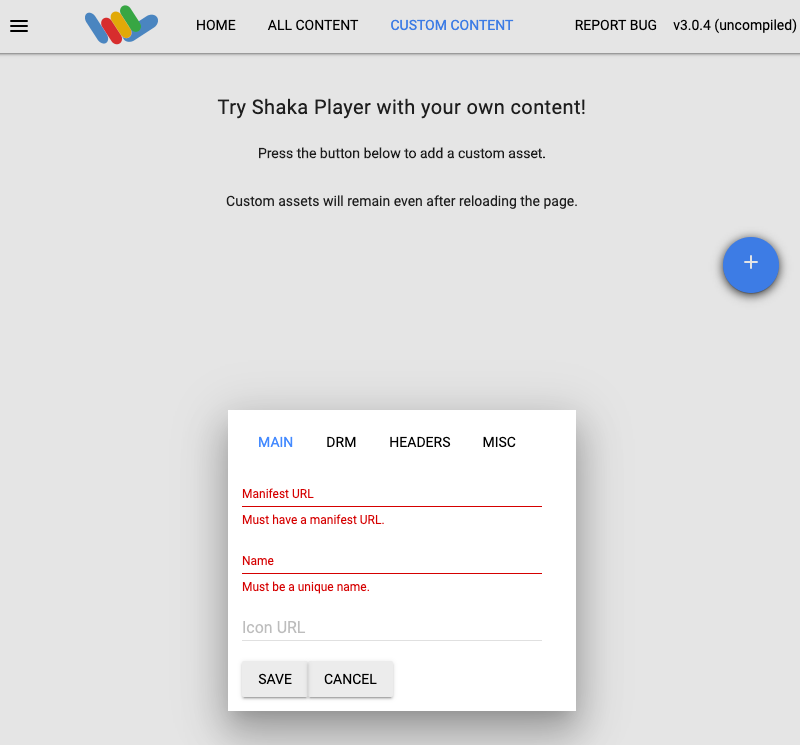
מפעילים את זרם ה-VOD עם המודעות שצורפו באמצעות ה-URI משדה playUri של אובייקט התגובה. כדי להפעיל את סשן ה-VOD הזה ב-Shaka Player, מבצעים את השלבים הבאים:

  1. עוברים אל Shaka Player, נגן מדיה אונליין.
  2. בסרגל הניווט העליון, לוחצים על תוכן בהתאמה אישית.
  3. לוחצים על הלחצן +.
  4. מדביקים את הערך של השדה playUri (PLAY_URI) בתיבה Manifest URL (כתובת ה-URL של המניפסט).

  5. מקלידים שם בתיבה שם.

  6. לוחצים על Save.

  7. לוחצים על הפעלה.

אם הסרטון נמצא בקטגוריה של Cloud Storage, צריך לוודא שהקטגוריה היא ציבורית ושה-CORS מופעל בקטגוריה.

דוגמה לסרטון עם תפירת מודעות שמשתמש בסרטון לאימון המודל של Transcoder API ובכתובת URL של תג מודעה מסוג VMAP Pre-roll.

הסרת המשאבים

כדי לא לצבור חיובים בחשבון על המשאבים שבהם השתמשתם בדף הזה, אתם צריכים למחוק את הפרויקט יחד עם המשאבים. Google Cloud Google Cloud

מחיקת ההגדרה של VOD

כדי למחוק את הגדרת ה-VOD:

REST

לפני שמשתמשים בנתוני הבקשה, צריך להחליף את הנתונים הבאים:

  • PROJECT_NUMBER: מספר הפרויקט שלכם. הוא מופיע בשדה מספר הפרויקט בדף הגדרות IAM. Google Cloud
  • LOCATION: המיקום של הגדרת ה-VOD. צריך להשתמש באחד מהאזורים הנתמכים
    הצגת מיקומים
    • us-central1
    • us-east1
    • us-west1
    • asia-east1
    • asia-south1
    • asia-southeast1
    • europe-west1
    • southamerica-east1
  • VOD_CONFIG_ID: המזהה שהוגדר על ידי המשתמש להגדרות ה-VOD

כדי לשלוח את הבקשה צריך להרחיב אחת מהאפשרויות הבאות:

אתם אמורים לקבל תגובת JSON שדומה לזו:

{
  "name": "projects/PROJECT_NUMBER/locations/LOCATION/operations/OPERATION_ID",
  "metadata": {
    "@type": "type.googleapis.com/google.cloud.common.OperationMetadata",
    "createTime": CREATE_TIME,
    "target": "projects/PROJECT_NUMBER/locations/LOCATION/vodConfigs/VOD_CONFIG_ID",
    "verb": "delete"
  },
  "done": false
}
הפקודה הזו יוצרת פעולה ממושכת (LRO) שאפשר להריץ עליה שאילתה כדי לעקוב אחרי ההתקדמות. מידע נוסף זמין במאמר בנושא בדיקת התוצאה.

C#

לפני שמנסים את הדוגמה הזו, צריך לפעול לפי C# הוראות ההגדרה במאמר הפעלה מהירה של Video Stitcher API באמצעות ספריות לקוח. מידע נוסף מופיע במאמרי העזרה של Video Stitcher API C# API.

כדי לבצע אימות ב-Video Stitcher API, צריך להגדיר את Application Default Credentials. מידע נוסף זמין במאמר הגדרת אימות לסביבת פיתוח מקומית.


using Google.Cloud.Video.Stitcher.V1;
using Google.LongRunning;
using Google.Protobuf.WellKnownTypes;
using System.Threading.Tasks;

public class DeleteVodConfigSample
{
    public async Task DeleteVodConfigAsync(
        string projectId, string location, string vodConfigId)
    {
        // Create the client.
        VideoStitcherServiceClient client = VideoStitcherServiceClient.Create();

        DeleteVodConfigRequest request = new DeleteVodConfigRequest
        {
            VodConfigName = VodConfigName.FromProjectLocationVodConfig(projectId, location, vodConfigId)
        };

        // Make the request.
        Operation<Empty, OperationMetadata> response = await client.DeleteVodConfigAsync(request);

        // Poll until the returned long-running operation is complete.
        await response.PollUntilCompletedAsync();
    }
}

Go

לפני שמנסים את הדוגמה הזו, צריך לפעול לפי Go הוראות ההגדרה במאמר הפעלה מהירה של Video Stitcher API באמצעות ספריות לקוח. מידע נוסף מופיע במאמרי העזרה של Video Stitcher API Go API.

כדי לבצע אימות ב-Video Stitcher API, צריך להגדיר את Application Default Credentials. מידע נוסף זמין במאמר הגדרת אימות לסביבת פיתוח מקומית.

import (
	"context"
	"fmt"
	"io"

	stitcher "cloud.google.com/go/video/stitcher/apiv1"
	stitcherstreampb "cloud.google.com/go/video/stitcher/apiv1/stitcherpb"
)

// deleteVodConfig deletes a previously-created VOD config.
func deleteVodConfig(w io.Writer, projectID, vodConfigID string) error {
	// projectID := "my-project-id"
	// vodConfigID := "my-vod-config-id"
	location := "us-central1"
	ctx := context.Background()
	client, err := stitcher.NewVideoStitcherClient(ctx)
	if err != nil {
		return fmt.Errorf("stitcher.NewVideoStitcherClient: %w", err)
	}
	defer client.Close()

	req := &stitcherstreampb.DeleteVodConfigRequest{
		Name: fmt.Sprintf("projects/%s/locations/%s/vodConfigs/%s", projectID, location, vodConfigID),
	}
	// Deletes the VOD config.
	op, err := client.DeleteVodConfig(ctx, req)
	if err != nil {
		return fmt.Errorf("client.DeleteVodConfig: %w", err)
	}
	err = op.Wait(ctx)
	if err != nil {
		return err
	}

	fmt.Fprintf(w, "Deleted VOD config")
	return nil
}

Java

לפני שמנסים את הדוגמה הזו, צריך לפעול לפי Java הוראות ההגדרה במאמר הפעלה מהירה של Video Stitcher API באמצעות ספריות לקוח. מידע נוסף מופיע במאמרי העזרה של Video Stitcher API Java API.

כדי לבצע אימות ב-Video Stitcher API, צריך להגדיר את Application Default Credentials. מידע נוסף זמין במאמר הגדרת אימות לסביבת פיתוח מקומית.


import com.google.cloud.video.stitcher.v1.DeleteVodConfigRequest;
import com.google.cloud.video.stitcher.v1.VideoStitcherServiceClient;
import com.google.cloud.video.stitcher.v1.VodConfigName;
import java.io.IOException;
import java.util.concurrent.ExecutionException;
import java.util.concurrent.TimeUnit;
import java.util.concurrent.TimeoutException;

public class DeleteVodConfig {

  private static final int TIMEOUT_IN_MINUTES = 2;

  public static void main(String[] args) throws Exception {
    // TODO(developer): Replace these variables before running the sample.
    String projectId = "my-project-id";
    String location = "us-central1";
    String vodConfigId = "my-vod-config-id";

    deleteVodConfig(projectId, location, vodConfigId);
  }

  // Deletes a video on demand (VOD) config.
  public static void deleteVodConfig(String projectId, String location, String vodConfigId)
      throws IOException, ExecutionException, InterruptedException, TimeoutException {
    // Initialize client that will be used to send requests. This client only needs to be created
    // once, and can be reused for multiple requests.
    try (VideoStitcherServiceClient videoStitcherServiceClient =
        VideoStitcherServiceClient.create()) {
      DeleteVodConfigRequest deleteVodConfigRequest =
          DeleteVodConfigRequest.newBuilder()
              .setName(VodConfigName.of(projectId, location, vodConfigId).toString())
              .build();

      videoStitcherServiceClient
          .deleteVodConfigAsync(deleteVodConfigRequest)
          .get(TIMEOUT_IN_MINUTES, TimeUnit.MINUTES);
      System.out.println("Deleted VOD config");
    }
  }
}

Node.js

לפני שמנסים את הדוגמה הזו, צריך לפעול לפי Node.js הוראות ההגדרה במאמר הפעלה מהירה של Video Stitcher API באמצעות ספריות לקוח. מידע נוסף מופיע במאמרי העזרה של Video Stitcher API Node.js API.

כדי לבצע אימות ב-Video Stitcher API, צריך להגדיר את Application Default Credentials. מידע נוסף זמין במאמר הגדרת אימות לסביבת פיתוח מקומית.

/**
 * TODO(developer): Uncomment these variables before running the sample.
 */
// projectId = 'my-project-id';
// location = 'us-central1';
// vodConfigId = 'my-vod-config-id';

// Imports the Video Stitcher library
const {VideoStitcherServiceClient} =
  require('@google-cloud/video-stitcher').v1;
// Instantiates a client
const stitcherClient = new VideoStitcherServiceClient();

async function deleteVodConfig() {
  // Construct request
  const request = {
    name: stitcherClient.vodConfigPath(projectId, location, vodConfigId),
  };
  const [operation] = await stitcherClient.deleteVodConfig(request);
  await operation.promise();
  console.log('Deleted VOD config');
}

deleteVodConfig().catch(err => {
  console.error(err.message);
  process.exitCode = 1;
});

PHP

לפני שמנסים את הדוגמה הזו, צריך לפעול לפי PHP הוראות ההגדרה במאמר הפעלה מהירה של Video Stitcher API באמצעות ספריות לקוח. מידע נוסף מופיע במאמרי העזרה של Video Stitcher API PHP API.

כדי לבצע אימות ב-Video Stitcher API, צריך להגדיר את Application Default Credentials. מידע נוסף זמין במאמר הגדרת אימות לסביבת פיתוח מקומית.

use Google\Cloud\Video\Stitcher\V1\Client\VideoStitcherServiceClient;
use Google\Cloud\Video\Stitcher\V1\DeleteVodConfigRequest;

/**
 * Deletes a VOD config.
 *
 * @param string $callingProjectId     The project ID to run the API call under
 * @param string $location             The location of the VOD config
 * @param string $vodConfigId         The ID of the VOD config
 */
function delete_vod_config(
    string $callingProjectId,
    string $location,
    string $vodConfigId
): void {
    // Instantiate a client.
    $stitcherClient = new VideoStitcherServiceClient();

    $formattedName = $stitcherClient->vodConfigName($callingProjectId, $location, $vodConfigId);
    $request = (new DeleteVodConfigRequest())
        ->setName($formattedName);
    $operationResponse = $stitcherClient->deleteVodConfig($request);
    $operationResponse->pollUntilComplete();
    if ($operationResponse->operationSucceeded()) {
        // Print status
        printf('Deleted VOD config %s' . PHP_EOL, $vodConfigId);
    } else {
        $error = $operationResponse->getError();
        // handleError($error)
    }
}

Python

לפני שמנסים את הדוגמה הזו, צריך לפעול לפי Python הוראות ההגדרה במאמר הפעלה מהירה של Video Stitcher API באמצעות ספריות לקוח. מידע נוסף מופיע במאמרי העזרה של Video Stitcher API Python API.

כדי לבצע אימות ב-Video Stitcher API, צריך להגדיר את Application Default Credentials. מידע נוסף זמין במאמר הגדרת אימות לסביבת פיתוח מקומית.


import argparse

from google.cloud.video.stitcher_v1.services.video_stitcher_service import (
    VideoStitcherServiceClient,
)
from google.protobuf import empty_pb2 as empty


def delete_vod_config(
    project_id: str, location: str, vod_config_id: str
) -> empty.Empty:
    """Deletes a VOD config.
    Args:
        project_id: The GCP project ID.
        location: The location of the VOD config.
        vod_config_id: The user-defined VOD config ID."""

    client = VideoStitcherServiceClient()

    name = f"projects/{project_id}/locations/{location}/vodConfigs/{vod_config_id}"
    operation = client.delete_vod_config(name=name)
    response = operation.result()
    print("Deleted VOD config")
    return response

Ruby

לפני שמנסים את הדוגמה הזו, צריך לפעול לפי Ruby הוראות ההגדרה במאמר הפעלה מהירה של Video Stitcher API באמצעות ספריות לקוח. מידע נוסף מופיע במאמרי העזרה של Video Stitcher API Ruby API.

כדי לבצע אימות ב-Video Stitcher API, צריך להגדיר את Application Default Credentials. מידע נוסף זמין במאמר הגדרת אימות לסביבת פיתוח מקומית.

require "google/cloud/video/stitcher"

##
# Delete a VOD config
#
# @param project_id [String] Your Google Cloud project (e.g. `my-project`)
# @param location [String] The location (e.g. `us-central1`)
# @param vod_config_id [String] Your VOD config name (e.g. `my-vod-config`)
#
def delete_vod_config project_id:, location:, vod_config_id:
  # Create a Video Stitcher client.
  client = Google::Cloud::Video::Stitcher.video_stitcher_service

  # Build the resource name of the VOD config.
  name = client.vod_config_path project: project_id, location: location,
                                vod_config: vod_config_id

  # Delete the VOD config.
  operation = client.delete_vod_config name: name

  # The returned object is of type Gapic::Operation. You can use this
  # object to check the status of an operation, cancel it, or wait
  # for results. Here is how to block until completion:
  operation.wait_until_done!

  # Print a success message.
  puts "Deleted VOD config"
end

מחיקת מפתח ה-CDN

כדי למחוק את מפתח ה-CDN:

REST

לפני שמשתמשים בנתוני הבקשה, צריך להחליף את הנתונים הבאים:

  • PROJECT_NUMBER: מספר הפרויקט שלכם. הוא מופיע בשדה מספר הפרויקט בדף הגדרות IAM. Google Cloud
  • LOCATION: המיקום שבו נמצא מפתח ה-CDN. צריך להשתמש באחד מהאזורים הנתמכים.
    הצגת מיקומים
    • us-central1
    • us-east1
    • us-west1
    • asia-east1
    • asia-south1
    • asia-southeast1
    • europe-west1
    • southamerica-east1
  • CDN_KEY_ID: מזהה מוגדר על ידי המשתמש עבור מפתח ה-CDN

כדי לשלוח את הבקשה צריך להרחיב אחת מהאפשרויות הבאות:

אתם אמורים לקבל תגובת JSON שדומה לזו:

{
  "name": "projects/PROJECT_NUMBER/locations/LOCATION/operations/OPERATION_ID",
  "metadata": {
    "@type": "type.googleapis.com/google.cloud.common.OperationMetadata",
    "createTime": CREATE_TIME,
    "target": "projects/PROJECT_NUMBER/locations/LOCATION/cdnKeys/CDN_KEY_ID",
    "verb": "delete",
    "cancelRequested": false,
    "apiVersion": "v1"
  },
  "done": false
}
הפקודה הזו יוצרת פעולה ממושכת (LRO) שאפשר להריץ עליה שאילתה כדי לעקוב אחרי ההתקדמות. מידע נוסף זמין במאמר בנושא בדיקת התוצאה.

C#

לפני שמנסים את הדוגמה הזו, צריך לפעול לפי C# הוראות ההגדרה במאמר הפעלה מהירה של Video Stitcher API באמצעות ספריות לקוח. מידע נוסף מופיע במאמרי העזרה של Video Stitcher API C# API.

כדי לבצע אימות ב-Video Stitcher API, צריך להגדיר את Application Default Credentials. מידע נוסף זמין במאמר הגדרת אימות לסביבת פיתוח מקומית.


using Google.Cloud.Video.Stitcher.V1;
using Google.LongRunning;
using Google.Protobuf.WellKnownTypes;
using System.Threading.Tasks;

public class DeleteCdnKeySample
{
    public async Task DeleteCdnKeyAsync(
        string projectId, string location, string cdnKeyId)
    {
        // Create the client.
        VideoStitcherServiceClient client = VideoStitcherServiceClient.Create();

        DeleteCdnKeyRequest request = new DeleteCdnKeyRequest
        {
            CdnKeyName = CdnKeyName.FromProjectLocationCdnKey(projectId, location, cdnKeyId)
        };

        // Make the request.
        Operation<Empty, OperationMetadata> response = await client.DeleteCdnKeyAsync(request);

        // Poll until the returned long-running operation is complete.
        await response.PollUntilCompletedAsync();
    }
}

Go

לפני שמנסים את הדוגמה הזו, צריך לפעול לפי Go הוראות ההגדרה במאמר הפעלה מהירה של Video Stitcher API באמצעות ספריות לקוח. מידע נוסף מופיע במאמרי העזרה של Video Stitcher API Go API.

כדי לבצע אימות ב-Video Stitcher API, צריך להגדיר את Application Default Credentials. מידע נוסף זמין במאמר הגדרת אימות לסביבת פיתוח מקומית.

import (
	"context"
	"fmt"
	"io"

	stitcher "cloud.google.com/go/video/stitcher/apiv1"
	stitcherstreampb "cloud.google.com/go/video/stitcher/apiv1/stitcherpb"
)

// deleteCDNKey deletes a CDN key.
func deleteCDNKey(w io.Writer, projectID, keyID string) error {
	// projectID := "my-project-id"
	// keyID := "my-cdn-key"
	location := "us-central1"
	ctx := context.Background()
	client, err := stitcher.NewVideoStitcherClient(ctx)
	if err != nil {
		return fmt.Errorf("stitcher.NewVideoStitcherClient: %w", err)
	}
	defer client.Close()

	name := fmt.Sprintf("projects/%s/locations/%s/cdnKeys/%s", projectID, location, keyID)

	req := &stitcherstreampb.DeleteCdnKeyRequest{
		Name: name,
	}
	// Deletes the CDN key.
	op, err := client.DeleteCdnKey(ctx, req)
	if err != nil {
		return fmt.Errorf("client.DeleteCdnKey: %w", err)
	}
	err = op.Wait(ctx)
	if err != nil {
		return err
	}

	fmt.Fprintf(w, "Deleted CDN key")
	return nil
}

Java

לפני שמנסים את הדוגמה הזו, צריך לפעול לפי Java הוראות ההגדרה במאמר הפעלה מהירה של Video Stitcher API באמצעות ספריות לקוח. מידע נוסף מופיע במאמרי העזרה של Video Stitcher API Java API.

כדי לבצע אימות ב-Video Stitcher API, צריך להגדיר את Application Default Credentials. מידע נוסף זמין במאמר הגדרת אימות לסביבת פיתוח מקומית.


import com.google.cloud.video.stitcher.v1.CdnKeyName;
import com.google.cloud.video.stitcher.v1.DeleteCdnKeyRequest;
import com.google.cloud.video.stitcher.v1.VideoStitcherServiceClient;
import java.io.IOException;
import java.util.concurrent.ExecutionException;
import java.util.concurrent.TimeUnit;
import java.util.concurrent.TimeoutException;

public class DeleteCdnKey {

  private static final int TIMEOUT_IN_MINUTES = 2;

  public static void main(String[] args) throws Exception {
    // TODO(developer): Replace these variables before running the sample.
    String projectId = "my-project-id";
    String location = "us-central1";
    String cdnKeyId = "my-cdn-key-id";

    deleteCdnKey(projectId, location, cdnKeyId);
  }

  // Deletes a CDN key.
  public static void deleteCdnKey(String projectId, String location, String cdnKeyId)
      throws InterruptedException, ExecutionException, TimeoutException, IOException {
    // Initialize client that will be used to send requests. This client only needs to be created
    // once, and can be reused for multiple requests.
    try (VideoStitcherServiceClient videoStitcherServiceClient =
        VideoStitcherServiceClient.create()) {
      DeleteCdnKeyRequest deleteCdnKeyRequest =
          DeleteCdnKeyRequest.newBuilder()
              .setName(CdnKeyName.of(projectId, location, cdnKeyId).toString())
              .build();

      videoStitcherServiceClient
          .deleteCdnKeyAsync(deleteCdnKeyRequest)
          .get(TIMEOUT_IN_MINUTES, TimeUnit.MINUTES);
      System.out.println("Deleted CDN key");
    }
  }
}

Node.js

לפני שמנסים את הדוגמה הזו, צריך לפעול לפי Node.js הוראות ההגדרה במאמר הפעלה מהירה של Video Stitcher API באמצעות ספריות לקוח. מידע נוסף מופיע במאמרי העזרה של Video Stitcher API Node.js API.

כדי לבצע אימות ב-Video Stitcher API, צריך להגדיר את Application Default Credentials. מידע נוסף זמין במאמר הגדרת אימות לסביבת פיתוח מקומית.

/**
 * TODO(developer): Uncomment these variables before running the sample.
 */
// projectId = 'my-project-id';
// location = 'us-central1';
// cdnKeyId = 'my-cdn-key';

// Imports the Video Stitcher library
const {VideoStitcherServiceClient} =
  require('@google-cloud/video-stitcher').v1;
// Instantiates a client
const stitcherClient = new VideoStitcherServiceClient();

async function deleteCdnKey() {
  // Construct request
  const request = {
    name: stitcherClient.cdnKeyPath(projectId, location, cdnKeyId),
  };
  const [operation] = await stitcherClient.deleteCdnKey(request);
  await operation.promise();
  console.log('Deleted CDN key');
}

deleteCdnKey().catch(err => {
  console.error(err.message);
  process.exitCode = 1;
});

PHP

לפני שמנסים את הדוגמה הזו, צריך לפעול לפי PHP הוראות ההגדרה במאמר הפעלה מהירה של Video Stitcher API באמצעות ספריות לקוח. מידע נוסף מופיע במאמרי העזרה של Video Stitcher API PHP API.

כדי לבצע אימות ב-Video Stitcher API, צריך להגדיר את Application Default Credentials. מידע נוסף זמין במאמר הגדרת אימות לסביבת פיתוח מקומית.

use Google\Cloud\Video\Stitcher\V1\Client\VideoStitcherServiceClient;
use Google\Cloud\Video\Stitcher\V1\DeleteCdnKeyRequest;

/**
 * Deletes a CDN key.
 *
 * @param string $callingProjectId     The project ID to run the API call under
 * @param string $location             The location of the CDN key
 * @param string $cdnKeyId             The ID of the CDN key
 */
function delete_cdn_key(
    string $callingProjectId,
    string $location,
    string $cdnKeyId
): void {
    // Instantiate a client.
    $stitcherClient = new VideoStitcherServiceClient();

    $formattedName = $stitcherClient->cdnKeyName($callingProjectId, $location, $cdnKeyId);
    $request = (new DeleteCdnKeyRequest())
        ->setName($formattedName);
    $operationResponse = $stitcherClient->deleteCdnKey($request);
    $operationResponse->pollUntilComplete();
    if ($operationResponse->operationSucceeded()) {
        // Print status
        printf('Deleted CDN key %s' . PHP_EOL, $cdnKeyId);
    } else {
        $error = $operationResponse->getError();
        // handleError($error)
    }
}

Python

לפני שמנסים את הדוגמה הזו, צריך לפעול לפי Python הוראות ההגדרה במאמר הפעלה מהירה של Video Stitcher API באמצעות ספריות לקוח. מידע נוסף מופיע במאמרי העזרה של Video Stitcher API Python API.

כדי לבצע אימות ב-Video Stitcher API, צריך להגדיר את Application Default Credentials. מידע נוסף זמין במאמר הגדרת אימות לסביבת פיתוח מקומית.


import argparse

from google.cloud.video.stitcher_v1.services.video_stitcher_service import (
    VideoStitcherServiceClient,
)
from google.protobuf import empty_pb2 as empty


def delete_cdn_key(project_id: str, location: str, cdn_key_id: str) -> empty.Empty:
    """Deletes a CDN key.
    Args:
        project_id: The GCP project ID.
        location: The location of the CDN key.
        cdn_key_id: The user-defined CDN key ID."""

    client = VideoStitcherServiceClient()

    name = f"projects/{project_id}/locations/{location}/cdnKeys/{cdn_key_id}"
    operation = client.delete_cdn_key(name=name)
    response = operation.result()
    print("Deleted CDN key")
    return response

Ruby

לפני שמנסים את הדוגמה הזו, צריך לפעול לפי Ruby הוראות ההגדרה במאמר הפעלה מהירה של Video Stitcher API באמצעות ספריות לקוח. מידע נוסף מופיע במאמרי העזרה של Video Stitcher API Ruby API.

כדי לבצע אימות ב-Video Stitcher API, צריך להגדיר את Application Default Credentials. מידע נוסף זמין במאמר הגדרת אימות לסביבת פיתוח מקומית.

require "google/cloud/video/stitcher"

##
# Delete a CDN key
#
# @param project_id [String] Your Google Cloud project (e.g. `my-project`)
# @param location [String] The location (e.g. `us-central1`)
# @param cdn_key_id [String] Your CDN key name (e.g. `my-cdn-key`)
#
def delete_cdn_key project_id:, location:, cdn_key_id:
  # Create a Video Stitcher client.
  client = Google::Cloud::Video::Stitcher.video_stitcher_service

  # Build the resource name of the CDN key.
  name = client.cdn_key_path project: project_id, location: location,
                             cdn_key: cdn_key_id

  # Delete the CDN key.
  operation = client.delete_cdn_key name: name

  # The returned object is of type Gapic::Operation. You can use this
  # object to check the status of an operation, cancel it, or wait
  # for results. Here is how to block until completion:
  operation.wait_until_done!

  # Print a success message.
  puts "Deleted CDN key"
end

ביטול פרטי הכניסה

  1. אם תרצו, תוכלו לבטל את פרטי הכניסה שיצרתם ולמחוק את הקובץ המקומי של פרטי הכניסה.

    gcloud auth application-default revoke
  2. אם רוצים, מבטלים את פרטי הכניסה של ה-CLI של gcloud.

    gcloud auth revoke

המאמרים הבאים

מידע נוסף זמין במאמרי העזרה של Video Stitcher API.