


Chirp 3 是 Google 最新一代的多語言自動語音辨識 (ASR) 專用生成式模型,旨在根據意見回饋和經驗滿足使用者需求。Chirp 3 的準確度和速度比先前的 Chirp 模型更出色,並提供語音分段和自動偵測語言功能。
模型詳細資料
Chirp 3:語音轉錄功能僅適用於 Speech-to-Text API V2。
型號 ID
Chirp 3: Transcription 的使用方式與其他模型相同,只要在使用 API 時,於辨識要求中指定適當的模型 ID,或是在 Google Cloud 控制台中指定模型名稱即可。在辨識要求中指定適當的 ID。
| 模型 | 型號 ID |
|---|---|
| Chirp 3 | chirp_3 |
API 方法
並非所有辨識方法都支援相同的語言可用性組合,因為 Chirp 3 適用於 Speech-to-Text API V2,因此支援下列辨識方法:
| API 版本 | API 方法 | 支援 |
|---|---|---|
| V2 | Speech.StreamingRecognize (適用於串流和即時音訊) | 支援 |
| V2 | Speech.Recognize (適合長度不到一分鐘的音訊) | 支援 |
| V2 | Speech.BatchRecognize (適合 1 分鐘到 1 小時的一般長音訊,但如果啟用字詞層級時間戳記,則最多 20 分鐘) | 支援 |
區域可用性
chirp_3 模型需要區域或多區域 API 端點,例如 us-speech.googleapis.com。global 端點不支援這項功能。
如要瞭解支援的位置、語言代碼和功能,請參閱「Cloud Speech-to-Text V2 支援的語言」,並依 chirp_3 篩選。您也可以按照「區域可用性」一文所述,查詢 Locations API。
語音轉錄功能支援的語言
Chirp 3 支援StreamingRecognize、Recognize和BatchRecognize的語音轉錄。如需目前支援的語言清單,請參閱「Cloud Speech-to-Text V2 支援的語言」,並依 chirp_3 模型篩選。如要瞭解各項功能的推出階段,請按照「區域可用性」一節的說明,查詢 Locations API。
分段標記功能支援的語言
Chirp 3 支援 Recognize 和 BatchRecognize 的說話者分段標記,但不支援 StreamingRecognize。如果所說的語言支援辨識功能,則辨識功能也適用於 auto 語言偵測。如要查看支援的語言代碼,請參閱「Cloud Speech-to-Text V2 支援的語言」。
功能支援與限制
Chirp 3 支援下列功能:
| 功能 | 說明 | 發布階段 |
|---|---|---|
| 自動加上標點符號 | 由模型自動生成,可視需要停用。 | 正式發布版 |
| 自動大寫 | 由模型自動產生,可視需要停用。 | 正式發布版 |
| 語句層級時間戳記 | 由模型自動生成。僅適用於Speech.StreamingRecognize |
正式發布版 |
| 說話者分段標記 | 自動識別單聲道音訊樣本中的不同說話者。適用於Speech.Recognize和Speech.BatchRecognize。 |
正式發布版 |
| 語音調整 (偏向) | 提供提示詞詞組提示,提高特定字詞或專有名詞的辨識準確度。請參閱「透過模型調整機制提高準確度」。 | 正式發布版 |
| 字詞層級時間戳記 | 啟用後,系統會為每個轉錄字詞產生時間戳記,但轉錄準確率可能會略為降低。適用於Speech.Recognize和Speech.BatchRecognize,不支援Speech.StreamingRecognize。 |
正式發布版 |
| 不限語言的音訊轉錄 | 自動推論並轉錄最常見的語言。 | 正式發布版 |
| 自訂提示 | 向模型提供自訂語音轉錄格式設定指令。 | 預覽 |
Chirp 3 不支援下列功能:
| 功能 | 說明 |
|---|---|
| 字詞層級可信度分數 | API 會傳回一個值,但這並非真正的可信度分數。 |
使用 Chirp 3 轉錄
瞭解如何使用 Chirp 3 執行語音轉錄工作。
執行串流語音辨識
Python
import os

from google.cloud.speech_v2 import SpeechClient
from google.cloud.speech_v2.types import cloud_speech
from google.api_core.client_options import ClientOptions

PROJECT_ID = os.getenv("GOOGLE_CLOUD_PROJECT")
REGION = "us"

def transcribe_streaming_chirp3(
   audio_file: str
) -> cloud_speech.StreamingRecognizeResponse:
   """Transcribes audio from audio file stream using the Chirp 3 model of Google Cloud Speech-to-Text v2 API.

   Args:
       audio_file (str): Path to the local audio file to be transcribed.
           Example: "resources/audio.wav"

   Returns:
       cloud_speech.RecognizeResponse: The response from the Speech-to-Text API V2 containing
       the transcription results.
   """

   # Instantiates a client
   client = SpeechClient(
       client_options=ClientOptions(
           api_endpoint=f"{REGION}-speech.googleapis.com",
       )
   )

   # Reads a file as bytes
   with open(audio_file, "rb") as f:
       content = f.read()

   # In practice, stream should be a generator yielding chunks of audio data
   chunk_length = len(content) // 5
   stream = [
       content[start : start + chunk_length]
       for start in range(0, len(content), chunk_length)
   ]
   audio_requests = (
       cloud_speech.StreamingRecognizeRequest(audio=audio) for audio in stream
   )

   recognition_config = cloud_speech.RecognitionConfig(
       auto_decoding_config=cloud_speech.AutoDetectDecodingConfig(),
       language_codes=["en-US"],
       model="chirp_3",
   )
   streaming_config = cloud_speech.StreamingRecognitionConfig(
       config=recognition_config
   )
   config_request = cloud_speech.StreamingRecognizeRequest(
       recognizer=f"projects/{PROJECT_ID}/locations/{REGION}/recognizers/_",
       streaming_config=streaming_config,
   )

   def requests(config: cloud_speech.RecognitionConfig, audio: list) -> list:
       yield config
       yield from audio

   # Transcribes the audio into text
   responses_iterator = client.streaming_recognize(
       requests=requests(config_request, audio_requests)
   )
   responses = []
   for response in responses_iterator:
       responses.append(response)
       for result in response.results:
           print(f"Transcript: {result.alternatives[0].transcript}")

   return responses
執行同步語音辨識
Python
import os

from google.cloud.speech_v2 import SpeechClient
from google.cloud.speech_v2.types import cloud_speech
from google.api_core.client_options import ClientOptions

PROJECT_ID = os.getenv("GOOGLE_CLOUD_PROJECT")
REGION = "us"

def transcribe_sync_chirp3(
   audio_file: str
) -> cloud_speech.RecognizeResponse:
   """Transcribes an audio file using the Chirp 3 model of Google Cloud Speech-to-Text V2 API.
   Args:
       audio_file (str): Path to the local audio file to be transcribed.
           Example: "resources/audio.wav"
   Returns:
       cloud_speech.RecognizeResponse: The response from the Speech-to-Text API containing
       the transcription results.
   """

   # Instantiates a client
   client = SpeechClient(
       client_options=ClientOptions(
           api_endpoint=f"{REGION}-speech.googleapis.com",
       )
   )

   # Reads a file as bytes
   with open(audio_file, "rb") as f:
       audio_content = f.read()

   config = cloud_speech.RecognitionConfig(
       auto_decoding_config=cloud_speech.AutoDetectDecodingConfig(),
       language_codes=["en-US"],
       model="chirp_3",
   )

   request = cloud_speech.RecognizeRequest(
       recognizer=f"projects/{PROJECT_ID}/locations/{REGION}/recognizers/_",
       config=config,
       content=audio_content,
   )

   # Transcribes the audio into text
   response = client.recognize(request=request)

   for result in response.results:
       print(f"Transcript: {result.alternatives[0].transcript}")

   return response
執行批次語音辨識
Python
import os

from google.cloud.speech_v2 import SpeechClient
from google.cloud.speech_v2.types import cloud_speech
from google.api_core.client_options import ClientOptions

PROJECT_ID = os.getenv("GOOGLE_CLOUD_PROJECT")
REGION = "us"

def transcribe_batch_3(
   audio_uri: str,
) -> cloud_speech.BatchRecognizeResults:
   """Transcribes an audio file from a Google Cloud Storage URI using the Chirp 3 model of Google Cloud Speech-to-Text v2 API.
   Args:
       audio_uri (str): The Google Cloud Storage URI of the input audio file.
           E.g., gs://[BUCKET]/[FILE]
   Returns:
       cloud_speech.RecognizeResponse: The response from the Speech-to-Text API containing
       the transcription results.
   """

   # Instantiates a client
   client = SpeechClient(
       client_options=ClientOptions(
           api_endpoint=f"{REGION}-speech.googleapis.com",
       )
   )

   config = cloud_speech.RecognitionConfig(
       auto_decoding_config=cloud_speech.AutoDetectDecodingConfig(),
       language_codes=["en-US"],
       model="chirp_3",
   )

   file_metadata = cloud_speech.BatchRecognizeFileMetadata(uri=audio_uri)

   request = cloud_speech.BatchRecognizeRequest(
       recognizer=f"projects/{PROJECT_ID}/locations/{REGION}/recognizers/_",
       config=config,
       files=[file_metadata],
       recognition_output_config=cloud_speech.RecognitionOutputConfig(
           inline_response_config=cloud_speech.InlineOutputConfig(),
       ),
   )

   # Transcribes the audio into text
   operation = client.batch_recognize(request=request)

   print("Waiting for operation to complete...")
   response = operation.result(timeout=120)

   for result in response.results[audio_uri].transcript.results:
       print(f"Transcript: {result.alternatives[0].transcript}")

   return response.results[audio_uri].transcript
使用 Chirp 3 功能
瞭解如何使用最新功能,並查看程式碼範例:
執行不限語言的轉錄作業
Chirp 3 可自動辨識音訊中的主要語言並轉錄,這對多語言應用程式來說至關重要。如要達到這個目的,請按照程式碼範例所示設定 language_codes=["auto"]:
Python
import os

from google.cloud.speech_v2 import SpeechClient
from google.cloud.speech_v2.types import cloud_speech
from google.api_core.client_options import ClientOptions

PROJECT_ID = os.getenv("GOOGLE_CLOUD_PROJECT")
REGION = "us"

def transcribe_sync_chirp3_auto_detect_language(
   audio_file: str
) -> cloud_speech.RecognizeResponse:
   """Transcribes an audio file and auto-detect spoken language using Chirp 3.
   Please see https://cloud.google.com/speech-to-text/docs/encoding for more
   information on which audio encodings are supported.
   Args:
       audio_file (str): Path to the local audio file to be transcribed.
           Example: "resources/audio.wav"
   Returns:
       cloud_speech.RecognizeResponse: The response from the Speech-to-Text API containing
       the transcription results.
   """
   # Instantiates a client
   client = SpeechClient(
       client_options=ClientOptions(
           api_endpoint=f"{REGION}-speech.googleapis.com",
       )
   )

   # Reads a file as bytes
   with open(audio_file, "rb") as f:
       audio_content = f.read()

   config = cloud_speech.RecognitionConfig(
       auto_decoding_config=cloud_speech.AutoDetectDecodingConfig(),
       language_codes=["auto"],  # Set language code to auto to detect language.
       model="chirp_3",
   )

   request = cloud_speech.RecognizeRequest(
       recognizer=f"projects/{PROJECT_ID}/locations/{REGION}/recognizers/_",
       config=config,
       content=audio_content,
   )

   # Transcribes the audio into text
   response = client.recognize(request=request)

   for result in response.results:
       print(f"Transcript: {result.alternatives[0].transcript}")
       print(f"Detected Language: {result.language_code}")

   return response
執行語言受限的轉錄作業
Chirp 3 可自動辨識及轉錄音訊檔案中的主要語言。您也可以根據預期的特定語言代碼設定條件,例如:["en-US", "fr-FR"],這會將模型的資源集中在最可能的語言,以取得更可靠的結果,如程式碼範例所示:
Python
import os

from google.cloud.speech_v2 import SpeechClient
from google.cloud.speech_v2.types import cloud_speech
from google.api_core.client_options import ClientOptions

PROJECT_ID = os.getenv("GOOGLE_CLOUD_PROJECT")
REGION = "us"

def transcribe_sync_3_auto_detect_language(
   audio_file: str
) -> cloud_speech.RecognizeResponse:
   """Transcribes an audio file and auto-detect spoken language using Chirp 3.
   Please see https://cloud.google.com/speech-to-text/docs/encoding for more
   information on which audio encodings are supported.
   Args:
       audio_file (str): Path to the local audio file to be transcribed.
           Example: "resources/audio.wav"
   Returns:
       cloud_speech.RecognizeResponse: The response from the Speech-to-Text API containing
       the transcription results.
   """
   # Instantiates a client
   client = SpeechClient(
       client_options=ClientOptions(
           api_endpoint=f"{REGION}-speech.googleapis.com",
       )
   )

   # Reads a file as bytes
   with open(audio_file, "rb") as f:
       audio_content = f.read()

   config = cloud_speech.RecognitionConfig(
       auto_decoding_config=cloud_speech.AutoDetectDecodingConfig(),
       language_codes=["en-US", "fr-FR"],  # Set language codes of the expected spoken locales
       model="chirp_3",
   )

   request = cloud_speech.RecognizeRequest(
       recognizer=f"projects/{PROJECT_ID}/locations/{REGION}/recognizers/_",
       config=config,
       content=audio_content,
   )

   # Transcribes the audio into text
   response = client.recognize(request=request)

   for result in response.results:
       print(f"Transcript: {result.alternatives[0].transcript}")
       print(f"Detected Language: {result.language_code}")

   return response
執行語音轉錄和說話者分段標記
使用 Chirp 3 執行語音轉錄和分段任務。
Python
import os

from google.cloud.speech_v2 import SpeechClient
from google.cloud.speech_v2.types import cloud_speech
from google.api_core.client_options import ClientOptions

PROJECT_ID = os.getenv("GOOGLE_CLOUD_PROJECT")
REGION = "us"

def transcribe_batch_chirp3(
   audio_uri: str,
) -> cloud_speech.BatchRecognizeResults:
   """Transcribes an audio file from a Google Cloud Storage URI using the Chirp 3 model of Google Cloud Speech-to-Text V2 API.
   Args:
       audio_uri (str): The Google Cloud Storage URI of the input
         audio file. E.g., gs://[BUCKET]/[FILE]
   Returns:
       cloud_speech.RecognizeResponse: The response from the
         Speech-to-Text API containing the transcription results.
   """

   # Instantiates a client.
   client = SpeechClient(
       client_options=ClientOptions(
           api_endpoint=f"{REGION}-speech.googleapis.com",
       )
   )

   config = cloud_speech.RecognitionConfig(
       auto_decoding_config=cloud_speech.AutoDetectDecodingConfig(),
       language_codes=["en-US"],  # Use "auto" to detect language.
       model="chirp_3",
       features=cloud_speech.RecognitionFeatures(
           # Enable diarization by setting empty diarization configuration.
           diarization_config=cloud_speech.SpeakerDiarizationConfig(),
       ),
   )

   file_metadata = cloud_speech.BatchRecognizeFileMetadata(uri=audio_uri)

   request = cloud_speech.BatchRecognizeRequest(
       recognizer=f"projects/{PROJECT_ID}/locations/{REGION}/recognizers/_",
       config=config,
       files=[file_metadata],
       recognition_output_config=cloud_speech.RecognitionOutputConfig(
           inline_response_config=cloud_speech.InlineOutputConfig(),
       ),
   )

   # Creates audio transcription job.
   operation = client.batch_recognize(request=request)

   print("Waiting for transcription job to complete...")
   response = operation.result(timeout=120)

   for result in response.results[audio_uri].transcript.results:
       print(f"Transcript: {result.alternatives[0].transcript}")
       print(f"Detected Language: {result.language_code}")
       print(f"Speakers per word: {result.alternatives[0].words}")

   return response.results[audio_uri].transcript
透過模型調整機制提高準確度
Chirp 3 支援使用 PhraseSet 資源進行模型調整,提高特定領域專用字詞、專有名詞和縮寫的辨識準確率。
Chirp 3 會透過模型提示套用調整詞組,因此有下列限制:
- 一項要求最多可包含 1,000 個詞組,涵蓋所有內嵌和參照的
PhraseSet資源。如果超過 1,000 個詞組,系統會傳回INVALID_ARGUMENT錯誤。 - Chirp 3 會忽略
PhraseSet和Phrase項目上的數值boost值 (如果提供,值仍須在有效的0至20範圍內)。 如果
PhraseSet清單過大且未指定目標,可能會降低一般準確度,並在靜音或噪音期間增加非預期的轉錄內容。請將清單重點放在音訊中出現的罕見字詞。
Python
import os

from google.cloud.speech_v2 import SpeechClient
from google.cloud.speech_v2.types import cloud_speech
from google.api_core.client_options import ClientOptions

PROJECT_ID = os.getenv("GOOGLE_CLOUD_PROJECT")
REGION = "us"

def transcribe_sync_chirp3_model_adaptation(
   audio_file: str
) -> cloud_speech.RecognizeResponse:
   """Transcribes an audio file using the Chirp 3 model with adaptation, improving accuracy for specific audio characteristics or vocabulary.
   Args:
       audio_file (str): Path to the local audio file to be transcribed.
           Example: "resources/audio.wav"
   Returns:
       cloud_speech.RecognizeResponse: The response from the Speech-to-Text API containing
       the transcription results.
   """

   # Instantiates a client
   client = SpeechClient(
       client_options=ClientOptions(
           api_endpoint=f"{REGION}-speech.googleapis.com",
       )
   )

   # Reads a file as bytes
   with open(audio_file, "rb") as f:
       audio_content = f.read()

   config = cloud_speech.RecognitionConfig(
       auto_decoding_config=cloud_speech.AutoDetectDecodingConfig(),
       language_codes=["en-US"],
       model="chirp_3",
       # Use model adaptation
       adaptation=cloud_speech.SpeechAdaptation(
         phrase_sets=[
             cloud_speech.SpeechAdaptation.AdaptationPhraseSet(
                 inline_phrase_set=cloud_speech.PhraseSet(phrases=[
                   {
                       "value": "alphabet",
                   },
                   {
                         "value": "cell phone service",
                   }
                 ])
             )
         ]
       )
   )

   request = cloud_speech.RecognizeRequest(
       recognizer=f"projects/{PROJECT_ID}/locations/{REGION}/recognizers/_",
       config=config,
       content=audio_content,
   )

   # Transcribes the audio into text
   response = client.recognize(request=request)

   for result in response.results:
       print(f"Transcript: {result.alternatives[0].transcript}")

   return response
使用自訂提示詞設定語音轉錄稿格式
Chirp 3 接受自訂提示,做為模型的格式設定指令。
Python
import os

from google.cloud.speech_v2 import SpeechClient
from google.cloud.speech_v2.types import cloud_speech
from google.api_core.client_options import ClientOptions

PROJECT_ID = os.getenv("GOOGLE_CLOUD_PROJECT")
REGION = "us"

def transcribe_sync_chirp3_custom_prompt(
 audio_file: str,
 custom_prompt: str,
 ) -> cloud_speech.RecognizeResponse:
     """Transcribes an audio file and auto-detect spoken language using Chirp 3.
     Args:
         audio_file (str): Path to the local audio file to be transcribed.
             Example: "resources/audio.wav"
         custom_prompt: the customized formatting instructions.
             Example: "Capitalize the following special words: GOOGLE, CHIRP."
             Example: "For dates don't use the 'December 23rd, 1939' format!
             But strictly use the '12/23/1939' format."
     Returns:
         cloud_speech.RecognizeResponse: The response from the Speech-to-Text API containing
         the transcription results.
     """
     # Instantiates a client
     client = SpeechClient(
         client_options=ClientOptions(
             api_endpoint=f"{REGION}-speech.googleapis.com",
         )
     )

     # Reads a file as bytes
     with open(audio_file, "rb") as f:
         audio_content = f.read()

     config = cloud_speech.RecognitionConfig(
         auto_decoding_config=cloud_speech.AutoDetectDecodingConfig(),
         language_codes=["en-US"],
         model="chirp_3",
         features=cloud_speech.RecognitionFeatures(
             custom_prompt_config=cloud_speech.CustomPromptConfig(
                 custom_prompt= custom_prompt,
             )
         ),
     )

     request = cloud_speech.RecognizeRequest(
         recognizer=f"projects/{PROJECT_ID}/locations/{REGION}/recognizers/_",
         config=config,
         content=audio_content,
     )

     # Transcribes the audio into text
     response = client.recognize(request=request)
     print(f"Prompt used: {response.metadata.prompt}")

     for result in response.results:
         print(f"Transcript: {result.alternatives[0].transcript}")
         print(f"Detected Language: {result.language_code}")

     return response
啟用降噪器
在 RecognitionConfig 上設定 denoiser_config,Chirp 3 即可在串流轉錄期間降低背景噪音:
- 設定
denoise_audio=true可減少非語音背景噪音,例如音樂、雨聲或車流聲。 - 將
snr_threshold設為大於0.0的值,即可略過信噪比低的音訊片段。0.0值會停用門檻篩選功能。
Python
 import os

 from google.api_core.client_options import ClientOptions
 from google.cloud.speech_v2 import SpeechClient
 from google.cloud.speech_v2.types import cloud_speech

 PROJECT_ID = os.getenv("GOOGLE_CLOUD_PROJECT")
 REGION = "us"

 def transcribe_streaming_chirp3_denoiser(
     audio_file: str,
 ) -> list[cloud_speech.StreamingRecognizeResponse]:
     """Streams an audio file to Chirp 3 with the denoiser enabled."""
     client = SpeechClient(
         client_options=ClientOptions(
             api_endpoint=f"{REGION}-speech.googleapis.com",
         )
     )

     recognition_config = cloud_speech.RecognitionConfig(
         auto_decoding_config=cloud_speech.AutoDetectDecodingConfig(),
         language_codes=["en-US"],
         model="chirp_3",
         denoiser_config=cloud_speech.DenoiserConfig(
             denoise_audio=True,
             snr_threshold=0.0,
         ),
     )
     config_request = cloud_speech.StreamingRecognizeRequest(
         recognizer=f"projects/{PROJECT_ID}/locations/{REGION}/recognizers/_",
         streaming_config=cloud_speech.StreamingRecognitionConfig(
             config=recognition_config,
         ),
     )

     def requests():
         yield config_request
         with open(audio_file, "rb") as f:
             while chunk := f.read(4096):
                 yield cloud_speech.StreamingRecognizeRequest(audio=chunk)

     responses_iterator = client.streaming_recognize(requests=requests())
     responses = []
     for response in responses_iterator:
         responses.append(response)
         for result in response.results:
             if result.is_final:
                 print(f"Transcript: {result.alternatives[0].transcript}")
     return responses
調整端點偵測敏感度
Cloud Speech-to-Text API 可讓您控制 Chirp 3 串流和即時應用程式的延遲時間與準確度之間的取捨。根據預設,辨識模型會在偵測到語音後等待一小段靜音時間,確保使用者已說完完整句子或詞組。這有助於確保最高準確度,但最終回覆會稍微延遲。
endpointing_sensitivity 可針對語音指令或語音機器人等時效性應用程式進行調整,以便更快完成結果。
敏感度等級
您可以根據用途,將端點偵測敏感度設為下列其中一個等級:
ENDPOINTING_SENSITIVITY_STANDARD(預設):標準設定,可平衡延遲時間和準確度。這項功能已針對大多數用途進行最佳化,包括長篇聽寫和自然對話。模型會等待語句完整,再完成結果。ENDPOINTING_SENSITIVITY_SHORT:針對簡短語句進行最佳化,例如單句或指令,像是「提醒我明天打電話給牙醫」。這項設定可縮短偵測到語音後的等待時間,因此回應速度比標準設定更快,同時仍能維持合理的句子層級準確度。ENDPOINTING_SENSITIVITY_SUPERSHORT:針對極短的指令或單一字詞 (例如「是」、「否」或「停止」) 進行最佳化。這項設定的延遲時間最短,偵測到語音結束後會立即完成結果。建議僅用於速度至關重要且語句簡短的應用程式。
Python
import time
from google.api_core.client_options import ClientOptions
from google.cloud import speech_v2

RATE = 16000

def transcribe_streaming(
    project_id: str,
    audio_file: str,
    # 'us' is a multi-region that currently supports the 'chirp_3' model.
    # Other valid regions include 'eu' or specific regions like 'asia-southeast1'.
    region: str = "us"
):
    recognizer_path = f"projects/{project_id}/locations/{region}/recognizers/_"

    # Setup client with the correct regional endpoint
    client = speech_v2.SpeechClient(
        client_options=ClientOptions(
            api_endpoint=f"{region}-speech.googleapis.com",
            quota_project_id=project_id
        )
    )

    recognition_config_obj = speech_v2.RecognitionConfig(
        explicit_decoding_config=speech_v2.ExplicitDecodingConfig(
            encoding=speech_v2.ExplicitDecodingConfig.AudioEncoding.LINEAR16,
            sample_rate_hertz=RATE,
            audio_channel_count=1,
        ),
        language_codes=["en-US"],
        model="chirp_3",
        features=speech_v2.RecognitionFeatures(
            enable_automatic_punctuation=True,
        ),
    )

    config_request = speech_v2.StreamingRecognizeRequest(
        recognizer=recognizer_path,
        streaming_config=speech_v2.StreamingRecognitionConfig(
            config=recognition_config_obj,
            streaming_features=speech_v2.StreamingRecognitionFeatures(
                interim_results=False,
                enable_voice_activity_events=True,
                # Set sensitivity to SUPERSHORT (Low Latency)
                endpointing_sensitivity=speech_v2.StreamingRecognitionFeatures.EndpointingSensitivity.ENDPOINTING_SENSITIVITY_SUPERSHORT,
            ),
        )
    )

    def request_generator():
        yield config_request
        with open(audio_file, "rb") as f:
            while chunk := f.read(4096):
                yield speech_v2.StreamingRecognizeRequest(audio=chunk)

    start_time = time.time()

    print(f"Streaming audio to {region}-speech.googleapis.com...")

    for response in client.streaming_recognize(requests=request_generator()):
        if response.results:
            for result in response.results:
                if result.is_final:
                    print(f"Transcript: {result.alternatives[0].transcript}")
                    print(f"Time taken: {time.time() - start_time:.3f}s")

def main() -> None:
    # TODO: Replace with your Project ID and File Path
    PROJECT_ID = "your-project-id"
    AUDIO_FILE_PATH = "path/to/your/audio.wav"

    transcribe_streaming(
        project_id=PROJECT_ID,
        audio_file=AUDIO_FILE_PATH
    )

if __name__ == "__main__":
    main()
在 Google Cloud 控制台使用 Chirp 3
- 註冊 Google Cloud 帳戶並建立專案。
- 前往 Google Cloud 控制台的「Speech」。
- 如果 API 尚未啟用,請啟用 API。
確認您有 STT 控制台工作區。如果沒有工作區,則必須建立工作區。
前往語音轉錄頁面,然後按一下「New Transcription」(新增語音轉錄)。
開啟「Workspace」下拉式選單,然後點選「New Workspace」,建立語音轉錄工作區。
在「Create a new workspace」(建立新工作區) 導覽側欄中,按一下「Browse」(瀏覽)。
按一下即可建立新的 bucket。
輸入值區名稱,然後按一下「Continue」(繼續)。
按一下「Create」(建立),建立 Cloud Storage bucket。
建立 bucket 後,按一下「選取」,選取要使用的 bucket。
點選「建立」,完成 Speech-to-Text API V2 控制台工作區的建立作業。
轉錄實際音訊。
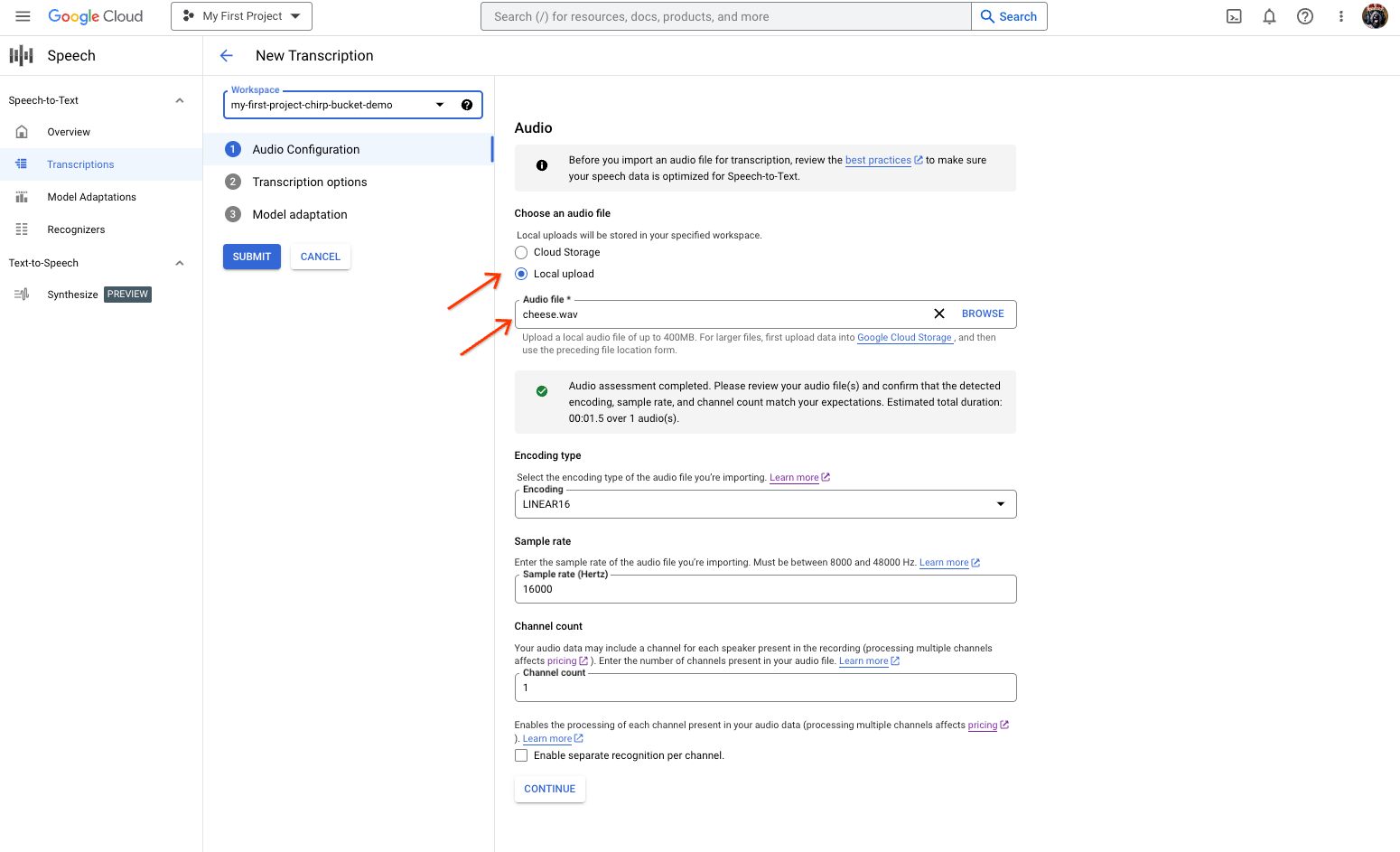
Speech-to-Text 語音轉錄建立頁面,顯示檔案選取或上傳。 在「New Transcription」頁面,選取要上傳的音訊檔案 (Local upload),或指定現有的 Cloud Storage 檔案 (Cloud storage)。
按一下「繼續」,前往「語音轉錄選項」。
選取要用於 Chirp 辨識的「語音語言」,請從先前建立的辨識工具中選擇。
在模型下拉式選單中,選取「chirp_3」chirp_3。
在「Recognizer」(辨識器) 下拉式選單中,選取新建立的辨識器。
點選「Submit」(提交),使用
chirp_3執行第一個辨識要求。
查看 Chirp 3 語音轉錄結果。
在「Transcriptions」(語音轉錄) 頁面中,按一下語音轉錄作業的名稱,即可查看結果。
在「Transcription details」(語音轉錄詳細資料) 頁面中查看語音轉錄結果,並視需要透過瀏覽器播放音訊。