

This page describes transactions in Spanner and introduces Spanner's read-write, read-only, and partitioned DML transaction interfaces.
A transaction in Spanner is a set of reads and writes. All operations in a transaction are atomic, meaning either they all succeed or they all fail.
A session is used to perform transactions in a Spanner database. A session represents a logical communication channel with the Spanner database service. Sessions can execute a single or multiple transactions at a time. For more information, see Sessions.
Transaction types
Spanner supports the following transaction types, each designed for specific data interaction patterns:
Read-write: These transactions are used for read and write operations, followed by a commit. They might acquire locks. If they fail, they'll require retries. While they're confined to a single database, they can modify data across multiple tables within that database.
Read-only: These transactions guarantee data consistency across multiple read operations, but don't permit data modifications. They execute at a system-determined timestamp for consistency, or at a user-configured past timestamp. Unlike read-write transactions, they don't require a commit operation or locks. However, they might pause to wait for ongoing write operations to conclude.
Partitioned DML: This transaction type executes DML statements as partitioned DML operations. It's optimized for executing DML statements at scale but with restrictions to ensure the statement is idempotent and partitionable in a way that lets it execute independently of other partitions. For numerous writes that don't need an atomic transaction, consider using batch writes. For more information, see Modify data using batch writes.
Read-write transactions
A read-write transaction consists of zero or more reads or query statements followed by a commit request. At any time before the commit request, the client can send a rollback request to abort the transaction.
Serializable isolation
Using the default serializable isolation level with pessimistic concurrency, read-write transactions atomically read, modify, and write data. This type of transaction is externally consistent.
When you use read-write transactions, we recommend that you minimize the time that a transaction is active. Shorter transaction durations result in locks being held for less time, which increases the probability of a successful commit and reduces contention. This is because long-held locks can lead to deadlocks and transaction aborts. Spanner attempts to keep read locks active as long as the transaction continues to perform reads and the transaction has not terminated through commit or roll back. If the client remains inactive for long periods of time, Spanner might release the transaction's locks and abort the transaction.
To perform a write operation that depends on one or more read operations, use a read-write transaction:
- If you must commit one or more write operations atomically, perform those writes within the same read-write transaction. For example, if you transfer $200 from account A to account B, perform both write operations (decreasing account A by $200 and increasing account B by $200) and the reads of the initial account balances within the same transaction.
- If you want to double the balance of account A, perform the read and write operations within the same transaction. This ensures the system reads the balance before doubling and updating it.
- If write operations depend on read operations, perform both within the same read-write transaction, even if the writes don't execute. For example, if you want to transfer $200 from account A to account B only if A's balance is greater than $500, include the read of A's balance and the conditional write operations within the same transaction, even if the transfer doesn't occur.
To perform read operations, use a single read method or read-only transaction:
- If you're only performing read operations, and you can express the read operation using a single read method, use the single read method or a read-only transaction. Unlike read-write transactions, single reads don't acquire locks.
Alternatively, you can also configure serializable isolation to use optimistic concurrency. Optimistic concurrency control assumes conflicts are rare. Reads and queries even within a read-write transaction proceed without acquiring locks. With serializable isolation, reads are validated at commit time. This ensures that no other concurrently committed transaction modified the data previously read by the transaction.
Repeatable read isolation
In Spanner, repeatable read isolation is implemented using a technique known as snapshot isolation. Repeatable read isolation ensures that all read operations within a transaction are consistent with the database as it existed at the start of the transaction. It also guarantees that concurrent writes on the same data only succeed if there are no conflicts.
With its default optimistic concurrency, writes don't acquire locks until commit time. If there is a conflict with the written data or due to transient events within Spanner like a server restart, Spanner might still abort transactions. Because reads in read-write transactions don't acquire locks in repeatable read isolation, there is no difference between executing read-only operations within a read-only transaction or read-write transaction.
Use pessimistic concurrency
with repeatable read to acquire exclusive locks for data read with a FOR UPDATE
clause or the lock_scanned_ranges=exclusive hint, and for data written by DML
queries. These semantics are more similar to the locking behavior of
repeatable read isolation in other databases. With pessimistic concurrency,
all reads are served at the snapshot, so transactions might abort if concurrent
transactions update the read data. However, it prevents concurrent transactions
from updating the locked data from the time locks are acquired until commit
time, which might reduce potential write-write conflicts.
Consider using read-write transactions in repeatable read isolation in the following scenarios:
- The workload is read-heavy and has low write conflicts.
- The application is experiencing performance bottlenecks due to delays from lock-contention and transaction aborts caused by older, higher-priority transactions wounding newer, lower-priority transactions to prevent potential deadlocks (wound-wait).
- The application doesn't require the stricter guarantees provided by the serializable isolation level.
Consider using repeatable read isolation with pessimistic concurrency for
workloads where FOR UPDATE and DML statements acquire locks.
When performing a write operation that depends on one or more read operations,
write skew is possible under repeatable read isolation. Write skew arise from a
particular kind of concurrent update, where each update is independently
accepted, but their combined effect violates application data integrity.
Therefore, make sure you perform reads that are part of a transaction's critical
section with either a FOR UPDATE clause or a lock_scanned_ranges=exclusive
hint to avoid write skew. For more information, see
Read-write conflicts and correctness,
and the example discussed in
Read-write semantics.
Interface
The Spanner client libraries provide an interface for executing a body of work within a read-write transaction, with retries for transaction aborts. A transaction might require multiple retries before it commits.
Several situations can cause transaction aborts. For example, if two transactions attempt to modify data concurrently, a deadlock might occur. In such cases, Spanner aborts one transaction to let the other proceed. Less frequently, transient events within Spanner can also cause transaction aborts.
All read-write transactions provide the ACID properties of relational databases.
Because transactions are atomic, an aborted transaction doesn't affect the
database. Spanner client libraries retry such transactions
automatically, but if you don't use the client libraries, retry the transaction
within the same session to improve success rates. Each retry that results in an
ABORTED error increases the transaction's lock priority. In addition,
Spanner client drivers include an internal transaction retry
logic that masks transient errors by rerunning the transaction.
When using a transaction in a Spanner client library, you define the transaction's body as a function object. This function encapsulates the reads and writes performed on one or more database tables. The Spanner client library executes this function repeatedly until the transaction either commits successfully or encounters an error that can't be retried.
Example
Assume you have a MarketingBudget column in the
Albums table:
CREATE TABLE Albums (
  SingerId        INT64 NOT NULL,
  AlbumId         INT64 NOT NULL,
  AlbumTitle      STRING(MAX),
  MarketingBudget INT64
) PRIMARY KEY (SingerId, AlbumId);
Your marketing department asks you to move $200,000 from the budget of Albums
(2, 2) to Albums (1, 1), but only if the money is available in that album's
budget. You should use a locking read-write transaction for this operation,
because the transaction might perform writes depending on the result of a read.
The following client library examples show how to execute a read-write transaction using the default serializable isolation level:
C++
C#
Go
Java
Node.js
PHP
Python
Ruby
For examples on how to execute a read-write transaction using repeatable read isolation, see Use repeatable read isolation level.
Semantics
This section describes the semantics for read-write transactions in Spanner.
Properties
Serializable isolation is the default isolation level in Spanner. Under serializable isolation, Spanner provides clients with the strictest concurrency-control guarantees for transactions, external consistency. A read-write transaction executes a set of reads and writes atomically. Writes can proceed without being blocked by read-only transactions. The timestamp at which read-write transactions execute matches elapsed time. The serialization order matches this timestamp order.
Because of these properties, as an application developer, you can focus on the correctness of each transaction on its own, without worrying about how to protect its execution from other transactions that might execute at the same time.
You can also execute your read-write transactions using repeatable read isolation. Repeatable read isolation ensures that all read operations within a transaction see a consistent strong snapshot of the database as it existed at the start of the transaction. For more information, see Repeatable read isolation.
Read-write transactions with serializable isolation
After successfully committing a transaction that contains a series of reads and writes in the default serializable isolation, the following applies:
- The transaction returns values that reflect a consistent snapshot at the transaction's commit timestamp.
- Empty rows or ranges remain empty at commit time.
- The transaction commits all writes at the transaction's commit timestamp.
- No transaction can see the writes until after the transaction commits.
Spanner client drivers include transaction retry logic that masks transient errors by rerunning the transaction and validating the data the client observes.
The effect is that all reads and writes appear to have occurred at a single point in time, both from the perspective of the transaction itself and from the perspective of other readers and writers to the Spanner database. This means the reads and writes occur at the same timestamp. For an example, see Serializability and external consistency.
Read-write transactions with repeatable read isolation
After successfully committing a transaction with repeatable read isolation, the following applies:
- The transaction returns values that reflect a consistent snapshot of the database. The snapshot is typically established during the first transaction operation, which might not be the same as the commit timestamp.
- Since repeatable read is implemented using snapshot isolation, the transaction commits all writes at the transaction's commit timestamp only if the write-set hasn't changed between the transaction snapshot timestamp and the commit timestamp.
- Other transactions don't see the writes until after the transaction commits.
Isolation for read-write transactions with read-only operations
When a read-write transaction performs only read operations, it provides similar consistency guarantees as a read-only transaction. All reads within the transaction return data from a consistent timestamp, including confirmation of non-existent rows.
One difference is when a read-write transaction commits without executing a write operation. In this scenario, there's no guarantee that the data read within the transaction remained unchanged in the database between the read operation and the transaction's commit.
To ensure data freshness and validate that data hasn't been modified since its last retrieval, a subsequent read is required. This re-read can be performed either within another read-write transaction or with a strong read.
For optimal efficiency, if a transaction is exclusively performing reads, use a read-only transaction instead of a read-write transaction, especially when using serializable isolation.
How serializability and external consistency differs from repeatable read
By default, Spanner offers strong transactional guarantees, including serializability and external consistency. These properties ensure that data remains consistent and operations occur in a predictable order, even in a distributed environment.
Serializability ensures that all transactions appear to execute one after another in a single, sequential order, even if they are processed concurrently. Spanner achieves this by assigning commit timestamps to transactions, reflecting the order in which they were committed.
Spanner provides an even stronger guarantee known as external consistency. This means that not only do transactions commit in an order reflected by their commit timestamps, but these timestamps also align with real-world time. This lets you compare commit timestamps to real time, providing a consistent and globally ordered view of your data.
In essence, if a transaction Txn1 commits before another transaction Txn2 in
real time, then Txn1's commit timestamp is earlier than Txn2's commit
timestamp.
Consider the following example:
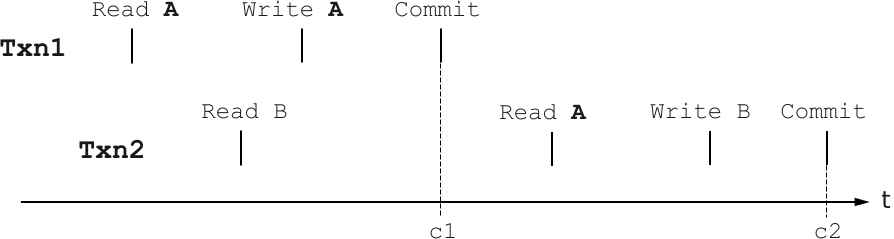
In this scenario, during the timeline t:
- Transaction
Txn1reads dataA, stages a write toA, and then successfully commits. - Transaction
Txn2begins afterTxn1starts. It reads dataBand then reads dataA.
Even though Txn2 started before Txn1 completed, Txn2 observes the changes
made by Txn1 to A. This is because Txn2 reads A after Txn1 commits
its write to A.
While Txn1 and Txn2 might overlap in their execution time, their commit
timestamps, c1 and c2 respectively, enforce a linear transaction order. This
means:
- All reads and writes within
Txn1appear to have occurred at a single point in time,c1. - All reads and writes within
Txn2appear to have occurred at a single point in time,c2. - Crucially,
c1is earlier thanc2for committed writes, even if the writes occurred on different machines. IfTxn2performs only reads,c1is earlier or at the same time asc2.
This strong ordering means that if a subsequent read operation observes the
effects of Txn2, it also observes the effects of Txn1. This property holds
true for all successfully committed transactions.
On the other hand, if you use repeatable read isolation, the following scenario occurs for the same transactions:
Txn1starts by reading dataA, creating its own snapshot of the database at that moment.Txn2then begins, reading dataB, and establishes its own snapshot.- Next,
Txn1modifies dataA, and successfully commits its changes. Txn2attempts to read dataA. Crucially, because it's operating at an earlier snapshot,Txn2doesn't see the updateTxn1just made toA.Txn2reads the older value.Txn2modifies dataBand commits.
In this scenario, each transaction operates on its own consistent snapshot of
the database, taken from the moment the transaction starts. This sequence can
lead to a write skew anomaly if the write to B by Txn2 was logically
dependent on the value it read from A. In essence, Txn2 made its updates
based on outdated information, and its subsequent write might violate an
application-level invariant. To prevent this scenario from arising, consider
either using SELECT...FOR UPDATE for repeatable read
isolation, or creating
check constraints in your schema.
Read and write guarantees on transaction failure
If a call to execute a transaction fails, the read and write guarantees you have depend on what error the underlying commit call failed with.
Spanner might execute a transaction's operations multiple times internally. If an execution attempt fails, the returned error specifies the conditions that occurred and indicates the guarantees you receive. However, if Spanner retries your transaction, any side effects from its operations (for example, changes to external systems or a system state outside a Spanner database) might occur multiple times.
When a Spanner transaction fails, the guarantees you receive for reads and writes depend on the specific error encountered during the commit operation.
For example, an error message such as "Row Not Found" or "Row Already Exists" indicates an issue during the writing of buffered mutations. This can occur if, for example, a row the client is attempting to update doesn't exist. In these scenarios:
- Reads are consistent: Any data read during the transaction is guaranteed to be consistent up to the point of the error.
- Writes are not applied: The mutations the transaction attempted aren't committed to the database.
- Row consistency: The non-existence (or existing state) of the row that triggered the error is consistent with the reads performed within the transaction.
You can cancel asynchronous read operations in Spanner at any time without affecting other ongoing operations within the same transaction. This flexibility is useful if a higher-level operation is cancelled, or if you decide to abort a read based on initial results.
However, it's important to understand that requesting the cancellation of a read doesn't guarantee its immediate termination. After a cancellation request, the read operation might still:
- Successfully complete: the read might finish processing and return results before the cancellation takes effect.
- Fail for another reason: the read could terminate due to a different error, such as an abort.
- Return incomplete results: the read might return partial results, which are then validated as part of the transaction commit process.
Cancelling a commit operation aborts the entire transaction, unless the transaction has already committed or failed due to another reason.
Atomicity, consistency, durability
In addition to isolation, Spanner provides the other ACID property guarantees:
- Atomicity: A transaction is considered atomic if all its operations are completed successfully, or none at all. If any operation within a transaction fails, the entire transaction is rolled back to its original state, ensuring data integrity.
- Consistency: A transaction must maintain the integrity of the database's rules and constraints. After a transaction completes, the database should be in a valid state, adhering to predefined rules.
- Durability: After a transaction is committed, its changes are permanently stored in the database and persist in the event of system failures, power outages, or other disruptions.
Performance
This section describes issues that affect read-write transaction performance.
Locking concurrency control
By default, Spanner permits multiple clients to interact with the same database concurrently in its default serializable isolation level. To maintain data consistency across these concurrent transactions, Spanner has a locking mechanism that uses both shared and exclusive locks. These read locks are only acquired for serializable transactions, but not for transactions that use repeatable read isolation.
When a serializable transaction performs a read operation, Spanner acquires shared read locks on the relevant data. These shared locks let other concurrent read operations access the same data. This concurrency is maintained until your transaction prepares to commit its changes.
In serializable isolation, during the commit phase, as writes are applied, the transaction attempts to upgrade its locks to exclusive locks. To achieve this, Spanner does the following:
- Blocks any new shared read lock requests on the affected data.
- Waits for all existing shared read locks on that data to be released.
- After all shared read locks are cleared, it places an exclusive lock, granting it sole access to the data for the duration of the write.
In contrast, neither Spanner's serializable isolation with optimistic concurrency nor repeatable read isolation with optimistic concurrency acquire locks throughout the execution of the transaction. When committing, the transaction acquires exclusive locks for the written data. The transaction might have to wait for locks if a concurrent transaction is also committing writes to the same data.
In repeatable read isolation with pessimistic concurrency, exclusive locks are
acquired for the data read by queries that use FOR UPDATE, or the
lock_scanned_ranges=exclusive hint, and for data written with DML queries.
Therefore, no further locks need to be acquired at commit time.
Notes about locks:
- Granularity: Spanner applies locks at the row-and-column
granularity. This means that if transaction
T1holds a lock on columnAof rowalbumid, transactionT2can still concurrently write to columnBof the same rowalbumidwithout conflict. Writes without reads:
- When there are no reads in the transaction, Spanner might not require an exclusive lock for writes without reads. Instead, it might use a writer shared lock. This is because the order of application for writes without reads is determined by their commit timestamps, letting multiple writers operate on the same item concurrently without conflict. An exclusive lock is only necessary if your transaction first reads the data it intends to write.
- In repeatable read isolation, transactions commonly acquire exclusive locks for written cells at commit time.
Secondary indexes for row lookups: in serializable isolation, when performing reads within a read-write transaction, using secondary indexes can significantly improve performance. By using secondary indexes to limit the scanned rows to a smaller range, Spanner locks fewer rows in the table, thereby enabling greater concurrent modification of rows outside of that specific range.
External resource exclusive access: Spanner's internal locks are designed for data consistency within the Spanner database itself. Don't use them to guarantee exclusive access to resources outside of Spanner. Spanner can abort transactions for various reasons, including internal system optimizations like data movement across compute resources. If a transaction is retried (either explicitly by your application code or implicitly by client libraries like the Spanner JDBC driver), locks are only guaranteed to have been held during the successful commit attempt.
Lock statistics: to diagnose and investigate lock conflicts within your database, use the Lock statistics introspection tool.
Deadlock detection
Spanner detects when multiple transactions might be deadlocked
and forces all but one of the transactions to abort. Consider this scenario:
Txn1 holds a lock on record A and is waiting for a lock on record B, while
Txn2 holds a lock on record B and is waiting for a lock on record A. To
resolve this, one of the transactions must abort, releasing its lock and
allowing the other to proceed.
Spanner uses the standard wound-wait algorithm for deadlock detection. Under the hood, Spanner tracks the age of each transaction requesting conflicting locks. It lets older transactions abort younger ones. An older transaction is one whose earliest read, query, or commit occurred sooner.
By prioritizing older transactions, Spanner ensures that every transaction eventually acquires locks after it becomes old enough to have higher priority. For example, an older transaction needing a writer-shared lock can abort a younger transaction holding a reader-shared lock.
Distributed execution
Spanner can execute transactions on data that spans multiple servers, though this capability comes with a performance cost compared to single-server transactions.
What types of transactions might be distributed? Spanner can distribute responsibility for database rows across many servers. Typically, a row and its corresponding interleaved table rows are served by the same server, as are two rows in the same table with nearby keys. Spanner can perform transactions across rows on different servers. However, as a general rule, transactions affecting many co-located rows are faster and cheaper than those affecting many rows scattered throughout the database or a large table.
The most efficient transactions in Spanner include only the reads and writes that should be applied atomically. Transactions are fastest when all reads and writes access data in the same part of the key space.
Read-only transactions
In addition to locking read-write transactions, Spanner offers read-only transactions.
Use a read-only transaction when you need to execute more than one read at the same timestamp. If you can express your read using one of Spanner's single read methods, you should use that single read method instead. The performance of using such a single read call should be comparable to the performance of a single read done in a read-only transaction.
If you are reading a large amount of data, consider using partitions to read the data in parallel.
Because read-only transactions don't write, they don't hold locks and they don't block other transactions. Read-only transactions observe a consistent prefix of the transaction commit history, so your application always gets consistent data.
Interface
Spanner provides an interface for executing a body of work in the context of a read-only transaction, with retries for transaction aborts.
Example
The following example shows how to use a read-only transaction to get consistent data for two reads at the same timestamp:
C++
C#
Go
Java
Node.js
PHP
Python
Ruby
Semantics
This section describes semantics for read-only transactions.
Snapshot read-only transactions
When a read-only transaction executes in Spanner, it performs all its reads at a single logical point in time. This means that both the read-only transaction and any other concurrent readers and writers see a consistent snapshot of the database at that specific moment.
These snapshot read-only transactions offer a simpler approach for consistent reads compared to locking read-write transactions. Here's why:
- No locks: read-only transactions don't acquire locks. Instead, they operate by selecting a Spanner timestamp and executing all reads against that historical version of the data. Because they don't use locks, they won't block concurrent read-write transactions.
- No aborts: these transactions never abort. While they might fail if their chosen read timestamp is garbage collected, Spanner's default garbage collection policy is typically generous enough that most applications won't encounter this issue.
- No commits or rollbacks: read-only transactions don't require calls to
sessions.commitorsessions.rollbackand are actually prevented from doing so.
To execute a snapshot transaction, the client defines a timestamp bound, which instructs Spanner how to select a read timestamp. The types of timestamp bounds include the following:
- Strong reads: these reads guarantee that you'll see the effects of all transactions committed before the read began. All rows within a single read are consistent. However, strong reads aren't repeatable, although strong reads do return a timestamp, and reading again at that same timestamp is repeatable. Two consecutive strong read-only transactions might produce different results due to concurrent writes. Queries on change streams must use this bound. For more details, see TransactionOptions.ReadOnly.strong.
- Exact staleness: this option executes reads at a timestamp you specify, either as an absolute timestamp or as a staleness duration relative to the current time. It ensures you observe a consistent prefix of the global transaction history up to that timestamp and blocks conflicting transactions that might commit with a timestamp less than or equal to the read timestamp. While slightly faster than bounded staleness modes, it might return older data. For more details, see TransactionOptions.ReadOnly.read_timestamp and TransactionOptions.ReadOnly.exact_staleness.
- Bounded staleness: Spanner selects the newest timestamp within a user-defined staleness limit, allowing execution at the nearest available replica without blocking. All rows returned are consistent. Like strong reads, bounded staleness isn't repeatable, as different reads might execute at different timestamps even with the same bound. These reads operate in two phases (timestamp negotiation, then read) and are usually slightly slower than exact staleness, but they often return fresher results and are more likely to execute at a local replica. This mode is only available for single-use read-only transactions because timestamp negotiation requires knowing which rows will be read beforehand. For more details, seeTransactionOptions.ReadOnly.max_staleness and TransactionOptions.ReadOnly.min_read_timestamp.
Partitioned DML transactions
You can use partitioned DML to execute
large-scale UPDATE and DELETE statements without encountering transaction
limits or locking an entire table. Spanner achieves this by
partitioning the key space and executing the DML statements on each partition
within a separate read-write transaction.
To use non-partitioned DML, you execute statements within read-write transactions that you explicitly create in your code. For more details, see Using DML.
Interface
Spanner provides the TransactionOptions.partitionedDml interface for executing a single partitioned DML statement.
Examples
The following code example updates the MarketingBudget column of the Albums
table.
C++
You use the ExecutePartitionedDml() function to execute a partitioned DML statement.
C#
You use the ExecutePartitionedUpdateAsync() method to execute a partitioned DML statement.
Go
You use the PartitionedUpdate() method to execute a partitioned DML statement.
Java
You use the executePartitionedUpdate() method to execute a partitioned DML statement.
Node.js
You use the runPartitionedUpdate() method to execute a partitioned DML statement.
PHP
You use the executePartitionedUpdate() method to execute a partitioned DML statement.
Python
You use the execute_partitioned_dml() method to execute a partitioned DML statement.
Ruby
You use the execute_partitioned_update() method to execute a partitioned DML statement.
The following code example deletes rows from the Singers table, based on the
SingerId column.
C++
C#
Go
Java
Node.js
PHP
Python
Ruby
Semantics
This section describes the semantics for partitioned DML.
Understanding partitioned DML execution
You can execute only one partitioned DML statement at a time, whether you are using a client library method or the Google Cloud CLI.
Partitioned transactions don't support commits or rollbacks. Spanner executes and applies the DML statement immediately. If you cancel the operation, or the operation fails, Spanner cancels all the executing partitions and doesn't start any remaining ones. However, Spanner doesn't roll back any partitions that have already executed.
Partitioned DML lock acquisition strategy
To reduce lock contention, partitioned DML acquires read locks only on rows that
match the WHERE clause. Smaller, independent transactions used for each
partition also hold locks for less time.
Old read timestamps and version garbage collection
Spanner performs version garbage collection to collect deleted or
overwritten data and reclaim storage. By default, data older than one hour is
reclaimed. Spanner can't perform reads at timestamps older than
the configured VERSION_RETENTION_PERIOD, which defaults to one hour but can be
configured to up to one week. When reads become too old during execution, they
fail and return the FAILED_PRECONDITION error.
Queries on change streams
A change stream is a schema object you can configure to monitor data modifications across an entire database, specific tables, or a defined set of columns within a database.
When you create a change stream, Spanner defines a
corresponding SQL table-valued function (TVF). You can use this TVF to query the
change records in the associated change stream with the
sessions.executeStreamingSql
method. The TVF's name is generated from the change stream's name and always
starts with READ_.
All queries on change stream TVFs must be executed using the
sessions.executeStreamingSql API within a single-use read-only transaction
with a strong read-only timestamp_bound. The change stream TVF lets you
specify start_timestamp and end_timestamp for the time range. All change
records within the retention period are accessible using this strong read-only
timestamp_bound. All other
TransactionOptions are
invalid for change stream queries.
Additionally, if
TransactionOptions.read_only.return_read_timestamp
is set to true, the
Transaction message describing
the transaction returns a special value of 2^63 - 2 instead of a valid read
timestamp. You should discard this special value and not use it for any
subsequent queries.
For more information, see Change streams query workflow.
Idle Transactions
A transaction is considered idle if it has no outstanding reads or SQL queries
and hasn't started one in the last 10 seconds. Spanner can abort
idle transactions to prevent them from holding locks indefinitely. If an idle
transaction is aborted, the commit fails and returns an ABORTED error.
Periodically executing a small query, such as SELECT 1, within the transaction
can prevent it from becoming idle.
What's next
- Learn more about Spanner isolation levels.