

This page describes techniques for tuning Spanner query performance. Before you begin tuning your queries, review the following pages, which explain foundational concepts and tools used in query tuning:
The queries and execution plans on this page are based on the following database schema:
CREATE TABLE Singers (
  SingerId   INT64 NOT NULL,
  FirstName  STRING(1024),
  LastName   STRING(1024),
  SingerInfo BYTES(MAX),
  BirthDate  DATE
) PRIMARY KEY(SingerId);

CREATE INDEX SingersByFirstLastName ON Singers(FirstName, LastName);

CREATE TABLE Albums (
  SingerId        INT64 NOT NULL,
  AlbumId         INT64 NOT NULL,
  AlbumTitle      STRING(MAX),
  MarketingBudget INT64
) PRIMARY KEY(SingerId, AlbumId),
  INTERLEAVE IN PARENT Singers ON DELETE CASCADE;

CREATE INDEX AlbumsByAlbumTitle ON Albums(AlbumTitle);

CREATE INDEX AlbumsByAlbumTitle2 ON Albums(AlbumTitle) STORING (MarketingBudget);

CREATE TABLE Songs (
  SingerId  INT64 NOT NULL,
  AlbumId   INT64 NOT NULL,
  TrackId   INT64 NOT NULL,
  SongName  STRING(MAX),
  Duration  INT64,
  SongGenre STRING(25)
) PRIMARY KEY(SingerId, AlbumId, TrackId),
  INTERLEAVE IN PARENT Albums ON DELETE CASCADE;

CREATE INDEX SongsBySingerAlbumSongNameDesc ON Songs(SingerId, AlbumId, SongName DESC), INTERLEAVE IN Albums;

CREATE INDEX SongsBySongName ON Songs(SongName);

CREATE TABLE Concerts (
  VenueId      INT64 NOT NULL,
  SingerId     INT64 NOT NULL,
  ConcertDate  DATE NOT NULL,
  BeginTime    TIMESTAMP,
  EndTime      TIMESTAMP,
  TicketPrices ARRAY<INT64>
) PRIMARY KEY(VenueId, SingerId, ConcertDate);
You can use the following Data Manipulation Language (DML) statements to add data to these tables:
INSERT INTO Singers (SingerId, FirstName, LastName, BirthDate)
VALUES (1, "Marc", "Richards", "1970-09-03"),
       (2, "Catalina", "Smith", "1990-08-17"),
       (3, "Alice", "Trentor", "1991-10-02"),
       (4, "Lea", "Martin", "1991-11-09"),
       (5, "David", "Lomond", "1977-01-29");

INSERT INTO Albums (SingerId, AlbumId, AlbumTitle)
VALUES (1, 1, "Total Junk"),
       (1, 2, "Go, Go, Go"),
       (2, 1, "Green"),
       (2, 2, "Forever Hold Your Peace"),
       (2, 3, "Terrified"),
       (3, 1, "Nothing To Do With Me"),
       (4, 1, "Play");

INSERT INTO Songs (SingerId, AlbumId, TrackId, SongName, Duration, SongGenre)
VALUES (2, 1, 1, "Let's Get Back Together", 182, "COUNTRY"),
       (2, 1, 2, "Starting Again", 156, "ROCK"),
       (2, 1, 3, "I Knew You Were Magic", 294, "BLUES"),
       (2, 1, 4, "42", 185, "CLASSICAL"),
       (2, 1, 5, "Blue", 238, "BLUES"),
       (2, 1, 6, "Nothing Is The Same", 303, "BLUES"),
       (2, 1, 7, "The Second Time", 255, "ROCK"),
       (2, 3, 1, "Fight Story", 194, "ROCK"),
       (3, 1, 1, "Not About The Guitar", 278, "BLUES");
Benchmark recommendations
The most reliable performance statistics come from running a load test that uses different, randomized query parameter values from a Google Cloud virtual machine (VM) instance that resides in the same region as the target instance.
Avoid relying on the Spanner Studio or the QueryMode.PROFILE mode to
benchmark queries, because these tools don't replicate actual production network
and client environments. However, after a load test identifies a performance
issue, query plans (whether sampled in Query insights or run on demand
in the Spanner Studio) are useful tools for investigating that specific
issue.
Understand query execution plans
In the query plan visualizer, a query execution plan is shown as a tree of operators, where each operator reads rows from its child operators, processes them, and passes the results up to its parent operator.
For most operators in the visual plan, the reported latency is additive (it
reflects only the time spent in that operator). However, for the
Distributed union and Distributed apply operators, the reported latency is
cumulative: it includes both the time spent in the distributed operator itself
and the time spent in its child operators. For more information about these
operators, see Distributed union and
Distributed apply.
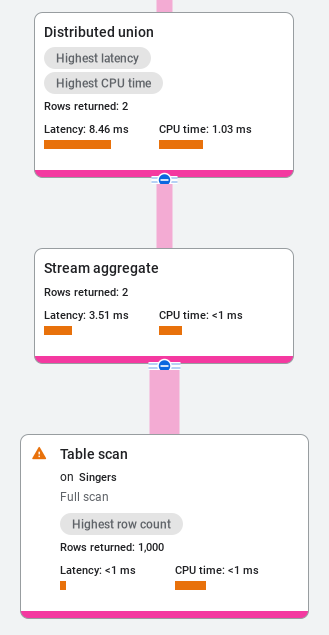
For example, in the following distributed union plan, the Distributed union
card reports a total latency of 8.46 ms, while its child Stream aggregate
operator reports 3.51 ms and Table scan reports 1 ms. Because the
Distributed union latency is cumulative, the Distributed union operator
itself adds only about 5 ms of latency, rather than 8 ms:
In the next example, the Distributed union card reports 13.69 ms of
latency, while its child operators (Stream aggregate at <1 ms,
Cross apply at 1.14 ms, Table scan on Albums at <1 ms,
Filter scan at 1 ms, and Table scan on Singers at 10.85 ms)
account for approximately 13 ms. As a result, the Distributed union
operator itself adds less than 1 ms of latency, rather than 13 ms:

You can also view the cumulative latency values in the operator summary panel.
Combine multiple indexes
When a query filters on multiple indexed columns using OR or AND conditions,
Spanner can sometimes combine multiple secondary indexes to avoid
scanning the full base table. The examples in this section extend the Albums
table from the preceding example schema by adding a ReleaseDate column and an
AlbumsByReleaseDate secondary index:
CREATE TABLE Albums (
  SingerId        INT64 NOT NULL,
  AlbumId         INT64 NOT NULL,
  AlbumTitle      STRING(MAX),
  ReleaseDate     DATE,
  MarketingBudget INT64
) PRIMARY KEY(SingerId, AlbumId),
  INTERLEAVE IN PARENT Singers ON DELETE CASCADE;

CREATE INDEX AlbumsByAlbumTitle ON Albums(AlbumTitle);

CREATE INDEX AlbumsByReleaseDate ON Albums(ReleaseDate);
Consider the following query, which uses an OR condition to filter on
predicates from two separate secondary indexes (AlbumsByAlbumTitle and
AlbumsByReleaseDate):
SELECT a.AlbumId, a.AlbumTitle, a.ReleaseDate
FROM Albums AS a
WHERE a.AlbumTitle = 'Play' OR a.ReleaseDate = '2023-09-07';
When a query has an OR condition on predicates from two separate indexes,
Spanner might use cost-based optimization to read both indexes
and combine the results (an index union). You can also force this optimization
by adding the INDEX_STRATEGY=FORCE_INDEX_UNION table hint to the query:
SELECT a.AlbumId, a.AlbumTitle, a.ReleaseDate
FROM Albums@{INDEX_STRATEGY=FORCE_INDEX_UNION} AS a
WHERE a.AlbumTitle = 'Play' OR a.ReleaseDate = '2023-09-07';
For more information about table hints, see Table hints.
The following execution plan diagram shows how Spanner evaluates
this OR condition (disjunction) by scanning each branch separately and
combining the results using the Union all and Hash aggregate operators:

Next, consider a query that uses an AND condition to filter on both indexed
columns:
SELECT a.AlbumId, a.ReleaseDate, a.AlbumTitle
FROM Albums AS a
WHERE a.AlbumTitle = 'Aardvark' AND a.ReleaseDate = '2023-09-07';
With an AND condition, Spanner picks a single index by default
and then joins back to the base table, if needed, to evaluate the remaining
condition in the AND clause. To determine whether this base table back-join is
a performance bottleneck, inspect the query execution plan in the visualizer: if
the Index scan operator returns many rows that are subsequently filtered out
after joining with the Table scan operator on the base table (resulting in
high latency or CPU time on the Table scan branch relative to the final number
of rows returned), then the back-join is a bottleneck.
If the base table back-join is the bottleneck for the query, the recommended
solution is to add the extra column in the AND condition to the STORING
clause of the secondary index so Spanner can evaluate both
conditions directly from the index without reading the base table:
CREATE INDEX AlbumsByAlbumTitleStoringReleaseDate
  ON Albums(AlbumTitle)
  STORING (ReleaseDate);
If modifying the index isn't viable, an alternative is to rewrite the query to
perform an intersection of both indexes using INTERSECT DISTINCT, and then
join the matching primary keys back to the Albums base table:
SELECT union_a.AlbumId, a.ReleaseDate, a.AlbumTitle FROM
  (SELECT a1.SingerId, a1.AlbumId
  FROM Albums @{force_index=AlbumsByReleaseDate} AS a1
  WHERE a1.ReleaseDate = '2023-09-07'
  INTERSECT DISTINCT
  SELECT a2.SingerId, a2.AlbumId
  FROM Albums @{force_index=AlbumsByAlbumTitle} AS a2
  WHERE a2.AlbumTitle = 'Aardvark') AS union_a
JOIN Albums AS a
  ON a.SingerId = union_a.SingerId AND a.AlbumId = union_a.AlbumId;
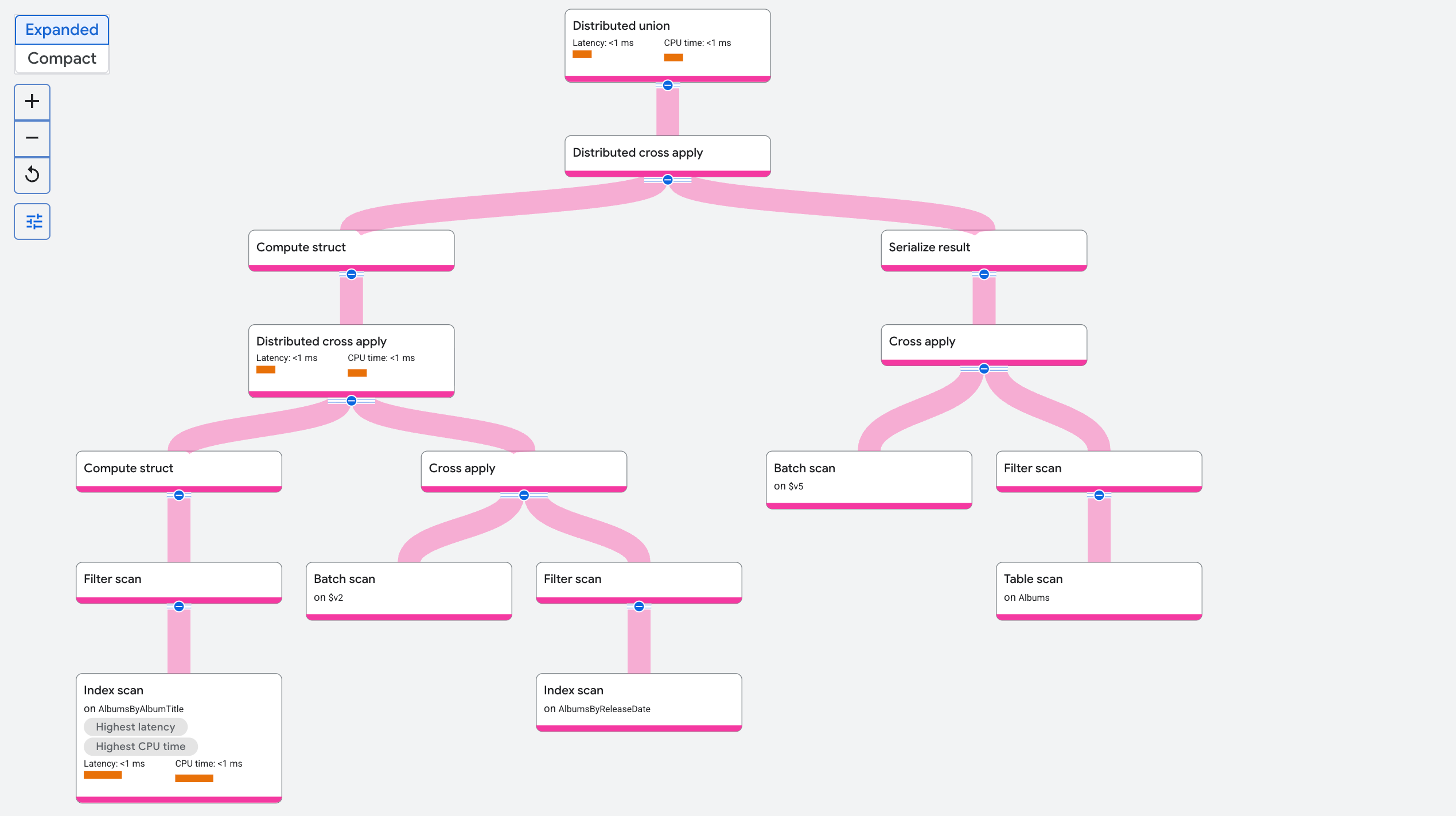
The following execution plan diagram shows the rewritten query. Notice how the
plan uses two Index scan operators (on AlbumsByAlbumTitle and
on AlbumsByReleaseDate) to find the intersecting keys before performing the
Table scan on the Albums base table:
If filtering across multiple columns is a frequent pattern in your workload, consider using multi-column full-text search instead of secondary indexes. For more information, see Perform a multi-column search.
Optimize joins
When Spanner executes a query that joins multiple tables, the query optimizer chooses both the join order (the sequence in which tables are joined) and the join method (the algorithm used to combine rows from two inputs, such as an apply join, hash join, or merge join). If a query with a join is slower than expected, you can use a query hint to instruct Spanner to use a different join order or join method. This changes the execution plan, but doesn't change the returned results. For example:
GoogleSQL
Force join order:
SELECT *
FROM Singers AS s JOIN@{FORCE_JOIN_ORDER=TRUE} Albums AS a
ON s.SingerId = a.SingerId
WHERE s.LastName LIKE '%x%' AND a.AlbumTitle LIKE '%love%';
Change join method:
SELECT *
FROM Singers AS s JOIN@{JOIN_METHOD=HASH_JOIN} Albums AS a
ON s.SingerId = a.SingerId;
PostgreSQL
Force join order:
SELECT *
FROM Singers AS s JOIN/*@ FORCE_JOIN_ORDER=TRUE */ Albums AS a
ON s.SingerId = a.SingerId
WHERE s.LastName LIKE '%x%' AND a.AlbumTitle LIKE '%love%';
Change join method:
SELECT *
FROM Singers AS s JOIN/*@ JOIN_METHOD=HASH_JOIN */ Albums AS a
ON s.SingerId = a.SingerId;
The following sections provide background that can help you determine which join orders and join methods can help improve query performance.
Join method and scans
Spanner supports several join methods, and your choice of join method directly affects how Spanner scans the underlying tables or indexes:
- Apply join (known in some systems as a lookup join or nested loop join): executes its right-hand ("map") side once for each row from the left-hand ("input") side. Because each right-hand lookup uses values from the current left-hand row, the join columns from the left can be used as a seek key on the right. A distributed apply join works similarly to a local apply join, but batches rows together for more efficient communication across splits in a distributed join.
- Hash join: reads rows from one input to build an in-memory hash table on the join keys, and then scans the other input to probe the hash table for matches.
- Merge join: reads both inputs in sorted order on the join keys and merges matching rows in a single pass.
For example, consider the following query that joins Singers and Albums:
SELECT s.*, a.AlbumTitle
FROM Singers AS s
JOIN Albums AS a ON s.SingerId = a.SingerId
WHERE s.SingerId = 2 AND a.AlbumId = 1;
With an apply join, s.SingerId = a.SingerId acts as a seek condition on the
right side of the join, so the query only has to read one row from the Albums
table.
By contrast, in a hash join or merge join, the left and right inputs are read independently of each other, so the join condition doesn't provide a seek key from one side to the other. In the worst case, a hash or merge join performs a full-table scan of each input.
In interactive and transactional queries, most joins use indexes, so distributed apply is the most common join type in Spanner. However, sometimes a hash or merge join is a better choice because reading a contiguous range of rows is significantly faster than performing the same number of scattered single-row seeks. The tradeoff is whether it's faster to seek fewer rows (using an apply join) or scan a larger contiguous range of rows (using a hash or merge join). For more information about this tradeoff, see Sequential reads versus scattered seeks.
For queries that read thousands of rows, if an index is available on the join key, it's usually safer to use a distributed apply join. This is because the apply join cost is proportional to the number of joined rows, whereas with a hash or merge join, the cost can be proportional to the total table size. For larger queries (such as queries that process millions of rows), using a hash or merge join might offer a significant performance improvement.
For more information about join operators and hints, see the following resources:
Join ordering
As in other relational database management systems (RDBMSs), order joins to keep the intermediate result size as small as possible. That means filtering out data as early as possible, and deferring any large matches as late as possible.
If you provide the FORCE_JOIN_ORDER=TRUE hint, Spanner executes
the joins in the exact order in which they appear in the query text. Move joins
with very selective filters earlier in the query, and move joins with large
matches later in the query.
Optimize aggregations
The following techniques can help you reduce the number of rows scanned and sorted during aggregation queries.
Retrieve one row per key prefix
A common aggregation pattern is to retrieve one row per key prefix (for
example, the row with the highest version number or timestamp). In
GoogleSQL, the most efficient way to do this is to use ANY_VALUE
with HAVING MAX, which finds the row with the maximum value and returns the
requested column in a single aggregation pass without requiring a self-join or
full sort. For example, the following query groups the Concerts table by
ConcertDate and returns the BeginTime of the concert with the latest
EndTime for each date:
SELECT ConcertDate, ANY_VALUE(BeginTime HAVING MAX(EndTime))
FROM Concerts
GROUP BY ConcertDate;
Check row existence
To check whether a table has any rows, or rows that match a specific condition,
use LIMIT rather than COUNT. For example:
SELECT 1 FROM Albums LIMIT 1;
Increase parallelism
Spanner divides tables and indexes into contiguous primary-key
ranges called splits, which can be processed in parallel across multiple
servers. Typically, Spanner chooses query parallelism to balance
latency and efficiency. For example, if a query has a LIMIT clause, it might
use less parallelism to avoid wasting work that the limit discards. The number
of splits scanned by the query limits the maximum degree of parallelism.
For queries with limits or large scans, you can set the
USE_ADDITIONAL_PARALLELISM=TRUE statement hint to instruct
Spanner to optimize primarily for latency:
GoogleSQL
@{USE_ADDITIONAL_PARALLELISM=TRUE}
SELECT *
FROM Singers
LIMIT 10;
PostgreSQL
/*@ USE_ADDITIONAL_PARALLELISM=TRUE */
SELECT *
FROM Singers
LIMIT 10;
This hint might saturate the CPU on a given split. If the query is long running, send it with medium request priority to avoid increasing latency for other high-priority queries.
Optimize limits
If a query contains a LIMIT clause but scans many more rows than the limit
value, check the following potential causes:
Missing index
If a query has a filter that can't be satisfied by using an index, the query
plan scans the base table or an index that doesn't provide the required sort
order. The query then fully sorts the matching data before evaluating the
LIMIT clause.
To resolve this issue, consider adding a secondary index that covers the
filter columns. If the index is defined as NULL_FILTERED (meaning that it
excludes rows where an indexed column is NULL), make sure that the query
predicate includes IS NOT NULL so the optimizer can use the index. For more
information about creating secondary indexes, see
Secondary indexes.
Full sort
If an index exists on the filtered column, but the index doesn't provide the
sort order required by the ORDER BY clause, Spanner must read
all matching rows and pass them to a Sort operator in the query execution plan
before applying the LIMIT.
To avoid a full sort, specify the columns in your CREATE INDEX statement in
the following order:
- First, any columns that have an equality (
=) orINcondition in the query - Then, the same columns as the query's
ORDER BYclause, in the same order, and with the same sort direction (ASCorDESC)
For example, suppose you have a Users table (not shown in the preceding
example schema) and want to optimize the following query:
SELECT * FROM Users
WHERE Name='Alex'
ORDER BY LastLogin DESC
LIMIT 10;
Create an index on (Name, LastLogin DESC) so Spanner can read
the top 10 rows directly in index order without sorting:
CREATE INDEX UsersByNameLastLogin ON Users(Name, LastLogin DESC);
Order by key suffix
Even when an index includes the ORDER BY column as a suffix of the index key,
a query might still scan extra rows if there is an IN, OR, or range
predicate on one of the prefix columns of the index.
For example, consider the following query that uses the (Name, LastLogin DESC)
index from the preceding full sort example, which isn't part of the example
schema:
SELECT *
FROM Users
WHERE Name IN ('Alex','Amal')
ORDER BY LastLogin DESC
LIMIT 10;
Because Name matches multiple values, the matching rows aren't stored in a
single globally sorted range by LastLogin DESC. You can restructure the query
using UNNEST and a join so Spanner retrieves the top rows for
each Name value separately and then combines them:
SELECT *
FROM UNNEST(['Alex','Amal']) AS Name
JOIN Users AS u ON u.Name = Name
ORDER BY LastLogin DESC
LIMIT 10;
This rewrite results in more efficient scans by reading the minimum number of
rows from each bound prefix key ('Alex' and 'Amal'), followed by a small
sort over the combined results to produce the final LIMIT.
A common special case of this pattern is a shard prefix, where a ShardId
column is added as the leading key column to distribute writes across splits.
For example, the following query scans across 32 shards (0 through 31):
SELECT *
FROM Users
WHERE ShardId BETWEEN 0 AND 31
ORDER BY LastLogin DESC
LIMIT 10;
To optimize this query, explicitly enumerate the shard IDs (0 through 31)
and join them against the Users table using GENERATE_ARRAY in
GoogleSQL or generate_series in PostgreSQL:
GoogleSQL
SELECT *
FROM GENERATE_ARRAY(0, 31) AS id
JOIN Users AS u ON u.ShardId = id
ORDER BY LastLogin DESC
LIMIT 10;
PostgreSQL
SELECT *
FROM generate_series(0, 31) AS id
JOIN Users AS u ON u.ShardId = id
ORDER BY LastLogin DESC
LIMIT 10;
For more information about these array and series generation functions, see
GENERATE_ARRAY for GoogleSQL and
generate_series for PostgreSQL.
Understand scan performance
The following sections describe the most common causes of slow table or index scans and how to mitigate them.
Deleted rows
By default, Spanner retains deleted or overwritten rows for one hour to support historical reads and point-in-time recovery, and you can increase this retention period up to seven days. After an old row version passes the retention period, it becomes eligible for removal during background storage compaction, which can take up to seven more days. Until an old row version is compacted, queries that scan the key range might have to read the deleted or overwritten row versions and filter them out. For more information about data retention, see Point-in-time recovery (PITR).
You can check whether a query scanned deleted rows by inspecting the Deleted rows scanned metric in the Scan operator details view in the query plan visualizer details panel.
To mitigate slow scans caused by a large number of recently deleted rows, you can trigger a manual data compaction. For more information, see Manual data compaction.
Large rows
For small rows (up to a few hundred bytes), the cost of a scan depends primarily on the number of rows scanned. As row size increases, the byte size of the rows becomes more significant. In row-oriented storage, the total size of the row affects scan performance, not just the size of the columns projected by the query.
For scan-heavy analytical queries over large tables, consider using the columnar engine. For more information, see Monitor columnar engine.
For queries on narrower sets of rows, if a table has both large columns and smaller columns that are frequently queried, consider the following options:
- Separate the larger columns into a non-default locality group (which stores specified columns separately on disk from the rest of the table) or a separate child table so scans of the smaller columns don't read the large column data. For more information, see Create and manage locality groups.
- For additional read-time optimization, duplicate the smaller columns into a
secondary index with the same primary key as the base table, using the
STORINGclause to include the smaller columns.
For example, suppose a Documents table (not part of the preceding example
schema) stores a small Metadata string alongside a large Content JSON
object. You can create a secondary index that stores only Metadata so queries
that don't need Content can scan the smaller index instead of the base table:
CREATE TABLE Documents (
  Id INT64,
  Metadata STRING(MAX),
  Content JSON
) PRIMARY KEY (Id);

CREATE INDEX DocumentMetadata ON Documents(Id) STORING (Metadata);
Large interleaved data
When tables are interleaved, Spanner physically stores each parent row together with its interleaved child rows in key order. If a parent table has many interleaved child rows, or a child table has significantly fewer rows than its parent or sibling tables, then range scans over the smaller table are sparser and less efficient because the scan must skip over the interleaved rows from the other tables.
For example, consider the following schema (not part of the preceding example
schema), in which both Transaction and AuthorizedPerson are interleaved in
Account:
CREATE TABLE Account (
  AccountId INT64,
  -- Additional columns omitted
) PRIMARY KEY (AccountId);

CREATE TABLE Transaction (
  AccountId INT64,
  TransactionId STRING(MAX),
  -- Additional columns omitted
) PRIMARY KEY (AccountId, TransactionId),
INTERLEAVE IN PARENT Account;

CREATE TABLE AuthorizedPerson (
  AccountId INT64,
  SignerId INT64,
  Name STRING(MAX),
  -- Additional columns omitted
) PRIMARY KEY (AccountId, SignerId),
INTERLEAVE IN PARENT Account;
If every Account row has thousands of Transaction rows and only a few
AuthorizedPerson rows, a range scan on Account or AuthorizedPerson has a
higher per-row cost than a range scan on Transaction (even though its total
cost is still lower). This happens because a Transaction scan reads many
contiguous Transaction rows at once, whereas a scan on Account or
AuthorizedPerson has fewer adjacent rows of the same table and must skip over
the interleaved Transaction rows.
To optimize range scans on the sparser table (Account or AuthorizedPerson),
create a non-interleaved secondary index that duplicates the columns needed by
your query, similar to the approach for large rows:
CREATE INDEX AuthorizedPersonByAccount
  ON AuthorizedPerson(AccountId, SignerId)
  STORING (Name);
Use batch-oriented execution
Spanner can execute query scans and query operators using either a row-oriented method (processing one row at a time) or a batch-oriented method (processing blocks of rows at a time). The following sections explain how to inspect and configure batch-oriented scans and batch-oriented operator execution.
Batch-oriented scans
Certain Spanner queries might benefit from using a batch-oriented processing method when scanning data rather than the more common row-oriented processing method. Processing scans in batches is a more efficient way to process large volumes of data all at once, and it lets queries achieve lower CPU utilization and latency.
The Spanner scan operation always starts execution in the row-oriented method. During this time, Spanner collects several runtime metrics. Then, Spanner applies a set of heuristics based on the result of these metrics to determine the optimal scan method. When appropriate, Spanner switches to a batch-oriented processing method to help improve scan throughput and performance.
Common use cases
Queries with the following characteristics generally benefit from batch-oriented processing:
- Large scans over infrequently updated data
- Scans with predicates on fixed-width columns
- Scans with large seek counts (a seek uses an index to retrieve records)
Use cases without performance gains
Not all queries benefit from batch-oriented processing. The following query types perform better with row-oriented scan processing:
- Point lookup queries: queries that fetch only one row.
- Small scan queries: table scans that scan only a few rows, unless they have large seek counts.
- Queries with a
LIMITclause: queries that stop scanning after returning a fixed number of rows. - Queries that read high-churn data: queries in which more than approximately 10% of the data read is frequently updated.
- Queries with rows containing large values: queries on rows that contain values larger than 32,000 bytes (pre-compression) in a single column.
Check the scan method used by a query
To check whether your query uses batch-oriented processing, row-oriented processing, or automatically switches between the two scan methods, follow these steps:
In the Google Cloud console, go to the Spanner Instances page.
Click the name of the instance with the query that you want to investigate.
In the Databases table, click the database with the query that you want to investigate.
In the Spanner navigation menu, click Spanner Studio.
Click New SQL editor tab or New tab.
In the query editor, enter your query.
Click Run.
Spanner runs the query and shows the results.
In the query editor pane, click the Explanation tab.
Spanner shows the query execution plan visualizer. Each card on the graph represents an iterator. For more information about execution plans, see Query execution plans.
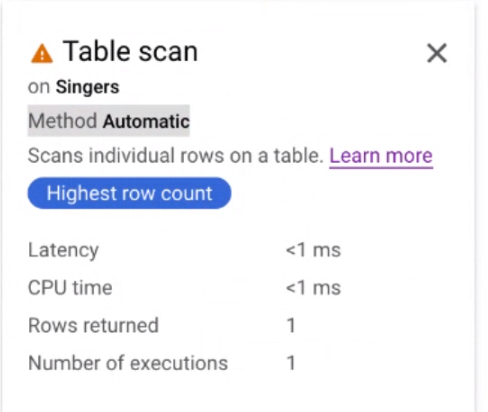
Click the Table scan iterator card to open an information panel.
The information panel shows contextual information about the selected scan, including the scan method (Method). Automatic indicates that Spanner determines the scanning method. Other possible values include Batch for batch-oriented processing and Row for row-oriented processing, as shown in the following image:
Enforce the scan method used by a query
To optimize query performance, Spanner chooses the optimal scan method for your query. Google recommends that you use this default scan method. However, there might be scenarios in which you want to enforce a specific type of scan method.
Enforce batch-oriented scanning
You can enforce batch-oriented scanning at the table level and statement level.
To enforce the batch-oriented scan method at the table level, use a table hint in your query:
GoogleSQL
SELECT *
FROM (Singers@{SCAN_METHOD=BATCH} AS s
  JOIN Albums AS a ON s.SingerId = a.SingerId);
PostgreSQL
SELECT *
FROM (Singers/*@ scan_method=batch */ AS s
  JOIN Albums AS a ON s.SingerId = a.SingerId);
To enforce the batch-oriented scan method at the statement level, use a statement hint in your query:
GoogleSQL
@{SCAN_METHOD=BATCH}
SELECT *
FROM Singers;
PostgreSQL
/*@ scan_method=batch */
SELECT *
FROM Singers;
When you use a statement-level hint, it applies to the entire query. Setting the hint at the table level is preferable and provides more granular control.
Force row-oriented scanning
Although Google doesn't recommend disabling the automatic scanning method set by Spanner, you can disable it and use the row-oriented scanning method for troubleshooting purposes, such as diagnosing latency.
To disable the automatic scan method selection and enforce row processing at the table level, use a table hint in your query:
GoogleSQL
SELECT *
FROM (Singers@{SCAN_METHOD=ROW} AS s
  JOIN Albums AS a ON s.SingerId = a.SingerId);
PostgreSQL
SELECT *
FROM (Singers/*@ scan_method=row */ AS s
  JOIN Albums AS a ON s.SingerId = a.SingerId);
To disable the automatic scan method and enforce row processing at the statement level, use a statement hint in your query:
GoogleSQL
@{SCAN_METHOD=ROW}
SELECT *
FROM Singers;
PostgreSQL
/*@ scan_method=row */
SELECT *
FROM Singers;
Execution method
In addition to batch-oriented scans, you can also optimize query execution by enforcing the execution method at the statement level. This only works for some operators, and it's independent of the scan method, which is only used by the scan operator. For more information about batch-oriented scans, see the Batch-oriented scans section of this document.
By default, most operators execute in the row-oriented method, which processes data one row at a time. Vectorized operators execute in the batch-oriented method to help improve execution throughput and performance. These operators process data one block at a time. When an operator needs to process many rows, the batch-oriented execution method is usually more efficient.
Execution method versus scan method
The query execution method is independent of the query scan method. You can set one, both, or neither of these methods in your query hint.
The query execution method refers to the way query operators process intermediate results and how the operators interact with each other, whereas the scan method refers to the way the scan operator interacts with the Spanner storage layer.
Enforce the execution method used by the query
To optimize query performance, Spanner chooses the optimal execution method for your query based on various heuristics. Google recommends that you use this default execution method. However, there might be scenarios in which you want to enforce a specific type of execution method.
You can enforce your execution method at the statement level. The
EXECUTION_METHOD query hint is advisory rather than a directive. Ultimately,
the query optimizer decides which method to use for each individual operator.
To enforce the batch-oriented execution method at the statement level, use a statement hint in your query:
GoogleSQL
@{EXECUTION_METHOD=BATCH}
SELECT *
FROM Singers;
PostgreSQL
/*@ EXECUTION_METHOD=BATCH */
SELECT *
FROM Singers;
Although Google doesn't recommend disabling the automatic execution method set by Spanner, you can disable it and use the row-oriented execution method for troubleshooting purposes, such as diagnosing latency.
To disable the automatic execution method and enforce the row-oriented execution method at the statement level, use a statement hint in your query:
GoogleSQL
@{EXECUTION_METHOD=ROW}
SELECT *
FROM Singers;
PostgreSQL
/*@ EXECUTION_METHOD=ROW */
SELECT *
FROM Singers;
Check which execution method is enabled
Not all Spanner operators support both batch-oriented and row-oriented execution methods. For each operator, the query execution plan visualizer shows the execution method in the iterator card. If the execution method is batch-oriented, it shows Batch. If it's row-oriented, it shows Row. For more information about the visualizer, see Query execution plans.
If the operators in your query execute using different execution methods, the
execution method adapters DataBlockToRowAdapter and RowToDataBlockAdapter
appear between the operators to show the change in execution method. For more
information about these operators, see
DataBlockToRowAdapter and
RowToDataBlockAdapter.