

Overview
This page explains the concepts behind query execution plans and how Spanner uses them to perform queries in a distributed environment. To learn how to retrieve an execution plan for a specific query using the Google Cloud console, see Understand how Spanner executes queries. You can also view sampled historical query plans to compare query performance over time. To learn more, see Sampled query plans.
Spanner uses declarative SQL statements to query its databases. SQL statements define what the user wants without specifying how to obtain the results. A query execution plan is the set of steps for how the results are obtained. For a given SQL statement, there may be multiple ways to obtain the results. The Spanner query optimizer evaluates different execution plans and chooses the most efficient one. Spanner then uses the execution plan to retrieve the results. Execution plans support GoogleSQL-dialect databases and PostgreSQL-dialect databases.
For more information about the query optimizer, see Query optimizer overview.
Conceptually, an execution plan is a tree of relational operators. Each operator reads rows from its inputs and produces output rows. The result of the operator at the root of the execution is returned as the result of the SQL query.
As an example, consider the following query:
SELECT s.SongName FROM Songs AS s;
This query results in a query execution plan that can be visualized as:
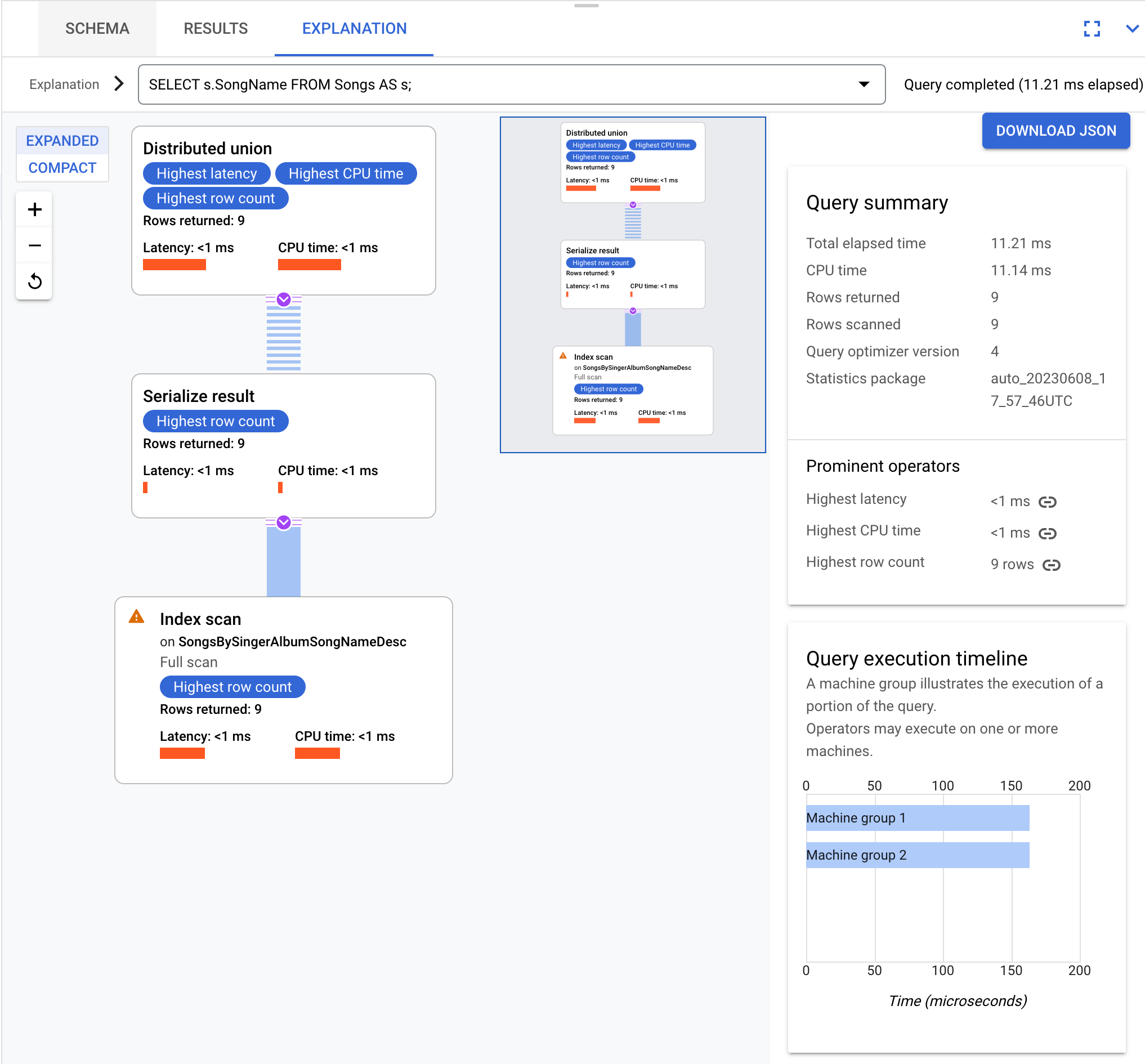
In this example, Spanner executes the query plan top-down, and
data flows bottom-up. The
distributed union
operator executes first. The dashed blue lines indicate that this operator can
make a remote call. Whether locally or remotely, it invokes the
serialize result
operator and continues down the tree. When the
table scan operator produces a row,
it immediately returns control to the serialize result operator. This process
continues until the query scans all rows.
The queries and execution plans on this page are based on the following database schema:
CREATE TABLE Singers (
  SingerId   INT64 NOT NULL,
  FirstName  STRING(1024),
  LastName   STRING(1024),
  SingerInfo BYTES(MAX),
  BirthDate  DATE
) PRIMARY KEY(SingerId);

CREATE INDEX SingersByFirstLastName ON Singers(FirstName, LastName);

CREATE TABLE Albums (
  SingerId        INT64 NOT NULL,
  AlbumId         INT64 NOT NULL,
  AlbumTitle      STRING(MAX),
  MarketingBudget INT64
) PRIMARY KEY(SingerId, AlbumId),
  INTERLEAVE IN PARENT Singers ON DELETE CASCADE;

CREATE INDEX AlbumsByAlbumTitle ON Albums(AlbumTitle);

CREATE INDEX AlbumsByAlbumTitle2 ON Albums(AlbumTitle) STORING (MarketingBudget);

CREATE TABLE Songs (
  SingerId  INT64 NOT NULL,
  AlbumId   INT64 NOT NULL,
  TrackId   INT64 NOT NULL,
  SongName  STRING(MAX),
  Duration  INT64,
  SongGenre STRING(25)
) PRIMARY KEY(SingerId, AlbumId, TrackId),
  INTERLEAVE IN PARENT Albums ON DELETE CASCADE;

CREATE INDEX SongsBySingerAlbumSongNameDesc ON Songs(SingerId, AlbumId, SongName DESC), INTERLEAVE IN Albums;

CREATE INDEX SongsBySongName ON Songs(SongName);

CREATE TABLE Concerts (
  VenueId      INT64 NOT NULL,
  SingerId     INT64 NOT NULL,
  ConcertDate  DATE NOT NULL,
  BeginTime    TIMESTAMP,
  EndTime      TIMESTAMP,
  TicketPrices ARRAY<INT64>
) PRIMARY KEY(VenueId, SingerId, ConcertDate);
You can use the following Data Manipulation Language (DML) statements to add data to these tables:
INSERT INTO Singers (SingerId, FirstName, LastName, BirthDate)
VALUES (1, "Marc", "Richards", "1970-09-03"),
       (2, "Catalina", "Smith", "1990-08-17"),
       (3, "Alice", "Trentor", "1991-10-02"),
       (4, "Lea", "Martin", "1991-11-09"),
       (5, "David", "Lomond", "1977-01-29");

INSERT INTO Albums (SingerId, AlbumId, AlbumTitle)
VALUES (1, 1, "Total Junk"),
       (1, 2, "Go, Go, Go"),
       (2, 1, "Green"),
       (2, 2, "Forever Hold Your Peace"),
       (2, 3, "Terrified"),
       (3, 1, "Nothing To Do With Me"),
       (4, 1, "Play");

INSERT INTO Songs (SingerId, AlbumId, TrackId, SongName, Duration, SongGenre)
VALUES (2, 1, 1, "Let's Get Back Together", 182, "COUNTRY"),
       (2, 1, 2, "Starting Again", 156, "ROCK"),
       (2, 1, 3, "I Knew You Were Magic", 294, "BLUES"),
       (2, 1, 4, "42", 185, "CLASSICAL"),
       (2, 1, 5, "Blue", 238, "BLUES"),
       (2, 1, 6, "Nothing Is The Same", 303, "BLUES"),
       (2, 1, 7, "The Second Time", 255, "ROCK"),
       (2, 3, 1, "Fight Story", 194, "ROCK"),
       (3, 1, 1, "Not About The Guitar", 278, "BLUES");
Obtaining efficient execution plans is challenging because Spanner divides data into splits. Splits can move independently from each other, and Spanner can assign them to different servers, which might be in different physical locations. To evaluate execution plans over distributed data, Spanner performs the following tasks:
- Runs subplans locally on servers that store the data.
- Orchestrates and aggregates multiple remote executions with aggressive distribution pruning.
To enable this model, Spanner uses the
distributed union
operator, along with its
distributed cross apply
and
distributed outer apply
variants.
How Spanner executes queries
Conceptually, query execution flows from top to bottom, and query results flow from bottom to top. The following diagram shows this pattern:

Spanner compiles a SQL query into an execution plan. To minimize the number of hops to the queried data, Spanner chooses an initial root server and sends the plan to this server. The root server performs the following actions:
- Initiates the remote execution of subplans, if necessary.
- Waits for results from the remote executions.
- Handles any remaining local execution steps, such as aggregating results.
- Returns the query results.
A remote server that receives a subplan acts as a root server for its subplan, following the same model as the topmost root server. This execution model results in a tree of remote executions.
Key performance metrics
The Spanner Studio query plan visualizer displays summary metrics for query execution. Summary metrics represent the aggregate of metrics from all individual operators executed during the query. The following table describes the key performance metrics:
| Metric | Description |
|---|---|
| Total elapsed time | The total wall-clock time taken to execute the query. |
| CPU time | The total amount of CPU time spent across all servers involved in executing the query. Because some parts of query execution can proceed in parallel, the CPU time can be greater than the total elapsed time. |
Sampled query plans
Spanner sampled query plans let you view samples of historical query plans and compare the performance of a query over time. Sampled query plans aren't available for all queries. Spanner might sample only queries that consume significant CPU. Spanner retains query plan samples for 30 days. To find query plan samples on the Query insights page of the Google Cloud console, see View sampled query plans.
The anatomy of a sampled query plan is the same as a regular query execution plan. For more information on how to understand visual plans and use them to debug your queries, see A tour of the query plan visualizer.
Common use cases for sampled query plans
Common use cases for sampled query plans include the following:
- Observing query plan changes because of schema changes (for example, adding or removing an index).
- Observing query plan changes because of an optimizer version update.
- Observing query plan changes because of new optimizer statistics.
Spanner collects these statistics automatically every three
days, or you can update them manually using the
ANALYZEcommand.
If query performance varies significantly over time, or if you want to improve performance, then see SQL best practices to construct optimized query statements that help Spanner find efficient execution plans.
Common patterns
The following examples illustrate common patterns in Spanner execution plans.
Aggregate queries
An aggregate query implements GROUP BY logic.
For example, the following query calculates song counts by singer:
SELECT s.SingerId, COUNT(*) AS SongCount
FROM Songs AS s
WHERE s.SingerId < 100
GROUP BY s.SingerId;
These are the results:
+----------+-----------+
| SingerId | SongCount |
+----------+-----------+
|        3 |         1 |
|        2 |         8 |
+----------+-----------+
Conceptually, this is the execution plan:
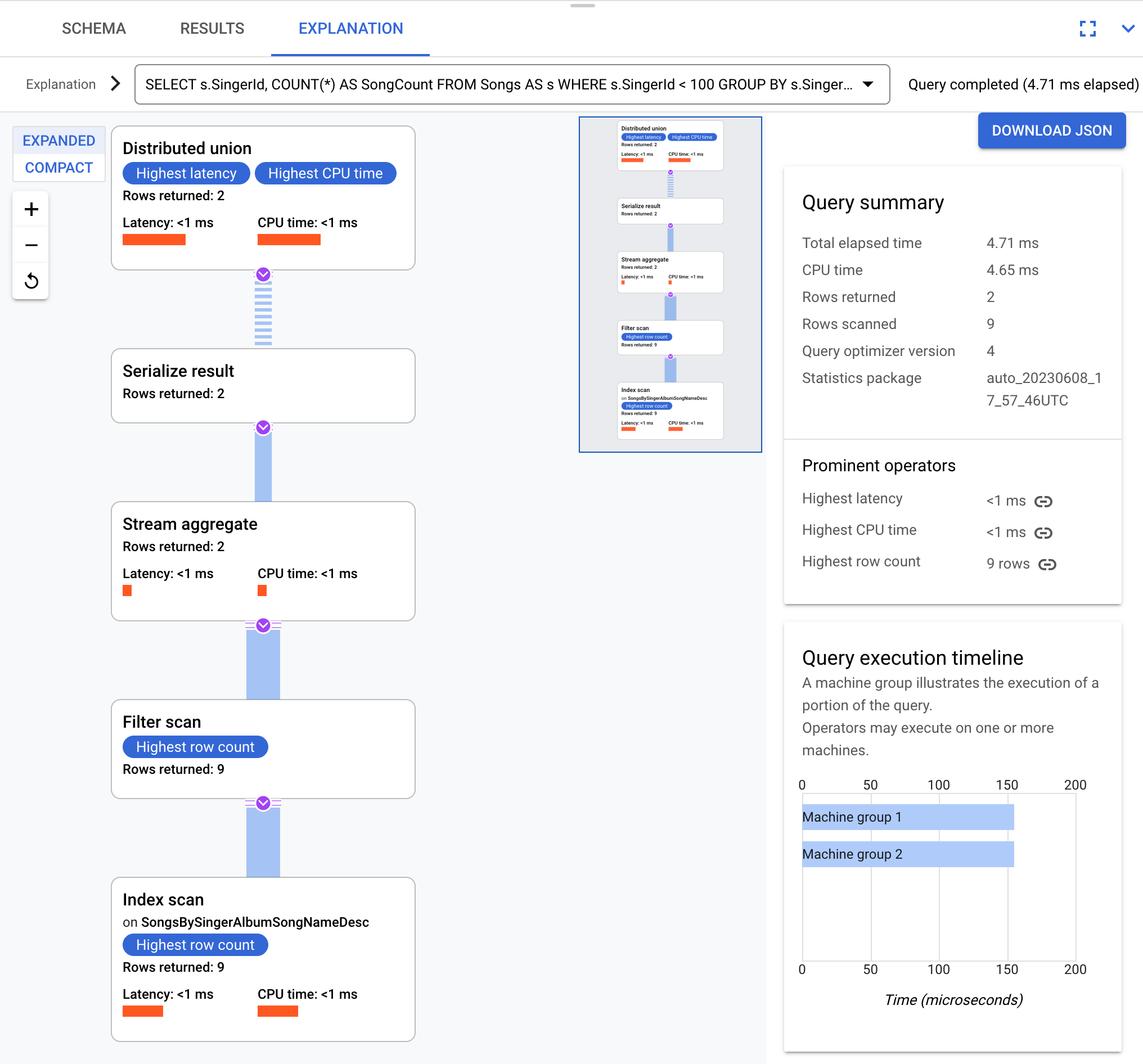
Spanner sends the execution plan to a root server that coordinates the query execution and distributes subplans remotely.
This execution plan starts with a distributed union operator that distributes
subplans to remote servers whose splits satisfy SingerId < 100. After the scan
on individual splits completes, the stream aggregate operator aggregates rows
to get the counts for each SingerId. The serialize result operator then
serializes the result. Finally, the distributed union combines all results and
returns the query results.
For more information about aggregates, see Aggregate operators.
Co-located join queries
In interleaved tables, Spanner physically stores related rows together. A co-located join is a join between interleaved tables. Co-located joins can improve performance compared to joins that require indexes or back joins.
For example, consider the following query:
SELECT al.AlbumTitle, so.SongName
FROM Albums AS al, Songs AS so
WHERE al.SingerId = so.SingerId AND
      al.AlbumId = so.AlbumId;
This query assumes that Songs is interleaved in Albums.
These are the results:
+-----------------------+--------------------------+
| AlbumTitle            | SongName                 |
+-----------------------+--------------------------+
| Nothing To Do With Me | Not About The Guitar     |
| Green                 | The Second Time          |
| Green                 | Starting Again           |
| Green                 | Nothing Is The Same      |
| Green                 | Let's Get Back Together  |
| Green                 | I Knew You Were Magic    |
| Green                 | Blue                     |
| Green                 | 42                       |
| Terrified             | Fight Story              |
+-----------------------+--------------------------+
This is the execution plan:
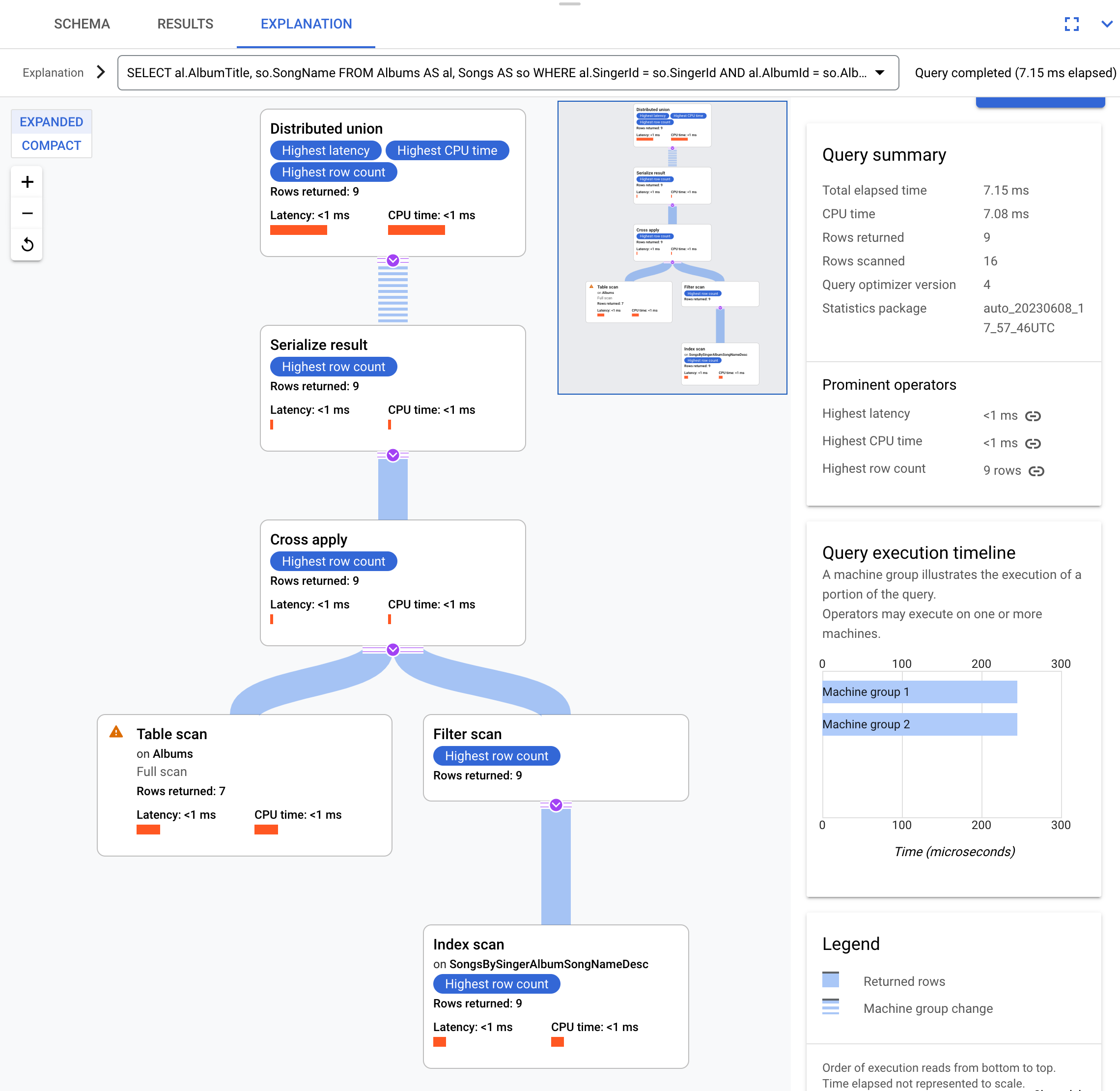
This execution plan starts with a distributed union operator that distributes
subplans to remote servers, which contain splits of the Albums table. Because
Songs is interleaved in Albums, each remote server executes the entire
subplan locally without performing a join across different servers.
The subplans contain a cross apply operator. Each cross apply operator
performs a
table scan on the Albums table to retrieve SingerId, AlbumId, and
AlbumTitle. The cross apply operator then maps the output from the table scan
to the output from an index scan on the SongsBySingerAlbumSongNameDesc index.
This index is subject to a filter, which requires that the SingerId in the index matches
the SingerId from the table scan output. Each cross apply operator sends
its results to a serialize result operator, which serializes the
AlbumTitle and SongName data and returns the results to the local
distributed unions. The distributed union aggregates results from the local
distributed unions and returns them as the query result.
Index and back join queries
The previous example uses a join on two tables, where one table is interleaved in the other. If two tables, or a table and an index, aren't interleaved, then execution plans are more complex and less efficient.
Consider an index created with the following command:
CREATE INDEX SongsBySongName ON Songs(SongName);
To use this index in a query, select one of the following database dialect options:
GoogleSQL
SELECT s.SongName, s.Duration
FROM Songs@{force_index=SongsBySongName} AS s
WHERE STARTS_WITH(s.SongName, "B");
PostgreSQL
SELECT s.SongName, s.Duration
FROM Songs /*@ force_index=SongsBySongName */ AS s
WHERE STARTS_WITH(s.SongName, "B");
These are the results:
+----------+----------+
| SongName | Duration |
+----------+----------+
| Blue     |      238 |
+----------+----------+
This is the execution plan:
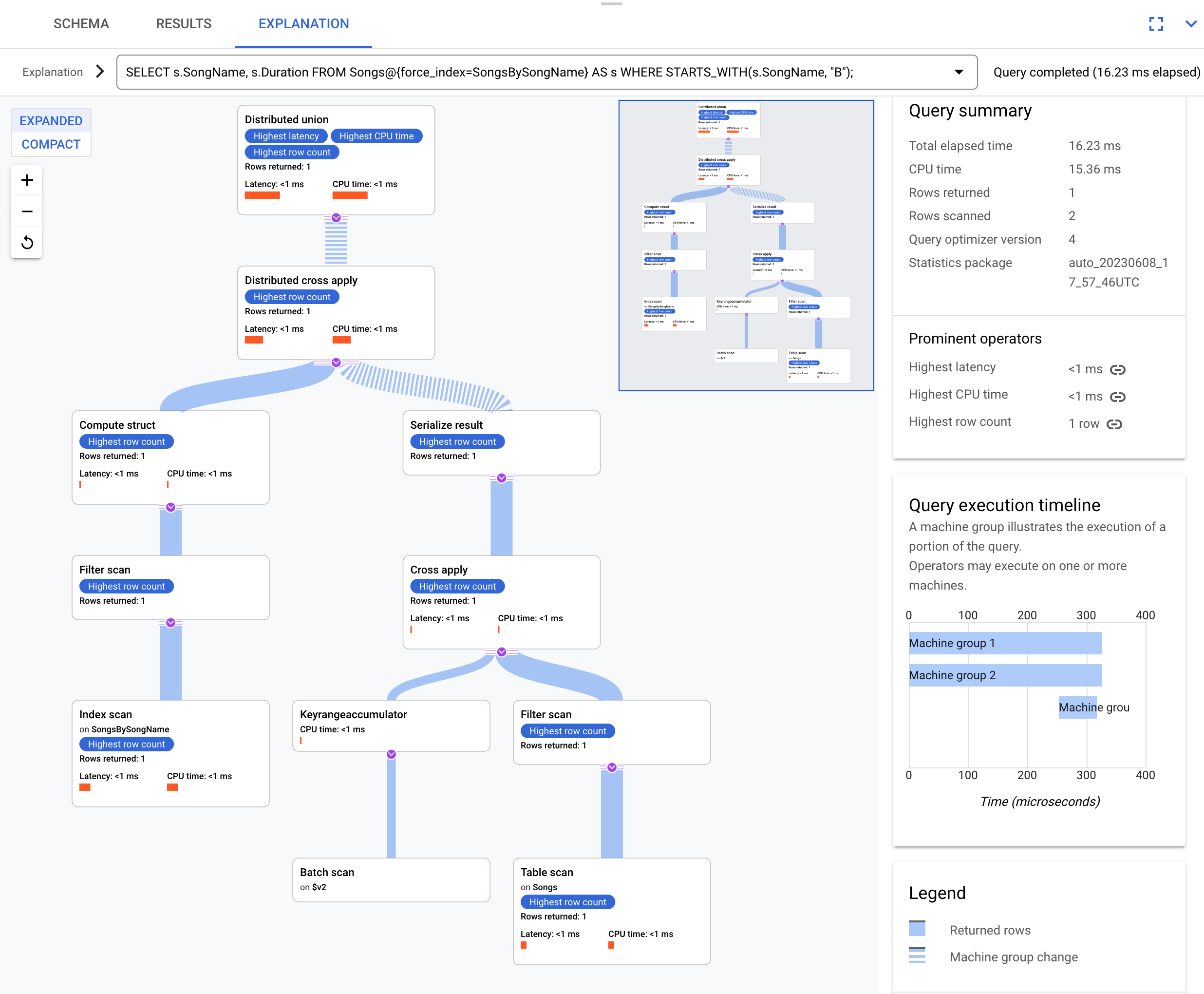
The resulting execution plan is complex because the SongsBySongName index
doesn't contain the Duration column. To obtain the Duration value,
Spanner back joins the indexed results to the Songs
table. This is a join, but it isn't co-located because the Songs table and
the SongsBySongName global index aren't interleaved. If data isn't
co-located, then Spanner performs optimizations to speed up
the execution. These optimizations make the execution plan more complex than
the previous co-located join example.
The top operator is a distributed cross apply. The input side
of this operator receives batches of rows from the SongsBySongName index that
satisfy the STARTS_WITH(s.SongName, "B") predicate. The distributed cross apply
operator then maps these batches to remote servers that contain splits with the
Duration data. To retrieve the Duration column, the remote servers perform
a table scan. This scan uses the
Condition:($Songs_key_TrackId' = $batched_Songs_key_TrackId) filter condition,
which joins TrackId from the Songs table to the TrackId columns of the
rows batched from the SongsBySongName index.
Spanner aggregates the results into the final query answer.
In turn, the input side of the distributed cross apply operator contains a
distributed union or local distributed union pair to evaluate rows from the
index that satisfy the STARTS_WITH predicate.
Consider a slightly different query that doesn't select the s.Duration column:
GoogleSQL
SELECT s.SongName
FROM Songs@{force_index=SongsBySongName} AS s
WHERE STARTS_WITH(s.SongName, "B");
PostgreSQL
SELECT s.SongName
FROM Songs /*@ force_index=SongsBySongName */ AS s
WHERE STARTS_WITH(s.SongName, "B");
The following execution plan shows that this query fully uses the index:
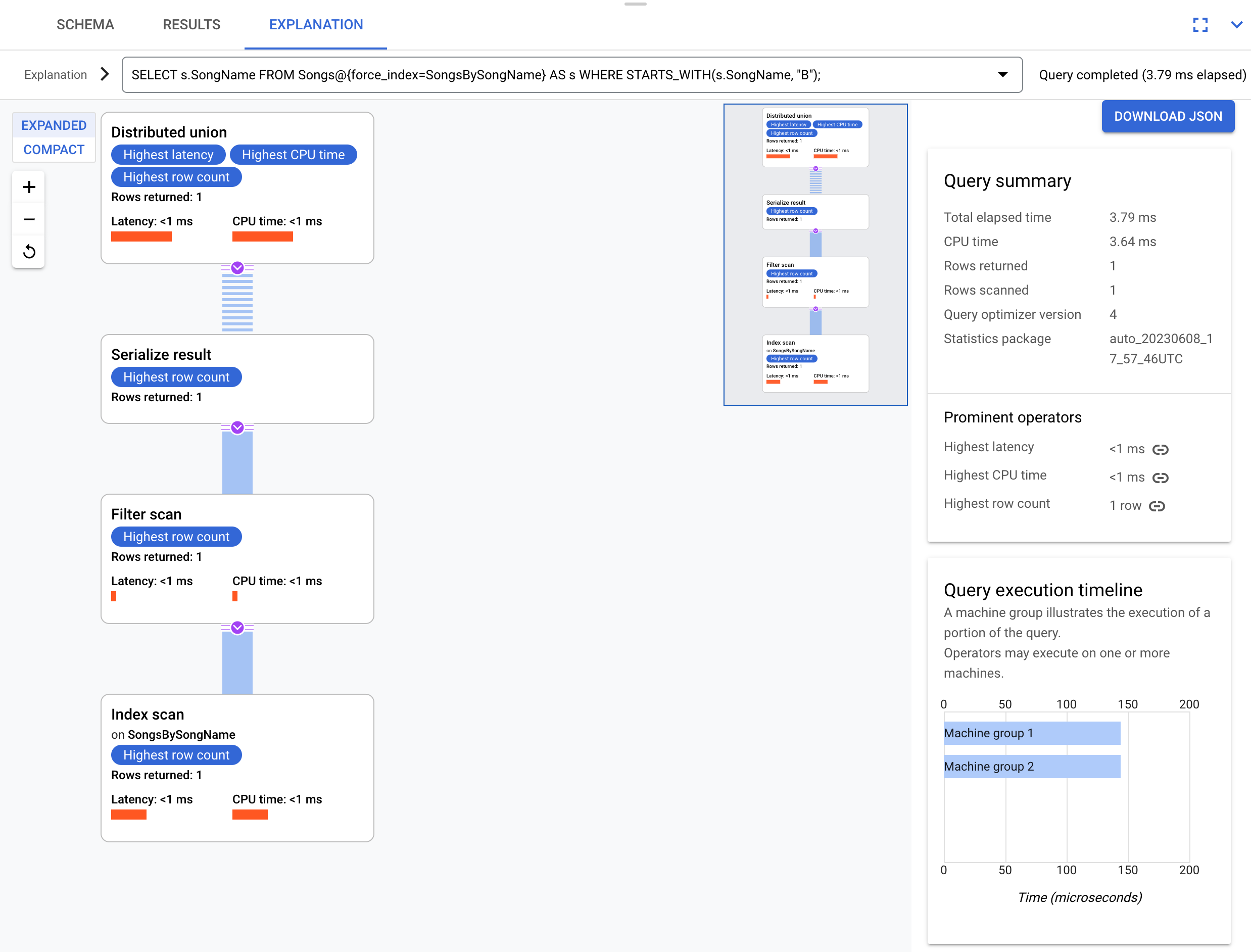
The execution plan doesn't require a back join because the index contains all of the columns that the query requests.
Sequential scan versus scattered seeks
Reading a contiguous range of rows is significantly faster than reading the same number of scattered rows.
For example, the following query sums the duration of songs from a specified set of singers. This query performs seeks for each specified singer ID. To see how many seeks the query performed, see the Seek count statistic.
SELECT SUM(Duration)
FROM Songs
WHERE SingerId IN (1, 3, 9, 10, 15);
However, if you structure the query to read a contiguous sequence of singer
IDs, then you can improve performance by performing a sequential read of the
Songs table. The Songs table contains SingerId as part of its primary key.
SELECT SUM(Duration)
FROM Songs
WHERE SingerId BETWEEN 1 AND 5;
This difference is relevant when you choose a join method and when you make schema design decisions, such as choosing a primary key. For more information about choosing a join method, see How joins interact with scans.
Sharing distributed unions
Every table or index in a query must have a corresponding distributed operator.
This operator is either distributed union or a distributed apply. If two
tables or indexes are interleaved in the same parent, then the query optimizer
might use a single distributed union operator for both tables or indexes.
What's next
- Learn about query execution operators.
- Learn about the Spanner query optimizer.
- Learn how to manage the query optimizer.