


在 Cloud Service Mesh 1.5 以上版本中,自動雙向 TLS (自動 mTLS) 預設為啟用。啟用自動 mTLS 後,用戶端 Sidecar Proxy 會自動偵測伺服器是否有 Sidecar。用戶端 sidecar 會將 mTLS 傳送至具有 sidecar 的工作負載,並將純文字傳送至沒有 sidecar 的工作負載。不過,請注意,服務會接受純文字和 mTLS 流量。當您將 Sidecar Proxy 插入 Pod 時,建議您也將服務設定為僅接受 mTLS 流量。
有了 Cloud Service Mesh,您只要套用單一 YAML 檔案,就能在應用程式程式碼之外強制執行 mTLS。Cloud Service Mesh 可讓您靈活地將驗證政策套用至整個服務網格、命名空間或個別工作負載。

費用
在本文件中,您會使用下列 Google Cloud計費元件:
您可以使用 Pricing Calculator,根據預測用量估算費用。
完成本教學課程後,您可以刪除建立的資源,以免持續產生費用。詳情請參閱「清除所用資源」。
事前準備
確認專案已啟用計費功能。
在 GKE 叢集上佈建 Cloud Service Mesh。支援多種設定方法:
複製存放區:
git clone https://github.com/GoogleCloudPlatform/anthos-service-mesh-samples
cd anthos-service-mesh-samples
部署 Ingress 閘道
將
kubectl的目前環境設為叢集:gcloud container clusters get-credentials CLUSTER_NAME \ --project=PROJECT_ID \ --zone=CLUSTER_LOCATION為 Ingress 閘道建立命名空間:
kubectl create namespace asm-ingress啟用命名空間,以便插入。步驟取決於控制層實作。
代管 (TD)
將預設插入標籤套用至命名空間:
kubectl label namespace asm-ingress \
    istio.io/rev- istio-injection=enabled --overwrite
代管 (Istiod)
建議做法:執行下列指令,將預設插入標籤套用至命名空間:
  kubectl label namespace asm-ingress \
      istio.io/rev- istio-injection=enabled --overwrite
如果您是使用代管 Istiod 控制層的現有使用者:建議您使用預設插入,但系統支援以修訂版本為基礎的插入。請按照下列操作說明進行:
執行下列指令,找出可用的發布版本:
kubectl -n istio-system get controlplanerevision輸出結果會與下列內容相似:
NAME AGE asm-managed-rapid 6d7h在輸出內容中,
NAME欄下方的值是修訂版本標籤,對應至 Cloud Service Mesh 版本的可用發布管道。將修訂版本標籤套用至命名空間:
kubectl label namespace asm-ingress \
    istio-injection- istio.io/rev=REVISION_LABEL --overwrite
在
anthos-service-mesh-samples存放區中部署範例閘道:kubectl apply -n asm-ingress \ -f docs/shared/asm-ingress-gateway預期輸出內容:
serviceaccount/asm-ingressgateway configured
service/asm-ingressgateway configured
deployment.apps/asm-ingressgateway configured
gateway.networking.istio.io/asm-ingressgateway configured
部署 Online Boutique 範例應用程式
如果尚未設定,請將
kubectl的目前環境設為叢集:gcloud container clusters get-credentials CLUSTER_NAME \ --project=PROJECT_ID \ --zone=CLUSTER_LOCATION建立範例應用程式的命名空間:
kubectl create namespace onlineboutique為
onlineboutique命名空間加上標籤,自動插入 Envoy Proxy。按照這篇文章的步驟啟用自動加入邊車容器功能。部署範例應用程式、前端的
VirtualService,以及工作負載的服務帳戶。在本教學課程中,您將部署微服務示範應用程式 Online Boutique。kubectl apply \ -n onlineboutique \ -f docs/shared/online-boutique/virtual-service.yaml kubectl apply \ -n onlineboutique \ -f docs/shared/online-boutique/service-accounts
查看服務
查看
onlineboutique命名空間中的 Pod:kubectl get pods -n onlineboutique預期輸出內容:
NAME                                     READY   STATUS    RESTARTS   AGE
adservice-85598d856b-m84m6               2/2     Running   0          2m7s
cartservice-c77f6b866-m67vd              2/2     Running   0          2m8s
checkoutservice-654c47f4b6-hqtqr         2/2     Running   0          2m10s
currencyservice-59bc889674-jhk8z         2/2     Running   0          2m8s
emailservice-5b9fff7cb8-8nqwz            2/2     Running   0          2m10s
frontend-77b88cc7cb-mr4rp                2/2     Running   0          2m9s
loadgenerator-6958f5bc8b-55q7w           2/2     Running   0          2m8s
paymentservice-68dd9755bb-2jmb7          2/2     Running   0          2m9s
productcatalogservice-84f95c95ff-c5kl6   2/2     Running   0          114s
recommendationservice-64dc9dfbc8-xfs2t   2/2     Running   0          2m9s
redis-cart-5b569cd47-cc2qd               2/2     Running   0          2m7s
shippingservice-5488d5b6cb-lfhtt         2/2     Running   0          2m7s
應用程式的所有 Pod 都應正常運作,且「
READY」欄中會顯示2/2。這表示 Pod 已成功插入 Envoy Sidecar Proxy。如果幾分鐘後仍未顯示2/2,請參閱疑難排解指南。取得外部 IP 並設為變數:
kubectl get services -n asm-ingress
export FRONTEND_IP=$(kubectl --namespace asm-ingress \
get service --output jsonpath='{.items[0].status.loadBalancer.ingress[0].ip}' \
)
畫面會顯示類似以下內容的輸出:
NAME                   TYPE           CLUSTER-IP      EXTERNAL-IP   PORT(S)                                      AGE
asm-ingressgateway   LoadBalancer   10.19.247.233   35.239.7.64   80:31380/TCP,443:31390/TCP,31400:31400/TCP   27m
在網路瀏覽器中前往
EXTERNAL-IP位址。瀏覽器中應會顯示 Online Boutique 商店。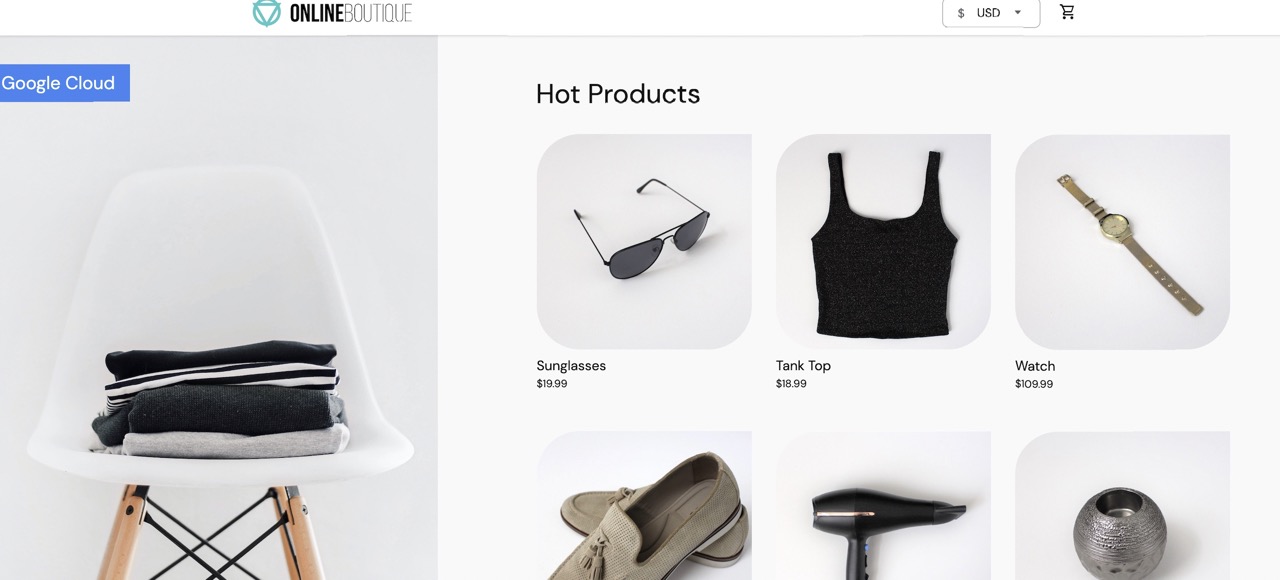
建立 TestCurl Pod
建立 TestCurl Pod,傳送明文流量進行測試。
  apiVersion: v1
  kind: Pod
  metadata:
    name: testcurl
    namespace: default
    annotations:
      sidecar.istio.io/inject: "false"
  spec:
    containers:
    - name: curl
      image: curlimages/curl
      command: ["sleep", "600"]
存取 Online Boutique
將
kubectl的目前環境設為部署 Online Boutique 的叢集:gcloud container clusters get-credentials CLUSTER_NAME \ --project=PROJECT_ID \ --zone=CLUSTER_LOCATION列出
frontend命名空間中的 Service:kubectl get services -n frontend請注意,
frontend-external是LoadBalancer,且具有外部 IP 位址。範例應用程式包含負載平衡器服務,因此可在沒有 Cloud Service Mesh 的情況下部署至 GKE。使用
frontend-external服務的外部 IP 位址,在瀏覽器中造訪應用程式:http://FRONTEND_EXTERNAL_IP/Cloud Service Mesh 可讓您部署 Ingress 閘道。您也可以使用 ingress 閘道的外部 IP 位址存取 Online Boutique。取得閘道的外部 IP。將預留位置替換為下列資訊:
- GATEWAY_SERVICE_NAME:輸入閘道服務的名稱。如果您部署的範例閘道未經修改,或部署的是預設輸入閘道,則名稱為
istio-ingressgateway。 - GATEWAY_NAMESPACE:您部署 ingress 閘道的命名空間。如果您部署了預設的輸入閘道,命名空間為
istio-system。
kubectl get service GATEWAY_NAME -n GATEWAY_NAMESPACE- GATEWAY_SERVICE_NAME:輸入閘道服務的名稱。如果您部署的範例閘道未經修改,或部署的是預設輸入閘道,則名稱為
在瀏覽器中開啟另一個分頁,然後使用 ingress 閘道的外部 IP 位址造訪應用程式:
http://INGRESS_GATEWAY_EXTERNAL_IP/執行下列指令,從另一個 Pod 使用純 HTTP
curlfrontend服務。由於服務位於不同的命名空間,您需要對frontend服務的 DNS 名稱執行 curl。kubectl debug --image istio/base --target istio-proxy -it \ $(kubectl get pod -l app=productcatalogservice -n product-catalog -o jsonpath={.items..metadata.name}) \ -n product-catalog -- \ curl http://frontend.frontend.svc.cluster.local:80/ -o /dev/null -s -w '%{http_code}\n'您的要求成功,狀態為
200,因為根據預設,系統會接受 TLS 和純文字流量。
為每個命名空間啟用 mTLS
如要強制執行 mTLS,請使用 kubectl 套用 PeerAuthentication 政策。
將下列驗證政策儲存為
mtls-namespace.yaml。cat <<EOF > mtls-namespace.yaml apiVersion: "security.istio.io/v1beta1" kind: "PeerAuthentication" metadata: name: "namespace-policy" spec: mtls: mode: STRICT EOFYAML 中的
mode: STRICT行會將服務設為僅接受 mTLS。mode預設為PERMISSIVE,會將服務設為接受明文和 mTLS。套用驗證政策,將所有 Online Boutique 服務設為僅接受 mTLS:
for ns in ad cart checkout currency email frontend loadgenerator \
     payment product-catalog recommendation shipping; do
kubectl apply -n $ns -f mtls-namespace.yaml
done
預期的輸出內容:
peerauthentication.security.istio.io/namespace-policy created
peerauthentication.security.istio.io/namespace-policy created
peerauthentication.security.istio.io/namespace-policy created
peerauthentication.security.istio.io/namespace-policy created
peerauthentication.security.istio.io/namespace-policy created
peerauthentication.security.istio.io/namespace-policy created
peerauthentication.security.istio.io/namespace-policy created
peerauthentication.security.istio.io/namespace-policy created
peerauthentication.security.istio.io/namespace-policy created
peerauthentication.security.istio.io/namespace-policy created
peerauthentication.security.istio.io/namespace-policy created
在瀏覽器中,前往使用
frontend-external服務外部 IP 位址存取 Online Boutique 的分頁:http://FRONTEND_EXTERNAL_IP/重新整理頁面。瀏覽器會顯示下列錯誤:
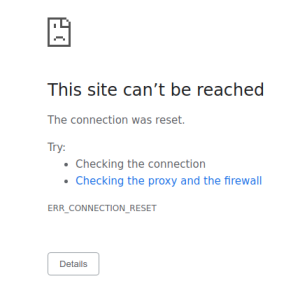
重新整理頁面會導致明文傳送至
frontend服務。由於STRICT驗證政策,Sidecar Proxy 會封鎖對服務的要求。在瀏覽器中,前往使用
istio-ingressgateway外部 IP 位址存取 Online Boutique 的分頁,然後重新整理頁面,頁面就會成功顯示。使用 ingress 閘道存取 Online Boutique 時,要求會採用下列路徑:
mTLS 驗證流程:
- 瀏覽器會向伺服器傳送明文 HTTP 要求。
- 輸入閘道 Proxy 容器會攔截要求。
- 輸入閘道 Proxy 會與伺服器端 Proxy (在本範例中為前端服務) 執行 TLS 握手。這項交握包括交換憑證。Cloud Service Mesh 會將這些憑證預先載入 Proxy 容器。
- 輸入閘道 Proxy 會對伺服器的憑證執行安全命名檢查,驗證伺服器是否由授權身分執行。
- 輸入閘道和伺服器 Proxy 會建立雙向 TLS 連線,伺服器 Proxy 則會將要求轉送至伺服器應用程式容器 (前端服務)。
執行下列指令,從另一個 Pod 使用純 HTTP
curlfrontend服務。kubectl exec testcurl -n default -- curl \ http://frontend.frontend.svc.cluster.local:80/ -o /dev/null -s -w '%{http_code}\n'您的要求失敗,因為我們從未套用 sidecar 的工作負載傳送明文流量,而該工作負載已套用 STRICT
peerAuthentication政策。
尋找及刪除驗證政策
如要列出服務網格中的所有
PeerAuthentication政策,請執行下列指令:kubectl get peerauthentication --all-namespaces輸出結果會與下列內容相似:
NAMESPACE         NAME               MODE     AGE
ad                namespace-policy   STRICT   17m
cart              namespace-policy   STRICT   17m
checkout          namespace-policy   STRICT   17m
currency          namespace-policy   STRICT   17m
email             namespace-policy   STRICT   17m
frontend          namespace-policy   STRICT   17m
loadgenerator     namespace-policy   STRICT   17m
payment           namespace-policy   STRICT   17m
product-catalog   namespace-policy   STRICT   17m
recommendation    namespace-policy   STRICT   17m
shipping          namespace-policy   STRICT   17m
從所有 Online Boutique 命名空間刪除驗證政策:
for ns in ad cart checkout currency email frontend loadgenerator payment \
  product-catalog recommendation shipping; do
    kubectl delete peerauthentication -n $ns namespace-policy
done;
預期輸出內容:
peerauthentication.security.istio.io "namespace-policy" deleted
peerauthentication.security.istio.io "namespace-policy" deleted
peerauthentication.security.istio.io "namespace-policy" deleted
peerauthentication.security.istio.io "namespace-policy" deleted
peerauthentication.security.istio.io "namespace-policy" deleted
peerauthentication.security.istio.io "namespace-policy" deleted
peerauthentication.security.istio.io "namespace-policy" deleted
peerauthentication.security.istio.io "namespace-policy" deleted
peerauthentication.security.istio.io "namespace-policy" deleted
peerauthentication.security.istio.io "namespace-policy" deleted
peerauthentication.security.istio.io "namespace-policy" deleted
使用
frontend-external服務的外部 IP 位址存取 Online Boutique,並重新整理頁面。頁面會如預期顯示。執行下列指令,從另一個 Pod 使用純 HTTP
curlfrontend服務。kubectl debug --image istio/base --target istio-proxy -it \ $(kubectl get pod -l app=productcatalogservice -n product-catalog -o jsonpath={.items..metadata.name}) \ -n product-catalog -- \ curl http://frontend.frontend.svc.cluster.local:80/ -o /dev/null -s -w '%{http_code}\n'要求成功,狀態為
200,因為根據預設,系統會接受 TLS 和純文字流量。
在 Google Cloud 控制台重新整理顯示「Workloads」(工作負載) 清單的頁面,現在會顯示 mTLS 狀態為Permissive。
為各項工作負載啟用 mTLS
如要為特定工作負載設定 PeerAuthentication 政策,您必須設定 selector 區段,並指定與所需工作負載相符的標籤。不過,Cloud Service Mesh 無法針對傳出至服務的 mTLS 流量,匯總工作負載層級政策。您必須設定目的地規則,才能管理這項行為。
將驗證政策套用至特定工作負載。請注意,下列政策如何使用標籤和選取器指定特定
frontend部署作業。cat <<EOF | kubectl apply -n frontend -f - apiVersion: "security.istio.io/v1beta1" kind: "PeerAuthentication" metadata: name: "frontend" namespace: "frontend" spec: selector: matchLabels: app: frontend mtls: mode: STRICT EOF預期輸出內容:
peerauthentication.security.istio.io/frontend created
設定相符的目的地規則。
cat <<EOF | kubectl apply -n frontend -f -
apiVersion: "networking.istio.io/v1alpha3"
kind: "DestinationRule"
metadata:
  name: "frontend"
spec:
  host: "frontend.demo.svc.cluster.local"
  trafficPolicy:
    tls:
      mode: ISTIO_MUTUAL
EOF
預期輸出內容:
destinationrule.networking.istio.io/frontend created
使用
frontend-external服務的外部 IP 位址存取 Online Boutique,並重新整理頁面。frontend service設為STRICTmTLS,且 Sidecar Proxy 封鎖要求,因此系統不會顯示頁面。執行下列指令,從另一個 Pod 使用純 HTTP
curlfrontend服務。kubectl exec testcurl -n default -- curl \ http://frontend.frontend.svc.cluster.local:80/ -o /dev/null -s -w '%{http_code}\n'您的要求失敗,因為我們從未套用 sidecar 的工作負載傳送明文流量,而該工作負載已套用 STRICT
peerAuthentication政策。刪除驗證政策:
kubectl delete peerauthentication -n frontend frontend預期輸出內容:
peerauthentication.security.istio.io "frontend" deleted刪除目的地規則:
kubectl delete destinationrule -n frontend frontend預期輸出內容:
destinationrule.networking.istio.io "frontend" deleted
強制執行網格層級 mTLS
如要防止網格中的所有服務接受明文流量,請設定網格層級的 PeerAuthentication 政策,並將 mTLS 模式設為 STRICT。網格層級的 PeerAuthentication 政策不應有選取器,且必須在根命名空間 istio-system 中套用。部署政策時,控制層會自動佈建 TLS 憑證,讓工作負載可以互相驗證。
強制執行網格層級 mTLS:
kubectl apply -f - <<EOF
apiVersion: "security.istio.io/v1beta1"
kind: "PeerAuthentication"
metadata:
  name: "mesh-wide"
  namespace: "istio-system"
spec:
  mtls:
    mode: STRICT
EOF
預期的輸出內容:
peerauthentication.security.istio.io/mesh-wide created
使用
frontend-external服務的外部 IP 位址存取 Online Boutique,並重新整理頁面。頁面不會顯示。執行下列指令,從另一個 Pod 使用純 HTTP
curlfrontend服務。kubectl exec testcurl -n default -- curl \ http://frontend.frontend.svc.cluster.local:80/ -o /dev/null -s -w '%{http_code}\n'您的要求失敗,因為我們從未套用 sidecar 的工作負載傳送明文流量,而該工作負載已套用 STRICT
peerAuthentication政策。刪除
mesh-wide政策:kubectl delete peerauthentication -n istio-system mesh-wide預期輸出內容:
peerauthentication.security.istio.io "mesh-wide" deleted
清除所用資源
為避免因為本教學課程所用資源,導致系統向 Google Cloud 帳戶收取費用,請刪除含有相關資源的專案,或者保留專案但刪除個別資源。
如要避免產生額外費用,請刪除叢集:
gcloud container clusters delete  CLUSTER_NAME  \
    --project=PROJECT_ID \
    --zone=CLUSTER_LOCATION
如要保留叢集並移除 Online Boutique 範例:
- 刪除應用程式命名空間:
kubectl delete -f online-boutique/kubernetes-manifests/namespaces預期輸出內容:
namespace "ad" deleted namespace "cart" deleted namespace "checkout" deleted namespace "currency" deleted namespace "email" deleted namespace "frontend" deleted namespace "loadgenerator" deleted namespace "payment" deleted namespace "product-catalog" deleted namespace "recommendation" deleted namespace "shipping" deleted- 刪除服務項目:
kubectl delete -f online-boutique/istio-manifests/allow-egress-googleapis.yaml預期輸出內容:
serviceentry.networking.istio.io "allow-egress-googleapis" deleted
serviceentry.networking.istio.io "allow-egress-google-metadata" deleted
後續步驟
- 如需設定
PeerAuthentication政策的一般指南,請參閱「設定傳輸安全性」。