


Personalized Service Health 會在 Cloud Logging 中記錄服務健康狀態事件。並將活動說明、關聯性或狀態的所有更新記錄為個別記錄。
本文說明如何查看、匯出及儲存服務健康狀態記錄。
事前準備
記錄結構定義
如要瞭解可在查詢中設定的欄位,請參閱記錄結構定義參考資料。
查看 Service Health 記錄
如要查看 Service Health 記錄,請按照下列步驟操作:
前往 Google Cloud 控制台的「Logs Explorer」頁面。
選取頁面頂端的 Google Cloud 專案。
在「記錄檔名稱」下拉式選單中,選取「Service Health」。

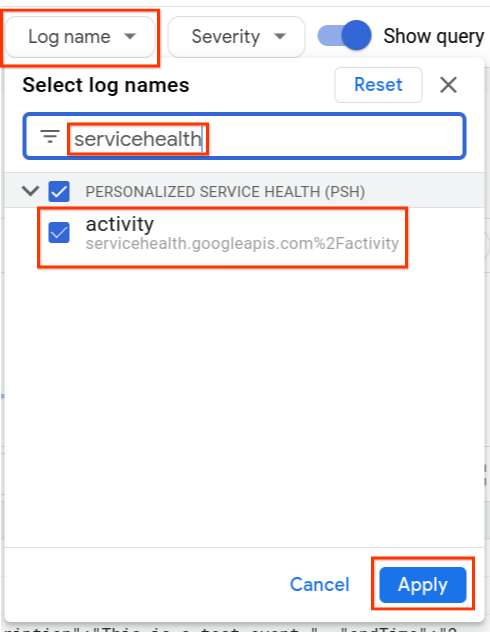
系統會顯示「
type.googleapis.com/google.cloud.servicehealth.logging.v1.EventLog」的記錄清單。展開記錄項目即可查看事件詳細資料。以下範例顯示一般事件。
"insertId":"1pw1msgf6a3zc6",
"timestamp":"2022-06-14T17:17:55.722035096Z",
"receiveTimestamp":"2022-06-14T17:17:55.722035096Z",
"logName":"projects/PROJECT_ID/logs/servicehealth.googleapis.com%2Factivity",
"resource":{
    "type":"servicehealth.googleapis.com/Event",
    "labels":{
        "resource_container":"797731824162",
        "location":"global",
        "event_id":"U4AqrjwFQYi5fFBmyAX-Gg"
    }
}
"labels":{
    "new_event":"true"
    "updated_fields": "[]"
},
"jsonPayload":{
    "@type":"type.googleapis.com/google.cloud.servicehealth.logging.v1.EventLog",
    "category":"INCIDENT",
    "title":"We are experiencing a connectivity issue affecting Cloud SQL in us-east1, australia-southeast2.",
    "description":"We are experiencing an issue with Google Cloud infrastructure components at us-east1, australia-southeast2. Our engineering team continues to investigate the issue. We apologize to all who are affected by the disruption.",
    "updateTime":"2023-11-14T22:26:40Z",
    "endTime":"2023-11-14T22:13:20Z",
    "impactedLocations":"['us-east1','australia-southeast2']",
    "impactedProducts":"['Google Cloud SQL']",
    "impactedProductIds":"['hV87iK5DcEXKgWU2kDri']",
    "nextUpdateTime":"2023-11-14T22:40:00Z",
    "startTime":"2020-09-13T12:26:40Z",
    "state":"ACTIVE",
    "detailedState":"CONFIRMED",
    "relevance":"RELATED",
}
查詢 Service Health 記錄
您可以使用 Logs Explorer 查詢 Service Health 記錄。您可能需要下列參照資料來建構查詢:
範例:
| 狀況 | 查詢 |
| 取得與特定事件相關的記錄 | jsonPayload.relevance = ("IMPACTED" OR "RELATED")
|
| 結合多個篩選器 | jsonPayload.impactedLocations : "us-central1" AND jsonPayload.impactedProducts : "Google Compute Engine" AND jsonPayload.state = "ACTIVE"
|
匯出 Service Health 記錄
您可以使用 Google Cloud 控制台、API 或 gcloud CLI,將 Service Health 記錄匯出至任何 Cloud Logging 接收器目的地。如要設定 Cloud Logging 接收器,請參閱「設定及管理接收器」。
您可以為接收器設定納入和排除篩選器,納入及排除 Service Health 記錄。
設定產品或位置時,請使用 Google Cloud products 和 locations 中的值。
在資料夾層級匯總 Service Health 記錄檔
將資料夾中所有專案的 Service Health 相關記錄檔傳送至為 Service Health 記錄檔建立的專案,即可對這些記錄檔執行更複雜的查詢。
您會在資料夾層級建立接收器,將所有與服務健康狀態相關的記錄傳送至該資料夾下的新專案。請執行下列步驟:
在資料夾下建立新專案。這個專案會分配給 Service Health 記錄。
gcloud projects create PROJECT_ID --folder FOLDER_ID在資料夾層級為資料夾中的其他專案建立匯總接收器。
gcloud logging sinks create SINK_NAME \
SINK_DESTINATION  --include-children \
--folder=FOLDER_ID --log-filter="LOG_FILTER"
如要取得所有相關事件的記錄,請將 LOG_FILTER 值設為下列項目:
resource.type=servicehealth.googleapis.com/Event AND jsonPayload.category=INCIDENT AND jsonPayload.relevance!=NOT_IMPACTED AND jsonPayload.@type=type.googleapis.com/google.cloud.servicehealth.logging.v1.EventLog-
gcloud projects add-iam-policy-binding PROJECT_ID --member=SERVICE_ACCT_NAME --role=roles/logging.bucketWriter

gcloud projects add-iam-policy-binding PROJECT_ID --member=SERVICE_ACCT_NAME --role=roles/logging.logWriter
(選用) 如果不想將記錄傳送至
_Default接收器,請在專案中建立記錄檔 bucket,存放與 Service Health 相關的記錄。gcloud logging buckets create BUCKET_ID --location=LOCATION --enable-analytics --async如果您已建立記錄檔 bucket,請建立接收器,將這些記錄檔傳送至該 bucket。
gcloud logging sinks create SINK_NAME_BUCKET \
logging.googleapis.com/projects/PROJECT_ID/locations/LOCATION/buckets/BUCKET_ID \
--project=PROJECT_ID --log-filter="LOG_FILTER"
使用 BigQuery 查詢 Service Health 記錄
您可以透過下列方式,使用 BigQuery 查詢傳送至 Cloud Logging 的記錄:
- 建立 SQL 查詢。
- 使用 BigQuery API 將查詢結果提供給外部系統。
請執行下列步驟:
在您為 Service Health 記錄檔建立的專案中,建立記錄檔 bucket。
gcloud logging buckets create BUCKET_ID --location=LOCATION --enable-analytics --async-
gcloud logging buckets update BUCKET_ID --location=LOCATION --enable-analytics --async 建立連結至 bucket 的新 BigQuery 資料集,其中包含 Service Health 記錄。
gcloud logging links create LINK_ID --bucket=BUCKET_ID --location=LOCATION視需要啟用 BigQuery API。
gcloud services enable bigquery.googleapis.com
現在您可以對 BigQuery 執行複雜的 SQL 查詢,例如:
| 狀況 | 查詢 |
| 取得與特定事件相關的記錄 | gcloud query --use_legacy_sql=false 'SELECT * FROM `PROJECT_ID.LINK_ID._AllLogs` WHERE JSON_VALUE(json_payload["relevance"]) = "IMPACTED"'
|
| 取得父項事件的所有子項記錄事件 | gcloud query --use_legacy_sql=false 'SELECT * FROM `PROJECT_ID.LINK_ID._AllLogs` WHERE JSON_VALUE(json_payload["parentEvent"]) = "projects/PROJECT_ID/locations/global/events/EVENT_ID"'
|
保留過往活動
Personalized Service Health 服務的事件保留期限有限。
如要保留幾個月前的服務健康狀態事件記錄,建議您儲存 Service Health 記錄。