检查图片是否存在敏感数据

本文档介绍了如何使用 Cloud Data Loss Prevention API 检测图片中的敏感文本和对象。Sensitive Data Protection 会返回其检测到的所有敏感数据的位置。

若将图片作为输入,Sensitive Data Protection 会检测图片中的敏感数据。检查操作的输出包括检测到的 infoTypes、匹配的可能性,以及指示 Sensitive Data Protection 在其中找到敏感数据的区域的像素坐标和长度值。图片左下角的坐标为 (0,0)

检查图片中是否存在所有默认 infoType

如需检查图片中的敏感数据,请向 content.inspect 方法提交使用 base64 编码的图片。除非您指定要搜索的特定信息类型 (infoTypes),否则 Sensitive Data Protection 会搜索最常见的 infoType。

如需检查图片中是否包含所有默认 infoType,请按以下步骤操作:

  1. 对图片进行 base64 编码。
  2. 向 DLP API 的 content.inspect 方法提交请求。请求只需要 base64 编码的图片。

例如,请看下面这张文档图片。
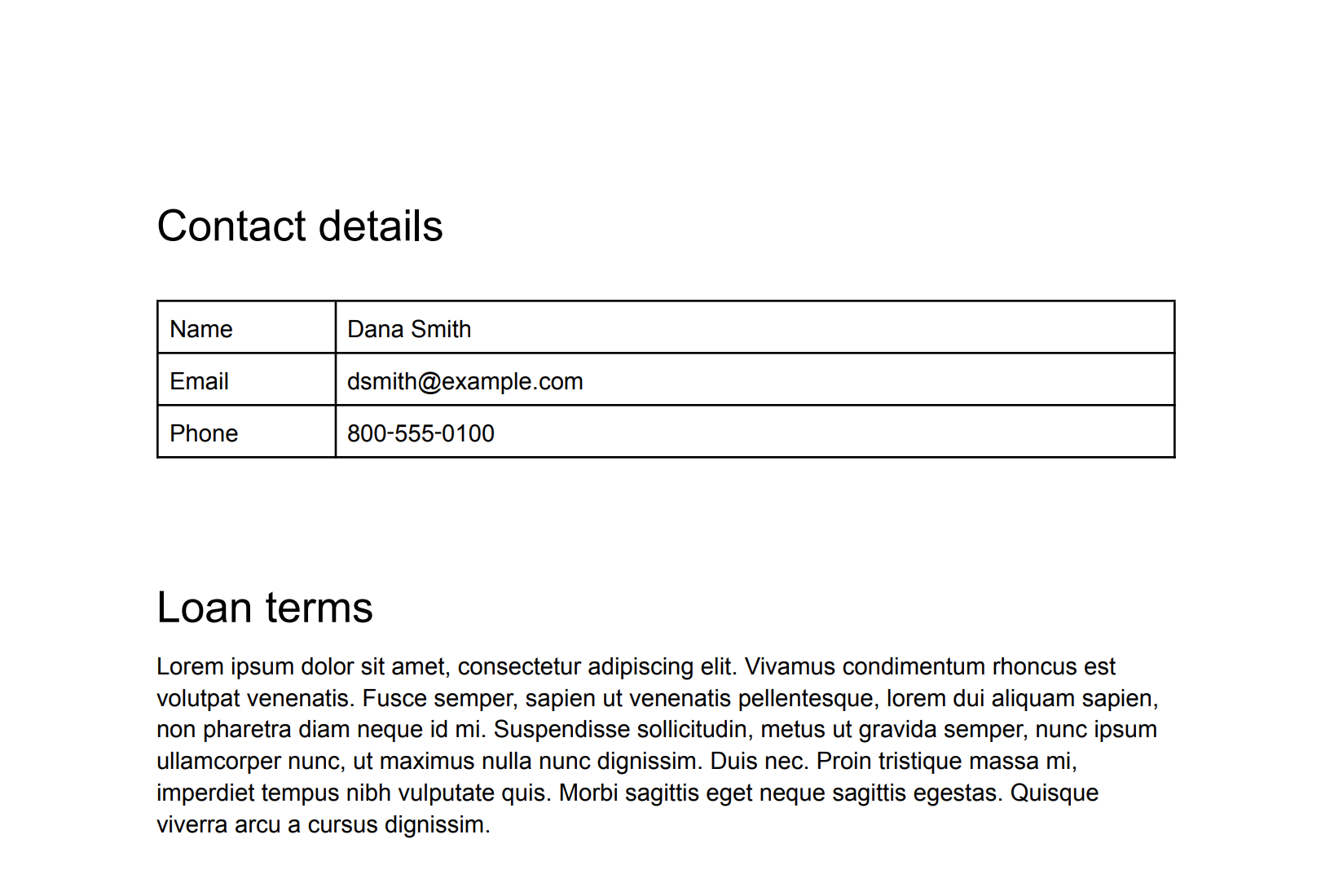
包含某人联系信息的原始图片。
原始图片(点击可放大)。

C#

如需了解如何安装和使用 Sensitive Data Protection 客户端库,请参阅 Sensitive Data Protection 客户端库

如需向 Sensitive Data Protection 进行身份验证,请设置应用默认凭据。 如需了解详情,请参阅为本地开发环境设置身份验证


using System;
using System.IO;
using System.Linq;
using Google.Api.Gax.ResourceNames;
using Google.Cloud.Dlp.V2;
using Google.Protobuf;

public class InspectImageForSensitiveDataWithInfoTypes
{
    public static InspectContentResponse InspectImage(
        string projectId,
        string filePath)
    {
        // Instantiate dlp client.
        var dlp = DlpServiceClient.Create();

        // Construct the content item.
        var contentItem = new ContentItem
        {
            ByteItem = new ByteContentItem
            {
                Type = ByteContentItem.Types.BytesType.ImagePng,
                Data = ByteString.FromStream(new FileStream(filePath, FileMode.Open))
            }
        };

        // Construct the request.
        var request = new InspectContentRequest
        {
            ParentAsLocationName = new LocationName(projectId, "global"),
            Item = contentItem,
            InspectConfig = new InspectConfig
            {
                IncludeQuote = true,
                InfoTypes =
                    {
                        new InfoType { Name = "PHONE_NUMBER" },
                        new InfoType { Name = "EMAIL_ADDRESS" },
                        new InfoType { Name = "PERSON_NAME" }
                    }
            }
        };

        // Call the API.
        var response = dlp.InspectContent(request);

        // Inspect the response.
        var resultFindings = response.Result.Findings;

        Console.WriteLine($"Findings: {resultFindings.Count}\n");

        foreach (var f in resultFindings)
        {
            var data = from location in f.Location.ContentLocations
                       from b in location.ImageLocation.BoundingBoxes
                       select new { b.Height, b.Width, b.Top, b.Left };
            Console.WriteLine("Info type: " + f.InfoType.Name);
            Console.WriteLine("\tImageLocations: " + string.Join(',', data));
            Console.WriteLine("\tQuote: " + f.Quote);
            Console.WriteLine("\tLikelihood: " + f.Likelihood + "\n");
        }

        return response;
    }
}

Go

如需了解如何安装和使用 Sensitive Data Protection 客户端库,请参阅 Sensitive Data Protection 客户端库

如需向 Sensitive Data Protection 进行身份验证,请设置应用默认凭据。 如需了解详情,请参阅为本地开发环境设置身份验证

import (
	"context"
	"fmt"
	"io"
	"os"

	dlp "cloud.google.com/go/dlp/apiv2"
	"cloud.google.com/go/dlp/apiv2/dlppb"
)

// inspectImageFileAllInfoTypes inspects a image for sensitive data with infoTypes
func inspectImageFileAllInfoTypes(w io.Writer, projectID, inputPath string) error {
	// projectId := "your-project-id"
	// inputPath := "your-input-path"

	ctx := context.Background()

	// Initialize a client once and reuse it to send multiple requests. Clients
	// are safe to use across goroutines. When the client is no longer needed,
	// call the Close method to cleanup its resources.
	client, err := dlp.NewClient(ctx)
	if err != nil {
		return err
	}

	// Closing the client safely cleans up background resources.
	defer client.Close()

	// read the image file
	data, err := os.ReadFile(inputPath)
	if err != nil {
		return err
	}

	// Create and send the request.
	req := &dlppb.InspectContentRequest{
		Parent: fmt.Sprintf("projects/%s/locations/global", projectID),
		Item: &dlppb.ContentItem{
			// Specify the content to be inspected.
			DataItem: &dlppb.ContentItem_ByteItem{
				ByteItem: &dlppb.ByteContentItem{
					Type: dlppb.ByteContentItem_IMAGE_JPEG,
					Data: data,
				},
			},
		},
	}

	// Send the request.
	resp, err := client.InspectContent(ctx, req)
	if err != nil {
		return fmt.Errorf("InspectContent: %w", err)
	}

	// Process the results.
	fmt.Fprintf(w, "Findings: %d\n", len(resp.Result.Findings))
	for _, f := range resp.Result.Findings {
		fmt.Fprintf(w, "\tQuote: %s\n", f.Quote)
		fmt.Fprintf(w, "\tInfo type: %s\n", f.InfoType.Name)
		fmt.Fprintf(w, "\tLikelihood: %s\n", f.Likelihood)
	}
	return nil

}

Java

如需了解如何安装和使用 Sensitive Data Protection 客户端库,请参阅 Sensitive Data Protection 客户端库

如需向 Sensitive Data Protection 进行身份验证,请设置应用默认凭据。 如需了解详情,请参阅为本地开发环境设置身份验证


import com.google.cloud.dlp.v2.DlpServiceClient;
import com.google.privacy.dlp.v2.ByteContentItem;
import com.google.privacy.dlp.v2.ByteContentItem.BytesType;
import com.google.privacy.dlp.v2.ContentItem;
import com.google.privacy.dlp.v2.Finding;
import com.google.privacy.dlp.v2.InspectContentRequest;
import com.google.privacy.dlp.v2.InspectContentResponse;
import com.google.privacy.dlp.v2.LocationName;
import com.google.protobuf.ByteString;
import java.io.FileInputStream;
import java.io.IOException;

class InspectImageFileAllInfoTypes {

  public static void main(String[] args) throws IOException {
    // TODO(developer): Replace these variables before running the sample.
    String projectId = "my-project-id";
    String inputPath = "src/test/resources/sensitive-data-image.jpeg";
    inspectImageFileAllInfoTypes(projectId, inputPath);
  }

  static void inspectImageFileAllInfoTypes(String projectId, String inputPath) throws IOException {
    // Initialize client that will be used to send requests. This client only needs to be created
    // once, and can be reused for multiple requests. After completing all of your requests, call
    // the "close" method on the client to safely clean up any remaining background resources.
    try (DlpServiceClient dlp = DlpServiceClient.create()) {
      // Specify the content to be inspected.
      ByteString fileBytes = ByteString.readFrom(new FileInputStream(inputPath));
      ByteContentItem byteItem =
          ByteContentItem.newBuilder().setType(BytesType.IMAGE_JPEG).setData(fileBytes).build();

      // Construct the Inspect request to be sent by the client.
      // Do not specify the type of info to inspect.
      InspectContentRequest request =
          InspectContentRequest.newBuilder()
              .setParent(LocationName.of(projectId, "global").toString())
              .setItem(ContentItem.newBuilder().setByteItem(byteItem).build())
              .build();

      // Use the client to send the API request.
      InspectContentResponse response = dlp.inspectContent(request);

      // Parse the response and process results.
      System.out.println("Findings: " + response.getResult().getFindingsCount());
      for (Finding f : response.getResult().getFindingsList()) {
        System.out.println("\tQuote: " + f.getQuote());
        System.out.println("\tInfo type: " + f.getInfoType().getName());
        System.out.println("\tLikelihood: " + f.getLikelihood());
      }
    }
  }
}

Node.js

如需了解如何安装和使用 Sensitive Data Protection 客户端库,请参阅 Sensitive Data Protection 客户端库

如需向 Sensitive Data Protection 进行身份验证,请设置应用默认凭据。 如需了解详情,请参阅为本地开发环境设置身份验证

// Imports the Google Cloud Data Loss Prevention library
const DLP = require('@google-cloud/dlp');
const mime = require('mime');
const fs = require('fs');

// Instantiates a client
const dlp = new DLP.DlpServiceClient();

// The project ID to run the API call under
// const projectId = 'my-project';

// Image Path
// const imagePath = './test.jpeg';

async function inspectImageFileAllType() {
  let fileBytes = null;
  let fileTypeConstant = null;
  try {
    // Load Image
    fileTypeConstant =
      ['image/jpeg', 'image/bmp', 'image/png', 'image/svg'].indexOf(
        mime.getType(imagePath)
      ) + 1;
    fileBytes = Buffer.from(fs.readFileSync(imagePath)).toString('base64');
  } catch (error) {
    console.error(error.message);
    return;
  }
  // Specify the content to be inspected.
  const item = {
    byteItem: {
      type: fileTypeConstant,
      data: fileBytes,
    },
  };

  // Construct the Inspect request to be sent by the client.
  // Do not specify the type of info to inspect.
  const request = {
    parent: `projects/${projectId}/locations/global`,
    item: item,
    inspectConfig: {
      includeQuote: true,
    },
  };

  // Use the client to send the API request.
  const [response] = await dlp.inspectContent(request);

  // Print findings.
  const findings = response.result.findings;
  if (findings.length > 0) {
    console.log(`Findings: ${findings.length}\n`);
    findings.forEach(finding => {
      console.log(`InfoType: ${finding.infoType.name}`);
      console.log(`\tQuote: ${finding.quote}`);
      console.log(`\tLikelihood: ${finding.likelihood} \n`);
    });
  } else {
    console.log('No findings.');
  }
}
inspectImageFileAllType();

PHP

如需了解如何安装和使用 Sensitive Data Protection 客户端库,请参阅 Sensitive Data Protection 客户端库

如需向 Sensitive Data Protection 进行身份验证,请设置应用默认凭据。 如需了解详情,请参阅为本地开发环境设置身份验证

use Google\Cloud\Dlp\V2\ByteContentItem;
use Google\Cloud\Dlp\V2\ByteContentItem\BytesType;
use Google\Cloud\Dlp\V2\Client\DlpServiceClient;
use Google\Cloud\Dlp\V2\ContentItem;
use Google\Cloud\Dlp\V2\InspectContentRequest;
use Google\Cloud\Dlp\V2\Likelihood;

/**
 * Inspect image for sensitive data with infoTypes.
 * To inspect an image for sensitive data, you submit a base64-encoded image to the Cloud DLP API's
 * content.inspect method. Unless you specify information types (infoTypes) to search for, Cloud DLP
 * searches for the most common infoTypes.
 *
 * @param string $projectId         The Google Cloud project id to use as a parent resource.
 * @param string $inputPath         The image path to inspect.
 */
function inspect_image_all_infotypes(
    // TODO(developer): Replace sample parameters before running the code.
    string $projectId,
    string $inputPath = './test/data/test.png'
): void {
    // Instantiate a client.
    $dlp = new DlpServiceClient();

    // Get the bytes of the file.
    $fileBytes = (new ByteContentItem())
        ->setType(BytesType::IMAGE_PNG)
        ->setData(file_get_contents($inputPath));

    $parent = "projects/$projectId/locations/global";

    // Specify what content you want the service to Inspect.
    $item = (new ContentItem())
        ->setByteItem($fileBytes);

    // Run request.
    $inspectContentRequest = (new InspectContentRequest())
        ->setParent($parent)
        ->setItem($item);
    $response = $dlp->inspectContent($inspectContentRequest);

    // Print the results.
    $findings = $response->getResult()->getFindings();
    if (count($findings) == 0) {
        printf('No findings.' . PHP_EOL);
    } else {
        printf('Findings:' . PHP_EOL);
        foreach ($findings as $finding) {
            printf('  Info type: %s' . PHP_EOL, $finding->getInfoType()->getName());
            printf('  Likelihood: %s' . PHP_EOL, Likelihood::name($finding->getLikelihood()));
        }
    }
}

Python

如需了解如何安装和使用 Sensitive Data Protection 客户端库,请参阅 Sensitive Data Protection 客户端库

如需向 Sensitive Data Protection 进行身份验证,请设置应用默认凭据。 如需了解详情,请参阅为本地开发环境设置身份验证

import google.cloud.dlp


def inspect_image_file_all_infotypes(
    project: str,
    filename: str,
    include_quote: bool = True,
) -> None:
    """Uses the Data Loss Prevention API to analyze strings for protected data in image file.
    Args:
        project: The Google Cloud project id to use as a parent resource.
        filename: The path to the file to inspect.
        include_quote: Boolean for whether to display a quote of the detected
            information in the results.

    Returns:
        None; the response from the API is printed to the terminal.
    """

    # Instantiate a client.
    dlp = google.cloud.dlp_v2.DlpServiceClient()

    # Construct the byte_item, containing the image file's byte data.
    with open(filename, mode="rb") as f:
        byte_item = {"type_": "IMAGE", "data": f.read()}

    # Convert the project id into a full resource id.
    parent = f"projects/{project}"

    # Call the API.
    response = dlp.inspect_content(
        request={
            "parent": parent,
            "inspect_config": {"include_quote": include_quote},
            "item": {"byte_item": byte_item},
        }
    )

    # Print out the results.
    print("Findings: ", response.result.findings.count)
    if response.result.findings:
        for finding in response.result.findings:
            print(f"Quote: {finding.quote}")
            print(f"Info type: {finding.info_type.name}")
            print(f"Likelihood: {finding.likelihood}")
    else:
        print("No findings.")

REST

如需检查此图片以获取默认 infoType,请将以下 JSON 发送到 content.inspect 方法:

{
  "item": {
    "byteItem": {
      "data": "BASE64_ENCODED_IMAGE",
      "type": "IMAGE_PNG"
    }
  }
}

输出类似于以下内容:

{
  "result": {
    "findings": [
      {
        "infoType": {
          "name": "PERSON_NAME",
          "sensitivityScore": {
            "score": "SENSITIVITY_MODERATE"
          }
        },
        "likelihood": "LIKELY",
        "location": {
          "contentLocations": [
            {
              "imageLocation": {
                "boundingBoxes": [
                  {
                    "top": 383,
                    "left": 419,
                    "width": 82,
                    "height": 38
                  },
                  {
                    "top": 383,
                    "left": 494,
                    "width": 91,
                    "height": 37
                  }
                ]
              }
            }
          ]
        },
        "createTime": "2025-05-22T20:27:03.730Z",
        "findingId": "2025-05-22T20:27:03.731510Z4997664074931396457"
      },
      {
        "infoType": {
          "name": "EMAIL_ADDRESS",
          "sensitivityScore": {
            "score": "SENSITIVITY_MODERATE"
          }
        },
        "likelihood": "VERY_LIKELY",
        "location": {
          "contentLocations": [
            {
              "imageLocation": {
                "boundingBoxes": [
                  {
                    "top": 445,
                    "left": 390,
                    "width": 357,
                    "height": 48
                  }
                ]
              }
            }
          ]
        },
        "createTime": "2025-05-22T20:27:03.728Z",
        "findingId": "2025-05-22T20:27:03.731538Z284444825812417100"
      },
      {
        "infoType": {
          "name": "PHONE_NUMBER",
          "sensitivityScore": {
            "score": "SENSITIVITY_MODERATE"
          }
        },
        "likelihood": "VERY_LIKELY",
        "location": {
          "contentLocations": [
            {
              "imageLocation": {
                "boundingBoxes": [
                  {
                    "top": 515,
                    "left": 404,
                    "width": 223,
                    "height": 34
                  }
                ]
              }
            }
          ]
        },
        "createTime": "2025-05-22T20:27:03.729Z",
        "findingId": "2025-05-22T20:27:03.731544Z7910624062018243126"
      },
      {
        "infoType": {
          "name": "PERSON_NAME",
          "sensitivityScore": {
            "score": "SENSITIVITY_MODERATE"
          }
        },
        "likelihood": "UNLIKELY",
        "location": {
          "contentLocations": [
            {
              "imageLocation": {
                "boundingBoxes": [
                  {
                    "top": 798,
                    "left": 473,
                    "width": 81,
                    "height": 45
                  }
                ]
              }
            }
          ]
        },
        "createTime": "2025-05-22T20:27:03.730Z",
        "findingId": "2025-05-22T20:27:03.731551Z2345136870450870227"
      },
      {
        "infoType": {
          "name": "PERSON_NAME",
          "sensitivityScore": {
            "score": "SENSITIVITY_MODERATE"
          }
        },
        "likelihood": "UNLIKELY",
        "location": {
          "contentLocations": [
            {
              "imageLocation": {
                "boundingBoxes": [
                  {
                    "top": 837,
                    "left": 1166,
                    "width": 46,
                    "height": 45
                  }
                ]
              }
            }
          ]
        },
        "createTime": "2025-05-22T20:27:03.730Z",
        "findingId": "2025-05-22T20:27:03.731557Z6725780456697828166"
      },
      {
        "infoType": {
          "name": "PERSON_NAME",
          "sensitivityScore": {
            "score": "SENSITIVITY_MODERATE"
          }
        },
        "likelihood": "UNLIKELY",
        "location": {
          "contentLocations": [
            {
              "imageLocation": {
                "boundingBoxes": [
                  {
                    "top": 915,
                    "left": 453,
                    "width": 141,
                    "height": 43
                  }
                ]
              }
            }
          ]
        },
        "createTime": "2025-05-22T20:27:03.730Z",
        "findingId": "2025-05-22T20:27:03.731562Z7328853308213386463"
      },
      {
        "infoType": {
          "name": "PERSON_NAME",
          "sensitivityScore": {
            "score": "SENSITIVITY_MODERATE"
          }
        },
        "likelihood": "UNLIKELY",
        "location": {
          "contentLocations": [
            {
              "imageLocation": {
                "boundingBoxes": [
                  {
                    "top": 915,
                    "left": 1180,
                    "width": 105,
                    "height": 43
                  }
                ]
              }
            }
          ]
        },
        "createTime": "2025-05-22T20:27:03.730Z",
        "findingId": "2025-05-22T20:27:03.731569Z5618332947461439057"
      }
    ]
  }
}

在此示例中,Sensitive Data Protection 找到了以下 infoType,但它们的匹配可信度各不相同:

  • PERSON_NAME
  • EMAIL_ADDRESS
  • PHONE_NUMBER

如需详细了解如何将 DLP API 与 JSON 结合使用,请参阅 JSON 快速入门

请注意,敏感数据保护通常使用多个框来指示图片内单个敏感数据实例的位置。

检查特定 infoType 的图片

如果要仅检查图片的某些敏感数据类型,请指定其对应的内置 infoType。

如需检查图片的特定 infoType,请按以下步骤操作:

  1. 对图片进行 base64 编码。
  2. 向 DLP API 的 content.inspect 方法提交请求。该请求必须包含以下信息:

C#

如需了解如何安装和使用 Sensitive Data Protection 客户端库,请参阅 Sensitive Data Protection 客户端库

如需向 Sensitive Data Protection 进行身份验证,请设置应用默认凭据。 如需了解详情,请参阅为本地开发环境设置身份验证


using System;
using System.IO;
using System.Linq;
using Google.Api.Gax.ResourceNames;
using Google.Cloud.Dlp.V2;
using Google.Protobuf;

public class InspectImageForSensitiveDataWithListedInfoTypes
{
    public static InspectContentResponse InspectImage(
        string projectId,
        string filePath)
    {
        // Instantiate dlp client.
        var dlp = DlpServiceClient.Create();

        // Construct the content item by providing the image file and its type.
        var contentItem = new ContentItem
        {
            ByteItem = new ByteContentItem
            {
                Type = ByteContentItem.Types.BytesType.ImagePng,
                Data = ByteString.FromStream(new FileStream(filePath, FileMode.Open))
            }
        };

        // Specify the type of info the inspection will look for.
        var infoTypes = new InfoType[]
        {
            new InfoType { Name = "PHONE_NUMBER" },
            new InfoType { Name = "EMAIL_ADDRESS" },
            new InfoType { Name = "US_SOCIAL_SECURITY_NUMBER" }
        };

        // Construct the Inspect config.
        var inspectConfig = new InspectConfig
        {
            InfoTypes = { infoTypes },
            IncludeQuote = true
        };

        // Construct the request.
        var request = new InspectContentRequest
        {
            ParentAsLocationName = new LocationName(projectId, "global"),
            InspectConfig = inspectConfig,
            Item = contentItem
        };

        // Call the API.
        InspectContentResponse response = dlp.InspectContent(request);

        // Inspect the response.
        var resultFindings = response.Result.Findings;

        Console.WriteLine($"Findings: {resultFindings.Count}");

        foreach (var f in resultFindings)
        {
            var data = from location in f.Location.ContentLocations
                       from b in location.ImageLocation.BoundingBoxes
                       select new { b.Height, b.Width, b.Top, b.Left };

            Console.WriteLine("Info type: " + f.InfoType.Name);
            Console.WriteLine("\tQuote: " + f.Quote);
            Console.WriteLine("\tImageLocations: " + string.Join(",", data));
            Console.WriteLine("\tLikelihood: " + f.Likelihood);
        }

        return response;
    }
}

Go

如需了解如何安装和使用 Sensitive Data Protection 客户端库,请参阅 Sensitive Data Protection 客户端库

如需向 Sensitive Data Protection 进行身份验证,请设置应用默认凭据。 如需了解详情,请参阅为本地开发环境设置身份验证

import (
	"context"
	"fmt"
	"io"
	"os"

	dlp "cloud.google.com/go/dlp/apiv2"
	"cloud.google.com/go/dlp/apiv2/dlppb"
)

// inspectImageFileListedInfoTypes inspects an image for sensitive data listed infoTypes.
func inspectImageFileListedInfoTypes(w io.Writer, projectID, filePath string) error {
	// projectId := "my-project-id"
	// filePath := "testdata/image.jpg"

	ctx := context.Background()

	// Initialize a client once and reuse it to send multiple requests. Clients
	// are safe to use across goroutines. When the client is no longer needed,
	// call the Close method to cleanup its resources.
	client, err := dlp.NewClient(ctx)
	if err != nil {
		return err
	}

	// Closing the client safely cleans up background resources.
	defer client.Close()

	// Read a image file
	data, err := os.ReadFile(filePath)
	if err != nil {
		return err
	}

	// Specify the type and content to be inspected.
	item := &dlppb.ContentItem{
		DataItem: &dlppb.ContentItem_ByteItem{
			ByteItem: &dlppb.ByteContentItem{
				Type: dlppb.ByteContentItem_IMAGE_JPEG,
				Data: data,
			},
		},
	}

	// Construct the configuration for the Inspect request.
	inspectConfig := &dlppb.InspectConfig{
		InfoTypes: []*dlppb.InfoType{
			{Name: "PHONE_NUMBER"},
			{Name: "EMAIL_ADDRESS"},
			{Name: "US_SOCIAL_SECURITY_NUMBER"},
		},
		IncludeQuote: true,
	}

	// Construct the Inspect request to be sent by the client.
	req := &dlppb.InspectContentRequest{
		Parent:        fmt.Sprintf("projects/%s/locations/global", projectID),
		Item:          item,
		InspectConfig: inspectConfig,
	}

	// Send the request.
	resp, err := client.InspectContent(ctx, req)
	if err != nil {
		return err
	}

	// Process the results.
	fmt.Fprintf(w, "Findings: %d\n", len(resp.Result.Findings))
	for _, f := range resp.Result.Findings {
		fmt.Fprintf(w, "\tQuote: %s\n", f.Quote)
		fmt.Fprintf(w, "\tInfo type: %s\n", f.InfoType.Name)
		fmt.Fprintf(w, "\tLikelihood: %s\n", f.Likelihood)
	}
	return nil
}

Java

如需了解如何安装和使用 Sensitive Data Protection 客户端库,请参阅 Sensitive Data Protection 客户端库

如需向 Sensitive Data Protection 进行身份验证,请设置应用默认凭据。 如需了解详情,请参阅为本地开发环境设置身份验证


import com.google.cloud.dlp.v2.DlpServiceClient;
import com.google.privacy.dlp.v2.ByteContentItem;
import com.google.privacy.dlp.v2.ByteContentItem.BytesType;
import com.google.privacy.dlp.v2.ContentItem;
import com.google.privacy.dlp.v2.Finding;
import com.google.privacy.dlp.v2.InfoType;
import com.google.privacy.dlp.v2.InspectConfig;
import com.google.privacy.dlp.v2.InspectContentRequest;
import com.google.privacy.dlp.v2.InspectContentResponse;
import com.google.privacy.dlp.v2.LocationName;
import com.google.protobuf.ByteString;
import java.io.FileInputStream;
import java.io.IOException;
import java.util.ArrayList;
import java.util.List;

class InspectImageFileListedInfoTypes {

  public static void main(String[] args) throws IOException {
    // TODO(developer): Replace these variables before running the sample.
    String projectId = "my-project-id";
    String inputPath = "src/test/resources/sensitive-data-image.jpeg";
    inspectImageFileListedInfoTypes(projectId, inputPath);
  }

  static void inspectImageFileListedInfoTypes(String projectId, String inputPath)
      throws IOException {
    // Initialize client that will be used to send requests. This client only needs to be created
    // once, and can be reused for multiple requests. After completing all of your requests, call
    // the "close" method on the client to safely clean up any remaining background resources.
    try (DlpServiceClient dlp = DlpServiceClient.create()) {
      // Specify the content to be inspected.
      ByteString fileBytes = ByteString.readFrom(new FileInputStream(inputPath));
      ByteContentItem byteItem =
          ByteContentItem.newBuilder().setType(BytesType.IMAGE_JPEG).setData(fileBytes).build();

      // Specify the type of info the inspection will look for.
      List<InfoType> infoTypes = new ArrayList<>();
      // See https://cloud.google.com/dlp/docs/infotypes-reference for complete list of info types
      for (String typeName :
          new String[] {"US_SOCIAL_SECURITY_NUMBER", "EMAIL_ADDRESS", "PHONE_NUMBER"}) {
        infoTypes.add(InfoType.newBuilder().setName(typeName).build());
      }

      // Construct the configuration for the Inspect request.
      InspectConfig inspectConfig = InspectConfig.newBuilder().addAllInfoTypes(infoTypes).build();

      // Construct the Inspect request to be sent by the client.
      InspectContentRequest request =
          InspectContentRequest.newBuilder()
              .setParent(LocationName.of(projectId, "global").toString())
              .setItem(ContentItem.newBuilder().setByteItem(byteItem).build())
              .setInspectConfig(inspectConfig)
              .build();

      // Use the client to send the API request.
      InspectContentResponse response = dlp.inspectContent(request);

      // Parse the response and process results.
      System.out.println("Findings: " + response.getResult().getFindingsCount());
      for (Finding f : response.getResult().getFindingsList()) {
        System.out.println("\tQuote: " + f.getQuote());
        System.out.println("\tInfo type: " + f.getInfoType().getName());
        System.out.println("\tLikelihood: " + f.getLikelihood());
      }
    }
  }
}

Node.js

如需了解如何安装和使用 Sensitive Data Protection 客户端库,请参阅 Sensitive Data Protection 客户端库

如需向 Sensitive Data Protection 进行身份验证,请设置应用默认凭据。 如需了解详情,请参阅为本地开发环境设置身份验证

// Imports the Google Cloud Data Loss Prevention library
const DLP = require('@google-cloud/dlp');
const mime = require('mime');
const fs = require('fs');

// Instantiates a client
const dlp = new DLP.DlpServiceClient();

// The project ID to run the API call under
// const imagePath = './test.pdf';

// InfoTypes
const infoTypes = [
  {name: 'PHONE_NUMBER'},
  {name: 'EMAIL_ADDRESS'},
  {name: 'US_SOCIAL_SECURITY_NUMBER'},
];

async function inspectImageFileListedInfoTypes() {
  let fileBytes = null;
  let fileTypeConstant = null;
  try {
    // Load Image
    fileTypeConstant =
      ['image/jpeg', 'image/bmp', 'image/png', 'image/svg'].indexOf(
        mime.getType(imagePath)
      ) + 1;
    fileBytes = Buffer.from(fs.readFileSync(imagePath)).toString('base64');
  } catch (error) {
    console.log(error);
    return;
  }
  // Specify item to inspect
  const item = {
    byteItem: {
      type: fileTypeConstant,
      data: fileBytes,
    },
  };

  // Specify inspect configuration to match information with mentioned infotypes.
  const inspectConfig = {
    infoTypes: infoTypes,
    includeQuote: true,
  };

  // Combine configurations into a request for the service.
  const request = {
    parent: `projects/${projectId}/locations/global`,
    inspectConfig: inspectConfig,
    item: item,
  };

  // Use the client to send the request.
  const [response] = await dlp.inspectContent(request);

  // Print Findings
  const findings = response.result.findings;
  if (findings.length > 0) {
    console.log(`Findings: ${findings.length}\n`);
    findings.forEach(finding => {
      console.log(`InfoType: ${finding.infoType.name}`);
      console.log(`\tQuote: ${finding.quote}`);
      console.log(`\tLikelihood: ${finding.likelihood} \n`);
    });
  } else {
    console.log('No findings.');
  }
}
inspectImageFileListedInfoTypes();

PHP

如需了解如何安装和使用 Sensitive Data Protection 客户端库,请参阅 Sensitive Data Protection 客户端库

如需向 Sensitive Data Protection 进行身份验证,请设置应用默认凭据。 如需了解详情,请参阅为本地开发环境设置身份验证

use Google\Cloud\Dlp\V2\ByteContentItem;
use Google\Cloud\Dlp\V2\ByteContentItem\BytesType;
use Google\Cloud\Dlp\V2\Client\DlpServiceClient;
use Google\Cloud\Dlp\V2\ContentItem;
use Google\Cloud\Dlp\V2\InfoType;
use Google\Cloud\Dlp\V2\InspectConfig;
use Google\Cloud\Dlp\V2\InspectContentRequest;
use Google\Cloud\Dlp\V2\Likelihood;

/**
 * Inspect an image for sensitive data with listed infoTypes.
 * If you want to inspect an image for only certain sensitive data types, specify their corresponding
 * built-in infoTypes.
 *
 * @param string $projectId         The Google Cloud project id to use as a parent resource.
 * @param string $inputPath         The image path to inspect.
 */
function inspect_image_listed_infotypes(
    // TODO(developer): Replace sample parameters before running the code.
    string $projectId,
    string $inputPath = './test/data/test.png'
): void {
    // Instantiate a client.
    $dlp = new DlpServiceClient();

    // Get the bytes of the file.
    $fileBytes = (new ByteContentItem())
        ->setType(BytesType::IMAGE_PNG)
        ->setData(file_get_contents($inputPath));

    $parent = "projects/$projectId/locations/global";

    // Specify what content you want the service to Inspect.
    $item = (new ContentItem())
        ->setByteItem($fileBytes);

    // Create inspect config configuration.
    $inspectConfig = (new InspectConfig())
        // The infoTypes of information to match.
        ->setInfoTypes([
            (new InfoType())->setName('PHONE_NUMBER'),
            (new InfoType())->setName('EMAIL_ADDRESS'),
            (new InfoType())->setName('US_SOCIAL_SECURITY_NUMBER')
        ]);

    // Run request.
    $inspectContentRequest = (new InspectContentRequest())
        ->setParent($parent)
        ->setInspectConfig($inspectConfig)
        ->setItem($item);
    $response = $dlp->inspectContent($inspectContentRequest);

    // Print the results.
    $findings = $response->getResult()->getFindings();
    if (count($findings) == 0) {
        printf('No findings.' . PHP_EOL);
    } else {
        printf('Findings:' . PHP_EOL);
        foreach ($findings as $finding) {
            printf('  Info type: %s' . PHP_EOL, $finding->getInfoType()->getName());
            printf('  Likelihood: %s' . PHP_EOL, Likelihood::name($finding->getLikelihood()));
        }
    }
}

Python

如需了解如何安装和使用 Sensitive Data Protection 客户端库,请参阅 Sensitive Data Protection 客户端库

如需向 Sensitive Data Protection 进行身份验证,请设置应用默认凭据。 如需了解详情,请参阅为本地开发环境设置身份验证

from typing import List

import google.cloud.dlp


def inspect_image_file_listed_infotypes(
    project: str,
    filename: str,
    info_types: List[str],
    include_quote: bool = True,
) -> None:
    """Uses the Data Loss Prevention API to analyze strings in an image for
    data matching the given infoTypes.
    Args:
        project: The Google Cloud project id to use as a parent resource.
        filename: The path of the image file to inspect.
        info_types:  A list of strings representing infoTypes to look for.
            A full list of info type categories can be fetched from the API.
        include_quote: Boolean for whether to display a matching snippet of
            the detected information in the results.
    """

    # Instantiate a client.
    dlp = google.cloud.dlp_v2.DlpServiceClient()

    # Prepare info_types by converting the list of strings into a list of
    # dictionaries.
    info_types = [{"name": info_type} for info_type in info_types]

    # Construct the configuration dictionary.
    inspect_config = {
        "info_types": info_types,
        "include_quote": include_quote,
    }

    # Construct the byte_item, containing the image file's byte data.
    with open(filename, mode="rb") as f:
        byte_item = {"type_": "IMAGE", "data": f.read()}

    # Convert the project id into a full resource id.
    parent = f"projects/{project}"

    # Call the API.
    response = dlp.inspect_content(
        request={
            "parent": parent,
            "inspect_config": inspect_config,
            "item": {"byte_item": byte_item},
        }
    )

    # Print out the results.
    if response.result.findings:
        for finding in response.result.findings:
            print(f"Info type: {finding.info_type.name}")
            if include_quote:
                print(f"Quote: {finding.quote}")
            print(f"Likelihood: {finding.likelihood} \n")
    else:
        print("No findings.")

REST

请参考上一部分中的原始图片。如要仅检查电子邮件地址和电话号码,请将以下 JSON 发送到 content.inspect 方法。

{
  "item": {
    "byteItem": {
      "data": "BASE64_ENCODED_IMAGE",
      "type": "IMAGE_PNG"
    }
  },
  "inspectConfig": {
    "infoTypes": [
      {
        "name": "PHONE_NUMBER"
      },
      {
        "name": "EMAIL_ADDRESS"
      }
    ]
  }
}

输出类似于以下内容:

{
  "result": {
    "findings": [
      {
        "infoType": {
          "name": "EMAIL_ADDRESS",
          "sensitivityScore": {
            "score": "SENSITIVITY_MODERATE"
          }
        },
        "likelihood": "VERY_LIKELY",
        "location": {
          "contentLocations": [
            {
              "imageLocation": {
                "boundingBoxes": [
                  {
                    "top": 445,
                    "left": 390,
                    "width": 357,
                    "height": 48
                  }
                ]
              }
            }
          ]
        },
        "createTime": "2025-05-22T20:59:48.653Z",
        "findingId": "2025-05-22T20:59:48.654873Z3907900286477341146"
      },
      {
        "infoType": {
          "name": "PHONE_NUMBER",
          "sensitivityScore": {
            "score": "SENSITIVITY_MODERATE"
          }
        },
        "likelihood": "VERY_LIKELY",
        "location": {
          "contentLocations": [
            {
              "imageLocation": {
                "boundingBoxes": [
                  {
                    "top": 515,
                    "left": 404,
                    "width": 223,
                    "height": 34
                  }
                ]
              }
            }
          ]
        },
        "createTime": "2025-05-22T20:59:48.653Z",
        "findingId": "2025-05-22T20:59:48.654914Z7486984971818202511"
      }
    ]
  }
}

如需详细了解如何将 DLP API 与 JSON 结合使用,请参阅 JSON 快速入门

检查图片中是否存在敏感对象

如需检查图片中是否存在敏感对象,请在请求中指定内置的对象 infoType 检测器。

如需检查图片的特定对象 infoType,请按以下步骤操作:

  1. 对图片进行 base64 编码。
  2. 向 DLP API 的 content.inspect 方法提交请求。该请求必须包含以下信息:

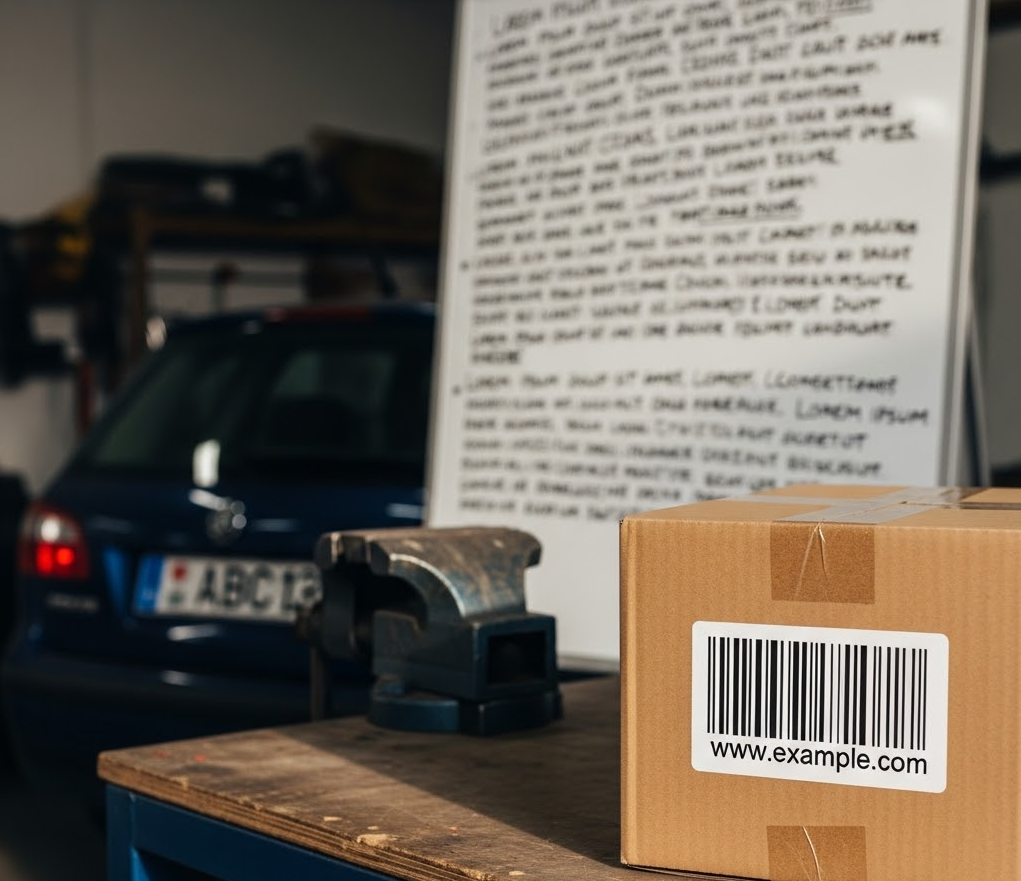
例如,请参考下图。

包含条形码、车牌和白板的 AI 生成的图片。
包含条形码、车牌和白板的 AI 生成图片(点击可放大)。

如需检查此图片以获取特定对象 infoType,请将以下 JSON 发送到 content.inspect 方法:

{
  "item": {
    "byteItem": {
      "data": "BASE64_ENCODED_IMAGE",
      "type": "IMAGE_PNG"
    }
  },
  "inspectConfig": {
    "infoTypes": [
      {
        "name": "OBJECT_TYPE/BARCODE"
      },
      {
        "name": "OBJECT_TYPE/LICENSE_PLATE"
      },
      {
        "name": "OBJECT_TYPE/WHITEBOARD"
      }
    ]
  }
}

输出类似于以下内容:

{
  "result": {
    "findings": [
      {
        "infoType": {
          "name": "OBJECT_TYPE/WHITEBOARD",
          "sensitivityScore": {
            "score": "SENSITIVITY_LOW"
          }
        },
        "likelihood": "LIKELY",
        "location": {
          "contentLocations": [
            {
              "imageLocation": {
                "boundingBoxes": [
                  {
                    "left": 427,
                    "width": 561,
                    "height": 678
                  }
                ]
              }
            }
          ]
        },
        "createTime": "2025-05-22T22:25:09.564718Z",
        "findingId": "2025-05-22T22:25:09.564721Z3400818180961962648"
      },
      {
        "infoType": {
          "name": "OBJECT_TYPE/LICENSE_PLATE",
          "sensitivityScore": {
            "score": "SENSITIVITY_MODERATE"
          }
        },
        "likelihood": "LIKELY",
        "location": {
          "contentLocations": [
            {
              "imageLocation": {
                "boundingBoxes": [
                  {
                    "top": 554,
                    "left": 137,
                    "width": 187,
                    "height": 70
                  }
                ]
              }
            }
          ]
        },
        "createTime": "2025-05-22T22:25:09.564752Z",
        "findingId": "2025-05-22T22:25:09.564753Z2359274424382836782"
      },
      {
        "infoType": {
          "name": "OBJECT_TYPE/BARCODE",
          "sensitivityScore": {
            "score": "SENSITIVITY_LOW"
          }
        },
        "likelihood": "LIKELY",
        "location": {
          "contentLocations": [
            {
              "imageLocation": {
                "boundingBoxes": [
                  {
                    "top": 569,
                    "left": 666,
                    "width": 306,
                    "height": 274
                  }
                ]
              }
            }
          ]
        },
        "createTime": "2025-05-22T22:25:09.564762Z",
        "findingId": "2025-05-22T22:25:09.564762Z1655085669963455621"
      }
    ]
  }
}

如需详细了解如何将 DLP API 与 JSON 结合使用,请参阅 JSON 快速入门

代码示例

以下是多种语言的示例代码,演示了如何使用敏感数据保护功能检查图片中的敏感数据。

C#

如需了解如何安装和使用 Sensitive Data Protection 客户端库,请参阅 Sensitive Data Protection 客户端库

如需向 Sensitive Data Protection 进行身份验证,请设置应用默认凭据。 如需了解详情,请参阅为本地开发环境设置身份验证


using System;
using System.Collections.Generic;
using System.IO;
using System.Linq;
using Google.Api.Gax.ResourceNames;
using Google.Cloud.Dlp.V2;
using Google.Protobuf;

public class InspectImage
{
    public static InspectContentResponse Inspect(
        string projectId,
        string filePath,
        IEnumerable<InfoType> infoTypes = null)
    {
        // Instantiate dlp client.
        var dlp = DlpServiceClient.Create();

        // Construct the content item by setting the type of image and data to be inspected.
        var contentItem = new ContentItem
        {
            ByteItem = new ByteContentItem
            {
                Type = ByteContentItem.Types.BytesType.ImagePng,
                Data = ByteString.FromStream(new FileStream(filePath, FileMode.Open))
            }
        };

        // Construct the Inspect config by specifying the type of info to be inspected.
        var inspectConfig = new InspectConfig
        {
            InfoTypes =
            {
                infoTypes ?? new InfoType[]
                {
                    new InfoType { Name = "PHONE_NUMBER" },
                    new InfoType { Name = "EMAIL_ADDRESS" },
                    new InfoType { Name = "CREDIT_CARD_NUMBER" }
                }
            },
            IncludeQuote = true
        };

        // Construct the request.
        var request = new InspectContentRequest
        {
            ParentAsLocationName = new LocationName(projectId, "global"),
            InspectConfig = inspectConfig,
            Item = contentItem
        };

        // Call the API.
        InspectContentResponse response = dlp.InspectContent(request);

        // Inspect the response.
        var resultFindings = response.Result.Findings;

        Console.WriteLine($"Findings: {resultFindings.Count}\n");

        // Print the results.
        foreach (var f in resultFindings)
        {
            var data = from location in f.Location.ContentLocations
                       from b in location.ImageLocation.BoundingBoxes
                       select new { b.Height, b.Width, b.Top, b.Left };

            Console.WriteLine("Info type: " + f.InfoType.Name);
            Console.WriteLine("\tQuote: " + f.Quote);
            Console.WriteLine("\tImageLocations: " + string.Join(",", data));
            Console.WriteLine("\tLikelihood: " + f.Likelihood);
        }

        return response;
    }
}

Go

如需了解如何安装和使用 Sensitive Data Protection 客户端库,请参阅 Sensitive Data Protection 客户端库

如需向 Sensitive Data Protection 进行身份验证,请设置应用默认凭据。 如需了解详情,请参阅为本地开发环境设置身份验证

import (
	"context"
	"fmt"
	"io"
	"os"

	dlp "cloud.google.com/go/dlp/apiv2"
	"cloud.google.com/go/dlp/apiv2/dlppb"
)

// inspectImageFile inspects an image file for sensitive data
func inspectImageFile(w io.Writer, projectID, filePath string) error {
	// projectId := "my-project-id"
	// filePath := "inspect/testdata/test.png"

	ctx := context.Background()

	// Initialize a client once and reuse it to send multiple requests. Clients
	// are safe to use across goroutines. When the client is no longer needed,
	// call the Close method to cleanup its resources.
	client, err := dlp.NewClient(ctx)
	if err != nil {
		return err
	}

	// Closing the client safely cleans up background resources.
	defer client.Close()

	// Read a image file
	data, err := os.ReadFile(filePath)
	if err != nil {
		return err
	}

	// Specify the type and content to be inspected.
	item := &dlppb.ContentItem{
		DataItem: &dlppb.ContentItem_ByteItem{
			ByteItem: &dlppb.ByteContentItem{
				Type: dlppb.ByteContentItem_IMAGE,
				Data: data,
			},
		},
	}

	// Construct the configuration for the Inspect request.
	inspectConfig := &dlppb.InspectConfig{
		InfoTypes: []*dlppb.InfoType{
			{Name: "PHONE_NUMBER"},
			{Name: "EMAIL_ADDRESS"},
			{Name: "CREDIT_CARD_NUMBER"},
		},
		IncludeQuote: true,
	}

	// Construct the Inspect request to be sent by the client.
	req := &dlppb.InspectContentRequest{
		Parent:        fmt.Sprintf("projects/%s/locations/global", projectID),
		Item:          item,
		InspectConfig: inspectConfig,
	}

	// Send the request.
	resp, err := client.InspectContent(ctx, req)
	if err != nil {
		return err
	}

	// Process the results.
	fmt.Fprintf(w, "Findings: %d\n", len(resp.Result.Findings))
	for _, f := range resp.Result.Findings {
		fmt.Fprintf(w, "\tQuote: %s\n", f.Quote)
		fmt.Fprintf(w, "\tInfo type: %s\n", f.InfoType.Name)
		fmt.Fprintf(w, "\tLikelihood: %s\n", f.Likelihood)
	}
	return nil
}

Java

如需了解如何安装和使用 Sensitive Data Protection 客户端库,请参阅 Sensitive Data Protection 客户端库

如需向 Sensitive Data Protection 进行身份验证,请设置应用默认凭据。 如需了解详情,请参阅为本地开发环境设置身份验证


import com.google.cloud.dlp.v2.DlpServiceClient;
import com.google.privacy.dlp.v2.ByteContentItem;
import com.google.privacy.dlp.v2.ByteContentItem.BytesType;
import com.google.privacy.dlp.v2.ContentItem;
import com.google.privacy.dlp.v2.Finding;
import com.google.privacy.dlp.v2.InfoType;
import com.google.privacy.dlp.v2.InspectConfig;
import com.google.privacy.dlp.v2.InspectContentRequest;
import com.google.privacy.dlp.v2.InspectContentResponse;
import com.google.privacy.dlp.v2.LocationName;
import com.google.protobuf.ByteString;
import java.io.FileInputStream;
import java.io.IOException;
import java.util.ArrayList;
import java.util.List;

public class InspectImageFile {

  public static void main(String[] args) throws Exception {
    // TODO(developer): Replace these variables before running the sample.
    String projectId = "your-project-id";
    String filePath = "path/to/image.png";
    inspectImageFile(projectId, filePath);
  }

  // Inspects the specified image file.
  public static void inspectImageFile(String projectId, String filePath) throws IOException {
    // Initialize client that will be used to send requests. This client only needs to be created
    // once, and can be reused for multiple requests. After completing all of your requests, call
    // the "close" method on the client to safely clean up any remaining background resources.
    try (DlpServiceClient dlp = DlpServiceClient.create()) {
      // Specify the type and content to be inspected.
      ByteString fileBytes = ByteString.readFrom(new FileInputStream(filePath));
      ByteContentItem byteItem =
          ByteContentItem.newBuilder().setType(BytesType.IMAGE).setData(fileBytes).build();
      ContentItem item = ContentItem.newBuilder().setByteItem(byteItem).build();

      // Specify the type of info the inspection will look for.
      List<InfoType> infoTypes = new ArrayList<>();
      // See https://cloud.google.com/dlp/docs/infotypes-reference for complete list of info types
      for (String typeName : new String[] {"PHONE_NUMBER", "EMAIL_ADDRESS", "CREDIT_CARD_NUMBER"}) {
        infoTypes.add(InfoType.newBuilder().setName(typeName).build());
      }

      // Construct the configuration for the Inspect request.
      InspectConfig config =
          InspectConfig.newBuilder().addAllInfoTypes(infoTypes).setIncludeQuote(true).build();

      // Construct the Inspect request to be sent by the client.
      InspectContentRequest request =
          InspectContentRequest.newBuilder()
              .setParent(LocationName.of(projectId, "global").toString())
              .setItem(item)
              .setInspectConfig(config)
              .build();

      // Use the client to send the API request.
      InspectContentResponse response = dlp.inspectContent(request);

      // Parse the response and process results.
      System.out.println("Findings: " + response.getResult().getFindingsCount());
      for (Finding f : response.getResult().getFindingsList()) {
        System.out.println("\tQuote: " + f.getQuote());
        System.out.println("\tInfo type: " + f.getInfoType().getName());
        System.out.println("\tLikelihood: " + f.getLikelihood());
      }
    }
  }
}

Node.js

如需了解如何安装和使用 Sensitive Data Protection 客户端库,请参阅 Sensitive Data Protection 客户端库

如需向 Sensitive Data Protection 进行身份验证,请设置应用默认凭据。 如需了解详情,请参阅为本地开发环境设置身份验证

// Imports the Google Cloud Data Loss Prevention library
const DLP = require('@google-cloud/dlp');
const mime = require('mime');
const fs = require('fs');

// Instantiates a client
const dlp = new DLP.DlpServiceClient();

// The project ID to run the API call under
// const imagePath = './test.jpeg';

// InfoTypes
const infoTypes = [
  {name: 'PHONE_NUMBER'},
  {name: 'EMAIL_ADDRESS'},
  {name: 'CREDIT_CARD_NUMBER'},
];

async function inspectImageFile() {
  let fileBytes = null;
  let fileTypeConstant = null;
  try {
    // Load Image
    fileTypeConstant =
      ['image/jpeg', 'image/bmp', 'image/png', 'image/svg'].indexOf(
        mime.getType(imagePath)
      ) + 1;
    fileBytes = Buffer.from(fs.readFileSync(imagePath)).toString('base64');
  } catch (error) {
    console.log(error);
    return;
  }

  // Specify item to inspect
  const item = {
    byteItem: {
      type: fileTypeConstant,
      data: fileBytes,
    },
  };

  // Specify inspect configuration to match information with mentioned infotypes.
  const inspectConfig = {
    infoTypes: infoTypes,
    includeQuote: true,
  };

  // Combine configurations into a request for the service.
  const request = {
    parent: `projects/${projectId}/locations/global`,
    inspectConfig: inspectConfig,
    item: item,
  };

  // Use the client to send the request.
  const [response] = await dlp.inspectContent(request);

  // Print Findings
  const findings = response.result.findings;
  if (findings.length > 0) {
    console.log(`Findings: ${findings.length}\n`);
    findings.forEach(finding => {
      console.log(`InfoType: ${finding.infoType.name}`);
      console.log(`\tQuote: ${finding.quote}`);
      console.log(`\tLikelihood: ${finding.likelihood} \n`);
    });
  } else {
    console.log('No findings.');
  }
}
inspectImageFile();

PHP

如需了解如何安装和使用 Sensitive Data Protection 客户端库,请参阅 Sensitive Data Protection 客户端库

如需向 Sensitive Data Protection 进行身份验证,请设置应用默认凭据。 如需了解详情,请参阅为本地开发环境设置身份验证

use Google\Cloud\Dlp\V2\ByteContentItem;
use Google\Cloud\Dlp\V2\ByteContentItem\BytesType;
use Google\Cloud\Dlp\V2\Client\DlpServiceClient;
use Google\Cloud\Dlp\V2\ContentItem;
use Google\Cloud\Dlp\V2\InfoType;
use Google\Cloud\Dlp\V2\InspectConfig;
use Google\Cloud\Dlp\V2\InspectContentRequest;
use Google\Cloud\Dlp\V2\Likelihood;

/**
 * @param string $projectId
 * @param string $filepath
 */
function inspect_image_file(string $projectId, string $filepath): void
{
    // Instantiate a client.
    $dlp = new DlpServiceClient();

    // Get the bytes of the file
    $fileBytes = (new ByteContentItem())
        ->setType(BytesType::IMAGE_PNG)
        ->setData(file_get_contents($filepath));

    // Construct request
    $parent = "projects/$projectId/locations/global";
    $item = (new ContentItem())
        ->setByteItem($fileBytes);
    $inspectConfig = (new InspectConfig())
        // The infoTypes of information to match
        ->setInfoTypes([
            (new InfoType())->setName('PHONE_NUMBER'),
            (new InfoType())->setName('EMAIL_ADDRESS'),
            (new InfoType())->setName('CREDIT_CARD_NUMBER')
        ])
        // Whether to include the matching string
        ->setIncludeQuote(true);

    // Run request
    $inspectContentRequest = (new InspectContentRequest())
        ->setParent($parent)
        ->setInspectConfig($inspectConfig)
        ->setItem($item);
    $response = $dlp->inspectContent($inspectContentRequest);

    // Print the results
    $findings = $response->getResult()->getFindings();
    if (count($findings) == 0) {
        print('No findings.' . PHP_EOL);
    } else {
        print('Findings:' . PHP_EOL);
        foreach ($findings as $finding) {
            print('  Quote: ' . $finding->getQuote() . PHP_EOL);
            print('  Info type: ' . $finding->getInfoType()->getName() . PHP_EOL);
            $likelihoodString = Likelihood::name($finding->getLikelihood());
            print('  Likelihood: ' . $likelihoodString . PHP_EOL);
        }
    }
}

Python

如需了解如何安装和使用 Sensitive Data Protection 客户端库,请参阅 Sensitive Data Protection 客户端库

如需向 Sensitive Data Protection 进行身份验证,请设置应用默认凭据。 如需了解详情,请参阅为本地开发环境设置身份验证

import google.cloud.dlp


def inspect_image_file(
    project: str,
    filename: str,
    include_quote: bool = True,
) -> None:
    """Uses the Data Loss Prevention API to analyze strings for
    protected data in image file.
    Args:
        project: The Google Cloud project id to use as a parent resource.
        filename: The path to the file to inspect.
        include_quote: Boolean for whether to display a quote of the detected
            information in the results.
    """
    # Instantiate a client.
    dlp = google.cloud.dlp_v2.DlpServiceClient()

    # Prepare info_types by converting the list of strings into a list of
    # dictionaries.
    info_types = ["PHONE_NUMBER", "EMAIL_ADDRESS", "CREDIT_CARD_NUMBER"]
    info_types = [{"name": info_type} for info_type in info_types]

    # Construct the configuration for the Inspect request.
    inspect_config = {
        "info_types": info_types,
        "include_quote": include_quote,
    }

    # Construct the byte_item, containing the image file's byte data.
    with open(filename, mode="rb") as f:
        byte_item = {"type_": "IMAGE", "data": f.read()}

    # Convert the project id into a full resource id.
    parent = f"projects/{project}/locations/global"

    # Call the API.
    response = dlp.inspect_content(
        request={
            "parent": parent,
            "inspect_config": inspect_config,
            "item": {"byte_item": byte_item},
        }
    )

    # Parse the response and process results.
    if response.result.findings:
        for finding in response.result.findings:
            print(f"Quote: {finding.quote}")
            print(f"Info type: {finding.info_type.name}")
            print(f"Likelihood: {finding.likelihood}")
    else:
        print("No findings.")

试试看

您可以在 content.inspect 的 API Explorer 的参考页面中自行尝试每个示例,或者尝试您自己的图片:

转到 API Explorer

后续步骤