

Sensitive Data Protection includes different types of methods that you can use to inspect, transform (de-identify), discover, and classify data. Using these methods, you can scan data both on and off Google Cloud and optimize the behavior of Sensitive Data Protection for different types of workloads.
Sensitive Data Protection provides the following method types:
Inspection and de-identification methods
This section describes the methods that you can use to locate and, optionally, de-identify each piece of data that matches an information type listed in your inspection configuration.
Content methods
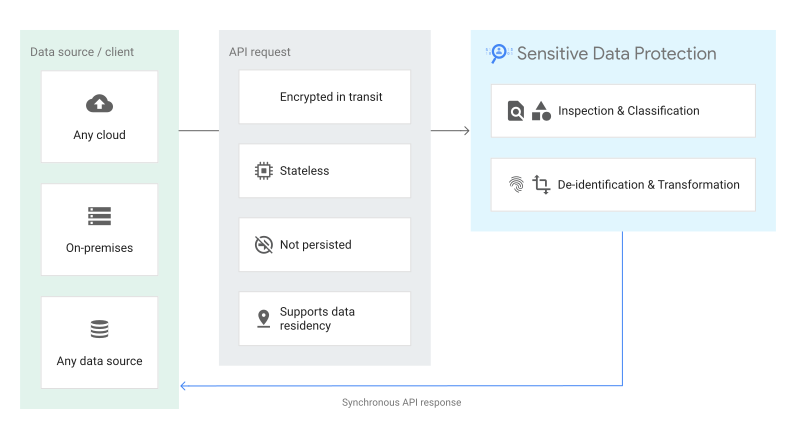
Content methods are synchronous, stateless methods. The data to be inspected or transformed is sent directly in the request to the DLP API. Sensitive Data Protection inspection findings or transformed data is returned in the API response. Request data is encrypted in transit and is not stored.
When to use content methods
The following are some common use cases:
- Inspect user input in real time: Scan form fields, chat messages, or feedback submissions synchronously within web and mobile applications before storing data in databases.
- Mask sensitive text before external processing: De-identify or redact sensitive tokens from text strings synchronously before passing content to third-party APIs or large language models (LLMs).
- Redact sensitive data from uploaded images: Obfuscate sensitive text in image formats (such as JPEG, PNG, or TIFF) by overlaying opaque rectangles on detected PII before displaying or storing the image.
- Re-identify tokenized data on demand: De-tokenize previously pseudonymized tokens in authorized server-side workflows when an authenticated business user requires access to the original plaintext.
- Validate data privacy in client-side applications: Run stateless privacy checks on endpoints without provisioning cloud storage repositories or configuring backend job infrastructure.
To learn more, explore the REST API reference for content methods:
Storage methods
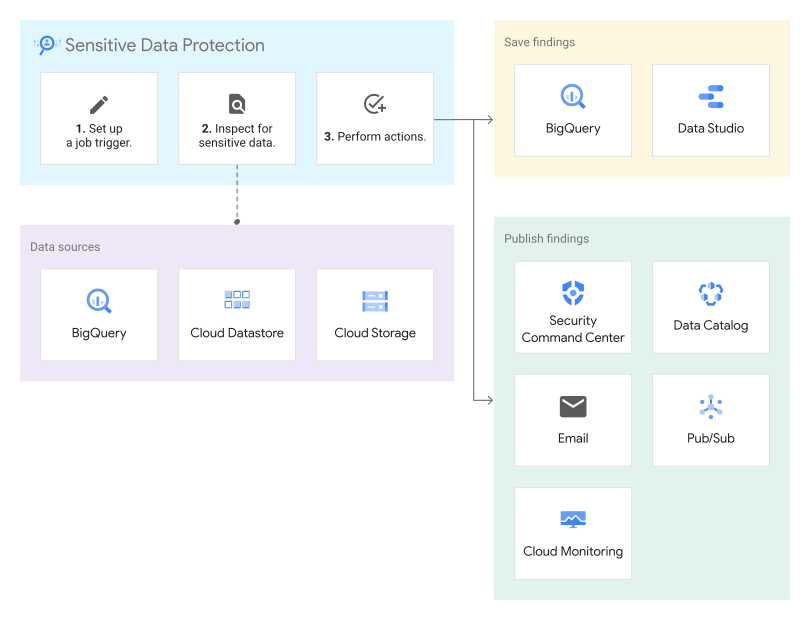
Storage methods are designed to inspect data stored on Google Cloud in systems
like Cloud Storage, BigQuery, and
Firestore in Datastore mode (Datastore). To enable storage inspection, you create a
Sensitive Data Protection job using the
dlpJobs
resource. Each job runs as a managed service to inspect data and then perform
Sensitive Data Protection actions such as save or publish findings. In
addition to these optional actions, Sensitive Data Protection creates and stores
details about the job including job status, bytes scanned, and summary findings
per infoType. You can manage jobs using the DLP API or
Sensitive Data Protection in the Google Cloud console.
When to use storage methods
The following are some common use cases:
- Scan large-scale analytical tables: Inspect petabyte-scale datasets in BigQuery using distributed, serverless batch scanning.
- Audit unstructured file repositories: Inspect documents, archives, and media files stored in Cloud Storage buckets to locate unencrypted or misplaced sensitive data.
- Track historical scan results and trends: Persist detailed inspection findings directly into BigQuery tables to track findings over time and generate compliance audit trails.
- Trigger event-driven remediation workflows: Stream scan completion events and high-risk finding alerts to Pub/Sub to start automated security response playbooks.
- Sample large datasets for cost efficiency: Configure sampling limits or row limits to estimate data risk posture across large databases without scanning entire datasets.
To learn more, explore the REST API reference for the
projects.dlpJobs resource. You specify the
storage details in the
StorageConfig object.
Hybrid methods
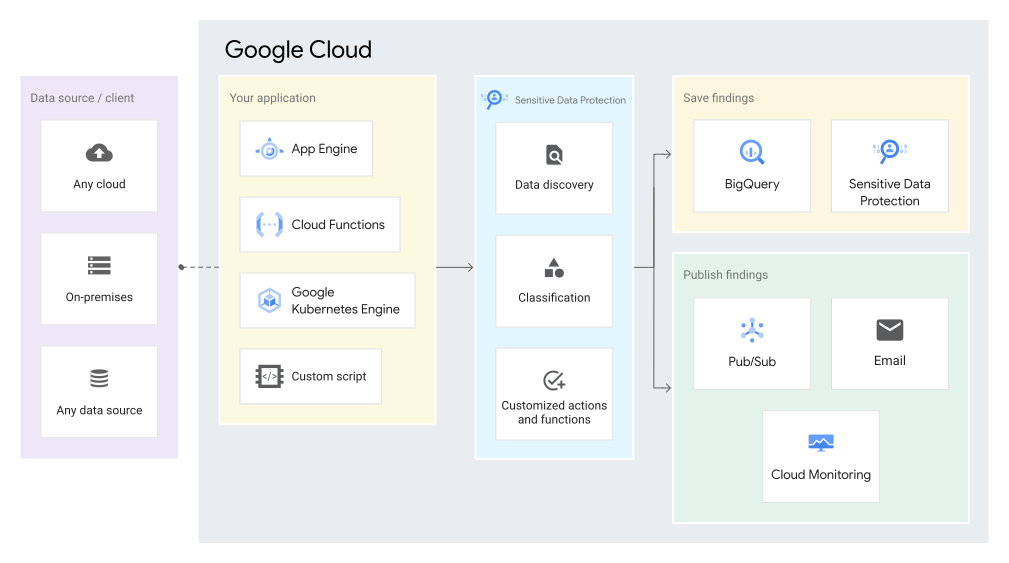
Hybrid methods are a set of asynchronous API methods that allow you to scan payloads of data sent from virtually any source for sensitive information and store the findings in Google Cloud. Hybrid methods are similar to content methods in that the data you want to inspect is included in one or more inspection requests; however, unlike content methods, hybrid methods do not return inspection results in the API response. Instead, inspection results are processed server-side asynchronously and results are tabulated and stored in a manner similar to storage methods.
To enable hybrid inspection, you create a Sensitive Data Protection job using the
dlpJobs
resource. Each hybrid job runs as a managed service to listen for inspection
requests and performs Sensitive Data Protection actions such as
save or publish findings. In addition to these optional actions,
Sensitive Data Protection creates and stores details about the job including job
status, bytes scanned, and summary findings per infoType. You can manage jobs
using the DLP API or Sensitive Data Protection in the
Google Cloud console.
When to use hybrid methods
The following are some common use cases:
- Inspect data in hybrid and multi-cloud environments: Stream data from on-premises databases, bare-metal servers, or other cloud providers into Sensitive Data Protection while keeping finding reports centralized in Google Cloud.
- Audit custom application data pipelines: Send streaming data from custom crawlers, microservices, or ETL pipelines to Sensitive Data Protection without managing local scanner worker fleets.
- Sanitize workloads during cloud migration: Continuously inspect and tokenize sensitive assets during live database replication from legacy systems into Google Cloud.
- Centralize multi-cloud compliance reporting: Aggregate inspection results across disparate operating environments into a single BigQuery dataset for unified governance.
- Process custom file types and proprietary formats: Extract text client-side from proprietary binary formats and stream the extracted payloads to Sensitive Data Protection for inspection.
To learn more, explore the REST API reference for the
projects.dlpJobs resource. You specify the
data source in the hybridOptions field of the
StorageConfig object.
Discovery methods
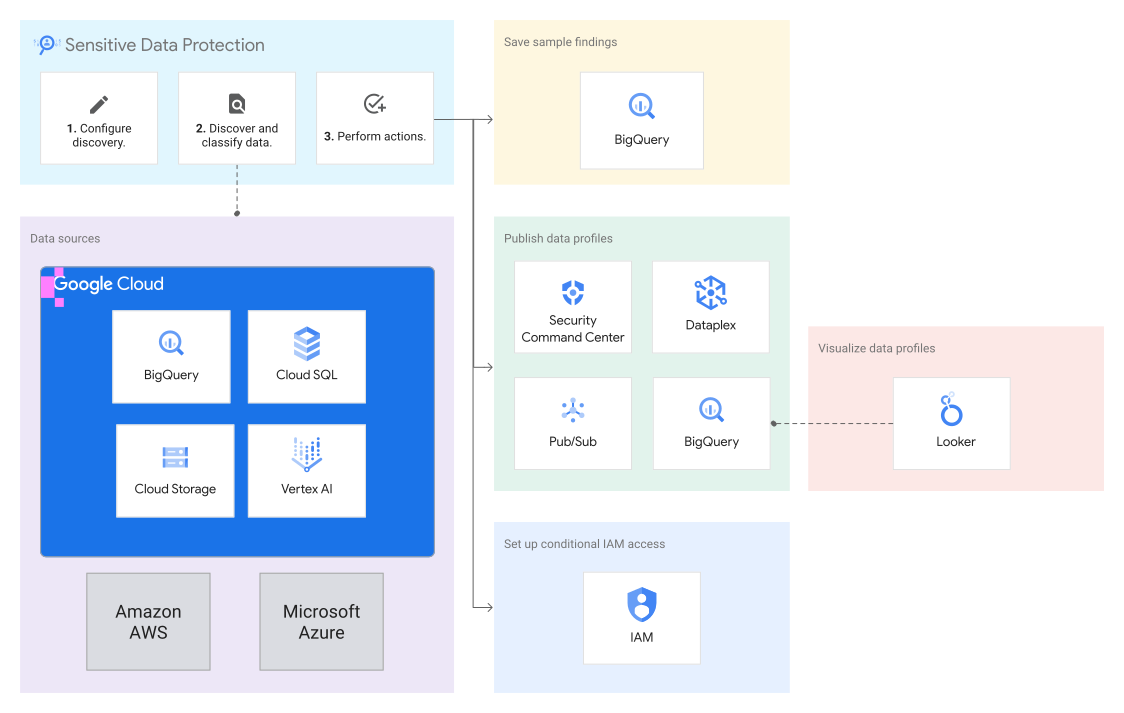
Discovery methods allow you to configure sensitive data discovery to generate data profiles. Data profiles provide insights to help you determine where sensitive data resides in your organization, what kind of sensitive data you are storing, and whether that data has access controls in place.
You can configure discovery to scan data stored on Google Cloud in systems like BigQuery, Cloud SQL, Cloud Storage, and Vertex AI. If you have a Security Command Center Enterprise activation, you can also use Sensitive Data Protection to scan data from other cloud providers.
You can specify actions that you want Sensitive Data Protection to perform after each discovery scan. For example, you can send scan results to other Google Cloud services—like Security Command Center and Google Security Operations—to increase your visibility into your organization's data security posture. You can configure the discovery service to tag your profiled resources to automatically grant or deny IAM access to those resources. You can also export the data profiles to BigQuery. You can connect the exported profiles to Data Studio to view the premade report. You can also create your own custom queries and reports.
To enable discovery, you create a
DiscoveryConfig
resource. Discovery runs based on the scope and frequency that you set in the
discovery configuration. For information about where Sensitive Data Protection
stores the generated profiles, see Data residency
considerations.
You can manage the discovery configurations, data profiles, and Cloud SQL connections using the DLP API or the Google Cloud console.
When to use discovery methods
The following are some common use cases:
- Automate organization-wide data discovery: Continuously scan and profile all data assets across BigQuery, Cloud SQL, and Cloud Storage without writing individual scan jobs or schedules.
- Identify high-risk data repositories: Generate data risk and data sensitivity scores for tables and buckets to prioritize data protection and governance initiatives.
- Enforce dynamic access controls with data tags: Automatically tag profiled resources based on discovered infoTypes to grant or restrict access using Identity and Access Management policies.
- Feed data security posture management: Send discovery profile insights to Security Command Center and Google Security Operations to correlate data risks with infrastructure threats.
- Visualize compliance posture with executive dashboards: Export data profiles to BigQuery and connect premade Data Studio dashboards to monitor sensitive data distribution across the organization, folders and projects.
To learn more, explore the REST API reference for the following:
Discovery configurations
Connections
Connections are relevant only to discovery for Cloud SQL.
Data profiles
organizations.locations.projectDataProfilesprojects.locations.projectDataProfilesorganizations.locations.fileStoreDataProfilesprojects.locations.fileStoreDataProfilesorganizations.locations.tableDataProfilesprojects.locations.tableDataProfilesorganizations.locations.columnDataProfilesprojects.locations.columnDataProfiles
What's next
- Read the how-to guides to get started with inspecting text and images for sensitive data, as well as redacting sensitive data from text and images:
- For more information about inspecting storage and how to use actions, see Inspecting storage and databases for sensitive data.
- For more information about sensitive data discovery, see Data profiles
- Review pricing.