

This page provides best practices for creating a multi-tenant architecture to host untrusted code with Cloud Run. As a Google Cloud customer, a "tenant" is defined as one of your own customers and "untrusted code" is code supplied by these tenants to be run on your platform.
Use cases
The use cases for such architectures include:
- App hosting platforms: You provide a platform where your customers deploy their code. For example, a web hosting platform (customers provide a web server) or a Functions-as-a-Service platform (customers provide a function).
- Agent hosting platforms: Your customers use SDKs to build AI agents, your platform runs them in the background.
- Fine-tuned model platforms: You offer the ability to customize AI models on a per-customer basis. Your platform then runs them on demand leveraging GPUs.
- User-defined functions: Your software allows its customers to define custom logic using code. For example, you provide an analytics engine and want to allow customers to write custom functions, or you provide an API gateway and want to allow customers to filter or mutate requests based on their own custom logic.
- Software-as-a-Service (SaaS) extensibility: You might be offering a SaaS and would like to allow customers to extend its capabilities using extensions. These extensions might be written by customers or partners.
Google Cloud customers are successfully using Cloud Run in production for these use cases.
Challenges of multi-tenant platforms
The typical challenges of creating such architecture include:
- Security: It is impossible to scan or sanitize provided code. Untrusted code can include malicious actions or vulnerable dependencies. If not properly isolated, untrusted code could potentially access sensitive data belonging to other tenants. Simply packaging the code in a container is not a strong enough security boundary. The code also needs to be restricted in what it can do by applying the principle of least privilege permissions.
- Cost efficiency: Such architecture can become expensive if each tenant incur fixed costs for your platform.
- Tenant management: Managing hundreds of thousands of tenants can be challenging, notably when it comes to data deletion.
Benefits of Cloud Run
A Cloud Run-based architecture offers a solution for common challenges with many benefits, such as security, cost efficiency, and tenant management.
Security
Cloud Run provides the out of the box security features relevant to this architecture:
- Compute isolation: Cloud Run ensures a strict isolation between container instances, be it of the same service, or different services from different projects. For more information about container security and execution environments, see Security design overview.
- Security updates: Automated security updates of base images can be enabled in order to keep the operating system and runtime of the deployed workloads up to date and patched without requiring large-scale re-deployments.
- Network isolation: Cloud Run doesn't only sandbox the containers, it also provides a multi-tenant networking stack.
- Service identity: Cloud Run workloads can be configured to have dedicated identities with restricted permissions.
Cost efficiency
- Scale-to-zero and pay-per-use: Cloud Run instances automatically scale to zero when not in use, ensuring hosted workloads are only charged when they need to run. Resulting in a very efficient resource utilization compared to architectures leveraging "always-on" virtual machines.
- Per-request billing: In addition to scale to zero, you can benefit from an even more granular billing model that only charges when requests are processed, providing even higher cost efficiency.
- On-demand and fast starting: When scaled down, Cloud Run services can rapidly scale back up, leading to little latency perceived by the end user of the deployed application.
- Automated cost labeling: All costs reported by Cloud Run are labeled, enabling you to automate the cost attribution and tracking of your tenants.
- Commitments to lower aggregate costs: At the billing account level, you can use flexible committed use discounts to optimize expenditure for any baseline Cloud Run usage.
Tenant management
Due to its on-demand nature, Cloud Run costs aren't higher when using multiple Google Cloud projects, enabling tenant management as described in Organizing your Google Cloud projects.
Target architecture for multi-tenant platforms
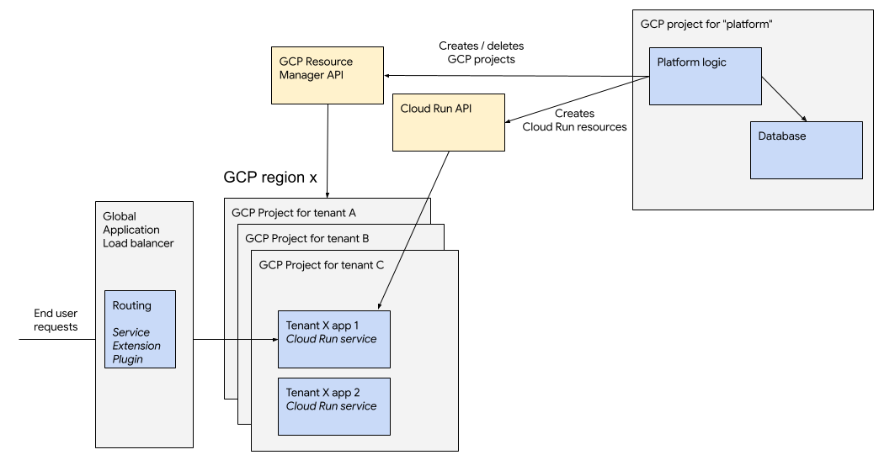
At a high level, here is the recommended architecture:
Organizing your Google Cloud projects
You need to set up a Google Cloud organization, offline billing, and reach out to your account team to let them know you are acting as a reseller account. Google Cloud might work with you to ensure proper communication channels are put in place for abuse mitigation.
You must use folders to organize your Google Cloud projects, notably, it is essential that you put in different folders the projects running your first party code from the projects running untrusted code of your tenants. You need to automate tenant onboarding so that creating the projects and resources of a tenant doesn't require humans in the loop.
Google recommends using one Google Cloud project per tenant. It is also possible to host multiple tenants in the same project, but this comes with additional limitations:
Single tenant per Google Cloud project (Recommended)
In this architecture, each of your platform's tenant is hosted in a dedicated Google Cloud project, which has many benefits:
- Simpler security: The Google Cloud project is a strict boundary for all resources it contains. This means that if a tenant needs access to multiple Google Cloud resources like multiple Cloud Run services, a Cloud Storage bucket, you can use the project as a secure perimeter.
- Less limited:
- The number of resources in a given project is limited. For example, Cloud Run only allows creating 1,000 services per region in a project. There are similar limits in the number of service accounts and other related resources.
- The number of projects is itself a quota and can be increased, there are no limits to this number for a Google Cloud organization. There is a soft limit of 100,000 projects per billing account, which can be multiplied by talking to Google. Your organization can also create many billing accounts and group them in an "account group" (currently in Private Preview).
- Simpler monitoring and management:
- Using a project per tenant, leads to easier data deletion processes, where deleting data for a tenant boils down to deleting the respective project.
- Google Cloud Monitoring and Logging work across projects and can allow you to monitor your entire fleet.
- Project-level quotas enable you to cap Cloud Run resource utilization for a given tenant, potentially aligning limits with your own pricing tiers.
- Custom organization policies allow you to apply on all projects of a folder's specific restrictions, such as available regions or maximum CPU/memory allocation.
Creating a Google Cloud project and initializing APIs and resources can have latency, Google recommends you use a pool of pre-created projects that you assign to your tenants when needed.
Multiple tenants per Google Cloud project (Not recommended)
It is possible to host multiple of your tenants in the same Google Cloud project, but Google does not recommend this architecture.
Many Google Cloud services have per project resource limits. For example, Cloud Run has a non-adjustable limit of 1,000 Cloud Run services per region in a project. Consequently, hosting multiple tenants per project will still require you to manage a fleet of Google Cloud projects, which will overall increase tenant management complexity. From a security perspective, Google Cloud projects are designed as a security boundary, hosting two distinct tenants in the same projects requires you to be more careful when it comes to security. For example, using by ensuring dedicated service accounts and fine-grained permissions.
Deploying to many regions
For both reliability and scalability, Google recommends spreading tenant deployments over multiple Google Cloud regions. Each tenant application is deployed to a single region, but you can use different regions for different tenants. The region selection can be random, or can take into account the tenant's location to optimize for latency.
Request routing and custom domains
If you want to expose your tenant's Cloud Run services to end users, you will want to add your own domain and use your own routing logic. For example, to map a subdomain to the Google Cloud project hosting the tenant's service.
You can implement your custom routing service, but Google recommends using a global external application load balancer with Service Extensions for routing logic. Service Extensions can be implemented as plugins (where the logic is executed inline with request processing) or callouts (the routing logic is delegated to a separate Cloud Run service which can call one of Google Cloud's scalable multi-regional databases like Spanner).
Using an application load balancer will also allow you to add a caching layer by leveraging Cloud CDN and additional Distributed Denial-of-Service (DDoS) attack protection to your platform using Cloud Armor.
Reputation and abuse
Any hosting platform allowed to run untrusted code will be subject to abuse.
We recommend using a different Cloud Billing account for each of the reputation tiers you offer. For example, your free tier tenants shouldn't be attached to the same billing account as your high paying customers. Google can consider these billing accounts at different reputation levels.
As described in Organizing your Google Cloud projects, in addition to separating per billing accounts, you should use folders to organize projects. Google can help you set folder-level quotas to ensure that all resources within a folder never consume more than a set maximum, enabling you to better manage your platform's cost.
By default, Google automatically takes down abusive workloads according to Google Cloud terms of services, Google can also log abuse detection events in Cloud Logging, which you can then take action on.