

This page provides an overview of configuration options for Cloud Run services. These configurations are listed in the order that they appear in the Google Cloud console when you are deploying a new service.
After specifying the deployment option, service name, and region, you will see the following configuration settings described on this page. Some configurations settings require additional permissions or enabling APIs, and some additional settings will appear in the web interface if you select GitHub or Functions as your deployment option.
Configure service-level settings
Configure service-level settings, such as authentication, billing, service scaling, and ingress.
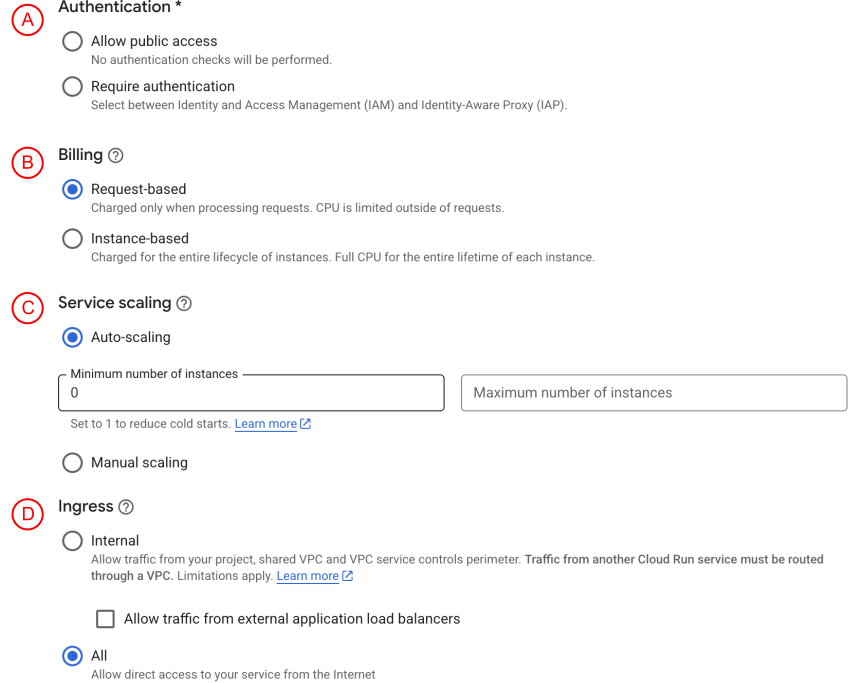
The following table explains the features for this section:
| Section | Feature | Description |
|---|---|---|
| A | Authentication | All Cloud Run services are deployed privately by default, which means that they can't be accessed without providing authentication credentials in the request. You can choose to allow public (unauthenticated) access instead. |
| B | Billing | Use billing settings to control how you are charged, either per request and only when the instance processes a request, or for the entire lifecycle of the instance. |
| C | Service scaling | You can set your service to autoscaling or manual scaling, depending on how much control you need over your scaling behavior. When using autoscaling, each Cloud Run revision is automatically scaled to the number of instances needed to handle all incoming requests, events, or CPU utilization. You can control how many instances your Cloud Run service creates to serve requests by setting maximum instances and minimum instances. You can avoid cold starts for your application and reduce application latency by setting a minimum number of instances. Setting a maximum number of instances can help to curb costs and guard against abnormally high request levels. Manual scaling lets you set a specific instance count, regardless of traffic or utilization, and without requiring redeployment. By default, Cloud Run automatically scales out to a specified or default maximum number of instances. However, for some use cases, you might want the ability to set a specific number of instances. |
| D | Ingress | Use ingress settings to restrict network access to your Cloud Run service. |
Container
You can configure the container by specifying the container port, settings, variables and secrets, and volume mounts.
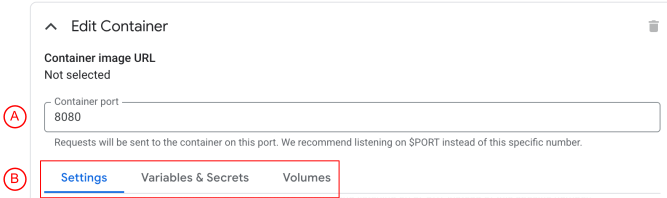
| Section | Feature | Description |
|---|---|---|
| A | Container port | Specify the port you want requests to be sent to. The default value of 8080. For Cloud Run services, Cloud Run injects the PORT environment variable into the container. If you deploy multiple containers to a service, this is the ingress container. See Configure the container port for a service. |
| B | Container configurations | You can further configure your container in the Settings, Variables & Secrets, and Volumes tabs. These features are explained in the following sections. |
Settings
Customize your service by configuring the container, capacity, GPU, and health checks.
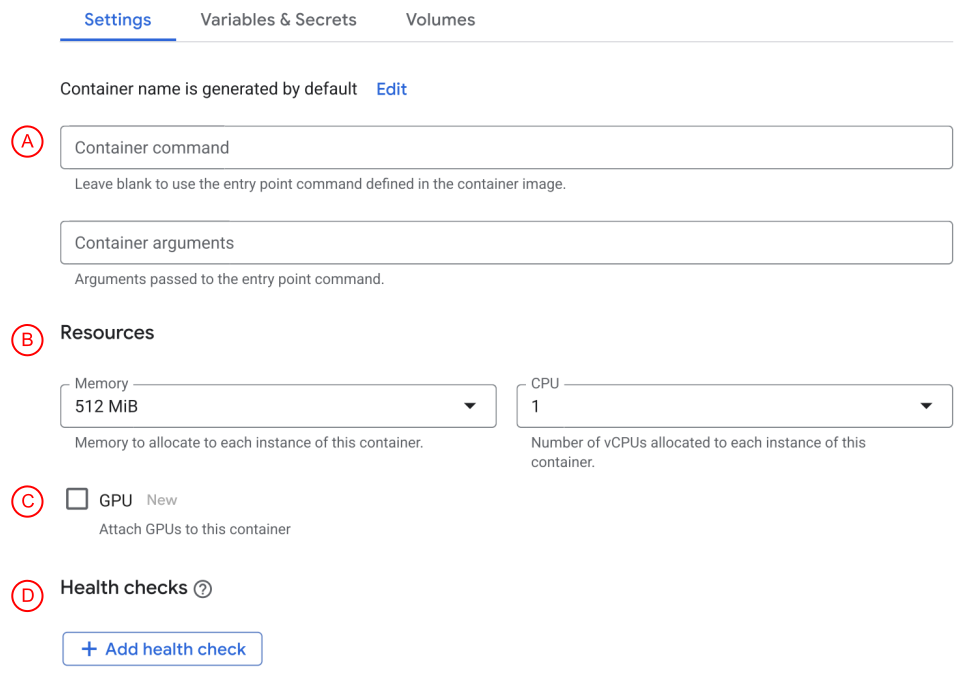
The following table explains the features for this section:
| Section | Feature | Description |
|---|---|---|
| A | Containers | Configure entrypoint and arguments for services if you want to override the image's defaults. |
| B | Capacity | You can control the amount of memory and CPU a service can use. |
| C | GPU | If you need to host AI workloads, such as inference models and model training, you can configure Cloud Run services with GPUs. |
| D | Health Checks | Cloud Run lets you configure three types of health check probes. The startup probe determines when the container is ready to accept traffic, the liveness probe determines whether to restart the container, and the readiness probe (Preview) determine when an instance in your Cloud Run service should serve traffic. Learn more about container health checks. |
You can also configure timeouts, maximum concurrency, the execution environment, revision scaling, startup CPU boost, or connect to a Cloud SQL instance.

The following table explains the features for this section:
| Section | Feature | Description |
|---|---|---|
| A | Timeouts | You can set a Cloud Run request timeout that specifies the time within which a response must be returned. |
| B | Maximum concurrency | You can configure the maximum concurrent requests per instance to specify the maximum number of requests that can be processed simultaneously by a given instance. You can increase this to a maximum of 1,000. |
| C | Execution environment | Cloud Run has two execution environments. Learn about the differences between both execution environments, and how to choose which one to use. |
| D | Revision scaling | Any configuration change leads to the creation of a new revision. By default, Cloud Run revisions are configured to scale up to a maximum of 100 instances. If you need to change the default number of container instances that are kept warm, ready to receive requests, you can set revision-level maximum instances and minimum instances. |
| E | Startup CPU boost | The startup CPU boost for revisions provides additional CPU during instance startup time and for 10 seconds after the instance has started. |
| F | Cloud SQL connections | Connect to a Cloud SQL instance from a service running in Cloud Run. |
Variables & Secrets
Configure environment variables and secrets to securely manage your service.

The following table explains the features for this section:
| Section | Feature | Description |
|---|---|---|
| A | Environment variables | You can create key-value pairs for use with your Cloud Run service. See Configure environment variables for services to learn more. |
| B | Secrets | You can use Secret Manager with your Cloud Run to securely store API keys, passwords, and other sensitive information. See Configure secrets to learn more. |
Volumes mounts
Configure volume mounts for your service.

Cloud Run volume mounts lets you access shared data stored in a local file system, such as a storage bucket or file server content, from your container. You can mount a Cloud Storage bucket, an NFS share like a Filestore instance, an in-memory filesystem provided by Cloud Run, or a CIFS/SMB network file systems.
Networking
Connect to other Google Cloud services using HTTP/2, traffic splitting, a VPC network, or service mesh.
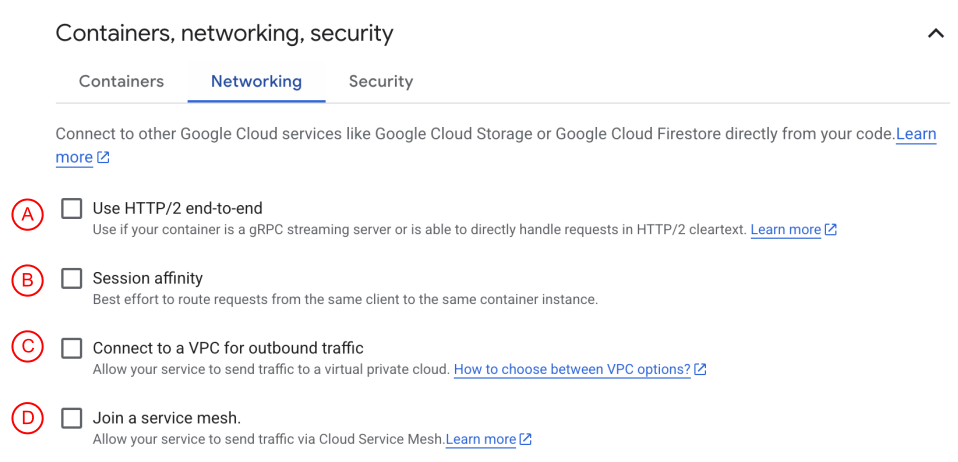
The following table explains the features for this section:
| Section | Feature | Description |
|---|---|---|
| A | Use HTTP/2 for services | Configure your service to use end-to-end HTTP/2, which prevents Cloud Run from downgrading requests to HTTP/1. |
| B | Session affinity | Each time you deploy or redeploy a service, a new revision of the underlying Cloud Run service is automatically created. See Session affinity and traffic splitting for more details. |
| C | Connect to a VPC | Enable your Cloud Run service to send traffic to a VPC network by using Direct VPC egress. See VPC options. |
| D | Service mesh | Cloud Service Mesh lets you enable mesh advanced traffic management capabilities, such as weighted traffic splitting and global load balancing, as well as observability and security policies for traffic from one Cloud Run service to another. |
Security
Configure the service account, Binary Authorization, or encryption keys for your service.

The following table explains the features for this section:
| Section | Feature | Description |
|---|---|---|
| A | Service account | The Cloud Run service identity is the service account that is used as the authenticated account for accessing Google Cloud APIs from your Cloud Run instance container. We recommend that you create a service account and determine the most minimal set of permissions that the service account needs to access specific Google Cloud resources. |
| B | Binary Authorization | Binary Authorization is a deploy-time security control that ensures only trusted container images are deployed to your Cloud Run resources. |
| C | Encryption | If you want to control your encryption keys, you can use customer-managed encryption keys. |
Postdeployment
After your service is successfully deployed, you can continue to configure additional settings for your service.
Labels
Cloud Run labels are key/value pairs that you can apply to Cloud Run services, revisions, and Cloud Run functions. Labels help you organize your Cloud Run resources, and manage costs at scale with the granularity you need.
Labels you previously set for your Cloud Run functions using either
gcloud functions commands or the Cloud Functions v2 API propagate to Cloud Run when you deploy your functions in Cloud Run.
Recommendations
See Optimize with Recommender to learn the optimizations provided by Recommender on Cloud Run.
Tag services
Tags are key-value pairs you can apply to your resources for fine-grained access control using Cloud Run console.
Tag administrators create tags for resources across Google Cloud at the organization or project level. Tags provides a way to conditionally allow or deny policies based on whether a resource has a specific tag. To learn more, see Tag services.