

Manual scaling lets you set a specific instance count without requiring redeployment. Use manual scaling when your workload needs a fixed number of instances, or when you want to control the instance count from your own system.
To scale instances automatically based on CPU utilization instead of setting a fixed instance count, see Configure CPU autoscaling for worker pools.
Billing considerations when using manual scaling
When you use manual scaling, all the instances that you requested are billed as active instances, even if they happen to be idle. For complete billing details, see the pricing page.
Required roles
To get the permissions that you need to configure and deploy Cloud Run worker pools, ask your administrator to grant you the following IAM roles:
- Cloud Run Developer (
roles/run.developer) on the Cloud Run worker pool - Service Account User (
roles/iam.serviceAccountUser) on the service identity
For a list of IAM roles and permissions that are associated with Cloud Run, see Cloud Run IAM roles and Cloud Run IAM permissions. If your Cloud Run worker pool interfaces with Google Cloud APIs, such as Cloud Client Libraries, see the service identity configuration guide. For more information about granting roles, see deployment permissions and manage access.
Configure scaling
Changing scaling mode or changing the manual instance count does not create a new revision.
To configure the scaling mode, use the Google Cloud console, the Google Cloud CLI, YAML, Terraform, or REST API:
Console
In the Google Cloud console, go to Cloud Run:
If you are configuring a new worker pool, select Worker pools from the menu, and click Deploy container. If you are configuring an existing worker pool, click the worker pool to display its detail pane, then click the pen icon next to Scaling at the top right of the detail panel.
Locate the Scaling form (for a new worker pool) or the Edit scaling form for an existing worker pool.
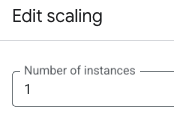
In the field labelled Number of instances, specify the number of container instances for the worker pool.
Finish the specification.
Click Create for a new worker pool or Save for an existing worker pool.
gcloud
- To specify manual scaling for a new worker pool, run the following command
with the
--scalingflag:
gcloud beta run worker-pools deploy WORKER_POOL \
    --scaling=INSTANCE_COUNT \
    --image IMAGE_URL
Replace the following:
- WORKER_POOL: the name of your worker pool.
- INSTANCE_COUNT: the number of instances for the worker pool.
This sets the worker pool to manual scaling. Specify a value of
0to disable the worker pool. IMAGE_URL: a reference to the container image that contains the worker pool, such asus-docker.pkg.dev/cloudrun/container/worker-pool:latest.To specify manual scaling for an existing worker pool, run the following command with the
--scalingflag:
gcloud beta run worker-pools update WORKER_POOL \
    --scaling=INSTANCE_COUNT
Replace the following:
- WORKER_POOL: the name of your worker pool.
- INSTANCE_COUNT: the number of instances for the worker pool.
YAML
If you are creating a new worker pool, skip this step. If you are updating an existing worker pool, download its YAML configuration:
gcloud run worker-pools describe WORKER_POOL --format export > worker-pool.yaml
Set
scalingModetomanualand specifymanualInstanceCount:apiVersion: run.googleapis.com/v1 kind: WorkerPool metadata: name: WORKER_POOL annotations: run.googleapis.com/scalingMode: manual run.googleapis.com/manualInstanceCount: "INSTANCE_COUNT"
Replace the following:
- WORKER_POOL: the name of your Cloud Run worker pool.
- INSTANCE_COUNT: the number of instances you are manually
scaling for the worker pool. Specify a value of
0to disable the worker pool.
Create or update the worker pool using the following command:
gcloud run worker-pools replace worker-pool.yaml
The
gcloud run worker-pools replacecommand defaults to usingworker-pool.yamlfile if present.
Terraform
To learn how to apply or remove a Terraform configuration, see Basic Terraform commands.
resource "google_cloud_run_v2_worker_pool" "default" {
  name     = "WORKER_POOL"
  location = "REGION"

  template {
    containers {
      image = "IMAGE_URL"
    }
  }
  scaling {
    scaling_mode = "MANUAL"
    manual_instance_count = "INSTANCE_COUNT"
  }
}
Replace the following:
- WORKER_POOL: the name of the worker pool.
- REGION: the Google Cloud region—for example,
europe-west1. IMAGE_URL: a reference to the container image that contains the worker pool, such asus-docker.pkg.dev/cloudrun/container/worker-pool:latest.- INSTANCE_COUNT: the number of instances for the worker pool.
This sets the worker pool to manual scaling. Specify a value of
0to disable the worker pool.
REST API
To update the number of instances for a given worker pool, send a PATCH
HTTP request to the Cloud Run Admin API
workerPools.patch endpoint:
curl -H "Content-Type: application/json" \
   -H "Authorization: Bearer ACCESS_TOKEN" \
   -X PATCH \
   -d '{"scaling":{"scalingMode":"MANUAL","manualInstanceCount":INSTANCE_COUNT}}' \
   https://run.googleapis.com/v2/projects/PROJECT_ID/locations/REGION/workerPools/WORKER_POOL?update_mask=scaling.scalingMode,scaling.manualInstanceCount
Replace the following:
- ACCESS_TOKEN: a valid access token for an account that
has the IAM permissions to update a worker pool.
For example, if you are logged into
gcloud, you can retrieve an access token usinggcloud auth print-access-token. From within a Cloud Run container instance, you can retrieve an access token using the container instance metadata server. - INSTANCE_COUNT: the number of instances for the worker pool.
- PROJECT_ID: the Google Cloud project ID.
- REGION: the Google Cloud region that the worker pool is deployed in.
- WORKER_POOL: the name of the worker pool.
View scaling configuration for a worker pool
In the Google Cloud console, go to Cloud Run:
Click Worker pools to display the list of deployed worker pools.
Click the worker pool you want to examine to display its details pane.
The current scaling setting is shown above the worker pools revision list: Scaling: Manual (Instances: ).
Disable a worker pool
To disable a worker pool, run the following command with the
--scaling=0
flag:
gcloud beta run worker-pools update WORKER_POOL --scaling=0
Replace WORKER_POOL with the name of your worker pool.