


用量
constant: constant_name {
  value: "string"
  export: none | override_required | override_optional
}
|
階層
constant |
預設值
無
接受
|
定義
constant 參數會定義 LookML 常數,讓您指定可在整個專案中重複使用的值。在模型中,只要是接受字串的地方,以及 LookML 資訊主頁元素的 model 和 explore 參數,都可以參照常數,有助於減少 LookML 程式碼中的重複內容。
常數必須在專案資訊清單檔案中定義。接著,您可以使用 @{constant_name} 語法,在整個專案中使用常數。
您可以使用 constant 的 export 子參數,指定當參照常數的檔案匯入其他專案時,開發人員是否應覆寫常數的值。
export
您可以使用 constant 的 export 子參數,決定當參照常數的檔案匯入其他專案時,如何使用常數。
根據預設,參照常數的匯入檔案會使用匯入專案資訊清單檔案中指定的值。export 參數會指定開發人員是否應覆寫常數值,方法是為該常數提供新值,以便在匯入專案時使用。export 參數可能的值如下:
none:export的預設值。匯入專案中的常數值無法覆寫。匯入專案會使用匯入專案資訊清單檔案中指定的常數值。override_optional:您可以在匯入專案中選擇覆寫常數值。如果匯入專案的資訊清單檔案未提供值,系統會使用匯入專案的原始值。override_required:匯入專案必須覆寫匯入專案資訊清單檔案中原本指定的常數值。如果匯入專案未提供新的常數值,Looker 就會顯示錯誤。
常數僅適用於最初定義常數的專案檔案。因此,在已匯入檔案的專案中定義的常數,只能由匯入的檔案使用,而不能由匯入專案中定義的檔案使用。
如要在匯入專案的檔案中使用常數,請在匯入專案的資訊清單檔案中定義新的常數。以這種方式定義的常數,只能用於匯入專案中定義的檔案。
將參照常數的檔案匯入其他專案時,您可以在匯入專案的資訊清單檔案中,使用 local_dependency 或 remote_dependency 的 override_constant 子參數,為 export 設為 override_optional 或 override_required 的常數提供新值。
如要進一步瞭解如何覆寫匯入專案中的常數,並查看相關範例,請參閱「從其他專案匯入檔案」說明文件頁面。
範例
以下舉例說明如何使用 constant 參數,定義可在整個專案中使用的值。
使用 constant 參數為探索加上標籤
假設您想建立兩個探索,在使用者介面中分別標示為「San Francisco Users」和「San Francisco Orders」。如要這麼做,您可以在專案的 manifest.lkml 檔案中,定義值為 "San Francisco" 的常數 city:
constant: city {
  value: "San Francisco"
}
接著,您可以使用 @{city} 語法,在專案中接受字串的任何部分參照這個常數。在這個範例中,您可以定義 users 和 orders 探索,並將 "@{city} Users" 和 "@{city} Orders" 指定為 label 參數的值,如以下範例所示:
explore: users {
  label: "@{city} Users"
}

explore: orders {
  label: "@{city} Orders"
}
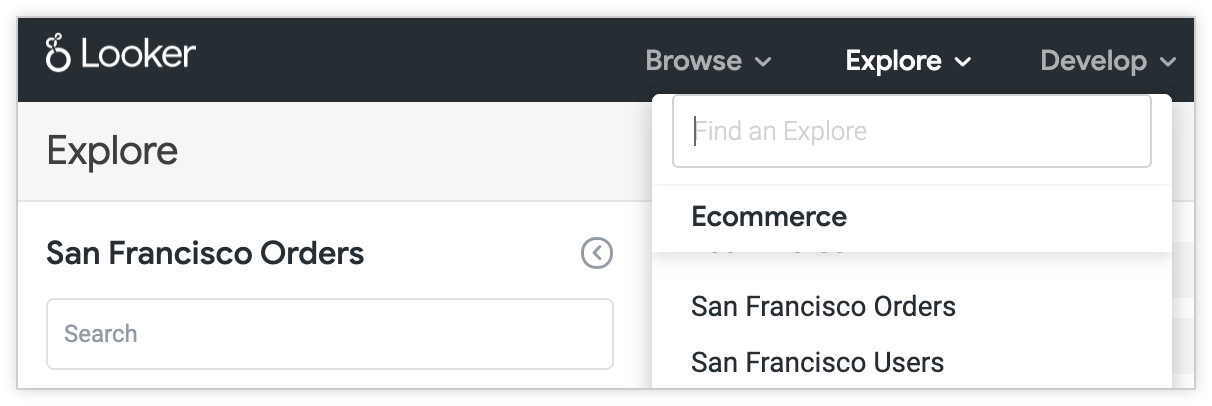
在這個範例中,Looker 會在「探索」選單和探索標題中顯示「舊金山使用者」和「舊金山訂單」,而非預設的「使用者」和「訂單」標籤。
搭配常數使用 sql_table_name 參數
假設您想根據結構定義 02349_sfo 中的資料表建立多個檢視表。為避免多次指定 02349_sfo 值,請在專案的 manifest.lkml 檔案中建立名為 schema 的常數,如下所示:
constant: schema {
  value: "02349_sfo"
}
接著,您可以將 sql_table_name 參數的值指定為 @{schema}.view_name,根據 02349_sfo 結構定義建立檢視表:
view: users {
  sql_table_name: @{schema}.users ;;
}
這會根據結構定義 02349_sfo 中的 users 資料表,建立名為「Users」的檢視表。
使用 Liquid 變數和 HTML 搭配常數
假設您希望負數資料值顯示在括號內,並以紅色字型顯示。只要將這個格式設為 LookML 常數的值,就能使用 Liquid 變數和 HTML 指定格式,而且只需指定一次。之後,只要想將該格式套用至欄位,就能參照這個常數。
舉例來說,您可以建立常數 negative_format,將此格式套用至欄位:
constant: negative_format {
  value: "{% if value < 0 %}<p style='color:red;'>({{rendered_value}})</p>{% else %} {{rendered_value}} {% endif %}"
}
這會建立常數 negative_format,指定負資料值應使用紅色字型,並以括號括住。接著,您可以使用 html 參數,將這項格式設定套用至資料集中的維度和測量指標。
舉例來說,您可以建立 type: sum 的「Total Amount」測量指標,並將 html 參數的值指定為 @{negative_format}:
measure: total_amount {
  type: sum
  value_format_name: usd
  sql: ${amount} ;;
  html: @{negative_format} ;;
}
在表格中,「總金額」指標的負值會按照 negative_format 常數定義中的指定格式顯示,也就是以紅色字體呈現,並加上括號。

在 LookML 資訊主頁中使用常數
為 LookML 資訊主頁定義資訊主頁元素時,您可以使用 LookML 常數定義元素所依據的模型和探索。
舉例來說,假設您在專案的 manifest.lkml 檔案中定義了常數 model_name 和 explore_name:
constant: model_name {
  value: "thelook"
}

constant: explore_name {
  value: "orders"
}
在資訊主頁檔案中,您可以將 model 的值設為 "@{model_name}",並將 explore 的值設為 "@{explore_name}",用於任何要以模型 thelook 和探索 orders 為基礎的資訊主頁元素。
舉例來說,假設您正在編輯柱狀圖元素的 LookML。在資訊主頁檔案中,您可以指定 model 和 explore 參數的值,如下所示:
- dashboard: dashboard_name
  title: "dashboard title"
  layout: newspaper
  elements:
  - title: Element Title
    name: element_name
    model: "@{model_name}"
    explore: "@{explore_name}"
    type: looker_column
在資訊主頁代理操作說明中使用常數
您也可以在 LookML 資訊主頁代理的 instructions 參數中使用 LookML 常數,在多個資訊主頁代理之間共用標準業務規則或指南。
例如,在 manifest.lkml 檔案中定義常數:
constant: FISCAL_YEAR_RULE {
  value: "Always filter all requests by the current fiscal year unless specified otherwise."
}
接著,您可以在 agent 定義的 instructions 參數中參照常數:
agent: sales_dashboard_agent {
  instructions: "Focus on revenue metrics. @{FISCAL_YEAR_RULE}"
  is_dashboard_agent: yes
}
注意事項
參照常數定義中的常數
定義常數時,您可以參照專案資訊清單檔案中定義的其他常數。假設您已宣告常數 city:
constant: city {
  value: "San Francisco"
}
接著,您可以宣告參照 city 常數的 state 常數:
constant: city_state {
  value: "@{city}, California"
}
常數 state 會解析為字串「San Francisco, California」。
逸出常數語法
如要編寫類似常數語法的字串,但不想將該字串評估為常數,可以使用反斜線逸出字元 \,在 @ 字元後逸出常數語法。例如:
dimension: id { type: string label: "@{id}" sql: ${TABLE}.id }
In this example, the [`label` parameter](/looker/docs/2620/reference/param-explore-label) displays the string **@{id}** as the label for the `id` dimension, rather than evaluating the `id` constant and outputting its value.

Constant references won't be evaluated if the brackets are not closed, in which case it is not necessary to escape constant syntax. Thus, `@{id` in the following example wouldn't be evaluated as a constant.


```none

dimension: id {
  type: string
  label: "@{id"
  sql: ${TABLE}.id
}