

In this document, the term SSL refers to both the Secure Sockets Layer (SSL) and Transport Layer Security (TLS) protocols. The information in this document applies to TLS connections over the TCP transport protocol, which can use any supported version of TLS. For load balancers that use HTTP/3, the underlying transport protocol is QUIC, which uses TLS 1.3 exclusively.
An SSL policy defines the TLS features, such as protocol versions and cipher suites, that are supported by load balancers during a TLS handshake. An SSL policy is associated with a target HTTPS proxy or target SSL proxy.
Each predefined profile of an SSL policy specifies a set of TLS capabilities that the load balancer is configured to support. The minimum TLS version further restricts the load balancer to use only specific versions of TLS. And in cases where you need to specify support for particular cipher suites used by TLS 1.2 and earlier, a custom profile lets you do that. Each SSL policy has an associated scope, either global or regional, depending on the load balancer.
The following load balancers support global SSL policies: The following load balancers support regional SSL policies:
Associating an SSL policy with a target HTTPS proxy or target SSL proxy is optional. Each target HTTPS proxy or target SSL proxy can be associated with no more than one SSL policy. You can associate the same SSL policy with multiple target HTTPS proxies or multiple target SSL proxies as long as the SSL policy and target proxy use identical scopes. Changes made to SSL policies don't alter or interrupt existing load balancer connections.
The following example shows how connections from clients are established and terminated at a load balancer.
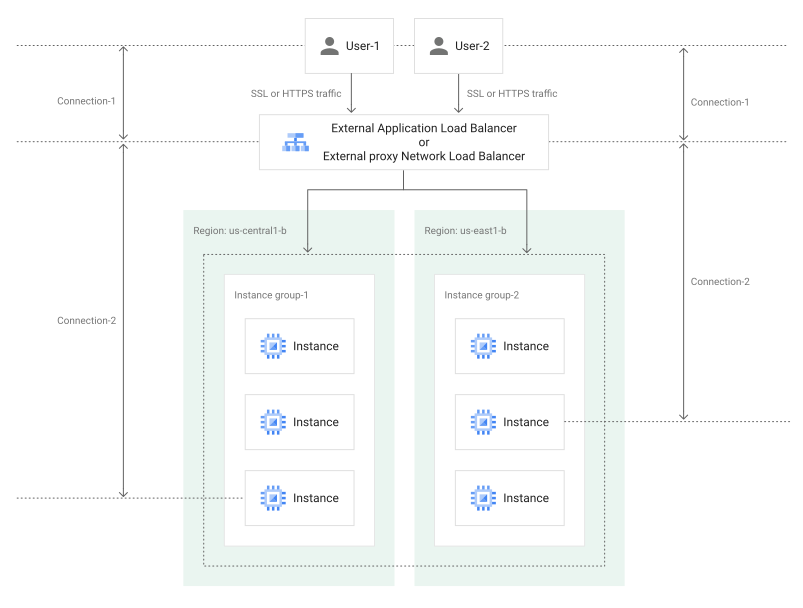
You can use an SSL policy to configure the minimum TLS version and SSL features that are enabled in the load balancer. SSL policies affect connections between clients and the load balancer (Connection-1 in the figure). SSL policies don't affect the connections between the load balancer and the backends (Connection-2 in the figure).
Creating an SSL policy
When you create an SSL policy, you specify the following information:
- profile, which specifies a set of TLS capabilities that the load balancer is configured to support
- minimum TLS version, which further restricts the load balancer to use only specific versions of TLS
- post-quantum key exchange setting, which specifies when post-quantum key exchange is enabled on the load balancer
When connecting to the load balancer, the clients advertise the TLS protocol versions, cipher suites, and other TLS capabilities that they are able to support. During the TLS handshake, the load balancer chooses the most recent TLS protocol version that both it and the client support, and also chooses other TLS parameters (including a cipher suite) for the connection. The TLS handshake fails if the load balancer and client don't support overlapping TLS versions, cipher suites, and other capabilities.
Predefined profiles
Google Cloud provides the following predefined profiles.
COMPATIBLE. Supports the broadest set of clients, including clients that can only use earlier TLS versions and TLS capabilities.MODERN. Supports a wide set of TLS ciphers, allowing modern clients to negotiate TLS.RESTRICTED. Supports a reduced set of TLS ciphers. TheRESTRICTEDprofile is intended to meet stricter compliance requirements.FIPS_202205. Supports a set of TLS capabilities that are intended to meet FIPS 140-3 compliance.
Custom profile
The COMPATIBLE, MODERN, and RESTRICTED profiles differ in the set of
cipher suites they support when the load balancer negotiates TLS 1.2 and earlier
versions. The table in the section
Cipher suites for TLS 1.2 and earlier shows these differences.
You can also create a CUSTOM profile and specify individually the cipher
suites that the load balancer supports for TLS 1.2 and earlier. This does not
affect how the load balancer negotiates TLS 1.3.
Behavior when no SSL policy is specified
If you don't associate an SSL policy with a target HTTPS proxy or target SSL proxy, the load balancer operates as if you had associated an SSL policy with the following settings:
- the
COMPATIBLEprofile selected, and - the minimum TLS version set to 1.0
TLS version support
Note that a profile can indirectly restrict the versions of TLS that the load
balancer can negotiate. For example, the cipher suites enabled in the
RESTRICTED profile do not include any cipher suites that are supported by
TLS 1.0 or 1.1; choosing the RESTRICTED profile therefore effectively
disallows clients from using TLS 1.0 and 1.1, even if the SSL policy's minimum
TLS version is set to 1.0 or 1.1.
Cloud Load Balancing doesn't support SSL versions 3.0 or earlier. The following table describes the feature support for each TLS/SSL version.
| TLS/SSL version | Feature support |
|---|---|
| TLS 1.3 |
All profiles except for the
The
|
| TLS 1.2 and earlier | The profile used by the SSL policy controls which cipher suites are used with TLS 1.2 and earlier. |
| SSL 3.0 or earlier | Not supported by load balancers that use SSL policies. |
Cipher suites for TLS 1.2 and earlier
The following table shows cipher suites for TLS 1.2 and earlier that are
included in each predefined profile. When you create an SSL policy that uses the
CUSTOM profile, you can select these cipher suites individually. SSL policies
that use the CUSTOM profile must include at least one cipher suite from the
following list.
| IANA value | Feature | COMPATIBLE |
MODERN |
RESTRICTED |
FIPS_202205 |
|---|---|---|---|---|---|
0xCCA9 |
TLS_ECDHE_ECDSA_WITH_CHACHA20_POLY1305_SHA256 |
||||
0xCCA8 |
TLS_ECDHE_RSA_WITH_CHACHA20_POLY1305_SHA256 |
||||
0xC02B |
TLS_ECDHE_ECDSA_WITH_AES_128_GCM_SHA256 |
||||
0xC02F |
TLS_ECDHE_RSA_WITH_AES_128_GCM_SHA256 |
||||
0xC02C |
TLS_ECDHE_ECDSA_WITH_AES_256_GCM_SHA384 |
||||
0xC030 |
TLS_ECDHE_RSA_WITH_AES_256_GCM_SHA384 |
||||
0xC009 |
TLS_ECDHE_ECDSA_WITH_AES_128_CBC_SHA |
||||
0xC013 |
TLS_ECDHE_RSA_WITH_AES_128_CBC_SHA |
||||
0xC00A |
TLS_ECDHE_ECDSA_WITH_AES_256_CBC_SHA |
||||
0xC014 |
TLS_ECDHE_RSA_WITH_AES_256_CBC_SHA |
||||
0x009C |
TLS_RSA_WITH_AES_128_GCM_SHA256 |
||||
0x009D |
TLS_RSA_WITH_AES_256_GCM_SHA384 |
||||
0x002F |
TLS_RSA_WITH_AES_128_CBC_SHA |
||||
0x0035 |
TLS_RSA_WITH_AES_256_CBC_SHA |
||||
0x000A |
TLS_RSA_WITH_3DES_EDE_CBC_SHA |
FIPS_202205 profile details
The FIPS_202205 profile restricts the load balancer to use a set of TLS
capabilities that is intended to be compatible with the FIPS 140-3 standard.
When an SSL policy uses this profile, the load balancer
supports TLS 1.2 or 1.3, with the following restrictions:
If the TLS connection uses TLS 1.2, only the following cipher suites are allowed:
TLS_ECDHE_ECDSA_WITH_AES_128_GCM_SHA256TLS_ECDHE_RSA_WITH_AES_128_GCM_SHA256TLS_ECDHE_ECDSA_WITH_AES_256_GCM_SHA384TLS_ECDHE_RSA_WITH_AES_256_GCM_SHA384
If the TLS connection uses TLS 1.3, only the following cipher suites are allowed:
TLS_AES_128_GCM_SHA256TLS_AES_256_GCM_SHA384
For key exchange, only
secp256r1andsecp384r1are allowed. If post-quantum key exchange is enabled,X25519MLKEM768is also allowed.Only the following load balancer certificate digital signatures are allowed:
- With RSA certificates,
rsa_pkcs1_sha256,rsa_pkcs1_sha384, orrsa_pkcs1_sha512. - With ECDSA certificates,
ecdsa_secp256r1_sha256orecdsa_secp384r1_sha384.
- With RSA certificates,
Post-quantum key exchange
Post-quantum key exchange protects against certain threats to TLS security posed by quantum computing technology. Over time we will be enabling it by default in Google Cloud load balancers. The post quantum key exchange setting lets you enable it sooner, and we recommend that you do this.
The particular form of post-quantum key exchange supported by Google Cloud
load balancers is X25519MLKEM768, a hybrid of classical and
post-quantum cryptographic algorithms.
You can enable X25519MLKEM768 key exchange on all
load balancers that support SSL policies.
When you enable post-quantum key exchange, consider the following behavior:
When post-quantum key exchange is enabled, the load balancer uses
X25519MLKEM768key exchange when connecting to clients that advertise support for TLS 1.3 andX25519MLKEM768. Connections to clients that don't support TLS 1.3 orX25519MLKEM768are unaffected.Post-quantum key exchange is supported only for frontend TLS connections, that is, for connections between the client and the load balancer.
Post-quantum key exchange can be enabled with any of the SSL policy profiles, and any minimum TLS version setting.
Post-quantum key exchange modes
The post-quantum key exchange setting lets you specify one of the following:
ENABLED. The load balancer usesX25519MLKEM768key exchange with clients that advertise support for it.DEFAULT. The load balancer disallowsX25519MLKEM768key exchange until October 2026. This is the default behavior if no SSL policy is attached.DEFERRED. The load balancer disallowsX25519MLKEM768key exchange until October 2027.
The following timeline shows the planned rollout of the post-quantum key exchange support for load balancers.
| Timeline | Post-quantum key exchange status |
|---|---|
| Now | Disabled by default, enabled only when set to ENABLED |
| After October 2026 | Enabled by default, disabled when set to DEFERRED |
| After October 2027 | Enabled always |
For more information about how to create an SSL policy with post-quantum key exchange, see Create SSL policies.
Cross-project SSL policy referencing
SSL policy cross-project referencing lets you define and maintain a central SSL policy in an administrative project (the central policy project) and reference it from target HTTPS proxies or target SSL proxies in different projects (service projects). This is useful for organizations that want to enforce standardized security configurations and eliminate configuration drift across different applications and teams.
The following load balancers support cross-project referencing for global SSL policies:
- Global external Application Load Balancer
- Cross-region internal Application Load Balancer
- Global external proxy Network Load Balancer
The following load balancers support cross-project referencing for regional SSL policies:
- Regional external Application Load Balancer
- Regional internal Application Load Balancer
For more information about how to configure cross-project SSL policy referencing, see Configure cross-project SSL policy referencing.
Limitations
Disabling particular SSL versions or ciphers can result in some earlier clients being unable to connect to your proxy by using HTTPS or SSL. Disabling a sufficiently broad selection of ciphers in the
CUSTOMprofile can result in no clients being able to negotiate HTTPS.An SSL certificate associated with your load balancer uses either an ECDSA or an RSA digital signature. The predefined profiles are compatible with both types of certificate signatures. A custom profile must enable ciphers that are compatible with the digital signature used by your load balancer's certificates.
What's next
- To create, modify, or delete an SSL policy, see Use SSL policies.
- To configure an SSL certificate, see SSL certificates overview.