

By default, an internal passthrough Network Load Balancer distributes new connections to eligible backends without considering the zone in which the client and backend are located.
With zonal affinity, the load balancer can distribute new connections from a given client VM to a modified set of eligible backends that are in the client VM's zone. Limiting cross-zone traffic by keeping traffic local to the zone whenever possible reduces inter-zone data transfer cost, reduces latency and improves performance, while maintaining the benefits of multi-zonal architecture.
Zonal affinity is configured on the backend service of an Internal passthrough Network Load Balancer. The load balancer supports different zonal affinity options that offer varying degrees of preference for routing new connections to eligible backends that are in the same zone as a compatible client. Note that established connections in the load balancer's connection tracking table aren't affected by zonal affinity.
Feature compatibility
Before enabling zonal affinity, you must understand which internal passthrough Network Load Balancer features are supported with zonal affinity.
Supported features
- Next hops for static routes
- Next hops for policy-based routes
- Failover
- Private Service Connect published service. Zonal affinity is supported for compatible clients that send packets to a Private Service Connect endpoint whose published service producer uses an internal passthrough Network Load Balancer.
Unsupported features
Zonal affinity is incompatible with internal passthrough Network Load Balancers that are configured with the following:
Compatible clients
Zonal affinity is possible only for VM clients that are located in the same region as the load balancer. Zonal affinity isn't compatible with the following clients, which always operate as if zonal affinity is disabled:
Clients connected through Cloud VPN tunnels and Cloud Interconnect VLAN attachments: Cloud VPN tunnels and Cloud Interconnect VLAN attachments are regional resources, not zonal resources. Packets routed through a Cloud VPN tunnel or VLAN attachment never support zonal affinity, regardless of whether they are in the same region as the load balancer or not.
Client VMs in regions that don't match the load balancer's region: an internal passthrough Network Load Balancer located in one region is reachable by clients in all other regions if global access is enabled. When client VMs are in a region that's different from the load balancer's region, client VMs never share a common zone with any of the load balancer's backends.
Compatibility with next hop internal passthrough Network Load Balancers
While zonal affinity can be enabled for internal passthrough Network Load Balancers used as next hops for static routes, it is generally discouraged for stateful architectures where virtual appliances like firewalls are configured in parallel and load balancing entities are placed on either side of the firewalls.
To learn more, see the requirements section in the Internal passthrough Network Load Balancer as next hops guide.
Zonal affinity options
Internal passthrough Network Load Balancers support the following zonal affinity options:
ZONAL_AFFINITY_DISABLED(default): zonal affinity is disabled. The load balancer selects an eligible backend for a new connection without modifying the set of original eligible backends.ZONAL_AFFINITY_STAY_WITHIN_ZONE: zonal affinity is enabled. When a zonal match occurs, the load balancer keeps traffic in the client's zone even if it means using unhealthy backends. For details about this option, see HowZONAL_AFFINITY_STAY_WITHIN_ZONEworks.ZONAL_AFFINITY_SPILL_CROSS_ZONE: zonal affinity is enabled. When a zonal match occurs, the load balancer allows new connections to be distributed within the client's zone or spill over to other zones. The spill over is controlled by the spillover ratio. For more information about this option, see HowZONAL_AFFINITY_SPILL_CROSS_ZONEand spillover ratio work.
To learn how to configure zonal affinity on the backend service of an internal passthrough Network Load Balancer, see Use zonal affinity.
How zonal affinity works
The sections that follow provide an advanced understanding of how zonal affinity works. Understanding these details is not required to configure zonal affinity, but it can help you understand edge cases and precise traffic distribution behavior.
Specifically, these sections cover the following:
Different types of backends used in the selection process.
How the load balancer determines a zonal match.
The detailed zonal affinity logic for different configuration options.
Different types of backends
Zonal affinity creates a set of modified eligible backends based on the load balancer's original eligible backends and configured backends. To explain how zonal affinity performs this modification, we precisely define five different backend sets. This document references the following terms in subsequent sections as it explains how zonal affinity works.
Input sets
Configured backends: the set of all backends that are a part of the load balancer's backend service. This includes all primary backends and, if the failover feature is enabled, all primary and all failover backends.
Original eligible backends: a subset of configured backends that are eligible to receive new connections. The set of original eligible backends is produced by the Identify eligible backends step of the backend selection and connection tracking process.
Intermediary sets
Zonal match test backends: a subset of configured backends used to test for a zonal match. Both the configured backends and the original eligible backends determine which VMs are zonal match test backends.
Zonal matched backends: a subset of the zonal match test backends that are in the same zone as a compatible client.
Output set
- Modified eligible backends: depending on the type of zonal affinity configured and the spillover ratio, the modified eligible backends might be the same as the original eligible backends, a subset of the original eligible backends, or different from the original eligible backends. This set is used to provide the configured zonal affinity.
Zonal match
A zonal match describes the conditions under which zonal affinity is triggered. The load balancer might then modify the set of original eligible backends to provide the configured zonal affinity. The modification of the original eligible backends takes place after the load balancer selects an eligible backend for a new connection.
In order for the zonal affinity logic to be triggered, the following sequence of events must occur:
Zonal affinity must be enabled.
If zonal affinity is enabled, continue to the next step.
Determine whether the client is a compatible client.
If the client is compatible, continue to the next step.
Determine whether a zonal match can occur.
A zonal match means that the client VM is in a zone that contains at least one zonal match test backend. Zonal match test backends are a set of configured backends, based on the original eligible backends. For details, see Zonal match conditions.
A zonal match is never possible if either of the following is true:
- Zonal affinity is disabled
- The client isn't a compatible client
Apply the zonal affinity logic.
Zonal match conditions
For a zonal match to happen, at least one instance or endpoint in the zonal match test backends must be in the same zone as a compatible client. Both the configured backends and the original eligible backends are inputs used to determine the zonal match test backends.
| Original eligible backends | Zonal match test backends |
|---|---|
| All healthy primary backends |
All configured primary backends Configured primary backends might all be healthy or a combination of healthy and unhealthy. |
| All healthy failover backends |
All configured failover backends Configured failover backends might all be healthy or a combination of healthy and unhealthy. |
| All unhealthy primary backends |
All configured primary backends The configured primary backends are all unhealthy by definition when the original eligible backends are all unhealthy primary backends. |
Zonal match example
Consider the following setup for an internal passthrough Network Load Balancer to understand whether a zonal match occurs.
- Primary backends: Zones A and B
- Failover backends: Zones C and D
- Client VM location: Zone A
- Zonal affinity enabled
- Default failover policy is present
Scenario 1:
- Original eligible backends: All healthy primary backends (zones A and B)
- Zonal match test backends: All configured primary backends (zones A and B)
- Is there a zonal match?: Yes. In this case, the client VM is in the same zone as the zonal match test backends, so there's a zonal match.
Scenario 2:
- Original eligible backends: All healthy failover backends (zones C and D)
- Zonal match test backends: All configured failover backends (zones C and D)
- Is there a zonal match?: No. For a zonal match to occur, the client VM must be in a zone that contains at least one backend from the set of zonal match test backends. In this case, the client is in zone A, and the zonal match test backends are in zones C and D.
After a zonal match occurs, you apply the zonal affinity logic as outlined in the following sections.
Zonal affinity logic
If a zonal match occurs, apply the zonal affinity logic depending on the zonal affinity option that is configured. The options that enable zonal affinity are as follows:
ZONAL_AFFINITY_STAY_WITHIN_ZONEZONAL_AFFINITY_SPILL_CROSS_ZONEwith a spillover ratio of0ZONAL_AFFINITY_SPILL_CROSS_ZONEwith a nonzero spillover ratio
After a zonal match occurs and depending on the type of zonal affinity option that is configured, the modified eligible backends might be the same as the original eligible backends, a subset of the original eligible backends, or different from the original eligible backends.
How ZONAL_AFFINITY_STAY_WITHIN_ZONE works
If zonal affinity is set to ZONAL_AFFINITY_STAY_WITHIN_ZONE, and a zonal match
occurs, the load balancer distributes new connections to the modified eligible
backends. The modified eligible backends might be the same as the original
eligible backends, a subset of the original eligible backends, or
different from the original eligible backends.
To create modified eligible backends, the load balancer uses the following process:
Start with the zonal match test backends identified by the zonal match condition.
Remove all backends that aren't in the same zone as the client. This gives us a set of zonal matched backends. This set is always non-empty because a zonal match has occurred.
Compute the intersection of the zonal matched backends with the original eligible backends. This intersection might be non-empty or empty.
If the intersection is non-empty, the modified eligible backends is the intersection set. The modified eligible backends might be the same as the original eligible backends, or the modified eligible backends might be a subset of the original eligible backends.
If the intersection is empty, the modified eligible backends is the zonal matched backends itself, which is always different from the original eligible backends. In this situation, all modified eligible backends are unhealthy.
The following table summarizes the process to create the set of modified
eligible backends when the zonal affinity option is
ZONAL_AFFINITY_STAY_WITHIN_ZONE. This zonal affinity option favors backends in
the client's zone even if it means using unhealthy backends.
| Original eligible backends (A) | Zonal match test backends (B) | Zonal matched backends (C) | Intersection (A∩C) | Modified eligible backends |
|---|---|---|---|---|
| All healthy primary backends |
All configured primary backends Zonal match test backends might all be healthy or a combination of healthy and unhealthy. |
All primary backends in the client's zone Zonal matched backends might all be healthy, all unhealthy, or a combination of healthy and unhealthy. |
All healthy primary backends in the client's zone |
Intersection not empty: The modified eligible backends are all healthy primary backends in the client's zone. The modified eligible backends might be the same as the original eligible backends or a subset of the original eligible backends. Intersection is empty: The modified eligible backends are all unhealthy primary backends in the client's zone. The modified eligible backends are the same as the zonal matched backends, which are all primary backends in the client's zone; however, all of these backends are unhealthy because the intersection with the original eligible backends is empty. |
| All healthy failover backends |
All configured failover backends Zonal match test backends might all be healthy or a combination of healthy and unhealthy. |
All failover backends in the client's zone Zonal matched backends might all be healthy, all unhealthy, or a combination of healthy and unhealthy. |
All healthy failover backends in the client's zone |
Intersection not empty: The modified eligible backends are all healthy failover backends in the client's zone. The modified eligible backends might be the same as the original eligible backends or a subset of the original eligible backends. Intersection is empty: The modified eligible backends are all unhealthy failover backends in the client's zone. The modified eligible backends are the same as the zonal matched backends, which are all failover backends in the client's zone; however, all of these backends are unhealthy because the intersection with the original eligible backends is empty. |
| All unhealthy primary backends |
All configured primary backends Zonal match test backends are all unhealthy by definition when the original eligible backends are all unhealthy primary backends. |
All unhealthy primary backends in the client's zone |
All unhealthy primary backends in the client's zone |
Intersection is always not empty: The modified eligible backends are all unhealthy primary backends in the client's zone. The modified eligible backends might be the same as the original eligible backends or a subset of the original eligible backends. |
How ZONAL_AFFINITY_SPILL_CROSS_ZONE and spillover ratio work
If zonal affinity is set to ZONAL_AFFINITY_SPILL_CROSS_ZONE, and a zonal match
occurs, the load balancer distributes new connections to the modified eligible
backends. The modified eligible backends might be the same as the original
eligible backends or a subset of the original eligible backends.
When the modified eligible backends are the same as the original eligible backends, new connections might be sent to eligible backends in the client's zone, or they might be sent to eligible backends in any zone ("spill over"). This distribution depends on a configurable spillover ratio.
A configurable spillover ratio indicates the threshold value for keeping traffic
in the client's zone. The value of the spillover ratio can range from 0.0 to
1.0, inclusive. If you don't specify a spillover ratio when configuring
ZONAL_AFFINITY_SPILL_CROSS_ZONE, Google Cloud uses a default value of
0.0.
Zero spillover ratio
If the configured spillover ratio is 0.0, the load balancer uses the
following process to create the modified eligible backends:
Start with the zonal match test backends identified by the zonal match condition.
Remove all backends that aren't in the same zone as the client. This gives us a set of zonal matched backends. This set is always non-empty because a zonal match has occurred.
Compute the intersection of the zonal matched backends with the original eligible backends. This intersection might be non-empty or empty.
If this intersection is non-empty, the modified eligible backends is the intersection set. The modified eligible backends might be the same as the original eligible backends, or the modified eligible backends might be a subset of the original eligible backends.
If the intersection is empty, the modified eligible backends are the same as the original eligible backends.
The following table summarizes the process to create the set of modified
eligible backends when the zonal affinity option is
ZONAL_AFFINITY_SPILL_CROSS_ZONE and the configured spillover ratio is 0.0.
| Original eligible backends (A) | Zonal match test backends (B) | Zonal matched backends (C) | Intersection (A∩C) | Modified eligible backends |
|---|---|---|---|---|
| All healthy primary backends |
All configured primary backends Zonal match test backends might all be healthy or a combination of healthy and unhealthy. |
All primary backends in the client's zone Zonal matched backends might all be healthy, all unhealthy, or a combination of healthy and unhealthy. |
All healthy primary backends in the client's zone |
Intersection not empty: The modified eligible backends are all healthy primary backends in the client's zone. New connections are distributed within the client's zone. The modified eligible backends might be the same as the original eligible backends or a subset of the original eligible backends. Intersection is empty: The modified eligible backends are the same as original eligible backends. New connections might be distributed within the client's zone or to other zones. |
| All healthy failover backends |
All configured failover backends Zonal match test backends might all be healthy or a combination of healthy and unhealthy. |
All failover backends in the client's zone Zonal matched backends might all be healthy, all unhealthy, or a combination of healthy and unhealthy. |
All healthy failover backends in the client's zone |
Intersection not empty: The modified eligible backends are all healthy failover backends in the client's zone. New connections are distributed within the client's zone. The modified eligible backends might be the same as the original eligible backends or a subset of the original eligible backends. Intersection is empty: The modified eligible backends are the same as original eligible backends. New connections might be distributed within the client's zone or to other zones. |
| All unhealthy primary backends |
All configured primary backends Zonal match test backends are all unhealthy by definition when the original eligible backends are all unhealthy primary backends. |
All unhealthy primary backends in the client's zone |
All unhealthy primary backends in the client's zone |
Intersection is always not empty: The modified eligible backends are all unhealthy primary backends in the client's zone. New connections are distributed within the client's zone. The modified eligible backends might be the same as the original eligible backends or a subset of the original eligible backends. |
Nonzero spillover ratio
If the configured spillover ratio is greater than 0.0 but less than or equal
to 1.0, the load balancer uses the following process to create the modified
eligible backends:
Start with the zonal match test backends identified by the zonal match condition.
Remove all backends that aren't in the same zone as the client. This gives us a set of zonal matched backends. This set is always non-empty because a zonal match has occurred.
Compute the intersection of the zonal matched backends with the original eligible backends. This set might be non-empty or empty.
Calculate the following ratio:
$$ \frac{\text{count}(\text{zonal matched backends} \; \cap \; \text{original eligible backends})}{\text{count}(\text{zonal matched backends})} $$Note that the calculated ratio is always zero when the intersection set is empty.
Use the calculated ratio to determine the modified eligible backends:
If the calculated ratio is greater than or equal to the spillover ratio, the modified eligible backends is the intersection set. The modified eligible backends might be the same as the original eligible backends, or the modified eligible backends might be a subset of the original eligible backends.
If the calculated ratio is less than the spillover ratio, the modified eligible backends are the same as the original eligible backends.
The following table summarizes the process to create the set of modified
eligible backends when the zonal affinity option is
ZONAL_AFFINITY_SPILL_CROSS_ZONE option and the configured spillover ratio
isn't 0.0:
| Original eligible backends (A) | Zonal match test backends (B) | Zonal matched backends (C) | Intersection (A∩C) | Modified eligible backends |
|---|---|---|---|---|
| All healthy primary backends |
All configured primary backends Zonal match test backends might all be healthy or a combination of healthy and unhealthy. |
All primary backends in the client's zone Zonal matched backends might all be healthy, all unhealthy, or a combination of healthy and unhealthy. |
All healthy primary backends in the client's zone |
Calculated ratio ≥ spillover ratio: The modified eligible backends are all healthy primary backends in the client's zone. New connections are distributed within the client's zone. The modified eligible backends might be the same as the original eligible backends or a subset of the original eligible backends. Calculated ratio < spillover ratio: The modified eligible backends are the same as original eligible backends. New connections might be distributed within the client's zone or to other zones. |
| All healthy failover backends |
All configured failover backends Zonal match test backends might all be healthy or a combination of healthy and unhealthy. |
All failover backends in the client's zone Zonal matched backends might all be healthy, all unhealthy, or a combination of healthy and unhealthy. |
All healthy failover backends in the client's zone |
Calculated ratio ≥ spillover ratio: The modified eligible backends are all healthy failover backends in the client's zone. New connections are distributed within the client's zone. The modified eligible backends might be the same as the original eligible backends or a subset of the original eligible backends. Calculated ratio < spillover ratio: The modified eligible backends are the same as original eligible backends. New connections might be distributed within the client's zone or to other zones. |
| All unhealthy primary backends |
All configured primary backends Zonal match test backends are all unhealthy by definition when the original eligible backends are all unhealthy primary backends. |
All unhealthy primary backends in the client's zone |
All unhealthy primary backends in the client's zone |
Calculated ratio is always ≥ spillover ratio: The modified eligible backends are all unhealthy primary backends in the client's zone. New connections are distributed within the client's zone. The modified eligible backends might be the same as the original eligible backends or a subset of the original eligible backends. |
Spillover ratio examples
The following examples show how ZONAL_AFFINITY_SPILL_CROSS_ZONE works.
A spillover ratio of
1.0means the following:- When the intersection of the zonal matched backends and the original eligible backends is the same set as the zonal matched backends, the modified eligible backends is the intersection set.
- When the intersection of the zonal matched backends and the original eligible backends is not the same set as the zonal matched backends, the modified eligible backends is the same as the original eligible backends.
A spillover ratio of
0.8means the following:- When the number of backends in the intersection of the zonal matched backends and the original eligible backends is at least 80% of the number of zonal matched backends, the modified eligible backends is that intersection set.
- When the number of backends in the intersection of the zonal matched backends and the original eligible backends is less than 80% of the number of zonal matched backends, the modified eligible backends is the same as the original eligible backends.
A spillover ratio of
0.0means the following:- If the intersection of the zonal matched backends and the original eligible backends is not empty, the modified eligible backends is the intersection set.
- If the intersection of the zonal matched backends and the original eligible backends is empty, the modified eligible backends is the same as the original eligible backends.
Consider the following setup where an internal passthrough Network Load Balancer is configured with a
ZONAL_AFFINITY_SPILL_CROSS_ZONE zonal affinity option with a spillover
ratio of 0.8:
- Configured backends: Ten primary backends (five in zone 1, five in zone 2)
- Original eligible backends: All healthy primary backends (Eight backends—five in zone 1, three in zone 2)
- Zonal match test backends: All ten configured primary backends
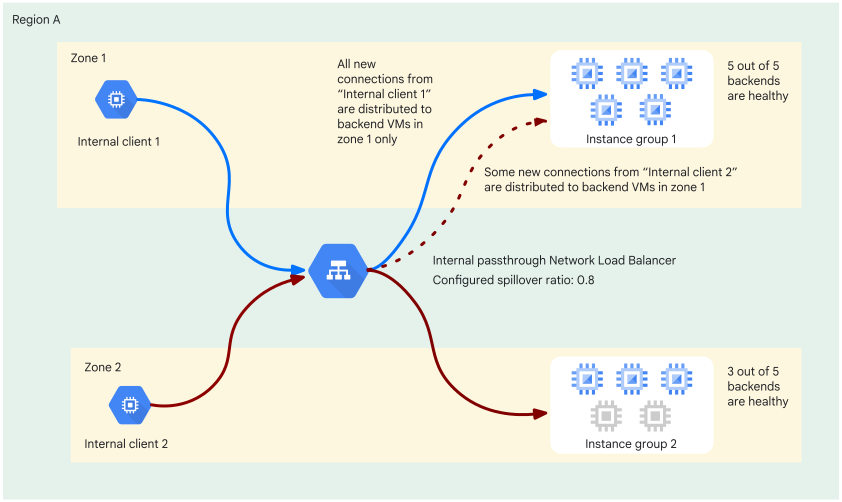
Scenario A: Compatible client in zone 1
- Zonal matched backends: Five backends in zone 1.
- Intersection: The intersection of zonal matched backends and original eligible backends consists of the five healthy backends in zone 1.
- Calculated ratio: 5 / 5 = 1.0
- Outcome: Because the calculated ratio of 1.0 ≥ 0.8, the modified eligible backends are in the intersection set, that is, all five healthy primary backends in the client's zone 1. New connections are distributed exclusively within the client's zone.
Scenario B: Compatible client in zone 2
- Zonal matched backends: Five backends in zone 2.
- Intersection: The intersection of zonal matched backends and original eligible backends consists of the three healthy backends in zone 2.
- Calculated ratio: 3 / 5 = 0.6
- Outcome: Because the calculated ratio of 0.6 < 0.8, the modified eligible backends are the original eligible backends. The original eligible backends are the eight healthy backends (five in zone 1, three in zone 2). New connections are distributed to either zone 1 or zone 2.
What's next
- To configure Cloud Monitoring for internal passthrough Network Load Balancers, see Internal passthrough Network Load Balancer logging and monitoring.
- To troubleshoot issues with your internal passthrough Network Load Balancer, see Troubleshoot internal passthrough Network Load Balancers.