

This page describes how to configure a highly available multi-region deployment with regional external Application Load Balancers. To achieve high availability, deploy multiple individual regional external Application Load Balancers in regions that best support your application's traffic. This works because regional external Application Load Balancers in different regions are not only isolated from each other, they are also isolated from any global external Application Load Balancer or classic Application Load Balancer infrastructure running in the same region.
High availability strategies
You can implement cross-region resilience for regional external Application Load Balancers by using one of the following strategies:
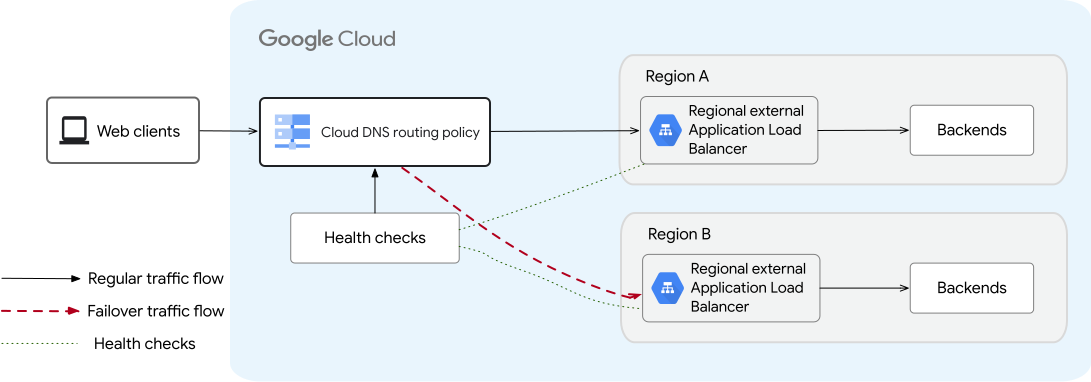
Active-passive (region failover): Deploy a primary regional external Application Load Balancer in your primary region and one or more backup regional external Application Load Balancers in secondary regions. In steady state, Cloud DNS routes all traffic to the primary load balancer. If the primary load balancer fails health checks, Cloud DNS uses a failover routing policy to route traffic to the backup regional load balancers.
Here's a sample active-passive setup that shows two regional external Application Load Balancers in two different regions.
Active-active (proximity routing): Deploy multiple regional external Application Load Balancers in different regions that serve traffic simultaneously. Use a Cloud DNS geolocation routing policy to direct clients to the nearest healthy region. If a load balancer in one region experiences an outage, Cloud DNS automatically routes traffic away from the unhealthy region to healthy load balancers in other regions.
Here's a sample active-active setup that shows two regional external Application Load Balancers in two different regions.
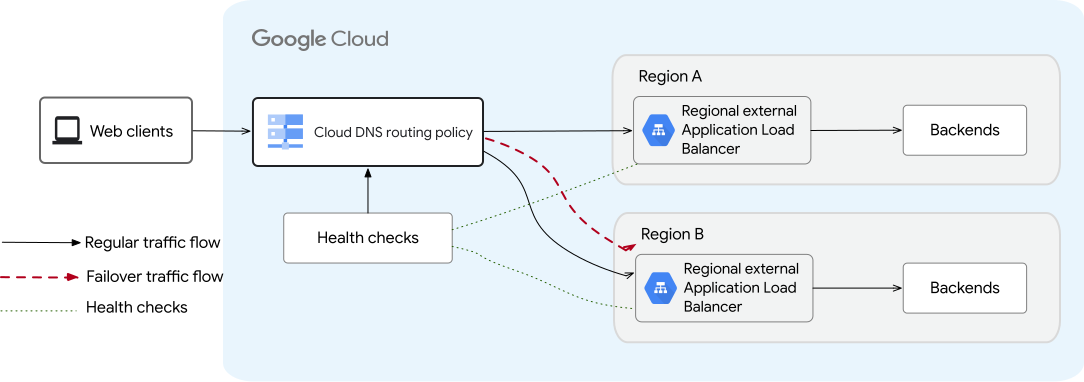
High availability with two regional external Application Load Balancers (click to enlarge).
The following sections describe how health checking and traffic steering operate across regions in a typical workflow:
Use health checks to detect regional failures
Google Cloud uses health checks to detect whether your regional load balancers are healthy. You configure these health checks to send probes from three source regions. These three source regions must be representative of the regions from where your clients access the load balancers. For example, if you have a regional external Application Load Balancer with the majority of your client traffic originating from North America and Europe, you can have probes originating from two or more regions in North America and probes originating from two or more regions in Europe.
Additional notes:
- You must specify exactly three source regions when you create the health check. Only global health checks can specify source regions.
- HTTP, HTTPS, and TCP health checks are supported.
- The health check probes originate from a Point of Presence (PoP) on the internet within some small distance of the configured Google Cloud source region.
Route traffic based on routing policies
- Active-passive: Cloud DNS uses a failover routing policy to steer 100% of client traffic to the primary regional load balancer during steady state. When the primary regional load balancer fails health checks, Cloud DNS directs traffic to the backup regional load balancers.
- Active-active: Cloud DNS uses a geolocation routing policy to steer traffic to the load balancers. When all load balancers are healthy, Cloud DNS routes traffic to the load balancer geographically closest to the client. When a load balancer in a region starts failing health checks, traffic is automatically steered to available healthy load balancers in other regions.
Failback to the primary load balancer
Failback is automatic when health checks start passing again. Traffic is restored without downtime because the load balancers are serving traffic.
Configure multi-region load balancing
To configure a multi-region deployment that facilitates high availability, perform the following steps:
- Create regional external Application Load Balancers in the regions that you determine best support traffic for your application. Each of these load balancers must have the same traffic management and security configurations.
- Create health checks to monitor the forwarding rule IP addresses of your regional load balancers.
- Configure your DNS routing policy in Cloud DNS:
- For active-passive deployments, create a failover routing policy.
- For active-active deployments, create a geolocation routing policy.
Create load balancers in multiple regions
Note the following considerations as you configure your additional redundant load balancers:
Configure all regional external Application Load Balancers with similar features so that traffic is processed consistently regardless of which load balancer serves the request. For example, make sure that you use the same type of SSL certificate, the same Cloud Armor regional security policies, and the same URL map routing settings for all regional external Application Load Balancers.
We recommend that you use an automation framework such as Terraform to help achieve and maintain consistency in load balancer configurations across the different regional deployments.
We recommend that you set up regional external Application Load Balancers in every region that you determine would best support traffic for your application.
Regional external Application Load Balancers support both Premium and Standard Network Service Tiers. We recommend that you set up the regional external Application Load Balancers in Premium Tier to ensure low latency.
To learn how to configure a regional external Application Load Balancer, see Set up a regional external Application Load Balancer with VM instance group backends.
Create the health check
Create a global health check to monitor the external IP address of each regional load balancer's forwarding rule:
gcloud compute health-checks create http HEALTH_CHECK_NAME \
    --global \
    --source-regions=SOURCE_REGION_1,SOURCE_REGION_2,SOURCE_REGION_3 \
    --use-serving-port \
    --check-interval=HEALTH_CHECK_INTERVAL \
    --healthy-threshold=HEALTHY_THRESHOLD \
    --unhealthy-threshold=UNHEALTHY_THRESHOLD \
    --request-path=REQUEST_PATH
Replace the following:
HEALTH_CHECK_NAME: the name of the health checkSOURCE_REGION_1,SOURCE_REGION_2, andSOURCE_REGION_3: the three Google Cloud regions from which health checks probes are sent. You must specify exactly three source regions.HEALTH_CHECK_INTERVAL: the amount of time in seconds from the start of one probe issued by one prober to the start of the next probe issued by the same prober. The minimum supported value is 30 seconds. For recommended values, see Best practices.HEALTHY_THRESHOLDandUNHEALTHY_THRESHOLD: specify the number of sequential probes that must succeed or fail for the load balancer to be considered healthy or unhealthy. If either is omitted, Google Cloud uses a default threshold of 2.REQUEST_PATH: the URL path to which Google Cloud sends health check probe requests. If omitted, Google Cloud sends probe requests to the root path,/. If the endpoints being health-checked are private, which is not typical for external forwarding rule IP addresses, you can set this path to/afhealthz.
Configure active-passive regional failover
In Cloud DNS, create a record set and apply a FAILOVER routing policy to send steady-state traffic to the primary regional load balancer and fail over to the backup regional load balancer during an outage:
gcloud dns record-sets create DNS_RECORD_SET_NAME \
    --ttl=TIME_TO_LIVE \
    --type=RECORD_TYPE \
    --zone="MANAGED_ZONE_NAME" \
    --routing-policy-type=FAILOVER \
    --routing-policy-primary-data=PRIMARY_REGIONAL_FORWARDING_RULE \
    --routing-policy-backup-data_type=GEO \
    --routing-policy-backup-data="BACKUP_REGION_1=BACKUP_LOAD_BALANCER_1_IP[;BACKUP_REGION_2=BACKUP_LOAD_BALANCER_2_IP]" \
    --health-check=HEALTH_CHECK_NAME \
    --backup-data-trickle-ratio=BACKUP_DATA_TRICKLE_RATIO
Replace the following:
DNS_RECORD_SET_NAME: the DNS or domain name of the record set to add—for example,test.example.comTIME_TO_LIVE: the TTL in seconds for the record. For recommended values, see Best practices.RECORD_TYPE: the record type—for example,AMANAGED_ZONE_NAME: the name of your Cloud DNS managed zone—for example,my-zone-namePRIMARY_REGIONAL_FORWARDING_RULE: the forwarding rule name of the primary regional external Application Load BalancerBACKUP_REGION_1andBACKUP_REGION_2: the regions where the backup regional external Application Load Balancers are deployedBACKUP_LOAD_BALANCER_1_IPandBACKUP_LOAD_BALANCER_2_IP: the forwarding rule external IP addresses of the backup regional external Application Load BalancersHEALTH_CHECK_NAME: the name of the health checkBACKUP_DATA_TRICKLE_RATIO: the fraction of traffic (from 0 to 1, such as0.1) to send to the backup regional load balancer during steady state to ensure the backup is primed and ready. The default is 0.
Configure active-active region routing
In Cloud DNS, create a record set and apply a geolocation routing policy to steer traffic concurrently across healthy regional load balancers:
gcloud dns record-sets create DNS_RECORD_SET_NAME \
    --ttl=TIME_TO_LIVE \
    --type=RECORD_TYPE \
    --zone="MANAGED_ZONE_NAME" \
    --routing-policy-type="GEO" \
    --routing-policy-data="FORWARDING_RULE_NAME_A@REGION_A;FORWARDING_RULE_NAME_B@REGION_B[,;FORWARDING_RULE_NAME_C@REGION_C]" \
    --health-check=HEALTH_CHECK_NAME
Replace the following:
DNS_RECORD_SET_NAME: the DNS or domain name of the record set to add—for example,test.example.comTIME_TO_LIVE: the time to live (TTL), in seconds, for the record. For recommended values, see Best practices.RECORD_TYPE: the record type—for example,AMANAGED_ZONE_NAME: the name of the managed zone whose record sets you want to manage—for example,my-zone-nameFORWARDING_RULE_NAME_A,FORWARDING_RULE_NAME_B, andFORWARDING_RULE_NAME_C: the names of the forwarding rules for the load balancers in each corresponding regionREGION_A,REGION_B, andREGION_C: the regions where each load balancer is deployedHEALTH_CHECK_NAME: the name of the health check
Best practices
Here are some best practices to keep in mind when you configure Cloud DNS records and health checks:
Calculate outage duration: The time it takes for traffic to be routed from unhealthy to healthy load balancers (the duration of the outage) depends on the DNS TTL value, the health check interval, and the health check's unhealthy threshold parameter:
Duration of outage = DNS TTL + Health Check Interval * Unhealthy ThresholdWe recommend setting the DNS TTL to 30 to 60 seconds. Higher TTLs lead to longer downtimes because clients on the internet continue to access the unhealthy load balancers even after DNS has failed over to other regions.
Configure health check thresholds: Configure the healthy and unhealthy threshold parameters to avoid unnecessary and abrupt rerouting of traffic due to transient errors. Higher thresholds increase the time it takes for traffic to shift to load balancers in other regions.
Use trickle traffic for active-passive validation: In active-passive setups, configure the
--backup-data-trickle-ratioflag to continuously send a small percentage of traffic (for example,0.1) to the backup regional load balancer during steady state. This verifies that the backup infrastructure is active and ready to handle traffic during a failover event.