


本文提供自訂錯誤回應的設定範例。設定自訂錯誤回應前,請先閱讀自訂錯誤回應總覽。
本頁面說明的範例設定,會在網址對應資源的三個層級 (負載平衡器層級、網址網域層級和網址路徑層級),設定自訂錯誤回應政策。
範例設定會運用下列文件所述的概念和設定:
範例 1:為所有主機的常見「4xx」錯誤設定錯誤頁面
本範例假設您已按照「設定具有 VM 執行個體群組後端的全域外部應用程式負載平衡器」一文所述,設定負載平衡器。
在本範例中,系統會將負載平衡器的要求轉送至名為 web-backend-service 的後端服務。如果要求遇到 4xx 回應,自訂錯誤回應政策會設定將要求傳送至錯誤服務,並向用戶端傳回錯誤物件 (not-found.html)。
如要建立自訂錯誤回應政策,請按照下列步驟操作:
將 HTML 錯誤頁面 (
not-found.html) 上傳至 Cloud Storage bucket。gcloud storage cp Desktop/not-found.html gs://GCS_BUCKET_NAME/
將網址對應 (
web-map-http) 匯出至名為web-map-http.yaml的檔案。gcloud compute url-maps export web-map-http --destination web-map-http.yaml
新增自訂錯誤回應政策前,網址對應 (
web-map-http) 的設定類似於下列設定。creationTimestamp: '2020-01-14T19:12:44.680-08:00' defaultService: https://www.googleapis.com/compute/v1/projects/PROJECT_ID/global/backendServices/web-backend-service fingerprint: d0eJJpCBpHg= kind: compute#urlMap name: web-map-http selfLink: https://www.googleapis.com/compute/v1/projects/PROJECT_ID/global/urlMaps/web-map-http
在
defaultCustomErrorResponsePolicy區段中,編輯web-map-http.yaml以新增自訂錯誤回應政策,如下列 YAML 設定中醒目顯示的部分。在本範例中,錯誤回應政策是在負載平衡器層級設定 (urlMaps.defaultCustomErrorResponsePolicy)。creationTimestamp: '2020-01-14T19:12:44.680-08:00' defaultService: https://www.googleapis.com/compute/v1/projects/PROJECT_ID/global/backendServices/web-backend-service defaultCustomErrorResponsePolicy: errorResponseRules: - matchResponseCodes: - 4xx path: '/not-found.html' errorService: https://www.googleapis.com/compute/v1/projects/PROJECT_ID/global/backendBuckets/CUSTOM_ERRORS_BUCKET fingerprint: d0eJJpCBpHg= kind: compute#urlMap name: web-map-http selfLink: https://www.googleapis.com/compute/v1/projects/PROJECT_ID/global/urlMaps/web-map-http建議您將所有錯誤物件儲存在 Cloud Storage bucket 中,並透過附加至負載平衡器的後端 bucket 參照這些物件。Cloud Storage bucket 可讓您輕鬆儲存錯誤物件,並透過負載平衡器傳回給用戶端。不過,您也可以在不使用後端 bucket 的情況下,提供錯誤頁面和相關資產。舉例來說,您可以參考後端服務,該服務會參考已設定 Apache 伺服器的 VM 執行個體群組後端,以提供自訂錯誤回應頁面。
從
web-map-http.yaml匯入最新設定,更新網址對應。gcloud compute url-maps import web-map-http --source web-map-http.yaml
更新網址對應後,須等待一段時間,才能開始將流量傳送至負載平衡器的 IP 位址。
要求不存在的網頁。
curl -I http://IP_ADDRESS/a-page-that-does-not-exist
系統會提供
not-found.html的錯誤內容,並傳回 HTTP404狀態碼。
範例 2:為特定主機的特定錯誤代碼設定錯誤頁面
這個範例以上一個範例為基礎,也就是為所有主機的常見 4xx 錯誤設定錯誤頁面。假設負載平衡器已設定完成,因此對主機 video.example.com 的要求會轉送至名為 video-backend-service 的後端服務。如果後端服務授權要求失敗,服務會傳回 401 (Unauthorized) 回應。自訂錯誤回應政策會設定為將要求傳送至錯誤服務,並向用戶端傳回錯誤物件 (video-obtain-authorization.html)。
在大多數情況下,錯誤內容可能含有素材資源的連結,例如標誌圖片。用戶端會要求錯誤頁面中參照的資產,並將額外要求傳送至負載平衡器來擷取這些資產。接著,負載平衡器會回應要求並傳回連結的資產。方法是在 defaultCustomErrorResponsePolicy 中指定的相同後端值區中儲存這些資產,並新增規則,將來自資產網址 (例如 /assets/logo.svg) 的要求,轉送至後端值區。負載平衡器對連結資產要求的相關回應並非錯誤回應,而是正常回應,如下列設定所示。
pathMatchers:
...
  pathRules:
  - service: https://www.googleapis.com/compute/v1/projects/PROJECT_ID/global/backendBuckets/CUSTOM_ERRORS_BUCKET
    paths:
    - /assets
您也可以透過這項政策,定義要求最終應有的回應代碼。在本例中,只要將 overrideResponseCode 的值指定為 200,回應代碼就會從 401 變更為 200。如果是其他 4xx 錯誤,系統會將 not-found.html 中的錯誤內容傳回給用戶端,並保留後端服務的原始 HTTP 回應代碼。
如下表所示,本範例中設定了兩項自訂錯誤回應政策。這些政策是在負載平衡器層級和網址網域層級建立。
| 政策層級 | API 欄位 | 比對 HTTP 回應代碼 | 服務錯誤 | 傳回的錯誤物件 |
|---|---|---|---|---|
| 網址網域 | pathMatchers[].defaultCustomErrorResponsePolicy |
401 | CUSTOM_ERRORS_BUCKET |
video-obtain-authorization.html |
| 負載平衡器 | urlMaps.defaultCustomErrorResponsePolicy |
所有 4xx | CUSTOM_ERRORS_BUCKET |
not-found.html |
如要為主機 video.example.com 的 401 錯誤代碼建立自訂錯誤回應政策,請按照下列步驟操作:
將 HTML 錯誤頁面 (
video-obtain-authorization.html) 和相關資產 (logo.svg) 上傳至 Cloud Storage bucket。gcloud storage cp Desktop/video-obtain-authorization.html gs://GCS_BUCKET_NAME/ gcloud storage cp Desktop/logo.svg gs://GCS_BUCKET_NAME/assets/
將網址對應 (
web-map-http) 匯出至名為web-map-http.yaml的檔案。gcloud compute url-maps export web-map-http --destination web-map-http.yaml
在
defaultCustomErrorResponsePolicy區段中,編輯web-map-http.yaml以新增自訂錯誤回應政策,如下列 YAML 設定中醒目顯示的部分。在本範例中,自訂錯誤回應政策是在負載平衡器層級 (urlMaps.defaultCustomErrorResponsePolicy) 和網址網域層級 (pathMatchers[].defaultCustomErrorResponsePolicy) 設定。由於系統未在網址網域層級定義錯誤服務,因此網址網域層級的錯誤服務會預設為較高層級 (即負載平衡器層級) 定義的錯誤服務。
creationTimestamp: '2020-01-14T19:12:44.680-08:00'
defaultService: https://www.googleapis.com/compute/v1/projects/PROJECT_ID/global/backendServices/web-backend-service
defaultCustomErrorResponsePolicy:
  errorResponseRules:
    - matchResponseCodes:
      - 4xx
      path: '/not-found.html'
  errorService: https://www.googleapis.com/compute/v1/projects/PROJECT_ID/global/backendBuckets/CUSTOM_ERRORS_BUCKET
fingerprint: d0eJJpCBpHg=
hostRules:
- hosts:
  - video.example.com
  pathMatcher: path-matcher-1
kind: compute#urlMap
name: web-map-http
selfLink: https://www.googleapis.com/compute/v1/projects/PROJECT_ID/global/urlMaps/web-map-http
pathMatchers:
- defaultService: https://www.googleapis.com/compute/v1/projects/PROJECT_ID/global/backendServices/video-backend-service
  name: path-matcher-1
  defaultCustomErrorResponsePolicy:
    errorResponseRules:
      - matchResponseCodes:
        - 401
        path: "/video-obtain-authorization.html
        overrideResponseCode: 200
    // The `errorService` in `pathMatchers[].defaultCustomErrorResponsePolicy` references the
    // error service configured in `urlMaps.defaultCustomErrorResponsePolicy`.

  // A URL map path rule to route requests from asset URLs (for example, "/assets/logo.svg") to the backend bucket.
  pathRules:
  - service: https://www.googleapis.com/compute/v1/projects/PROJECT_ID/global/backendBuckets/CUSTOM_ERRORS_BUCKET
    paths:
    - /assets
從
web-map-http.yaml匯入最新設定,更新網址對應。gcloud compute url-maps import web-map-http --source web-map-http.yaml
更新網址對應後,須等待一段時間,才能開始將流量傳送至負載平衡器的 IP 位址。
向主機傳送需要授權的網址要求。
curl -I http://video.example.com/a-page-that-needs-authorization
系統會提供
video-obtain-authorization.html的錯誤內容,並傳回 HTTP200狀態碼。
範例 3:為不同網域、路徑和錯誤回應代碼設定精細的自訂錯誤回應政策
這個範例說明如何針對不同網址網域、網址路徑和 HTTP 錯誤回應代碼,自訂特定錯誤回應。
本範例說明的自訂錯誤回應設定,假設您已完成下列事項:
您已為外部應用程式負載平衡器設定網址對應,並根據主機和路徑進行轉送,如下圖所示。
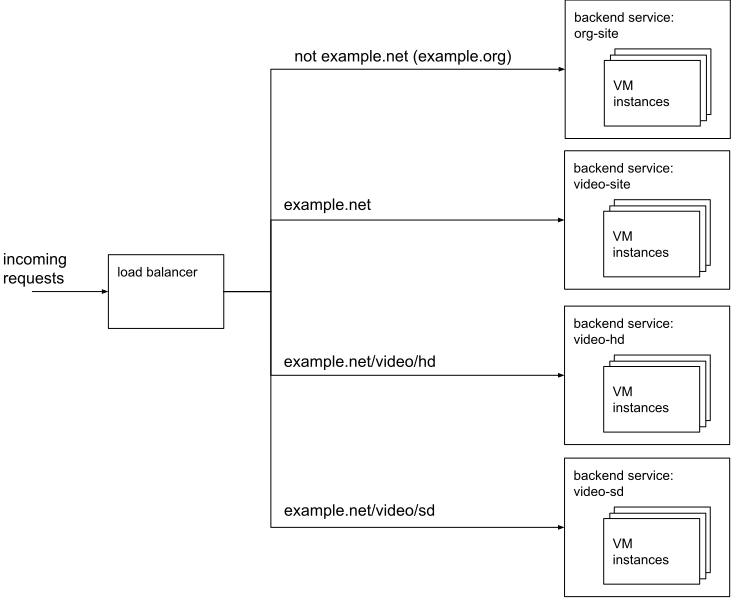
後端服務設定範例 (按一下即可放大) 您已設定兩個名為
BUCKET_1和BUCKET_2的後端 bucket,用來傳回自訂錯誤頁面。
如下表所示,本範例中設定了四項自訂錯誤回應政策。這些政策是在三個層級中建立,優先順序如下:
- 網址路徑 (
pathMatchers[].pathRules[].customErrorResponsePolicy) - 網址網域 (
pathMatchers[].defaultCustomErrorResponsePolicy) - 負載平衡器 (
urlMaps.defaultCustomErrorResponsePolicy)
| 政策層級 | 申請網址 | 比對 HTTP 回應代碼 | 服務錯誤 | 傳回的錯誤物件 |
|---|---|---|---|---|
| 網址路徑 | example.net/video/hd/* |
404 | BUCKET-2 |
not-found-hd-videos-404.html |
| 網址路徑 | example.net/video/sd/* |
404 | BUCKET-2 |
not-found-sd-videos-404.html |
| 網址網域 | example.net/* |
所有 4xx | BUCKET-1 |
example-net-4xx.html |
| 負載平衡器 | Any |
所有 4xx 或 5xx | BUCKET-1 |
error-page-generic.html |
只有在政策符合錯誤條件,且較低層級 (即網址網域或網址路徑) 未定義錯誤代碼的相符政策時,系統才會套用負載平衡器層級的自訂錯誤回應政策。同樣地,只有在政策符合錯誤條件,且較低層級 (即網址路徑) 未定義錯誤代碼的相符政策時,系統才會套用網址網域層級的自訂錯誤回應政策。在這個範例中,如果對網址 www.example.net/video/hd 的要求遇到 404 回應,系統就會傳回 not-found-hd-videos-404.html 檔案。不過,如果對網址 www.example.net/video/ 的要求遇到 404 回應,系統就會傳回檔案 example-net-4xx.html。
如要在網址對應的三個層級建立自訂錯誤回應政策,請按照下列步驟操作:
將錯誤物件上傳至 Cloud Storage bucket。
gcloud storage cp Desktop/error-page-generic.html gs://GCS_BUCKET_1_NAME/
gcloud storage cp Desktop/example-net-4xx.html gs://GCS_BUCKET_1_NAME/
gcloud storage cp Desktop/not-found-sd-videos-404.html gs://GCS_BUCKET_2_NAME/
gcloud storage cp Desktop/not-found-hd-videos-404.html gs://GCS_BUCKET_2_NAME/
將網址對應 (
video-org-url-map) 匯出至名為video-org-url-map.yaml.的檔案gcloud compute url-maps export video-org-url-map --destination video-org-url-map.yaml
新增自訂錯誤回應政策前,網址對應 (
video-org-url-map) 的設定類似於下列設定。creationTimestamp: '2021-03-05T13:34:15.833-08:00' defaultService: https://www.googleapis.com/compute/v1/projects/PROJECT_ID/global/backendServices/org-site fingerprint: mfyJIT7Zurs= hostRules: - hosts: - '*' pathMatcher: video-matcher - hosts: - example.net pathMatcher: video-matcher id: '8886405179645041976' kind: compute#urlMap name: video-org-url-map pathMatchers: - defaultService: https://www.googleapis.com/compute/v1/projects/PROJECT_ID/global/backendServices/video-site name: video-matcher pathRules: - paths: - /video/hd - /video/hd/* service: https://www.googleapis.com/compute/v1/projects/PROJECT_ID/global/backendServices/video-hd - paths: - /video/sd - /video/sd/* service: https://www.googleapis.com/compute/v1/projects/PROJECT_ID/global/backendServices/video-sd selfLink: https://www.googleapis.com/compute/v1/projects/PROJECT_ID/global/urlMaps/video-org-url-map在
defaultCustomErrorResponsePolicy區段中,編輯video-org-url-map.yaml以新增自訂錯誤回應政策,如下列 YAML 設定中醒目顯示的部分所示。由於系統未在網址網域層級定義錯誤服務,因此網址網域層級的錯誤服務會預設為較高層級 (即負載平衡器層級) 定義的錯誤服務。
creationTimestamp: '2021-03-05T13:34:15.833-08:00'
defaultService: https://www.googleapis.com/compute/v1/projects/PROJECT_ID/global/backendServices/org-site
fingerprint: mfyJIT7Zurs=
hostRules:
- hosts:
  - '*'
  pathMatcher: video-matcher
- hosts:
  - example.net
  pathMatcher: video-matcher
id: '8886405179645041976'
kind: compute#urlMap
name: video-org-url-map
defaultCustomErrorResponsePolicy:
  errorResponseRules:
    - matchResponseCodes:
      - 4xx
      - 5xx
      path: '/error-page-generic.html'
  errorService: https://www.googleapis.com/compute/v1/projects/PROJECT_ID/global/backendBuckets/BUCKET-1
pathMatchers:
- defaultService: https://www.googleapis.com/compute/v1/projects/PROJECT_ID/global/backendServices/video-site
  name: video-matcher
  defaultCustomErrorResponsePolicy:
      errorResponseRules:
        - matchResponseCodes:
          - 4xx
          path: '/example-net-4xx.html'
      // The `errorService` in `pathMatchers[].defaultCustomErrorResponsePolicy` references the
      // error service configured in `urlMaps.defaultCustomErrorResponsePolicy`.
  pathRules:
  - paths:
    - /video/hd
    - /video/hd/*
    service: https://www.googleapis.com/compute/v1/projects/PROJECT_ID/global/backendServices/video-hd
    customErrorResponsePolicy:
          errorResponseRules:
            - matchResponseCodes:
              - 404
              path: '/not-found-hd-videos-404.html'
          errorService: https://www.googleapis.com/compute/v1/projects/PROJECT_ID/global/backendBuckets/BUCKET-2
  - paths:
    - /video/sd
    - /video/sd/*
    service: https://www.googleapis.com/compute/v1/projects/PROJECT_ID/global/backendServices/video-sd
    customErrorResponsePolicy:
          errorResponseRules:
            - matchResponseCodes:
              - 404
              path: '/not-found-sd-videos-404.html'
          errorService: https://www.googleapis.com/compute/v1/projects/PROJECT_ID/global/backendBuckets/BUCKET-2
selfLink: https://www.googleapis.com/compute/v1/projects/PROJECT_ID/global/urlMaps/video-org-url-map
從
video-org-url-map.yaml匯入最新設定,更新網址對應。gcloud compute url-maps import video-org-url-map --source video-org-url-map.yaml
更新網址對應後,須等待一段時間,才能開始將流量傳送至負載平衡器的 IP 位址。
要求不存在的網頁。
curl -I http://example.net/a-page-that-does-not-exist
系統會提供
example-net-4xx.html的錯誤內容。同樣地,請測試網域和路徑不同的其他網址。