

To protect against infrastructure outages or configuration errors, you can design failover strategies for global external Application Load Balancers. These strategies use regional external Application Load Balancers and route traffic to them from a global external Application Load Balancer to maintain high availability during global infrastructure outages or configuration errors.
In a failover architecture, you deploy a primary load balancer and one or more backup load balancers:
- The primary load balancer is the global external Application Load Balancer that handles client traffic during normal operations.
- The backup load balancer is a regional external Application Load Balancer that receives traffic when the primary load balancer fails health checks.
Failover and failback are automatic traffic-routing processes:
- Failover occurs when Cloud DNS detects an outage and routes traffic from the primary load balancer to the backup load balancers.
- Failback occurs when Cloud DNS reverses this routing and redirects traffic to the primary load balancer after health checks pass.
This document covers failover from a global external Application Load Balancer to regional backup load balancers. If you want to configure failover between regional external Application Load Balancers across different regions, see High availability for regional external Application Load Balancers.
Why use regional load balancers for failover
Regional external Application Load Balancers work best as failover load balancers for global external Application Load Balancers because of the following properties:
- Regional external Application Load Balancers are self-contained within individual Google Cloud regions and are also isolated from any global external Application Load Balancer infrastructure running in the same region.
- Regional external Application Load Balancers and global external Application Load Balancers are both based on Envoy proxies and process traffic in similar ways.
To implement global to regional failover for global external Application Load Balancers, create two or more regional external Application Load Balancers in the regions where you want the traffic to fail over.
Failover strategies
You can implement failover for global external Application Load Balancers by using the following strategies:
- Active-passive (global-to-regional failover): You deploy one or more regional external Application Load Balancers solely for backup purposes. In steady state, Cloud DNS resolves to the IP address of the global external Application Load Balancer. If the global load balancer fails, Cloud DNS routes traffic to the backup regional load balancers. This configuration uses a Cloud DNS failover routing policy.
- Active-active (global-to-regional bypass): A global external Application Load Balancer acts as an edge frontend providing Cloud CDN functions such as edge caching that forwards requests to regional external Application Load Balancers using internet network endpoint groups (NEGs) with fully qualified domain names (FQDNs). In steady state, traffic flows sequentially through both load balancing layers. This can be configured by using a Cloud DNS geolocation routing policy. If the global load balancer experiences an outage, DNS routing policies bypass the global layer and route client traffic directly to the regional load balancers.
As a best practice, if your architecture doesn't rely on capacity-aware global backend load balancing, prefer the active-active strategy. However, if your application explicitly requires global backend load balancing to distribute and spill traffic across regions based on backend capacity, implement the active-passive strategy.
Comparison of failover strategies
The following table compares the active-passive and active-active failover strategies:
| Strategy attribute | Active-passive | Active-active |
|---|---|---|
| Steady-state traffic flow | Client → Global external Application Load Balancer → Backend | Client → Global external Application Load Balancer → Regional external Application Load Balancer → Backend |
| Failure-state traffic flow | Client → Regional external Application Load Balancer → Backend. The service remains available, but might experience higher latency due to the loss of edge performance benefits. |
Client → Regional external Application Load Balancer → Backend (bypassing the global external Application Load Balancer). The service remains available, but might experience higher latency due to the loss of edge performance benefits. |
| Configuration management | Requires synchronizing independent configurations across global and regional load balancers. | The global layer requires minimal configuration because most application logic resides on regional load balancers. However, you must duplicate edge security policies (Cloud Armor) and connection termination configuration (TLS certificates) on both layers. |
| Reliability verification | The regional external Application Load Balancer is idle in steady state. Periodic testing or DNS trickle traffic is recommended. | Steady-state traffic continuously tests the regional external Application Load Balancer. Periodic testing or trickle traffic directly to the regional load balancer is recommended. |
| Progressive deployment safety | Global external Application Load Balancer configuration changes apply globally. Regional external Application Load Balancer changes are isolated, but steady-state traffic doesn't test them. | You can apply regional external Application Load Balancer changes progressively, region by region. If a region fails, the global layer automatically routes traffic away from it to healthy regions. |
| Global backend load balancing | Supported The global external Application Load Balancer can balance traffic across backends in different regions based on capacity. |
Limited The global external Application Load Balancer routes traffic to the closest regional external Application Load Balancer. The regional load balancer balances traffic locally only and doesn't spill traffic across regions based on backend capacity. |
| Cost and billing | Data processing fees apply to a single load balancing layer. In steady state, costs come from the global external Application Load Balancer; charges for the regional external Application Load Balancer apply only during testing or failover events. | Both load balancing layers generate data processing charges simultaneously because traffic flows through both global and regional tiers in steady state. |
| Recommended use case | Workloads requiring advanced global backend load balancing and capacity-based traffic spilling across regions. | Workloads designed around regional isolation that use the global layer for edge performance and caching. |
Active-passive strategy
In an active-passive configuration, you deploy independent regional external Application Load Balancers in one or more regions alongside your primary global external Application Load Balancer or classic Application Load Balancer.
How active-passive failover works
The following setup demonstrates failover from a global external Application Load Balancer to two backup regional external Application Load Balancers, with one in each region where the global load balancer has deployed backends.
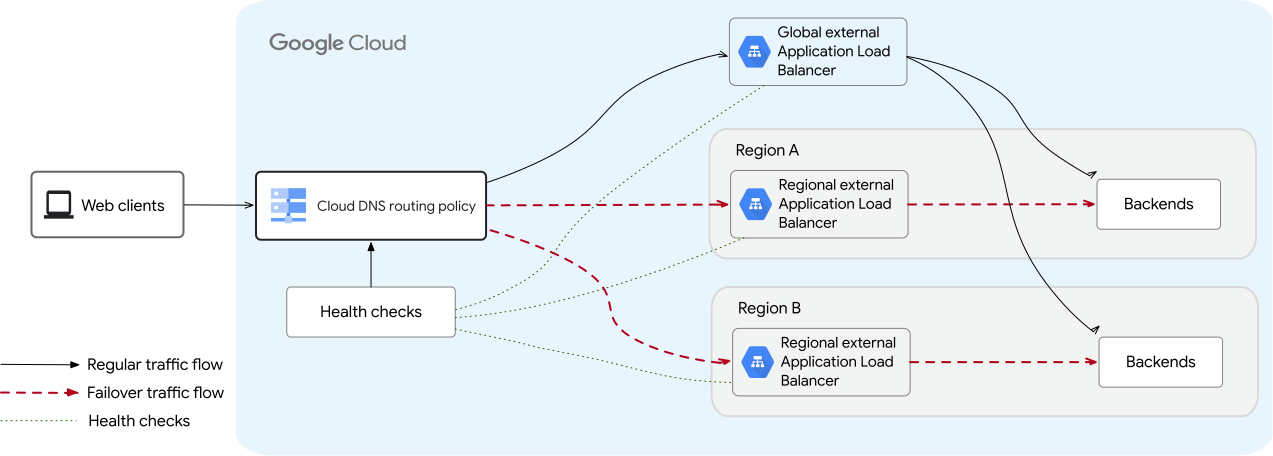
Active-passive failover follows this workflow:
- Steady state: Cloud DNS routes all client traffic to the global external Application Load Balancer.
- Failure detection: Google Cloud uses health checks configured with three source regions to detect whether the primary load balancer is healthy. If health checks originating from two or more source regions fail, Cloud DNS triggers failover.
- Failover: Cloud DNS failover routing policies route client traffic directly to the backup regional external Application Load Balancers. Latency impact during failover: Because regional external Application Load Balancers terminate connections within a specific Google Cloud region, clients located far from the destination region might experience increased latency and round-trip times (RTT) while failover is active.
- Failback: After health checks succeed again, Cloud DNS automatically restores traffic to the primary load balancer without downtime because both load balancers are serving traffic.
Active-active strategy (global-to-regional bypass)
In an active-active strategy, the global external Application Load Balancer uses an internet
FQDN NEG (INTERNET_FQDN_PORT) to send traffic to regional external Application Load Balancers in two
or more regions.
How active-active bypass works
The following setup demonstrates failover from a global external Application Load Balancer to two backup regional external Application Load Balancers, with one in each region where the global load balancer has deployed backends.
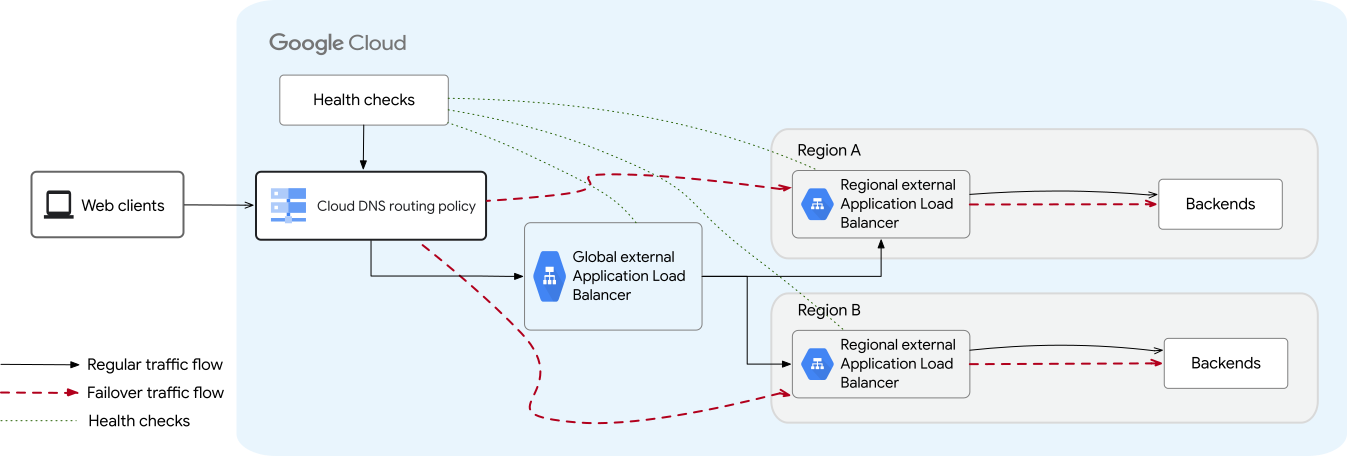
Active-active failover follows this workflow:
- Steady state: Traffic flows from the client to the global external Application Load Balancer.
The global load balancer uses an internet FQDN network endpoint group (NEG) of
type
INTERNET_FQDN_PORTto forward traffic to the nearest regional external Application Load Balancers. The regional load balancers then deliver traffic to local backends. - Failure detection: In steady state, if a single regional external Application Load Balancer or its region fails, the global external Application Load Balancer detects the failure by using the Cloud DNS health checking policy on the internet NEG. The global load balancer automatically routes traffic away from the unhealthy region to healthy regional load balancers.
- Bypass: If the global external Application Load Balancer experiences an outage, Cloud DNS failover policies detect the failure and route traffic directly to the regional external Application Load Balancers, bypassing the global layer completely. Latency impact during bypass: The global external Application Load Balancer provides edge performance benefits such as terminating connections closer to users and edge caching. When traffic bypasses the global load balancer, client connections establish directly with the regional VIPs, which can increase connection latency and RTT for geographically distant clients.
- Failback: When the global load balancer passes consecutive health checks, Cloud DNS automatically resumes returning the global Anycast VIP in DNS responses, restoring the global edge routing tier.
Review primary load balancer configuration
Before you configure failover, confirm that the backup regional external Application Load Balancer supports the features used by the primary load balancer.
- In active-passive mode, the backup regional load balancer must support similar features to take over traffic seamlessly during an outage.
- In active-active mode, core routing and security rules must be configured directly on the regional tier, while global edge features, such as Cloud CDN, are bypassed during a global outage.
| Feature | Compatibility requirements |
|---|---|
| Google Kubernetes Engine deployments | Use GKE Gateway to deploy both primary and backup load balancers. This is because load balancers deployed using GKE Gateway are more compatible with this failover mechanism than load balancers deployed using the GKE Ingress controller. The GKE Ingress controller supports only the classic Application Load Balancer. |
| Cloud CDN | Regional external Application Load Balancers don't support Cloud CDN. If failover occurs, operations relying on Cloud CDN are affected. |
| Cloud Armor | If you use Cloud Armor on the primary load balancer, configure equivalent regional Cloud Armor security policies on the backup load balancers. Cloud Armor has different features available in the regional versus the global scope. For more information, see Regional Cloud Armor security policies and Global Cloud Armor security policies. |
| SSL certificates | Verify that the SSL certificate type used by the primary load balancer is compatible with the backup regional external Application Load Balancer. Review the differences between the SSL certificates available with global, regional, and classic load balancers. For more information, see Compute Engine SSL certificates and Certificate Manager SSL certificates. |
Considerations for the regional load balancers
Configure and deploy regional external Application Load Balancers in the region where you want traffic to be redirected in the event of a failure.
Note the following considerations for failover or bypass architectures as you configure your regional load balancer:
You must configure the features of the backup regional external Application Load Balancer to be as similar as possible to the primary load balancer so that traffic is processed similarly across both deployments.
Global external Application Load Balancer. The regional external Application Load Balancers support most of the same features as the global external Application Load Balancers, with a few exceptions. The regional load balancer also supports the same advanced traffic management capabilities as the global load balancer, which makes it easier to achieve equivalence between the primary and backup load balancers.
Classic Application Load Balancer. With the classic Application Load Balancer, feature parity between the primary and backup load balancer is harder to achieve because the regional external Application Load Balancer is an Envoy-based load balancer that processes traffic differently. Make sure you test the failover and failback thoroughly before deploying to production.
To view the specific capabilities of the regional, global, and classic Application Load Balancers, see the Load balancer feature comparison page.
We recommend that you use an automation framework such as Terraform to help achieve and maintain consistency in load balancer configurations across both primary and backup deployments.
Regional external Application Load Balancers support both Premium and Standard Network Service Tiers. If latency is not your primary concern during failover, we recommend that you set up the backup regional external Application Load Balancers using Standard Tier. Using Standard Tier infrastructure offers additional isolation from the Premium Tier infrastructure used by global external Application Load Balancers.
Ensure that the proxy-only subnet is sufficiently sized to accommodate the increased traffic during a failover event without disrupting other regional load balancers in the same region and network. For details, see Reserve additional proxy-only subnet capacity.
To learn how to configure a regional external Application Load Balancer, see Set up a regional external Application Load Balancer with VM instance group backends.
Reserve additional proxy-only subnet capacity
All regional Envoy-based load balancers in a region and VPC network share the same pool of Envoy proxies. In a failover event, the backup regional external Application Load Balancers see an increase in proxy usage to handle failover traffic from the primary load balancer. Reserving sufficient proxy capacity ensures that failover events don't disrupt other regional Envoy-based load balancers in the same region and network.
To help ensure that capacity is always available for the backup load balancers, review the size of your proxy-only subnet. We recommend that you calculate the estimated number of proxies needed to handle traffic in a given region and increase capacity if needed. For more information about proxy capacity limits and sizing calculations, see the Proxy instance charge section in "Cloud Load Balancing pricing".
If you're using DNS policies to split traffic across multiple backup load balancers in different regions, you must take that into account when estimating proxy requirements per region and network. A larger proxy-only subnet lets Google Cloud assign a larger number of Envoy proxies to your load balancer when necessary.
You can't expand a proxy-only subnet in the same way that you would for a primary address range (with the expand-ip-range command). Instead, you must create a backup proxy-only subnet that meets your needs and then promote it to the active role.
To learn how to change the size of your proxy-only subnet, see Change the size or address range of a proxy-only subnet.
Sharing backends between primary and backup load balancers
To achieve complete infrastructural redundancy, you must introduce redundancy at both the load balancer level and at the backend level. That means that you must configure your backup regional external Application Load Balancers with backends (instance groups or network endpoint groups) that have no overlap with the primary load balancers.
If you choose instead to use the same backends for both primary and backup load balancers, you must create each backup regional external Application Load Balancer in the region where those backends are located. Additionally, if autoscaling is enabled for the instance groups, you must fulfill the following requirements to help ensure that proper failover occurs:
- Configure the autoscaler with CPU-based scaling only. Autoscaling based on load balancer utilization is not supported.
- Both the global and regional backend services must use only the
UTILIZATIONbalancing mode. Don't use theRATEbalancing mode because your instances could receive 2x traffic from both global and regional load balancers during the failover process. - Configure scale-in controls to prevent the autoscaler from prematurely scaling down the group during downtime when traffic is switching over from the global load balancer to the regional load balancer. This downtime can be as high as the sum of DNS TTL (time to live) plus the health check interval configured.
Failure to set up autoscaling correctly can result in a secondary outage during failover because the loss of traffic from the global load balancer causes the instance group to rapidly shrink before the regional load balancer takes over.
Configure active-passive failover
To configure active-passive failover, follow these steps:
- Review architecture considerations: Before creating resources, review considerations for regional load balancers to verify feature compatibility, proxy capacity, and shared backend autoscaling requirements.
- Configure the primary load balancer: Set up your global external Application Load Balancer with backend services distributed across one or more regions. For more information on how to configure a global external Application Load Balancer, see Set up a global external Application Load Balancer.
- Review primary load balancer configuration: Confirm that the features (such as security features, traffic management and routing features, and Cloud CDN) used by the primary load balancer are available with the backup regional external Application Load Balancer. If similar features are not available, then this load balancer might not be a good candidate for failover.
- Configure the backup regional external Application Load Balancers: Set up independent regional external Application Load Balancers in the regions where you want traffic to fail over. For information on how to configure a regional external Application Load Balancer, see Set up a regional external Application Load Balancer with VM instance group backends.
- Configure DNS routing and health checks: Create a health check for the primary load balancer and configure a Cloud DNS failover routing policy to detect outages and route client traffic to backup regional load balancers.
Configure active-active bypass
To configure the active-active architecture, follow these steps:
Review architecture considerations: Before creating resources, review considerations for regional load balancers to verify feature compatibility, and ensure your proxy-only subnet capacity can handle steady-state and failover traffic.
Configure Regional external Application Load Balancers: Before configuring regional load balancers, review Feature compatibility and limitations. Deploy regional external Application Load Balancers in two or more regions with your backend services, external IP addresses, SSL certificates, and regional Cloud Armor security policies. For setup instructions, see Set up a regional external Application Load Balancer with VM instance group backends.
Configure DNS for regional load balancers: Create a DNS record (for example,
regional-api.example.com) that points to the external IP addresses of your regional external Application Load Balancers using a geolocation or latency routing policy. Enable DNS health checking on this record to detect a failure in a specific region and automatically route traffic away from it to other healthy regions.Configure the Global external Application Load Balancer: Reserve a global external IP address and create a global internet network endpoint group (NEG) of type
INTERNET_FQDN_PORT. Add an endpoint to the internet NEG pointing to the regional DNS record FQDN, for example,regional-api.example.com. Configure a backend service for the global external Application Load Balancer, attach the internet NEG, and enable Cloud CDN or Cloud Armor if required. Configure the URL map, target HTTP(S) proxy, and global forwarding rule.Configure DNS for failover and health checks: Create the main service DNS record (for example,
api.example.com) using aFAILOVERrouting policy. Make sure that the record set has a primary endpoint pointing to the ip address of the global external Application Load Balancer and backup endpoints pointing to the IP addresses of the external IP addresses of the regional external Application Load Balancers. Configure a DNS health check to monitor the global external Application Load Balancer.
Best practices
Keep the following best practices in mind when you configure the Cloud DNS record and health checks::
Calculate outage duration: The time required for traffic to fail over from primary to backup load balancers depends on the DNS TTL, health check interval, and health check's unhealthy threshold parameter:
With Google's Cloud DNS, the upper bound for this period can be calculated using the following formula:
Duration of outage = DNS TTL + Health Check Interval * Unhealthy ThresholdSet the DNS TTL to 30–60 seconds. Higher TTL values lead to longer failover times because client on the internet continue to access the primary external Application Load Balancers even after DNS has failed over to the backup regional external Application Load Balancer.
Configure the health check thresholds: Set the healthy and unhealthy threshold parameters to avoid failovers caused by transient network errors. Higher thresholds increase the time required for traffic to fail over to backup load balancers.
Use trickle traffic for validation: Configure the
--backup-data-trickle-ratioflag to continuously send a small percentage of traffic to the backup load balancers even when the primary load balancers are healthy. This ensures that backup infrastructure is active and ready to handle traffic. You can configure the percentage of the traffic sent to the backup load balancers as a fraction from 0 to 1. The typical value is 0.1, although Cloud DNS lets you send 100 percent of the traffic to the backup VIP addresses, to manually trigger a failover.Test failover and failback periodically: Include failover testing in your disaster recovery plan. Verify both gradual and sudden shifts in traffic from primary to backup load balancers, and verify that traffic returns smoothly to the primary load balancer after failback.