

A backend bucket lets you use a Cloud Storage bucket as a backend for your Application Load Balancer. We recommend that you use backend buckets particularly when your application needs to serve static content such as images or video.
If your application needs to serve dynamic content over HTTP(S), use backend services instead.
Load balancer support
The following load balancers support the use of backend buckets:
- Global external Application Load Balancer
- Classic Application Load Balancer
- Regional external Application Load Balancer
- Cross-region internal Application Load Balancer
- Regional internal Application Load Balancer
Private Service Connect NEG deployments
Backend buckets offer a seamless, fully-integrated experience so that your load balancer can serve content directly from your Cloud Storage bucket.
However, Private Service Connect offers an alternative deployment type where you create a Private Service Connect NEG that points to Cloud Storage API endpoints, and then configure this NEG as a backend for a load balancer. This deployment type provides a private network path to the Cloud Storage API endpoints. However, note that this method doesn't inherently grant access to private buckets. Additionally, you are responsible for making sure that the client application can authenticate itself to Cloud Storage.
For details, see Access global Google APIs through backends.
Cloud CDN support
By default, Cloud Storage uses the same cache that Cloud CDN uses. While Cloud Storage does include built-in caching for its objects, we recommend that you enable Cloud CDN on your backend bucket for better performance delivering content to your users.
If you don't enable Cloud CDN on your backend bucket, you can only use
origin Cache-Control headers to control caching for smaller content, as set
by the Cloud Storage metadata.
If you do enable Cloud CDN on your backend bucket, you can use more Cloud CDN controls on your content such as cache modes, signed URLs, and cache invalidation. Cloud CDN also lets you cache content larger than 10 MiB. For more details and pricing considerations, see Cloud Storage and Cloud CDN in the Cloud Storage documentation.
Sample architecture
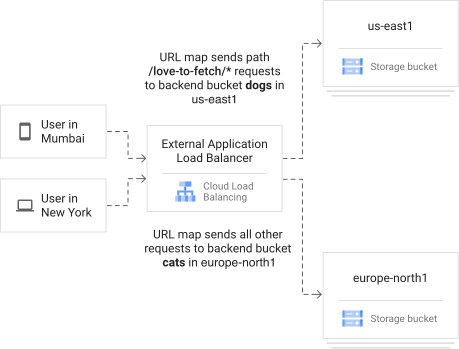
In the following diagram, the external Application Load Balancer uses a URL map to direct traffic from specified URL paths to your backends.
The load balancer sends traffic with a URL path including /love-to-fetch/ to a
Cloud Storage bucket in the us-east1 region. All other requests go to
a Cloud Storage bucket in the europe-north1 region.
API and gcloud reference
For more information about the properties of the backend bucket resource, see the following reference documentation:
- Global backend bucket API resource
- Regional backend bucket API resource
gcloud compute backend-bucketspage (for global and regional resources)
What's next
- Set up a global external Application Load Balancer with Cloud Storage buckets
- Set up a regional external Application Load Balancer with Cloud Storage buckets
- Set up a classic Application Load Balancer with Cloud Storage buckets
- Set up a cross-region internal Application Load Balancer with Cloud Storage buckets
- Set up a regional internal Application Load Balancer with Cloud Storage buckets