


Este documento explica um exemplo prático para implementar um gateway de vários clusters externo para encaminhar o tráfego de Internet para uma aplicação que é executada em dois clusters do GKE diferentes.
Os gateways em vários clusters oferecem uma forma eficaz de gerir o tráfego para serviços implementados em vários clusters do GKE. Ao usar a infraestrutura de balanceamento de carga global da Google, pode criar um único ponto de entrada para as suas aplicações, o que simplifica a gestão e melhora a fiabilidade.Neste tutorial, vai usar uma aplicação de exemplo store para simular um cenário real
em que um serviço de compras online é detido e operado por equipas
separadas e implementado numa frota de
clusters do GKE partilhados.
Antes de começar
Os gateways de vários clusters requerem alguma preparação ambiental antes de poderem ser implementados. Antes de continuar, siga os passos em Prepare o seu ambiente para gateways multicluster:
Implemente clusters do GKE.
Registe os seus clusters numa frota (se ainda não o tiverem feito).
Ative os controladores de serviço em vários clusters e de gateway em vários clusters.
Por último, reveja as limitações e os problemas conhecidos do controlador do GKE Gateway antes de usar o controlador no seu ambiente.
Vários clusters, várias regiões, gateway externo
Neste tutorial, vai criar um Gateway externo de vários clusters que serve tráfego externo numa aplicação executada em dois clusters do GKE.
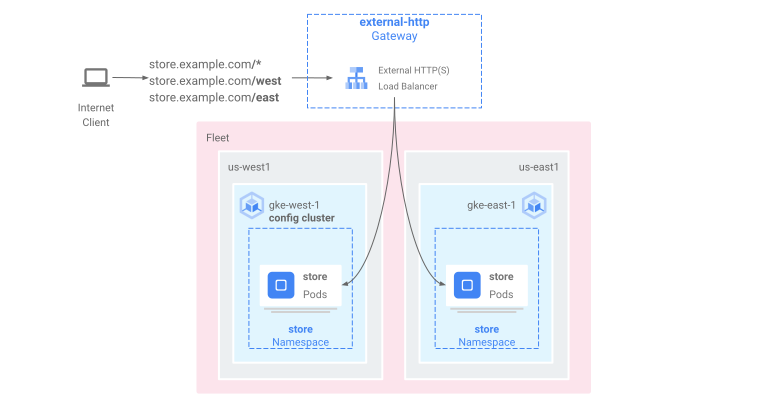
Nos passos seguintes:
- Implemente a aplicação
storede exemplo nos clustersgke-west-1egke-east-1. - Configure os serviços em cada cluster a serem exportados para a sua frota (serviços em vários clusters).
- Implemente um gateway externo de vários clusters e um HTTPRoute
no cluster de configuração (
gke-west-1).
Depois de implementar os recursos da aplicação e do gateway, pode controlar o tráfego nos dois clusters do GKE através do encaminhamento baseado em caminhos:
- Os pedidos para
/westsão encaminhados para os podsstoreno clustergke-west-1. - Os pedidos para
/eastsão encaminhados para os podsstoreno clustergke-east-1. - Os pedidos para qualquer outro caminho são encaminhados para qualquer um dos clusters, de acordo com o respetivo estado, capacidade e proximidade do cliente que está a fazer o pedido.
Implementar a aplicação de demonstração
Crie a
storeimplementação e o espaço de nomes nos três clusters que foram implementados em Prepare o seu ambiente para gateways de vários clusters:kubectl apply --context gke-west-1 -f https://raw.githubusercontent.com/GoogleCloudPlatform/gke-networking-recipes/main/gateway/gke-gateway-controller/multi-cluster-gateway/store.yaml kubectl apply --context gke-west-2 -f https://raw.githubusercontent.com/GoogleCloudPlatform/gke-networking-recipes/main/gateway/gke-gateway-controller/multi-cluster-gateway/store.yaml kubectl apply --context gke-east-1 -f https://raw.githubusercontent.com/GoogleCloudPlatform/gke-networking-recipes/main/gateway/gke-gateway-controller/multi-cluster-gateway/store.yamlImplementa os seguintes recursos em cada cluster:
namespace/store created
deployment.apps/store created
Todos os exemplos nesta página usam a app implementada neste passo. Certifique-se de que a app está implementada nos três clusters antes de experimentar qualquer um dos passos restantes. Este exemplo usa apenas os clusters
gke-west-1egke-east-1, egke-west-2é usado noutro exemplo.
Serviços em vários clusters
Os serviços são a forma como os pods são expostos aos clientes. Uma vez que o controlador de gateway do GKE usa o equilíbrio de carga nativo de contentores, não usa o ClusterIP nem o equilíbrio de carga do Kubernetes para alcançar os pods. O tráfego é enviado diretamente do equilibrador de carga para os endereços IP dos pods. No entanto, os serviços continuam a desempenhar um papel fundamental como identificador lógico para o agrupamento de pods.
Os serviços em vários clusters (MCS) são uma norma de API para serviços que abrangem clusters, e o respetivo controlador do GKE fornece a descoberta de serviços em clusters do GKE. O controlador do gateway de vários clusters usa recursos da API MCS para agrupar pods num serviço que é endereçável em vários clusters ou abrange vários clusters.
A API Services em vários clusters define os seguintes recursos personalizados:
- Os ServiceExports são mapeados para um serviço do Kubernetes, exportando os pontos finais desse serviço para todos os clusters registados na frota. Quando um serviço tem um ServiceExport correspondente, significa que o serviço pode ser resolvido por um gateway de vários clusters.
- Os ServiceImports são gerados automaticamente pelo controlador de serviços de vários clusters. ServiceExport e ServiceImport são usados aos pares. Se existir um ServiceExport na frota, é criado um ServiceImport correspondente para permitir o acesso ao serviço mapeado para o ServiceExport a partir de todos os clusters.
Os serviços de exportação funcionam da seguinte forma. Um serviço de loja existe em gke-west-1, que seleciona um grupo de agrupamentos nesse cluster. É criado um ServiceExport no cluster que permite que os pods em gke-west-1 se tornem acessíveis a partir dos outros clusters na frota. O ServiceExport mapeia e expõe os
serviços que têm o mesmo nome e espaço de nomes que o recurso ServiceExport.
apiVersion: v1
kind: Service
metadata:
  name: store
  namespace: store
spec:
  selector:
    app: store
  ports:
  - port: 8080
    targetPort: 8080
---
kind: ServiceExport
apiVersion: net.gke.io/v1
metadata:
  name: store
  namespace: store
O diagrama seguinte mostra o que acontece depois de uma ServiceExport ser implementada. Se existir um par ServiceExport e Service, o controlador de serviços de vários clusters implementa um ServiceImport correspondente em todos os clusters do GKE na frota. O ServiceImport é a representação local do store Service
em todos os clusters. Isto permite que o client pod em gke-east-1 use ClusterIP ou serviços sem cabeçalho para alcançar os store pods em gke-west-1. Quando usados desta forma, os serviços de vários clusters oferecem balanceamento de carga leste-oeste entre clusters sem exigir um serviço LoadBalancer interno.
Para usar serviços em vários clusters para o equilíbrio de carga de cluster para cluster, consulte o artigo
Configurar serviços em vários clusters.

Os gateways de vários clusters também usam ServiceImports, mas não para o equilíbrio de carga de cluster para cluster. Em alternativa, os gateways usam ServiceImports como identificadores lógicos para um serviço que existe noutro cluster ou que se estende por vários clusters. O HTTPRoute seguinte faz referência a um ServiceImport em vez de um recurso de serviço. Ao fazer referência a um ServiceImport, isto indica que está a encaminhar tráfego para um grupo de pods de back-end que são executados em um ou mais clusters.
kind: HTTPRoute
apiVersion: gateway.networking.k8s.io/v1
metadata:
  name: store-route
  namespace: store
  labels:
    gateway: multi-cluster-gateway
spec:
  parentRefs:
  - kind: Gateway
    namespace: store
    name: external-http
  hostnames:
  - "store.example.com"
  rules:
  - backendRefs:
    - group: net.gke.io
      kind: ServiceImport
      name: store
      port: 8080
O diagrama seguinte mostra como o HTTPRoute encaminha o tráfego store.example.com para os pods store em gke-west-1 e gke-east-1. O balanceador de carga trata-os como um único conjunto de back-ends. Se os pods de um dos clusters ficarem em mau estado,
inacessíveis ou não tiverem capacidade de tráfego, a carga de tráfego é equilibrada para os
pods restantes no outro cluster. É possível adicionar ou remover novos clusters com o serviço store e o ServiceExport. Isto adiciona ou remove de forma transparente Pods de back-end sem alterações explícitas à configuração de encaminhamento.

Serviços de exportação
Neste momento, a aplicação está a ser executada em ambos os clusters. Em seguida, expõe e exporta as aplicações implementando serviços e ServiceExports em cada cluster.
Aplique o seguinte manifesto ao cluster
gke-west-1para criar os serviçosstoreestore-west-1e as exportações de serviços:cat << EOF | kubectl apply --context gke-west-1 -f - apiVersion: v1 kind: Service metadata: name: store namespace: store spec: selector: app: store ports: - port: 8080 targetPort: 8080 --- kind: ServiceExport apiVersion: net.gke.io/v1 metadata: name: store namespace: store --- apiVersion: v1 kind: Service metadata: name: store-west-1 namespace: store spec: selector: app: store ports: - port: 8080 targetPort: 8080 --- kind: ServiceExport apiVersion: net.gke.io/v1 metadata: name: store-west-1 namespace: store EOFAplique o seguinte manifesto ao cluster
gke-east-1para criar os serviçosstoreestore-east-1e as exportações de serviços:cat << EOF | kubectl apply --context gke-east-1 -f - apiVersion: v1 kind: Service metadata: name: store namespace: store spec: selector: app: store ports: - port: 8080 targetPort: 8080 --- kind: ServiceExport apiVersion: net.gke.io/v1 metadata: name: store namespace: store --- apiVersion: v1 kind: Service metadata: name: store-east-1 namespace: store spec: selector: app: store ports: - port: 8080 targetPort: 8080 --- kind: ServiceExport apiVersion: net.gke.io/v1 metadata: name: store-east-1 namespace: store EOFVerifique se foram criados os ServiceExports corretos nos clusters.
kubectl get serviceexports --context CLUSTER_NAME --namespace storeSubstituir CLUSTER_NAME por
gke-west-1egke-east-1. O resultado é semelhante ao seguinte:# gke-west-1 NAME AGE store 2m40s store-west-1 2m40s # gke-east-1 NAME AGE store 2m25s store-east-1 2m25sA saída demonstra que o serviço
storecontémstorepods em ambos os clusters e que os serviçosstore-west-1estore-east-1contêm apenasstorepods nos respetivos clusters. Estes serviços sobrepostos são usados para segmentar os agrupamentos em vários clusters ou um subconjunto de agrupamentos num único cluster.Após alguns minutos, verifique se os
ServiceImportsassociados foram criados automaticamente pelo controlador de serviços de vários clusters em todos os clusters na frota.kubectl get serviceimports --context CLUSTER_NAME --namespace storeSubstituir CLUSTER_NAME por
gke-west-1egke-east-1. O resultado deve ser semelhante ao seguinte:# gke-west-1 NAME TYPE IP AGE store ClusterSetIP ["10.112.31.15"] 6m54s store-east-1 ClusterSetIP ["10.112.26.235"] 5m49s store-west-1 ClusterSetIP ["10.112.16.112"] 6m54s # gke-east-1 NAME TYPE IP AGE store ClusterSetIP ["10.72.28.226"] 5d10h store-east-1 ClusterSetIP ["10.72.19.177"] 5d10h store-west-1 ClusterSetIP ["10.72.28.68"] 4h32mIsto demonstra que os três serviços são acessíveis a partir de ambos os clusters na frota. No entanto, uma vez que existe apenas um cluster de configuração ativo por frota, só pode implementar gateways e HTTPRoutes que referenciem estas importações de serviços em
gke-west-1. Quando um HTTPRoute no cluster de configuração faz referência a estes ServiceImports como backends, o Gateway pode encaminhar o tráfego para estes serviços, independentemente do cluster a partir do qual são exportados.
Implementar o Gateway e o HTTPRoute
Depois de as aplicações terem sido implementadas, pode configurar um gateway através da gke-l7-global-external-managed-mcGatewayClass. Este gateway cria um Application Load Balancer externo configurado para distribuir o tráfego pelos seus clusters de destino.
Aplique o manifesto
Gatewayseguinte ao cluster de configuração,gke-west-1neste exemplo:cat << EOF | kubectl apply --context gke-west-1 -f - kind: Gateway apiVersion: gateway.networking.k8s.io/v1 metadata: name: external-http namespace: store spec: gatewayClassName: gke-l7-global-external-managed-mc listeners: - name: http protocol: HTTP port: 80 allowedRoutes: kinds: - kind: HTTPRoute EOFEsta configuração de gateway implementa recursos do Application Load Balancer externos com a seguinte convenção de nomenclatura:
gkemcg1-NAMESPACE-GATEWAY_NAME-HASH.Os recursos predefinidos criados com esta configuração são:
- 1 balanceador de carga:
gkemcg1-store-external-http-HASH - 1 endereço IP público:
gkemcg1-store-external-http-HASH - 1 regra de encaminhamento:
gkemcg1-store-external-http-HASH - 2 serviços de back-end:
- Serviço de back-end 404 predefinido:
gkemcg1-store-gw-serve404-HASH - Serviço de back-end predefinido 500:
gkemcg1-store-gw-serve500-HASH
- Serviço de back-end 404 predefinido:
- 1 verificação de funcionamento:
- Verificação do estado 404 predefinida:
gkemcg1-store-gw-serve404-HASH
- Verificação do estado 404 predefinida:
- 0 regras de encaminhamento (URLmap está vazio)
Nesta fase, qualquer pedido para GATEWAY_IP:80 resulta numa página predefinida que apresenta a seguinte mensagem:
fault filter abort.- 1 balanceador de carga:
Aplique o manifesto
HTTPRouteseguinte ao cluster de configuração,gke-west-1neste exemplo:cat << EOF | kubectl apply --context gke-west-1 -f - kind: HTTPRoute apiVersion: gateway.networking.k8s.io/v1 metadata: name: public-store-route namespace: store labels: gateway: external-http spec: hostnames: - "store.example.com" parentRefs: - name: external-http rules: - matches: - path: type: PathPrefix value: /west backendRefs: - group: net.gke.io kind: ServiceImport name: store-west-1 port: 8080 - matches: - path: type: PathPrefix value: /east backendRefs: - group: net.gke.io kind: ServiceImport name: store-east-1 port: 8080 - backendRefs: - group: net.gke.io kind: ServiceImport name: store port: 8080 EOFNesta fase, qualquer pedido para GATEWAY_IP:80 resulta numa página predefinida que apresenta a seguinte mensagem:
fault filter abort.Após a implementação, esta configuração HTTPRoute configura o seguinte comportamento de encaminhamento:
- Os pedidos para
/westsão encaminhados para os podsstoreno clustergke-west-1, porque os pods selecionados pelo ServiceExportstore-west-1só existem no clustergke-west-1. - Os pedidos para
/eastsão encaminhados para os podsstoreno clustergke-east-1, porque os pods selecionados pelo ServiceExportstore-east-1só existem no clustergke-east-1. - Os pedidos para qualquer outro caminho são encaminhados para
storepods em qualquer um dos clusters, de acordo com o respetivo estado, capacidade e proximidade do cliente solicitante. - Os pedidos para GATEWAY_IP:80 resultam numa página predefinida que apresenta a seguinte mensagem:
fault filter abort.

Tenha em atenção que, se todos os pods num determinado cluster não estiverem em bom estado (ou não existirem), o tráfego para o serviço
storesó é enviado para clusters que tenham realmente podsstore. A existência de um ServiceExport e um Service num determinado cluster não garante que o tráfego seja enviado para esse cluster. Os pods têm de existir e responder afirmativamente à verificação de estado do equilibrador de carga. Caso contrário, o equilibrador de carga envia apenas tráfego para podsstoresaudáveis noutros clusters.Os novos recursos são criados com esta configuração:
- 3 serviços de back-end:
- O
storeserviço de back-end:gkemcg1-store-store-8080-HASH - O
store-east-1serviço de back-end:gkemcg1-store-store-east-1-8080-HASH - O
store-west-1serviço de back-end:gkemcg1-store-store-west-1-8080-HASH
- O
- 3 verificações de funcionamento:
- A
storeverificação de funcionamentogkemcg1-store-store-8080-HASH: - A
store-east-1verificação de funcionamentogkemcg1-store-store-east-1-8080-HASH: - A
store-west-1verificação de funcionamentogkemcg1-store-store-west-1-8080-HASH:
- A
- 1 regra de encaminhamento no URLmap:
- A regra de encaminhamento
store.example.com: - 1 anfitrião:
store.example.com - Vários
matchRulespara encaminhar para os novos serviços de back-end
- A regra de encaminhamento
- Os pedidos para
O diagrama seguinte mostra os recursos que implementou em ambos os clusters.
Uma vez que gke-west-1 é o cluster de configuração do Gateway, é o cluster no qual o nosso Gateway, HTTPRoutes e ServiceImports são monitorizados pelo controlador do Gateway. Cada cluster tem um store ServiceImport e outro
ServiceImport específico desse cluster. Ambos apontam para os mesmos pods. Isto permite que a HTTPRoute especifique exatamente para onde o tráfego deve ir: para os store pods
num cluster específico ou para os store pods em todos os clusters.
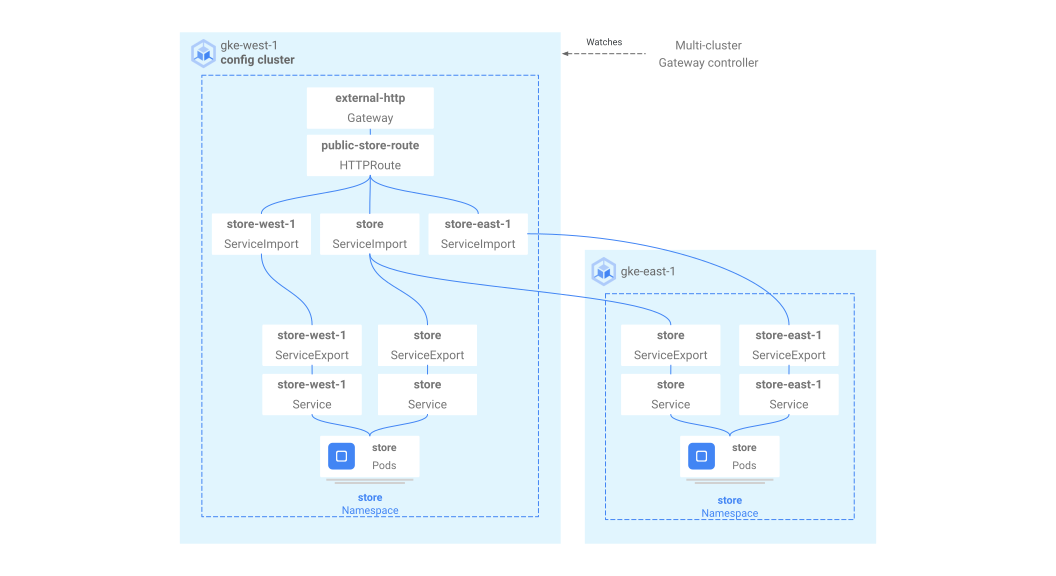
Tenha em atenção que este é um modelo de recurso lógico e não uma representação do fluxo de tráfego. O caminho do tráfego vai diretamente do equilibrador de carga para os pods de back-end e não tem relação direta com o cluster que é o cluster de configuração.
Validar a implementação
Agora, pode emitir pedidos para o nosso gateway de vários clusters e distribuir o tráfego pelos clusters do GKE.
Valide se o Gateway e o HTTPRoute foram implementados com êxito inspecionando o estado e os eventos do Gateway.
kubectl describe gateways.gateway.networking.k8s.io external-http --context gke-west-1 --namespace storeO resultado deve ser semelhante ao seguinte:
Name:         external-http
Namespace:    store
Labels:       <none>
Annotations:  networking.gke.io/addresses: /projects/PROJECT_NUMBER/global/addresses/gkemcg1-store-external-http-laup24msshu4
              networking.gke.io/backend-services:
                /projects/PROJECT_NUMBER/global/backendServices/gkemcg1-store-gw-serve404-80-n65xmts4xvw2, /projects/PROJECT_NUMBER/global/backendServices/gke...
              networking.gke.io/firewalls: /projects/PROJECT_NUMBER/global/firewalls/gkemcg1-l7-default-global
              networking.gke.io/forwarding-rules: /projects/PROJECT_NUMBER/global/forwardingRules/gkemcg1-store-external-http-a5et3e3itxsv
              networking.gke.io/health-checks:
                /projects/PROJECT_NUMBER/global/healthChecks/gkemcg1-store-gw-serve404-80-n65xmts4xvw2, /projects/PROJECT_NUMBER/global/healthChecks/gkemcg1-s...
              networking.gke.io/last-reconcile-time: 2023-10-12T17:54:24Z
              networking.gke.io/ssl-certificates:
              networking.gke.io/target-http-proxies: /projects/PROJECT_NUMBER/global/targetHttpProxies/gkemcg1-store-external-http-94oqhkftu5yz
              networking.gke.io/target-https-proxies:
              networking.gke.io/url-maps: /projects/PROJECT_NUMBER/global/urlMaps/gkemcg1-store-external-http-94oqhkftu5yz
API Version:  gateway.networking.k8s.io/v1
Kind:         Gateway
Metadata:
  Creation Timestamp:  2023-10-12T06:59:32Z
  Finalizers:
    gateway.finalizer.networking.gke.io
  Generation:        1
  Resource Version:  467057
  UID:               1dcb188e-2917-404f-9945-5f3c2e907b4c
Spec:
  Gateway Class Name:  gke-l7-global-external-managed-mc
  Listeners:
    Allowed Routes:
      Kinds:
        Group:  gateway.networking.k8s.io
        Kind:   HTTPRoute
      Namespaces:
        From:  Same
    Name:      http
    Port:      80
    Protocol:  HTTP
Status:
  Addresses:
    Type:   IPAddress
    Value:  34.36.127.249
  Conditions:
    Last Transition Time:  2023-10-12T07:00:41Z
    Message:               The OSS Gateway API has deprecated this condition, do not depend on it.
    Observed Generation:   1
    Reason:                Scheduled
    Status:                True
    Type:                  Scheduled
    Last Transition Time:  2023-10-12T07:00:41Z
    Message:
    Observed Generation:   1
    Reason:                Accepted
    Status:                True
    Type:                  Accepted
    Last Transition Time:  2023-10-12T07:00:41Z
    Message:
    Observed Generation:   1
    Reason:                Programmed
    Status:                True
    Type:                  Programmed
    Last Transition Time:  2023-10-12T07:00:41Z
    Message:               The OSS Gateway API has altered the "Ready" condition semantics and reservedit for future use.  GKE Gateway will stop emitting it in a future update, use "Programmed" instead.
    Observed Generation:   1
    Reason:                Ready
    Status:                True
    Type:                  Ready
  Listeners:
    Attached Routes:  1
    Conditions:
      Last Transition Time:  2023-10-12T07:00:41Z
      Message:
      Observed Generation:   1
      Reason:                Programmed
      Status:                True
      Type:                  Programmed
      Last Transition Time:  2023-10-12T07:00:41Z
      Message:               The OSS Gateway API has altered the "Ready" condition semantics and reservedit for future use.  GKE Gateway will stop emitting it in a future update, use "Programmed" instead.
      Observed Generation:   1
      Reason:                Ready
      Status:                True
      Type:                  Ready
    Name:                    http
    Supported Kinds:
      Group:  gateway.networking.k8s.io
      Kind:   HTTPRoute
Events:
  Type    Reason  Age                    From                   Message
  ----    ------  ----                   ----                   -------
  Normal  UPDATE  35m (x4 over 10h)      mc-gateway-controller  store/external-http
  Normal  SYNC    4m22s (x216 over 10h)  mc-gateway-controller  SYNC on store/external-http was a success
Depois de a gateway ter sido implementada com êxito, obtenha o endereço IP externo a partir da
external-httpgateway.kubectl get gateways.gateway.networking.k8s.io external-http -o=jsonpath="{.status.addresses[0].value}" --context gke-west-1 --namespace storeSubstitua
VIPnos passos seguintes pelo endereço IP que recebe como resultado.Enviar tráfego para o caminho raiz do domínio. Este carregamento equilibra o tráfego para o
storeServiceImport que está no clustergke-west-1egke-east-1. O balanceador de carga envia o seu tráfego para a região mais próxima de si e pode não ver respostas da outra região.curl -H "host: store.example.com" http://VIPO resultado confirma que o pedido foi processado pelo pod do cluster
gke-east-1:{ "cluster_name": "gke-east-1", "zone": "us-east1-b", "host_header": "store.example.com", "node_name": "gke-gke-east-1-default-pool-7aa30992-t2lp.c.agmsb-k8s.internal", "pod_name": "store-5f5b954888-dg22z", "pod_name_emoji": "⏭", "project_id": "agmsb-k8s", "timestamp": "2021-06-01T17:32:51" }Em seguida, envie tráfego para o caminho
/west. Isto encaminha o tráfego para o ServiceImport que só tem pods em execução no clustergke-west-1.store-west-1Uma ServiceImport específica do cluster, comostore-west-1, permite que um proprietário da aplicação envie explicitamente tráfego para um cluster específico, em vez de deixar que o balanceador de carga tome a decisão.curl -H "host: store.example.com" http://VIP/westO resultado confirma que o pedido foi processado pelo pod do cluster
gke-west-1:{ "cluster_name": "gke-west-1", "zone": "us-west1-a", "host_header": "store.example.com", "node_name": "gke-gke-west-1-default-pool-65059399-2f41.c.agmsb-k8s.internal", "pod_name": "store-5f5b954888-d25m5", "pod_name_emoji": "🍾", "project_id": "agmsb-k8s", "timestamp": "2021-06-01T17:39:15", }Por fim, envie tráfego para o caminho
/east.curl -H "host: store.example.com" http://VIP/eastO resultado confirma que o pedido foi processado pelo pod do cluster
gke-east-1:{ "cluster_name": "gke-east-1", "zone": "us-east1-b", "host_header": "store.example.com", "node_name": "gke-gke-east-1-default-pool-7aa30992-7j7z.c.agmsb-k8s.internal", "pod_name": "store-5f5b954888-hz6mw", "pod_name_emoji": "🧜🏾", "project_id": "agmsb-k8s", "timestamp": "2021-06-01T17:40:48" }
Limpar
Depois de concluir os exercícios neste documento, siga estes passos para remover recursos e evitar a incorrência de cobranças indesejadas na sua conta:
Anule o registo dos clusters da frota se não precisarem de ser registados para outro fim.
Desative a funcionalidade
multiclusterservicediscovery:gcloud container fleet multi-cluster-services disableDesative a entrada em vários clusters:
gcloud container fleet ingress disableDesative as APIs:
gcloud services disable \
    multiclusterservicediscovery.googleapis.com \
    multiclusteringress.googleapis.com \
    trafficdirector.googleapis.com \
    --project=PROJECT_ID
Resolução de problemas
Não existe um upstream em bom estado
Sintoma:
O seguinte problema pode ocorrer quando cria um gateway, mas não consegue aceder aos serviços de back-end (código de resposta 503):
no healthy upstream
Motivo:
Esta mensagem de erro indica que o verificador de estado de funcionamento não consegue encontrar serviços de back-end em bom estado. É possível que os seus serviços de back-end estejam em bom estado, mas pode ter de personalizar as verificações de funcionamento.
Solução alternativa:
Para resolver este problema, personalize a verificação de estado com base nos requisitos da sua aplicação (por exemplo, /health) através de um HealthCheckPolicy.
O que se segue?
- Saiba mais sobre o controlador de gateway.