


이 문서에서는 인터넷 트래픽을 서로 다른 두 GKE 클러스터에서 실행되는 애플리케이션으로 라우팅하기 위해 외부 멀티 클러스터 게이트웨이를 배포하는 실제 예를 안내합니다.
멀티 클러스터 게이트웨이는 여러 GKE 클러스터에 배포된 서비스의 트래픽을 관리하는 강력한 방법을 제공합니다. Google의 글로벌 부하 분산 인프라를 사용하면 애플리케이션의 단일 진입점을 만들어 관리를 간소화하고 안정성을 개선할 수 있습니다.이 튜토리얼에서는 샘플 store 애플리케이션을 사용하여 온라인 쇼핑 서비스가 개별 팀에 의해 소유 및 운영되고 공유되는 GKE 클러스터의 Fleet 간에 배포되는 실제 시나리오를 시뮬레이션합니다.
시작하기 전에
멀티 클러스터 게이트웨이는 배포되기 전 몇 가지 환경적인 준비가 요구됩니다. 계속하기 전에 멀티 클러스터 게이트웨이 환경 준비의 단계를 따르세요.
마지막으로 환경에서 컨트롤러를 사용하기 전에 GKE Gateway Controller 제한사항 및 알려진 문제를 검토합니다.
멀티 클러스터, 멀티 리전, 외부 게이트웨이
이 튜토리얼에서는 2개의 GKE 클러스터에서 실행되는 애플리케이션 간에 외부 트래픽을 제공하는 외부 멀티 클러스터 게이트웨이를 만듭니다.
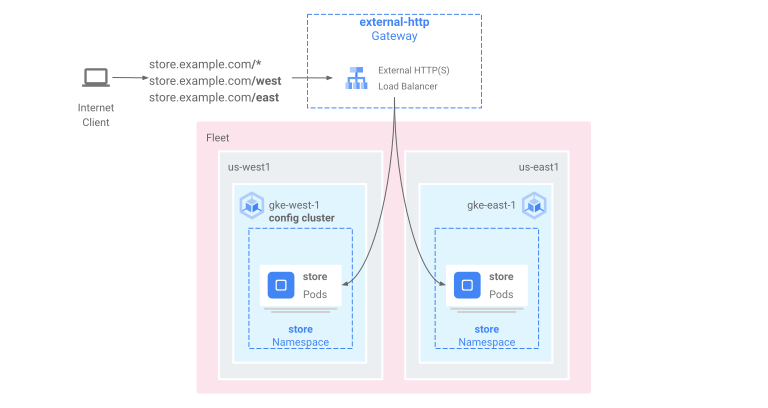
다음 단계에서 다음을 수행합니다.
gke-west-1및gke-east-1클러스터에 샘플store애플리케이션을 배포합니다.- Fleet으로 내보낼 각 클러스터의 서비스를 구성합니다(멀티 클러스터 서비스).
- 구성 클러스터(
gke-west-1)에 외부 멀티 클러스터 게이트웨이 및 HTTPRoute를 배포합니다.
애플리케이션 및 게이트웨이 리소스가 배포된 후 경로 기반 라우팅을 사용하여 2개의 GKE 클러스터 간에 트래픽을 제어할 수 있습니다.
/west에 대한 요청은gke-west-1클러스터의store포드에 라우팅됩니다./east에 대한 요청은gke-east-1클러스터의store포드에 라우팅됩니다.- 다른 경로에 대한 요청은 요청 클라이언트에 대한 해당 상태, 용량, 근접성에 따라 각 클러스터에 라우팅됩니다.
데모 애플리케이션 배포
멀티 클러스터 게이트웨이 환경 준비에 배포된 클러스터 3개 모두에
store배포 및 네임스페이스를 만듭니다.kubectl apply --context gke-west-1 -f https://raw.githubusercontent.com/GoogleCloudPlatform/gke-networking-recipes/main/gateway/gke-gateway-controller/multi-cluster-gateway/store.yaml kubectl apply --context gke-west-2 -f https://raw.githubusercontent.com/GoogleCloudPlatform/gke-networking-recipes/main/gateway/gke-gateway-controller/multi-cluster-gateway/store.yaml kubectl apply --context gke-east-1 -f https://raw.githubusercontent.com/GoogleCloudPlatform/gke-networking-recipes/main/gateway/gke-gateway-controller/multi-cluster-gateway/store.yaml각 클러스터에 다음 리소스를 배포합니다.
namespace/store created
deployment.apps/store created
이 페이지의 모든 예시에는 이 단계에서 배포된 앱이 사용됩니다. 남은 단계를 시도하기 전 3개 클러스터 모두에 앱이 배포되었는지 확인합니다. 이 예시에서는
gke-west-1및gke-east-1클러스터만 사용되고gke-west-2는 다른 예시에서 사용됩니다.
멀티 클러스터 서비스
서비스는 포드가 클라이언트에 노출되는 방법을 제어합니다. GKE Gateway Controller에 컨테이너 기반 부하 분산이 사용되기 때문에 포드 연결을 위해 ClusterIP 또는 Kubernetes 부하 분산을 사용하지 않습니다. 트래픽은 부하 분산기에서 포드 IP 주소로 직접 전송됩니다. 하지만 서비스는 여전히 포드 그룹화에 대한 논리적 식별자로서 중요한 역할을 수행합니다.
멀티 클러스터 서비스(MCS)는 클러스터에 걸쳐진 서비스의 API 표준이기도 하고 GKE 클러스터 간에 서비스 검색을 제공하는 GKE 컨트롤러이기도 합니다. 멀티 클러스터 게이트웨이 컨트롤러는 MCS API 리소스를 사용하여 여러 클러스터 간에 주소 지정되거나 걸쳐 있는 서비스로 포드를 그룹화합니다.
멀티 클러스터 Services API는 다음 커스텀 리소스를 정의합니다.
- ServiceExports는 Kubernetes 서비스에 매핑되며, 해당 서비스의 엔드포인트를 Fleet에 등록된 모든 클러스터로 내보냅니다. 서비스에 해당 ServiceExport가 있으면 멀티 클러스터 게이트웨이가 서비스에 주소 지정할 수 있음을 의미합니다.
- ServiceImports는 멀티 클러스터 서비스 컨트롤러에서 자동으로 생성됩니다. ServiceExport 및 ServiceImport는 쌍으로 제공됩니다. ServiceExport가 Fleet에 존재할 경우 ServiceExport에 매핑된 서비스를 클러스터 간에 주소 지정할 수 있도록 해당 ServiceImport가 생성됩니다.
서비스 내보내기는 다음 방법으로 작동합니다. 매장 서비스는 해당 클러스터에서 포드 그룹을 선택하는 gke-west-1에 존재합니다. ServiceExport는 Fleet의 다른 클러스터에서 gke-west-1의 포드에 액세스할 수 있게 해주는 클러스터에 생성됩니다. ServiceExport는 ServiceExport 리소스와 이름 및 네임스페이스가 동일한 서비스로 매핑되며 이를 노출합니다.
apiVersion: v1
kind: Service
metadata:
  name: store
  namespace: store
spec:
  selector:
    app: store
  ports:
  - port: 8080
    targetPort: 8080
---
kind: ServiceExport
apiVersion: net.gke.io/v1
metadata:
  name: store
  namespace: store
다음 다이어그램은 ServiceExport가 배포된 후에 발생하는 결과를 보여줍니다. ServiceExport 및 서비스 쌍이 존재할 경우 멀티 클러스터 서비스 컨트롤러가 해당 ServiceImport를 Fleet에 있는 모든 GKE 클러스터에 배포합니다. ServiceImport는 모든 클러스터에 있는 store 서비스의 로컬 표현입니다. 이를 사용하면 gke-east-1의 client 포드가 ClusterIP 또는 헤드리스 서비스를 사용하여 gke-west-1의 store 포드에 연결할 수 있습니다. 이러한 방식으로 사용하면 멀티 클러스터 서비스가 내부 LoadBalancer 서비스 없이도 클러스터 간에 east-west 부하 분산을 제공합니다.
클러스터간 부하 분산을 위해 멀티 클러스터 서비스를 사용하려면 멀티 클러스터 서비스 구성을 참조하세요.
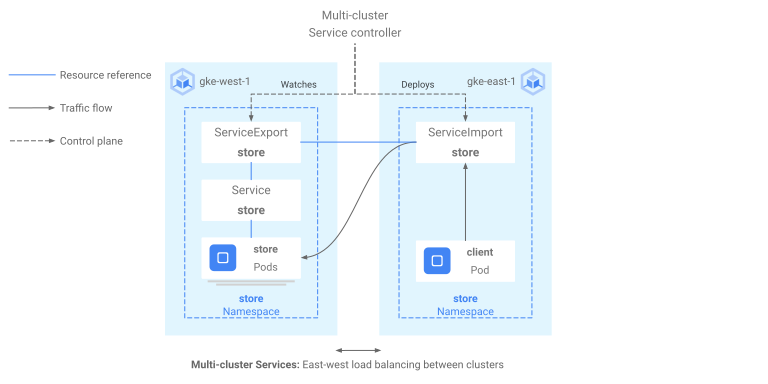
멀티 클러스터 게이트웨이는 또한 ServiceImports를 사용하지만 클러스터간 부하 분산을 사용하지 않습니다. 대신 게이트웨이는 다른 클러스터에 있는 서비스 또는 여러 클러스터 간에 분산된 서비스에 대한 논리적 식별자로 ServiceImports를 사용합니다. 다음 HTTPRoute는 서비스 리소스 대신 ServiceImport를 참조합니다. ServiceImport를 참조함으로써 하나 이상의 클러스터에서 실행되는 백엔드 포드 그룹으로 트래픽을 전달합니다.
kind: HTTPRoute
apiVersion: gateway.networking.k8s.io/v1
metadata:
  name: store-route
  namespace: store
  labels:
    gateway: multi-cluster-gateway
spec:
  parentRefs:
  - kind: Gateway
    namespace: store
    name: external-http
  hostnames:
  - "store.example.com"
  rules:
  - backendRefs:
    - group: net.gke.io
      kind: ServiceImport
      name: store
      port: 8080
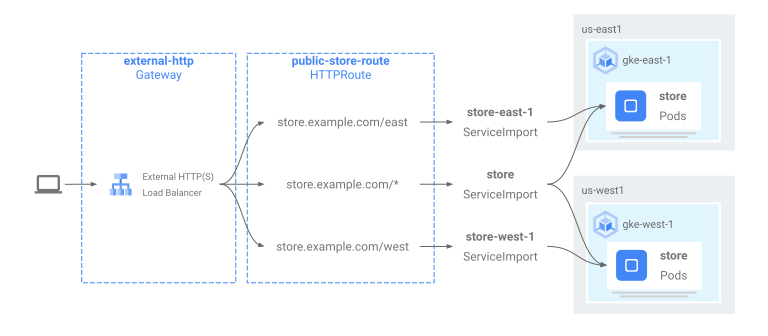
다음 다이어그램은 HTTPRoute가 store.example.com 트래픽을 gke-west-1 및 gke-east-1의 store 포드로 라우팅하는 방법을 보여줍니다. 부하 분산기는 이를 백엔드 중 하나의 풀로 취급합니다. 클러스터 중 하나의 포드가 비정상 또는 연결할 수 없는 상태가 되거나 트래픽 용량이 없으면 다른 클러스터의 남은 포드로 트래픽 로드가 분산됩니다. store 서비스 및 ServiceExport로 새 클러스터를 추가하거나 삭제할 수 있습니다. 이렇게 하면 명시적인 라우팅 구성 변경 없이 백엔드 포드를 투명하게 추가하거나 삭제할 수 있습니다.
서비스 내보내기
이제 애플리케이션이 두 클러스터 간에 실행됩니다. 이제 서비스 및 ServiceExports를 각 클러스터에 배포하여 애플리케이션을 노출하고 내보냅니다.
gke-west-1클러스터에 다음 매니페스트를 적용하여store및store-west-1Service와 ServiceExport를 만듭니다.cat << EOF | kubectl apply --context gke-west-1 -f - apiVersion: v1 kind: Service metadata: name: store namespace: store spec: selector: app: store ports: - port: 8080 targetPort: 8080 --- kind: ServiceExport apiVersion: net.gke.io/v1 metadata: name: store namespace: store --- apiVersion: v1 kind: Service metadata: name: store-west-1 namespace: store spec: selector: app: store ports: - port: 8080 targetPort: 8080 --- kind: ServiceExport apiVersion: net.gke.io/v1 metadata: name: store-west-1 namespace: store EOFgke-east-1클러스터에 다음 매니페스트를 적용하여store및store-east-1Service와 ServiceExport를 만듭니다.cat << EOF | kubectl apply --context gke-east-1 -f - apiVersion: v1 kind: Service metadata: name: store namespace: store spec: selector: app: store ports: - port: 8080 targetPort: 8080 --- kind: ServiceExport apiVersion: net.gke.io/v1 metadata: name: store namespace: store --- apiVersion: v1 kind: Service metadata: name: store-east-1 namespace: store spec: selector: app: store ports: - port: 8080 targetPort: 8080 --- kind: ServiceExport apiVersion: net.gke.io/v1 metadata: name: store-east-1 namespace: store EOF클러스터에 올바른 ServiceExport가 생성되었는지 확인합니다.
kubectl get serviceexports --context CLUSTER_NAME --namespace storeCLUSTER_NAME을
gke-west-1및gke-east-1로 바꿉니다. 다음과 유사한 결과가 출력됩니다.# gke-west-1 NAME AGE store 2m40s store-west-1 2m40s # gke-east-1 NAME AGE store 2m25s store-east-1 2m25s출력은
store서비스에 두 클러스터 간의store포드가 포함된 것을 보여주며store-west-1및store-east-1서비스는 해당 클러스터의store포드만 포함합니다. 이러한 겹쳐진 서비스는 여러 클러스터 간의 포드 또는 단일 클러스터의 포드 하위 집합을 대상으로 지정하기 위해 사용됩니다.몇 분 후 함께 제공된
ServiceImports가 Fleet의 모든 클러스터 간에 멀티 클러스터 서비스 컨트롤러로 자동으로 생성되었는지 확인합니다.kubectl get serviceimports --context CLUSTER_NAME --namespace storeCLUSTER_NAME을
gke-west-1및gke-east-1로 바꿉니다. 출력은 다음과 비슷하게 표시됩니다.# gke-west-1 NAME TYPE IP AGE store ClusterSetIP ["10.112.31.15"] 6m54s store-east-1 ClusterSetIP ["10.112.26.235"] 5m49s store-west-1 ClusterSetIP ["10.112.16.112"] 6m54s # gke-east-1 NAME TYPE IP AGE store ClusterSetIP ["10.72.28.226"] 5d10h store-east-1 ClusterSetIP ["10.72.19.177"] 5d10h store-west-1 ClusterSetIP ["10.72.28.68"] 4h32m이것은 Fleet의 두 클러스터 모두에서 3개의 서비스 모두에 액세스할 수 있음을 보여줍니다. 하지만 Fleet당 활성 구성 클러스터가 하나만 있으므로
gke-west-1에서 ServiceImports를 참조하는 Gateways and HTTPRoutes만 배포할 수 있습니다. 구성 클러스터의 HTTPRoute가 이러한 ServiceImports를 백엔드로 참조할 때 게이트웨이는 내보낸 클러스터가 무엇이든 간에 이러한 서비스로 트래픽을 전달할 수 있습니다.
게이트웨이 및 HTTPRoute 배포
애플리케이션이 배포된 후 gke-l7-global-external-managed-mc GatewayClass를 사용하여 게이트웨이를 구성할 수 있습니다. 이 게이트웨이는 대상 클러스터 간에 트래픽을 분산하도록 구성된 외부 애플리케이션 부하 분산기를 만듭니다.
다음
Gateway매니페스트를 구성 클러스터(이 예시에서는gke-west-1)에 적용합니다.cat << EOF | kubectl apply --context gke-west-1 -f - kind: Gateway apiVersion: gateway.networking.k8s.io/v1 metadata: name: external-http namespace: store spec: gatewayClassName: gke-l7-global-external-managed-mc listeners: - name: http protocol: HTTP port: 80 allowedRoutes: kinds: - kind: HTTPRoute EOF이 게이트웨이 구성은
gkemcg1-NAMESPACE-GATEWAY_NAME-HASH이름 지정 규칙을 사용하여 외부 애플리케이션 부하 분산기 리소스를 배포합니다.이 구성으로 생성된 기본 리소스는 다음과 같습니다.
- 부하 분산기 1개:
gkemcg1-store-external-http-HASH - 공개 IP 주소 1개:
gkemcg1-store-external-http-HASH - 전달 규칙 1개:
gkemcg1-store-external-http-HASH - 백엔드 서비스 2개:
- 기본 404 백엔드 서비스:
gkemcg1-store-gw-serve404-HASH - 기본 500 백엔드 서비스:
gkemcg1-store-gw-serve500-HASH
- 기본 404 백엔드 서비스:
- 상태 점검 1개:
- 기본 404 상태 점검:
gkemcg1-store-gw-serve404-HASH
- 기본 404 상태 점검:
- 라우팅 규칙 0개(URLmap 비어 있음)
이 단계에서 GATEWAY_IP:80을 요청하면
fault filter abort메시지가 기본 페이지에 표시됩니다.- 부하 분산기 1개:
다음
HTTPRoute매니페스트를 구성 클러스터(이 예시에서는gke-west-1)에 적용합니다.cat << EOF | kubectl apply --context gke-west-1 -f - kind: HTTPRoute apiVersion: gateway.networking.k8s.io/v1 metadata: name: public-store-route namespace: store labels: gateway: external-http spec: hostnames: - "store.example.com" parentRefs: - name: external-http rules: - matches: - path: type: PathPrefix value: /west backendRefs: - group: net.gke.io kind: ServiceImport name: store-west-1 port: 8080 - matches: - path: type: PathPrefix value: /east backendRefs: - group: net.gke.io kind: ServiceImport name: store-east-1 port: 8080 - backendRefs: - group: net.gke.io kind: ServiceImport name: store port: 8080 EOF이 단계에서 GATEWAY_IP:80을 요청하면
fault filter abort메시지가 기본 페이지에 표시됩니다.배포된 다음에는 이 HTTPRoute가 다음 라우팅 동작을 구성합니다.
store-west-1ServiceExport에서 선택한 포드가gke-west-1클러스터에만 존재하므로/west에 대한 요청이gke-west-1클러스터의store포드로 라우팅됩니다.store-east-1ServiceExport에서 선택한 포드가gke-east-1클러스터에만 존재하므로/east에 대한 요청이gke-east-1클러스터의store포드로 라우팅됩니다.- 다른 경로에 대한 요청은 요청 클라이언트에 대한 해당 상태, 용량, 근접성에 따라 각 클러스터의
store포드로 라우팅됩니다. - GATEWAY_IP:80을 요청하면 기본 페이지에
fault filter abort메시지가 표시됩니다.
지정된 클러스터의 모든 포드가 정상이 아니면(또는 존재하지 않으면) 실제
store포드를 갖고 있는 클러스터로만store서비스가 전송됩니다. 지정된 클러스터에 ServiceExport 및 서비스가 존재한다고 해서 트래픽이 해당 클러스터로 반드시 전송되지는 않습니다. 포드가 존재하고 부하 분산기 상태 확인에 적절하게 반응해야 합니다. 그렇지 않으면 부하 분산기가 다른 클러스터에 있는 정상store포드로 트래픽을 전송합니다.다음 구성으로 새 리소스가 생성됩니다.
- 백엔드 서비스 3개:
store백엔드 서비스:gkemcg1-store-store-8080-HASHstore-east-1백엔드 서비스:gkemcg1-store-store-east-1-8080-HASHstore-west-1백엔드 서비스:gkemcg1-store-store-west-1-8080-HASH
- 상태 점검 3개:
store상태 점검:gkemcg1-store-store-8080-HASHstore-east-1상태 점검:gkemcg1-store-store-east-1-8080-HASHstore-west-1상태 점검:gkemcg1-store-store-west-1-8080-HASH
- URLmap의 라우팅 규칙 1개:
store.example.com라우팅 규칙:- 호스트 1개:
store.example.com - 새 백엔드 서비스로 라우팅하는 여러
matchRules
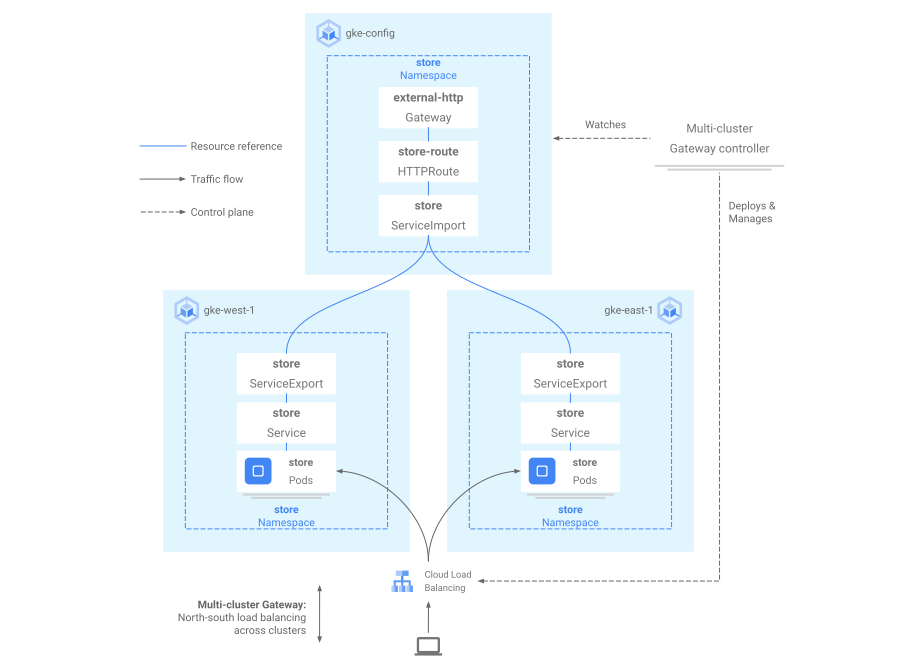
다음 다이어그램은 두 클러스터 간에 배포한 리소스를 보여줍니다.
gke-west-1은 게이트웨이 구성 클러스터이기 때문에 게이트웨이, HTTPRoutes, ServiceImports가 게이트웨이 컨트롤러에서 감시되는 클러스터입니다. 각 클러스터에는 store ServiceImport 및 해당 클러스터와 관련된 또 다른 ServiceImport가 포함되어 있습니다. 둘 다 동일한 포드를 가리킵니다. 이렇게 하면 HTTPRoute가 특정 클러스터의 store 포드 또는 모든 클러스터 간의 store 포드와 같은 트래픽의 정확한 전송 위치를 지정할 수 있습니다.
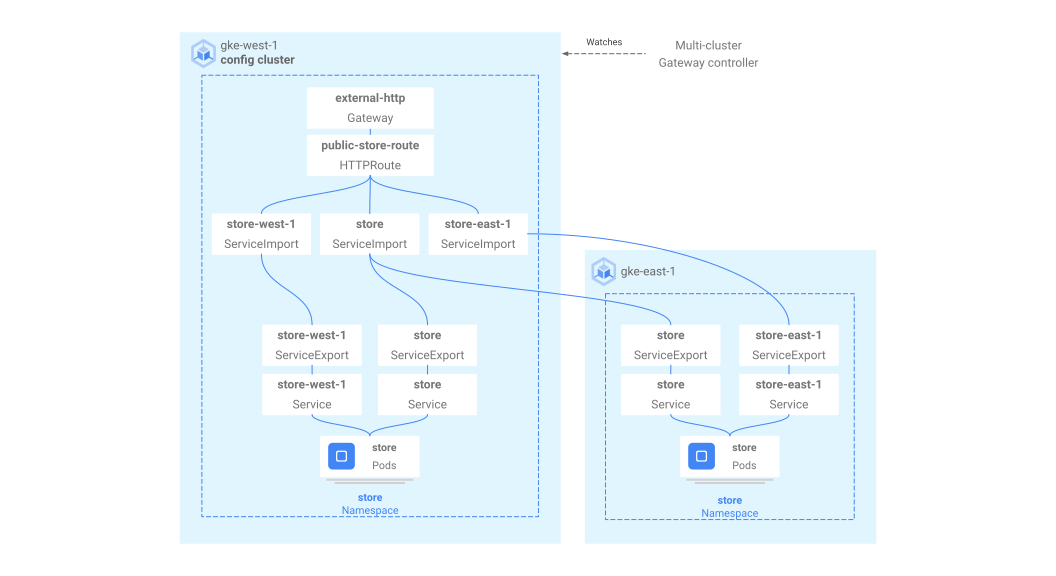
이것은 트래픽 흐름을 보여주는 것이 아닌 논리적인 리소스 모델입니다. 트래픽 경로는 부하 분산기에서 백엔드 포드로 직접 이동되며, 구성 클러스터가 무엇이든 직접적인 관련이 없습니다.
배포 검증
이제 멀티 클러스터 게이트웨이에 요청을 실행하고 두 GKE 클러스터 간에 트래픽을 분산할 수 있습니다.
게이트웨이 상태 및 이벤트를 조사하여 게이트웨이 및 HTTPRoute가 성공적으로 배포되었는지 확인합니다.
kubectl describe gateways.gateway.networking.k8s.io external-http --context gke-west-1 --namespace store출력은 다음과 비슷하게 표시됩니다.
Name:         external-http
Namespace:    store
Labels:       <none>
Annotations:  networking.gke.io/addresses: /projects/PROJECT_NUMBER/global/addresses/gkemcg1-store-external-http-laup24msshu4
              networking.gke.io/backend-services:
                /projects/PROJECT_NUMBER/global/backendServices/gkemcg1-store-gw-serve404-80-n65xmts4xvw2, /projects/PROJECT_NUMBER/global/backendServices/gke...
              networking.gke.io/firewalls: /projects/PROJECT_NUMBER/global/firewalls/gkemcg1-l7-default-global
              networking.gke.io/forwarding-rules: /projects/PROJECT_NUMBER/global/forwardingRules/gkemcg1-store-external-http-a5et3e3itxsv
              networking.gke.io/health-checks:
                /projects/PROJECT_NUMBER/global/healthChecks/gkemcg1-store-gw-serve404-80-n65xmts4xvw2, /projects/PROJECT_NUMBER/global/healthChecks/gkemcg1-s...
              networking.gke.io/last-reconcile-time: 2023-10-12T17:54:24Z
              networking.gke.io/ssl-certificates:
              networking.gke.io/target-http-proxies: /projects/PROJECT_NUMBER/global/targetHttpProxies/gkemcg1-store-external-http-94oqhkftu5yz
              networking.gke.io/target-https-proxies:
              networking.gke.io/url-maps: /projects/PROJECT_NUMBER/global/urlMaps/gkemcg1-store-external-http-94oqhkftu5yz
API Version:  gateway.networking.k8s.io/v1
Kind:         Gateway
Metadata:
  Creation Timestamp:  2023-10-12T06:59:32Z
  Finalizers:
    gateway.finalizer.networking.gke.io
  Generation:        1
  Resource Version:  467057
  UID:               1dcb188e-2917-404f-9945-5f3c2e907b4c
Spec:
  Gateway Class Name:  gke-l7-global-external-managed-mc
  Listeners:
    Allowed Routes:
      Kinds:
        Group:  gateway.networking.k8s.io
        Kind:   HTTPRoute
      Namespaces:
        From:  Same
    Name:      http
    Port:      80
    Protocol:  HTTP
Status:
  Addresses:
    Type:   IPAddress
    Value:  34.36.127.249
  Conditions:
    Last Transition Time:  2023-10-12T07:00:41Z
    Message:               The OSS Gateway API has deprecated this condition, do not depend on it.
    Observed Generation:   1
    Reason:                Scheduled
    Status:                True
    Type:                  Scheduled
    Last Transition Time:  2023-10-12T07:00:41Z
    Message:
    Observed Generation:   1
    Reason:                Accepted
    Status:                True
    Type:                  Accepted
    Last Transition Time:  2023-10-12T07:00:41Z
    Message:
    Observed Generation:   1
    Reason:                Programmed
    Status:                True
    Type:                  Programmed
    Last Transition Time:  2023-10-12T07:00:41Z
    Message:               The OSS Gateway API has altered the "Ready" condition semantics and reservedit for future use.  GKE Gateway will stop emitting it in a future update, use "Programmed" instead.
    Observed Generation:   1
    Reason:                Ready
    Status:                True
    Type:                  Ready
  Listeners:
    Attached Routes:  1
    Conditions:
      Last Transition Time:  2023-10-12T07:00:41Z
      Message:
      Observed Generation:   1
      Reason:                Programmed
      Status:                True
      Type:                  Programmed
      Last Transition Time:  2023-10-12T07:00:41Z
      Message:               The OSS Gateway API has altered the "Ready" condition semantics and reservedit for future use.  GKE Gateway will stop emitting it in a future update, use "Programmed" instead.
      Observed Generation:   1
      Reason:                Ready
      Status:                True
      Type:                  Ready
    Name:                    http
    Supported Kinds:
      Group:  gateway.networking.k8s.io
      Kind:   HTTPRoute
Events:
  Type    Reason  Age                    From                   Message
  ----    ------  ----                   ----                   -------
  Normal  UPDATE  35m (x4 over 10h)      mc-gateway-controller  store/external-http
  Normal  SYNC    4m22s (x216 over 10h)  mc-gateway-controller  SYNC on store/external-http was a success
게이트웨이가 성공적으로 배포되었으면
external-http게이트웨이에서 외부 IP 주소를 검색합니다.kubectl get gateways.gateway.networking.k8s.io external-http -o=jsonpath="{.status.addresses[0].value}" --context gke-west-1 --namespace store다음 단계에서
VIP를 출력으로 수신되는 IP 주소로 바꿉니다.도메인의 루트 경로로 트래픽을 전송합니다. 이렇게 하면
gke-west-1및gke-east-1클러스터 간에 있는storeServiceImport로 트래픽을 부하 분산합니다. 부하 분산기가 가장 가까운 리전으로 트래픽을 전송하며, 다른 리전의 응답은 표시되지 않을 수 있습니다.curl -H "host: store.example.com" http://VIP이 출력은 요청이
gke-east-1클러스터의 포드에서 제공되었는지 확인합니다.{ "cluster_name": "gke-east-1", "zone": "us-east1-b", "host_header": "store.example.com", "node_name": "gke-gke-east-1-default-pool-7aa30992-t2lp.c.agmsb-k8s.internal", "pod_name": "store-5f5b954888-dg22z", "pod_name_emoji": "⏭", "project_id": "agmsb-k8s", "timestamp": "2021-06-01T17:32:51" }그런 후
/west경로로 트래픽을 전송합니다. 이것은gke-west-1클러스터에서 실행되는 포드만 있는store-west-1ServiceImport로 트래픽을 라우팅합니다.store-west-1과 같은 클러스터 특정 ServiceImport는 부하 분산기가 결정을 내리도록 허용하는 대신 애플리케이션 소유자가 특정 클러스터로 트래픽을 명시적으로 전송할 수 있게 해줍니다.curl -H "host: store.example.com" http://VIP/west이 출력은 요청이
gke-west-1클러스터의 포드에서 제공되었는지 확인합니다.{ "cluster_name": "gke-west-1", "zone": "us-west1-a", "host_header": "store.example.com", "node_name": "gke-gke-west-1-default-pool-65059399-2f41.c.agmsb-k8s.internal", "pod_name": "store-5f5b954888-d25m5", "pod_name_emoji": "🍾", "project_id": "agmsb-k8s", "timestamp": "2021-06-01T17:39:15", }마지막으로
/east경로로 트래픽을 전송합니다.curl -H "host: store.example.com" http://VIP/east이 출력은 요청이
gke-east-1클러스터의 포드에서 제공되었는지 확인합니다.{ "cluster_name": "gke-east-1", "zone": "us-east1-b", "host_header": "store.example.com", "node_name": "gke-gke-east-1-default-pool-7aa30992-7j7z.c.agmsb-k8s.internal", "pod_name": "store-5f5b954888-hz6mw", "pod_name_emoji": "🧜🏾", "project_id": "agmsb-k8s", "timestamp": "2021-06-01T17:40:48" }
삭제
이 문서의 연습을 완료한 후에는 다음 단계에 따라 자신의 계정에 원치 않는 비용이 발생하지 않도록 리소스를 삭제합니다.
다른 목적으로 등록할 필요가 없으면 Fleet에서 클러스터를 등록 취소합니다.
multiclusterservicediscovery기능을 사용 중지합니다.gcloud container fleet multi-cluster-services disable멀티 클러스터 인그레스 사용 중지
gcloud container fleet ingress disableAPI를 사용 중지합니다.
gcloud services disable \
    multiclusterservicediscovery.googleapis.com \
    multiclusteringress.googleapis.com \
    trafficdirector.googleapis.com \
    --project=PROJECT_ID
문제 해결
정상 업스트림 없음
증상:
게이트웨이를 만들 때 백엔드 서비스에 액세스할 수 없는 경우 다음 문제가 발생할 수 있습니다(503 응답 코드).
no healthy upstream
이유:
이 오류 메시지는 상태 점검 프로버가 정상 백엔드 서비스를 찾을 수 없음을 나타냅니다. 백엔드 서비스가 정상일 수 있지만 상태 점검을 맞춤설정해야 할 수도 있습니다.
해결 방법:
이 문제를 해결하려면 HealthCheckPolicy를 사용하여 애플리케이션 요구사항(예: /health)에 따라 상태 점검을 맞춤설정합니다.
다음 단계
- 게이트웨이 컨트롤러 자세히 알아보기
- 멀티 클러스터 게이트웨이의 백엔드 TLS를 구성하려면 백엔드 TLS 구성을 참고하세요.