


本文档将通过一个实际示例,引导您部署外部多集群网关,以将网络流量路由到在两个不同的 GKE 集群中运行的应用。
多集群网关提供了一种强大的方式来管理部署在多个 GKE 集群中的服务的流量。借助 Google 的全球负载均衡基础架构,您可以为应用创建一个统一的入口点,从而简化管理并提高可靠性。在本教程中,您将使用示例 store 应用来模拟以下现实场景:在线购物服务由单独的团队自有自营,并且跨共享 GKE 集群舰队进行部署。
准备工作
多集群 Gateway 需要一些环境准备才能部署。在继续操作之前,请按照为多集群网关准备环境中的步骤操作:
最后,请先查看 GKE Gateway Controller 的限制和已知问题,然后在环境中使用该控制器。
多集群、多区域、外部 Gateway
在本教程中,您将创建一个外部多集群 Gateway,用于处理两个 GKE 集群中运行的整个应用中的外部流量。
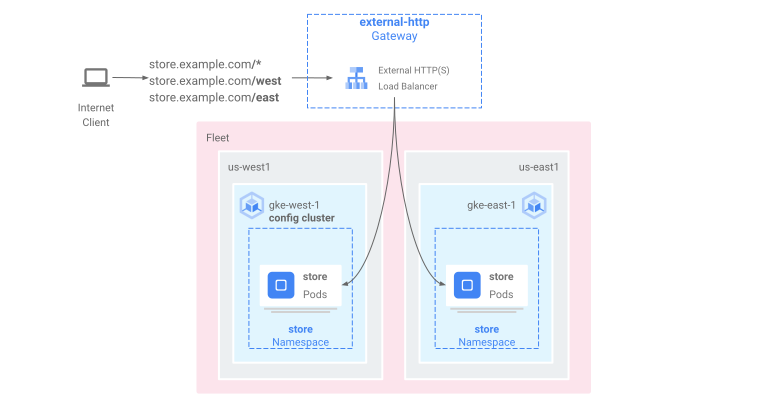
在以下步骤中,您将执行以下操作:
- 将示例
store应用部署到gke-west-1和gke-east-1集群。 - 配置要导出到舰队的每个集群上的 Service(多集群 Service)。
- 将外部多集群 Gateway 和 HTTPRoute 部署到配置集群 (
gke-west-1)。
部署应用和 Gateway 资源后,您可以使用基于路径的路由来控制两个 GKE 集群之间的流量:
- 对
/west的请求将路由到gke-west-1集群中的storepod。 - 对
/east的请求将路由到gke-east-1集群中的storepod。 - 针对任何其他路径的请求会根据其运行状况、容量和与请求客户端的邻近程度路由到集群。
部署演示应用
在为多集群 Gateway 准备环境中部署的所有三个集群中创建
store部署和命名空间:kubectl apply --context gke-west-1 -f https://raw.githubusercontent.com/GoogleCloudPlatform/gke-networking-recipes/main/gateway/gke-gateway-controller/multi-cluster-gateway/store.yaml kubectl apply --context gke-west-2 -f https://raw.githubusercontent.com/GoogleCloudPlatform/gke-networking-recipes/main/gateway/gke-gateway-controller/multi-cluster-gateway/store.yaml kubectl apply --context gke-east-1 -f https://raw.githubusercontent.com/GoogleCloudPlatform/gke-networking-recipes/main/gateway/gke-gateway-controller/multi-cluster-gateway/store.yaml它会将以下资源部署到每个集群:
namespace/store created
deployment.apps/store created
本页面中的所有示例均使用此步骤中部署的应用。在尝试任何其余步骤之前,请确保已在全部三个集群中部署该应用。此示例仅使用集群
gke-west-1和gke-east-1,而gke-west-2则用于另一示例。
多集群 Service
Service 是将 Pod 公开给客户端的方式。由于 GKE Gateway Controller 控制器使用容器原生负载均衡,因此不使用 ClusterIP 或 Kubernetes 负载均衡来访问 Pod。流量会直接从负载均衡器发送到 Pod IP 地址。但是,Service 仍然发挥关键作用,是 Pod 分组的逻辑标识符。
多集群 Service (MCS) 是一种适用于跨集群的 Service 的 API 标准,其 GKE 控制器可跨 GKE 集群提供服务发现。多集群 Gateway 控制器使用 MCS API 资源将 Pod 分组到可跨多个集群寻址的 Service 中。
Multi-cluster Services API 定义了以下自定义资源:
- ServiceExport 会映射到 Kubernetes Service,并将该 Service 的端点导出到向队列注册的所有集群。当 Service 具有相应的 ServiceExport 时,表示该 Service 可以通过多集群 Gateway 进行寻址。
- ServiceImport 由多集群 Service 控制器自动生成。ServiceExport 和 ServiceImport 成对提供。如果舰队中存在 ServiceExport,则系统会创建相应的 ServiceImport,以允许从集群访问映射到 ServiceExport 的 Service。
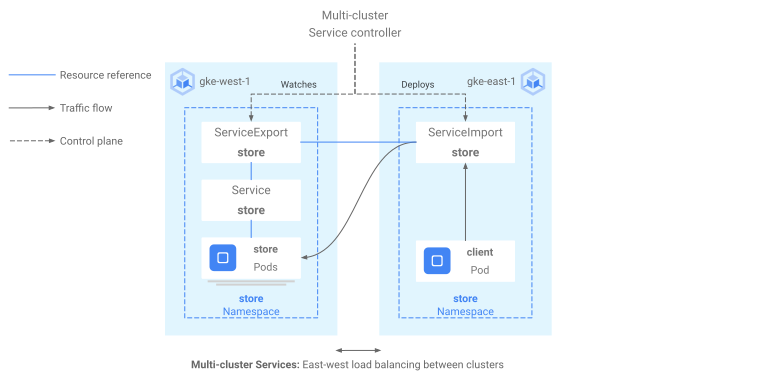
导出 Service 的方式如下。gke-west-1 中存在一项存储服务,用于选择该集群中的一组 Pod。系统会在集群中创建 ServiceExport,该资源允许从舰队中的其他集群访问 gke-west-1 中的 Pod。ServiceExport 会映射到并公开与 ServiceExport 资源具有相同名称和命名空间的 Service。
apiVersion: v1
kind: Service
metadata:
  name: store
  namespace: store
spec:
  selector:
    app: store
  ports:
  - port: 8080
    targetPort: 8080
---
kind: ServiceExport
apiVersion: net.gke.io/v1
metadata:
  name: store
  namespace: store
下图显示了部署 ServiceExport 后会发生什么。如果存在 ServiceExport 和 Service 对,则多集群 Service 控制器会将相应的 ServiceImport 部署到机群中的每个 GKE 集群。ServiceImport 是每个集群中 store Service 的本地表示形式。这允许 gke-east-1 中 client Pod 使用 ClusterIP 或无头 Service 访问 gke-west-1 中的 store Pod。以这种方式使用多集群 Service 时,可以在集群之间提供东-西负载均衡,而无需内部 LoadBalancer Service。如需使用多集群 Service 进行集群到集群负载均衡,请参阅配置多集群 Service。
多集群 Gateway 也使用 ServiceImport,但不用于集群到集群负载均衡。相反,Gateway 将 ServiceImport 用作存在于另一个集群中或跨多个集群的 Service 的逻辑标识符。以下 HTTPRoute 引用 ServiceImport 而不是 Service 资源。通过引用 ServiceImport,这表示它正在将流量转发到在一个或多个集群上运行的一组后端 Pod。
kind: HTTPRoute
apiVersion: gateway.networking.k8s.io/v1
metadata:
  name: store-route
  namespace: store
  labels:
    gateway: multi-cluster-gateway
spec:
  parentRefs:
  - kind: Gateway
    namespace: store
    name: external-http
  hostnames:
  - "store.example.com"
  rules:
  - backendRefs:
    - group: net.gke.io
      kind: ServiceImport
      name: store
      port: 8080
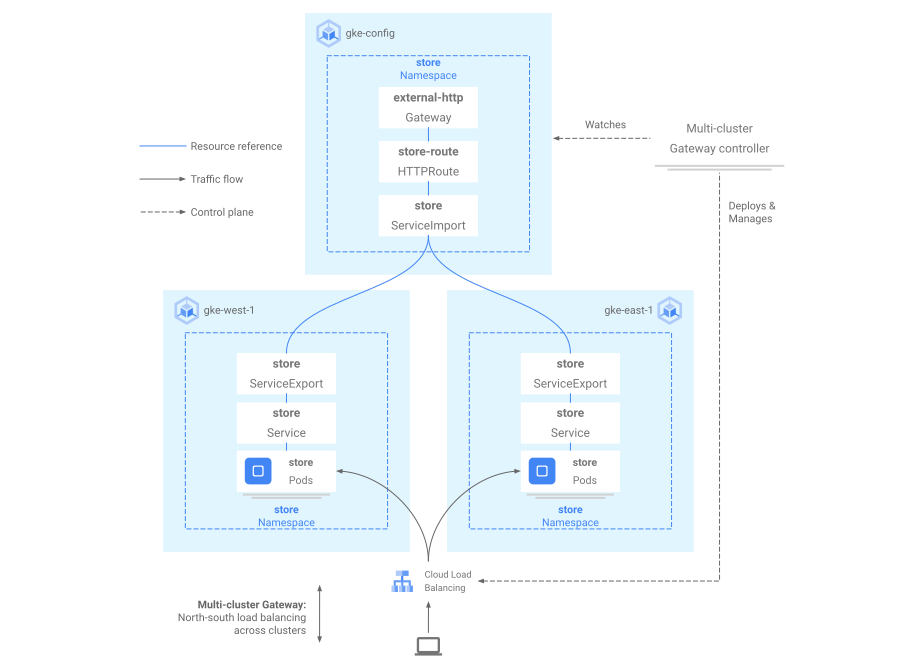
下图显示了 HTTPRoute 如何将 store.example.com 流量路由到 gke-west-1 和 gke-east-1 上的 store Pod。负载均衡器将它们视为一个后端池。如果来自其中一个集群的 Pod 运行状况不佳、无法访问或没有流量容量,则流量负载会均衡到另一个集群上剩余的 Pod。您可以使用 store Service 和 ServiceExport 添加或移除新集群。这样可以透明地添加或移除后端 Pod,而无需进行任何明确的路由配置更改。
导出 Service
此时,应用在这两个集群中运行。接下来,您将向每个集群部署 Service 和 ServiceExport,以公开和导出应用。
将以下清单应用于
gke-west-1集群,以创建store和store-west-1Service 和 ServiceExport:cat << EOF | kubectl apply --context gke-west-1 -f - apiVersion: v1 kind: Service metadata: name: store namespace: store spec: selector: app: store ports: - port: 8080 targetPort: 8080 --- kind: ServiceExport apiVersion: net.gke.io/v1 metadata: name: store namespace: store --- apiVersion: v1 kind: Service metadata: name: store-west-1 namespace: store spec: selector: app: store ports: - port: 8080 targetPort: 8080 --- kind: ServiceExport apiVersion: net.gke.io/v1 metadata: name: store-west-1 namespace: store EOF将以下清单应用于
gke-east-1集群,以创建store和store-east-1Service 和 ServiceExport:cat << EOF | kubectl apply --context gke-east-1 -f - apiVersion: v1 kind: Service metadata: name: store namespace: store spec: selector: app: store ports: - port: 8080 targetPort: 8080 --- kind: ServiceExport apiVersion: net.gke.io/v1 metadata: name: store namespace: store --- apiVersion: v1 kind: Service metadata: name: store-east-1 namespace: store spec: selector: app: store ports: - port: 8080 targetPort: 8080 --- kind: ServiceExport apiVersion: net.gke.io/v1 metadata: name: store-east-1 namespace: store EOF验证是否已在集群中创建了正确的 ServiceExport。
kubectl get serviceexports --context CLUSTER_NAME --namespace store将 CLUSTER_NAME 替换为
gke-west-1和gke-east-1。输出将类似以下内容:# gke-west-1 NAME AGE store 2m40s store-west-1 2m40s # gke-east-1 NAME AGE store 2m25s store-east-1 2m25s输出表明,
storeService包含两个集群中的storePod,而store-west-1和store-east-1Service 在其各自的集群仅包含storePod。这些重叠的 Service 用于面向多个集群中的 Pod 或单个集群上的部分 Pod。几分钟后,请验证多集群 Service 控制器是否已跨舰队中的所有集群自动创建随附的 ServiceImport。
kubectl get serviceimports --context CLUSTER_NAME --namespace store将 CLUSTER_NAME 替换为
gke-west-1和gke-east-1。您应该会看到类似如下所示的输出:# gke-west-1 NAME TYPE IP AGE store ClusterSetIP ["10.112.31.15"] 6m54s store-east-1 ClusterSetIP ["10.112.26.235"] 5m49s store-west-1 ClusterSetIP ["10.112.16.112"] 6m54s # gke-east-1 NAME TYPE IP AGE store ClusterSetIP ["10.72.28.226"] 5d10h store-east-1 ClusterSetIP ["10.72.19.177"] 5d10h store-west-1 ClusterSetIP ["10.72.28.68"] 4h32m这表明可以从集群中的所有两个集群访问所有三个 Service。但是,由于每个机组只有一个活跃配置集群,因此您只能在
gke-west-1中部署引用这些 ServiceImport 的 Gateway 和 HTTPRoute。当配置集群中的 HTTPRoute 将这些 ServiceImport 引用为后端时,Gateway 可以将流量转发到这些 Service,无论它们是从哪个集群导出的。
部署 Gateway 和 HTTPRoute
部署应用后,您可以使用 gke-l7-global-external-managed-mc GatewayClass 配置 Gateway。此 Gateway 会创建一个外部应用负载均衡器,配置为在目标集群之间分配流量。
将以下网关清单应用于配置集群(在此示例中为
gke-west-1):cat << EOF | kubectl apply --context gke-west-1 -f - kind: Gateway apiVersion: gateway.networking.k8s.io/v1 metadata: name: external-http namespace: store spec: gatewayClassName: gke-l7-global-external-managed-mc listeners: - name: http protocol: HTTP port: 80 allowedRoutes: kinds: - kind: HTTPRoute EOF此 Gateway 配置会根据以下命名惯例部署外部应用负载均衡器资源:
gkemcg1-NAMESPACE-GATEWAY_NAME-HASH。使用此配置创建的默认资源包括:
- 1 个负载均衡器:
gkemcg1-store-external-http-HASH - 1 个公共 IP 地址:
gkemcg1-store-external-http-HASH - 1 条转发规则:
gkemcg1-store-external-http-HASH - 2 个后端服务:
- 默认的 404 后端服务:
gkemcg1-store-gw-serve404-HASH - 默认的 500 后端服务:
gkemcg1-store-gw-serve500-HASH
- 默认的 404 后端服务:
- 1 项健康检查:
- 默认的 404 健康检查:
gkemcg1-store-gw-serve404-HASH
- 默认的 404 健康检查:
- 0 条路由规则(URLmap 为空)
在此阶段,对 GATEWAY_IP:80 的任何请求都会导致生成默认页面,其中显示以下消息:
fault filter abort。- 1 个负载均衡器:
将以下 HTTPRoute 清单应用于配置集群(在此示例中为
gke-west-1):cat << EOF | kubectl apply --context gke-west-1 -f - kind: HTTPRoute apiVersion: gateway.networking.k8s.io/v1 metadata: name: public-store-route namespace: store labels: gateway: external-http spec: hostnames: - "store.example.com" parentRefs: - name: external-http rules: - matches: - path: type: PathPrefix value: /west backendRefs: - group: net.gke.io kind: ServiceImport name: store-west-1 port: 8080 - matches: - path: type: PathPrefix value: /east backendRefs: - group: net.gke.io kind: ServiceImport name: store-east-1 port: 8080 - backendRefs: - group: net.gke.io kind: ServiceImport name: store port: 8080 EOF在此阶段,对 GATEWAY_IP:80 的任何请求都将导致生成默认页面,其中显示以下消息:
fault filter abort。部署后,此 HTTPRoute 将配置以下路由行为:
- 对
/west的请求将路由到gke-west-1集群中的storePod,因为store-west-1ServiceExport 选择的 Pod 仅存在于gke-west-1集群中。 - 对
/east的请求将路由到gke-east-1集群中的storePod,因为store-east-1ServiceExport 选择的 Pod 仅存在于gke-east-1集群中。 - 对任何其他路径的请求会根据集群的运行状况、容量和与请求客户端的邻近程度路由到任意集群的
storePod 中。 - 对 GATEWAY_IP:80 的请求将导致生成默认页面,其中显示以下消息:
fault filter abort。

请注意,如果给定集群上的所有 Pod 运行状况不佳(或不存在),则流向
storeService 的流量只会发送到实际具有storePod 的集群。如果给定集群上存在 ServiceExport 和 Service,则无法保证流量会发送到该集群。Pod 必须存在且对负载均衡器健康检查做出肯定响应,否则负载均衡器只会将流量发送到其他集群中健康状况良好的storePod。使用以下配置创建新资源:
- 3 个后端服务:
store后端服务:gkemcg1-store-store-8080-HASHstore-east-1后端服务:gkemcg1-store-store-east-1-8080-HASHstore-west-1后端服务:gkemcg1-store-store-west-1-8080-HASH
- 3 项健康检查:
store健康检查:gkemcg1-store-store-8080-HASHstore-east-1健康检查:gkemcg1-store-store-east-1-8080-HASHstore-west-1健康检查:gkemcg1-store-store-west-1-8080-HASH
- URLmap 中 1 个路由规则:
store.example.com路由规则:- 1 个主机:
store.example.com - 多个
matchRules,用于路由到新的后端服务
- 对
下图显示了您在这两个集群中部署的资源。由于 gke-west-1 是 Gateway 配置集群,因此它是 Gateway 控制器在其中监视 Gateway、HTTPRoute 和 ServiceImport 的集群。每个集群都有一个 store ServiceImport,还另外有一个特定于该集群的 ServiceImport。这两者都指向相同的 Pod。这样,HTTPRoute 就能精确地指定流量应流向何处 - 是特定集群上的 store Pod,还是所有集群中的 store Pod。

请注意,这是一个逻辑资源模型,而不是对流量的描述。流量路径直接从负载均衡器进入后端 Pod,与配置集群是哪个集群没有直接关系。
验证部署
您现在可以向我们的多集群 Gateway 发出请求,并将流量分配到多个 GKE 集群。
通过检查 Gateway 状态和事件来验证 Gateway 和 HTTPRoute 是否已成功部署。
kubectl describe gateways.gateway.networking.k8s.io external-http --context gke-west-1 --namespace store您的输出应如下所示:
Name:         external-http
Namespace:    store
Labels:       <none>
Annotations:  networking.gke.io/addresses: /projects/PROJECT_NUMBER/global/addresses/gkemcg1-store-external-http-laup24msshu4
              networking.gke.io/backend-services:
                /projects/PROJECT_NUMBER/global/backendServices/gkemcg1-store-gw-serve404-80-n65xmts4xvw2, /projects/PROJECT_NUMBER/global/backendServices/gke...
              networking.gke.io/firewalls: /projects/PROJECT_NUMBER/global/firewalls/gkemcg1-l7-default-global
              networking.gke.io/forwarding-rules: /projects/PROJECT_NUMBER/global/forwardingRules/gkemcg1-store-external-http-a5et3e3itxsv
              networking.gke.io/health-checks:
                /projects/PROJECT_NUMBER/global/healthChecks/gkemcg1-store-gw-serve404-80-n65xmts4xvw2, /projects/PROJECT_NUMBER/global/healthChecks/gkemcg1-s...
              networking.gke.io/last-reconcile-time: 2023-10-12T17:54:24Z
              networking.gke.io/ssl-certificates:
              networking.gke.io/target-http-proxies: /projects/PROJECT_NUMBER/global/targetHttpProxies/gkemcg1-store-external-http-94oqhkftu5yz
              networking.gke.io/target-https-proxies:
              networking.gke.io/url-maps: /projects/PROJECT_NUMBER/global/urlMaps/gkemcg1-store-external-http-94oqhkftu5yz
API Version:  gateway.networking.k8s.io/v1
Kind:         Gateway
Metadata:
  Creation Timestamp:  2023-10-12T06:59:32Z
  Finalizers:
    gateway.finalizer.networking.gke.io
  Generation:        1
  Resource Version:  467057
  UID:               1dcb188e-2917-404f-9945-5f3c2e907b4c
Spec:
  Gateway Class Name:  gke-l7-global-external-managed-mc
  Listeners:
    Allowed Routes:
      Kinds:
        Group:  gateway.networking.k8s.io
        Kind:   HTTPRoute
      Namespaces:
        From:  Same
    Name:      http
    Port:      80
    Protocol:  HTTP
Status:
  Addresses:
    Type:   IPAddress
    Value:  34.36.127.249
  Conditions:
    Last Transition Time:  2023-10-12T07:00:41Z
    Message:               The OSS Gateway API has deprecated this condition, do not depend on it.
    Observed Generation:   1
    Reason:                Scheduled
    Status:                True
    Type:                  Scheduled
    Last Transition Time:  2023-10-12T07:00:41Z
    Message:
    Observed Generation:   1
    Reason:                Accepted
    Status:                True
    Type:                  Accepted
    Last Transition Time:  2023-10-12T07:00:41Z
    Message:
    Observed Generation:   1
    Reason:                Programmed
    Status:                True
    Type:                  Programmed
    Last Transition Time:  2023-10-12T07:00:41Z
    Message:               The OSS Gateway API has altered the "Ready" condition semantics and reservedit for future use.  GKE Gateway will stop emitting it in a future update, use "Programmed" instead.
    Observed Generation:   1
    Reason:                Ready
    Status:                True
    Type:                  Ready
  Listeners:
    Attached Routes:  1
    Conditions:
      Last Transition Time:  2023-10-12T07:00:41Z
      Message:
      Observed Generation:   1
      Reason:                Programmed
      Status:                True
      Type:                  Programmed
      Last Transition Time:  2023-10-12T07:00:41Z
      Message:               The OSS Gateway API has altered the "Ready" condition semantics and reservedit for future use.  GKE Gateway will stop emitting it in a future update, use "Programmed" instead.
      Observed Generation:   1
      Reason:                Ready
      Status:                True
      Type:                  Ready
    Name:                    http
    Supported Kinds:
      Group:  gateway.networking.k8s.io
      Kind:   HTTPRoute
Events:
  Type    Reason  Age                    From                   Message
  ----    ------  ----                   ----                   -------
  Normal  UPDATE  35m (x4 over 10h)      mc-gateway-controller  store/external-http
  Normal  SYNC    4m22s (x216 over 10h)  mc-gateway-controller  SYNC on store/external-http was a success
Gateway 部署成功后,从
external-httpGateway 成功检索外部 IP 地址。kubectl get gateways.gateway.networking.k8s.io external-http -o=jsonpath="{.status.addresses[0].value}" --context gke-west-1 --namespace store将以下步骤中的
VIP替换为您收到的 IP 地址作为输出。将流量发送到网域的根路径。这会将流量负载均衡到跨集群
gke-west-1和gke-east-1的storeServiceImport。负载均衡器会将流量发送到离您最近的区域,因此您可能不会看到来自其他区域的响应。curl -H "host: store.example.com" http://VIP输出会确认 Pod 已从
gke-east-1集群处理请求:{ "cluster_name": "gke-east-1", "zone": "us-east1-b", "host_header": "store.example.com", "node_name": "gke-gke-east-1-default-pool-7aa30992-t2lp.c.agmsb-k8s.internal", "pod_name": "store-5f5b954888-dg22z", "pod_name_emoji": "⏭", "project_id": "agmsb-k8s", "timestamp": "2021-06-01T17:32:51" }接下来,将流量发送到
/west路径。这会将流量路由到仅在gke-west-1集群上运行 Pod 的store-west-1ServiceImport。通过store-west-1等集群专用的 ServiceImport,应用所有者可以将流量明确发送到特定集群,而不是让负载均衡器做出决策。curl -H "host: store.example.com" http://VIP/west输出会确认 Pod 已从
gke-west-1集群处理请求:{ "cluster_name": "gke-west-1", "zone": "us-west1-a", "host_header": "store.example.com", "node_name": "gke-gke-west-1-default-pool-65059399-2f41.c.agmsb-k8s.internal", "pod_name": "store-5f5b954888-d25m5", "pod_name_emoji": "🍾", "project_id": "agmsb-k8s", "timestamp": "2021-06-01T17:39:15", }最后,将流量发送到
/east路径。curl -H "host: store.example.com" http://VIP/east输出会确认 Pod 已从
gke-east-1集群处理请求:{ "cluster_name": "gke-east-1", "zone": "us-east1-b", "host_header": "store.example.com", "node_name": "gke-gke-east-1-default-pool-7aa30992-7j7z.c.agmsb-k8s.internal", "pod_name": "store-5f5b954888-hz6mw", "pod_name_emoji": "🧜🏾", "project_id": "agmsb-k8s", "timestamp": "2021-06-01T17:40:48" }
清理
完成本文档上的练习后,请按照以下步骤移除资源,防止您的账号产生不必要的费用:
删除集群。
如果不需要为其他目的注册集群,请从舰队中取消注册集群。
停用
multiclusterservicediscovery功能:gcloud container fleet multi-cluster-services disable停用多集群 Ingress:
gcloud container fleet ingress disable停用 API:
gcloud services disable \
    multiclusterservicediscovery.googleapis.com \
    multiclusteringress.googleapis.com \
    trafficdirector.googleapis.com \
    --project=PROJECT_ID
问题排查
没有健康的上行
具体情况:
创建网关但无法访问后端服务(503 响应代码)时,可能会出现以下问题:
no healthy upstream
原因:
此错误消息表示健康检查探测器找不到健康状况良好的后端服务。您的后端服务可能处于健康状况良好状态,但您可能需要自定义健康检查。
临时解决方法:
如需解决此问题,请使用 HealthCheckPolicy 根据应用的要求自定义监控状况检查(例如 /health)。
后续步骤
- 详细了解 Gateway Controller。
- 如需为多集群 Gateway 配置后端 TLS,请参阅配置后端 TLS。