


本文档介绍了如何使用 Multus CNI、IPVLAN CNI 插件和 Whereabouts IPAM 插件在 Google Kubernetes Engine (GKE) 中配置具有多个网络接口的 Pod。
IPVLAN CNI 插件可为其他 Pod 接口提供第 2 层连接,而 Whereabouts IPAM 插件可动态地为这些接口分配 IP 地址。
此设置支持高级网络配置,例如分离控制平面和数据平面流量,以增强网络隔离和分段。
本文档适用于为组织设计和架构网络的云架构师和网络专家。如需详细了解我们在 Google Cloud 内容中提及的常见角色和示例任务,请参阅常见的 GKE 用户角色和任务。
在阅读本文档之前,请确保您熟悉以下概念:
将 Multus 与 IPVLAN 搭配使用的优势
使用此解决方案为 Pod 配置多个网络接口具有以下几项关键优势。在第 2 层模式下使用 IPVLAN 配置 Multus 的主要应用场景是需要第 2 层邻接的网络分段:
- 流量隔离:隔离不同类型的流量,以提高安全性和性能。例如,您可以将敏感的管理流量与应用数据流量分开。
- 控制平面和数据平面分离:将主网络接口专用于控制平面流量,同时通过辅助 IPVLAN 接口引导高吞吐量数据平面流量。
- 第 2 层邻接:满足需要在同一辅助网络上的 Pod 之间建立直接第 2 层连接的应用的要求。
限制
搭配 IPVLAN 和 Whereabouts 的 Multus 具有以下限制:
- 配置了 Multus 接口的 Pod 无法同时使用 GKE 的内置多网络功能。Pod 的网络配置必须使用 Multus 或集群的内置多网络功能。
- Multus 搭配 IPVLAN 和 Whereabouts 需要 Pod 内第 2 层 ARP 解析才能正常运行。
- 默认情况下,VPC 子网不允许在 Compute Engine 虚拟机的辅助接口上进行 ARP 解析。如需允许此 ARP 解析,您可以提交支持请求,注册
resolve-subnet-mask功能的非公开预览版。
Multus 如何与 IPVLAN 和 Whereabouts 搭配使用
Multus 是一种 CNI 元插件,可让 Pod 挂接到多个网络。Multus 充当调度程序,调用其他 CNI 插件,以根据 NetworkAttachmentDefinition 资源配置网络接口。您可以使用 NetworkAttachmentDefinition 定义每个附加网络,该参数用于指定要为相应网络使用哪个 CNI 插件(例如 IPVLAN)和 IPAM 插件(例如 Whereabouts)。
下图展示了使用 IPVLAN 和 Whereabouts 插件的 Multus 架构。Whereabouts 插件可与 Multus 和 IPVLAN 搭配使用,以处理 Pod 的其他网络接口的 IP 地址管理 (IPAM)。
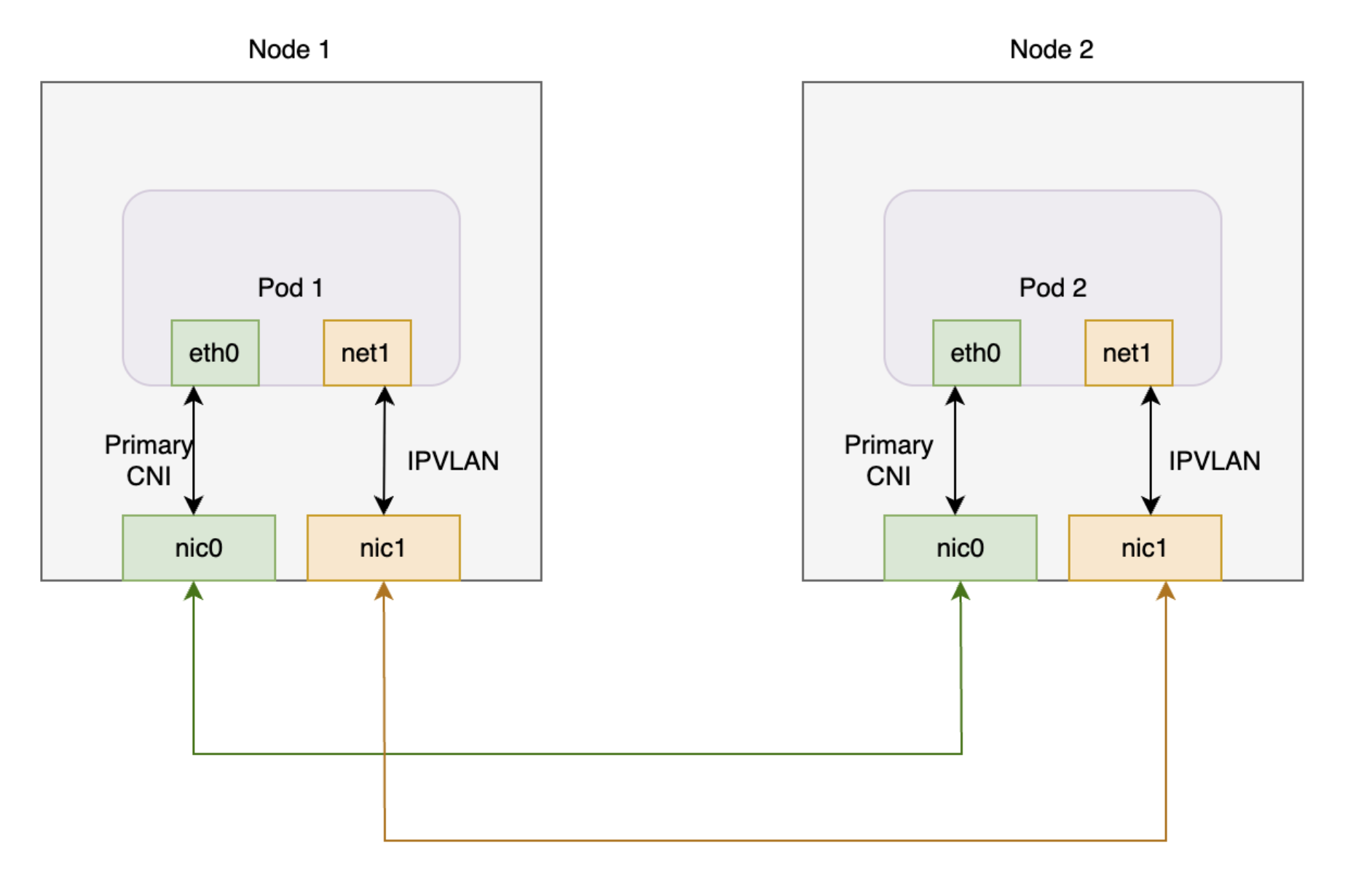
此图表显示了两个节点,每个节点都有一个 Pod。每个 Pod 都有一个主接口和一个额外接口。两个主接口连接到共享网络接口卡,而两个附加接口连接到另一个共享网络接口卡。
在 GKE 上将 Multus 与 IPVLAN 和 Whereabouts 搭配使用时,Pod 通常具有以下接口配置:
- 主接口 (
eth0):GKE Dataplane V2 管理此接口,提供默认集群连接。 - 其他接口(
net1等):Multus 负责管理这些接口。 对于您在 Pod 注释中指定的每个NetworkAttachmentDefinition,Multus 都会在第 2 层模式下调用 IPVLAN CNI 插件。此配置可提供与辅助 VPC 网络的第 2 层连接。 - IP 地址管理 (IPAM):您可以在
NetworkAttachmentDefinition中配置 Whereabouts IPAM 插件。Whereabouts IPAM 插件会从预定义的范围内动态为额外的 IPVLAN 接口分配 IP 地址。
使用多个网络进行 Pod 调度
当您创建 Pod 并在其注释中指定 NetworkAttachmentDefinition 时,GKE 调度器只会将该 Pod 放置在能够满足网络要求的节点上。调度程序会识别节点池中配置了所需辅助网络接口的节点。此节点识别过程有助于确保调度程序将 Pod 调度到可以连接到附加网络并从指定范围接收 IP 地址的节点上。
以下部分将指导您在 GKE 集群上使用 IPVLAN 和 Whereabouts 插件配置 Multus。
准备工作
在开始之前,请确保您已执行以下任务:
- 启用 Google Kubernetes Engine API。 启用 Google Kubernetes Engine API
- 如需使用 Google Cloud CLI 执行此任务,请安装并初始化 gcloud CLI。如果您之前安装了 gcloud CLI,请通过运行
gcloud components update命令来获取最新版本。较早版本的 gcloud CLI 可能不支持运行本文档中的命令。
- 安装
kubectl命令行工具。 - 设置一个运行 1.28 版或更高版本的 GKE 集群,并启用 Dataplane V2、IP 别名和多网络。如需了解具体方法,请参阅设置 Pod 的多网络支持。启用多网络功能还会启用多 IP 子网和永久性 IP HA 政策功能,从而无需手动设置节点间连接。
- 使用 GKE 验证的 Multus CNI 版本(例如 v4.2.1)以确保兼容性。
设置 VPC
如需设置要与 Multus 搭配使用的虚拟私有云 (VPC),包括为节点网络创建子网和为 Pod 网络创建次要范围,请完成以下步骤:
创建新 VPC 或使用现有 VPC:
gcloud compute networks create VPC_NAME \
--subnet-mode=custom
将
VPC_NAME替换为 VPC 的名称。在此 VPC 中创建一个新子网:
gcloud compute networks subnets create SUBNET_NAME \
    --range=PRIMARY_RANGE \
    --network=VPC_NAME \
    --region=REGION \
    --secondary-range=SECONDARY_RANGE_NAME=SECONDARY_RANGE_CIDR
替换以下内容:
SUBNET_NAME:新子网的名称。PRIMARY_RANGE:子网的主要 CIDR 范围,例如10.0.1.0/24。此命令将此范围用于节点接口。VPC_NAME:VPC 的名称。REGION:子网的区域,例如us-central1。SECONDARY_RANGE_NAME:子网中 Pod 的次要 IP 地址范围的名称。SECONDARY_RANGE_CIDR:Pod 的次要 CIDR 范围,例如172.16.1.0/24。Pod 上的其他接口使用此范围。
此命令会创建一个子网,其中包含一个用于额外节点接口的主要 CIDR 范围和一个用于额外 Pod 接口的次要范围。
创建 GKE Standard 集群
创建启用了多网络的 GKE Standard 集群:
gcloud container clusters create CLUSTER_NAME \
    --cluster-version=CLUSTER_VERSION \
    --enable-dataplane-v2 \
    --enable-ip-alias \
    --enable-multi-networking
替换以下内容:
CLUSTER_NAME:新集群的名称。CLUSTER_VERSION:GKE 集群的版本。您必须使用 1.28 或更高版本。
启用多网络功能后,您可以创建具有多个网络接口的节点池,而 Multus CNI 需要这样做。
创建 GKE Standard 节点池
创建连接到其他 VPC 网络的 GKE Standard 节点池:
gcloud container node-pools create NODEPOOL_NAME \
    --cluster CLUSTER_NAME \
    --zone "ZONE" \
    --additional-node-network network=VPC_NAME,subnetwork=SUBNET_NAME \
    --additional-pod-network subnetwork=SUBNET_NAME,pod-ipv4-range=SECONDARY_RANGE_NAME,max-pods-per-node=8
替换以下内容:
NODEPOOL_NAME:新节点池的名称。CLUSTER_NAME:您的集群的名称。ZONE:节点池的可用区,例如us-central1-c。VPC_NAME:附加 VPC 的名称。SUBNET_NAME:子网的名称。SECONDARY_RANGE_NAME:子网中 Pod 的次要 IP 地址范围的名称。
此命令会创建一个节点池,其中节点在 SUBNET_NAME 中具有额外的网络接口,并且这些节点上的 Pod 可以使用 SECONDARY_RANGE_NAME 中的 IP 地址。您可以视需要为 --additional-node-network 标志指定 stack-type 参数(预览版)。如需了解详情,请参阅设置 Pod 的多网络支持。
如需详细了解如何创建具有多网络功能的 GKE 集群,请参阅设置 Pod 的多网络支持。
应用 Multus 部署
如需为 Pod 启用多个网络接口,请安装 Multus CNI 插件。将以下清单(包含所需的 DaemonSet 和自定义资源定义 [CRD])保存为 multus-manifest.yaml:
apiVersion: apiextensions.k8s.io/v1
kind: CustomResourceDefinition
metadata:
  name: ippools.whereabouts.cni.cncf.io
spec:
  group: whereabouts.cni.cncf.io
  names:
    kind: IPPool
    listKind: IPPoolList
    plural: ippools
    singular: ippool
  scope: Namespaced
  versions:
  - name: v1alpha1
    schema:
      openAPIV3Schema:
        description: IPPool is the Schema for the ippools API
        properties:
          apiVersion:
            description: 'APIVersion defines the versioned schema of this representation
                of an object. Servers should convert recognized schemas to the latest
                internal value, and may reject unrecognized values. More info: https://git.k8s.io/community/contributors/devel/api-conventions.md#resources'
            type: string
          kind:
            description: 'Kind is a string value representing the REST resource this
                object represents. Servers may infer this from the endpoint the client
                submits requests to. Cannot be updated. In CamelCase. More info: https://git.k8s.io/community/contributors/devel/api-conventions.md#types-kinds'
            type: string
          metadata:
            type: object
          spec:
            description: IPPoolSpec defines the desired state of IPPool
            properties:
              allocations:
                additionalProperties:
                  description: IPAllocation represents metadata about the pod/container
                    owner of a specific IP
                  properties:
                    id:
                      type: string
                    podref:
                      type: string
                  required:
                  - id
                  type: object
                description: Allocations is the set of allocated IPs for the given
                  range. Its indices are a direct mapping to the IP with the same
                  index/offset for the pools range.
                type: object
              range:
                description: Range is a RFC 4632/4291-style string that represents
                  an IP address and prefix length in CIDR notation
                type: string
            required:
            - allocations
            - range
            type: object
        type: object
    served: true
    storage: true
status:
  acceptedNames:
    kind: ""
    plural: ""
  conditions: []
  storedVersions: []
---
apiVersion: apiextensions.k8s.io/v1
kind: CustomResourceDefinition
metadata:
  annotations:
    controller-gen.kubebuilder.io/version: v0.4.1
  name: overlappingrangeipreservations.whereabouts.cni.cncf.io
spec:
  group: whereabouts.cni.cncf.io
  names:
    kind: OverlappingRangeIPReservation
    listKind: OverlappingRangeIPReservationList
    plural: overlappingrangeipreservations
    singular: overlappingrangeipreservation
  scope: Namespaced
  versions:
  - name: v1alpha1
    schema:
      openAPIV3Schema:
        description: OverlappingRangeIPReservation is the Schema for the OverlappingRangeIPReservations
          API
        properties:
          apiVersion:
            description: 'APIVersion defines the versioned schema of this representation of an object. Servers should convert recognized schemas to the latest internal value, and may reject unrecognized values. More info: https://git.k8s.io/community/contributors/devel/sig-architecture/api-conventions.md#resources'
            type: string
          kind:
            description: 'Kind is a string value representing the REST resource this object represents. Servers may infer this from the endpoint the client submits requests to. Cannot be updated. In CamelCase. More info: https://git.k8s.io/community/contributors/devel/sig-architecture/api-conventions.md#types-kinds'
            type: string
          metadata:
            type: object
          spec:
            description: OverlappingRangeIPReservationSpec defines the desired state
              of OverlappingRangeIPReservation
            properties:
              containerid:
                type: string
              podref:
                type: string
            required:
            - containerid
            type: object
        required:
        - spec
        type: object
    served: true
    storage: true
status:
  acceptedNames:
    kind: ""
    plural: ""
  conditions: []
  storedVersions: []
---
kind: ConfigMap
apiVersion: v1
metadata:
  name: multus-cni-config
  namespace: kube-system
  labels:
    app: gke-multinet
data:
  cni-conf.json: |
    {
      "name": "multus-cni-network",
      "type": "multus",
      "confDir": "/etc/cni/net.d",
      "namespaceIsolation": true,
      "logLevel": "verbose",
      "logFile": "/var/log/multus.log",
      "kubeconfig": "/var/lib/kubelet/kubeconfig",
      "clusterNetwork": "gke-pod-network"
    }
---
apiVersion: apiextensions.k8s.io/v1
kind: CustomResourceDefinition
metadata:
  name: network-attachment-definitions.k8s.cni.cncf.io
spec:
  group: k8s.cni.cncf.io
  scope: Namespaced
  names:
    plural: network-attachment-definitions
    singular: network-attachment-definition
    kind: NetworkAttachmentDefinition
    shortNames:
    - net-attach-def
  versions:
  - name: v1
    served: true
    storage: true
    schema:
      openAPIV3Schema:
        description: 'NetworkAttachmentDefinition is a CRD schema specified by the Network Plumbing
            Working Group to express the intent for attaching pods to one or more logical or physical
            networks. More information available at: https://github.com/k8snetworkplumbingwg/multi-net-spec'
        type: object
        properties:
          apiVersion:
            description: 'APIVersion defines the versioned schema of this represen
                tation of an object. Servers should convert recognized schemas to the
                latest internal value, and may reject unrecognized values. More info:
                https://git.k8s.io/community/contributors/devel/sig-architecture/api-conventions.md#resources'
            type: string
          kind:
            description: 'Kind is a string value representing the REST resource this
                object represents. Servers may infer this from the endpoint the client
                submits requests to. Cannot be updated. In CamelCase. More info: https://git.k8s.io/community/contributors/devel/sig-architecture/api-conventions.md#types-kinds'
            type: string
          metadata:
            type: object
          spec:
            description: 'NetworkAttachmentDefinition spec defines the desired state of a network attachment'
            type: object
            properties:
              config:
                description: 'NetworkAttachmentDefinition config is a JSON-formatted CNI configuration'
                type: string
---
apiVersion: rbac.authorization.k8s.io/v1
kind: ClusterRole
metadata:
  name: multus-role
rules:
- apiGroups: ["k8s.cni.cncf.io"]
  resources:
  - '*'
  verbs:
  - '*'
---
kind: ClusterRole
apiVersion: rbac.authorization.k8s.io/v1
metadata:
  name: whereabouts
rules:
- apiGroups:
  - whereabouts.cni.cncf.io
  resources:
  - ippools
  - overlappingrangeipreservations
  verbs:
  - get
  - list
  - watch
  - create
  - update
  - patch
  - delete
- apiGroups:
  - coordination.k8s.io
  resources:
  - leases
  verbs:
  - create
- apiGroups:
  - coordination.k8s.io
  resources:
  - leases
  resourceNames:
  - whereabouts
  verbs:
  - '*'
- apiGroups: [""]
  resources:
  - pods
  verbs:
  - list
  - get
---
kind: ClusterRoleBinding
apiVersion: rbac.authorization.k8s.io/v1
metadata:
  name: multus-role-binding
subjects:
- kind: Group
  name: system:nodes
roleRef:
  kind: ClusterRole
  name: multus-role
  apiGroup: rbac.authorization.k8s.io
---
apiVersion: rbac.authorization.k8s.io/v1
kind: ClusterRoleBinding
metadata:
  name: whereabouts-role-binding
roleRef:
  apiGroup: rbac.authorization.k8s.io
  kind: ClusterRole
  name: whereabouts
subjects:
- kind: ServiceAccount
  name: whereabouts-sa
  namespace: kube-system
---
apiVersion: v1
kind: ServiceAccount
metadata:
  name: whereabouts-sa
  namespace: kube-system
---
apiVersion: apps/v1
kind: DaemonSet
metadata:
  name: gke-multinet
  namespace: kube-system
  labels:
    app: gke-multinet
spec:
  selector:
    matchLabels:
      app: gke-multinet
  template:
    metadata:
      labels:
        app: gke-multinet
    spec:
      priorityClassName: system-node-critical
      hostNetwork: true
      tolerations:
      - operator: Exists
      serviceAccountName: whereabouts-sa
      containers:
      - name: whereabouts-gc
        command: [/ip-control-loop]
        args:
        - "--log-level=debug"
        - "--enable-pod-watch=false"
        - "--cron-schedule=* * * * *"
        image: gcr.io/gke-release/whereabouts:v0.7.0-gke.3@sha256:2bb8450a99d86c73b262f5ccd8c433d3e3abf17d36ee5c3bf1056a1fe479e8c2
        env:
        - name: NODENAME
          valueFrom:
            fieldRef:
              apiVersion: v1
              fieldPath: spec.nodeName
        - name: WHEREABOUTS_NAMESPACE
          valueFrom:
            fieldRef:
              fieldPath: metadata.namespace
        resources:
          requests:
            cpu: "100m"
            memory: "50Mi"
          limits:
            cpu: "100m"
            memory: "50Mi"
      initContainers:
      - name: install-multus-config
        image: gcr.io/gke-release/multus-cni:v4.2.1-gke.6@sha256:25b48b8dbbf6c78a10452836f52dee456514783565b70633a168a39e6d322310
        args:
        - "--cni-conf-dir=/host/etc/cni/net.d"
        - "--multus-conf-file=/tmp/multus-conf/00-multus.conf"
        - "--multus-log-level=verbose"
        - "--multus-kubeconfig-file-host=/var/lib/kubelet/kubeconfig"
        - "--skip-multus-binary-copy=true"
        - "--skip-config-watch=true"
        resources:
          requests:
            cpu: "100m"
            memory: "50Mi"
          limits:
            cpu: "100m"
            memory: "50Mi"
        securityContext:
          privileged: true
        volumeMounts:
        - name: cni
          mountPath: /host/etc/cni/net.d
        - name: multus-cfg
          mountPath: /tmp/multus-conf
      - name: install-whereabouts
        command: ["/bin/sh"]
        args:
        - -c
        - >
          SLEEP=false /install-cni.sh
        image: gcr.io/gke-release/whereabouts:v0.7.0-gke.3@sha256:2bb8450a99d86c73b262f5ccd8c433d3e3abf17d36ee5c3bf1056a1fe479e8c2
        env:
        - name: NODENAME
          valueFrom:
            fieldRef:
              apiVersion: v1
              fieldPath: spec.nodeName
        - name: WHEREABOUTS_NAMESPACE
          valueFrom:
            fieldRef:
              fieldPath: metadata.namespace
        resources:
          requests:
            cpu: "100m"
            memory: "50Mi"
          limits:
            cpu: "100m"
            memory: "50Mi"
        securityContext:
          privileged: true
        volumeMounts:
        - name: cni
          mountPath: /host/etc/cni/net.d
        - name: cnibin
          mountPath: /host/opt/cni/bin
      - name: install-binary
        image: gcr.io/gke-release/multus-cni:v4.2.1-gke.6@sha256:25b48b8dbbf6c78a10452836f52dee456514783565b70633a168a39e6d322310
        command: ["/gkecmd"]
        args:
        - "-operation=copy"
        - "-cni-bin-dir=/host/opt/cni/bin"
        resources:
          requests:
            cpu: "10m"
            memory: "100Mi"
          limits:
            cpu: "10m"
            memory: "100Mi"
        securityContext:
          privileged: true
        volumeMounts:
        - name: cnibin
          mountPath: /host/opt/cni/bin
      volumes:
      - hostPath:
          path: /var/lib/kubelet/kubeconfig
          type: File
        name: kubelet-credentials
      - name: cni
        hostPath:
          path: /etc/cni/net.d
          type: DirectoryOrCreate
      - name: cnibin
        hostPath:
          path: /home/kubernetes/bin
          type: DirectoryOrCreate
      - name: multus-cfg
        configMap:
          name: multus-cni-config
          items:
          - key: cni-conf.json
            path: 00-multus.conf
  updateStrategy:
    rollingUpdate:
      maxUnavailable: 2
    type: RollingUpdate
然后,将清单应用到您的集群:
kubectl apply -f multus-manifest.yaml
创建NetworkAttachmentDefinition清单
如需让 Pod 连接到其他网络,请创建 NetworkAttachmentDefinition 清单。此清单定义了 Pod 如何连接到网络,并指定了 IPAM 插件(例如 Whereabouts)分配的 IP 地址范围。此范围必须是连接节点额外网络接口的子网的一部分。
将此清单保存为
nad.yaml。 此清单使用 IPVLAN 和 Whereabouts 插件。apiVersion: "k8s.cni.cncf.io/v1" kind: NetworkAttachmentDefinition metadata: name: NAD_NAME spec: config: '{ "cniVersion": "0.3.1", "plugins": [ { "type": "ipvlan", "master": "eth1", "mode": "l2", "ipam": { "type": "whereabouts", "range": SECONDARY_RANGE_NAME } } ] }'清单包含以下字段:
NAD_NAME:NetworkAttachmentDefinition的名称。master:节点的辅助网络接口的名称,该接口充当 IPVLAN 的master接口。在 GKE 上,辅助网络接口通常以eth1开头,并按顺序命名。如需确认接口名称,请使用 SSH 连接到节点并运行ip addr命令。range:Pod 接口的 IP 地址范围,与您为 Pod 创建的次要 IPv4 范围 (SECONDARY_RANGE_NAME) 相同。例如,172.16.1.0/24。
将清单应用到您的集群:
kubectl apply -f nad.yaml
将 Pod 连接到其他网络
如需将 Pod 挂接到其他网络,请将 k8s.v1.cni.cncf.io/networks 注解添加到 Pod 清单。对于多个影音平台,请按以下格式提供以英文逗号分隔的 NetworkAttachmentDefinition 名称列表:<namespace>/<nad-name>。
以下示例展示了一个 Pod 清单,该清单附加到 default 命名空间中名为 NAD_NAME 的 NetworkAttachmentDefinition:
apiVersion: v1
kind: Pod
metadata:
  name: samplepod
  annotations:
    k8s.v1.cni.cncf.io/networks: default/NAD_NAME
spec:
  containers:
  - name: sample-container
    image: nginx
将 NAD_NAME 替换为您创建的 NetworkAttachmentDefinition 的名称。
应用此清单后,Kubernetes 会创建 Pod,该 Pod 具有一个额外的网络接口 (net1),该接口连接到 NetworkAttachmentDefinition 指定的网络。
验证 Pod 的其他 IP 地址
如需验证 Pod 在附加到其他网络后是否会收到额外的 IP 地址,请检查 Pod 内的网络接口:
如需检查
samplepod并验证其他 IP 地址,请使用以下命令:$kubectl describe pod PODNAME将
PODNAME替换为 Pod 的名称,例如samplepod。检查输出。
eth0接口具有 Pod 的主要 IP 地址。Whereabouts 插件会将额外的 IP 地址分配给另一个接口,例如net1。输出类似于以下内容:
k8s.v1.cni.cncf.io/network-status:
  [{
    "name": "gke-pod-network",
    "interface": "eth0",
    "ips": [
      "10.104.3.4"
    ],
    "mac": "ea:e2:f6:ce:18:b5",
    "default": true,
    "dns": {},
    "gateway": [
      "\u003cnil\u003e"
    ]
  },{
    "name": "default/my-nad",
    "interface": "net1",
    "ips": [
      "10.200.1.1"
    ],
    "mac": "42:01:64:c8:c8:07",
    "dns": {}
  }]
k8s.v1.cni.cncf.io/networks: default/my-nad
在此示例中,
10.104.5.19是eth0上的主要 IP 地址,10.200.1.1是net1上的其他 IP 地址。
后续步骤
- 详细了解 Multus CNI。
- 详细了解 IPVLAN CNI。
- 详细了解 Whereabouts IPAM。