

This page provides a general overview of Google Kubernetes Engine (GKE) Ingress for Application Load Balancers, and explains how the Ingress controller provisions Application Load Balancers to expose applications to HTTP(S) traffic from either inside or outside your VPC network.
This page serves as the primary entry point for understanding how GKE Ingress functions. To examine the underlying networking architecture, traffic routing patterns, and security implementations in greater detail, see About GKE Ingress routing and security.
This page assumes that you know about the following:
This page is for Networking specialists who design and architect the network for their organization and install, configure, and support network equipment. To learn more about common roles and example tasks that we reference in Google Cloud content, see Common GKE user roles and tasks.
Overview
GKE provides a built-in and managed Ingress
controller called GKE
Ingress. When you create an Ingress resource in GKE, the
controller automatically configures an HTTPS load balancer that allows HTTP or
HTTPS traffic to reach your Services. The Ingress controller configures the load
balancer and routes traffic to applications that run in your cluster based on
the rules specified in your Ingress manifest and the associated Service
objects.
An Ingress object is associated with one or more Service objects, which, in turn, are associated with a set of Pods. To learn more about how Ingress exposes applications using Services, see Service networking overview.
To use Ingress, you must enable the HTTP load balancing add-on. GKE clusters enable this add-on by default; you must not disable it.
Difference between Kubernetes Service and Google Cloud backend service
The Kubernetes Service object and the Google Cloud backend service object serve similar but distinct purposes. While they are strongly related, the relationship is not always one-to-one.
The GKE Ingress controller acts as the translator between these
two concepts. When you create an Ingress resource, the controller provisions a
Google Cloud load balancer. The controller then creates a dedicated
Google Cloud backend service for every unique (service.name,
service.port) combination referenced in the Ingress manifest.
For example, an Ingress manifest might have the same Kubernetes Service name but
point to a different service.port for two separate host or path rules. In
this case, the GKE Ingress controller creates two separate
backend services. Therefore, one Kubernetes Service object can be related to
several Google Cloud backend services.
Ingress for external and internal traffic
There are two types of GKE Ingress resources:
Ingress for external Application Load Balancers deploys the classic Application Load Balancer. This internet-facing load balancer is deployed globally across Google's edge network as a managed and scalable pool of load balancing resources. Learn how to set up and use Ingress for external Application Load Balancers.
Ingress for internal Application Load Balancers deploys the internal Application Load Balancer. These internal Application Load Balancers are powered by Envoy proxy systems outside of your GKE cluster, but within your VPC network. Learn how to set up and use Ingress for internal Application Load Balancers.
Required networking environment for external Application Load Balancers
The external Application Load Balancer is a managed, globally distributed system that uses Google Front End (GFE) proxies deployed across Google's edge network. These proxies are not located within your VPC network. When a client sends a request to the external IP address of the load balancer, the request is routed by using Google's anycast network to the nearest GFE. The GFE terminates the user traffic (including TLS, if configured) and then forwards the traffic to the backend Pods in your GKE cluster.
For this flow to work, the GKE Ingress controller automatically
creates firewall rules to allow traffic from the GFEs and from
Google Cloud's health check systems to reach your Pods. These rules allow
traffic from Google's known IP address ranges (130.211.0.0/22 and
35.191.0.0/16).
Here's how the external Application Load Balancer works:
- A client sends a request to the IP address and port of the load balancer's forwarding rule.
- The request is routed to a Google Front End (GFE) proxy on Google's global network. This proxy terminates the client's network connection.
- The GFE proxy forwards the request to the appropriate backend Pod endpoint in your GKE cluster, as determined by the load balancer's URL map and backend services.
Unlike the internal Application Load Balancer, there is no requirement to configure a proxy-only subnet in your VPC network for an external Application Load Balancer.
Required networking environment for internal Application Load Balancers
The internal Application Load Balancer provides a pool of proxies for your network. The proxies evaluate where each HTTP(S) request should go based on factors such as the URL map, the BackendService's session affinity, and the balancing mode of each backend NEG.
A region's internal Application Load Balancer uses the proxy-only subnet for that region in your VPC network to assign internal IP addresses to each proxy created by Google Cloud.
By default, the IP address assigned to a load balancer's forwarding rule comes from the node's subnet range assigned by GKE instead of from the proxy-only subnet. You can also manually specify an IP address for the forwarding rule from any subnet when you create the rule.
The following diagram provides an overview of the traffic flow for an internal Application Load Balancer, as described in the preceding paragraph.
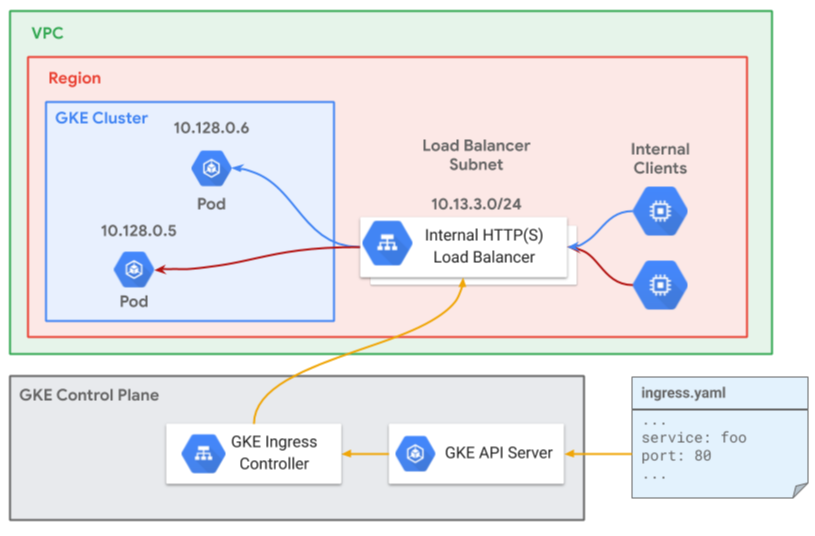
Here's how the internal Application Load Balancer works:
- A client makes a connection to the IP address and port of the load balancer's forwarding rule.
- A proxy receives and terminates the client's network connection.
- The proxy establishes a connection to the appropriate endpoint (Pod) in a NEG, as determined by the load balancer's URL map and backend services.
Each proxy listens on the IP address and port specified by the corresponding load balancer's forwarding rule. The source IP address of each packet sent from a proxy to an endpoint is the internal IP address assigned to that proxy from the proxy-only subnet.
GKE Ingress controller behavior
Whether or not the GKE Ingress controller processes an Ingress
depends on the value of the kubernetes.io/ingress.class annotation:
kubernetes. value |
ingressClassName value |
GKE Ingress controller behavior |
|---|---|---|
| Not set | Not set | Process the Ingress manifest and create an external Application Load Balancer. |
| Not set | Any value | Takes no action. The Ingress manifest could be processed by a third-party Ingress controller if one has been deployed. |
gce |
Any value. This field is ignored. | Process the Ingress manifest and create an external Application Load Balancer. |
gce-internal |
Any value. This field is ignored. | Process the Ingress manifest and create an internal Application Load Balancer. |
Set to a value other than gce or
gce-internal |
Any value | Takes no action. The Ingress manifest could be processed by a third-party Ingress controller if one has been deployed. |
kubernetes.io/ingress.class annotation deprecation
Although the kubernetes.io/ingress.class annotation is
deprecated in Kubernetes, GKE continues to use this
annotation. You must use this annotation to identify the Ingress class.
When you apply your configuration, you might encounter a deprecation warning.
This warning notes that the annotation is deprecated and instructs you to use
the ingressClassName field instead. You can safely ignore the warning because
GKE Ingress continues to rely exclusively on the
kubernetes.io/ingress.class annotation.
Ingress to Compute Engine resource mappings
The GKE Ingress controller deploys and manages Compute Engine load balancer resources based on the Ingress resources that are deployed in the cluster. The mapping of Compute Engine resources depends on the structure of the Ingress resource.
The following manifest describes an Ingress:
apiVersion: networking.k8s.io/v1
kind: Ingress
metadata:
  name: my-ingress
spec:
  rules:
  - http:
      paths:
      - path: /*
        pathType: ImplementationSpecific
        backend:
          service:
            name: my-products
            port:
              number: 60000
      - path: /discounted
        pathType: ImplementationSpecific
        backend:
          service:
            name: my-discounted-products
            port:
              number: 80
This Ingress manifest instructs GKE to create the following Compute Engine resources:
- A forwarding rule and IP address.
- Compute Engine firewall rules that permit traffic for load balancer health checks and application traffic from Google Front Ends or Envoy proxies.
- A target HTTP proxy and a target HTTPS proxy, if you configured TLS.
- A URL map with a single host rule referencing a single path matcher.
The path matcher has two path rules, one for
/*and another for/discounted. Each path rule maps to a unique backend service. - NEGs which hold a list of Pod IP addresses from each Service as endpoints.
These are created as a result of the
my-discounted-productsandmy-productsServices.
Load balancing methods
GKE supports container-native load balancing and instance groups.
Container-native load balancing
Container-native load balancing is the practice of load balancing
directly to Pod endpoints in GKE. Container-native load balancing
uses Network Endpoint Groups (NEGs) of type
GCE_VM_IP_PORT, where the endpoints are the Pods' IP addresses.
Container-native load balancing is always used for internal GKE Ingress and is optional for external Ingress. The Ingress controller creates the load balancer, including the virtual IP address, forwarding rules, health checks, and firewall rules.
Container-native load balancing supports Pod-based session affinity.
GKE automatically enables container-native load balancing when all of the following conditions are met:
- The cluster is VPC-native.
- The cluster doesn't use a Shared VPC network.
- The cluster doesn't use GKE Network Policy.
- The cluster has
HttpLoadBalancingadd-on enabled. GKE clusters have theHttpLoadBalancingadd-on enabled by default; you must not disable it.
When GKE enables container-native load balancing, Services are
automatically annotated with cloud.google.com/neg: '{"ingress": true}'. This
annotation triggers the creation of a NEG that mirrors the Pods IPs, letting
Compute Engine load balancers communicate directly with Pods.
For clusters where NEGs are not the default, it is still strongly recommended to use container-native load balancing, but it must be enabled explicitly on a per-Service basis.
For more flexibility, you can also create standalone NEGs. In this case, you are responsible for creating and managing all aspects of the load balancer.
Benefits
By using NEGs, container-native load balancing offers more performant and stable networking:
Improved network performance: without container-native load balancing,
traffic travels to the node instance groups, and then relies on iptables rules
configured by
kube-proxy
for routing to the target Pod. With container-native load balancing, traffic is
load balanced directly to the Pods, bypassing the need to route through the VM
IP and kube-proxy networking on the node. This flow eliminates extra network hops, and improves
latency and throughput.
Enhanced Health Checks: Pod readiness gates are implemented to determine Pod health from the load balancer's perspective, rather than relying solely on in-cluster health probes. This critical feature makes the load balancer aware of Pod lifecycle events (startup, loss, etc.), and improves traffic stability. To learn more about how Pod readiness gates are used to determine Pod health, see Pod readiness.
Increased visibility: with container-native load balancing, you have visibility into the latency from the Application Load Balancer directly to each Pod. Because latency is no longer aggregated at the node IP level, troubleshooting your Services at the NEG-level becomes easier.
Support for Cloud Service Mesh: the NEG data model is required to use Cloud Service Mesh, Google Cloud's fully managed traffic control plane for service mesh.
Limitations of container-native load balancers
Container-native load balancers through Ingress on GKE have the following limitations:
- Container-native load balancers don't support regional external passthrough Network Load Balancers.
- You must not manually change or update the configuration of the Application Load Balancer that GKE creates. Any changes that you make are overwritten by GKE.
Pricing for container-native load balancers
You are charged for the Application Load Balancer provisioned by the Ingress that you create in this guide. For load balancer pricing information, refer to Load balancing and forwarding rules on the Cloud Load Balancing pricing page.
Instance groups
When using instance groups, Compute Engine load balancers send traffic to VM IP addresses as backends. When running containers on VMs, in which containers share the same host interface, this introduces the following limitations:
- It incurs two hops of load balancing - one hop from the load balancer to the
VM
NodePortand another hop through kube-proxy routing to the Pod IP addresses (which may reside on a different VM). - Additional hops add latency and make the traffic path more complex.
- The Compute Engine load balancer has no direct visibility to Pods resulting in suboptimal traffic balancing.
- Environmental events like VM or Pod loss are more likely to cause intermittent traffic loss due to the double traffic hop.
External Ingress and routes-based clusters
If you use routes-based clusters with external Ingress, the
GKE Ingress controller cannot use container-native load balancing
using GCE_VM_IP_PORT network endpoint groups (NEGs). Instead, the Ingress
controller uses unmanaged instance group backends that include all nodes in all
node pools. If these unmanaged instance groups are also used by LoadBalancer
Services, it can cause issues related to the
Single load-balanced instance group limitation.
Some older external Ingress objects created in VPC-native
clusters might use instance group backends on the backend services of each
external Application Load Balancer they create. This is not relevant to internal Ingress because
internal Ingress resources always use GCE_VM_IP_PORT NEGs and require
VPC-native clusters.
To learn how to troubleshoot 502 errors with external Ingress, see External Ingress produces HTTP 502 errors.
Limitations of the GKE Ingress controller
GKE Ingress does not support certificates managed by Certificate Manager. To use certificates managed by Certificate Manager, use Gateway API.
In clusters using NEGs, ingress reconciliation time may be affected by the number of ingresses. For example, a cluster with 20 ingresses, each containing 20 distinct NEG backends, may result in a latency of more than 30 minutes for an ingress change to be reconciled. This especially impacts regional clusters due to the increased number of NEGs needed.
Quotas for URL maps apply.
If you're not using NEGs with the GKE ingress controller then GKE clusters have a limit of 1,000 nodes. When services are deployed with NEGs, there is no GKE node limit. Any non-NEG Services exposed through Ingress don't function correctly on clusters that have more than 1,000 nodes.
For the GKE Ingress controller to use your
readinessProbesas health checks, the Pods for an Ingress must exist at the time of Ingress creation. If your replicas are scaled to 0, the default health check applies. For more information, see this GitHub issue comment about health checks.Changes to a Pod's
readinessProbedon't affect the Ingress after it is created.An external Application Load Balancer terminates TLS in locations that are distributed globally, to minimize latency between clients and the load balancer. If you require geographic control over where TLS is terminated, you should use a custom ingress controller exposed through a GKE Service of type
LoadBalancerinstead, and terminate TLS on backends that are located in regions appropriate to your needs.Combining multiple Ingress resources into a single Google Cloud load balancer is not supported.
You must turn off mutual TLS on your application because it is not supported for external Application Load Balancers.
Ingress can only expose HTTP ports
80and443for its frontend.
What's next
- Learn about GKE Networking Recipes
- Learn more about load balancing in Google Cloud.
- Read an overview of networking in GKE.
- Learn how to configure Ingress for internal Application Load Balancers.
- Learn how to configure Ingress for external Application Load Balancers.