

A context set is a collection of guidance that helps tools such as QueryData generate accurate Graph Query Language (GQL) queries for the property graph in your Spanner database. QueryData reads your property graph schema directly from the database. A context set adds what the schema doesn't capture: the meaning of your business terms, verified queries for the questions that your users ask often, and how users refer to the values that are stored in your graph. You don't need to redefine your graph schema in a context set.
The following databases are supported by QueryData:
- AlloyDB for PostgreSQL
- Cloud SQL for MySQL
- Cloud SQL for PostgreSQL
- Spanner (including Spanner Graph)
- Firestore with MongoDB compatibility
To use context sets with relational Spanner tables rather than Spanner Graph, see Context sets overview for Spanner.
You define context in a JSON file that contains three types of objects: query templates, query facets, and value searches. You can author this file with the help of the context engineering agent, and then upload it to a context set that you create in Spanner Studio. QueryData uses the context set when a QueryData request references it in the agent_context_reference.context_set_id field.
You can create context sets in the us-central1, us-east1, europe-west4, and asia-southeast1 regions. The region of a context set doesn't need to match the location that you use in QueryData requests, such as locations/global.
The examples in this document use the FinGraph property graph schema (Person and Account nodes connected by Owns and Transfers edges). To set up the FinGraph property graph in your Spanner database and insert sample data, see Set up and query Spanner Graph.
How QueryData uses a context set
A context set can contain three types of context. Each type solves a different problem, and QueryData can use them independently or together:
| Context type | What you provide | When to use it | How QueryData uses it | FinGraph example |
|---|---|---|---|---|
| Query template | A complete, verified GQL query for one type of question, with ? placeholders for the values that change. |
Users ask the same question repeatedly with different parameter values, especially when the query is complex to generate (such as a multi-hop path pattern). | Reuses the sql query directly for an exact match, or substitutes parameters into parameterized_sql when the question matches the template. |
"Did any money sent from account 7 come back to it within 60 days?" |
| Query facet | A reusable GQL clause, such as a MATCH pattern or a WHERE condition, that defines a business term or condition. |
One reusable condition or pattern appears inside many different questions. | Incorporates the defined GQL clause when generating a new GQL query. | A high-risk transfer is a transfer of 200 or more to a blocked account. |
| Value search | A query that finds stored property values that match a value phrase in the user's question. | Users refer to values by names or spellings that differ from how they're stored in the graph. | Runs the lookup query with the value phrase before generating the GQL query, and then filters on the resolved stored value and property. | "rainy day" refers to Rainy Day Fund in Account.nick_name. |
The following diagram shows how QueryData processes a question using a context set:
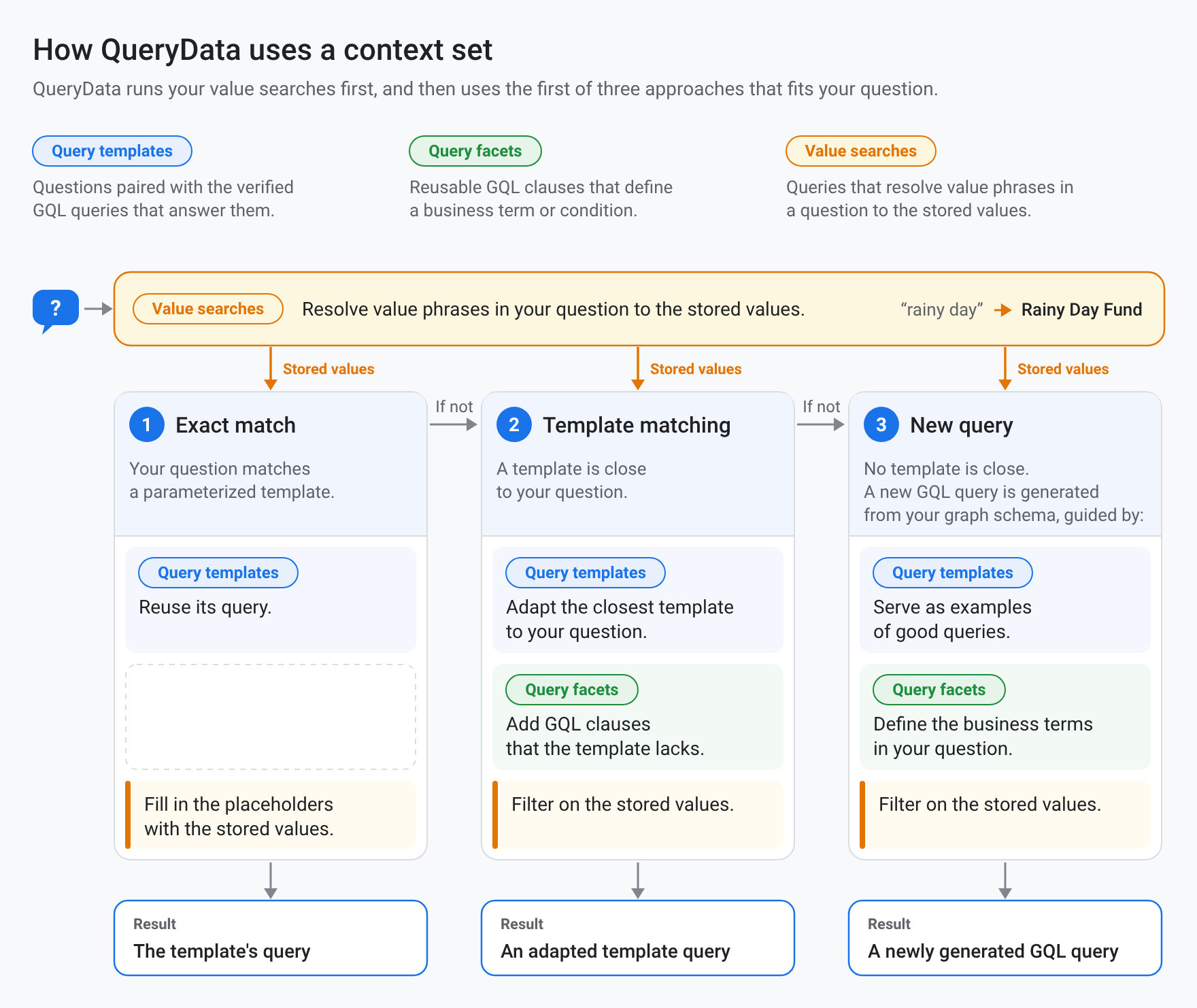
As the diagram shows, when QueryData receives a question, it uses your context set in the following order:
- Retrieve relevant context. QueryData retrieves the templates, facets, and value searches that are most similar to the question.
- Run value searches. For each value phrase in the question, such as a name or a nickname, QueryData runs your value searches to find the matching stored values. Value searches don't run for numbers, dates, times, or currency amounts.
- Match against query templates. If the question matches a template, QueryData uses the template's verified GQL query. For an exact match with
nl_query, QueryData runs thesqlquery directly. For a match with a parameterized template, QueryData replaces the?placeholders inparameterized_sqlwith the values from the question and runs the resulting query. - Generate a new GQL query. Otherwise, QueryData generates a new GQL query from your graph schema. It applies the relevant facets as business rules, uses the relevant templates as examples, and uses the stored values that the value searches found.
Context set file format
A context set file is a JSON object with three array fields (templates, facets, and value_searches) for the context items described in the following sections. An empty context set file has the following structure:
{
  "templates": [],
  "facets": [],
  "value_searches": []
}
Use any combination of these fields and omit the ones that you don't use. A good starting point for Spanner Graph is to create a template for each multi-hop or time-bounded question that requires a specific query structure, a facet for each business term that appears across multiple questions, and a value search for each text property that users refer to by name (such as names, nicknames, or countries).
When you edit a context set file, keep the following rules in mind:
- Single-line query strings. The values of
sql,parameterized_sql,sql_snippet,parameterized_sql_snippet,query, andnl_queryare JSON strings, so each query is written on one line. Inside a query, use single quotation marks (') for string literals, or escape double quotation marks as\". - GQL in
sqlfields. Some field names containsqlbecause the format is shared by all databases that QueryData supports. For Spanner Graph, provide GQL queries or clauses insql,parameterized_sql,sql_snippet, andparameterized_sql_snippet. - Exact field names. Field names must match the names in this document exactly. Fields with unrecognized names are ignored without an error.
Query templates
A template pairs a question that your users ask with the verified GQL query that answers it. Use templates for questions that users ask repeatedly, especially when the query is complex to generate (such as a multi-hop path pattern with a time condition).
Template example
With the following template in your context set file, QueryData can answer questions that share the same structure, such as "Did any money sent from account 7 come back to it within 60 days?" or "Did any money sent from account 16 come back to it within 30 days?":
{
  "templates": [
    {
      "nl_query": "Did any money sent from account 7 come back to it within 60 days?",
      "sql": "GRAPH FinGraph MATCH TRAIL (src:Account {id: 7})-[sent:Transfers]->(:Account)-[:Transfers]->{0,2}(:Account)-[returned:Transfers]->(src) WHERE returned.create_time > sent.create_time AND TIMESTAMP_DIFF(returned.create_time, sent.create_time, DAY) <= 60 RETURN sent.amount AS amount_sent, returned.amount AS amount_returned, TIMESTAMP_DIFF(returned.create_time, sent.create_time, DAY) AS days_to_return",
      "intent": "Find transfer loops of two to four transfers that start and end at account 7, where the last transfer happens within 60 days after the first transfer.",
      "manifest": "Find transfer loops of two to four transfers that start and end at a given account, where the last transfer happens within a given number of days after the first transfer.",
      "parameterized": {
        "parameterized_intent": "Find transfer loops of two to four transfers that start and end at account ?, where the last transfer happens within ? days after the first transfer.",
        "parameterized_sql": "GRAPH FinGraph MATCH TRAIL (src:Account {id: ?})-[sent:Transfers]->(:Account)-[:Transfers]->{0,2}(:Account)-[returned:Transfers]->(src) WHERE returned.create_time > sent.create_time AND TIMESTAMP_DIFF(returned.create_time, sent.create_time, DAY) <= ? RETURN sent.amount AS amount_sent, returned.amount AS amount_returned, TIMESTAMP_DIFF(returned.create_time, sent.create_time, DAY) AS days_to_return"
      }
    }
  ]
}
When a user asks, "Did any money sent from account 7 come back to it within 60 days?", QueryData matches the question to the template (or, for a question with different parameter values such as account 16 and 30 days, replaces the two ? placeholders in parameterized_sql) and runs the following GQL query:
GRAPH FinGraph
MATCH TRAIL
  (src:Account {id: 7})-[sent:Transfers]->(:Account)
    -[:Transfers]->{0,2}(:Account)-[returned:Transfers]->(src)
WHERE returned.create_time > sent.create_time
  AND TIMESTAMP_DIFF(returned.create_time, sent.create_time, DAY) <= 60
RETURN
  sent.amount AS amount_sent,
  returned.amount AS amount_returned,
  TIMESTAMP_DIFF(returned.create_time, sent.create_time, DAY) AS days_to_return
Using the FinGraph sample data, this query returns results similar to the following:
+-------------+-----------------+----------------+
| amount_sent | amount_returned | days_to_return |
+-------------+-----------------+----------------+
| 300         | 500             | 36             |
+-------------+-----------------+----------------+
Template fields
A template object contains the following fields:
| Field | Requirement | Description |
|---|---|---|
nl_query |
Required | An example question, phrased the way that a user asks it (for example, "Did any money sent from account 7 come back to it within 60 days?"). |
sql |
Required | The complete GQL query that answers nl_query. Start the query with GRAPH followed by the name of a property graph that you specify in the graph_ids field of your QueryData requests, such as GRAPH FinGraph. |
intent |
Required | A precise description of the results that sql returns. A user's question often leaves conditions unstated, and intent states them (for example, specifying that money "came back" means "transfer loops of two to four transfers that start and end at account 7, where the last transfer happens within 60 days after the first transfer"). |
manifest |
Required | A generalized version of intent that describes the kind of question the template answers, without the specific values (for example, "account 7" becomes "a given account", and "60 days" becomes "a given number of days"). QueryData retrieves templates by comparing the question with the manifest. |
parameterized.parameterized_intent |
Optional | The intent, with each specific value replaced by a ? placeholder. |
parameterized.parameterized_sql |
Optional | The sql query, with each specific value replaced by a ? placeholder in the same order as parameterized_intent. When a question matches the template, QueryData replaces the placeholders with the values from the question and runs this query. |
If you write the context set file by hand, fill in all four required fields; the upload fails with an INVALID_ARGUMENT error if any of them is empty. The context engineering agent generates intent, manifest, and parameterized from your nl_query and sql pairs. Review the generated values, and edit them if a value that should stay fixed is replaced by a placeholder, or if a value that should vary isn't replaced.
Query facets
A facet is a reusable GQL clause, such as a MATCH pattern or a WHERE condition, that defines a business term or condition. Unlike a template, a facet is a partial query rather than a complete query, so it doesn't start with a GRAPH clause and isn't tied to one question. When QueryData generates a new query, it applies the facets that are relevant to the question.
Facet example
In the following facets configuration, the first facet captures the pattern for transfers that involve a blocked account, and the second defines a high-risk transfer as a transfer of 200 or more to a blocked account:
{
  "facets": [
    {
      "sql_snippet": "MATCH (account:Account)-[transfer:Transfers]-(:Account {is_blocked: true})",
      "intent": "transfers involving a blocked account, in either direction"
    },
    {
      "sql_snippet": "MATCH (account:Account)-[transfer:Transfers]->(blocked_account:Account {is_blocked: true}) WHERE transfer.amount >= 200",
      "intent": "high-risk transfers, which are transfers of 200 or more to a blocked account",
      "manifest": "high-risk transfers, which are transfers of a given amount or more to a blocked account",
      "parameterized": {
        "parameterized_intent": "high-risk transfers, which are transfers of ? or more to a blocked account",
        "parameterized_sql_snippet": "MATCH (account:Account)-[transfer:Transfers]->(blocked_account:Account {is_blocked: true}) WHERE transfer.amount >= ?"
      }
    }
  ]
}
When a user asks, "How many high-risk transfers did Alex make?", no template matches the question. QueryData generates a new GQL query and incorporates the second facet to count transfers of 200 or more to a blocked account:
GRAPH `FinGraph`
MATCH (p:`Person` {`name`: "Alex"})-[:`Owns`]->(src:`Account`)
      -[t:`Transfers`]->(dst:`Account` {`is_blocked`: true})
FILTER t.`amount` >= 200.0
RETURN COUNT(*) AS high_risk_transfer_count
Using the FinGraph sample data, this query counts the 300 transfer from account 7 to blocked account 16 and returns results similar to the following:
+--------------------------+
| high_risk_transfer_count |
+--------------------------+
| 1                        |
+--------------------------+
Facet fields
A facet object uses the same structure as a query template, with the following differences:
- No
nl_queryfield. Facets don't have annl_queryfield, because a facet describes a condition that appears inside many questions rather than a single question. sql_snippetinstead ofsql(Required). A GQL clause, such as aMATCHpattern or aWHEREcondition. To avoid ambiguity, use explicit node and edge labels and variable names, such as(account:Account), so that QueryData can combine the GQL clause with the rest of the query.intent(Required),manifest(Optional), andparameterized(Optional). Define the business term or condition in the same way as template fields, except that QueryData matches questions against theintent(so make it descriptive, andmanifestis optional), andparameterizedcontainsparameterized_intentandparameterized_sql_snippet.
Value search queries
A value search is a query, not a lookup table. Before QueryData generates a GQL query, it runs your value searches once for each value phrase in the question (a text value such as a name, a nickname, or a country), substituting the phrase for $value. It then uses the closest stored values that the queries return, together with the property they come from, when it writes the GQL query. Value searches don't run for numbers, dates, times, or currency amounts.
Value search example
For example, in FinGraph, account 20 has the nickname Rainy Day Fund, and the Person.country property stores Czech_Republic with an underscore. The following value searches map value phrases like "rainy day" to Rainy Day Fund in Account.nick_name, and "Czech Republic" to Czech_Republic in Person.country:
{
  "value_searches": [
    {
      "query": "SELECT value, columns, concept_type, distance, context FROM GRAPH_TABLE(FinGraph MATCH (a:Account) WHERE STRPOS(LOWER(a.nick_name), LOWER($value)) > 0 RETURN DISTINCT a.nick_name AS value, 'FinGraph.Account.nick_name' AS columns, 'Account nickname' AS concept_type, 1 - LENGTH($value) / LENGTH(a.nick_name) AS distance, JSON '{}' AS context)",
      "concept_type": "Account nickname",
      "description": "Case-insensitive partial match on account nicknames. Distance is 0 for an exact match and grows as the phrase covers less of the nickname."
    },
    {
      "query": "SELECT value, columns, concept_type, distance, context FROM GRAPH_TABLE(FinGraph MATCH (p:Person) WHERE LOWER(REPLACE(p.country, '_', ' ')) = LOWER(REPLACE($value, '_', ' ')) RETURN DISTINCT p.country AS value, 'FinGraph.Person.country' AS columns, 'Person country' AS concept_type, 0 AS distance, JSON '{}' AS context)",
      "concept_type": "Person country",
      "description": "Match for country names on Person nodes that ignores case and treats underscores as spaces"
    }
  ]
}
The Account nickname query, formatted for readability, is as follows:
SELECT value, columns, concept_type, distance, context
FROM GRAPH_TABLE(
  FinGraph
  MATCH (a:Account)
  WHERE STRPOS(LOWER(a.nick_name), LOWER($value)) > 0
  RETURN DISTINCT
    a.nick_name AS value,
    'FinGraph.Account.nick_name' AS columns,
    'Account nickname' AS concept_type,
    1 - LENGTH($value) / LENGTH(a.nick_name) AS distance,
    JSON '{}' AS context
)
When a user asks, "Who owns the rainy day account?", QueryData runs the value searches with $value set to 'rainy day'. The Account nickname search calculates distance from the length of the phrase relative to the length of the stored nickname (whereas a broader phrase like "fund" matches Vacation Fund at about 0.69 and Rainy Day Fund at about 0.71, and an exact match like "rainy day fund" has a distance of 0), and returns results similar to the following:
+----------------+----------------------------+------------------+--------------------+---------+
| value          | columns                    | concept_type     | distance           | context |
+----------------+----------------------------+------------------+--------------------+---------+
| Rainy Day Fund | FinGraph.Account.nick_name | Account nickname | 0.3571428571428571 | {}      |
+----------------+----------------------------+------------------+--------------------+---------+
QueryData then generates a GQL query that filters on {nick_name: 'Rainy Day Fund'} instead of {nick_name: 'rainy day'}:
GRAPH `FinGraph`
MATCH (p:`Person`)-[:`Owns`]->(a:`Account` {`nick_name`: 'Rainy Day Fund'})
RETURN DISTINCT SAFE_TO_JSON(p) AS person
Using the FinGraph sample data, this query returns the Person node for Dana in JSON format, similar to the following:
{
  "element_definition_name": "Person",
  "identifier": "kQKRBA==",
  "kind": "node",
  "labels": ["Person"],
  "properties": {
    "birthday": "1980-10-31T08:00:00Z",
    "city": "Moravia",
    "country": "Czech_Republic",
    "id": 2,
    "name": "Dana"
  }
}
Value search fields and required SELECT columns
A value search object contains the following fields:
| Field | Requirement | Description |
|---|---|---|
query |
Required | A GoogleSQL query that finds the stored values that match a value phrase. Use $value where the phrase goes. QueryData replaces $value with the phrase as a quoted string literal, so don't enclose $value in quotation marks. You can use $value more than once. Write the query as a SELECT statement over a GRAPH_TABLE operator that matches a node or edge label, compares a property with $value, and returns the five columns in the following table. |
concept_type |
Required | A label for the kind of value that the search finds, such as Account nickname or Person country. |
description |
Optional | A description of how the search matches values. |
Every value search query must return the following five columns in this order:
| Output column | Description | FinGraph example |
|---|---|---|
value |
The matched property value, as it's stored in the database. | a.nick_name AS value ('Rainy Day Fund') |
columns |
The location of the property, in the form GRAPH_NAME.LABEL.PROPERTY. QueryData passes this value to the model as the location of the value, so use one consistent form. |
'FinGraph.Account.nick_name' AS columns |
concept_type |
A label for the kind of value. Use the same string as the concept_type field of the value search: the field labels the search, and the column labels each match. |
'Account nickname' AS concept_type |
distance |
How far the stored value is from the phrase, on a scale that you define, where 0 is an exact match. By convention, use values from 0 to 1. QueryData sorts the candidates from all value searches by distance and keeps the 10 closest. It doesn't apply a threshold, so exclude weak matches in the query itself, such as by adding WHERE distance < 1.0 to the outer SELECT statement. |
1 - LENGTH($value) / LENGTH(a.nick_name) AS distance |
context |
A JSON value. QueryData doesn't use this column, but the column must be present with the same type in every value search. Return JSON '{}'. |
JSON '{}' AS context |
How QueryData runs value searches
QueryData doesn't run value searches one at a time. For each value phrase in a question, it substitutes the phrase for $value in every value search, appends ORDER BY distance LIMIT 10 to each query, combines the queries with UNION ALL, and runs the result as a single GoogleSQL statement that keeps the 10 closest matches. The combined query is why value searches are written as SELECT statements over GRAPH_TABLE rather than as standalone GQL statements: GRAPH_TABLE runs your GQL MATCH pattern as a table, and UNION ALL and the shared ORDER BY distance are SQL constructs.
This execution model has the following consequences for the queries that you write:
- No outer
ORDER BYorLIMIT. Don't addORDER BYorLIMITto the outerSELECTstatement. QueryData appends them, and a duplicate clause makes the statement fail. - Compatible column types. Every value search in the file must return the same five columns, in the same order and with compatible types. For example, return
JSON '{}'forcontextin all of them, not'{}'in some. - Required
$valueplaceholder. The query must contain$valueat least once; the upload fails otherwise. - Text values only. Value searches run only for text values. QueryData doesn't run them for numbers, dates, times, or currency amounts.
Limitations
Context sets for Spanner Graph have the following limitations:
- Context sets for databases support query templates, query facets, and value searches only.
- Context sets for databases are used only by the
QueryDataendpoint in the Conversational Analytics API.
What's next
- Learn how to create or delete a context set in Spanner Studio.
- Learn how to build context sets using the context engineering agent.