


コールバックは、Python コードを使用して特定のエージェントの実行プロセスにフックする強力なメカニズムを提供する高度な機能です。コールバックを使用すると、特定の事前定義された時点でエージェントの動作を観察、カスタマイズ、制御できます。
さまざまなコールバック タイプを利用できます。各コールバック タイプは、会話ターンの特定の時点で実行されます。これらのタイプについては、以下のセクションで説明します。
Python ランタイムとクラス
Python コールバック コードでは、コードの作成に役立つ特定のクラスと関数にアクセスできます。詳細については、Python ランタイム リファレンスをご覧ください。
サンドボックスとネットワークの制限
Python コールバック コードはサンドボックス環境内で実行されます。この環境には次の制限があります。
- プライベート ネットワーク アクセス(PNA)なし: Service Directory が構成されていても、コールバックはプライベート IP アドレスに直接アクセスしたり、プライベート DNS ドメインを解決したりできません。プライベート ネットワーク内のリソースにアクセスする必要がある場合は、代わりにプライベート ネットワーク アクセスをサポートするツールタイプ(OpenAPI ツールや MCP ツールなど)を使用する必要があります。
- 公共のインターネット アクセス: コールバックは、インターネットで一般公開されているエンドポイントにのみアクセスできます。
コールバックの種類
コールバックのタイプに応じて、プライマリ コールバック関数は特定の名前である必要があります。これにより、コールバック コード内で任意の名前のヘルパー関数を定義できます。
各タイプのコールバックは、会話ターンの特定の時点で実行されます。
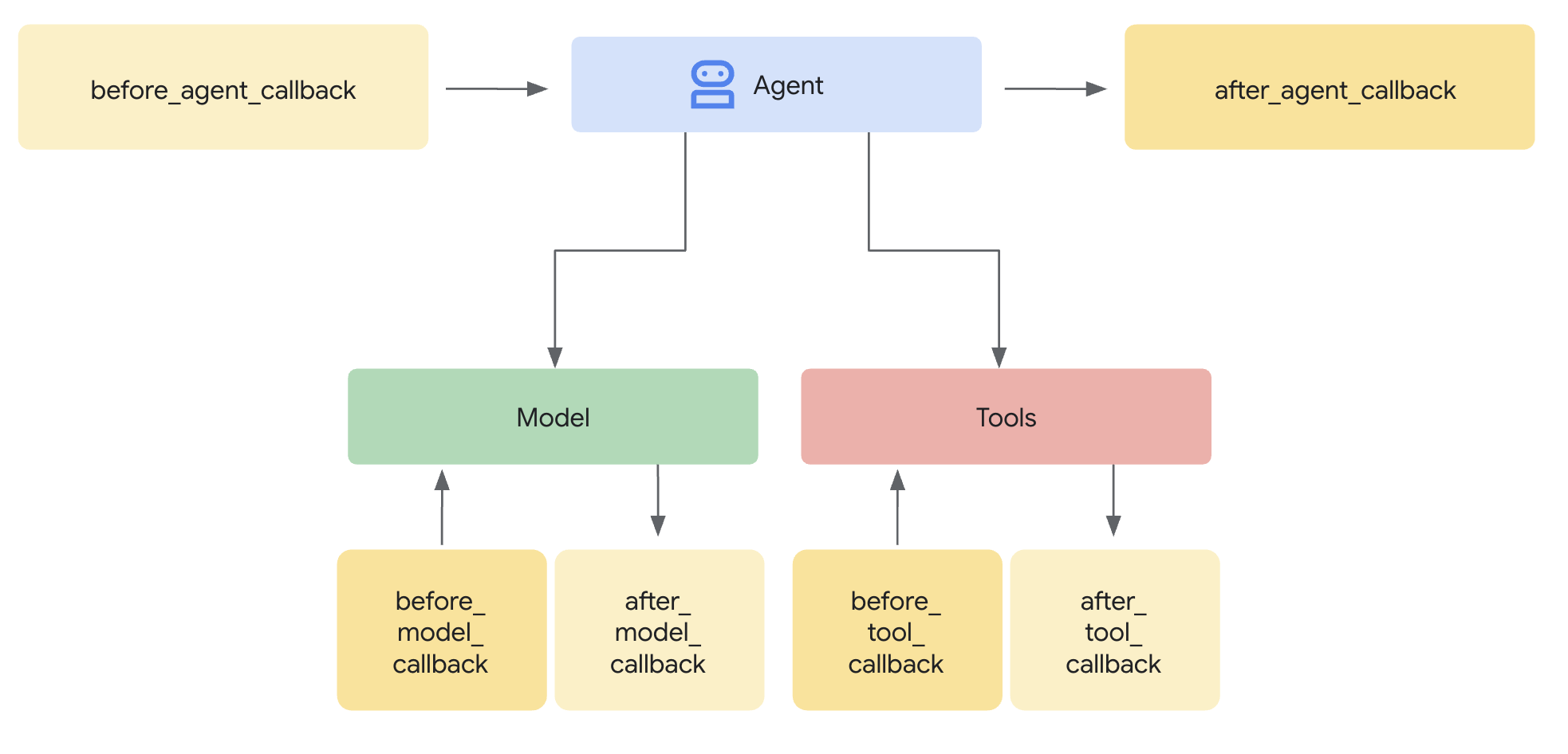
特定のタイプのコールバックを複数定義すると、定義した順序で実行されます。
以下のセクションでは、各コールバック タイプについて説明します。各タイプについて、次の情報が説明されています。
| X | X |
|---|---|
| 名前 | 必須のコールバック関数名 |
| 実行 | 会話ターンの実行ポイント。 |
| 目的 | コールバックを使用する便利なシナリオ。 |
| 引数 | 関数の入力引数。 |
| 返却 | 関数の戻り値。 |
| ADK コールバック | 対応する ADK コールバックのドキュメントへのリンク。 |
エージェントの開始前(before_agent_callback)
| X | X |
|---|---|
| 名前 | before_agent_callback |
| 実行 | エージェントが呼び出される前に呼び出されます。 |
| 目的 | このコールバックは、エージェントに必要なリソースや状態を設定する場合、セッション状態の検証チェックを行う場合、エージェントの呼び出しを回避する場合に役立ちます。 |
| 引数 | CallbackContext |
| 返却 | Content(省略可): 設定されている場合、エージェントは呼び出されず、指定されたレスポンスが使用されます。 |
| ADK コールバック | before agent callback |
コードサンプル:
import random

def before_agent_callback(
  callback_context: CallbackContext
) -> Optional[Content]:
  username = callback_context.variables.get("username", None)
  if not username:
    # default user
    final_name = "Default Name"
  else:
    # add a random integer to the username
    final_name = f"{username} {random.randint(1,10)}"
  # update the username variable
  callback_context.variables["username"] = final_name
エージェントの終了後(after_agent_callback)
| X | X |
|---|---|
| 名前 | after_agent_callback |
| 実行 | エージェントの完了後に呼び出されます。 |
| 目的 | このコールバックは、クリーンアップ タスク、実行後の検証、最終状態の変更、エージェントの回答の更新に役立ちます。 |
| 引数 | CallbackContext |
| 返却 | コンテンツ(省略可): 設定すると、エージェントの出力が指定された出力に置き換えられます。 |
| ADK コールバック | エージェント コールバック後 |
コードサンプル:
def after_agent_callback(
  callback_context: CallbackContext
) -> Optional[Content]:
  if callback_context.agent_name == "Routing Agent":
    counter = callback_context.variables.get("counter", 0)
    counter += 1
    # increment the invoked counter for this agent
    callback_context.variables["counter"] = int(counter)
LLM 呼び出し前(before_model_callback)
| X | X |
|---|---|
| 名前 | before_model_callback |
| 実行 | モデル リクエストの前に呼び出されます。 |
| 目的 | このコールバックは、モデル リクエストの検査や変更を行う場合、モデルの使用を回避する場合に役立ちます。 |
| 引数 | CallbackContext、LlmRequest |
| 返却 | LlmResponse: 設定されている場合、モデル呼び出しはスキップされ、レスポンスはモデルから返されたかのように使用されます。 |
| ADK コールバック | モデル前コールバック |
コードサンプル:
def before_model_callback(
  callback_context: CallbackContext,
  llm_request: LlmRequest
) -> Optional[LlmResponse]:
  """
  This callback executes *before* a request is sent to the LLM.

  By returning an `LlmResponse` object, we are intercepting the call to the
  LLM. The LLM will *not* be called, and the framework will instead use the
  `LlmResponse` we provide as if it came from the model.

  This is the core mechanism for implementing input guardrails, prompt
  validation, or serving responses from a cache. Here, we force the agent to
  call a function instead of thinking with the LLM.
  """
  # Modify the shared session state.
  callback_context.variables['foo'] = 'baz'

  # Skip the LLM call and return a custom response telling the agent to
  # execute a specific function.
  return LlmResponse(
    content=Content(parts=[Part(
      function_call=FunctionCall(
        name="function_name", args={"arg_name": "arg_value"}))],
      role="model"))
LLM 呼び出し後(after_model_callback)
| X | X |
|---|---|
| 名前 | after_model_callback |
| 実行 | モデル レスポンスの受信後に呼び出されます。 |
| 目的 | このコールバックは、モデルの回答を再フォーマットする場合、モデルが生成した機密情報を検閲する場合、モデルが生成した構造化データを変数で使用するために解析する場合、モデルのエラー処理を行う場合に役立ちます。 |
| 引数 | CallbackContext、LlmResponse |
| 返却 | LlmResponse: 設定されている場合、モデルのレスポンスが指定されたレスポンスに置き換えられます。 |
| ADK コールバック | モデル呼び出し後コールバック |
コードサンプル:
def after_model_callback(
  callback_context: CallbackContext,
  llm_response: LlmResponse
) -> Optional[LlmResponse]:
  """
  This callback executes *after* a response has been received from the LLM,
  but before the agent processes it.

  The `llm_response` parameter contains the actual data from the LLM.
  By returning `None`, we are approving this response and allowing the agent
  to use it as-is.

  If we returned a new `LlmResponse` object, it would *replace* the original,
  which is useful for redacting sensitive information, enforcing output
  formatting, or adding disclaimers.
  """
  # Returning None allows the LLM's actual response to be used.
  return None
ツール呼び出し前(before_tool_callback)
| X | X |
|---|---|
| 名前 | before_tool_callback |
| 実行 | ツール呼び出しの前に呼び出されます。 |
| 目的 | このコールバックは、ツールに渡される引数の検査と変更、ツール実行前の認可チェック、ツールレベルのキャッシュ保存の実装に役立ちます。 |
| 引数 | Tool、Dict[str,Any]: ツールの入力、CallbackContext |
| 返却 | Dict[str,Any] : 設定されている場合、ツールの実行はスキップされ、この出力がモデルに提供されます。 |
| ADK コールバック | ツール呼び出し前コールバック |
コードサンプル:
def before_tool_callback(
  tool: Tool,
  input: dict[str, Any],
  callback_context: CallbackContext
) -> Optional[dict[str, Any]]:
  """
  This callback executes *before* a specific tool is called by the agent.

  Here, we modify the input arguments intended for the tool and then return
  a dictionary. By returning a dictionary instead of `None`, we are
  overriding the default behavior. The actual tool function will *not* be
  executed. Instead, the dictionary we return will be treated as the
  llm.tool's result and passed back to the LLM for the next step.

  This is ideal for validating tool inputs, applying policies, or returning
  mocked/cached data for testing.
  """
  # Modify the shared session state.
  callback_context.variables['foo'] = 'baz'

  # Modify the arguments for the tool call in-place.
  input['input_arg'] = 'updated_val1'
  input['additional_arg'] = 'updated_val2'

  # Override the tool call and return a mocked result.
  return {"result": "ok"}
ツール呼び出し後(after_tool_callback)
| X | X |
|---|---|
| 名前 | after_tool_callback |
| 実行 | ツールの完了後に呼び出されます。 |
| 目的 | このコールバックは、ツール レスポンスをモデルに送り返す前に検査や変更を行う場合、ツール結果を後処理する場合、ツール レスポンスの特定部分を変数に保存する場合に役立ちます。 |
| 引数 | Tool, Dict[str,Any]: ツールの入力、CallbackContext, Dict[str,Any]: ツールのレスポンス |
| 返却 | Dict[str,Any]: 設定されている場合、モデルに提供されるツール レスポンスをオーバーライドします。 |
| ADK コールバック | ツール呼び出し後 |
コードサンプル:
# Previous tool was named `get_user_info`
# Previous tool returned the payload:
# {"username": "Patrick", "fave_food": ["pizza"]}

def after_tool_callback(
  tool: Tool,
  input: dict[str, Any],
  callback_context: CallbackContext,
  tool_response: dict
) -> Optional[dict]:

  if tool.name == "get_user_info":
    tool_response["username"] = "Gary"
    tool_response["pet"] = "dog"

    # Override tool response
    return tool_response
チャネルとモダリティ固有のアクション
Python ツールやコールバックを実装する場合、通常はすべてのモダリティとチャネルで同じ動作をさせるのが最適ですが、チャネル固有またはモダリティ固有の動作が望ましい場合もあります。_session グローバル変数を使用して、会話のチャネルまたはモダリティを確認できます。
コールバックを作成する
コールバックを作成するには:
- エージェントの設定を開きます。
- [コードを追加] をクリックします。
- コールバックのタイプを選択します。
- Python コードを提供する。
- [保存] をクリックします。
カスタム ペイロード(custom_payloads)
カスタム ペイロードを使用すると、エージェントのレスポンスに補足的な非テキストの構造化データ(通常は JSON 形式)を含めることができます。このペイロードは、エージェントが外部システムやクライアント アプリケーションとやり取りする際に、そのやり取りを指示または補強するうえで重要な役割を果たします。
ペイロード値は大規模言語モデル(LLM)には表示されません。最終的なレスポンスの生成にのみ使用されます。カスタム ペイロードは、コールバック(特に before_model_callback または after_model_callback)を使用して生成および設定されます。
カスタム ペイロードは、一般的にリッチで構造化されたインタラクションを可能にすることを中心に、いくつかの目的で使用できます。
- Agent Escalation/Handoff: ルーティング手順(ルーティング先の特定のキューなど)を指定して、インタラクションを人間のエージェントに転送するために頻繁に使用されます。
- リッチ コンテンツとクライアントサイド アクション: リッチ ウィジェットやその他のリッチ コンテンツをチャット エクスペリエンスに直接埋め込むことができます。これは、カスタム チャット統合で特に便利です。
- たとえば、コール コンパニオンなどのインターフェースを使用している顧客に対して、画像 URL やクイック返信チップ、オプションを表示する場合などです。
- レスポンスの構成: カスタム ペイロードは、さまざまな方法で返されるように構成できます。
- 明示的なペイロードのみを決定論的に返します。
- ペイロードと LLM によって生成されたテキスト レスポンスを返します。
- 静的テキスト レスポンスを含むペイロードを返す
エージェントのセットアップ
カスタム ペイロードは、コールバックを使用してのみ生成および設定できます。ペイロードは、mime_type が application/json の Blob として設定されます。
Part.from_json(data=payload_string)
after_model_callback のサンプル
これは、追加のカスタム ペイロード レスポンスとともにモデル レスポンスを返す after_model_callback のサンプルです。
import json

def after_model_callback(callback_context: CallbackContext, llm_response: LlmResponse) -> Optional[LlmResponse]:
 """
 Adds a custom payload to every model response which is a text
 """
 if (llm_response.content.parts[0].text is not None):
   # construct payload
   payload_dict = { "custom_payload_key": "custom_payload_value"}
   payload_json_string = json.dumps(payload_dict)

   new_parts = []
   # Keep the origial agent response part, as model only sees text in the historical context.
   new_parts.append(Part(text=llm_response.content.parts[0].text))

   # Append custom payload
   new_parts.append(Part.from_json(data=payload_json_string))

   return LlmResponse(content=Content(parts=new_parts))
before_model_callback のサンプル
これは、特定のツールがトリガーされた後にカスタム ペイロードを追加で返す before_model_callback のサンプルです。
import json

def has_escalate(llm_request: LlmRequest) -> bool:
  for content in llm_request.contents:
    for part in content.parts:
      if part.function_call and part.function_call.name == 'escalate':
        return True
  return False

def before_model_callback(callback_context: CallbackContext, llm_request: LlmRequest) -> Optional[LlmResponse]:
  # checks if `escalate` tool is being called
  if not has_escalate(llm_request):
    return None
  payload_dict = { "escalate": "user ask for escalation"}
  payload_json_string = json.dumps(payload_dict)

  return LlmResponse(content=Content(parts=[Part(text="ESCALATE!!!"), Part.from_json(data=payload_json_string)]))
レスポンスのペイロードをランタイムで検証する
ペイロードは、RunSession と BidiRunSession の両方の payload フィールドの Struct として入力されます。
ペイロード値は LLM に表示されません。