


パイプライン クエリの使用を始める
背景
パイプライン オペレーションは、高度なクエリ機能と複雑な式をサポートする Firestore の新しいクエリ インターフェースを提供します。複雑な変換を実行できるように、min(...)、max(...)、substring(...)、regex_match(...)、array_contains_all(...) などの多くの新しい関数とステージが導入されています。
スタートガイド
クライアント SDK をインストールして初期化するには、次のガイドの手順をご覧ください。
構文
以降のセクションでは、Pipeline オペレーションの構文の概要について説明します。
コンセプト
パイプライン オペレーションでの顕著な違いは、明示的な「ステージ」の順序付けが導入されたことです。これにより、より複雑なクエリを表現できるようになります。ただし、これはステージの順序が暗黙的に決まっていた既存のクエリ インターフェース(Core オペレーションを使用)とは大きく異なります。次の Pipeline オペレーションの例を考えてみましょう。
Node.js
  db.pipeline()
    .collection() // Step 1 (start a query with 'collection' scope)
    .where()      // Step 2 (filter collection)
    .sort()       // Step 3 (order results)
    .limit()      // Step 4 (limit results)

  // Note: Applying a limit before a sort can yield unintended
  // results (as the limit would be applied before sorting).
Web バージョン 9
const pipeline = db.pipeline() // Step 1: Start a query with collection scope .collection("cities") // Step 2: Filter the collection .where(field("population").greaterThan(100000)) // Step 3: Sort the remaining documents .sort(field("name").ascending()) // Step 4: Return the top 10. Note applying the limit earlier in the // pipeline would have unintentional results. .limit(10);
Swift
let pipeline = db.pipeline() // Step 1: Start a query with collection scope .collection("cities") // Step 2: Filter the collection .where(Field("population").greaterThan(100000)) // Step 3: Sort the remaining documents .sort([Field("name").ascending()]) // Step 4: Return the top 10. Note applying the limit earlier in the pipeline would have // unintentional results. .limit(10)
Kotlin
Android
val pipeline = db.pipeline() // Step 1: Start a query with collection scope .collection("cities") // Step 2: Filter the collection .where(field("population").greaterThan(100000)) // Step 3: Sort the remaining documents .sort(field("name").ascending()) // Step 4: Return the top 10. Note applying the limit earlier in the pipeline would have // unintentional results. .limit(10)
Java
Android
Pipeline pipeline = db.pipeline() // Step 1: Start a query with collection scope .collection("cities") // Step 2: Filter the collection .where(field("population").greaterThan(100000)) // Step 3: Sort the remaining documents .sort(field("name").ascending()) // Step 4: Return the top 10. Note applying the limit earlier in the pipeline would have // unintentional results. .limit(10);
Python
from google.cloud.firestore_v1.pipeline_expressions import Field pipeline = ( client.pipeline() .collection("cities") .where(Field.of("population").greater_than(100_000)) .sort(Field.of("name").ascending()) .limit(10) )
Go
pipeline := client.Pipeline(). Collection("cities"). Where(firestore.FieldOf("population").GreaterThan(100000)). Sort(firestore.Orders(firestore.Ascending(firestore.FieldOf("name")))). Limit(10)
初期化
Pipeline オペレーションには、既存の Firestore クエリから派生した非常に使い慣れた構文があります。まず、次のコードを記述してクエリを初期化します。
Node.js
const db = new Firestore({ projectId: '' , databaseId: databaseId'}) db.pipeline()
Java
  Firestore db = FirestoreOptions.newBuilder().build().getService();
  db.pipeline()
構造
パイプライン オペレーションを作成する際に理解しておくべき重要な用語がいくつかあります。それはステージ、式、関数、サブクエリ ラッパーです。
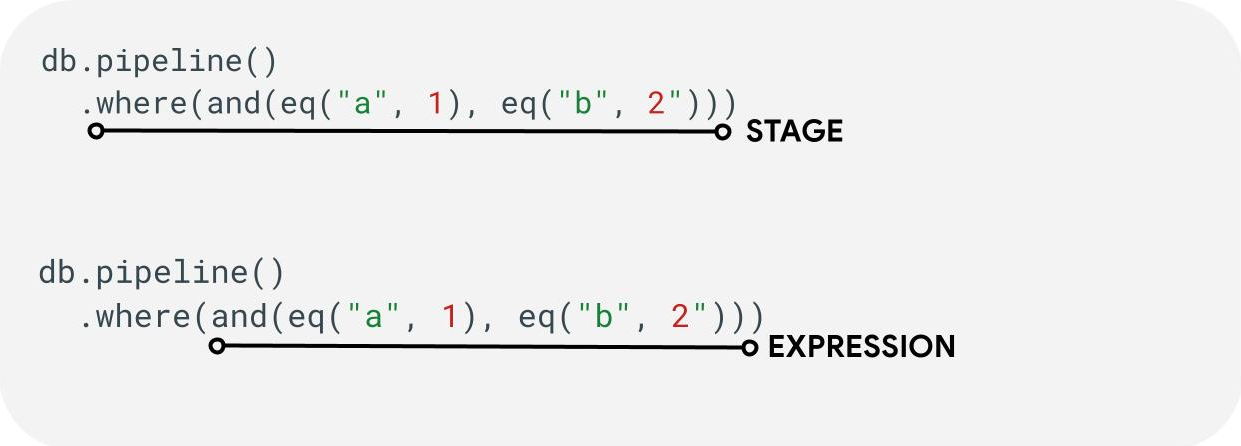
ステージ: パイプラインは 1 つ以上のステージで構成されます。論理的には、これらはクエリの実行に必要な一連の手順(ステージ)を表します。
式: ステージは多くの場合、より複雑なクエリを表現できる式を受け入れます。式は、単一の関数
のように eq("a", 1) 構成された単純なものである場合があります。また、
式をネストして、より複雑な式を表現することもできます。and(eq("a", 1), eq("b", 2)).
サブクエリ ラッパー: array() や scalar() などの関数を使用すると、ネストされたパイプラインをステージ内の式として埋め込むことができます。
フィールド / 定数 / 変数
Pipeline オペレーションは複雑な式をサポートしています。そのため、値がフィールドを表すのか、 定数を表すのか、変数を表すのかを区別することが 重要です。
フィールド はドキュメント内のデータを指し、定数 を使用すると任意の値を式の引数として指定できます。変数 を使用すると、処理されるドキュメントではなくクエリ実行のスコープに設定された一時的な値を定義して使用できます。以下にこれらの
概念の概要を示します。クエリ実行中に
変数を読み書きする方法について詳しくは、let(...)ステージをご覧ください。
| フィールド | 定数 | 変数 | |
|---|---|---|---|
| 目的 | ドキュメントにフィールドをアクセスまたは保存する | 固定値を指定する | パイプラインの実行中に一時的な値を使用する |
| SDK の使用 | field("name") |
constant("val") |
variable("name") |
| スコープ | 現在のドキュメントに対してローカル | グローバル | パイプラインとサブパイプラインに対してグローバル |
| 未定義の参照 | absent と評価される |
なし | ランタイム エラーを生成する |
例:
Node.js
  // Here the two parameters "name" and "toronto" could represent fields or constants.

  db.pipeline()
    .collection("cities")
    .where(eq("name","toronto"))

  // In many cases, it's not necessary to differentiate between the two. In the
  // case of equality, we will implicit treat the first parameter as a field
  // reference and the second as a constant. However if you need to override you
  // can always be explicit with the value types

  db.pipeline()
    .collection("cities")
    .where(eq(Field.of("name"), Constant.of("toronto")))

  // In some cases, being explicit is always required. However, it should be
  // enough to look at the type signature of the expressions to know what
  //parameters can be used with implicit types, and what should be explicitly specified.
Web バージョン 9
const pipeline = db.pipeline() .collection("cities") .where(field("name").equal(constant("Toronto")));
Swift
let pipeline = db.pipeline() .collection("cities") .where(Field("name").equal(Constant("Toronto")))
Kotlin
Android
val pipeline = db.pipeline() .collection("cities") .where(field("name").equal(constant("Toronto")))
Java
Android
Pipeline pipeline = db.pipeline() .collection("cities") .where(field("name").equal(constant("Toronto")));
Python
from google.cloud.firestore_v1.pipeline_expressions import Field, Constant pipeline = ( client.pipeline() .collection("cities") .where(Field.of("name").equal(Constant.of("Toronto"))) )
Go
pipeline := client.Pipeline().Collection("cities"). Where(firestore.FieldOf("name").Equal(firestore.ConstantOf("Toronto")))
ステージ
入力ステージ
入力ステージは、クエリの最初のステージを表します。これはクエリ対象のドキュメントの初期セットを定義します。パイプライン オペレーションの場合、
これは既存のクエリとほぼ同じで、ほとんどのクエリは
collection(...) ステージまたは
collection_group(...) ステージで始まります。新しい入力
ステージは database() と
documents(...) の 2 つです。
database() はデータベース内の
すべての
ドキュメントを返すことができます。documents(...)
はバッチ読み取りと同じように動作します。
Node.js
  // Return all restaurants in San Francisco
  const results = await db.pipeline()
    .collection("cities/sf/restaurants")
    .execute();

  // Return all restaurants
  const results = await db.pipeline()
    .collectionGroup("restaurants")
    .execute();

  // Return all documents across all collections in the database (huge result!)
  const results = await db.pipeline()
    .database()
    .execute();

  // Batch read of 3 documents
  const results = await db.pipeline()
    .documents(
      db.collection("cities").doc("SF"),
      db.collection("cities").doc("DC"),
      db.collection("cities").doc("NY"))
    .execute();
Web バージョン 9
let results; // Return all restaurants in San Francisco results = await execute(db.pipeline().collection("cities/sf/restaurants")); // Return all restaurants results = await execute(db.pipeline().collectionGroup("restaurants")); // Return all documents across all collections in the database (the entire database) results = await execute(db.pipeline().database()); // Batch read of 3 documents results = await execute(db.pipeline().documents([ doc(db, "cities", "SF"), doc(db, "cities", "DC"), doc(db, "cities", "NY") ]));
Swift
var results: Pipeline.Snapshot // Return all restaurants in San Francisco results = try await db.pipeline().collection("cities/sf/restaurants").execute() // Return all restaurants results = try await db.pipeline().collectionGroup("restaurants").execute() // Return all documents across all collections in the database (the entire database) results = try await db.pipeline().database().execute() // Batch read of 3 documents results = try await db.pipeline().documents([ db.collection("cities").document("SF"), db.collection("cities").document("DC"), db.collection("cities").document("NY") ]).execute()
Kotlin
Android
var results: Task<Pipeline.Snapshot> // Return all restaurants in San Francisco results = db.pipeline().collection("cities/sf/restaurants").execute() // Return all restaurants results = db.pipeline().collectionGroup("restaurants").execute() // Return all documents across all collections in the database (the entire database) results = db.pipeline().database().execute() // Batch read of 3 documents results = db.pipeline().documents( db.collection("cities").document("SF"), db.collection("cities").document("DC"), db.collection("cities").document("NY") ).execute()
Java
Android
Task<Pipeline.Snapshot> results; // Return all restaurants in San Francisco results = db.pipeline().collection("cities/sf/restaurants").execute(); // Return all restaurants results = db.pipeline().collectionGroup("restaurants").execute(); // Return all documents across all collections in the database (the entire database) results = db.pipeline().database().execute(); // Batch read of 3 documents results = db.pipeline().documents( db.collection("cities").document("SF"), db.collection("cities").document("DC"), db.collection("cities").document("NY") ).execute();
Python
# Return all restaurants in San Francisco results = client.pipeline().collection("cities/sf/restaurants").execute() # Return all restaurants results = client.pipeline().collection_group("restaurants").execute() # Return all documents across all collections in the database (the entire database) results = client.pipeline().database().execute() # Batch read of 3 documents results = ( client.pipeline() .documents( client.collection("cities").document("SF"), client.collection("cities").document("DC"), client.collection("cities").document("NY"), ) .execute() )
Go
// Return all restaurants in San Francisco results1, err := client.Pipeline().Collection("cities/sf/restaurants").Execute(ctx).Results().GetAll() if err != nil { fmt.Fprintf(w, "GetAll failed: %v", err) return err } // Return all restaurants results2, err := client.Pipeline().CollectionGroup("restaurants").Execute(ctx).Results().GetAll() if err != nil { fmt.Fprintf(w, "GetAll failed: %v", err) return err } // Return all documents across all collections in the database (the entire database) results3, err := client.Pipeline().Database().Execute(ctx).Results().GetAll() if err != nil { fmt.Fprintf(w, "GetAll failed: %v", err) return err } // Batch read of 3 documents results4, err := client.Pipeline(). Documents([]*firestore.DocumentRef{ client.Collection("cities").Doc("SF"), client.Collection("cities").Doc("DC"), client.Collection("cities").Doc("NY"), }). Execute(ctx).Results().GetAll() if err != nil { fmt.Fprintf(w, "GetAll failed: %v", err) return err }
他のすべてのステージと同様に、これらの入力ステージの結果の順序は安定していません。特定の順序が必要な場合は、必ず sort(...) 演算子を追加する必要があります。
場所
where(...) ステージは、前のステージで生成されたドキュメントに対する標準のフィルタ
オペレーションとして機能します。これは既存のクエリに存在する「where」構文とほぼ同じです。指定された式が true 以外の値と評価されるドキュメントは、返されるドキュメントから除外されます。
複数の where(...) ステートメントを連結
して、and(...) 式として機能させることが可能です。たとえば、次の 2 つのクエリは論理的に同等であり、同じ意味で使用できます。
Node.js
  const results = await db.pipeline()
    .collection("books")
    .where(eq("rating", 5.0))
    .where(lt('published', 1900))
    .execute();

  const results = await db.pipeline()
    .collection("books")
    .where(and(
      eq("rating", 5.0),
      lt('published', 1900)))
    .execute();
Web バージョン 9
let results; results = await execute(db.pipeline().collection("books") .where(field("rating").equal(5)) .where(field("published").lessThan(1900)) ); results = await execute(db.pipeline().collection("books") .where(and(field("rating").equal(5), field("published").lessThan(1900))) );
Swift
var results: Pipeline.Snapshot results = try await db.pipeline().collection("books") .where(Field("rating").equal(5)) .where(Field("published").lessThan(1900)) .execute() results = try await db.pipeline().collection("books") .where(Field("rating").equal(5) && Field("published").lessThan(1900)) .execute()
Kotlin
Android
var results: Task<Pipeline.Snapshot> results = db.pipeline().collection("books") .where(field("rating").equal(5)) .where(field("published").lessThan(1900)) .execute() results = db.pipeline().collection("books") .where(Expression.and(field("rating").equal(5), field("published").lessThan(1900))) .execute()
Java
Android
Task<Pipeline.Snapshot> results; results = db.pipeline().collection("books") .where(field("rating").equal(5)) .where(field("published").lessThan(1900)) .execute(); results = db.pipeline().collection("books") .where(Expression.and( field("rating").equal(5), field("published").lessThan(1900) )) .execute();
Python
from google.cloud.firestore_v1.pipeline_expressions import And, Field results = ( client.pipeline() .collection("books") .where(Field.of("rating").equal(5)) .where(Field.of("published").less_than(1900)) .execute() ) results = ( client.pipeline() .collection("books") .where(And(Field.of("rating").equal(5), Field.of("published").less_than(1900))) .execute() )
Go
results1, err := client.Pipeline(). Collection("books"). Where(firestore.FieldOf("rating").Equal(5)). Where(firestore.FieldOf("published").LessThan(1900)). Execute(ctx).Results().GetAll() if err != nil { fmt.Fprintf(w, "GetAll failed: %v", err) return err } results2, err := client.Pipeline(). Collection("books"). Where(firestore.And( firestore.FieldOf("rating").Equal(5), firestore.FieldOf("published").LessThan(1900), )). Execute(ctx).Results().GetAll() if err != nil { fmt.Fprintf(w, "GetAll failed: %v", err) return err }
フィールドを選択 / 追加 / 削除する
select(...)、
add_fields(...)、&
remove_fields(...) はすべて、これらを使用して
前のステージから返されたフィールドを変更できます。これら 3 つは一般に、プロジェクション スタイルのステージと呼ばれます。
select(...) と
add_fields(...) を使用して、
式の結果をユーザー指定のフィールド名に指定できます。
select(...) は指定されたフィールド名を持つドキュメントのみを返しますが、add_fields(...)
は前のステージのスキーマを拡張します(同じフィールド名の値が上書きされる可能性があります)。
remove_fields(...) を使用して、前のステージから削除する
フィールドのセットを指定できます。存在しないフィールド名を指定した場合は、
何も行われません。
以下の返されるフィールドを制限するセクション をご覧ください。一般に、このようなステージを使用して結果をクライアントで必要な フィールドのみに制限すると、ほとんどの クエリで費用とレイテンシを削減できます。
集計 / 個別
aggregate(...) ステージでは、入力ドキュメントに対して一連の集計を実行できます。デフォルトでは、すべてのドキュメントがまとめて集計されますが、オプションの grouping 引数を指定すると、入力ドキュメントを異なるバケットに集計できます。
Node.js
  const results = await db.pipeline()
    .collection("books")
    .aggregate({
        accumulators: [avg('rating').as('avg_rating')],
        groups: ['genre'],
      })
    .execute();
Web バージョン 9
const results = await execute(db.pipeline() .collection("books") .aggregate( field("rating").average().as("avg_rating") ) .distinct(field("genre")) );
Swift
let results = try await db.pipeline() .collection("books") .aggregate([ Field("rating").average().as("avg_rating") ], groups: [ Field("genre") ]) .execute()
Kotlin
Android
val results = db.pipeline() .collection("books") .aggregate( AggregateStage .withAccumulators(AggregateFunction.average("rating").alias("avg_rating")) .withGroups(field("genre")) ) .execute()
Java
Android
Task<Pipeline.Snapshot> results = db.pipeline() .collection("books") .aggregate(AggregateStage .withAccumulators( AggregateFunction.average("rating").alias("avg_rating")) .withGroups(field("genre"))) .execute();
Python
from google.cloud.firestore_v1.pipeline_expressions import Field results = ( client.pipeline() .collection("books") .aggregate( Field.of("rating").average().as_("avg_rating"), groups=[Field.of("genre")] ) .execute() )
Go
snapshot := client.Pipeline(). Collection("books"). Aggregate( firestore.Accumulators(firestore.Average("rating").As("avg_rating")), firestore.WithAggregateGroups("genre"), ). Execute(ctx)
groupings が指定されていない場合、このステージでは 1 つのドキュメントのみが生成されます。指定されている場合は、groupings 値の一意の組み合わせごとにドキュメントが生成されます。
distinct(...) ステージは簡略化された
集計演算子で、一意の groupings
のみをアキュムレータなしで生成できます。その他の点では、
aggregate(...) の場合と同じように動作します。次の例を示します。
Node.js
  const results = await db.pipeline()
    .collection("books")
    .distinct(toUppercase(Field.of("author")).as("author"), Field.of("genre"))
    .execute();
Web バージョン 9
const results = await execute(db.pipeline() .collection("books") .distinct( field("author").toUpper().as("author"), field("genre") ) );
Swift
let results = try await db.pipeline() .collection("books") .distinct([ Field("author").toUpper().as("author"), Field("genre") ]) .execute()
Kotlin
Android
val results = db.pipeline() .collection("books") .distinct( field("author").toUpper().alias("author"), field("genre") ) .execute()
Java
Android
Task<Pipeline.Snapshot> results = db.pipeline() .collection("books") .distinct( field("author").toUpper().alias("author"), field("genre") ) .execute();
Python
from google.cloud.firestore_v1.pipeline_expressions import Field results = ( client.pipeline() .collection("books") .distinct(Field.of("author").to_upper().as_("author"), "genre") .execute() )
Go
snapshot := client.Pipeline(). Collection("books"). Distinct(firestore.Fields( firestore.ToUpper(firestore.FieldOf("author")).As("author"), firestore.FieldOf("genre"), )). Execute(ctx)
関数
関数は、式や複雑なクエリを作成するための構成要素です。 関数の完全なリストと例については、 関数リファレンスをご覧ください。 では、一般的なクエリの構造を簡単に確認しましょう。

多くのステージでは、1 つ以上の関数を含む式を使用できます。最も
一般的な関数の使用は、
where(...) ステージと
select(...) ステージで見られます。次の 2 種類の主要な関数について理解しておく必要があります。
Node.js
  // Type 1: Scalar (for use in non-aggregation stages)
  // Example: Return the min store price for each book.

  const results = await db.pipeline()
    .collection("books")
    .select(logicalMin(Field.of("current"),Field.of("updated")).as("price_min"))
    .execute();

  // Type 2: Aggregation (for use in aggregate stages)
  // Example: Return the min price of all books.

  const results = await db.pipeline()
    .collection("books")
    .aggregate(min(Field.of("price")))
    .execute();
Web バージョン 9
let results; // Type 1: Scalar (for use in non-aggregation stages) // Example: Return the min store price for each book. results = await execute(db.pipeline().collection("books") .select(field("current").logicalMinimum(field("updated")).as("price_min")) ); // Type 2: Aggregation (for use in aggregate stages) // Example: Return the min price of all books. results = await execute(db.pipeline().collection("books") .aggregate(field("price").minimum().as("min_price")) );
Swift
var results: Pipeline.Snapshot // Type 1: Scalar (for use in non-aggregation stages) // Example: Return the min store price for each book. results = try await db.pipeline().collection("books") .select([ Field("current").logicalMinimum(["updated"]).as("price_min") ]) .execute() // Type 2: Aggregation (for use in aggregate stages) // Example: Return the min price of all books. results = try await db.pipeline().collection("books") .aggregate([Field("price").minimum().as("min_price")]) .execute()
Kotlin
Android
var results: Task<Pipeline.Snapshot> // Type 1: Scalar (for use in non-aggregation stages) // Example: Return the min store price for each book. results = db.pipeline().collection("books") .select( field("current").logicalMinimum("updated").alias("price_min") ) .execute() // Type 2: Aggregation (for use in aggregate stages) // Example: Return the min price of all books. results = db.pipeline().collection("books") .aggregate(AggregateFunction.minimum("price").alias("min_price")) .execute()
Java
Android
Task<Pipeline.Snapshot> results; // Type 1: Scalar (for use in non-aggregation stages) // Example: Return the min store price for each book. results = db.pipeline().collection("books") .select( field("current").logicalMinimum("updated").alias("price_min") ) .execute(); // Type 2: Aggregation (for use in aggregate stages) // Example: Return the min price of all books. results = db.pipeline().collection("books") .aggregate(AggregateFunction.minimum("price").alias("min_price")) .execute();
Python
from google.cloud.firestore_v1.pipeline_expressions import Field # Type 1: Scalar (for use in non-aggregation stages) # Example: Return the min store price for each book. results = ( client.pipeline() .collection("books") .select( Field.of("current").logical_minimum(Field.of("updated")).as_("price_min") ) .execute() ) # Type 2: Aggregation (for use in aggregate stages) # Example: Return the min price of all books. results = ( client.pipeline() .collection("books") .aggregate(Field.of("price").minimum().as_("min_price")) .execute() )
Go
// Type 1: Scalar (for use in non-aggregation stages) // Example: Return the min store price for each book. results1, err := client.Pipeline(). Collection("books"). Select(firestore.Fields( firestore.LogicalMinimum(firestore.FieldOf("current"), firestore.FieldOf("updated")).As("price_min"), )). Execute(ctx).Results().GetAll() if err != nil { fmt.Fprintf(w, "GetAll failed: %v", err) return err } // Type 2: Aggregation (for use in aggregate stages) // Example: Return the min price of all books. results2, err := client.Pipeline(). Collection("books"). Aggregate(firestore.Accumulators( firestore.Minimum("price").As("min_price"), )). Execute(ctx).Results().GetAll() if err != nil { fmt.Fprintf(w, "GetAll failed: %v", err) return err }
上限
ほとんどの場合、Enterprise エディションではクエリの形状に制限は課されません。つまり、IN クエリや OR クエリで値が少数に制限されることはありません。代わりに、次の 2 つの主な上限に注意する必要があります。
- 期限: 60 秒(Standard Edition と同じ)。
- メモリ使用量: クエリ実行中に実体化されるデータの量の上限は 128 MiB です。
エラー
クエリの失敗にはさまざまな原因が考えられます。一般的なエラーとその対処方法については、こちらをご覧ください。
| エラーコード | 操作 |
DEADLINE_EXCEEDED
|
実行中のクエリが 60 秒の期限を超えているため、追加の最適化が必要です。ヒントについては、パフォーマンスのセクションをご覧ください。問題の根本原因を特定できない場合は、チームにお問い合わせください。 |
RESOURCE_EXHAUSTED
|
実行しているクエリがメモリ上限を超えているため、追加の最適化が必要です。ヒントについては、パフォーマンスのセクションをご覧ください。問題の根本原因を特定できない場合は、チームにお問い合わせください。 |
INTERNAL
|
サポートについては、チームにお問い合わせください。 |
パフォーマンス
Enterprise エディションのデータベースでは、インデックスが常に存在する必要はありません。
つまり、クエリのレイテンシが既存のクエリよりも長くなる可能性があります。既存のクエリでは、FAILED_PRECONDITION インデックス不足エラーですぐに失敗します。Pipeline オペレーションのパフォーマンスを向上させるには、いくつかの手順を実行します。
インデックスを作成する
使用されるインデックス
Query Explain を使用すると、クエリがインデックスによって処理されているか、テーブル スキャンなどの効率の低いオペレーションにフォールバックしているかを特定できます。クエリがインデックスから完全に提供されていない場合は、手順に沿ってインデックスを作成できます。
インデックスの作成
既存のインデックス管理のドキュメントに沿って、インデックスを作成できます。インデックスを作成する前に、Firestore のインデックスに関する一般的なベスト プラクティスを理解しておいてください。クエリでインデックスを活用できるようにするには、ベスト プラクティスに沿って、次の順序でフィールドを含むインデックスを作成します。
- 等式フィルタで使用されるすべてのフィールド(任意の順序)
- 並べ替えに使用されるすべてのフィールド(同じ順序)。
- 不等式演算子の範囲で使用されるフィールド(クエリ制約の選択性の降順)。
たとえば、次のクエリの場合:
Node.js
const results = await db.pipeline()
  .collection('books')
  .where(lt('published', 1900))
  .where(eq('genre', 'Science Fiction'))
  .where(gt('avg_rating', 4.3))
  .sort(Field.of('published').descending())
  .execute();
Web バージョン 9
const results = await execute(db.pipeline() .collection("books") .where(field("published").lessThan(1900)) .where(field("genre").equal("Science Fiction")) .where(field("rating").greaterThan(4.3)) .sort(field("published").descending()) );
Swift
let results = try await db.pipeline() .collection("books") .where(Field("published").lessThan(1900)) .where(Field("genre").equal("Science Fiction")) .where(Field("rating").greaterThan(4.3)) .sort([Field("published").descending()]) .execute()
Kotlin
Android
val results = db.pipeline() .collection("books") .where(field("published").lessThan(1900)) .where(field("genre").equal("Science Fiction")) .where(field("rating").greaterThan(4.3)) .sort(field("published").descending()) .execute()
Java
Android
Task<Pipeline.Snapshot> results = db.pipeline() .collection("books") .where(field("published").lessThan(1900)) .where(field("genre").equal("Science Fiction")) .where(field("rating").greaterThan(4.3)) .sort(field("published").descending()) .execute();
Python
from google.cloud.firestore_v1.pipeline_expressions import Field results = ( client.pipeline() .collection("books") .where(Field.of("published").less_than(1900)) .where(Field.of("genre").equal("Science Fiction")) .where(Field.of("rating").greater_than(4.3)) .sort(Field.of("published").descending()) .execute() )
Go
snapshot := client.Pipeline(). Collection("books"). Where(firestore.FieldOf("published").LessThan(1900)). Where(firestore.FieldOf("genre").Equal("Science Fiction")). Where(firestore.FieldOf("rating").GreaterThan(4.3)). Sort(firestore.Orders(firestore.Descending(firestore.FieldOf("published")))). Execute(ctx)
推奨インデックスは、(genre [...], published DESC, avg_rating DESC). の books に対するコレクション スコープのインデックスです。
インデックス密度
Firestore は、スパース インデックスと非スパース インデックスをサポートしています。詳細については、 インデックス密度をご覧ください。
対象のクエリ + セカンダリ インデックス
返されるすべてのフィールドがセカンダリ インデックスに存在する場合、Firestore はドキュメント全体を取得せずに、インデックスから結果を返すことが可能です。通常、これによりレイテンシ(と費用)が大幅に改善されます。 次のサンプルクエリを使用します。
Node.js
const results = await db.pipeline()
  .collection("books")
  .where(like(Field.of("category"), "%fantasy%"))
  .where(exists("title"))
  .where(exists("author"))
  .select("title", "author")
  .execute();
Web バージョン 9
const results = await execute(db.pipeline() .collection("books") .where(field("category").like("%fantasy%")) .where(field("title").exists()) .where(field("author").exists()) .select(field("title"), field("author")) );
Swift
let results = try await db.pipeline() .collection("books") .where(Field("category").like("%fantasy%")) .where(Field("title").exists()) .where(Field("author").exists()) .select([Field("title"), Field("author")]) .execute()
Kotlin
Android
val results = db.pipeline() .collection("books") .where(field("category").like("%fantasy%")) .where(field("title").exists()) .where(field("author").exists()) .select(field("title"), field("author")) .execute()
Java
Android
Task<Pipeline.Snapshot> results = db.pipeline() .collection("books") .where(field("category").like("%fantasy%")) .where(field("title").exists()) .where(field("author").exists()) .select(field("title"), field("author")) .execute();
Python
from google.cloud.firestore_v1.pipeline_expressions import Field results = ( client.pipeline() .collection("books") .where(Field.of("category").like("%fantasy%")) .where(Field.of("title").exists()) .where(Field.of("author").exists()) .select("title", "author") .execute() )
Go
snapshot := client.Pipeline(). Collection("books"). Where(firestore.FieldOf("category").Like("%fantasy%")). Where(firestore.FieldOf("title").FieldExists()). Where(firestore.FieldOf("author").FieldExists()). Select(firestore.Fields("title", "author")). Execute(ctx)
データベースに (category [...], title [...], author [...]) の books に対するコレクション スコープのインデックスがすでに存在する場合、メイン ドキュメント自体から何も取得する必要はありません。この場合、インデックスの順序は重要ではなく、[...] を使用してそのことを示されます。
返されるフィールドを制限する
デフォルトでは、Firestore クエリは、リレーショナル システムの SELECT * と同様に、ドキュメント内のすべてのフィールドを返します。ただし、アプリケーションに必要なフィールドがサブセットのみの場合は、select(...)または restrict(...) ステージを使用して、このフィルタリングをサーバーサイドに push できます。これにより、レスポンス サイズが縮小される(ネットワーク下り(外向き)の費用が削減される)と同時に、レイテンシも改善されます。
トラブルシューティング ツール
Query Explain
Query Explain を使用すると、実行指標と使用されたインデックスの詳細を確認できます。
指標
既存の Firestore 指標と完全に統合されている場合の Pipeline オペレーション。
制限事項と既知の問題
特殊なインデックス
パイプライン オペレーションは、既存の array-contains と vector の インデックスのタイプをまだサポートしていません。Firestore は、このようなクエリを単に拒否するのではなく、他の既存の ascending と descending インデックスの使用を試みます。このため、このような array_contains 式や find_nearest 式を含むパイプライン オペレーションは、既存の同等のクエリよりも遅くなることが予想されます。
リアルタイムおよびオフライン サポート
パイプライン オペレーションには、リアルタイム機能とオフライン機能はありません。
次のステップ
- 関数リファレンスを確認する。
- サブクエリで結合を実行する方法を学ぶ。