


מודל נתונים
Firestore הוא מסד נתונים של NoSQL, שמבוסס על מסמכים. בניגוד למסד נתונים של SQL, אין טבלאות או שורות. במקום זאת, הנתונים מאוחסנים במסמכים, שמסודרים באוספים.
כל מסמך מכיל קבוצה של צמדי מפתח/ערך. Firestore מותאם לאחסון של אוספים גדולים של מסמכים קטנים.
כל המסמכים צריכים להיות מאוחסנים באוספים. מסמכים יכולים להכיל אוספי משנה ואובייקטים מוטמעים, שכל אחד מהם יכול לכלול שדות פרימיטיביים כמו מחרוזות או אובייקטים מורכבים כמו רשימות.
אוספים ומסמכים נוצרים באופן מרומז ב-Firestore. פשוט מקצים נתונים למסמך באוסף. אם האוסף או המסמך לא קיימים, Firestore יוצר אותם.
מסמכים
ב-Firestore, יחידת האחסון היא המסמך. מסמך הוא רשומה קלה שמכילה שדות שממופים לערכים. כל מסמך מזוהה באמצעות שם.
מסמך שמייצג משתמש alovelace יכול להיראות כך:
alovelace
first : "Ada"
last : "Lovelace"
born : 1815
אובייקטים מורכבים ומקוננים במסמך נקראים מפות. לדוגמה, אפשר ליצור מפה של השם של המשתמש מהדוגמה שלמעלה, כך:
alovelace
name :
first : "Ada"
last : "Lovelace"
born : 1815
יכול להיות שתשימו לב שהמסמכים דומים מאוד ל-JSON. למעשה, הן כמעט זהות. יש כמה הבדלים (לדוגמה, מסמכים תומכים בסוגי נתונים נוספים ומוגבלים למגבלת גודל המסמך), אבל באופן כללי, אפשר להתייחס למסמכים כרשומות JSON קלות משקל.
אוספים
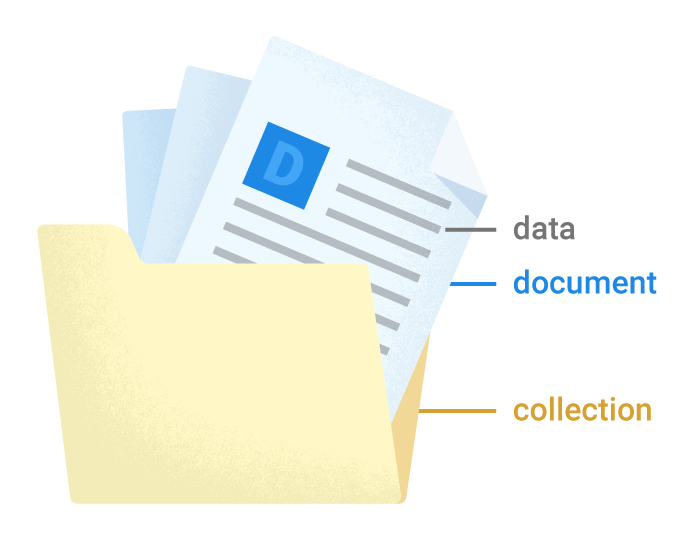
מסמכים נמצאים באוספים, שהם פשוט מאגרי מסמכים. לדוגמה, יכול להיות לכם אוסף users שמכיל את המשתמשים השונים, כשכל אחד מהם מיוצג על ידי מסמך:
משתמשים
alovelace
first : "Ada"
last : "Lovelace"
born : 1815aturing
first : "Alan"
last : "Turing"
born : 1912
ב-Firestore אין סכימה, ולכן יש לכם חופש מוחלט לגבי השדות שאתם מכניסים לכל מסמך וסוגי הנתונים שאתם מאחסנים בשדות האלה. מסמכים באותו אוסף יכולים להכיל שדות שונים או לאחסן סוגים שונים של נתונים בשדות האלה. עם זאת, מומלץ להשתמש באותם שדות ובאותם סוגי נתונים בכמה מסמכים, כדי שתוכלו לבצע שאילתות במסמכים בקלות רבה יותר.
אוסף מכיל מסמכים בלבד. הוא לא יכול להכיל ישירות שדות גולמיים עם ערכים, והוא לא יכול להכיל אוספים אחרים. (במאמר נתונים היררכיים מוסבר איך לבנות נתונים מורכבים יותר ב-Firestore).
השמות של המסמכים באוסף הם ייחודיים. אתם יכולים לספק מפתחות משלכם, כמו מזהי משתמשים, או לאפשר ל-Firestore ליצור בשבילכם מזהים אקראיים באופן אוטומטי.
אין צורך ליצור או למחוק אוספים. אחרי שיוצרים את המסמך הראשון באוסף, האוסף קיים. אם מוחקים את כל המסמכים באוסף, האוסף כבר לא קיים.
קובצי עזר
כל מסמך ב-Firestore מזוהה באופן ייחודי לפי המיקום שלו במסד הנתונים. בדוגמה הקודמת מוצג מסמך alovelace באוסף users. כדי להתייחס למיקום הזה בקוד, אפשר ליצור הפניה אליו.
גרסה 9 לאינטרנט
import { doc } from "firebase/firestore"; const alovelaceDocumentRef = doc(db, 'users', 'alovelace');
גרסה 8 לאינטרנט
var alovelaceDocumentRef = db.collection('users').doc('alovelace');
Swift
let alovelaceDocumentRef = db.collection("users").document("alovelace")
Objective-C
FIRDocumentReference *alovelaceDocumentRef = [[self.db collectionWithPath:@"users"] documentWithPath:@"alovelace"];
Kotlin
Android
val alovelaceDocumentRef = db.collection("users").document("alovelace")
Java
Android
DocumentReference alovelaceDocumentRef = db.collection("users").document("alovelace");
Dart
final alovelaceDocumentRef = db.collection("users").doc("alovelace");
Java
Python
Python
(Async)
C++
DocumentReference alovelace_document_reference = db->Collection("users").Document("alovelace");
Node.js
המשך
PHP
PHP
כדי לבצע אימות ב-Firestore, צריך להגדיר את Application Default Credentials. מידע נוסף זמין במאמר הגדרת אימות לסביבת פיתוח מקומית.
Unity
DocumentReference documentRef = db.Collection("users").Document("alovelace");
C#
C#
כדי לבצע אימות ב-Firestore, צריך להגדיר את Application Default Credentials. מידע נוסף זמין במאמר הגדרת אימות לסביבת פיתוח מקומית.
Ruby
קובץ עזר הוא אובייקט קל משקל שמצביע רק על מיקום במסד הנתונים. אפשר ליצור הפניה גם אם יש נתונים וגם אם אין נתונים, ויצירת הפניה לא מבצעת פעולות ברשת.
אפשר גם ליצור הפניות לאוספים:
גרסה 9 לאינטרנט
import { collection } from "firebase/firestore"; const usersCollectionRef = collection(db, 'users');
גרסה 8 לאינטרנט
var usersCollectionRef = db.collection('users');
Swift
let usersCollectionRef = db.collection("users")
Objective-C
FIRCollectionReference *usersCollectionRef = [self.db collectionWithPath:@"users"];
Kotlin
Android
val usersCollectionRef = db.collection("users")
Java
Android
CollectionReference usersCollectionRef = db.collection("users");
Dart
final usersCollectionRef = db.collection("users");
Java
Python
Python
(Async)
C++
CollectionReference users_collection_reference = db->Collection("users");
Node.js
המשך
PHP
PHP
כדי לבצע אימות ב-Firestore, צריך להגדיר את Application Default Credentials. מידע נוסף זמין במאמר הגדרת אימות לסביבת פיתוח מקומית.
Unity
CollectionReference collectionRef = db.Collection("users");
C#
C#
כדי לבצע אימות ב-Firestore, צריך להגדיר את Application Default Credentials. מידע נוסף זמין במאמר הגדרת אימות לסביבת פיתוח מקומית.
Ruby
כדי שיהיה לכם נוח, אתם יכולים גם ליצור הפניות על ידי ציון הנתיב למסמך או לאוסף כמחרוזת, כשכל רכיבי הנתיב מופרדים בקו נטוי (/). לדוגמה, כדי ליצור הפניה למסמך alovelace:
גרסה 9 לאינטרנט
import { doc } from "firebase/firestore"; const alovelaceDocumentRef = doc(db, 'users/alovelace');
גרסה 8 לאינטרנט
var alovelaceDocumentRef = db.doc('users/alovelace');
Swift
let aLovelaceDocumentReference = db.document("users/alovelace")
Objective-C
FIRDocumentReference *aLovelaceDocumentReference = [self.db documentWithPath:@"users/alovelace"];
Kotlin
Android
val alovelaceDocumentRef = db.document("users/alovelace")
Java
Android
DocumentReference alovelaceDocumentRef = db.document("users/alovelace");
Dart
final aLovelaceDocRef = db.doc("users/alovelace");
Java
Python
Python
(Async)
C++
DocumentReference alovelace_document = db->Document("users/alovelace");
Node.js
המשך
PHP
PHP
כדי לבצע אימות ב-Firestore, צריך להגדיר את Application Default Credentials. מידע נוסף זמין במאמר הגדרת אימות לסביבת פיתוח מקומית.
Unity
DocumentReference documentRef = db.Document("users/alovelace");
C#
C#
כדי לבצע אימות ב-Firestore, צריך להגדיר את Application Default Credentials. מידע נוסף זמין במאמר הגדרת אימות לסביבת פיתוח מקומית.
Ruby
נתונים היררכיים
כדי להבין איך מבני נתונים היררכיים פועלים ב-Firestore, נסתכל על דוגמה של אפליקציית צ'אט עם הודעות וחדרי צ'אט.
אתם יכולים ליצור אוסף בשם rooms כדי לאחסן בו חדרי צ'אט שונים:
חדרים
roomA
name : "my chat room"roomB
...
עכשיו שיש לכם חדרי צ'אט, אתם צריכים להחליט איך לאחסן את ההודעות. יכול להיות שלא תרצו לאחסן אותם במסמך של החדר. מסמכים ב-Firestore צריכים להיות קלים, וחדר צ'אט יכול להכיל מספר גדול של הודעות. עם זאת, אתם יכולים ליצור אוספים נוספים במסמך של חדר הצ'אט, כאוספי משנה.
אוספי משנה
הדרך הכי טובה לאחסן הודעות בתרחיש הזה היא באמצעות אוספי משנה. אוסף משנה הוא אוסף שמשויך למסמך ספציפי.
אפשר ליצור אוסף משנה בשם messages לכל מסמך של חדר באוסף rooms:
חדרים
roomA
name : "my chat room"messages
message1
from : "alex"
msg : "Hello World!"message2
...
roomB
...
בדוגמה הזו, יוצרים הפניה להודעה בקולקציית המשנה באמצעות הקוד הבא:
גרסה 9 לאינטרנט
import { doc } from "firebase/firestore"; const messageRef = doc(db, "rooms", "roomA", "messages", "message1");
גרסה 8 לאינטרנט
var messageRef = db.collection('rooms').doc('roomA') .collection('messages').doc('message1');
Swift
let messageRef = db .collection("rooms").document("roomA") .collection("messages").document("message1")
Objective-C
FIRDocumentReference *messageRef = [[[[self.db collectionWithPath:@"rooms"] documentWithPath:@"roomA"] collectionWithPath:@"messages"] documentWithPath:@"message1"];
Kotlin
Android
val messageRef = db .collection("rooms").document("roomA") .collection("messages").document("message1")
Java
Android
DocumentReference messageRef = db .collection("rooms").document("roomA") .collection("messages").document("message1");
Dart
final messageRef = db .collection("rooms") .doc("roomA") .collection("messages") .doc("message1");
Java
Python
Python
(Async)
C++
DocumentReference message_reference = db->Collection("rooms") .Document("roomA") .Collection("messages") .Document("message1");
Node.js
המשך
PHP
PHP
כדי לבצע אימות ב-Firestore, צריך להגדיר את Application Default Credentials. מידע נוסף זמין במאמר הגדרת אימות לסביבת פיתוח מקומית.
Unity
DocumentReference documentRef = db
	.Collection("Rooms").Document("RoomA")
	.Collection("Messages").Document("Message1");
C#
C#
כדי לבצע אימות ב-Firestore, צריך להגדיר את Application Default Credentials. מידע נוסף זמין במאמר הגדרת אימות לסביבת פיתוח מקומית.
Ruby
שימו לב לדפוס המתחלף של אוספים ומסמכים. האוספים והמסמכים שלכם צריכים תמיד לפעול לפי הדפוס הזה. אי אפשר להפנות לאוסף בתוך אוסף או למסמך בתוך מסמך.
אוספי משנה מאפשרים לכם לארגן את הנתונים בצורה היררכית, וכך לגשת אליהם בקלות רבה יותר. כדי לקבל את כל ההודעות ב-roomA, אפשר ליצור הפניה לאוסף המשנה messages ולקיים איתה אינטראקציה כמו עם כל הפניה אחרת לאוסף.
מסמכים בקולקציות משנה יכולים להכיל גם קולקציות משנה, וכך לאפשר לכם להוסיף עוד שכבות של נתונים. אפשר להציב נתונים בתוך נתונים עד 100 רמות עומק.