מפתחות הצפנה בניהול הלקוח (CMEK)

כברירת מחדל, Google Cloud הנתונים מוצפנים באופן אוטומטי כשהם במצב מנוחה באמצעות מפתחות הצפנה שמנוהלים על ידי Google.

אם יש לכם דרישות ספציפיות בנושא תאימות או רגולציה שקשורות למפתחות שמגנים על הנתונים שלכם, אתם יכולים להשתמש במפתחות הצפנה בניהול הלקוח (CMEK) ב-Document AI. במקום ש-Google תנהל את מפתחות ההצפנה שמגנים על הנתונים שלכם, מעבד Document AI מוגן באמצעות מפתח שאתם שולטים בו ומנהלים אותו ב-Cloud Key Management Service‏ (KMS).

במדריך הזה מתואר CMEK ל-Document AI. מידע נוסף על CMEK באופן כללי, כולל מתי ולמה כדאי להפעיל אותו, זמין במסמכי התיעוד של Cloud Key Management Service.

דרישות מוקדמות

לסוכן השירות של Document AI צריך להיות התפקיד Cloud KMS CryptoKey Encrypter/Decrypter במפתח שבו אתם משתמשים.

בדוגמה הבאה מוקצה תפקיד שמעניק גישה למפתח Cloud KMS:

gcloud

gcloud kms keys add-iam-policy-binding key \
    --keyring key-ring \
    --location location \
    --project key_project_id \
    --member serviceAccount:service-project_number@gcp-sa-prod-dai-core.iam.gserviceaccount.com \
    --role roles/cloudkms.cryptoKeyEncrypterDecrypter

מחליפים את key בשם המפתח. מחליפים את key-ring בשם של אוסף המפתחות שבו נמצא המפתח. מחליפים את location במיקום של Document AI עבור מחזיק המפתחות. מחליפים את key_project_id בפרויקט של מחזיק המפתחות. מחליפים את project_number במספר הפרויקט.

C#

למידע נוסף, קראו את מאמרי העזרה של Document AI C# API.

כדי לבצע אימות ב-Document AI, צריך להגדיר את Application Default Credentials. מידע נוסף זמין במאמר הגדרת אימות לסביבת פיתוח מקומית.


using Google.Cloud.Iam.V1;
using Google.Cloud.Kms.V1;

public class IamAddMemberSample
{
    public Policy IamAddMember(
      string projectId = "my-project", string locationId = "us-east1", string keyRingId = "my-key-ring", string keyId = "my-key",
      string member = "user:foo@example.com")
    {
        // Create the client.
        KeyManagementServiceClient client = KeyManagementServiceClient.Create();

        // Build the resource name.
        CryptoKeyName resourceName = new CryptoKeyName(projectId, locationId, keyRingId, keyId);

        // The resource name could also be a key ring.
        // var resourceName = new KeyRingName(projectId, locationId, keyRingId);

        // Get the current IAM policy.
        Policy policy = client.IAMPolicyClient.GetIamPolicy(
            new GetIamPolicyRequest
            { 
                ResourceAsResourceName = resourceName
            });

        // Add the member to the policy.
        policy.AddRoleMember("roles/cloudkms.cryptoKeyEncrypterDecrypter", member);

        // Save the updated IAM policy.
        Policy result = client.IAMPolicyClient.SetIamPolicy(
            new SetIamPolicyRequest
            {
                ResourceAsResourceName = resourceName,
                Policy = policy
            });

        // Return the resulting policy.
        return result;
    }
}

Go

למידע נוסף, קראו את מאמרי העזרה של Document AI Go API.

כדי לבצע אימות ב-Document AI, צריך להגדיר את Application Default Credentials. מידע נוסף זמין במאמר הגדרת אימות לסביבת פיתוח מקומית.

import (
	"context"
	"fmt"
	"io"

	kms "cloud.google.com/go/kms/apiv1"
)

// iamAddMember adds a new IAM member to the Cloud KMS key
func iamAddMember(w io.Writer, name, member string) error {
	// NOTE: The resource name can be either a key or a key ring. If IAM
	// permissions are granted on the key ring, the permissions apply to all keys
	// in the key ring.
	//
	// name := "projects/my-project/locations/us-east1/keyRings/my-key-ring/cryptoKeys/my-key"
	// member := "user:foo@example.com"

	// Create the client.
	ctx := context.Background()
	client, err := kms.NewKeyManagementClient(ctx)
	if err != nil {
		return fmt.Errorf("failed to create kms client: %w", err)
	}
	defer client.Close()

	// Get the current IAM policy.
	handle := client.ResourceIAM(name)
	policy, err := handle.Policy(ctx)
	if err != nil {
		return fmt.Errorf("failed to get IAM policy: %w", err)
	}

	// Grant the member permissions. This example grants permission to use the key
	// to encrypt data.
	policy.Add(member, "roles/cloudkms.cryptoKeyEncrypterDecrypter")
	if err := handle.SetPolicy(ctx, policy); err != nil {
		return fmt.Errorf("failed to save policy: %w", err)
	}

	fmt.Fprintf(w, "Updated IAM policy for %s\n", name)
	return nil
}

Java

למידע נוסף, קראו את מאמרי העזרה של Document AI Java API.

כדי לבצע אימות ב-Document AI, צריך להגדיר את Application Default Credentials. מידע נוסף זמין במאמר הגדרת אימות לסביבת פיתוח מקומית.

import com.google.cloud.kms.v1.CryptoKeyName;
import com.google.cloud.kms.v1.KeyManagementServiceClient;
import com.google.iam.v1.Binding;
import com.google.iam.v1.Policy;
import java.io.IOException;

public class IamAddMember {

  public void iamAddMember() throws IOException {
    // TODO(developer): Replace these variables before running the sample.
    String projectId = "your-project-id";
    String locationId = "us-east1";
    String keyRingId = "my-key-ring";
    String keyId = "my-key";
    String member = "user:foo@example.com";
    iamAddMember(projectId, locationId, keyRingId, keyId, member);
  }

  // Add the given IAM member to the key.
  public void iamAddMember(
      String projectId, String locationId, String keyRingId, String keyId, String member)
      throws IOException {
    // Initialize client that will be used to send requests. This client only
    // needs to be created once, and can be reused for multiple requests. After
    // completing all of your requests, call the "close" method on the client to
    // safely clean up any remaining background resources.
    try (KeyManagementServiceClient client = KeyManagementServiceClient.create()) {
      // Build the key version name from the project, location, key ring, key,
      // and key version.
      CryptoKeyName resourceName = CryptoKeyName.of(projectId, locationId, keyRingId, keyId);

      // The resource name could also be a key ring.
      // KeyRingName resourceName = KeyRingName.of(projectId, locationId, keyRingId);

      // Get the current policy.
      Policy policy = client.getIamPolicy(resourceName);

      // Create a new IAM binding for the member and role.
      Binding binding =
          Binding.newBuilder()
              .setRole("roles/cloudkms.cryptoKeyEncrypterDecrypter")
              .addMembers(member)
              .build();

      // Add the binding to the policy.
      Policy newPolicy = policy.toBuilder().addBindings(binding).build();

      client.setIamPolicy(resourceName, newPolicy);
      System.out.printf("Updated IAM policy for %s%n", resourceName.toString());
    }
  }
}

Node.js

למידע נוסף, קראו את מאמרי העזרה של Document AI Node.js API.

כדי לבצע אימות ב-Document AI, צריך להגדיר את Application Default Credentials. מידע נוסף זמין במאמר הגדרת אימות לסביבת פיתוח מקומית.

//
// TODO(developer): Uncomment these variables before running the sample.
//
// const projectId = 'my-project';
// const locationId = 'us-east1';
// const keyRingId = 'my-key-ring';
// const keyId = 'my-key';
// const member = 'user:foo@example.com';

// Imports the Cloud KMS library
const {KeyManagementServiceClient} = require('@google-cloud/kms');

// Instantiates a client
const client = new KeyManagementServiceClient();

// Build the resource name
const resourceName = client.cryptoKeyPath(
  projectId,
  locationId,
  keyRingId,
  keyId
);

// The resource name could also be a key ring.
// const resourceName = client.keyRingPath(projectId, locationId, keyRingId);

async function iamAddMember() {
  // Get the current IAM policy.
  const [policy] = await client.getIamPolicy({
    resource: resourceName,
  });

  // Add the member to the policy.
  policy.bindings.push({
    role: 'roles/cloudkms.cryptoKeyEncrypterDecrypter',
    members: [member],
  });

  // Save the updated policy.
  const [updatedPolicy] = await client.setIamPolicy({
    resource: resourceName,
    policy: policy,
  });

  console.log('Updated policy');
  return updatedPolicy;
}

return iamAddMember();

PHP

למידע נוסף, קראו את מאמרי העזרה של Document AI PHP API.

כדי לבצע אימות ב-Document AI, צריך להגדיר את Application Default Credentials. מידע נוסף זמין במאמר הגדרת אימות לסביבת פיתוח מקומית.

use Google\Cloud\Iam\V1\Binding;
use Google\Cloud\Iam\V1\GetIamPolicyRequest;
use Google\Cloud\Iam\V1\SetIamPolicyRequest;
use Google\Cloud\Kms\V1\Client\KeyManagementServiceClient;

function iam_add_member(
    string $projectId = 'my-project',
    string $locationId = 'us-east1',
    string $keyRingId = 'my-key-ring',
    string $keyId = 'my-key',
    string $member = 'user:foo@example.com'
) {
    // Create the Cloud KMS client.
    $client = new KeyManagementServiceClient();

    // Build the resource name.
    $resourceName = $client->cryptoKeyName($projectId, $locationId, $keyRingId, $keyId);

    // The resource name could also be a key ring.
    // $resourceName = $client->keyRingName($projectId, $locationId, $keyRingId);

    // Get the current IAM policy.
    $getIamPolicyRequest = (new GetIamPolicyRequest())
        ->setResource($resourceName);
    $policy = $client->getIamPolicy($getIamPolicyRequest);

    // Add the member to the policy.
    $bindings = $policy->getBindings();
    $bindings[] = (new Binding())
        ->setRole('roles/cloudkms.cryptoKeyEncrypterDecrypter')
        ->setMembers([$member]);
    $policy->setBindings($bindings);

    // Save the updated IAM policy.
    $setIamPolicyRequest = (new SetIamPolicyRequest())
        ->setResource($resourceName)
        ->setPolicy($policy);
    $updatedPolicy = $client->setIamPolicy($setIamPolicyRequest);
    printf('Added %s' . PHP_EOL, $member);

    return $updatedPolicy;
}

Python

למידע נוסף, קראו את מאמרי העזרה של Document AI Python API.

כדי לבצע אימות ב-Document AI, צריך להגדיר את Application Default Credentials. מידע נוסף זמין במאמר הגדרת אימות לסביבת פיתוח מקומית.

from google.cloud import kms
from google.iam.v1 import policy_pb2 as iam_policy


def iam_add_member(
    project_id: str, location_id: str, key_ring_id: str, key_id: str, member: str
) -> iam_policy.Policy:
    """
    Add an IAM member to a resource.

    Args:
        project_id (string): Google Cloud project ID (e.g. 'my-project').
        location_id (string): Cloud KMS location (e.g. 'us-east1').
        key_ring_id (string): ID of the Cloud KMS key ring (e.g. 'my-key-ring').
        key_id (string): ID of the key to use (e.g. 'my-key').
        member (string): Member to add (e.g. 'user:foo@example.com')

    Returns:
        Policy: Updated Cloud IAM policy.

    """

    # Create the client.
    client = kms.KeyManagementServiceClient()

    # Build the resource name.
    resource_name = client.crypto_key_path(project_id, location_id, key_ring_id, key_id)

    # The resource name could also be a key ring.
    # resource_name = client.key_ring_path(project_id, location_id, key_ring_id);

    # Get the current policy.
    policy = client.get_iam_policy(request={"resource": resource_name})

    # Add the member to the policy.
    policy.bindings.add(
        role="roles/cloudkms.cryptoKeyEncrypterDecrypter", members=[member]
    )

    # Save the updated IAM policy.
    request = {"resource": resource_name, "policy": policy}

    updated_policy = client.set_iam_policy(request=request)
    print(f"Added {member} to {resource_name}")
    return updated_policy

Ruby

למידע נוסף, קראו את מאמרי העזרה של Document AI Ruby API.

כדי לבצע אימות ב-Document AI, צריך להגדיר את Application Default Credentials. מידע נוסף זמין במאמר הגדרת אימות לסביבת פיתוח מקומית.

# TODO(developer): uncomment these values before running the sample.
# project_id  = "my-project"
# location_id = "us-east1"
# key_ring_id = "my-key-ring"
# key_id      = "my-key"
# member      = "user:foo@example.com"

# Require the library.
require "google/cloud/kms"

# Create the client.
client = Google::Cloud::Kms.key_management_service

# Build the resource name.
resource_name = client.crypto_key_path project:    project_id,
                                       location:   location_id,
                                       key_ring:   key_ring_id,
                                       crypto_key: key_id

# The resource name could also be a key ring.
# resource_name = client.key_ring_path project: project_id, location: location_id, key_ring: key_ring_id

# Create the IAM client.
iam_client = Google::Cloud::Kms::V1::IAMPolicy::Client.new

# Get the current IAM policy.
policy = iam_client.get_iam_policy resource: resource_name

# Add the member to the policy.
policy.bindings << Google::Iam::V1::Binding.new(
  members: [member],
  role:    "roles/cloudkms.cryptoKeyEncrypterDecrypter"
)

# Save the updated policy.
updated_policy = iam_client.set_iam_policy resource: resource_name, policy: policy
puts "Added #{member}"

שימוש ב-CMEK

הגדרות ההצפנה זמינות כשיוצרים מעבד. כדי להשתמש ב-CMEK, בוחרים באפשרות CMEK ובוחרים מפתח.
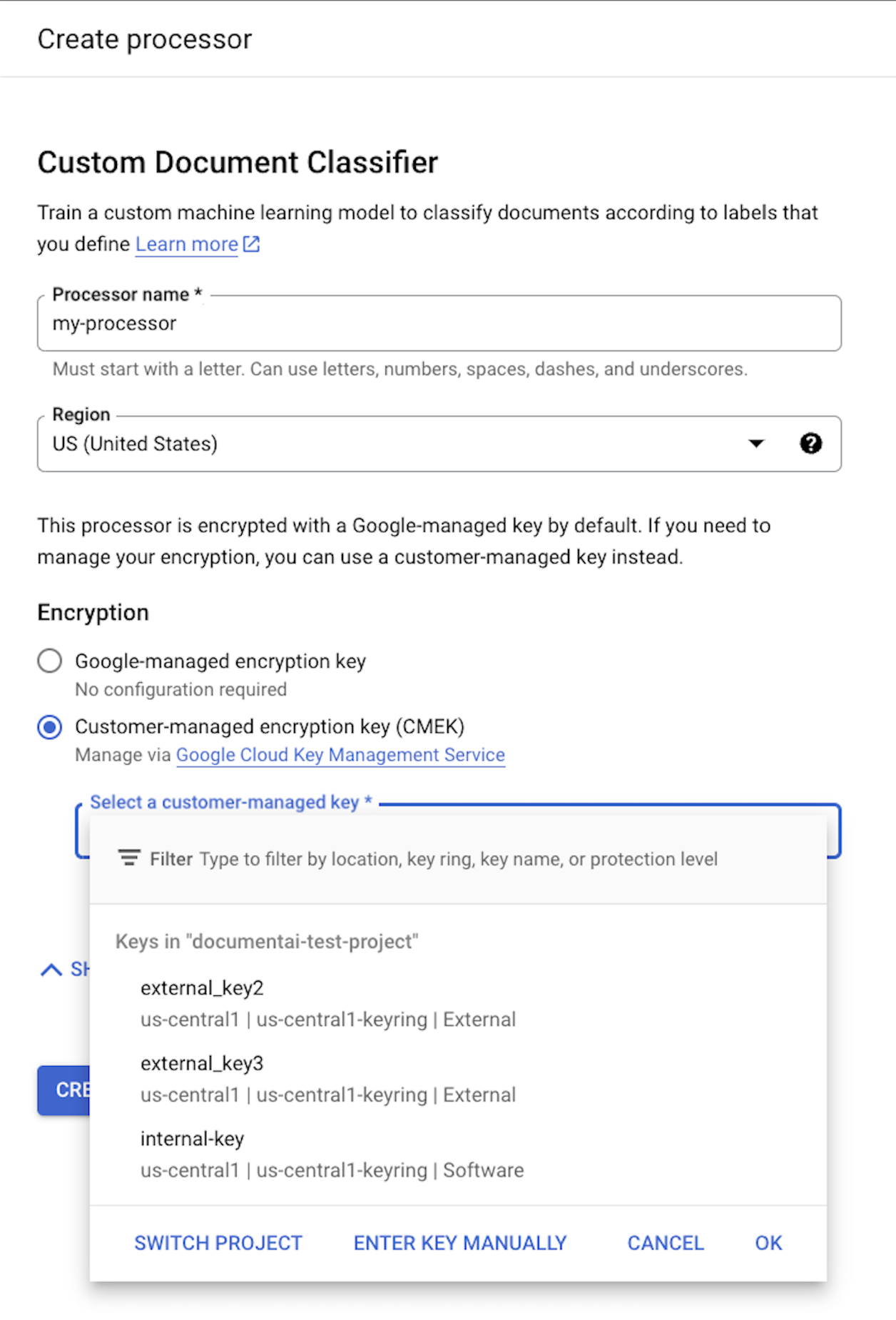
security-3

מפתח ה-CMEK משמש לכל הנתונים שמשויכים למעבד ולמשאבי הצאצא שלו. כל הנתונים שקשורים ללקוחות ונשלחים למעבד המידע מוצפנים באופן אוטומטי באמצעות המפתח שסופק לפני שהם נכתבים בדיסק.

אחרי שיוצרים מעבד, אי אפשר לשנות את הגדרות ההצפנה שלו. כדי להשתמש במפתח אחר, צריך ליצור מעבד חדש.

מפתחות חיצוניים

אתם יכולים להשתמש ב-Cloud External Key Manager (EKM) כדי ליצור ולנהל מפתחות חיצוניים להצפנת נתונים ב- Google Cloud.

כשמשתמשים במפתח Cloud EKM, ל-Google אין שליטה על הזמינות של המפתח שמנוהל חיצונית. אם תבקשו גישה למשאב שמוצפן באמצעות מפתח בניהול חיצוני, והמפתח לא יהיה זמין, Document AI ידחה את הבקשה. יכול להיות שיחלפו עד 10 דקות מרגע שהמפתח יהיה זמין ועד שתוכלו לגשת למשאב.

לשיקולים נוספים לשימוש במפתחות חיצוניים, אפשר לעיין במאמר שיקולים לשימוש ב-EKM.

משאבים שנתמכים על ידי CMEK

כשמאחסנים משאב כלשהו בדיסק, אם מאוחסנים נתוני לקוחות כחלק מהמשאב, Document AI מצפין קודם את התוכן באמצעות מפתח CMEK.

משאב חומר הלימוד מוצפן
Processor לא רלוונטי – אין נתוני משתמשים. עם זאת, אם מציינים מפתח CMEK במהלך יצירת המעבד, הוא חייב להיות תקין.
ProcessorVersion הכול
Evaluation הכול

ממשקי API שתומכים ב-CMEK

ה-API שמשתמש במפתח CMEK להצפנה כולל את האפשרויות הבאות:

‏Method הצפנה
processDocument לא רלוונטי – לא נשמרו נתונים בדיסק.
batchProcessDocuments הנתונים מאוחסנים באופן זמני בדיסק ומוצפנים באמצעות מפתח זמני (ראו תאימות ל-CMEK).
trainProcessorVersion המסמכים שמשמשים לאימון מוצפנים באמצעות מפתח ה-KMS/CMEK שסיפקתם.
evaluateProcessorVersion ההערכות מוצפנות באמצעות מפתח ה-KMS/CMEK שסופק.

בקשות ל-API שמנסות לגשת למשאבים מוצפנים ייכשלו אם המפתח מושבת או שלא ניתן להגיע אליו. דוגמאות:

‏Method פענוח
getProcessorVersion גרסאות של מעבדי מידע שאומנו באמצעות נתוני לקוחות מוצפנות. כדי לגשת לקובץ, צריך לפענח אותו.
processDocument כדי לעבד מסמכים באמצעות גרסה מוצפנת של מעבד, צריך לפענח אותם.
Import Documents כדי לייבא מסמכים עם auto-labeling מופעל באמצעות גרסה מוצפנת של מעבד, צריך לבצע פענוח.

‫CMEK ו-Cloud Storage

ממשקי API, כמו batchProcess, יכולים לקרוא מקטגוריות של Cloud Storage ולכתוב בהן.

כל הנתונים שנכתבים ב-Cloud Storage על ידי Document AI מוצפנים באמצעות מפתח ההצפנה שהוגדר לדלי, שיכול להיות שונה ממפתח ה-CMEK של המעבד.

מידע נוסף זמין במאמר מפתחות CMEK ב-Cloud Storage.