

This document describes a typical generative AI architecture in Google Cloud. It also lists the security best practices that are applicable to generative AI workloads and describes when you would use specific Google Cloud services.
Architecture
The following diagram shows the Google Cloud services in a typical generative AI architecture that uses Gemini Enterprise Agent Platform.
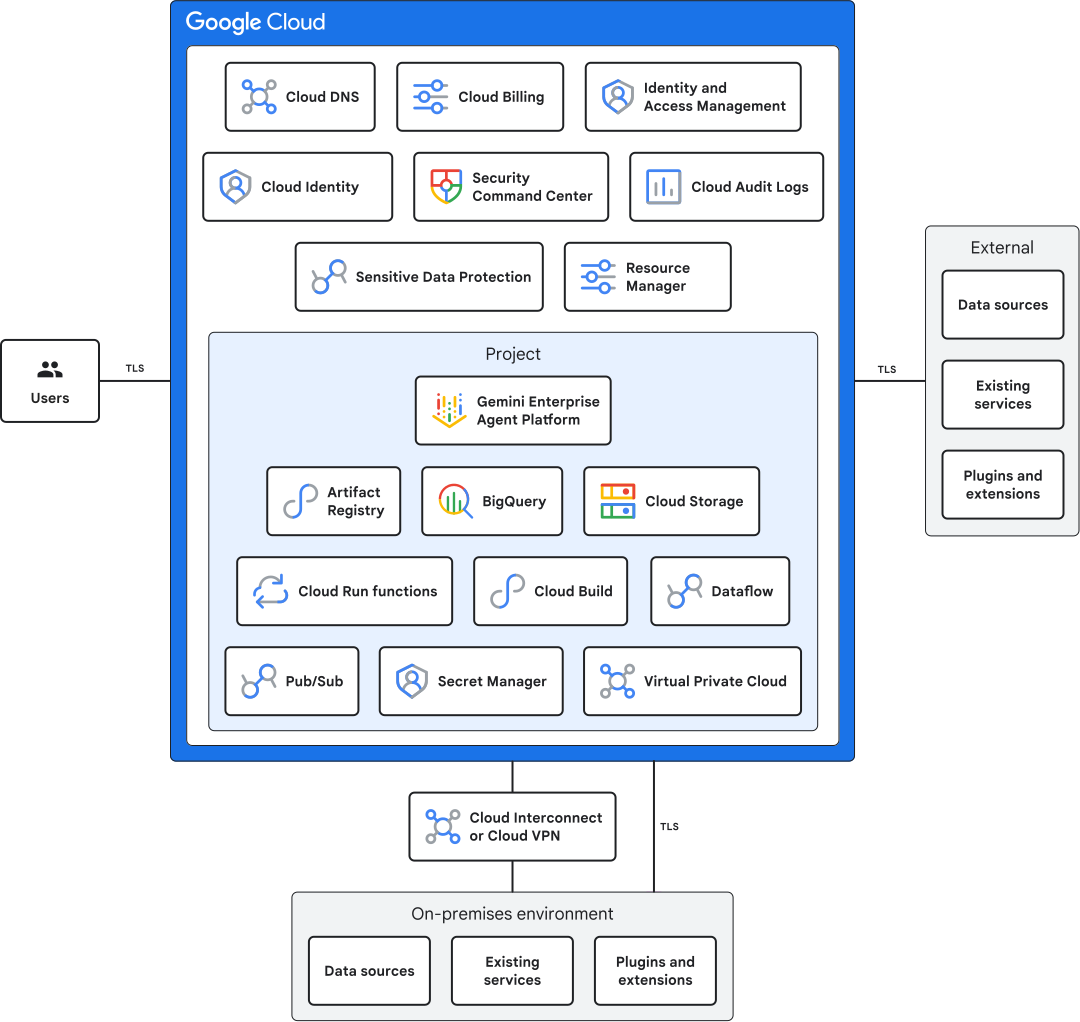
This diagram includes the following:
Agent Platform lets you build and use generative AI, including AI solutions, search, and conversation, on a single platform.
Artifact Registry streamlines your machine learning (ML) development and deployment process, improves collaboration, and ensures the security and reliability of your ML models.
BigQuery simplifies data access, enable scalable analysis, and lets you use its ML capabilities in your ML workflows.
Cloud Audit Logs tracks the actions that your users take in your environment, which enhances your troubleshooting, auditing, and incident response capabilities.
Cloud Billing dashboards and alerts let you review usage and billing of the Agent Platform workloads.
Cloud Build lets you build, test, and deploy a serverless CI/CD platform on Google Cloud.
Cloud Identity unifies identity, access, application, and management for Google Cloud.
Cloud Run functions automates tasks, serves predictions, triggers training jobs, integrates with other services, and builds event-driven ML pipelines.
Cloud Storage stores training data, model artifacts, and production data.
Dataflow lets you build complex pipelines that ingest data from various sources and aggregate the data as appropriate.
Cloud DNS registers, manages, and serves your domain.
Identity and Access Management (IAM) controls who can perform specific actions on your generative workload resources, such as creating, editing, or deleting them.
Model Armor proactively screens and filters LLM prompts and responses, MCP server-client connections, and agentic communications. Model Armor helps mitigate risks like prompt injection, data leakage, and harmful content.
Organization Policy Service centrally manages and enforces policies across your Google Cloud environment. Organization Policy helps to ensure consistent configuration and security compliance across the projects and resources within your organization.
Pub/Sub enables efficient communication and automation within your machine learning workflows.
Resource Manager helps you group and manage logical components of your Agent Platform workloads.
Secret Manager helps you protect the sensitive data and credentials that are used in Agent Platform projects.
Sensitive Data Protection automates the discovery of sensitive data in your data sets. Sensitive Data Protection can scan prompts and redact sensitive data before the data reaches the model. Sensitive Data Protection can also scan the model's output to avoid leaking sensitive training data in responses.
Security Command Center helps you protect your cloud organization, your AI workloads, and the AI data that you store on Google Cloud. Security Command Center provides the following:
- Centralized security management
- Threat detection and incident response
- Automated security assessments
- Compliance and regulatory reporting
- Security recommendations and best practices
Virtual Private Cloud (VPC) isolates your AI resources from the internet in a secure environment. This network configuration helps protect sensitive data and models from unauthorized access and potential cyberattacks.
Cloud VPN or Cloud Interconnect lets you establish a secure network connection between your on-premises infrastructure and your Agent Platform environment. Cloud VPN or Cloud Interconnect helps enable seamless data transfer and communication between your private network and Google Cloud resources. Consider this integration for scenarios like accessing on-premises data for model training or deploying models to on-premises resources for inference.
Best practices for generative AI workloads
This section provides links to the best practices fo generative AI workloads that use Agent Platform.
- Recommended user groups and IAM roles
Secure enterprise foundation best practices
Authentication and authorization best practices
- Disable automatic IAM grants for default service accounts
- Block the creation of external service account keys
- Block service account key uploads
- Configure separation of duties for organization policy administrators
- Enable two-step verification for super admin accounts
- Enforce two-step verification on the super admin organization unit
- Create an exclusive email address for the primary super admin
- Create redundant administrator accounts
- Implement tags to efficiently assign IAM policies and organization policies
- Audit high-risk changes to IAM
- Block access to Cloud Shell for Cloud Identity managed user accounts
- Configure Context-Aware Access for Google consoles
- Block account self-recovery for super admin accounts
- Turn off unused Google services
Organization best practices
Networking best practices
Logging, monitoring, and alerting best practices
Key and secret management best practices
- Encrypt data at rest in Google Cloud
- Use NIST-approved algorithms for encryption and decryption
- Set the purpose for Cloud Key Management Service keys
- Ensure that CMEK settings are appropriate for secure BigQuery data warehouses
- Rotate encryption key every 90 days
- Set up automatic secret rotation
- Use CMEK for Pub/Sub messages
- Restrict customer-managed encryption keys location
- Use CMEK for Google Cloud services
- Replicate secrets automatically
Security posture and analytics best practices
Infrastructure best practices
- Define VM instances that can enable IP forwarding
- Disable VM-nested virtualization
- Restrict external IP addresses on VMs
- Define permitted external IP addresses for VM instances
- Require VPC connector for Cloud Run functions
- Configure message storage policies
- Turn off external IP addresses for Dataflow jobs
- Use network tags for firewall rules
Data management best practices
Data warehouse best practices
- Ensure BigQuery datasets aren't publicly readable or set to allAuthenticatedUsers
- Ensure BigQuery tables aren't publicly readable or set to allAuthenticatedUsers
- Encrypt individual values in a BigQuery table
- Use authorized views for BigQuery datasets
- Use BigQuery column-level security
- Use BigQuery row-level security
- Use BigQuery resource charts
Storage best practices
- Block public access to Cloud Storage buckets
- Use uniform bucket-level access
- Protect HMAC keys for service accounts
- Detect enumeration of Cloud Storage buckets by service accounts
- Detect IAM policy modifications of Cloud Storage buckets by service accounts
- Ensure Cloud Storage bucket retention policy uses Bucket Lock
- Set lifecycle rules for the SetStorageClass action
- Set permitted regions for storage classes
- Enable lifecycle management for Cloud Storage buckets
- Enable lifecycle management rules for Cloud Storage buckets
- Review and evaluate temporary holds on active objects
- Enforce retention policies on Cloud Storage buckets
- Enforce classification tags for Cloud Storage buckets
- Enforce log buckets for Cloud Storage buckets
- Configure deletion rules for Cloud Storage buckets
- Ensure isLive condition is False for deletion rules
- Enforce versioning for Cloud Storage buckets
- Enforce owners for Cloud Storage buckets
- Enable logging of key Cloud Storage activities
Tools and inference best practices
- Define the access mode for Agent Platform Workbench notebooks and instances
- Disable file downloads on Agent Platform Workbench instances
- Disable root access on Agent Platform Workbench user-managed notebooks and instances
- Disable terminal on Agent Platform Workbench instances
- Restrict environment options on Agent Platform Workbench notebooks and instances
- Enforce automatic scheduled upgrades on Agent Platform Workbench user-managed notebooks and instances
- Restrict public access on new Agent Platform Workbench notebooks and instances
- Restrict VPC networks on Agent Platform Workbench instances
Agent and application best practices
Use cases for Artifact Registry
Consider the following use cases for Artifact Registry with Agent Platform:
- Manage your ML artifacts: Artifact Registry lets you store and manage all your ML artifacts in a single place, including model training code, datasets, trained models, and prediction serving containers. You can use this centralized repository to track, share, and reuse your ML artifacts across different teams and projects.
- Version control and reproducibility: Artifact Registry provides version control for your ML artifacts, helping you track changes and roll back to previous versions, if needed. This feature is crucial for ensuring the reproducibility of your ML experiments and deployments.
- Secure and reliable storage: Artifact Registry offers secure and reliable storage for your ML artifacts. These artifacts are encrypted at rest and in transit. Configure access control to restrict who can access the artifacts to help protect your valuable data and intellectual property.
- Integration with Gemini Enterprise Agent Platform Pipelines: integrate Artifact Registry with Agent Platform Pipelines to build and automate your ML workflows. Use Artifact Registry to store your pipeline artifacts (for example, your pipeline definitions, code, and data) and to automatically trigger pipeline runs when new artifacts are uploaded.
- Streamline CI/CD for ML: integrate Artifact Registry with your CI/CD tooling to streamline the development and deployment of your ML models. For example, use Artifact Registry to automatically build and deploy your model serving container whenever you push a new version of your model to Artifact Registry.
- Multi-region support: Artifact Registry lets you store your artifacts in multiple regions, which can help improve the performance and availability of your ML models, especially if you have users located in different parts of the world.
Use cases for BigQuery
Consider the following use cases for BigQuery with Agent Platform:
- Seamless integration: BigQuery and Agent Platform are tightly integrated, letting you access and analyze your data directly within the Agent Platform platform. This integration eliminates the need for data movement, streamlines your ML workflow, and reduces friction.
- Scalable data analysis: BigQuery offers a petabyte-scale data warehouse, letting you analyze massive datasets without worrying about infrastructure limitations. This scalability is critical for training and deploying data-intensive ML models.
- SQL-based ML: BigQuery ML lets you use familiar SQL commands to train and deploy models directly within BigQuery. This feature lets data analysts and SQL practitioners use ML capabilities without requiring advanced coding skills.
- Online and batch predictions: BigQuery ML supports online and batch predictions. You can run real-time predictions on individual rows or generate predictions for large datasets in batch mode. This flexibility supports diverse use cases with varying latency requirements.
- Reduced data movement: with BigQuery ML, you don't need to move your data to separate storage or compute resources for model training and deployment. This reduced movement simplifies your workflow, reduces latency, and minimizes the costs associated with data transfer.
- Model monitoring: Agent Platform provides comprehensive model monitoring capabilities, letting you track the performance, fairness, and explainability of your BigQuery ML models. Model monitoring helps you ensure that your models are performing as expected and address potential issues.
- Pretrained models: Agent Platform offers access to pretrained models, including those for natural language processing and computer vision. You can use these models within BigQuery to enhance your analysis and extract deeper insights from your data.
- Cost-effective solution: BigQuery ML offers a cost-effective, flexible way to train and deploy ML models. You only pay for the resources you use, making it an affordable option for organizations of all sizes.
- Advanced analytics capabilities: BigQuery provides tools for advanced analytics, including geospatial analysis and forecasting. These tools let you combine ML with other analytical techniques for deeper data exploration and richer insights.
- Enhanced collaboration: by using BigQuery with Agent Platform, data scientists, ML engineers, and analysts can collaborate seamlessly on ML projects. This collaboration helps create a more integrated and efficient approach to tackling complex data problems.
Use cases for Cloud Build
Consider the following use cases for Cloud Build with Agent Platform:
- Automate ML pipeline builds: Cloud Build lets you automate the building and testing of your ML pipelines defined in Agent Platform Pipelines. This automation helps you build and deploy your models faster and with greater consistency.
- Build custom container images for deployment: Cloud Build can build custom container images for your model-serving environments. Cloud Build lets you package your model code, dependencies, and runtime environment into a single image that you can deploy to Gemini Enterprise Agent Platform Inference for serving predictions.
- Integrate with CI/CD workflows: Cloud Build lets you automate the build and deployment of your ML models in your CI/CD workflows. This automation ensures that your models are up-to-date and deployed to production.
- Trigger builds based on code changes: Cloud Build can automatically trigger builds when changes are made to your model code or pipeline definition. This automation helps to ensure that your models are built with the latest code and that any changes are automatically deployed to production.
- Get scalable and secure infrastructure: Cloud Build uses Google Cloud scalable and secure infrastructure to build and deploy your models. This scalability means you don't need to worry about managing your own infrastructure and can focus on developing your models.
- Support for various programming languages: Cloud Build supports various programming languages, including Python, Java, Go, and Node.js. This support lets you build your models using the language of your choice.
- Use prebuilt build steps: to help simplify the build process, Cloud Build offers prebuilt build steps for common ML tasks, such as installing dependencies, running tests, and pushing images to container registries.
- Create custom build steps: you can define your own custom build steps in Cloud Build to execute any arbitrary code during the build process.
- Build artifacts for other Agent Platform services: Cloud Build can build artifacts for other Agent Platform services such as Feature Store on Agent Platform and Agent Platform Data Labeling. This flexibility helps you build a complete ML workflow on Google Cloud.
- Realize a cost-effective solution: Cloud Build offers a pay-as-you-go pricing model, so you only pay for the resources you use.
Use cases for Cloud Storage
Consider the following use cases for Cloud Storage with Agent Platform:
- Store training data: Agent Platform lets
you store your training datasets in Cloud Storage buckets. Using
Cloud Storage offers several advantages:
- Cloud Storage can handle datasets of any size, letting you train models on massive amounts of data without storage limitations.
- You can set granular access controls and encryption on your Cloud Storage buckets to ensure that your sensitive training data is protected.
- Cloud Storage lets you track changes and revert to previous versions of your data, providing valuable audit trails and facilitating reproducible training experiments.
- Agent Platform seamlessly integrates with Cloud Storage, letting you access your training data within the platform.
- Store model artifacts: you can store trained model artifacts such as
model files, hyperparameter configurations, and training logs, in
Cloud Storage buckets. Using Cloud Storage lets you do the
following:
- Keep all your model artifacts in Cloud Storage as a centralized repository to conveniently access and manage them.
- Track and manage different versions of your models, facilitating comparisons and rollbacks if needed.
- Grant teammates and collaborators access to specific Cloud Storage buckets to efficiently share models.
- Store production data: for models used in production, Cloud Storage
can store the data being fed to the model for prediction. For example, you can
use Cloud Storage to do the following:
- Store user data and interactions for real-time personalized recommendations.
- Keep images for on-demand processing and classification using your models.
- Maintain transaction data for real-time fraud identification using your models.
- Integrate with other services: Cloud Storage integrates seamlessly
with other Google Cloud services used in
Agent Platform workflows, such as the
following:
- Dataflow for streamlined data preprocessing and transformation pipelines.
- BigQuery for access to large datasets stored in BigQuery for model training and inference.
- Cloud Run functions for actions based on model predictions or data changes in Cloud Storage buckets.
- Manage costs: Cloud Storage offers a pay-as-you-go pricing model, meaning you only pay for the storage you use. This provides cost efficiency, especially for large datasets.
- Enable high availability and durability: Cloud Storage ensures your data is highly available and protected against failures or outages, guaranteeing reliability and robust access to your ML assets.
- Enable multi-region support: store your data in multiple Cloud Storage regions that are geographically closer to your users or applications, enhancing performance and reducing latency for data access and model predictions.
Use cases for Cloud Run functions
Consider the following use cases for Cloud Run functions with Agent Platform:
- Preprocess and post-process data: Cloud Run functions can preprocess data before sending it to your Agent Platform model for training or prediction. For example, a function can clean and normalize data, or extract features from it. Similarly, Cloud Run functions can post-process the output of your Agent Platform model. For example, a function can format the output data, or to send it to another service for further analysis.
- Trigger Agent Platform training jobs automatically: to automate the training of Agent Platform models, you can trigger Cloud Run functions using events from various Google Cloud services, such as Cloud Storage, Pub/Sub, and Cloud Scheduler. For example, you can create a function that is triggered when a new file is uploaded to Cloud Storage. This function can start a Agent Platform training job to train your model on the new data.
- Serve predictions: Cloud Run functions can serve predictions from your Agent Platform models, letting you create an API endpoint for your model without having to manage any infrastructure. For example, you can write a function that takes an image as input, and outputs a prediction from your Agent Platform image classification model. You can then deploy this function as an HTTP API endpoint.
- Build event-driven ML workflows: you can use Cloud Run functions to build event-driven ML workflows. For example, a function can trigger a Agent Platform prediction job when a new record is added to a Pub/Sub topic. This function lets you process data in real time and take action based on your model predictions.
- Integrate with other services: you can integrate Cloud Run functions with other Google Cloud services, such as Cloud Storage, BigQuery, and Cloud Firestore. Integration lets you build complex ML pipelines that connect different services together.
- Streamline costs: Cloud Run functions mean that you only pay for the resources that your function uses while it's running. Additionally, Cloud Run functions are automatically scaled to meet demand, so that you maintain appropriate resources during peak traffic.
Use cases for Pub/Sub
Consider the following use cases for Pub/Sub with Agent Platform:
- Asynchronous event-driven architecture: Pub/Sub enables event-driven communication so that you can trigger Agent Platform pipelines based on events that are published to Pub/Sub topics. These events can include new data and model updates.
- Scalability and reliability: Pub/Sub is highly scalable, letting you handle numerous events without impacting performance. Scalability is critical for processing large datasets or running multiple concurrent ML jobs. Pub/Sub also provides reliable message delivery and ordering within a topic, ensuring processing consistency even under heavy workloads.
- Flexibility: you can integrate Agent Platform with other services like Cloud Run functions or Dataflow using Pub/Sub, creating flexible and dynamic ML pipelines.
- Real-time monitoring and alerts: Pub/Sub lets you subscribe to specific topics to receive real-time notifications about events in your Agent Platform pipelines. Real-time monitoring helps you to monitor model training progress, data preprocessing results, and prediction output. You can configure alerts based on specific events, like failed jobs or anomalies detected during prediction. Alerts enable proactive intervention and timely troubleshooting.
For example, you can use Pub/Sub to do the following:
- Trigger model training when new data arrives in a Cloud Storage bucket.
- Send real-time predictions from a deployed model to downstream systems for further processing.
- Monitor and react to changes in model performance metrics.
- Trigger alerts for critical events like failed predictions or data quality issues.
Use cases for Resource Manager
Consider the following use cases for Resource Manager with Agent Platform:
- Create separate projects for different teams or departments to help ensure resource and data isolation and fine-grained access controls.
- Apply protective security policies to AI workloads.
- Define quotas for GPU usage in training jobs to prevent cost overruns.
- Automate the creation of required Cloud Storage buckets and Compute Engine instances for new projects.
- Track and analyze resource usage patterns for specific projects to optimize resource allocation.
- Generate audit reports to demonstrate compliance with data governance and security policies.
Use cases for Secret Manager
Consider the following use cases for Secret Manager with Agent Platform:
- Store API keys for accessing external data sources used in model training.
- Encrypt database credentials within prediction pipelines for secure access.
- Provision temporary access tokens for secure communication between services.
- Secure private keys and certificates that you use for encrypting communication channels.
- Manage passwords and credentials for third-party services that you use in your ML workflows.
Use cases for VPC
Consider the following use cases for VPC with Agent Platform:
Define granular firewall rules and access controls within your VPC network to restrict traffic and only allow authorized connections to specific resources.
Organize your Agent Platform resources into separate VPC networks based on function or security requirements.
This type of organization helps isolate resources and prevents unauthorized access between different projects or teams. You can create dedicated VPC networks for sensitive workloads, such as training models with confidential data, ensuring that only authorized users and services have network access.
What's next
Review Recommended IAM roles.
See more Google Cloud security best practices and guidelines.