

A playbook is the basic building block of generative agents. A generative agent typically has many playbooks, where each playbook is defined to handle specific tasks. The playbook data is provided to the LLM to help ensure that it has the information it needs to answer questions and execute tasks. Each playbook can provide information, send queries to external services, or defer conversation handling to a flow or another playbook to handle sub-tasks.
Limitations
The following limitations apply:
- Agents that use playbooks don't support sending a call companion SMS from the Default Welcome Intent route in the Default Start Flow, but you can enable the call companion SMS option in standard flows.
- Playbooks don't support DTMF input from telephone systems.
Language support
See the Playbooks column in the
language reference.
The languages marked for playbooks have been tested for quality by using
gemini-2.5-flash models.
When using languages other than English:
- In most cases, use English for playbook instructions. For certain languages and use cases, you can get slightly better responses if you additionally supply instructions in the target language.
- Declare your language support in the playbook instructions; for example, "Always answer using the French language."
- Define your examples in the target language.
Model support
You can select the LLM model used in a playbook in the following places:
- Select the LLM model at the agent level:
- In the Conversational Agents console Agent setting > Generative AI > Playbook section, select a model by its display name from the list of available models.
- Specify the model name in the
GenerativeSettings.llm_model_settings.modelfield when using the API to update agent settings. See GenerativeSettings.
- Override the model selection at the request level:
- In the Conversational Agents console simulator, select a model by its display name from the list when testing a playbook.
- Specify the model name in the
DetectIntentRequest.query_params.llm_model_settings.modelfield when using the API to test the agent. See DetectIntentRequest.
| Model Name | Model Spec | Launch Stage |
|---|---|---|
| gemini-2.5-flash | Gemini 2.5 flash | GA |
| gemini-2.5-flash-lite | Gemini 2.5 flash lite | GA |
| gemini-3.1-flash-lite | Gemini 3.1 flash lite | GA |
| gemini-3.5-flash-lite | Gemini 3.5 flash lite | GA |
Region support
Playbooks are supported in the following regions:
globalasia-south1asia-southeast1asia-southeast2asia-northeast1australia-southeast1eu(multi-region)europe-west1europe-west2europe-west3europe-west4europe-west6northamerica-northeast1us(multi-region)us-central1us-east1us-west1
Playbook data
A playbook is composed of the following data:
- Playbook name: A concise name in natural language that helps developers and the LLM understand what tasks the playbook handles.
- Goals: A high-level description of what the playbook should accomplish.
- Instructions: The process steps that the agent must take to accomplish the goal.
- Examples: Sample conversations that are effectively few-shot prompt examples for the LLM.
- Parameters: Variables that store information about a conversation, such as user input, user system information, and action results.
LLM prompt
For each conversational turn, Dialogflow CX uses your design-time playbook data and runtime conversation data to create an LLM prompt within the token limits.
The following list summarizes the contents of this prompt, where headers are meant to be illustrative and not necessarily part of the prompt:
# INTERNAL_SYSTEM_PROMPT
<you cannot see or edit this>

# INTERNAL_SYSTEM_EXAMPLES
<you cannot see or edit this>

# AVAILABLE_TOOLS_TO_CURRENT_PLAYBOOK
<tool names and schemas, for example...>

## Tool: my_datastore
   description: blah
   input: blah
   output: blah

## Tool: some_other_custom_tool
   description: blah
   input: blah
   output: blah

# PLAYBOOK
<verbatim Goal and Instructions that you provide in the console>

# PLAYBOOK_EXAMPLES
<as many Examples for the current Playbook as can fit in the prompt>

## Example 1

## Example 2
..
..
..
## Example N (up to the input token limit)

# CURRENT_CONVERSATION
<the conversation up to this point w/ some caveats...>

* Caveat 1: If there was a transition from Playbook A -> Playbook B, the
  Conversation that happened in Playbook A is summarized and provided as context
* Caveat 2: If there was a transition from Flow A -> Playbook A, the
  Conversation that happened prior to the entry of Playbook A is summarized and
  provided to the Playbook
Playbook types
When you create a playbook, you select its type: a task playbook or a routine playbook.
Task playbooks
Task playbooks are the original type of playbook. You can use them to break down complex tasks into smaller, reusable subtasks and model compositional conversation stages, where each stage communicates through input and output parameters.
A task playbook acting as a caller calls another task playbook acting as a callee:
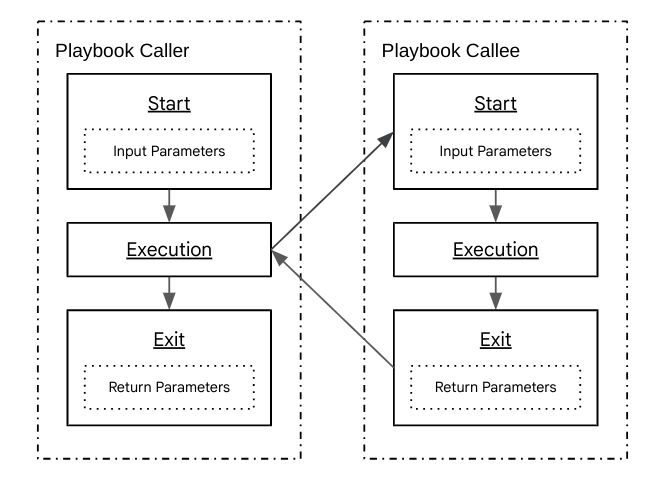
- The caller starts the callee.
- The caller provides necessary input parameters to the callee.
- The callee processes this information, performs its designated function, and returns output parameters.
- The caller receives parameters from the callee.
Any routine or task playbook can call another task playbook, but a task playbook can't call another routine playbook.
Routine playbooks
Routine playbooks are a recent type of playbook. They are used for modeling sequential conversation stages, where each stage is complete and independent. They can call task playbooks to decompose larger tasks into smaller subtasks, and they can transition to other routine playbooks or flows.
The following list shows routine playbook A transitioning to routine playbook B, which then transitions to flow C:
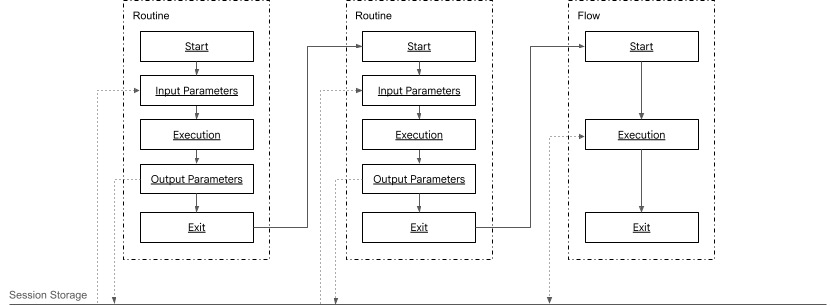
- Routine playbook A reads session parameters when it starts and writes session parameters just before exiting.
- Routine playbook A exits and transitions to routine playbook B.
- Routine playbook B reads session parameters when it starts and writes session parameters just before exiting.
- Routine playbook B exits and transitions to flow C.
- Flow C reads and writes session parameters.
If a routine playbook doesn't transition to another routine playbook or flow, the session returns to the last active flow or ends if there isn't one.
Routine playbooks have the following parameter management behavior:
- When a routine playbook is entered, its input parameters are assigned values that are equivalent to session parameters with the same name.
- When a routine playbook exits, it generates values for its output parameters and assigns them to session parameters with the same name.
Compare playbook types
| Category | Task Playbook | Routine Playbook |
|---|---|---|
| Latency | Each time a task playbook calls another task playbook, there is an LLM call. For a long chain of task playbooks in one conversational turn, this can increase latency. | Each routine playbook in a series of transitions occurs within a single conversational turn, so there is only a single LLM call and improved latency. |
| Parameter regeneration | When a task playbook calls another task playbook, parameter values need to be regenerated. If there is a long chain of task playbooks, this regeneration can lead to context loss. | Routine playbooks use session storage for parameters, which creates a more reliable context. |
| Session parameter integration | Task playbooks do not interface well with session parameters and instead require input and return parameters to be defined. | Routine playbooks interface well with session parameters. |
| Reusability | Because every task playbook has a fixed parent/child relationship, tasks are tightly coupled. | Routine playbooks can be defined independently from each other. |
Default playbook
When you create a generative agent using Conversational Agents console, Dialogflow CX automatically creates a Default Generative Playbook.
The default playbook is the starting point for conversations, so it has some important distinctions from other playbooks:
- The default playbook doesn't receive a summary of preceding conversation turns.
- The default playbook can't define or receive input parameters.
Create a playbook
To create a playbook:
- Click the playbook icon in the navigation menu of the console.
- Click Create.
- Select either a Routine or Task playbook type.
- Provide playbook data.
Use AI generation to create a playbook
When creating a playbook, a generative AI panel opens. This lets you generate playbook data.
Import and export playbooks
After you create playbooks by using the Conversational Agents console, you can export these playbooks for use in another agent.
To export a playbook:
- Go to the playbooks list.
- Select the playbook that you want to export and select Export.
- Select export options and click Export.
To import a playbook you have previously exported:
- Go to the playbooks list.
- Select the playbook that you want to import and select Import.
- Select import options and click Import.